Overview

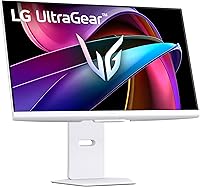
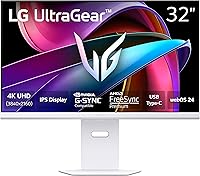
The LG 32G810SA-W 32-inch UltraGear Gaming Monitor arrives as something of an oddity in the gaming display market — a serious performance screen wrapped in a clean white finish, at a time when nearly every competitor ships in matte black. Beyond the looks, this UltraGear monitor carries a split personality: IPS panel performance tuned for color accuracy and smooth motion, paired with a full webOS smart platform that most gaming monitors wouldn't dream of including. That dual focus is either a strength or a distraction depending on what you need. At its price point, it squarely targets buyers who want one screen to handle gaming, creative work, and streaming — no extra devices required.
Features & Benefits

The IPS panel covers up to 95% of the DCI-P3 color space, which translates to noticeably rich, saturated visuals whether you're deep in a moody RPG or casually editing photos between sessions. At 144Hz with a 1ms GtG response time, this 32-inch 4K gaming display handles fast-paced titles without the motion blur you might expect from an older 4K IPS screen. Both NVIDIA G-SYNC Compatible and AMD FreeSync Premium are supported, so GPU brand isn't a concern. The webOS 24 platform brings Netflix, Disney+, and cloud gaming services like GeForce NOW directly to the screen — no streaming stick needed. USB Type-C input and a fully adjustable ergonomic stand round things out practically.

Best For

This UltraGear monitor is a strong fit for gamers who want genuine 4K detail without completely abandoning smooth gameplay — though it's worth flagging that pushing 4K at 144Hz demands a high-end GPU like an RTX 4080 or RX 7900 XTX; mid-range cards will likely run at lower resolutions or refresh rates. Content creators who also game will appreciate the accurate color coverage for casual editing work alongside entertainment. The webOS integration makes it particularly appealing to cord-cutters who want a single screen for everything from late-night Netflix to weekend sessions. And for anyone building a white battlestation, this is a rare premium option that actually fits the brief without compromise.

User Feedback

Across 181 ratings averaging 4.1 stars, the LG 32G810SA-W earns mostly positive marks, though not unanimously. Buyers consistently praise the color vibrancy, the distinctive design, and how webOS shifted from novelty to habit surprisingly fast in daily use. On the downside, some report mild backlight bleed along panel edges, and a handful feel the HDR 400 certification, while legitimate, does not deliver the dramatic contrast jump they anticipated. A few buyers also feel the price is difficult to justify given what competing screens offer. The ergonomic stand earns genuine praise for its range of adjustability, and the RGB hex backlighting reads more as a tasteful accent than an over-the-top gimmick.

Pros

  • Stunning color accuracy with up to 95% DCI-P3 makes games and creative work look genuinely vivid.
  • 144Hz at 4K is an impressive combination that few IPS monitors in this size class offer.
  • webOS 24 turns this UltraGear monitor into a standalone streaming hub — no extra devices needed.
  • Supports both NVIDIA G-SYNC Compatible and AMD FreeSync Premium, covering virtually every GPU buyer.
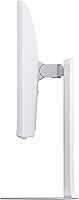
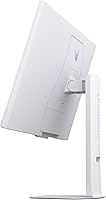
  • The ergonomic stand offers height, tilt, swivel, and pivot — real adjustability, not just tilt.
  • USB Type-C input is a practical touch for laptop users who want a clean, single-cable desk setup.
  • The white colorway stands out in a sea of black monitors and holds up well as a premium design choice.
  • Cloud gaming support via GeForce NOW and Amazon Luna works directly from the home screen.
  • At 31.5 inches, the screen size hits a sweet spot — expansive without overwhelming a standard desk.
  • Buyers consistently praise color vibrancy out of the box, with minimal calibration needed for most use cases.

Cons

  • HDR 400 certification delivers only a modest improvement over SDR — do not expect transformative contrast or brightness.
  • Driving 4K at 144Hz requires a flagship GPU; mid-range graphics cards will bottleneck the display significantly.
  • Some buyers report noticeable backlight bleed along panel edges, which can be distracting in dark scenes.
  • At its price point, a few users feel the value proposition is hard to justify against competing 4K displays.
  • The smart TV features, while useful, add software complexity that pure gaming monitor buyers may find unnecessary.
  • webOS updates and long-term software support are uncertain compared to dedicated streaming devices.
  • At 23.1 pounds, this is a heavy monitor that may stress cheaper third-party monitor arms.
  • Only two USB 2.0 ports are included — tight for users who rely on a monitor as a USB hub.
  • HDR gaming at 400 nits peak brightness can feel underwhelming on a large screen in a bright room.

Ratings

The LG 32G810SA-W 32-inch UltraGear Gaming Monitor earns an overall positive reception from buyers worldwide, and the scores below reflect what real users actually experience — generated by AI after analyzing verified purchase reviews while actively filtering out incentivized, bot, and duplicate submissions. Strengths in color quality, design, and smart platform convenience are clearly reflected, as are the honest pain points around HDR performance, GPU demands, and price justification that a meaningful portion of buyers raise.
Color Accuracy
88%
Buyers who do both gaming and light creative work consistently call out color vibrancy as a standout strength. The wide DCI-P3 coverage makes games look noticeably richer out of the box, and most users report that the panel requires minimal manual calibration to look excellent.
A small number of users notice slight color shift at extreme off-axis viewing angles — an inherent IPS trade-off. Those used to OLED reference panels may find the color depth slightly less saturated in direct comparison, though this is a niche concern for the majority of buyers.
Gaming Performance
84%
The combination of 144Hz and 1ms GtG response time produces genuinely smooth gameplay that most users can feel, especially when switching from a 60Hz panel. Variable refresh rate working across both NVIDIA and AMD GPUs is frequently praised as a practical, future-proof touch.
Achieving the full 144Hz at native 4K resolution demands top-tier GPU hardware that many buyers do not realize they need until after purchase. Users with mid-range graphics cards report having to compromise on either resolution or refresh rate, which undercuts the monitor's headline spec for a significant portion of buyers.
HDR Quality
58%
42%
HDR-enabled content does produce visibly improved highlight detail and a modest contrast lift compared to SDR, which occasional streamers and casual HDR gamers find satisfying enough. For buyers whose previous monitor had no HDR support at all, the upgrade feels meaningful.
DisplayHDR 400 is the entry tier of HDR certification, and buyers expecting cinema-quality contrast or deep blacks are regularly disappointed. At 400 nits peak brightness, bright scenes in dark rooms lack the punch that higher-tier HDR panels deliver, and several reviewers directly flag this as a premium-priced monitor with a budget-tier HDR implementation.
Smart Platform (webOS)
81%
19%
The webOS integration genuinely surprises buyers who expected it to feel like an afterthought. Having Netflix, Disney+, and cloud gaming services accessible directly from the monitor — without a streaming stick or console — proves practically useful for users who switch regularly between PC gaming and relaxed streaming sessions.
A handful of buyers find webOS adds unnecessary software complexity to what they wanted as a straightforward PC monitor. App update cadence and long-term platform support are also uncertain, and users heavily invested in a different smart ecosystem may find little reason to use the built-in platform at all.
Design & Aesthetics
91%
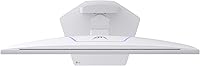
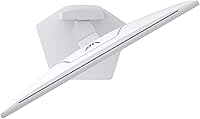
The white colorway earns consistent and enthusiastic praise from buyers who have deliberately built light-themed desk setups. The narrow bezel and slim profile look premium in person, and the RGB hexagonal rear lighting adds an understated ambient effect without overwhelming the space.
White plastic surfaces show dust and smudging more visibly than black alternatives, which bothers users who prefer a low-maintenance desk aesthetic. A small number of buyers also note that the white finish, while attractive initially, may appear slightly yellowish near heat-exposed areas on older units over extended time.
Ergonomics & Stand
86%
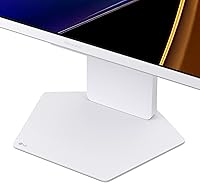
Height adjustment, tilt, swivel, and full portrait pivot make this one of the more capable included stands at this price tier. Buyers who have previously dealt with fixed-position or tilt-only stands consistently note how much of a difference the full adjustment range makes across long work-from-home sessions.
At 23.1 pounds, the monitor is on the heavier side, and a few users report that cheaper third-party monitor arms struggle to hold it steadily. The stand footprint is also fairly wide, which can feel constraining on smaller desks even with the ergonomic benefits accounted for.
Display Clarity
89%
Text rendering at 4K on a 31.5-inch panel is sharp and comfortable for productivity work, and buyers who use this display for both coding or spreadsheets during the day and gaming at night report that pixel density hits a practical sweet spot for their distance from the screen.
Some users note that Windows UI scaling at 4K on a 32-inch panel requires adjustment, and a handful of older applications do not scale cleanly without manual intervention. This is a platform-level limitation rather than a hardware flaw, but it catches buyers unfamiliar with high-DPI displays off guard.
Connectivity
77%
23%
The inclusion of USB Type-C alongside HDMI and DisplayPort gives laptop users a genuinely practical single-cable option for video and power simultaneously. Buyers who dock a laptop to this display daily call USB-C a convenient and underappreciated feature at this product tier.
Only two USB 2.0 downstream ports are available, which feels limited for buyers who rely on a monitor as a USB hub for peripherals. USB 2.0 speeds are also outdated for modern accessories, and a few users expected at least one USB 3.0 port given the overall price of the display.
Value for Money
66%
34%
Buyers who actively use both the gaming features and the webOS platform tend to feel the price is justified as a dual-purpose purchase, effectively replacing a dedicated streaming device. The build quality and color performance align with what buyers expect at this price point in the premium monitor segment.
Pure gaming-focused buyers frequently question whether the premium is warranted given competing 4K IPS monitors that offer comparable gaming specs at lower prices. The HDR 400 ceiling and GPU demands make the real-world 4K gaming experience feel less complete than the price implies, and several reviews directly raise value concerns.
Backlight Uniformity
69%
31%
The majority of buyers report no significant uniformity issues under normal mixed-use conditions, and in brightly lit rooms during daytime gaming or productivity the panel performs without visible hotspots or clouding.
A recurring minority of reviews flag noticeable backlight bleed along the bottom or corner edges, which becomes distracting during dark gaming scenes or nighttime movie watching. IPS glow is also an expected characteristic of this panel type, and buyers coming from VA panels may find the dark-scene performance a step backward.
Out-of-Box Setup
83%
Assembly of the stand is tool-free and takes most buyers under ten minutes, and the initial webOS setup process is straightforward for anyone familiar with a smart TV interface. Color and picture presets are well-configured from the factory, reducing the need for immediate calibration.
A few buyers report that navigating the webOS interface for the first time can be disorienting if they approached it expecting a typical monitor OSD menu. Input source switching between PC and smart platform modes also occasionally confuses first-time users until the workflow becomes familiar.
Audio
54%
46%
The built-in speakers are adequate for casual webOS streaming sessions where connecting external speakers is inconvenient, and buyers using the monitor as a standalone streaming device find them serviceable for background content or quiet room viewing.
For gaming or any serious audio use, the built-in speakers fall well short of expectations at this price tier. Most buyers quickly route audio to external speakers or headphones, and several reviews describe the onboard sound as thin and lacking in low-frequency presence — workable but not a feature worth factoring into a purchase decision.
Cloud Gaming Experience
74%
26%
Having GeForce NOW and Amazon Luna accessible natively without a PC or console is a genuinely useful feature for buyers in households with inconsistent gaming hardware access. Latency performance over a strong wired connection earns positive marks from users who rely on it as a secondary gaming method.
Cloud gaming quality depends entirely on internet connection quality, which the monitor has no control over, and buyers in regions with slower broadband find the feature significantly less useful than marketed. The service library is also constrained by each platform's licensing agreements, which limits its appeal as a standalone gaming solution.

Suitable for:

The LG 32G810SA-W 32-inch UltraGear Gaming Monitor is purpose-built for buyers who refuse to choose between visual quality and gaming performance — people who want rich, color-accurate imagery during the day and smooth, responsive gameplay at night. It makes particular sense for hybrid users: think graphic designers or video editors who also game, and who will genuinely use that 95% DCI-P3 coverage for more than just looking at character skins. The built-in webOS platform is a real differentiator for cord-cutters who want one screen to serve as both their primary gaming display and their living-room-style streaming hub, without a Chromecast or Apple TV cluttering the desk. Laptop users will find the USB Type-C input especially practical, since it can handle both video and power in a single cable. Finally, anyone deliberately building a white or light-themed desk setup will find this UltraGear monitor to be one of the very few premium 4K options that actually ships in white rather than treating it as an afterthought colorway.

Not suitable for:

The LG 32G810SA-W 32-inch UltraGear Gaming Monitor is a harder sell for competitive-first gamers who prioritize refresh rate and response time above all else, since plenty of 1440p or lower-resolution monitors hit 240Hz or beyond at a significantly lower price. Buyers expecting a dramatic, cinema-grade HDR experience should also temper expectations — VESA DisplayHDR 400 is an entry-level certification, and while it provides a modest lift over standard SDR, it does not produce the deep blacks or peak brightness that a true HDR panel delivers. Perhaps most critically, this 32-inch 4K gaming display is GPU-hungry: running games at native 4K resolution and 144Hz simultaneously requires top-tier graphics hardware, and buyers with mid-range GPUs may find themselves unable to take full advantage of what the panel offers. Anyone on a tighter budget who mainly games and has no interest in the streaming or smart features is likely paying a premium for functionality they will never use. And if backlight uniformity is a dealbreaker for you, the scattered user reports of edge bleed are worth factoring into your decision.
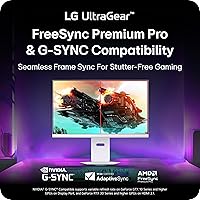
Specifications

  • Panel Type: This monitor uses an IPS (In-Plane Switching) panel, which prioritizes wide viewing angles and accurate color reproduction over the deeper blacks you would get from a VA panel.
  • Screen Size: The active display area measures 31.5 inches diagonally, marketed as a 32-inch screen in line with standard industry rounding conventions.
  • Resolution: Native resolution is 3840 x 2160 pixels (4K UHD), delivering approximately 140 pixels per inch for sharp, detailed imagery at typical desktop viewing distances.
  • Refresh Rate: The panel supports a maximum refresh rate of 144Hz, enabling smoother motion in games compared to the 60Hz or 75Hz displays common in productivity monitors at this resolution.
  • Response Time: LG specifies a 1ms GtG (gray-to-gray) response time, which helps reduce motion blur and ghosting during fast-moving scenes in gaming.
  • HDR Support: The monitor carries VESA DisplayHDR 400 certification, indicating a peak brightness capability at or above 400 nits with basic HDR tone mapping — considered entry-level HDR performance.
  • Color Gamut: Color coverage reaches up to 95% of the DCI-P3 wide color gamut, making it well-suited for color-sensitive work including photo editing and video production alongside gaming.
  • Sync Technology: Both NVIDIA G-SYNC Compatible and AMD FreeSync Premium are supported, allowing variable refresh rate technology to function with graphics cards from either manufacturer.
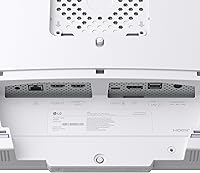
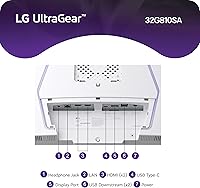
  • Connectivity: The monitor includes HDMI, DisplayPort, and USB Type-C inputs, with two USB 2.0 downstream ports for peripheral connections.
  • Smart Platform: webOS 24 is built into the display, providing direct access to streaming apps including Netflix, Prime Video, Disney+, Apple TV, and HBO Max without any external device.
  • Cloud Gaming: NVIDIA GeForce NOW, Amazon Luna, and Blacknut cloud gaming services are accessible natively through the webOS home screen.
  • Ergonomics: The included stand supports height adjustment, tilt, swivel, and pivot (portrait mode rotation), offering a full range of positioning options for varied desk setups.
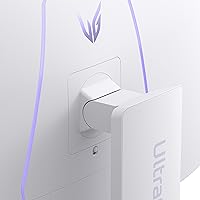
  • Lighting: RGB hexagonal backlighting is built into the rear of the monitor, providing ambient desk illumination that can be customized through LG software.
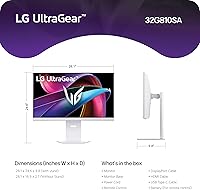
  • Dimensions: With the stand attached, the monitor measures approximately 10.5 x 28.1 x 24.7 inches (D x W x H) and weighs 23.1 pounds.
  • Color Finish: The monitor ships exclusively in a white colorway, covering both the panel bezel and the stand base for a consistent aesthetic.
  • Aspect Ratio: The display uses a standard 16:9 widescreen aspect ratio, compatible with all conventional gaming, streaming, and productivity content.
  • Surface Finish: The panel uses a matte anti-glare screen coating, which reduces reflections in bright rooms compared to glossy alternatives.
  • Release Date: This model was first made available in December 2024, placing it among the more recently introduced entries in LG's UltraGear gaming monitor lineup.

Related Reviews
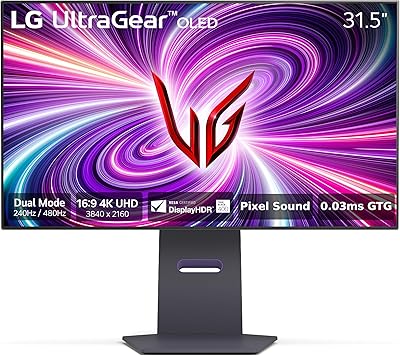
LG 32GS95UE 32-inch Ultragear OLED Gaming Monitor
88%
94%
Picture Quality
92%
Gaming Performance
86%
Value for Money
90%
Design & Build Quality
87%
Ease of Setup
More
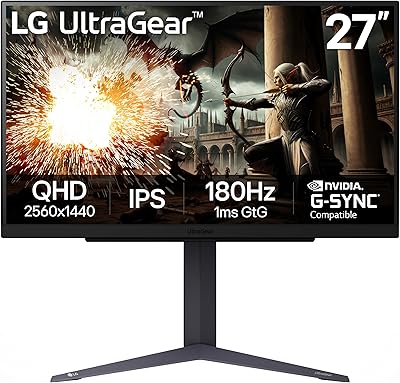
LG UltraGear 32″ QHD Gaming Monitor
80%
91%
Gaming Performance
84%
Image Quality
54%
HDR Experience
88%
Ergonomics & Stand
79%
Build Quality
More
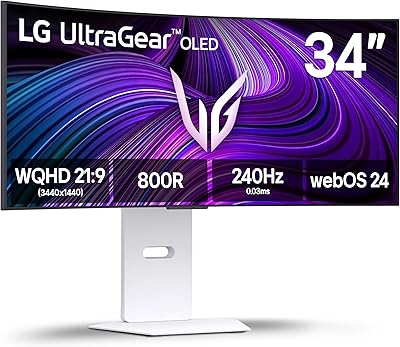
LG 34GX90SA-W 34-inch Ultragear OLED Gaming Monitor
89%
97%
Display Quality
94%
Color Accuracy
96%
Refresh Rate Performance
95%
Input Lag/Responsiveness
91%
HDR Performance
More
LG 39GX90SA-W 39-inch OLED Curved Gaming Monitor
77%
94%
Picture Quality
91%
Gaming Performance
88%
Immersion & Curvature
86%
HDR Experience
79%
webOS Smart Features
More
LG 32UL500-W 32-Inch 4K VA Monitor
74%
88%
Picture Quality
83%
Color Accuracy
62%
HDR Performance
54%
Refresh Rate & Gaming
41%
Ergonomics & Stand
More
LG 34GP63A-B 34-Inch Curved Gaming Monitor
79%
93%
Gaming Immersion
91%
Refresh Rate Performance
88%
Contrast & Black Depth
83%
Color Accuracy
86%
Input Lag & Responsiveness
More
LG 27GS75Q-B 27-inch QHD Gaming Monitor

82%
91%
Refresh Rate & Motion Performance
88%
Image Sharpness & Resolution
83%
Color Accuracy & Gamut
57%
HDR Performance
86%
Response Time & Ghosting
More
LG 32UP83A-W 32-inch 4K UHD Monitor
86%
94%
Display Quality
91%
Color Accuracy
88%
Build Quality
89%
Ergonomics/Adjustability
90%
Connectivity Options
More
LG 32GQ750-B 32-inch 4K Gaming Monitor
77%
91%
Image Clarity
86%
Refresh Rate & Smoothness
88%
HDMI 2.1 Compatibility
83%
Contrast & Black Levels
67%
Motion Clarity
More
LG 27GS60QC-B 27″ Curved Gaming Monitor
78%
91%
Motion & Refresh Performance
88%
Image Clarity & Sharpness
84%
Contrast & Black Levels
77%
Color Accuracy & Gamut
52%
HDR Performance
More

FAQ

For the full 4K at 144Hz experience in demanding games, yes — you realistically need something in the range of an RTX 4080 or RX 7900 XTX. That said, you can always connect a mid-range card and run games at 4K with lower refresh rates, or drop to 1440p for smoother frame rates. The monitor handles all of that fine; it just will not push 144fps at native 4K without serious graphics hardware behind it.

Most buyers are surprised to find it genuinely convenient rather than a gimmick. If you regularly switch between gaming and streaming, being able to jump straight into Netflix or GeForce NOW from the monitor itself — without a separate device — saves a noticeable amount of friction. That said, if you already have a smart TV or streaming stick and plan to use this purely as a PC monitor, the webOS layer adds little for you.

Honestly, temper your expectations a bit. VESA DisplayHDR 400 is the lowest tier of certified HDR, and while HDR-enabled content does look slightly more dynamic than standard SDR, you are not getting the dramatic contrast or brightness punch of a mini-LED or OLED panel. It is a real improvement, but not the night-and-day transformation the HDR label might suggest.

Yes, and this is one of the more practical aspects of the LG 32G810SA-W 32-inch UltraGear Gaming Monitor. The USB Type-C port supports video input and can handle power delivery simultaneously, meaning a single cable connects your laptop, charges it, and drives the full 4K display. Just verify your laptop's USB-C port supports DisplayPort Alt Mode to ensure video signal compatibility.

Based on available user feedback, the white plastic used on the bezel and stand holds up reasonably well under normal desk conditions. It is not a glossy white that fingerprints easily — the matte texture helps — but like any light-colored surface, it may show dust or smudging more visibly than a black monitor would. A quick wipe with a dry microfiber cloth handles it.

Some buyers have reported mild backlight bleed, particularly along the bottom or corner edges of the panel. IPS panels in general are more prone to this than VA panels, and at this screen size it is something to be aware of. It is not universal — many owners see none at all — but if you do a lot of gaming or watching in dark rooms, it is worth checking return policies before committing.

The included stand is genuinely one of the better ones in this category, offering height adjustment, full tilt and swivel, and pivot for portrait mode. Most users find it sufficient without needing an aftermarket arm. If you do want a VESA mount, the monitor is compatible with standard 100x100mm VESA patterns, but given the stand quality it is not a necessary upgrade for most.

HDMI 2.1 supports 4K at 144Hz, but if your device only has HDMI 2.0, you will be limited to 4K at 60Hz or 1440p at higher refresh rates over that connection. For the full 144Hz at 4K on a PC, DisplayPort is the most reliable route. The USB Type-C input can also carry the full bandwidth depending on your source device's capabilities.

The hexagonal RGB pattern on the rear is more restrained than the full underglow or strip lighting you see on some gaming monitors. Most buyers describe it as an accent that adds ambiance without being distracting, especially against a wall. If you dislike RGB entirely, it can be turned off through LG's software settings without affecting anything else.

Quite well, actually. The 31.5-inch 4K panel gives you a lot of screen real estate for multitasking, and text rendering at this pixel density is sharp and easy to read. The matte coating reduces glare during daytime use. The main consideration is that this 32-inch 4K gaming display sits at a size and resolution where UI scaling matters — Windows and macOS both handle it cleanly, but some older applications may need manual scaling adjustments.

Where to Buy