
Overview

The LG 27UN880-B 27-inch 4K IPS Monitor sits firmly in the premium end of the productivity display market, targeting creative professionals who need both accurate color and a flexible workspace setup. LG's UltraFine line has always leaned toward serious users over casual ones, and this ergonomic 4K monitor carries that forward with a sharp UHD panel, a thoughtfully engineered stand, and native USB-C support that makes it particularly attractive for MacBook and USB-C laptop users. It holds its own against other high-end productivity displays and is clearly not chasing gaming headlines — it's built for detail-oriented work and long hours at a desk.

Features & Benefits

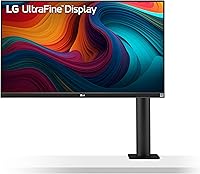
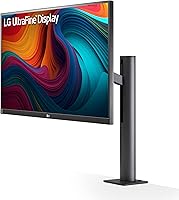
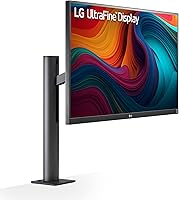
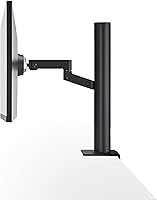
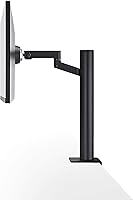
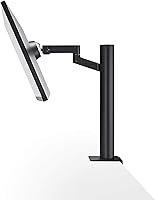
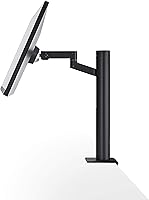
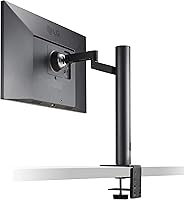
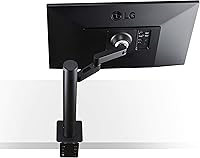
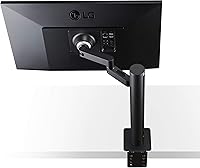
At the core of the 27UN880-B is a 27-inch IPS panel running at a native 3840x2160 resolution, which translates to noticeably crisp text and richly detailed images. Color accuracy is a genuine strength — 99% sRGB coverage means what you see on screen holds up reliably when printed or exported. The VESA DisplayHDR 400 certification adds some dynamic range, though it's entry-level HDR at best, so don't expect OLED-like contrast. The Ergo Stand is a standout feature: it extends, retracts, tilts, swivels, pivots, and adjusts in height, making repositioning feel natural throughout the day. USB-C with 60W Power Delivery handles most ultrabooks cleanly, though heavier laptops may still need their own charger alongside it.

Best For

This ergonomic 4K monitor is an especially good fit for graphic designers and photographers who need to trust what they see on screen — that 99% sRGB accuracy matters when color decisions have real consequences. Remote workers running a MacBook or any USB-C laptop will appreciate the single-cable desk setup: one connection handles video, data, and charging simultaneously, cutting down on cable clutter considerably. Video editors working with 4K footage also benefit from the native resolution, reviewing footage at full pixel-for-pixel detail without any downscaling. If you rotate, tilt, or reposition your display constantly, the Ergo Stand makes that practical rather than annoying. Casual gamers will find it adequate but not optimized for that use case.

User Feedback

Buyers consistently highlight color accuracy and the versatility of the Ergo Stand as the two main reasons they'd recommend this LG UltraFine display. The criticisms worth knowing: the glossy screen coating is a real problem in rooms with strong overhead or natural lighting, creating reflections that a matte finish would simply avoid. Some users with power-hungry laptops have found that 60W charging can't keep pace under heavy load. Build quality feedback is generally positive, and backlight uniformity across the panel is reported as solid. A small number of buyers have flagged dead pixel concerns, so inspecting the panel during the return window and being aware of the warranty terms is genuinely worthwhile.

Pros

  • Color accuracy is reliable out of the box, making it a strong choice for color-critical creative work without manual calibration.
  • The Ergo Stand offers one of the most complete ranges of physical adjustment available on any monitor at this size.
  • Native 4K resolution produces noticeably sharp text and fine image detail that lower-resolution panels cannot match.
  • Single USB-C cable connection keeps desk setups clean and dramatically reduces cable clutter for laptop users.
  • The IPS panel delivers wide, consistent viewing angles with no significant color shift when viewed off-axis.
  • AMD FreeSync support adds a layer of smoothness during video playback and light gaming without extra cost.
  • Three built-in USB 2.0 ports turn the monitor into a compact peripheral hub, reducing reliance on a separate dock.
  • Build quality feels solid and considered, with the Ergo arm in particular drawing consistent praise from buyers.
  • The 27-inch size hits a practical sweet spot for 4K — large enough to benefit from the resolution without requiring scaling adjustments.

Cons

  • The glossy screen coating causes noticeable reflections in bright rooms or near windows, which matte-screen alternatives avoid entirely.
  • At 60W, USB-C Power Delivery may not keep pace with larger or more power-hungry laptops under sustained load.
  • DisplayHDR 400 certification represents only entry-level HDR performance; contrast depth and peak brightness are not competitive with true HDR displays.
  • Some buyers have reported dead pixels or backlight uniformity issues, making early inspection during the return window important.
  • The refresh rate is standard and the response time is not optimized for fast-paced gaming, limiting its appeal to that audience.
  • The glossy panel also tends to show fingerprints and smudges more visibly than matte alternatives, requiring more frequent cleaning.
  • At this price tier, buyers are partly paying for the Ergo Stand and USB-C features; the panel alone is not uniquely superior to cheaper competitors.
  • USB-C compatibility has proven inconsistent with certain laptop models, with a small number of users reporting signal or charging issues.

Ratings

Our AI-generated scores for the LG 27UN880-B 27-inch 4K IPS Monitor are derived from analyzing verified global buyer reviews, with spam, incentivized, and bot-generated feedback actively filtered out before scoring. Each category reflects the honest distribution of praise and frustration found across thousands of real user experiences worldwide. Both standout strengths and recurring pain points are transparently represented so you can make a fully informed decision.

Color Accuracy
91%
Photographers and designers consistently report that colors look true and reliable straight out of the box, with minimal need for manual calibration. The 99% sRGB coverage means edited images and print-ready files hold up well when viewed on other calibrated displays or sent to print.
The panel does not cover DCI-P3 or Adobe RGB, which limits its usefulness for cinema color grading or high-end prepress work. Buyers targeting professional video delivery pipelines may find the gamut coverage insufficient for their specific workflow requirements.
Display Sharpness
88%
At 4K resolution on a 27-inch screen, text is exceptionally crisp and fine image detail is immediately noticeable — particularly when reviewing high-resolution photography or working with dense UI layouts at native scaling. Many users describe it as the single most impactful upgrade from a 1080p or 1440p panel.
To fully benefit from the pixel density, operating system scaling must be managed carefully, and some older applications do not render cleanly at 4K without blurriness. Windows users in particular occasionally report needing to tweak scaling settings before the sharpness advantage fully materializes.
Ergonomic Stand
93%
The Ergo Stand is one of the most frequently praised features across buyer reviews, with users highlighting how the extend-and-retract arm lets them push the monitor flush to the wall when not in use and pull it close for detailed work. Height, tilt, swivel, and pivot adjustments all operate smoothly, making it practical for users who shift posture or share a workstation.
The stand adds meaningful bulk and weight to the overall footprint, which can feel excessive for buyers who only ever use a single fixed position. A small number of users also reported minor wobble at the top of the height range, particularly on less stable desk surfaces.
USB-C Connectivity
82%
18%
The single-cable workflow resonates strongly with MacBook users and USB-C laptop owners who want a tidy desk without a separate dock. Connecting one cable and immediately getting 4K output, peripheral access through the USB-A ports, and simultaneous charging is a genuine quality-of-life improvement for daily users.
The 60W Power Delivery ceiling is a real limitation for users with larger or more power-hungry laptops, where the battery can drain slowly under sustained load even while connected. A handful of users also reported inconsistent USB-C compatibility with specific non-Apple laptops, requiring cable swaps or firmware checks to resolve.
HDR Performance
51%
49%
The VESA DisplayHDR 400 certification at least ensures the panel meets a documented brightness threshold, and some users appreciated the subtle improvement in highlight handling during HDR-tagged video content on streaming platforms.
DisplayHDR 400 is the lowest rung of the HDR certification ladder, and buyers expecting cinematic contrast or deep blacks will be underwhelmed. There is no local dimming, and the real-world HDR experience is barely distinguishable from standard SDR viewing for most content.
Screen Glare & Reflections
47%
53%
For users in controlled lighting environments, the glossy coating does produce more vivid, punchy colors than a matte alternative, and some photographers actively prefer it for color-critical work in dimly lit studios.
In a typical bright home office or near a window, reflections on the glossy surface are persistent and genuinely distracting, not just a minor inconvenience. Multiple buyers in naturally lit rooms have specifically cited this as a reason they returned the monitor or wished they had chosen a matte-finish alternative.
Build Quality
84%
The overall construction feels premium relative to the product category, with the Ergo Stand arm in particular drawing praise for its solid articulation mechanism and the quality feel of its movement. Panel bezels are slim and the overall aesthetic fits well in a professional workspace.
A small but notable number of buyers flagged dead pixel issues or backlight uniformity problems on arrival, which is concerning at this price point. While these cases appear to be a minority, they underscore the importance of inspecting the panel thoroughly within the return window.
Value for Money
63%
37%
For buyers who specifically need the Ergo Stand flexibility and USB-C single-cable functionality together in one package, the pricing feels justified as a bundled solution. The color accuracy and build quality are consistent with what the market tier suggests.
Buyers primarily focused on raw panel performance can find comparable 4K IPS display quality at noticeably lower price points from competing brands, making the premium feel steep if the stand and USB-C features are not central to the use case. Several reviews explicitly mention this trade-off when comparing alternatives.
Brightness
72%
28%
At 350 cd/m² typical, the display is comfortable for standard indoor use and handles moderately lit rooms without difficulty. Users working in dim home offices report the brightness levels feel well-balanced and non-fatiguing over long sessions.
In very bright environments or for users who prefer a high-brightness working environment, 350 cd/m² can feel modest — particularly alongside the glossy coating, which compounds the perception of a dimmer image in strong ambient light. HDR peak brightness is not meaningfully higher.
Viewing Angles
89%
The IPS panel's 178-degree horizontal and vertical viewing angles mean color and brightness remain consistent whether you are viewing straight-on or at a significant offset, which is particularly useful when sharing screen content with someone seated beside you.
While the angles themselves are excellent, the glossy coating can introduce localized reflections at certain viewing angles that partially undermine the consistency benefit in mixed lighting conditions.
Refresh Rate & Gaming
58%
42%
AMD FreeSync support provides noticeable improvement in smoothness during video playback and casual gaming, reducing screen tearing without requiring additional configuration. Casual gamers playing slower-paced or turn-based titles will find the display perfectly adequate.
The standard 60Hz refresh rate and unexceptional response time make this ergonomic 4K monitor a poor fit for competitive gaming or fast-action titles where high frame rates and low latency matter. Dedicated gaming monitors at similar price points offer dramatically better performance in this specific dimension.
Port Selection
69%
31%
Having three USB-A ports built directly into the monitor reduces desk cable management complexity and eliminates the need for a basic hub for users running a keyboard, mouse, and USB storage device simultaneously.
The USB-A ports are limited to USB 2.0 speeds, which is adequate for input devices but slow for transferring large files from external drives. Buyers expecting to use the monitor as a high-speed hub for storage or high-bandwidth peripherals will be disappointed.
Setup & Calibration
81%
19%
Most buyers report the display is ready to use with minimal setup, with color accuracy being reliable enough out of the box that creative professionals can start working immediately without running a calibration routine. The physical assembly of the Ergo Stand is straightforward and tool-free.
Windows scaling configuration can take some adjustment for first-time 4K monitor users, and the on-screen display menu for monitor settings has been described by some buyers as less intuitive than competing brands. USB-C compatibility troubleshooting adds setup friction for a minority of users.
Eye Comfort
76%
24%
During extended work sessions, the IPS panel's natural color temperature and wide viewing angles contribute to a relatively comfortable viewing experience, and users working four-to-eight-hour days consistently describe it as non-fatiguing under controlled lighting.
The lack of a matte coating means users sensitive to reflections or glare may experience more eye strain than expected, particularly in offices they cannot fully control. The monitor does not prominently feature flicker-free or low blue light certifications that some competing displays highlight.

Suitable for:

The LG 27UN880-B 27-inch 4K IPS Monitor is genuinely well-suited for professionals whose work lives or dies by color accuracy — think graphic designers, photographers, and video editors who need to trust what they see on screen without constant second-guessing. The 99% sRGB coverage delivers that confidence in a way that budget panels simply cannot. Remote workers and hybrid professionals running a MacBook or any modern USB-C laptop will find the single-cable setup particularly compelling, since one connection handles display, data, and up to 60W of charging simultaneously. Content creators editing native 4K footage also benefit directly from the UHD resolution, reviewing clips at full detail without any downscaling compromise. Beyond the display itself, anyone who genuinely shifts their monitor position throughout the day — tilting, pivoting, raising, or swinging the arm in and out — will get real daily value from the Ergo Stand rather than treating it as a novelty feature.

Not suitable for:

The LG 27UN880-B 27-inch 4K IPS Monitor is a harder sell for buyers whose primary activity is competitive gaming, since it lacks the high refresh rates and low response times that dedicated gaming monitors prioritize. The glossy screen coating is a genuine dealbreaker for anyone working in a bright room with overhead lighting or large windows nearby, as reflections can become a persistent distraction rather than a minor inconvenience. Users with power-hungry laptops — particularly larger gaming notebooks or mobile workstations that require well above 60W to maintain charge under load — may find the USB-C Power Delivery insufficient as a sole charging source. Buyers on a tighter budget should also weigh their options carefully, since competing 4K IPS monitors offer solid panel quality at meaningfully lower price points, and the premium here is partly being paid for the Ergo Stand and USB-C integration rather than raw display performance alone. Finally, HDR enthusiasts expecting cinematic contrast will be disappointed — DisplayHDR 400 is a baseline certification and should not be treated as a meaningful HDR experience.

Specifications

  • Panel Type: The display uses an IPS (In-Plane Switching) panel, which provides consistent color and wide viewing angles compared to TN or VA alternatives.
  • Screen Size: The viewable screen area measures 27 inches diagonally, a practical size for 4K resolution without requiring heavy display scaling.
  • Resolution: Native resolution is 3840x2160 pixels (4K UHD), delivering approximately 163 pixels per inch for crisp text and fine image detail.
  • Color Gamut: The panel covers 99% of the sRGB color space, making it reliable for color-sensitive creative work such as photo editing and graphic design.
  • HDR Support: VESA DisplayHDR 400 certification is included, representing entry-level HDR capability with a peak brightness threshold of 400 cd/m².
  • Brightness: Typical brightness is rated at 350 cd/m², which is adequate for most indoor environments but may feel limited in very bright rooms.
  • Viewing Angles: Horizontal and vertical viewing angles both reach 178 degrees, allowing accurate color perception even when viewing the screen from the side.
  • Screen Surface: The panel has a glossy surface coating, which enhances color vibrancy but increases the visibility of reflections in brightly lit environments.
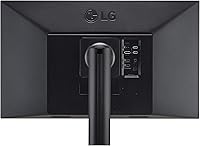
  • USB-C Port: A single USB-C port supports DisplayPort Alt Mode for video input and delivers up to 60W of Power Delivery for connected laptop charging.
  • USB-A Ports: Three USB 2.0 Type-A ports are built into the monitor body, functioning as a basic peripheral hub for mice, keyboards, and storage devices.
  • Adaptive Sync: AMD FreeSync is supported, reducing screen tearing during video playback and compatible light gaming scenarios.
  • Ergo Stand: The included stand supports height adjustment, tilt, swivel, pivot (portrait mode), and an extend/retract arm for flexible desk positioning.
  • Aspect Ratio: The display uses a standard 16:9 widescreen aspect ratio, compatible with virtually all modern video formats and operating systems.
  • Display Technology: The backlight uses LED technology, which is standard for this class of IPS monitor and contributes to the panel's brightness and color uniformity.
  • Dimensions: With the stand attached, the monitor measures approximately 24.1 x 15.8 x 23.5 inches (L x W x H), requiring a desk depth of at least 12 inches for the arm range.
  • Weight: The complete unit including the Ergo Stand weighs 17.16 pounds, which is within the normal range for a 27-inch monitor with a full-articulation stand.
  • Power Input: The monitor operates on 120V AC power and includes an internal power supply, so no external power brick is required on the desk.
  • VESA Compatibility: The monitor is VESA mount compatible, allowing the panel to be removed from the Ergo Stand and attached to a third-party monitor arm if preferred.

Related Reviews
LG 27MS550-B 27-inch IPS Monitor
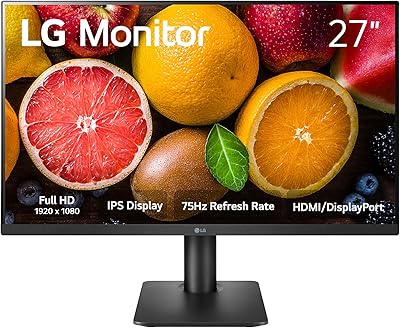
76%
83%
Display Clarity
79%
Color Accuracy
91%
Ergonomics & Stand
77%
Refresh Rate & Smoothness
72%
Response Time
More
LG 27MP450 27-inch FHD IPS Monitor
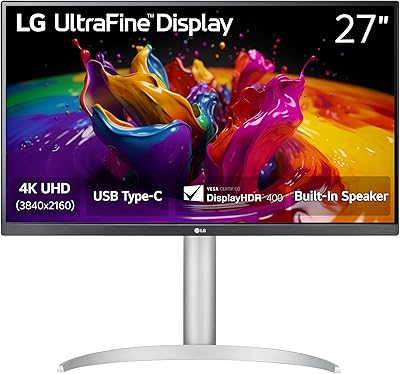
77%
78%
Image Quality
71%
Color Accuracy
67%
Gaming Performance
84%
Ergonomics & Stand
83%
Eye Comfort
More
LG 27UP850K-W 27-inch 4K IPS Monitor
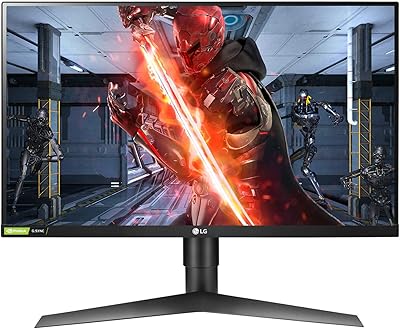
76%
88%
Image Quality
91%
Color Accuracy
93%
USB-C Connectivity & Power Delivery
86%
Ergonomics & Stand
84%
Build Quality & Design
More
LG 27GL650F-B 27-Inch Full HD IPS Gaming Monitor

85%
92%
Display Quality
89%
Gaming Performance
85%
Build Quality
91%
Ergonomics & Adjustability
90%
Value for Money
More
ViewSonic VG2756-4K 27-Inch 4K Docking Monitor
80%
91%
USB-C Docking Performance
88%
Display Clarity
74%
Connectivity & Port Selection
86%
Ergonomics & Stand Quality
71%
Color Accuracy
More
LG 27MK600M 27-inch IPS Monitor
75%
83%
Image Quality
71%
Color Accuracy
78%
Panel Uniformity
74%
Refresh Rate & Smoothness
62%
Response Time
More
LG 24BK430H-B 24-Inch FHD IPS Monitor
82%
91%
Display Quality
88%
Value for Money
94%
Eye Comfort
68%
Build Quality
87%
Ease of Setup
More
LG 32U631A-B 32-inch QHD Monitor

80%
91%
Image Clarity & Sharpness
88%
Color Accuracy & Vibrancy
54%
Stand & Ergonomics
73%
USB-C Connectivity
82%
Refresh Rate & Motion Performance
More
LG 24MP400-B 24-inch IPS Monitor
71%
83%
Image Quality
91%
Value for Money
79%
Eye Comfort
64%
Gaming Performance
67%
Build Quality
More
LG 34GP63A-B 34-Inch Curved Gaming Monitor
79%
93%
Gaming Immersion
91%
Refresh Rate Performance
88%
Contrast & Black Depth
83%
Color Accuracy
86%
Input Lag & Responsiveness
More

FAQ

Yes, and that is one of the more practical aspects of this display. A single USB-C cable carries the 4K video signal, connects your MacBook to the three USB-A ports on the monitor, and delivers up to 60W of charging power simultaneously. For most MacBook Air and 13-inch MacBook Pro models, 60W is sufficient to charge at a reasonable rate during normal use.

It depends on your laptop. For ultrabooks and thinner laptops — including most MacBook Air models and many Windows ultrabooks — 60W handles day-to-day use without issue. However, if you are running a larger laptop or a machine with a dedicated GPU that typically ships with a 90W or 140W charger, you may find the battery drains slowly under heavy load even while connected. In that case, you would likely want to keep your original charger as a supplement.

It depends heavily on your room setup. If your desk faces a window or sits under strong overhead lighting, reflections on the glossy panel can be genuinely distracting. A matte-finish monitor would serve you better in that environment. If your room has controlled or indirect lighting, the glossy coating actually helps color look more vivid and punchy, which is why many photographers and designers prefer it.

It is a solid choice for that use case. The native 3840x2160 resolution means you can review 4K footage at full pixel resolution without any downscaling. The 99% sRGB color accuracy also means your color grading decisions will translate reliably to other screens. Just keep in mind that this is not a wide-gamut DCI-P3 panel, so if your delivery target is cinema or HDR streaming, you may eventually want a display that covers a wider gamut.

Honest answer: it is not impressive as an HDR experience. The LG 27UN880-B 27-inch 4K IPS Monitor holds a VESA DisplayHDR 400 certification, which is the lowest tier in that certification scheme. It does not have local dimming, and the contrast ratio is not dramatically different from SDR viewing. Treat it as a checkbox feature rather than a meaningful HDR display — the monitor's real strengths lie elsewhere.

Yes, the Ergo Stand supports full pivot rotation, so you can rotate the panel 90 degrees into portrait orientation. At 4K resolution in portrait mode, a tall column of code or a long document is extremely readable. You will need to update your display rotation settings in your operating system after physically rotating the panel.

It is more useful than most articulating stands. The arm extends and retracts, which lets you push the monitor close to a wall when not in use or pull it toward you for detailed work. You can also tilt, swivel, and adjust the height independently. For anyone who shifts posture throughout the day or shares a desk, the stand genuinely earns its place rather than being a marketing feature that goes untouched.

A small number of users have reported that the USB-C connection does not behave identically across all laptop brands and models — occasional issues with signal stability or power delivery have been noted with specific non-Apple devices. The connection works consistently with most mainstream USB-C laptops, but if you are using a less common brand or an older USB-C port that does not support DisplayPort Alt Mode, you should verify compatibility before purchasing.

LG typically includes a USB-C cable and a power cable in the box with this monitor, which means most MacBook and USB-C laptop users can be up and running without buying anything extra. If you need to connect via DisplayPort or HDMI from a desktop or older laptop, you would need to source that cable separately.

Yes, the panel detaches from the Ergo Stand and is VESA mount compatible, so you can attach it to any standard third-party monitor arm. That said, the built-in Ergo Stand already covers most positioning needs that people buy an arm for, so unless you have a specific reason — like mounting above a dual-monitor setup — the included stand is likely all you need.

Where to Buy
