Overview

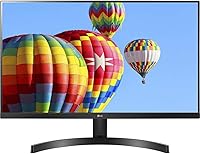
The LG 27MK600M 27-inch IPS Monitor landed back in 2018, and while the monitor market has moved quickly since then, this display has quietly held its ground as a dependable mid-range pick. Its three-side borderless design remains one of the cleaner-looking options at this size, making it a natural fit for side-by-side dual setups. Nearly 2,800 Amazon ratings averaging 4.5 stars suggest it has earned genuine trust from real buyers. Don't walk in expecting a specialist tool for color grading or high-frame-rate gaming — this LG IPS display is a solid all-rounder built for everyday reliability.

Features & Benefits

The IPS panel technology is where this 27-inch monitor earns its keep day to day. Colors stay consistent whether you are viewing straight-on or at a wide angle — a meaningful difference versus cheaper TN panels that wash out the moment you shift in your chair. The 75Hz refresh rate, paired with AMD FreeSync, handles casual gaming well enough to eliminate tearing, though competitive players will want something faster. Two HDMI ports let you keep a laptop and a console connected simultaneously. LG's On-Screen Control software also lets you tweak brightness and use Screen Split without ever touching the monitor's physical buttons.

Best For

The 27MK600M makes the most sense for people spending long hours at a desk — remote workers, students, or anyone staring at spreadsheets for most of the day will appreciate the IPS panel's consistent image. Its near-frameless border makes it a natural pick for side-by-side dual setups, where visible bezels normally break up your field of view. It is not the right call for competitive FPS players or professional photo editors chasing serious color precision. Console users get an extra perk: two HDMI inputs mean a PlayStation and a PC can both stay connected without ever swapping cables.

User Feedback

Across thousands of real-world reviews, the pattern is fairly consistent. Buyers often mention that colors look surprisingly accurate straight out of the box, with very little calibration needed, and setup is praised for being quick and hassle-free. The criticism tends to cluster in two areas: the stand is genuinely limiting — no height adjustment, no pivot — which frustrates desk workers who want a specific screen position. The glossy panel surface is a recurring complaint in bright rooms where reflections become distracting. A smaller group notes that 1080p across 27 inches can look slightly soft in text-heavy tasks. Long-term owners, however, consistently report solid build reliability over time.

Pros

  • IPS panel delivers consistent colors and wide viewing angles that hold up during long daily work sessions.
  • The three-side borderless design looks clean and works especially well in a side-by-side dual-monitor configuration.
  • AMD FreeSync keeps gameplay smooth and tear-free, which is genuinely noticeable even at 75Hz.
  • Dual HDMI inputs let you keep two devices connected simultaneously — no cable juggling required.
  • Colors are well-calibrated out of the box, requiring little to no adjustment for most users.
  • Setup is quick and plug-and-play friendly, with no complex configuration needed to get a good image.
  • On-Screen Control software lets you adjust settings from your PC, which is far more convenient than fiddling with physical buttons.
  • Smart Energy Saving reduces power draw automatically, which adds up over months of daily use.
  • Long-term owners consistently report reliable build quality with minimal backlight bleed over time.
  • The 27-inch size hits a practical sweet spot for productivity — big enough to multitask comfortably without dominating a small desk.

Cons

  • The stand offers only basic tilt adjustment — no height, swivel, or pivot, which is a real ergonomic compromise.
  • A glossy panel surface picks up reflections easily in brightly lit rooms or near windows.
  • At 27 inches, 1080p resolution results in a pixel density that can look slightly soft in text-heavy applications when sitting close.
  • No built-in speakers means you will need external audio for any sound output.
  • The 5ms GtG response time and 75Hz refresh rate are modest by current standards, limiting appeal for faster-paced gaming.
  • NTSC 72% color gamut coverage falls short of what creative professionals need for accurate color work.
  • The VGA (D-Sub) input feels dated and offers no practical benefit for most modern device setups.
  • No USB hub functionality, which is increasingly common on competing monitors at this size and price range.

Ratings

The scores below were generated by our AI review engine after analyzing thousands of verified buyer experiences for the LG 27MK600M 27-inch IPS Monitor worldwide, with spam, incentivized, and bot-flagged submissions actively filtered out before processing. Each category reflects both the genuine strengths buyers praised and the real frustrations they reported — nothing is glossed over. The result is an honest snapshot of how this display actually performs across the range of people who bought and used it.

Image Quality
83%
The IPS panel produces colors that look balanced and consistent straight out of the box, which most buyers appreciated given they expected to spend time calibrating. Watching movies or working with photos for casual purposes delivers a genuinely pleasing image, and colors hold up when viewed from wide angles — a real difference versus cheaper TN panels.
At 27 inches with a 1080p resolution, pixel density sits at roughly 82 PPI, which means text and fine detail can appear slightly soft when sitting close to the screen. Users who moved from a smaller 24-inch 1080p display were the most likely to notice and comment on this trade-off.
Color Accuracy
71%
29%
For everyday content — streaming, browsing, and light photo viewing — colors look natural and well-balanced without requiring manual adjustment. Buyers regularly noted that skin tones and natural scenes reproduce convincingly, which is more than can be said for many monitors at this price tier.
The NTSC 72% color gamut coverage is a genuine ceiling for anyone doing serious creative work. Graphic designers and photographers who compared this display against wider-gamut panels flagged visible differences in saturation and accuracy, particularly in greens and reds.
Panel Uniformity
78%
22%
The majority of long-term owners reported minimal backlight bleed and consistent brightness across the panel, which is a meaningful quality signal for an IPS display at this price point. Users who run dark-themed applications or watch content in dim environments appreciated the clean, even backlighting.
A smaller subset of buyers received units with noticeable corner bleed or slight brightness inconsistency at the edges, which is an inherent risk with IPS panels and not specific to this model. Quality control variability between production batches was occasionally mentioned in longer-term reviews.
Refresh Rate & Smoothness
74%
26%
The step up from 60Hz to 75Hz is subtle but real — scrolling through long documents, browsing fast-loading pages, and general desktop navigation all feel a touch smoother. Paired with FreeSync, casual gaming sessions in titles like RPGs or slower-paced action games benefit from noticeably reduced tearing.
Buyers who game at a more competitive level found 75Hz limiting compared to the 144Hz panels now widely available at comparable or modestly higher price points. The difference becomes obvious in fast-paced shooters, and several reviewers specifically noted upgrading to a higher refresh rate panel after using this one for gaming.
Response Time
62%
38%
For the majority of daily use cases — productivity, media consumption, and casual gaming in slower genres — the 5ms GtG response time is entirely unnoticeable and causes no practical issues. Buyers using this display for work tasks never flagged response time as a concern.
Competitive and fast-paced gamers noticed ghosting and trailing in demanding scenes, particularly during high-speed movement in first-person shooters. At 5ms, this display sits well behind the 1ms options now common on gaming-focused monitors, and that gap is measurable in practice.
FreeSync Performance
79%
21%
Buyers with AMD Radeon GPUs consistently reported that FreeSync worked reliably within the monitor's supported range, keeping gameplay visibly smoother and largely free of tearing. For mid-range gaming rigs running titles at 60 to 75 frames per second, the pairing is genuinely effective.
The effective FreeSync range is relatively narrow, which limits how much the technology helps when frame rates drop significantly below 60 FPS. Nvidia GPU users also faced compatibility questions, and results varied depending on driver versions and card generation.
Connectivity
86%
Having two HDMI inputs is a practical win that buyers used heavily — keeping a laptop and a gaming console both plugged in simultaneously without any cable swapping was frequently called out as a highlight. The input switching is quick and reliable, and the inclusion of a D-Sub VGA port adds compatibility for older hardware.
There is no DisplayPort input, which some users with higher-end GPUs or multiple-monitor workstation setups found limiting. The absence of any USB hub functionality is also increasingly noticeable given how many competing monitors now include USB-A or USB-C ports at this size.
Ergonomics & Stand
41%
59%
The stand is stable and keeps the monitor firmly in place without wobble, which at minimum means you are not dealing with a display that shifts when you adjust cables or brush the desk. Assembly is also tool-free and takes under five minutes.
The stand's limitations are the single most common complaint in reviews — tilt-only adjustment with no height, swivel, or pivot support is a real ergonomic shortfall for anyone spending hours at a desk. Many buyers ended up purchasing a third-party VESA arm specifically to compensate, which adds cost and effort that should not be necessary.
Build Quality
77%
23%
The overall chassis feels solid for a monitor in this category, and long-term owners frequently noted that the display held up well after one to three years of daily use without developing dead pixels, color degradation, or structural issues. The borderless frame also looks noticeably cleaner than bezel-heavy competitors.
The plastic casing does not feel premium when handled up close, and the thin bezels — while visually appealing — flex slightly under hand pressure. A small number of reviewers noted minor cosmetic inconsistencies on arrival, though structural failures were rarely reported.
Glare & Reflections
53%
47%
In controlled lighting environments — a room with no direct light sources behind the user — the glossy surface enhances perceived contrast and color depth in a way that matte panels typically cannot match. Night-time use in a dim setup is where this panel genuinely shines.
In brightly lit rooms or near windows, the glossy surface produces persistent and distracting reflections that many buyers underestimated before purchase. Several reviewers working in open-plan offices or near natural light sources specifically regretted not choosing a matte-screen alternative.
Setup & Ease of Use
91%
Nearly every review that touched on setup described the experience as fast and frustration-free — plug in the cable, power it on, and the image looks good immediately. The On-Screen Control software makes adjusting settings from a PC genuinely convenient compared to navigating physical button menus.
The physical button layout on the back of the monitor is awkward to navigate by feel alone, and users who needed to adjust settings without the software found the button placement unintuitive. First-time monitor buyers occasionally needed the manual to locate the power and input buttons.
Value for Money
82%
18%
Relative to its asking price, the 27MK600M delivers a large, IPS-quality panel with FreeSync and dual HDMI in a near-frameless design — a combination that is genuinely difficult to match for less. Buyers who prioritized screen size, color quality, and clean aesthetics over raw gaming specs consistently felt the purchase was well-justified.
The monitor market has evolved significantly since 2018, and buyers shopping today can find newer models with better stands, higher resolutions, or faster refresh rates at similar or only slightly higher prices. The value case is still solid, but it is no longer as clear-cut as it was at launch.
Multi-Monitor Compatibility
87%
The three-side virtually borderless design was purpose-built for side-by-side setups, and buyers who paired two of these displays praised how minimal the center gap looked. The clean sightline across two panels makes this one of the more satisfying affordable options for a dual-monitor home office arrangement.
Without height or swivel adjustment on the stand, getting two units perfectly aligned at the same height often required physical shimming or switching to a dual-arm VESA mount. Buyers who wanted a perfectly level dual setup without extra hardware investment found this more fiddly than expected.
Long-Term Reliability
84%
Owners who had used the 27MK600M for two or more years consistently reported that the panel remained stable — consistent brightness, no new dead pixels, and minimal backlight degradation. LG's track record on IPS monitor reliability gave many buyers added confidence in the purchase.
A small percentage of reviewers reported unit failures or backlight issues within the first year, and LG's warranty support experience drew mixed feedback depending on region. While overall reliability scores are above average, the experience after a fault can vary considerably.

Suitable for:

The LG 27MK600M 27-inch IPS Monitor is a strong match for anyone who spends the bulk of their day in front of a screen and wants a large, comfortable display without a steep price tag. Remote workers and students will appreciate the IPS panel's consistent, eye-friendly image during marathon work sessions — it handles documents, video calls, and browser tabs well without the color shift problems common on budget TN screens. The near-frameless three-side border makes this 27-inch monitor a particularly smart choice for dual-monitor desk setups, where visible bezels between screens can be genuinely distracting. Casual gamers who play story-driven or slower-paced titles will find the 75Hz refresh rate and FreeSync pairing more than adequate for a smooth, tear-free experience. Console players also get a practical advantage: two HDMI ports mean a gaming console and a PC can both stay plugged in at all times.

Not suitable for:

The LG 27MK600M 27-inch IPS Monitor has real limitations that make it the wrong call for certain buyers, and it is worth being upfront about them. Competitive gamers who play fast-paced shooters or fighting games will find 75Hz and a 5ms response time underwhelming compared to the 144Hz-and-beyond panels now available at similar or only slightly higher price points. Professional photographers, video editors, or anyone working in color-critical fields should also look elsewhere — an NTSC 72% color gamut is not wide enough for accurate creative work. The glossy panel surface is a genuine drawback if your desk sits near a window or under strong overhead lighting, as reflections can become a persistent annoyance. The stand is also a notable weak point: with no height adjustment, tilt-only movement, and no pivot option, people who care about proper ergonomic positioning will likely need to budget extra for a third-party monitor arm.

Specifications

  • Screen Size: The display measures 27 inches diagonally, offering a generous viewing area well-suited to productivity and casual media use.
  • Panel Type: Uses an IPS (In-Plane Switching) panel, which provides wide viewing angles and more consistent color reproduction than TN alternatives.
  • Resolution: Native resolution is 1920 x 1080 (Full HD), delivering a standard 1080p image across the 16:9 aspect ratio panel.
  • Refresh Rate: Runs at a maximum of 75Hz, which reduces motion blur compared to a standard 60Hz panel during everyday use and casual gaming.
  • Response Time: Rated at 5ms GtG (gray-to-gray), which is acceptable for general computing tasks and casual gaming but not optimized for competitive play.
  • Adaptive Sync: Supports AMD FreeSync, which synchronizes the display refresh rate with compatible GPU output to reduce screen tearing during gameplay.
  • Color Gamut: Covers approximately 72% of the NTSC color space, which is adequate for everyday content but below the threshold recommended for professional color work.
  • Inputs: Connectivity includes two HDMI ports and one D-Sub (VGA) port, allowing up to two modern devices to remain connected simultaneously.
  • Surface: The panel uses a glossy screen surface, which enhances contrast and color vibrancy but may produce noticeable reflections in brightly lit environments.
  • Design: Features a three-side virtually borderless frame, keeping bezels minimal on the top and both sides for a cleaner look in multi-monitor configurations.
  • Speakers: This monitor does not include built-in speakers; external audio output is required for any sound.
  • On-Screen Control: Compatible with LG's On-Screen Control software, which allows users to adjust monitor settings and use the Screen Split feature directly from their PC.
  • Energy Saving: Includes a Smart Energy Saving mode that automatically adjusts backlight brightness based on the brightness level of displayed content to reduce power consumption.
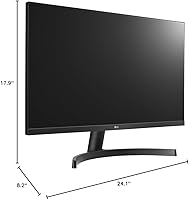
  • Dimensions: With the stand attached, the monitor measures 8.2 x 24.1 x 17.9 inches (D x W x H), making it compatible with most standard desk setups.
  • Weight: The unit weighs 10.6 pounds with stand, which is typical for a 27-inch monitor and manageable for single-person installation.
  • Stand Adjustments: The included stand supports tilt adjustment only; it does not offer height, swivel, or pivot functionality.
  • VESA Support: The monitor supports VESA 100x100mm mounting, making it compatible with standard third-party monitor arms and wall mounts.
  • Voltage: Rated at 240 volts, with a compatible power adapter included for use in standard regional electrical configurations.
  • Model Number: Official model designation is 27MK600M-B, with the -B suffix denoting the black colorway released for the North American market.
  • Release Year: This display was first made available in July 2018 and has not been discontinued by the manufacturer as of the latest available product data.

Related Reviews
LG 27MS550-B 27-inch IPS Monitor
85%
91%
Display Quality
87%
Ergonomics
92%
Value for Money
80%
Gaming Performance
85%
Build Quality
More
LG 27MP450-B 27-inch FHD IPS Monitor
85%
90%
Display Quality
87%
Ergonomics and Comfort
92%
Value for Money
85%
Gaming Performance
88%
Setup and Installation
More
LG 27UP850K-W 27-inch 4K IPS Monitor
76%
88%
Image Quality
91%
Color Accuracy
93%
USB-C Connectivity & Power Delivery
86%
Ergonomics & Stand
84%
Build Quality & Design
More
LG 27GL650F-B 27-Inch Full HD IPS Gaming Monitor

85%
92%
Display Quality
89%
Gaming Performance
85%
Build Quality
91%
Ergonomics & Adjustability
90%
Value for Money
More
Gigastone 27-inch IPS Monitor
84%
91%
Display Quality
88%
Ergonomics and Adjustability
92%
Value for Money
85%
Connectivity Options
89%
Setup and Installation
More
Dell P2714H 27-Inch IPS Monitor
84%
92%
Display Quality
88%
Color Accuracy
85%
Ergonomics/Adjustability
90%
Connectivity Options
80%
Build Quality
More
BenQ GW2791 27-inch FHD IPS Monitor
84%
89%
Display Quality
91%
Eye-Care Features
85%
Design & Build
88%
Ease of Setup
90%
Color Accuracy
More
Cunpu 27-inch 1440p 120Hz IPS Monitor
81%
89%
Display Quality
91%
Gaming Performance
88%
Color Accuracy
73%
Build Quality
85%
Eye-Care Features
More
GIGABYTE GS27QA 27-inch QHD Gaming Monitor
78%
88%
Gaming Performance
91%
Image Clarity
79%
Color Accuracy
54%
HDR Experience
89%
Refresh Rate & Smoothness
More
Acer SB272 27-Inch FHD IPS Monitor
84%
92%
Value for Money
88%
Display Quality
86%
Gaming Performance (FreeSync)
84%
Ergonomics & Tilt Adjustability
85%
Design & Build Quality
More

FAQ

Typically, LG includes one HDMI cable and a power cable in the packaging. That said, if you want to use both HDMI ports at once, you will need to supply a second cable yourself — they are inexpensive and easy to find.

Yes, the 27MK600M supports standard VESA 100x100mm mounting, so it is fully compatible with most third-party monitor arms and wall mounts. Many buyers actually go this route specifically to compensate for the stand's lack of height adjustment.

This is one of the more common concerns buyers raise, and it is fair. At 27 inches, 1080p gives you a pixel density of around 82 pixels per inch, which is noticeably lower than a 24-inch 1080p panel. For spreadsheets, reading long documents, or fine text at close range, some people find the image slightly soft. For video, casual gaming, and general browsing, most users find it perfectly acceptable. Sitting around 2 to 3 feet back helps.

FreeSync was originally designed for AMD Radeon GPUs, but many Nvidia GTX 10-series and RTX-series cards have supported FreeSync-compatible displays since Nvidia enabled adaptive sync functionality on their end. Whether it works seamlessly depends on your specific GPU and driver version — it is worth checking Nvidia's compatibility list for your card.

Yes, and this is one of the more practical features on this 27-inch monitor. With two HDMI inputs, you can keep both a PC and a console plugged in simultaneously and switch between them using the input selector — no cable swapping needed.

It depends heavily on where your desk is positioned. In a dimly lit room or with lighting behind you, reflections are minimal and most people do not notice them. If you sit near a window or work under strong overhead lights, the glossy surface will pick up reflections noticeably. If that describes your workspace, a matte-screen alternative might be a better fit.

On-Screen Control is a free software utility from LG that lets you adjust monitor settings like brightness, contrast, and input from your computer rather than hunting through the physical button menu on the monitor. It also enables the Screen Split feature, which divides your display into multiple zones for different windows. It is not essential, but it makes day-to-day adjustments noticeably more convenient.

For casual photo browsing and basic edits, the image quality is perfectly fine. For serious color-critical work, though, the NTSC 72% color gamut coverage means the display does not reproduce the full range of colors that professional editing workflows typically require. Photographers or designers who need accurate color representation would be better served by a wide-gamut panel with sRGB or Adobe RGB coverage closer to 95 to 100 percent.

This display does not include any built-in speakers, so you will need to use external speakers, a soundbar, or headphones for audio output. If you are connecting via HDMI, you can route audio through to a compatible external device.

Assembly is straightforward — the stand clicks into the monitor base without tools in most cases, and the whole process takes under five minutes. Connecting devices is equally simple thanks to the plug-and-play HDMI inputs. Most buyers report the monitor is ready to use with a good default image within a few minutes of unboxing, with minimal menu adjustment required.

Where to Buy