

Overview

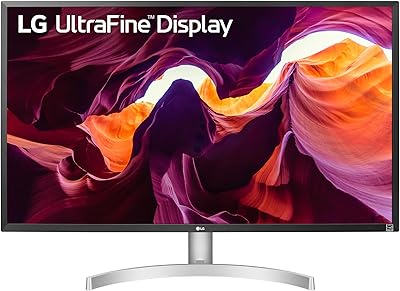
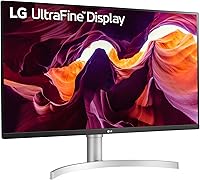
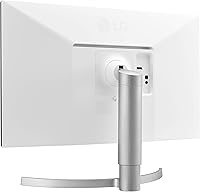
The LG 27UL550-W 27-inch 4K UHD Monitor occupies a sweet spot in the mid-range display market — it's aimed squarely at home office workers and creative-leaning users who want genuine color accuracy without paying prosumer prices. Released in 2019, it has aged reasonably well; the 4K IPS panel and ergonomic adjustable stand still hold their own against many newer rivals at a comparable price. One thing that immediately sets it apart aesthetically is the white and silver chassis, a rarity among monitors that tend to default to matte black. Just be clear going in: this is a productivity and content display, not a gaming monitor.

Features & Benefits

The IPS panel is the headline here — 178-degree viewing angles and 98% sRGB coverage mean colors stay consistent whether you're sitting dead-center or off to the side, and hobbyist photo editors will appreciate that what they see on screen actually matches real-world hues reasonably well. Cramming 3840x2160 pixels into 27 inches lands you at around 163 PPI, which is noticeably crisper than a 1080p screen of the same size — text and fine details look genuinely sharp. The stand covers height, tilt, and pivot adjustments, saving money on a separate monitor arm. One caveat: HDR10 is listed, but with a 300-nit brightness ceiling, the effect is subtle at best. FreeSync support exists, though the 60Hz cap makes it a minor perk for gamers.

Best For

This 27-inch IPS display is a natural fit for home office professionals who spend hours reading documents, joining video calls, or working in spreadsheets — the crisp 4K resolution makes text genuinely easier to read at normal scaling. Hobbyist photographers and graphic designers who want sRGB-accurate color without stepping into high-end territory will find it a capable daily driver. It pairs well with both Macs and Windows PCs, and the white aesthetic suits minimalist desk builds nicely. It also works well for casual streaming and 4K content consumption. If you're coming from a 1080p monitor, the sharpness upgrade alone feels significant. Less ideal if you're a competitive gamer or need USB-C connectivity.

User Feedback

Buyers have settled on a 4.5-star rating, and reading through the feedback, the themes are pretty consistent. The out-of-the-box color accuracy and sharpness get praised regularly, and many users specifically call out how straightforward the setup is. The stand's adjustability also earns real appreciation — not everyone wants to buy a separate arm just to use their monitor comfortably. On the downside, the absence of USB-C frustrates laptop users who expected it at this price point. A handful of users report mild backlight bleed around the corners, which is an IPS-panel reality rather than an LG-specific flaw. Some also note the default brightness runs high, requiring a manual reduction for comfortable extended use. Overall, the criticism is more about missing features than poor performance.

Pros

  • Sharp 4K resolution at roughly 163 PPI makes text and fine detail look noticeably crisper than any 1080p display of the same size.
  • The IPS panel covers 98% of sRGB, making the 27UL550-W a reliable pick for photo editing and color-sensitive work at this price tier.
  • Wide 178-degree viewing angles mean colors and brightness stay accurate from the side, not just dead-center.
  • The stand adjusts for height, tilt, and pivot straight out of the box, removing the cost and hassle of a separate monitor arm.
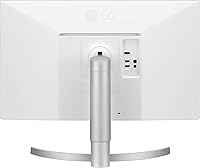
  • The white and silver finish is a rare aesthetic in this category, fitting naturally into clean or minimalist desk setups.
  • Color accuracy out of the box earns consistent praise from buyers, often requiring little to no manual calibration for everyday use.
  • Setup is genuinely plug-and-play, with most users reporting a working display within minutes of unboxing.
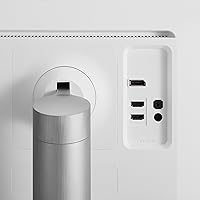
  • Both HDMI and DisplayPort inputs are included, covering the majority of desktop and modern laptop connection scenarios.
  • AMD FreeSync support adds a layer of light gaming flexibility for casual players who don't demand high frame rates.
  • The combination of 4K sharpness, IPS color accuracy, and a fully ergonomic stand represents strong overall value at this price point.

Cons

  • The 60Hz refresh rate is a firm ceiling — fast-paced gaming feels noticeably less fluid compared to higher-refresh alternatives.
  • HDR10 support is largely cosmetic; 300 nits of peak brightness cannot produce a convincing high dynamic range experience.
  • No USB-C port is a real gap for laptop users who want a single-cable setup for both video output and power delivery.
  • Some buyers report mild backlight bleed in the corners, which is distracting during dark scenes or dim-room use.
  • The glossy screen surface picks up reflections in bright rooms and can become fatiguing during long work sessions.
  • Default brightness ships too high for comfortable daily use, requiring immediate manual adjustment out of the box.
  • Color coverage tops out at sRGB and does not extend to DCI-P3 or Adobe RGB, limiting its appeal for professional video or print work.
  • Released in 2019, the 27UL550-W is showing its age against newer rivals that offer USB-C, higher refresh rates, or improved HDR at comparable prices.
  • The IPS contrast ratio of 1000:1 produces weaker blacks than VA panel alternatives, which is noticeable in dark or cinematic content.
  • The white chassis and glossy finish attract fingerprints and dust more visibly than matte-coated competitors.

Ratings

Our scores for the LG 27UL550-W 27-inch 4K UHD Monitor were calculated by an AI model trained to analyze verified global buyer reviews, actively filtering out incentivized, duplicate, and bot-generated feedback before processing sentiment across thousands of real-world responses. The ratings reflect the honest consensus of home office professionals, hobbyist creatives, and casual users, with genuine strengths and recurring pain points weighted transparently into each category. Whether this display earns a recommendation for your setup depends heavily on how you use it, and the scores below are designed to make that call clearer rather than to flatten the trade-offs.

Image Sharpness
93%
Buyers consistently describe the jump to 4K on a 27-inch screen as immediately and permanently noticeable, particularly for reading long documents and inspecting high-resolution photos. At roughly 163 PPI, text edges appear genuinely crisp at a normal desk distance, and fine details in design work or spreadsheets render without the softness that plagues 1080p screens.
A small number of users note that Windows display scaling requires manual tuning during initial setup to get UI elements to a comfortable size, which can involve trial and error across apps that handle high-DPI scaling inconsistently. There is no inherent panel limitation here — the friction is entirely software-side.
Color Accuracy
88%
The IPS panel's 98% sRGB coverage earns genuine praise from hobbyist photographers and designers who need colors to look consistent across the working day. Users frequently note that the display performs well straight out of the box without requiring third-party calibration tools, making it accessible to creative-leaning users who are not professional colorists.
The sRGB color space is the hard ceiling here — buyers doing video work targeting DCI-P3 or print work relying on Adobe RGB will find the gamut coverage insufficient for professional deliverables. Wide-gamut workflows are simply outside the scope of what this monitor was designed to support.
HDR Performance
47%
53%
The HDR10 compatibility at least ensures the monitor can receive and process HDR signals, meaning users connected to HDR sources will not be locked out entirely. For content that relies on subtle color grading rather than extreme contrast highlights, the experience can still feel marginally improved over standard SDR output.
At a typical brightness of 300 cd/m², the HDR effect is barely perceptible in practice — highlights do not pop, shadow detail lacks depth, and the overall result falls well short of what most buyers associate with HDR. Reviewers consistently single out this gap, noting that the HDR10 badge reads more like a footnote than a genuine feature.
Brightness & Contrast
67%
33%
For typical indoor office lighting, the 300 cd/m² output is adequate, and most users in normally lit rooms find the image bright enough for comfortable daily use once they dial the factory brightness down slightly. The 1000:1 contrast ratio handles well-lit product photos and vibrant web content without looking washed out.
Buyers who work near windows or in sun-facing rooms consistently flag that the glossy surface combined with the moderate brightness ceiling makes glare management frustrating. The IPS contrast ratio also makes dark-scene films and nighttime gaming look noticeably flat compared to VA or OLED panels available at a similar price.
Viewing Angles
86%
The 178-degree IPS viewing angles are a genuine strength in shared or collaborative environments — a colleague glancing from the side or a partner watching from the couch sees the same accurate colors as the person sitting centered. Color shift and brightness falloff at wide angles are minimal by any practical measure.
A small subset of users with large dual-monitor configurations note that off-axis consistency, while good for an IPS panel, still falls short of the absolute uniformity seen on premium professional displays costing significantly more. In everyday single-user home office use, this is rarely a practical concern.
Gaming Performance
52%
48%
AMD FreeSync support does add value for casual gamers running slower-paced titles — strategy games, RPGs, and indie titles at 60fps look smooth and tear-free on this display. Users who primarily use the monitor for work and game occasionally report that the experience is entirely acceptable for their relaxed needs.
For anyone playing competitive shooters, racing simulators, or action games, the 60Hz ceiling is a genuine bottleneck that no other feature can compensate for. Buyers coming from a 144Hz display consistently describe the motion as visibly sluggish, and it stands as the most frequently cited disappointment in gaming-focused feedback.
Stand & Ergonomics
89%
The stand's height, tilt, and pivot adjustability is one of the most consistently praised features across buyer feedback, especially from home office users who spend eight or more hours a day at their desks. Being able to raise, lower, and rotate the panel without purchasing an aftermarket arm is a meaningful practical advantage that reviewers explicitly highlight as a differentiator.
The stand base carries a fairly wide footprint that a minority of users with smaller desks find eats into valuable surface space. Left-right swivel is absent, meaning users who want to angle the screen toward a colleague or second person have to physically shift the entire unit to do so.
Build Quality & Design
84%
The white and silver chassis earns frequent compliments for its clean, modern look that contrasts distinctively with the all-black panels that dominate this price range. Build quality feels solid — the plastic used on the frame and stand mechanism does not flex noticeably, and the panel sits stable under normal desk conditions.
The glossy white surfaces attract fingerprints and visible dust more readily than a matte-black alternative, which tidier users find requires regular wiping. A few buyers also note that the OSD navigation buttons are small and positioned awkwardly at the rear, making settings adjustments feel fiddly to navigate.
Connectivity
61%
39%
Having both HDMI and DisplayPort covered means the 27UL550-W handles the vast majority of desktop PC and dedicated GPU setups without adapters, and switching between two sources is straightforward for users with dual machines. For a conventional desktop workflow, the input selection is functional and practical.
The absence of USB-C is a recurring and significant complaint, particularly from MacBook users and laptop professionals expecting a single-cable video-and-power setup. There is also no USB hub built in, so users who route peripherals through their monitor will need a separate dock — a convenience gap that is increasingly hard to accept at this price point.
Ease of Setup
91%
Out-of-the-box assembly consistently earns praise — buyers report that the stand attaches in minutes, cable connections are clearly labeled, and the display is recognized immediately by both Windows and macOS without driver installation. The monitor arrives at usable quality settings for most scenarios without requiring any manual configuration at all.
Windows users running 4K for the first time occasionally report needing to adjust display scaling to get application text and icons to the right size, which can involve trial and error across individual apps that handle high-DPI rendering inconsistently. This is a platform limitation rather than a monitor flaw, but it catches some first-time 4K buyers off guard.
Value for Money
78%
22%
For a home office or casual creative user, the combination of 4K IPS color quality, a fully adjustable ergonomic stand, and a distinctive design at this price tier represents a genuinely competitive package compared to similarly priced alternatives that cut corners on stand ergonomics or panel quality. Buyers who prioritize those attributes consistently feel the purchase was justified.
The monitor launched in 2019, and at its current price, buyers can find newer rivals offering USB-C, better HDR brightness, or higher refresh rates for a comparable investment. For users whose needs stretch beyond basic productivity, the value proposition weakens noticeably when placed alongside more recent competition.
Panel Uniformity
72%
28%
For document work, spreadsheets, and general productivity tasks, most users report that color and brightness look visually consistent across the panel without any glaring hot spots or dark corners during everyday use. The IPS technology keeps center-to-edge accuracy at a level that satisfies the clear majority of non-specialist users.
A noticeable minority of buyers report mild backlight bleed, most commonly in the lower corners, that becomes visible when displaying a fully black screen in a darkened room. This is a known IPS-panel characteristic at this price tier, but buyers who frequently watch dark content or work in dim environments should be aware it can and does occur.
Eye Comfort
74%
26%
The IPS panel's natural color rendering and the 4K resolution's ability to produce sharper text at larger font sizes without antialiasing artifacts make long reading sessions noticeably more comfortable than a comparable 1080p screen. Users who spend full workdays on the display generally report manageable eye fatigue when brightness is set appropriately.
The factory brightness default is widely flagged as too high for extended sessions, requiring immediate manual reduction before the display feels truly comfortable over hours of use. The glossy screen finish also introduces reflection fatigue in brightly lit rooms, adding to visual strain for users who lack good control over ambient lighting.

Suitable for:

The LG 27UL550-W 27-inch 4K UHD Monitor is well-suited to home office workers and creative-leaning users who spend most of their day in documents, spreadsheets, or photo editing software and want color they can actually trust. The 98% sRGB coverage and IPS panel make it a capable daily driver for hobbyist photographers and designers who need reasonable color accuracy without paying prosumer prices. At roughly 163 PPI on a 27-inch screen, text looks noticeably sharper and cleaner than on any 1080p display of the same size, which matters more than most people expect during long reading sessions. The fully adjustable stand — covering height, tilt, and pivot — is a genuine practical advantage over similarly priced competitors that often ship with fixed or minimally adjustable mounts. Mac and PC users who want a clean, understated desk aesthetic will also appreciate the white and silver finish, which is genuinely rare in this category. Casual streamers and 4K content consumers rounding out a home setup will get sharp, accurate visuals without a steep entry cost.

Not suitable for:

If you game even semi-regularly, the LG 27UL550-W 27-inch 4K UHD Monitor's hard 60Hz refresh rate ceiling will be a frustration — fast-paced titles look visibly less smooth compared to the 144Hz or 165Hz alternatives available at similar prices today. The HDR10 badge is present, but with a typical peak brightness of around 300 nits, it won't deliver anything close to the vivid contrast ratio you'd see on a display built specifically for HDR content. Laptop users who rely on USB-C for single-cable video and power delivery will find the connection options limiting, since only HDMI and DisplayPort are on offer. Professional creatives working in DCI-P3 for video or Adobe RGB for print will hit the sRGB color space ceiling quickly. The glossy panel also works against buyers in bright environments, picking up reflections that a matte-coated competitor would absorb. Given that this monitor launched in 2019, shoppers willing to spend a little more will find newer rivals that address several of these gaps simultaneously.

Specifications

  • Screen Size: The display measures 27 inches diagonally, offering a spacious working area without requiring an oversized desk footprint.
  • Resolution: Native resolution is 3840x2160 (4K UHD), delivering approximately 163 pixels per inch for sharp text and fine image detail at normal viewing distances.
  • Panel Type: Uses an IPS (In-Plane Switching) panel, which provides consistent color reproduction and brightness when viewed from wide angles.
  • Color Gamut: Covers 98% of the sRGB color space, making it suitable for color-accurate work in web design, hobbyist photography, and everyday digital content creation.
  • Brightness: Typical brightness is rated at 300 cd/m², with a minimum rated output of 240 cd/m² under standard operating conditions.
  • Contrast Ratio: Static contrast ratio is 1000:1 typical and 700:1 minimum, which is standard performance for an IPS panel at this price tier.
  • Viewing Angles: Rated at 178 degrees both horizontally and vertically, meaning colors and brightness remain consistent even when viewed from significantly off-center positions.
  • HDR Support: Compatible with the HDR10 standard, though the 300 cd/m² brightness ceiling significantly limits the visible impact of HDR content compared to dedicated high-brightness HDR displays.
  • Refresh Rate: Maximum refresh rate is 60Hz, which is adequate for productivity tasks and casual content viewing but below the threshold most gamers recommend for fast-paced titles.
  • Adaptive Sync: Supports AMD FreeSync within the 40–60Hz variable refresh rate range, reducing screen tearing during light gaming sessions on compatible AMD graphics hardware.
  • Inputs: Connectivity consists of one HDMI port and one DisplayPort input; no USB-C or Thunderbolt connection is available on this model.
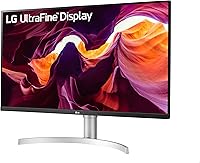
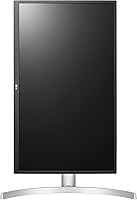
  • Stand: The factory-included stand supports height adjustment, forward and backward tilt, and full 90-degree pivot into portrait orientation without requiring a separate monitor arm.
  • Color Depth: Capable of rendering approximately 1.07 billion colors, supporting smooth tonal gradients and minimizing visible banding in demanding photographic or video content.
  • Pixel Pitch: Each pixel measures 0.1554 x 0.1554 mm, which contributes to the high pixel density that keeps text and UI elements appearing crisp at a standard desk viewing distance.
  • Weight: The assembled unit with stand weighs 9.68 pounds (approximately 4.39 kg), manageable for a single person to position or reposition on a desk.
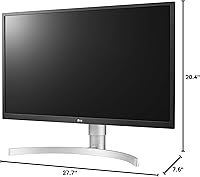
  • Dimensions: With the stand attached, overall dimensions are 27.7 inches wide, 20.4 inches tall, and 7.6 inches deep.
  • Screen Finish: The display uses a glossy panel surface, which enhances perceived color vibrancy but can produce visible reflections under bright ambient lighting conditions.
  • Chassis Color: The monitor ships in a white and silver colorway, a distinctive alternative to the matte-black finish that dominates most monitors at this price point.

Related Reviews
LG 27US500-W 27″ 4K UHD Monitor
76%
93%
Image Sharpness & Clarity
91%
Color Accuracy
72%
HDR Performance
47%
Stand & Ergonomics
54%
Connectivity
More
LG 27UP850K-W 27-inch 4K IPS Monitor
76%
88%
Image Quality
91%
Color Accuracy
93%
USB-C Connectivity & Power Delivery
86%
Ergonomics & Stand
84%
Build Quality & Design
More
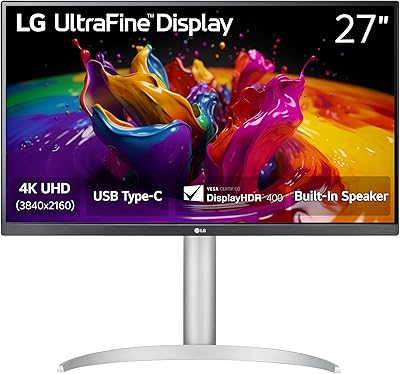
LG 27SR75U-W 27-inch 4K Smart Monitor
77%
88%
Picture Quality
91%
Smart Platform
84%
Connectivity
79%
Value for Money
76%
Build Quality
More
LG 32UP83A-W 32-inch 4K UHD Monitor
86%
94%
Display Quality
91%
Color Accuracy
88%
Build Quality
89%
Ergonomics/Adjustability
90%
Connectivity Options
More
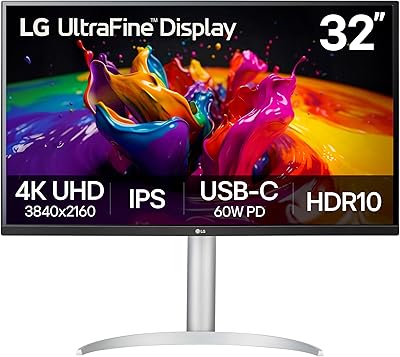
LG 32UL500-W 32-Inch 4K VA Monitor
74%
88%
Picture Quality
83%
Color Accuracy
62%
HDR Performance
54%
Refresh Rate & Gaming
41%
Ergonomics & Stand
More
LG 32G810SA-W 32-inch UltraGear Gaming Monitor

77%
88%
Color Accuracy
84%
Gaming Performance
58%
HDR Quality
81%
Smart Platform (webOS)
91%
Design & Aesthetics
More
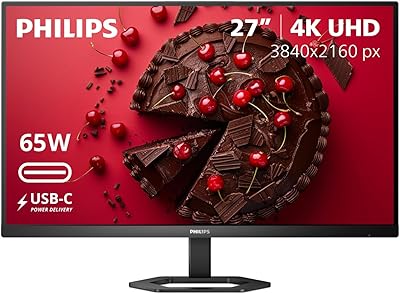
ViewSonic VX2776-4K-MHDU 27-inch 4K IPS Monitor
75%
91%
Image Clarity
93%
USB-C Convenience
78%
Color Accuracy
54%
HDR Performance
46%
Stand & Ergonomics
More
LG 32SQ780S 32-inch 4K Smart Monitor
73%
88%
Picture Quality
72%
Smart Platform (webOS)
91%
Ergonomic Stand
86%
Connectivity
67%
Value for Money
More
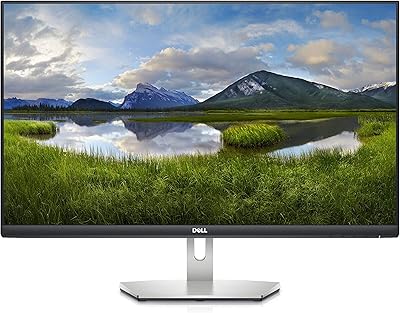
Philips 27E1N5900R 27-inch 4K Monitor
77%
91%
Image Clarity
78%
Color Accuracy
88%
USB-C Connectivity
54%
HDR Performance
58%
Glare & Reflections
More
Dell S2721Q 27-inch 4K IPS Monitor
74%
91%
Image Clarity
87%
Color Accuracy
83%
Build Quality
41%
Stand & Ergonomics
53%
Glare & Reflections
More

FAQ

Yes, it connects to MacBooks without issue via HDMI or DisplayPort using an appropriate cable or adapter. macOS will recognize the 4K resolution and let you choose scaled display settings for sharper text and more desktop space. The one thing to be aware of is that this monitor has no USB-C or Thunderbolt port, so if your MacBook only has USB-C outputs, you will need a dongle or adapter to make the connection.

For anything productivity-related — documents, spreadsheets, web browsing, photo editing, video watching — 60Hz is perfectly adequate and the overwhelming majority of users will not feel constrained. The gap becomes obvious the moment you play fast-paced games like first-person shooters or racing titles, where motion looks visibly smoother and more responsive on higher-refresh displays. For light or turn-based gaming, 60Hz is workable; for competitive play, it is a real limitation.

No, and this is the most commonly cited frustration from buyers. The only video inputs are HDMI and DisplayPort. If your laptop outputs exclusively over USB-C, you will need a USB-C to DisplayPort or USB-C to HDMI adapter, or a hub that includes those outputs. It is a meaningful gap for a monitor released in 2019, and worth factoring into your decision if you work primarily from a modern laptop.

To be straightforward about it: the HDR10 support here is limited. The LG 27UL550-W 27-inch 4K UHD Monitor tops out at around 300 nits of brightness, which is well below the 600 nits or higher that dedicated HDR monitors use to produce genuine contrast and highlight impact. You can enable HDR in Windows or macOS and some content may look marginally different, but do not expect the dramatic visual improvement that HDR marketing implies. Treat it as a low-level compatibility feature rather than a standout capability.

For general home office use, photo browsing, and casual creative work, the out-of-the-box color accuracy is good enough that most users will not feel the need to touch anything. The one adjustment nearly everyone should make immediately is lowering the factory brightness, which ships set too high for comfortable extended sessions. If you do professional photo retouching or print-preparation work, a hardware colorimeter will give you more confidence, but casual users are unlikely to find the default calibration lacking.

The stand is honestly one of the stronger selling points of this display compared to competitors at a similar price. It handles height adjustment, tilt, and full portrait pivot, which covers the ergonomic needs of most home office setups without any additional hardware. Unless you specifically want to wall-mount the panel, extend it far out from the desk surface, or pair it with a second monitor on a shared arm, the factory stand is more than adequate.

A portion of buyers do report minor backlight bleed, most often visible in the corners when the screen displays a fully black image. This is a known characteristic of IPS panels at this price range rather than a flaw unique to this model. Whether it bothers you depends heavily on what you do — for daytime office work and bright-room photo editing it is rarely noticeable, but if you frequently watch dark-scene-heavy films in a dim room, some corner glow may be visible.

Yes, the stand includes a pivot function that lets you rotate the panel a full 90 degrees into portrait orientation. It is a feature that writers, developers, and anyone who works with tall documents or vertical feeds tend to appreciate significantly. The stand handles the rotation mechanically, so no separate arm purchase is necessary — which is a practical advantage that not every monitor in this category offers.

It depends on what you need it for. The 4K IPS panel, 98% sRGB coverage, and fully adjustable stand are still genuinely competitive for productivity and home office use, and the image quality holds up well by current standards. Where it shows its age is in areas like USB-C connectivity, HDR brightness, and the 60Hz refresh rate ceiling — newer monitors at a comparable price have addressed some or all of these gaps. For focused work and content viewing it remains a capable choice; for anything beyond that, a more recent alternative is worth the comparison.

The difference is significant and immediately apparent. Moving from 1080p to 4K on the same screen size roughly doubles the pixel density, which makes text crisper, images sharper, and fine UI details considerably cleaner. The improvement is especially obvious when reading long documents, inspecting high-resolution photos, or working with small design elements. Most people who make this upgrade report that returning to a 1080p panel feels noticeably degraded within just a few days.