Lenovo 510 Wireless Keyboard and Mouse Combo



Overview
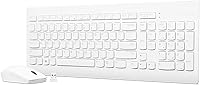
The Lenovo 510 Wireless Keyboard and Mouse Combo sits squarely in the value tier, built for home and office PC users who want wireless convenience without a big outlay. One single nano-USB dongle handles both devices — plug it in and everything works, no software installation required. The full-size layout with a dedicated number pad is a genuine advantage here, since many combos at this price drop the numpad entirely. The slim white design is understated and tidy without making a big deal of itself. A 4.3-star average across more than 2,500 verified buyers suggests it's doing something right for the people actually using it daily.
Features & Benefits
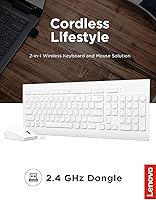
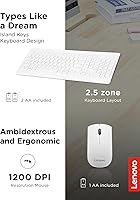
The single 2.4 GHz receiver is arguably the most convenient detail in this set — one USB port covers both the keyboard and mouse together, useful if your PC is already short on available ports. The keyboard is full-size with a dedicated number pad, which makes it genuinely practical for spreadsheets, data entry, or anything involving sustained numerical input. An island-style key layout means minor spills are less catastrophic than they might be on a conventional keyboard. The mouse is ambidextrous, works at a steady 1200 DPI, and suits general productivity tasks comfortably. LED indicators for Caps Lock and Num Lock are small additions that genuinely reduce typo-related frustration.
Best For
This wireless combo is a natural fit for home office workers who want a cleaner desk setup without committing to a significant expense. Students will appreciate how frictionless the setup is — there's nothing to install, which matters when you just need something to work. The ambidextrous mouse makes this keyboard and mouse bundle worth a look for left-handed users who are tired of right-hand-only designs. It also serves well as a secondary workstation combo: a spare PC, a media center setup, or a simple backup option. Anyone switching away from wired peripherals for the first time will find the transition notably easy.
User Feedback
Buyers consistently highlight the easy setup and comfortable key feel as standout positives, with the clean design getting honorable mentions from people who care how their desk looks. The keyboard side of this Lenovo 510 set earns more praise than the mouse, which some users describe as feeling a bit light and hollow in hand. The fixed 1200 DPI with no adjustment option is the most-cited functional limitation — it's fine for documents and browsing but may frustrate users who work across multiple large monitors. Wireless reliability in a typical home or office room is generally reported as solid. A recurring theme in positive reviews is that for basic daily tasks, this combo holds its own against pricier alternatives.
Pros
- Plug-and-play setup works immediately with no software or drivers needed.
- A single nano-USB receiver handles both devices, saving a valuable port.
- Full-size layout with a dedicated number pad is uncommon at this price.
- The ambidextrous mouse is a genuine win for left-handed users.
- Spill resistance on the keyboard adds practical peace of mind for everyday use.
- LED indicators for Caps Lock and Num Lock help avoid silent typing errors.
- Mouse battery life holds up well in real-world use, reducing how often you reach for replacements.
- Wireless signal is reliable within a standard home or office room.
- The slim white design keeps a desk looking tidy without drawing attention to itself.
- Over 2,500 buyers rate it at 4.3 stars, which reflects consistent satisfaction for the use case it targets.
Cons
- Mouse DPI is fixed at 1200 with no sensitivity adjustment available.
- The mouse feels light and hollow in hand, which bothers users who prefer a solid build.
- No Mac or cross-platform support — Windows PC use only.
- Spill resistance applies only to the keyboard; the mouse has no such protection.
- No backlit keys, which is a drawback for low-light working environments.
- The keyboard, while full-size, lacks media shortcut keys or any programmable functions.
- No USB-C connectivity option; relies entirely on a standard USB-A nano-receiver.
- Battery compartment access can feel fiddly, particularly on the mouse.
Ratings
The Lenovo 510 Wireless Keyboard and Mouse Combo has been scored by our AI after processing thousands of verified global buyer reviews, with spam, bot-generated, and incentivized feedback actively filtered out before analysis. The scores below reflect the honest consensus — strengths and shortcomings alike — so you can make a genuinely informed call before buying this wireless combo.
Value for Money
Ease of Setup
Keyboard Typing Feel
Mouse Performance
Wireless Reliability
Build Quality
Battery Life
Design & Aesthetics
Key Layout & Number Pad
LED Indicators
Portability
Compatibility
Long-Term Durability
Suitable for:
The Lenovo 510 Wireless Keyboard and Mouse Combo is a strong match for anyone who needs a dependable, no-fuss input setup without overcomplicating the buying decision. Home office workers on a practical budget will appreciate the full-size layout with number pad, which makes spreadsheet work and data entry genuinely comfortable day to day. Students who just need something that works out of the box — without installing drivers or troubleshooting software — will find this wireless combo refreshingly straightforward. Left-handed users are often underserved at this price point, so the ambidextrous mouse design is a real and specific advantage here. It also makes excellent sense as a secondary setup: a spare desk, a shared family computer, or a media PC connected to the living room TV all fit naturally. Anyone making their first move from a wired desk setup will find the transition simple and low-risk.
Not suitable for:
The Lenovo 510 Wireless Keyboard and Mouse Combo is not the right call for users who need precision control or adjustable mouse sensitivity, since the mouse is locked at 1200 DPI with no way to change it. Gamers should look elsewhere entirely — this keyboard and mouse bundle was built for productivity, not fast-paced input or customizable macros. Power users who work across large multi-monitor setups may find the fixed DPI limiting when it comes to navigating long cursor distances efficiently. The mouse has been described by multiple buyers as feeling lightweight and a bit hollow, which is a real tactile drawback for anyone who prefers a more substantial feel in hand. Mac users should also be aware that this set is designed for Windows PC environments, and full compatibility on other platforms is not guaranteed. If you rely heavily on your mouse and spend long hours doing detail-oriented work, investing in a dedicated, higher-quality mouse separately would be the smarter move.
Specifications
- Connectivity: Both the keyboard and mouse connect wirelessly via a single 2.4 GHz nano-USB receiver plugged into a standard USB-A port.
- Setup: The combo is fully plug-and-play, requiring no driver installation or software configuration on Windows PCs.
- Keyboard Layout: The keyboard is full-size with a dedicated number pad, island-style key spacing, and standard function row.
- Mouse DPI: The optical mouse operates at a fixed 1200 DPI with no software-based sensitivity adjustment available.
- Mouse Design: The mouse is ambidextrous, making it physically compatible with both left-handed and right-handed users.
- Spill Resistance: The keyboard features a spill-resistant construction designed to withstand minor liquid exposure; the mouse carries no such rating.
- LED Indicators: The keyboard includes LED status lights for both Caps Lock and Num Lock to provide clear visual confirmation of active states.
- Battery Included: The combo ships with three AA batteries included: two for the keyboard and one for the mouse.
- Battery Life: Lenovo rates the mouse battery life at up to 12 months under typical usage conditions with a single AA battery.
- Operating System: The combo is designed for Windows-based PCs and is not officially listed as compatible with macOS or Linux.
- Dimensions: The keyboard measures 16.69 x 6.12 x 0.81 inches, providing a standard desktop footprint with a slim profile.
- Weight: The combined package weight is 2.2 pounds, reflecting a lightweight build for both peripheral units.
- Color: This variant is finished in white, giving the set a clean, minimal appearance suited to modern desk setups.
- Model Number: The official model number for this combo is GX30W75336, used for warranty and support identification.
- Hardware Platform: The keyboard and mouse bundle is certified for PC use and operates on the Windows hardware platform.
- Availability: This product was first made available in February 2021 and has since accumulated over 2,500 customer ratings.
- Power Source: Both devices are battery-powered with no option for wired or rechargeable USB charging.
- Receiver Type: The nano-USB receiver is small enough to leave semi-permanently in a laptop or desktop USB port without protruding significantly.
Related Reviews
Lenovo Professional Wireless Keyboard and Mouse Combo
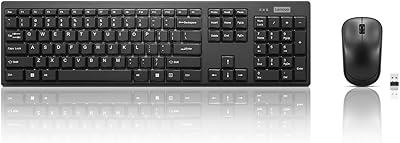
Lenovo 100 Wireless Keyboard and Mouse Combo

Arteck HW192 Wireless Keyboard and Mouse Combo

Kootop Wireless Keyboard Mouse Combo

Harburfine Wireless Keyboard and Mouse Combo

FOPETT Retro Wireless Keyboard and Mouse Combo

MOFII Wireless Keyboard and Mouse Combo

Trueque Wireless Keyboard and Mouse Combo

Mobifice Retro Wireless Keyboard and Mouse Combo