Overview

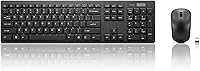
The Lenovo 100 Wireless Keyboard and Mouse Combo is exactly what it sounds like: a no-nonsense, budget-friendly peripheral set built for people who just need things to work. Plug the USB-A nano receiver into any available port and you are up and running in seconds — no drivers, no software, no pairing rituals. The keyboard's slim, compact footprint fits comfortably on a crowded desk without dominating the space. It works with both Windows and macOS straight out of the box. Just don't expect a productivity powerhouse — this wireless combo is squarely aimed at everyday tasks, not power users chasing peak performance.
Features & Benefits

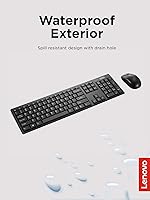
The spill-resistant keyboard is a practical touch — a small drain hole built into the frame gives you a fighting chance if you knock over a drink. It's not waterproof by any stretch, but it handles minor splashes better than most budget boards. The island-style keys are quiet with a low-travel feel that won't disturb coworkers or family members nearby. The included mouse is ambidextrous, a genuine plus for left-handed users who rarely find options at this price point. At 1000 DPI, the mouse tracks reliably for browsing, documents, and general tasks — just don't expect precision suited for graphic or design work.

Best For

This keyboard-and-mouse bundle makes the most sense for students, remote workers, or anyone furnishing a secondary desk on a tight budget. It's a natural fit for shared office environments where clicky keys are a genuine nuisance to colleagues. Left-handed users should take note — ambidextrous mice at this price are rarer than you'd think, and the Lenovo 100 set delivers one without requiring a special order. It also works well as a guest-room or spare workstation peripheral where premium gear feels unnecessary. If you're replacing a broken wired combo and simply need something reliable and quiet, this bundle covers the basics without overcomplicating things.

User Feedback

Across its 453 ratings, this wireless combo holds a 4.2-star average — a score that reflects genuine satisfaction tempered by a few recurring complaints. Most buyers praise the plug-and-play setup and appreciate how quiet the keys are for the price. The typing feel earns consistent approval for a budget board. On the downside, the mouse draws the most criticism: users with larger hands find it uncomfortably small and light, and some describe it as feeling slightly flimsy to hold. Battery life feedback is broadly positive, though occasional wireless dropout in larger rooms — when the receiver sits farther from the devices — does come up among a minority of reviewers.

Pros

  • Plug-and-play setup takes under a minute — no software, no drivers, no pairing screens.
  • Quiet key switches make this wireless combo a considerate choice in shared or noise-sensitive spaces.
  • The ambidextrous mouse is a genuine rarity at this price, giving left-handed users a practical option.
  • Works out of the box on both Windows and macOS without any configuration.
  • The slim keyboard footprint frees up meaningful desk space on crowded workstations.
  • A drain hole adds real-world protection against minor liquid splashes on a busy desk.
  • Battery-powered design means no charging cables to manage — the included AAA battery lasts months under normal use.
  • Ranked among the top 250 keyboard-and-mouse combos on Amazon with a 4.2-star average across hundreds of verified buyers.
  • Single nano receiver handles both devices simultaneously, using only one USB port.

Cons

  • No battery level indicator means the keyboard can die mid-task without any advance warning.
  • The nano receiver has no built-in storage slot, making it easy to lose during travel or desk reorganization.
  • Wireless dropouts are reported by users whose receiver sits more than a meter away, such as in a desktop tower under a desk.
  • The mouse feels hollow and lightweight in hand — a persistent complaint from users with medium to large hands.
  • No DPI adjustment option leaves users locked into a single sensitivity setting with no way to customize.
  • No numeric keypad rules this keyboard-and-mouse bundle out for data entry, accounting, or number-heavy workflows.
  • The plastic finish on both devices shows visible wear relatively quickly under daily heavy use.
  • No backlighting whatsoever — typing in dim rooms or at night requires either memorized key positions or a lamp.
  • macOS users lose key label accuracy since the layout is Windows-oriented, with no Command key marking.

Ratings

The Lenovo 100 Wireless Keyboard and Mouse Combo has been evaluated by our AI rating system after analyzing hundreds of verified purchase reviews from buyers across North America, Europe, and Asia — with spam, incentivized, and bot-generated feedback actively filtered out. The scores below reflect the honest consensus of real everyday users, capturing both what this keyboard-and-mouse bundle genuinely does well and where it falls short for certain buyers.
Value for Money
88%
Most buyers feel this wireless combo punches well above its price bracket for basic daily use. Getting a wireless keyboard and mouse with a unified receiver, quiet keys, and an ambidextrous mouse at this cost is considered a strong deal by the majority of reviewers who use it for home office tasks or school.
A small but vocal group of users feel the mouse quality in particular drags down the overall value proposition. When either component fails early — which a minority reports — the perceived value drops sharply since the combo is sold as a unit.
Setup & Ease of Use
93%
The plug-and-play experience earns some of the highest praise across all review categories. Users consistently report being fully operational within under a minute of opening the box — no drivers, no app downloads, no Bluetooth pairing screens to navigate.
A handful of users on older machines noted the nano receiver occasionally required switching USB ports before being recognized. It is a minor friction point, but worth flagging for those using aging desktops with limited USB bandwidth.
Keyboard Typing Feel
76%
24%
For a budget chiclet-style board, the key travel and feedback surprise many buyers positively. People who type for extended periods — writing reports, replying to emails, filling spreadsheets — find the keys responsive enough to avoid fatigue during a standard workday.
Anyone coming from a mechanical keyboard or even a mid-range membrane board will notice the shallow key travel and slightly hollow bottom-out feel. The keys lack the tactile confidence that faster or more precise typists prefer.
Noise Level
84%
The quiet key switches are a genuine selling point for shared spaces. Reviewers working in open-plan offices, shared apartments, or late-night home setups specifically call out how the keyboard avoids the distracting clatter of standard membrane boards.
The mouse clicks are quieter than average but not silent — in a very quiet room, the scroll wheel ratchet and button clicks are still audible. A small number of users expected near-silent mouse operation and were mildly disappointed.
Mouse Comfort & Ergonomics
58%
42%
The ambidextrous shape works reasonably well for users with small to average-sized hands, and left-handed users especially appreciate having a symmetrical option at this price tier without needing to shop a specialty store.
Users with larger hands consistently flag the mouse as too small and too light, leaving it feeling flimsy during extended use. The low weight makes precise tracking feel less controlled, and some describe it as having a toy-like quality that undermines confidence in daily navigation tasks.
Mouse Tracking Accuracy
66%
34%
At 1000 DPI, the optical mouse handles web browsing, document editing, and casual computing without any significant lag or erratic jumps. For the intended use case, it tracks consistently across standard desk surfaces and most mouse pads.
Power users, designers, or anyone working with multiple monitors will find 1000 DPI limiting. There is no DPI adjustment option, so users who want faster or slower cursor sensitivity are stuck with the single factory setting.
Wireless Reliability
71%
29%
In typical home and office environments — receiver plugged into a laptop or desktop within a meter or two of the devices — the 2.4GHz connection is stable and consistent. Most users report no perceptible input lag during typing or mouse movement.
Dropouts become a recurring complaint when the receiver is farther away, such as when connected to a desktop tower under a desk. A few reviewers also note interference in environments with heavy wireless traffic, leading to intermittent cursor stuttering.
Build Quality
61%
39%
The keyboard frame feels adequately solid for a slim budget board, and the matte black finish resists smudging reasonably well during daily handling. It does not flex noticeably during aggressive typing, which is a plus at this price.
The mouse housing feels noticeably hollow and light in hand, and the plastic on both devices has a cost-conscious finish that shows wear with heavy use. This is not a combo that feels built to last years under demanding conditions.
Spill Resistance
63%
37%
The drain hole design has saved a few users from a complete keyboard replacement after minor liquid spills — coffee drips, water splashes — making it a practical feature for cluttered or busy desks where accidents happen.
It is important to understand this is a passive drain channel, not a sealed or rated waterproof design. A significant spill can still damage the keyboard if it is not quickly tilted to drain. Reviewers who treated it as fully waterproof had mixed results.
Battery Life
74%
26%
Most reviewers report the included AAA battery lasting several months under normal daily use, which aligns with expectations for a low-power wireless keyboard. Not needing to charge via cable is a small but appreciated convenience for users tired of USB-C clutter.
Because there is no battery indicator or low-power warning, several users report the keyboard dying mid-task without notice. Having to keep a spare AAA on hand is a minor but recurring annoyance flagged across multiple reviews.
Compatibility
87%
Out-of-the-box support for both Windows and macOS is a genuine convenience, particularly for users who switch between operating systems or share a peripheral between machines. No driver installation means it works on Chromebooks and Linux distributions too in most cases.
The keyboard layout is Windows-oriented, so macOS users lose some key labeling accuracy — the Alt key functions as Option, but there is no Command key label, which can disorient users switching over from a Mac-native keyboard.
Compact & Desk Footprint
81%
19%
The slim tenkeyless-adjacent footprint is consistently praised by users with small desks, dual-monitor setups, or those who like keeping their mouse close to their keyboard. It clears space without sacrificing a standard key layout.
The compact design does not include a numeric keypad, which frustrates users who regularly input numbers — accountants, data entry workers, and finance professionals specifically call this out as a deal-breaker for their workflow.
Portability
79%
21%
At just over 1.5 pounds total and with a nano receiver that stores easily, the Lenovo 100 set is a decent companion for users who move between locations — a home desk in the morning, a coworking space in the afternoon.
There is no dedicated storage slot for the nano receiver on the mouse or keyboard, which means the tiny dongle is easy to lose in transit. Several reviewers specifically mention misplacing the receiver as their reason for needing a replacement.
Aesthetics & Design
72%
28%
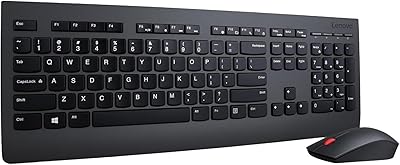
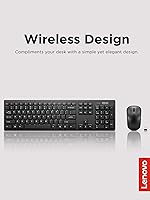
The all-black matte colorway and clean island-key layout give this keyboard-and-mouse bundle a tidy, professional appearance that looks at home on both home and corporate desks. It does not draw attention to itself, which many buyers consider a feature.
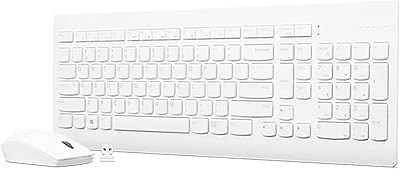
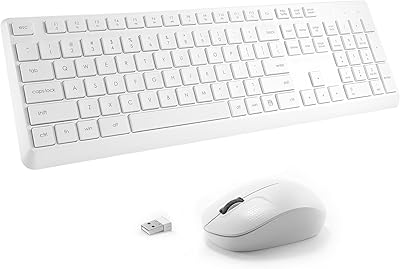
There is only one color option, and the design is strictly utilitarian — no backlighting, no accent colors, and no customization. Buyers hoping for even basic LED illumination for dim environments will need to look elsewhere.

Suitable for:

The Lenovo 100 Wireless Keyboard and Mouse Combo is a smart pick for anyone who needs a functional, wire-free desk setup without overthinking the budget. Students doing coursework on a laptop, remote workers handling emails and documents, and anyone furnishing a home office on a tight budget will find it covers the basics reliably. It is particularly well-suited to shared environments — open-plan offices, library carrels, or shared living spaces — where quiet keystrokes are a basic courtesy rather than a luxury preference. Left-handed users should take note: ambidextrous mice at this price point are genuinely uncommon, making this keyboard-and-mouse bundle a rare budget option that does not force a right-handed compromise. It also makes solid sense as a spare set for a guest room, a secondary workstation, or a quick replacement when an existing combo gives out and you need something working by end of day.

Not suitable for:

The Lenovo 100 Wireless Keyboard and Mouse Combo is the wrong choice for anyone who spends long hours typing and expects a keyboard that responds with crisp, confident feedback — the shallow chiclet keys will frustrate fast or heavy typists accustomed to mid-range or mechanical boards. Users with larger hands will likely find the compact, lightweight mouse uncomfortable over extended sessions, with several real-world reviewers describing it as feeling too small and insubstantial to grip naturally for hours at a time. There is no numeric keypad, which is a hard disqualifier for anyone regularly doing data entry, accounting, or financial work. Gamers, graphic designers, and anyone who needs adjustable DPI or precise cursor control should look elsewhere — 1000 DPI with no sensitivity options is simply not built for those workflows. Finally, buyers who want backlit keys for dim environments or late-night work will find nothing here; the keyboard is strictly unlit.
Specifications

  • Model Number: This combo is sold under Lenovo model number GX31K80998.
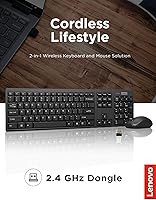
  • Connectivity: Both the keyboard and mouse connect via a single 2.4GHz wireless USB-A nano receiver.
  • Keyboard Layout: The keyboard uses an island-key (chiclet) layout with low-actuation, quiet switches.
  • Spill Resistance: The keyboard frame includes a passive drain hole designed to channel minor liquid spills away from internal components.
  • Mouse DPI: The optical mouse operates at a fixed 1000 DPI with no adjustable sensitivity settings.
  • Mouse Design: The mouse is ambidextrous, making it compatible with both left-handed and right-handed users.
  • OS Compatibility: The combo works out of the box on Windows and macOS without requiring driver installation.
  • Power Source: The keyboard is powered by one AAA battery, which is included in the box.
  • Combo Weight: The combined weight of the keyboard and mouse is approximately 1.55 pounds.
  • Keyboard Dimensions: The keyboard measures 21 x 7 x 2 inches (length x width x height).
  • Color: The combo is available in a single matte black colorway.
  • Backlighting: No backlighting is present on the keyboard or mouse — both are strictly unlit.
  • Numeric Keypad: The keyboard does not include a dedicated numeric keypad, following a compact tenkeyless-style footprint.
  • Receiver Ports: One USB-A nano receiver simultaneously connects both the keyboard and the mouse using a single port.
  • Compatible Devices: The combo is listed as compatible with laptops and desktop personal computers.
  • Brand & Series: Manufactured by Lenovo under the Keyboard and Mouse Sets product series.
  • Market Ranking: This combo holds a Best Sellers Rank of #249 in the Computer Keyboard and Mouse Combos category on Amazon.
  • Average Rating: Based on 453 verified ratings, the combo holds an average score of 4.2 out of 5 stars.

Related Reviews

Lenovo Professional Wireless Keyboard and Mouse Combo
78%
93%
Ease of Setup
81%
Keyboard Typing Feel
62%
Mouse Comfort & Ergonomics
88%
Wireless Reliability
74%
Battery Life
More
Lenovo 510 Wireless Keyboard and Mouse Combo GX30W75336

85%
88%
Ergonomics & Comfort
92%
Battery Life
94%
Setup & Installation
80%
Build Quality & Durability
78%
Mouse Comfort & Usability
More
Arteck HW192 Wireless Keyboard and Mouse Combo

78%
78%
Build Quality
72%
Typing Experience
63%
Mouse Comfort & Ergonomics
81%
Battery Life
69%
Wireless Connectivity
More
Arcwares Wireless Keyboard and Mouse Combo
78%
88%
Value for Money
91%
Aesthetic Design
76%
Keyboard Typing Experience
67%
Mouse Performance
84%
Wireless Connectivity
More
Links9+ Wireless Keyboard and Mouse Combo
85%
89%
Ergonomics and Comfort
92%
Wireless Performance and Connectivity
85%
Build Quality
94%
Ease of Use and Setup
80%
Battery Life
More
Atelus Wireless Keyboard and Mouse Combo
83%
94%
Ease of Setup
88%
Ergonomics & Comfort
90%
Design & Aesthetics
80%
Mouse Performance
86%
Keyboard Performance
More
VEILZOR UK418 Wireless Keyboard and Mouse Combo
81%
91%
Value for Money
84%
Typing Comfort
89%
Noise Level
82%
Wireless Reliability
76%
Mouse Ergonomics
More
TopMate Wireless Keyboard and Mouse Combo
77%
91%
Value for Money
78%
Typing Experience
68%
Mouse Performance
63%
Build Quality
83%
Wireless Reliability
More
Hayyiesh KG659-01 Wireless Keyboard and Mouse Combo
75%
88%
Value for Money
79%
Keyboard Comfort & Ergonomics
74%
Key Feel & Typing Experience
58%
Mouse Build Quality
86%
Noise Level
More
Trueque Wireless Keyboard and Mouse Combo
78%
83%
Value for Money
81%
Typing Comfort & Ergonomics
78%
Backlight Quality
74%
Mouse Performance
88%
Noise Level
More

FAQ

No, none at all. Just plug the nano receiver into a free USB-A port on your computer and both devices are ready to use within seconds. It works the same way on Windows and macOS without downloading anything.

It works on both operating systems right out of the box. The layout is designed with Windows in mind, so a few key labels will not match their macOS functions exactly — for example, the Alt key acts as Option — but day-to-day use on a Mac is perfectly functional.

The mouse is genuinely symmetrical, so left-handed users can hold and click it comfortably without any awkward reaching. At this price point, a truly ambidextrous design is less common than you might expect, which is one of the more practical advantages of this keyboard-and-mouse bundle.

Minor splashes — a drip of coffee or a small water spill — can drain through the built-in drain hole if you tilt the keyboard quickly enough. That said, this is not a waterproof or sealed design with any kind of IP rating, so a full cup of liquid poured directly on it is still likely to cause damage. Think of it as a practical safety net for small accidents, not a rugged feature.

Most users report the battery lasting anywhere from three to six months under everyday use, which covers a full workday of typing and occasional mouse use. There is no battery indicator light, though, so it is worth keeping a spare AAA nearby since the keyboard will go silent without any warning when it runs out.

The receiver uses a standard USB-A connector, so on a modern laptop with only USB-C ports, you would need a USB-A to USB-C adapter or a USB hub. The adapter is not included in the box, so factor that in if your machine lacks a full-size USB-A port.

Honestly, it is a point worth thinking about before buying. The mouse is on the compact and lightweight side, and a recurring complaint from users with medium-to-large hands is that it feels too small for extended use. If you have larger hands or prefer a full-size mouse with some weight to it, this one may leave you uncomfortable over long sessions.

In a standard home or office setup with the receiver plugged into a nearby laptop or desktop, the connection is stable up to roughly a meter or so without issues. Problems tend to start when the receiver is tucked away inside a desktop tower under a desk or in a heavily congested wireless environment — some users report intermittent cursor stuttering or brief keyboard dropouts in those situations.

The keyboard and mouse share a single nano receiver, so both devices need to be connected to the same machine through that one dongle. There is no option to pair them individually with separate devices — it is designed as an all-in-one combo solution.

Not through the mouse itself — it operates at a fixed 1000 DPI with no hardware button to change sensitivity. You can adjust cursor speed through your operating system settings as a workaround, but there is no on-the-fly DPI switching like you would find on gaming or productivity-focused mice.

Where to Buy