Overview

The LeadsaiL K786 Wireless Keyboard and Mouse Combo arrived on the market in late 2023 and has already climbed to a top-100 ranking in its category — a decent sign that budget shoppers are paying attention. It's a full-sized QWERTY setup with a single shared receiver handling both devices over 2.4GHz wireless, which keeps your USB ports free. The keyboard includes an integrated folding stand to give your wrists a slight lift, and at just 1.57 lbs combined, the whole bundle feels light and easy to move around. Just know going in: batteries are not included, so grab an AA and an AAA before you sit down to set up.

Features & Benefits

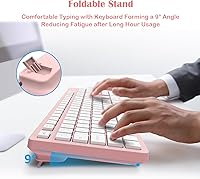
The silent dome-switch keys are one of the first things you notice — they're measurably quieter than standard membrane keyboards, making late-night typing sessions far less intrusive to anyone nearby. The folding stand gives a modest tilt that takes some pressure off your wrists during longer work stints, though it won't replace a proper ergonomic keyboard if that's a serious priority. A dedicated numpad and 12 Fn hotkeys cover media playback and volume adjustments without any fuss. Setup is entirely plug-and-play on Windows with no drivers or software needed. The nano USB receiver tucks neatly inside the mouse itself, which is a genuinely practical detail when packing up to work somewhere else.

Best For

This wireless combo is a natural fit for students, home office workers, or anyone who wants a tidy, cable-free desk without committing serious money to peripherals. If you share a workspace — a dorm room, an open-plan office, a bedroom — the quiet key action makes the bundle considerate of those around you. Windows users get the most out of the Fn shortcuts; Mac users should know upfront that those keys won't function as labeled, which is a real limitation worth flagging before purchase. The matching pink color appeals to buyers who care about a cohesive desk look, and the lightweight build makes it practical for anyone who regularly moves between workstations.

User Feedback

Buyers generally respond well to the LeadsaiL set, with quiet operation and plug-and-play simplicity coming up repeatedly as highlights. Key feel gets mixed reactions — some users appreciate the light actuation for quick typing, while others find it a touch too soft for their preference. Battery life seems reasonable in everyday use, though the auto-sleep kicks in fast enough that some find it slightly disruptive during longer pauses. A handful of buyers have noted occasional dropout at the far end of the wireless range, while close-range performance appears consistently stable. The Fn shortcut limitation on Mac is a recurring sticking point for mixed-OS households and deserves serious consideration before buying.

Pros

  • Plug-and-play setup works instantly on Windows with zero software or driver installation needed.
  • Silent key switches and quiet mouse clicks make this bundle genuinely considerate in shared or quiet environments.
  • A dedicated numpad is a real convenience for spreadsheet work, data entry, and number-heavy tasks.
  • The single shared USB receiver keeps your port usage minimal and tucks away inside the mouse when not in use.
  • Lightweight build and compact storage make it easy to carry between a home desk and another workspace.
  • The folding rear stand provides a helpful wrist angle improvement over a completely flat keyboard layout.
  • Auto-sleep mode on both devices helps extend battery life without any manual management.
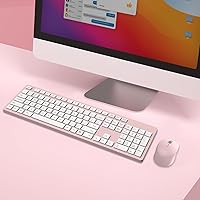
  • The matching pink aesthetic gives the desk setup a cohesive, intentional look that buyers specifically seek out.
  • Strong wireless performance at close to mid-range distances with no perceptible input lag during regular use.

Cons

  • Batteries are not included — you will need an AA and an AAA on hand before the set is usable.
  • The Fn shortcut row is completely non-functional on Mac OS, which is a serious gap for Apple users.
  • Key travel is shallow and soft, which experienced typists often describe as mushy rather than satisfying.
  • The 5-second auto-sleep timeout is aggressive and can interrupt workflow during natural pauses in typing.
  • Wireless signal reliability drops noticeably at the outer edge of the claimed 10-meter range.
  • Plastic housing feels noticeably thin and flex-prone, raising questions about long-term durability under heavy use.
  • Keycaps develop visible shine from finger oils faster than expected for a relatively new peripheral.
  • The mouse sensor resolution is insufficient for precision tasks like photo editing or detailed graphic work.
  • Occasional receiver pairing hesitation at first connection has been reported, requiring a re-plug to resolve.

Ratings

The scores below reflect an AI-assisted analysis of verified global buyer reviews for the LeadsaiL K786 Wireless Keyboard and Mouse Combo, with spam, bot-submitted, and incentivized feedback actively filtered out before scoring. Every category is rated on real-world usage patterns reported by everyday users — students, home office workers, and shared-workspace professionals alike. Both the standout strengths and the genuine frustrations are reflected transparently so you can make a fully informed decision.

Value for Money
88%
At its price point, buyers consistently express surprise at getting a full-sized keyboard, a matching mouse, and a shared wireless receiver in one box. For students furnishing a first desk or home workers replacing a failing wired set, the cost-to-functionality ratio lands well above expectations.
A few buyers who compared it directly to slightly pricier alternatives noted that the build materials feel noticeably budget-grade up close. For light daily use it holds up fine, but heavy typists may feel the gap in quality within a few months.
Typing Experience
71%
29%
The dome-switch keys have a soft, light actuation that many users find comfortable for long writing or browsing sessions. People who type quietly by nature appreciate that the keys respond without demanding heavy finger pressure.
Enthusiast typists and faster typists frequently flag the shallow key travel as unsatisfying, describing it as mushy rather than responsive. Those used to mechanical or higher-end membrane keyboards may need an adjustment period or may simply find the feel underwhelming.
Mouse Performance
74%
26%
The mouse tracks reliably on common desk surfaces and its silent click mechanism is genuinely appreciated in shared or quiet environments. Button response feels adequate for everyday tasks like browsing, document editing, and spreadsheet navigation.
Users doing precision work, such as photo editing or detailed design tasks, find the sensor resolution limiting. The scroll wheel also draws occasional criticism for feeling cheap and imprecise compared to mice sold independently at a similar price.
Noise Level
91%
Quiet operation is consistently one of the most praised aspects of this wireless combo. Users working late in shared bedrooms or open-plan offices report that both the keys and mouse clicks are noticeably softer than standard peripherals, making them genuinely considerate of others nearby.
A small number of buyers note that the keyboard is not completely silent — at very quiet hours in dead-silent rooms, the key bottoming-out sound is faintly audible. It is much quieter than average but should not be mistaken for a true silent mechanical switch.
Wireless Stability
76%
24%
At typical desk distances, the 2.4GHz connection performs reliably with no perceptible input lag during standard typing and clicking. Users who keep the receiver within a meter or two of their setup report a consistently clean signal throughout their workday.
At the outer range of the claimed 10-meter reach, dropout complaints surface with some regularity. A handful of buyers also noted occasional pairing hesitation when first connecting, requiring a receiver re-plug to resolve.
Setup & Ease of Use
93%
Plug-and-play on Windows means the combo is ready in under a minute with zero software installation. This simplicity is especially valued by less tech-savvy users who just want peripherals that work the moment they sit down.
The only real friction at setup is the missing batteries — both an AA and an AAA are required and neither is included, which catches some buyers off guard. It is a minor but avoidable inconvenience that a few reviewers flagged with noticeable frustration.
Mac Compatibility
38%
62%
The keyboard physically connects and types on a Mac without issue, and the mouse functions normally as a basic input device. For users who only need a Windows-compatible set, this is irrelevant and not a concern.
The 12 Fn shortcut keys are entirely non-functional on Mac OS, which is a meaningful limitation for mixed-OS households or buyers who assumed cross-platform compatibility. This is not a minor quirk — it effectively removes a full row of utility for Mac users.
Build Quality & Durability
63%
37%
For the price tier, the combo holds together acceptably in light daily use. Buyers who treat it as a casual desktop set — typing documents, browsing, and streaming — report no structural issues over several months of normal use.
The plastic housing on both units feels thin and flex-prone when handled firmly, and the keycaps show minor shine from finger oils faster than expected. It is not built to withstand rough handling or years of heavy professional use.
Ergonomics & Comfort
67%
33%
The folding rear stand gives the keyboard a modest upward tilt that takes noticeable pressure off the wrists during extended sessions compared to a flat keyboard. Users who type for a couple of hours at a stretch find it meaningfully more comfortable than expected at this price.
This is not a true ergonomic keyboard by any stretch — there is no wrist rest, no split layout, and the tilt adjustment is fixed rather than variable. Users with existing wrist strain or repetitive stress concerns should not rely on this as a health-focused solution.
Battery Life
72%
28%
The auto-sleep feature activates quickly during inactivity, which meaningfully extends the time between battery changes for users who step away from their desk frequently. Buyers doing moderate daily use report weeks of use before needing a replacement.
The 5-second sleep timeout is aggressive enough that it occasionally frustrates users during natural typing pauses, requiring a keypress just to re-engage the device. Heavy users also report that battery drain accelerates noticeably compared to light-use scenarios.
Portability
82%
18%
At 1.57 lbs and with the receiver stashing neatly inside the mouse, the bundle is genuinely easy to toss in a bag and carry between locations. Students who move between a dorm desk and a library workstation find it well-suited to that kind of daily transition.
The keyboard's full-size footprint, while useful for productivity, does take up meaningful bag space compared to compact or tenkeyless alternatives. For those prioritizing minimal carry weight, the size may be a trade-off worth considering.
Aesthetic & Design
84%
The pink colorway is well-received by buyers who want their desk setup to feel intentional and cohesive. The matching keyboard and mouse look noticeably more polished together than mismatched peripherals, and the color holds up well without fading visibly over time.
Design appeal is subjective, and buyers who prefer neutral or professional-looking peripherals will find the pink option limiting. The keycap legends are functional but not particularly refined up close, with a printed finish that some describe as basic.
Numpad Utility
79%
21%
Having a dedicated numpad on a budget wireless combo is genuinely useful for anyone who works with spreadsheets, invoicing, or data entry regularly. Buyers coming from compact keyboards specifically cite this as a deciding factor in choosing the full-size layout.
The numpad keys share the same shallow feel as the rest of the keyboard, which can slow down rapid numerical entry for experienced users. A few reviewers noted that the numpad cluster sits closer to the main keys than they expected, leading to occasional mis-hits early on.

Suitable for:

The LeadsaiL K786 Wireless Keyboard and Mouse Combo is a practical pick for students and home office workers who want a clean, cable-free desk setup without paying a premium for it. If you spend most of your day writing documents, browsing, or handling spreadsheets on a Windows machine, this wireless combo covers the basics reliably and without fuss. People who share workspaces — dorm rooms, open-plan offices, or bedrooms — will genuinely appreciate how quiet the keys and mouse clicks are compared to standard peripherals. The full-sized layout with a dedicated numpad is a real advantage for anyone who does regular data entry or works with numbers frequently. Those who move between a home desk and another location will also find the lightweight build and self-storing receiver convenient for packing up quickly.

Not suitable for:

The LeadsaiL K786 Wireless Keyboard and Mouse Combo has meaningful limitations that make it a poor fit for certain buyers, and it is worth being direct about them. Mac users should approach with caution — while the keyboard physically works, all 12 Fn shortcut keys are non-functional on Mac OS, which removes a substantial portion of the keyboard's advertised utility. Enthusiast typists or anyone who spends eight-plus hours a day typing will likely find the shallow, dome-switch key travel unsatisfying over time, and the build materials are not designed to hold up under heavy daily punishment. This keyboard bundle also should not be treated as an ergonomic solution — the folding stand provides a modest tilt but there is no wrist rest, no adjustable height, and no split layout, so buyers with existing wrist or repetitive strain concerns should look elsewhere. Gamers or creative professionals who need precise mouse tracking, low-latency response, or customizable inputs will find this wireless combo too basic for their workflow.
Specifications

  • Layout: Full-size QWERTY US layout with a dedicated numpad on the right side and a standard alphanumeric key arrangement.
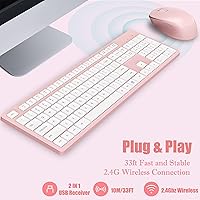
  • Connectivity: 2.4GHz wireless connection via a single shared USB nano receiver that handles both the keyboard and mouse simultaneously.
  • Wireless Range: Rated for up to 10 meters (33 ft) of reliable operation, though real-world performance is strongest within 5 meters.
  • Key Switch Type: Dome-switch membrane keys with a silent dampening design to reduce bottoming-out noise during typing.
  • Shortcut Keys: 12 Fn-activated hotkeys provide direct access to media playback, volume adjustment, and other system controls on Windows.
  • Folding Stand: Integrated rear folding stand tilts the keyboard to a fixed elevated angle to reduce flat-surface wrist strain.
  • Keyboard Battery: Powered by one AAA battery (not included); auto-sleep activates after 5 seconds of inactivity to conserve charge.
  • Mouse Battery: Powered by one AA battery (not included); mouse also enters sleep mode automatically during periods of inactivity.
  • Sleep Mode: Both devices independently enter low-power sleep mode after 5 seconds of inactivity and wake instantly on input.
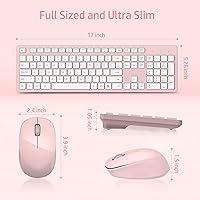
  • Dimensions: The keyboard measures 16.93 x 5.04 x 0.98 inches, providing a full-size footprint suitable for standard desk use.
  • Weight: The combined weight of the keyboard and mouse is approximately 1.57 pounds, making the bundle easy to carry.
  • USB Receiver Storage: The nano USB receiver stores inside a dedicated slot in the mouse battery compartment for safe transport.
  • OS Compatibility: Fully functional on Windows; the keyboard types normally on Mac OS but Fn shortcut keys do not work on Apple systems.
  • Color Option: Available in pink, with both the keyboard and mouse sharing a matching colorway for a cohesive desk aesthetic.
  • Plug-and-Play: No drivers or software installation are required; the combo is recognized automatically by Windows upon receiver insertion.
  • Mouse Click Type: Silent click mechanism on primary mouse buttons reduces audible click noise for use in quiet or shared environments.
  • Category Ranking: Ranked #100 in the Computer Keyboard and Mouse Combos category on Amazon as of early 2024.
  • Release Date: First made available for purchase on December 29, 2023, making it a relatively recent addition to the market.
  • Manufacturer: Produced by LeadsaiL, a brand focused on budget-oriented computer peripherals primarily sold through online retail channels.
  • Model Number: The official model identifier for this unit is K786-PINK, distinguishing it from other colorway variants in the lineup.

Related Reviews

Arteck HW192 Wireless Keyboard and Mouse Combo
78%
78%
Build Quality
72%
Typing Experience
63%
Mouse Comfort & Ergonomics
81%
Battery Life
69%
Wireless Connectivity
More
UBOTIE Wireless Keyboard and Mouse Combo

79%
88%
Value for Money
74%
Typing Experience
83%
Keycap Design & Aesthetics
67%
Mouse Performance
81%
Wireless Connectivity & Range
More
JOYACCESS Wireless Keyboard and Mouse Combo
82%
88%
Value for Money
83%
Typing Experience
74%
Mouse Performance
86%
Backlight Quality
81%
Battery Life
More
TKVPJYYI Wireless Retro Typewriter Keyboard and Mouse Combo
76%
88%
Design & Aesthetics
71%
Typing Experience
62%
Mouse Performance
58%
Build Quality
83%
Wireless Connectivity
More
KNOWSQT Wireless Keyboard and Mouse Combo
87%
89%
Wireless Performance
83%
Build Quality
86%
Ergonomics & Comfort
91%
Design & Aesthetics
76%
Battery Life
More
Mobifice Wireless Keyboard and Mouse Combo
87%
89%
Ergonomics & Comfort
92%
Design & Aesthetics
83%
Battery Life
95%
Ease of Use & Setup
88%
Wireless Connectivity
More
ULSOU Wireless Keyboard and Mouse Combo
85%
88%
Ergonomics and Comfort
92%
Battery Life
84%
Typing Experience
87%
Wireless Connectivity
80%
Mouse Performance
More
Kootop Wireless Keyboard Mouse Combo
87%
89%
Ergonomics and Comfort
91%
Typing Experience
85%
Wireless Connectivity
87%
Design and Aesthetics
83%
Battery Life
More
Tayderley Wireless Keyboard and Mouse Combo
86%
88%
Typing Comfort
85%
Mouse Performance
94%
Battery Life
83%
Build Quality
92%
Ease of Setup
More
Harburfine Wireless Keyboard and Mouse Combo
85%
88%
Ergonomics & Comfort
93%
Quietness & Noise Level
85%
Wireless Connectivity & Range
84%
Battery Life & Power Management
90%
Setup & Installation
More

FAQ

No, and that is genuinely one of its strengths. Just plug the USB receiver into your computer, and both the keyboard and mouse are recognized automatically on Windows. There is nothing to download, no account to create, and no setup wizard to click through.

The keyboard and mouse will connect and function on a Mac in the sense that you can type and move the cursor. However, the 12 Fn shortcut keys across the top do not work on Mac OS at all, so you lose a meaningful chunk of the keyboard's functionality. If you are primarily a Mac user, that is worth factoring in before buying.

Unfortunately, no. The keyboard needs one AAA battery and the mouse needs one AA battery, and neither comes included. Make sure you have both on hand before sitting down to set up, otherwise you will need a quick trip to grab them first.

They share a single nano USB receiver, which is actually a convenient design choice since it only occupies one port on your computer. The receiver slots into the mouse's battery compartment when not in use, so you are unlikely to lose it.

The rated range is 10 meters, but in practice the connection is most stable within roughly 3 to 5 meters. At farther distances, especially if there are walls or interference sources between you and the receiver, some users have reported occasional dropouts. For standard desk use, it performs well.

Both devices enter sleep mode after just 5 seconds of inactivity, which is quite aggressive. Simply press any key or click the mouse and they will wake up immediately. If that does not work, try unplugging the USB receiver and plugging it back in to re-establish the connection.

It is comfortable enough for moderate daily use — the silent keys are easy on the fingers and the folding stand gives a slight wrist-friendly tilt. That said, if you are typing for six or more hours a day, the shallow key travel may start to feel fatiguing over time. It is a solid choice for light to mid-intensity daily use, but not a substitute for a purpose-built ergonomic keyboard.

Based on buyer feedback, the color holds up reasonably well under normal use. The keycaps do tend to develop a slight shine from finger contact over time, which is common with this type of plastic finish, but the overall colorway does not visibly fade.

It may work as a basic input device on a Chromebook since Chrome OS supports standard HID peripherals, but Fn shortcuts and any advanced functions are unlikely to be recognized. Connecting to a smart TV depends on whether the TV accepts USB HID devices, which varies by brand and model. For anything beyond Windows desktop use, results will vary.

The nano receiver has a dedicated storage slot inside the mouse's battery compartment, right next to where the AA battery sits. It is a thoughtful design touch that prevents the receiver from getting lost in a bag, and it takes just a second to pop in or out.