Overview

The KOORUI E2212F 22-Inch Gaming Monitor sits in a crowded corner of the market where buyers want more than a basic 60Hz panel but aren't ready to spend heavily. It's a 22-inch VA display that lands in a practical sweet spot — large enough to fill your field of view comfortably, compact enough for a standard desk without dominating it. The ultra-slim bezels keep things looking tidy, and the matte screen surface handles ambient light without turning into a mirror. This is a monitor built for casual gamers and everyday PC users who want honest, reliable performance. It has genuine strengths, but also real trade-offs worth knowing before you buy.
Features & Benefits

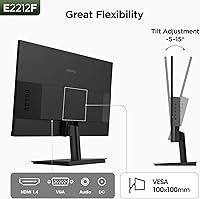
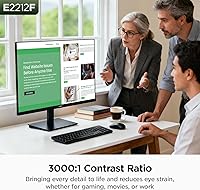
The VA panel's 3000:1 contrast ratio is the headline here — dark scenes in games look genuinely rich, with blacks that hold their depth rather than washing out into grey the way cheaper IPS panels sometimes do. The 100Hz refresh rate with AdaptiveSync keeps motion smooth even on mid-range GPUs, which matters for anyone who isn't running high-end hardware. The 5ms response time is workable for casual play, though fast-moving dark areas can produce slight trailing that VA panels are known for — not a dealbreaker, but worth knowing. Connectivity covers the essentials: HDMI and VGA inputs, a 3.5mm audio output, and VESA mounting support for anyone who prefers an arm over the included stand.

Best For

This budget gaming display makes the most sense for someone stepping up from an old 60Hz screen for the first time — the jump to 100Hz is immediately noticeable, and you don't need a powerful GPU to benefit from it. Single-player gamers, students, and home office workers who want a capable dual-purpose screen will find solid everyday value here. The compact 22-inch footprint suits smaller desks well, with no need to rearrange the whole workspace. If you have older hardware with only a VGA output, the dual-port setup offers flexibility that's increasingly rare at this tier. Competitive esports players chasing ultra-fast response times should probably look elsewhere.

User Feedback

With over 15,000 ratings and a 4.4-star average, the E2212F has clearly earned broad satisfaction. Buyers consistently highlight the strong out-of-box picture and straightforward setup, with the included HDMI cable cited as a small but appreciated touch. Contrast quality draws specific praise from users upgrading from TN panels. On the downside, the stand is a recurring frustration — tilt-only adjustment with no height or swivel means many people end up buying a monitor arm regardless, which the VESA compatibility at least accommodates. A handful of users mention ghosting in dark scenes, consistent with known VA panel behavior. One thing to read carefully: the panel warranty covers only one year, while other accessories get three.

Pros

  • The VA panel delivers noticeably deep, rich blacks that outperform TN and IPS screens at a comparable price.
  • A 100Hz refresh rate with AdaptiveSync keeps gameplay smooth without demanding a high-end graphics card.
  • 99% sRGB color coverage makes this budget gaming display genuinely capable for everyday media consumption.
  • The matte screen surface cuts glare effectively, reducing eye strain in brighter room conditions.
  • HDMI and VGA ports together cover both modern and legacy hardware without needing adapters.
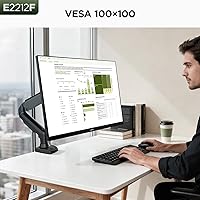
  • VESA 100x100mm compatibility means upgrading to a monitor arm is a straightforward and affordable fix.
  • Setup is fast and low-hassle, with an HDMI cable included in the box.
  • The slim bezels keep the overall footprint compact and visually clean on smaller desks.
  • Over 15,000 buyer ratings and a 4.4-star average reflect consistent real-world satisfaction at this price point.
  • The 3.5mm audio output adds flexibility for users who want to connect headphones or external speakers directly.

Cons

  • The included stand offers tilt adjustment only — no height, swivel, or pivot, which limits ergonomic flexibility.
  • VA-typical ghosting appears in fast-moving dark scenes, which can be distracting during action-heavy gaming.
  • Panel brightness tops out at 250 nits, making the screen look washed out in very bright environments.
  • The panel warranty lasts only one year, shorter than what many competing monitors offer at a similar price.
  • HDMI is limited to version 1.4, which caps bandwidth and rules out higher refresh rates on future hardware.
  • No built-in speakers means you will need headphones or external audio hardware from day one.
  • The 22-inch size, while practical, may feel limiting for users who regularly multitask across multiple windows.
  • No USB hub or extra ports beyond the two video inputs reduces desk connectivity options.
  • Brightness and contrast cannot be pushed into HDR territory, so HDR game content will not render as intended.

Ratings

Our AI-generated scores for the KOORUI E2212F 22-Inch Gaming Monitor were produced by analyzing thousands of verified global buyer reviews, with spam, incentivized, and bot-flagged feedback actively filtered out before scoring. The results reflect a balanced picture — where this budget gaming display genuinely earns its praise and where real users have consistently run into friction. Both strengths and shortcomings are represented transparently in each category below.
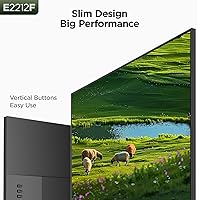
Image Contrast
91%
The VA panel's 3000:1 contrast ratio is the single most praised aspect across verified reviews. Users playing atmospheric or narrative games consistently note that dark environments look genuinely dark — shadows hold depth rather than collapsing into uniform grey, which makes a real difference during evening gaming sessions.
In very bright room conditions, the 250 nit brightness ceiling limits how well that contrast advantage comes through on screen. A handful of users working near windows found the overall image looking a little flat during daytime hours.
Motion Smoothness
78%
22%
The jump from 60Hz to 100Hz is immediately felt by most users, especially during open-world exploration and fast camera panning. AdaptiveSync does its job reliably on both AMD and most NVIDIA cards, reducing the tearing and micro-stuttering that budget monitors at lower refresh rates typically suffer from.
VA ghosting in fast dark sequences is a recurring criticism — trailing is visible when characters move quickly through low-lit areas. It is not a dealbreaker for casual play, but users coming from high-end IPS gaming monitors will likely notice the difference right away.
Color Accuracy
73%
27%
Out-of-box colors are frequently described as punchy and well-saturated for the price tier, with 99% sRGB coverage keeping everyday content, streaming, and web browsing looking vibrant. Users doing casual photo sorting or light editing report that colors feel representative without needing manual calibration.
Those with more serious color-work needs — graphic designers, photographers reviewing shots before print — will find the factory calibration inconsistent enough to require adjustment. Color uniformity toward the panel edges is occasionally flagged in longer-use reviews.
Ergonomics & Stand
43%
57%
The stand is stable and does not wobble during typing or light desk activity, and the tilt range covers basic angle preferences for shorter or longer viewing distances. For users who already own a VESA monitor arm, removing the stock stand and mounting the panel is described as quick and hassle-free.
This is the most consistent complaint across all review cohorts — there is no height adjustment, no swivel, and no pivot. Users working long hours at a desk frequently mention neck strain from being unable to raise the screen to eye level, and the fix requires purchasing a separate arm.
Build Quality
69%
31%
For a monitor at this price point, the chassis feels reasonably solid and the slim bezels look cleaner than most budget competitors. The matte panel coating is applied evenly, and the overall finish does not feel cheap or obviously plasticky at arm's length.
The stand mechanism and rear casing use lightweight plastics that flex slightly under pressure, and a few users report minor panel flex when adjusting the tilt angle. It holds together fine under normal desk use, but it does not project the solidity of a mid-range monitor.
Connectivity
77%
23%
Having both HDMI and VGA on a 22-inch display at this tier is genuinely useful — it covers both current desktops and older office hardware without any adapters. The included HDMI cable means most buyers can plug in and get running immediately after unboxing, which reviewers consistently appreciate.
HDMI 1.4 is the limiting factor here — it caps available bandwidth and means the monitor cannot take advantage of faster HDMI features on newer GPUs or consoles. There are no USB ports or any form of hub functionality, which feels like a missed convenience at this size.
Setup & Ease of Use
88%
Assembly is universally described as effortless — the stand snaps in without tools, and the monitor is ready to use within minutes of opening the box. The on-screen display menu is straightforward to navigate, and the included HDMI cable removes one common first-day frustration entirely.
The OSD button placement on the rear panel is awkward to reach without looking, particularly for users who like to make frequent brightness or input adjustments. A few reviewers note the instruction manual lacks detail for less experienced users adjusting display settings.
Glare Resistance
82%
18%
The matte anti-glare coating handles typical indoor lighting well — users working under overhead office lights or desk lamps report minimal distracting reflections during long sessions. This makes it more comfortable for daytime home office use than glossy-panel alternatives in the same price bracket.
In very bright rooms or near large uncovered windows, the 250 nit brightness is not strong enough to fully overcome ambient light even with the coating's help. Some users find the image looks slightly hazy in demanding bright-light conditions, which is a known matte panel trade-off.
Gaming Performance
74%
26%
For casual and single-player gaming — RPGs, platformers, racing games, adventure titles — this monitor holds up very well. The combination of decent refresh rate, AdaptiveSync, and strong contrast creates an engaging experience that punches well above expectations for a value-tier display.
Competitive FPS players will find the VA ghosting and 5ms response time meaningfully limiting when every millisecond counts. The monitor is simply not tuned or optimized for the fast, precise input feedback that esports gaming demands, and user feedback from that demographic reflects real frustration.
Value for Money
86%
Buyers who went in with realistic expectations consistently report feeling satisfied with what they received relative to the asking price. The combination of a 100Hz VA panel with AdaptiveSync and dual-port connectivity at this tier is not easy to match, and the 4.4-star rating across 15,000+ reviews reflects that broader satisfaction.
The stand situation and the one-year panel warranty chip away at the value calculation — buyers who factor in the likely cost of an aftermarket arm will find the total spend somewhat higher than the sticker price implies. A few users felt misled by the split warranty structure.
Brightness
58%
42%
For a dimly lit or controlled-light room — a gaming setup with blackout blinds, a bedroom workspace, or an evening home office — 250 nits is perfectly adequate and comfortable at this screen size. Most evening and indoor users rarely feel the need to push brightness to its limit.
In naturally bright environments, 250 nits falls short. Users near windows or in sun-exposed rooms frequently report the screen looking washed out during daylight hours, and there is no HDR mode to compensate or boost peak luminance in bright content areas.
Eye Comfort
71%
29%
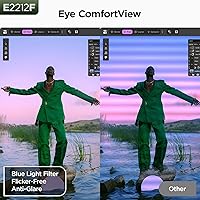
The matte coating reduces the harshness that glossy screens can introduce during long sessions, and users working at moderate brightness for 6–8 hours generally report manageable fatigue levels. The screen size is also well-matched to typical desktop viewing distances, which naturally reduces strain.
There is no flicker-free certification or low blue-light mode mentioned in verified specifications, and some sensitive users report mild discomfort during extended evening sessions. Without these features confirmed, buyers prone to screen-related eye fatigue should take that into account.
Warranty & Support
54%
46%
KOORUI's customer support is generally described as accessible and responsive, including on weekends, which is a practical differentiator for buyers who run into early issues. The three-year coverage on accessories provides some reassurance for cable and adapter longevity.
A one-year panel warranty is below average for this product category and is the most commonly cited disappointment in longer-form reviews. Buyers who had panel issues after the first year found themselves without manufacturer support, which stings on a screen that may otherwise function well for years.

Suitable for:

The KOORUI E2212F 22-Inch Gaming Monitor is a strong fit for anyone making their first meaningful upgrade from an aging 60Hz display — the step up in smoothness is immediately felt, and you don't need a powerful GPU to get there. Students and home office workers who split their time between productivity tasks and casual gaming will find the 22-inch size practical without being overwhelming on a compact desk. The VA panel's deep contrast makes movie watching and story-driven games genuinely enjoyable, well above what you'd expect from a monitor at this tier. People working with older PCs that only output VGA will also appreciate the dual-port flexibility, which is increasingly hard to find. If you're comfortable eventually pairing it with a budget monitor arm to compensate for the basic stand, the ergonomic limitation becomes much less of an issue.

Not suitable for:

Competitive FPS or esports players who prioritize split-second response times should steer clear — the E2212F carries the VA panel's known tendency toward ghosting in fast dark-scene motion, and no amount of refresh rate will fully offset that for high-stakes play. Content creators or anyone doing color-critical photo editing will also find the 250 nit brightness ceiling and the absence of HDR support limiting for professional work. Buyers who can't or won't invest in a separate monitor arm may find the tilt-only stand genuinely frustrating over long sessions, since there's no height adjustment to align the screen comfortably with eye level. Finally, anyone expecting full warranty peace of mind should know that only the accessories carry a three-year guarantee — the panel itself is covered for just one year, which is below average for the category.

Specifications

  • Screen Size: The panel measures 21.5 inches diagonally, marketed as a 22-inch display with a 16:9 widescreen aspect ratio.
  • Panel Type: Uses a VA (Vertical Alignment) panel, which provides superior contrast depth compared to TN and most IPS alternatives in this price range.
  • Resolution: Native resolution is 1920x1080 (Full HD), delivering a sharp and clear image for everyday computing and casual gaming at this screen size.
  • Refresh Rate: Runs at a native 100Hz, providing noticeably smoother motion than standard 60Hz displays during gaming and fast-scrolling content.
  • Response Time: Rated at 5ms response time, which is adequate for casual and single-player gaming but may show mild trailing in high-speed dark scenes.
  • Contrast Ratio: Static contrast ratio of 3000:1 produces deep, rich blacks that hold their depth rather than appearing washed out in dark scenes.
  • Brightness: Peak brightness is rated at 250 cd/m², suitable for indoor use in controlled lighting but limiting in very bright or sunlit environments.
  • Color Gamut: Covers 99% of the sRGB color space, making it appropriate for general media consumption and light creative work beyond gaming.
  • Adaptive Sync: Supports AdaptiveSync technology, which synchronizes the display refresh rate with the GPU output to reduce screen tearing and stuttering.
  • Connectivity: Equipped with one HDMI 1.4 port, one VGA port, and one 3.5mm audio output jack for headphones or external speakers.
  • VESA Mount: Compatible with standard 100x100mm VESA mounting patterns, allowing the monitor to be fitted to most third-party monitor arms and wall mounts.
  • Tilt Range: The included stand supports tilt adjustment from -5° (forward) to +15° (backward), with no height, swivel, or pivot adjustment available.
  • Panel Surface: Features a matte anti-glare coating that reduces reflections from ambient light sources, improving visibility in typical indoor environments.
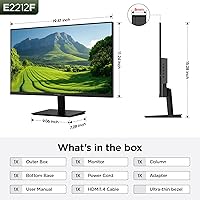
  • Dimensions: Physical dimensions with stand are approximately 495mm wide, 388mm tall, and 185mm deep (W×H×D).
  • Weight: The monitor with stand weighs approximately 2.3kg (around 5 lbs), making it light enough to reposition easily on a desk.
  • Power Supply: Operates on a 12V/2A external power adapter included in the box, with a rated voltage of up to 240V for broad regional compatibility.
  • In-Box Contents: Package includes the monitor, stand assembly, an HDMI cable (1.4), a power adapter, and a printed instruction manual.
  • Warranty: The display panel carries a 1-year limited warranty, while the stand, cables, and other included accessories are covered for 3 years.

Related Reviews

KOORUI 32-inch Curved Gaming Monitor
84%
89%
Display Quality
92%
Gaming Performance
78%
Build Quality
85%
Color Accuracy
82%
Ergonomics & Comfort
More
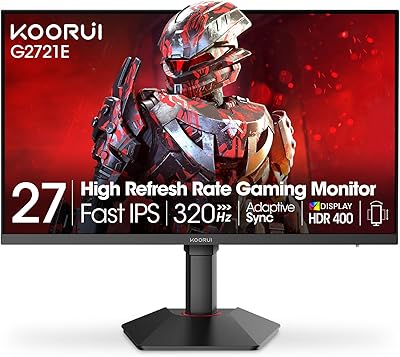
KOORUI G2721E 27-inch Gaming Monitor
86%
91%
Gaming Performance
89%
Display Quality
87%
Build Quality
90%
Ergonomics & Adjustability
85%
HDR & Color Accuracy
More
KOORUI E2411K 24-inch Gaming Monitor
76%
91%
Value for Money
83%
Gaming Performance
74%
Image & Color Quality
88%
Refresh Rate & Smoothness
81%
Eye Comfort
More
KOORUI P01 24-inch FHD Monitor
76%
91%
Value for Money
84%
Picture Quality
82%
Refresh Rate & Gaming
53%
Ergonomics & Adjustability
71%
Build Quality
More
KOORUI G2511E 24.5-inch Gaming Monitor
83%
92%
Display Quality
94%
Gaming Performance
88%
Color Accuracy
75%
Build Quality
84%
Ergonomics
More
KOORUI 25-inch Curved Gaming Monitor G2511XC
85%
92%
Display Quality
89%
Gaming Performance
85%
Build Quality
83%
Ease of Setup
88%
Connectivity Options
More
KOORUI G2711P 27-inch 200Hz Gaming Monitor
85%
88%
Overall Performance
91%
Display Quality
93%
Gaming Experience
82%
Build Quality
89%
Ease of Setup
More
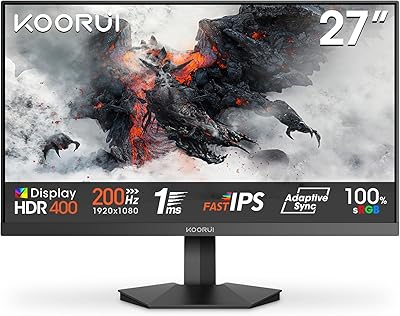
KOORUI GN02 27-inch 240Hz Gaming Monitor
87%
91%
Gaming Performance
89%
Display Quality
88%
Color Accuracy
93%
Response Time
85%
Ergonomics and Design
More
ViewSonic VX2267-MHD 22-Inch 1080p Gaming Monitor

83%
90%
Value for Money
89%
Gaming Performance (Refresh Rate & Response Time)
86%
Image Quality & Color Accuracy
75%
Build Quality
91%
Ease of Setup
More
Skytech Gaming Moonshadow 27-inch Curved Gaming Monitor
83%
88%
Image Quality
91%
Refresh Rate Performance
86%
Adaptive-Sync
83%
VA Panel Contrast
84%
Stand & Ergonomics
More

FAQ

Yes, it connects to both consoles via the HDMI port without any issues. The PS5 will run at 1080p and up to 60Hz on this display since the monitor tops out at 100Hz over HDMI 1.4, but it works reliably for console gaming.

Most people notice it right away, especially during fast camera movement in games or quick desktop window dragging. It is not as dramatic a jump as going from 60Hz to 144Hz, but it is a meaningful and visible improvement in day-to-day smoothness.

Absolutely. The E2212F is VESA 100x100mm compatible, so it works with the vast majority of aftermarket monitor arms on the market. Given that the included stand only tilts and offers no height adjustment, many buyers find a budget arm to be a worthwhile addition.

No, there are no built-in speakers. However, it does include a 3.5mm audio output jack, so you can plug in headphones or a pair of external speakers directly into the monitor itself.

It is a VA panel, so some degree of trailing in fast dark scenes is expected and present here. For single-player games, story games, or general use, most people will barely notice it. If you play competitive FPS titles at high speed, it is more likely to bother you and worth considering before buying.

Yes, the VGA port is there for exactly that reason. You can connect older desktops or laptops with VGA outputs without needing a separate adapter, which is increasingly uncommon on monitors in this category.

It handles everyday office work, web browsing, and video calls without any issues. The matte coating keeps glare down, and the 1080p resolution is sharp enough at 22 inches for reading documents and spreadsheets comfortably. It is a decent dual-purpose screen.

The split warranty is worth understanding clearly. The display panel itself is covered for one year from purchase, which is shorter than some competitors offer. The stand, cables, and other accessories in the box are covered for three years. Keep your purchase receipt, as KOORUI does require proof of purchase for warranty claims.

AdaptiveSync is the underlying technology, which AMD cards use natively through FreeSync. NVIDIA cards can also use it through their G-Sync Compatible mode, though compatibility is not officially certified on this model. In practice, many users report it working without issue on modern NVIDIA cards, but results can vary.

Setup is very straightforward. The stand attaches to the monitor body with a simple click-and-lock mechanism and takes a couple of minutes at most. An HDMI cable is included, so for most setups you can be up and running almost immediately after unboxing.

Where to Buy

Grooves-Inc.com
In stock $119.50