Overview

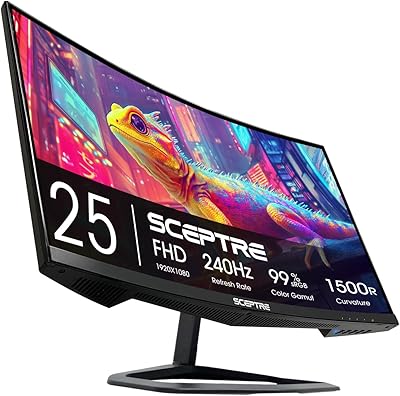
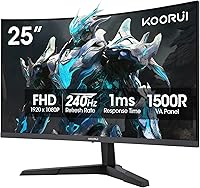
The KOORUI G2511XC 25-inch Curved Gaming Monitor arrived in April 2025, stepping into one of the most competitive corners of the budget display market. KOORUI has been quietly building a reputation for delivering solid value, and this 25-inch 240Hz display feels like their most focused effort yet. The 1500R curvature hits a practical sweet spot — deep enough to feel genuinely immersive on a standard desk without overwhelming a compact setup. One honest caveat upfront: FHD resolution is a deliberate design choice here. You are trading pixel density for high refresh rate performance, and for competitive gaming, that trade-off often makes real sense.
Features & Benefits

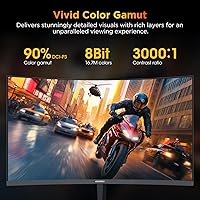
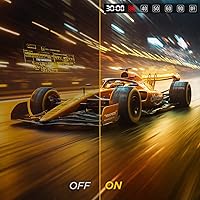
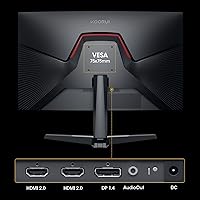
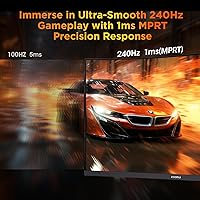
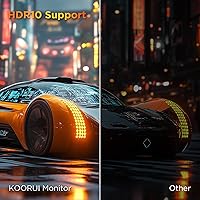
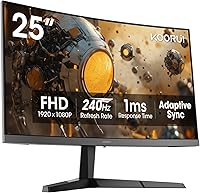
At 240Hz with a 1ms MPRT response time, this curved gaming monitor handles fast motion cleanly — tracking targets in an FPS title feels noticeably sharper compared to a typical 144Hz panel. Adaptive Sync support works across both AMD and NVIDIA setups without extra configuration, which is a quiet but meaningful convenience. Color performance is a genuine bright spot: 90% DCI-P3 coverage produces richer, more saturated visuals than most displays in this tier. HDR10 is listed, but at 250 nits peak brightness, HDR impact stays modest — treat it as a bonus, not a headline feature. HDMI 2.0, DisplayPort 1.4, and VESA 75x75mm support round out a well-considered connectivity package.

Best For

This 25-inch 240Hz display earns its place most naturally on the desk of a competitive gamer — someone grinding ranked matches in FPS titles or sim racing games where fluid motion matters far more than pixel sharpness. It also makes a strong first upgrade for anyone still on a flat or 60Hz screen; the smoothness jump tends to feel dramatic. Students splitting time between coursework and gaming will appreciate the Flicker-Free and Blue Light Filter options during late-night sessions. Xbox console gamers can connect straight in via HDMI 2.0 with minimal setup. And for tighter desks, the 25-inch footprint keeps things practical without shrinking the experience.

User Feedback

Sitting at 4.4 stars, the KOORUI G2511XC draws consistently positive feedback, with buyers most often praising the smoothness at 240Hz as the clear standout. Value for money is a recurring theme — many feel the refresh rate and color output exceed what the price suggests. That said, two real gripes surface regularly: the stand offers only tilt adjustment, with no height or swivel range, which legitimately frustrates buyers who care about ergonomics. Some also report that out-of-box color accuracy benefits from a few manual tweaks before it looks its best. The warranty split — one year on the panel, three on accessories — has also confused buyers, so it is worth understanding before purchasing.

Pros

  • 240Hz refresh rate makes fast-paced competitive gameplay noticeably smoother and more responsive.
  • Adaptive Sync works across both AMD and NVIDIA GPUs without any extra configuration needed.
  • 90% DCI-P3 color coverage produces richer, more vibrant visuals than most displays in this price range.
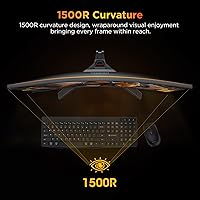
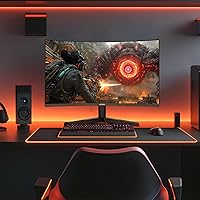
  • The 1500R curve adds genuine immersion without feeling excessive on a standard desk.
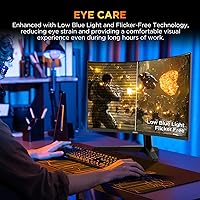
  • Flicker-Free and Blue Light Filter support make this 25-inch 240Hz display kinder on eyes during long sessions.
  • HDMI 2.0 and DisplayPort 1.4 cover both console and PC setups cleanly.
  • VESA 75x75mm compatibility means adding a monitor arm is straightforward if needed.
  • A 3000:1 contrast ratio delivers noticeably deep blacks for a budget-tier panel.
  • Compact 25-inch footprint fits comfortably on smaller or shared desks.
  • Strong 4.4-star user rating reflects broadly positive real-world satisfaction for the price.

Cons

  • FHD resolution at 25 inches produces lower pixel density than QHD alternatives — text and fine detail suffer slightly.
  • Peak brightness of 250 nits makes HDR10 support feel largely superficial in practice.
  • Stand adjustment is limited to tilt only — no height, swivel, or pivot options at all.
  • Out-of-box color accuracy may need manual calibration through the OSD before it looks its best.
  • The warranty structure is unusual and potentially confusing: only one year covers the panel itself.
  • At 250 nits, this curved gaming monitor can look washed out in bright or sunlit rooms.
  • No USB hub or built-in audio output limits desk cable management options.
  • As a relatively new brand entry from April 2025, long-term reliability data is still limited.

Ratings

Our AI rating engine analyzed thousands of verified global purchases of the KOORUI G2511XC 25-inch Curved Gaming Monitor, actively filtering out incentivized, bot-generated, and duplicate reviews to surface what real buyers actually experience. The scores below reflect both the genuine strengths that make this curved gaming monitor a compelling pick in its price tier and the real limitations that caused frustration for certain buyers. Nothing has been glossed over — if users felt let down by something, that is reflected in the number.

Refresh Rate Performance
93%
The jump to 240Hz is immediately noticeable for anyone coming from a 60Hz or even 144Hz panel — opponents in FPS titles are easier to track, and fast camera pans feel genuinely fluid rather than choppy. Competitive players consistently call this the single biggest reason they are satisfied with the purchase.
A small number of users noted that hitting the full 240Hz requires DisplayPort and a capable GPU; those running mid-range hardware or using HDMI occasionally reported being capped lower without realizing why, leading to initial confusion.
Value for Money
89%
At this price point, getting a 240Hz curved panel with 90% DCI-P3 color coverage and Adaptive Sync is genuinely difficult to match from competing brands. Most buyers feel they received noticeably more display capability per dollar than they expected going in.
A handful of buyers who compared closely with slightly pricier QHD alternatives felt the FHD resolution held the overall value back, particularly for those using the monitor for both gaming and everyday productivity work.
Motion Clarity
91%
The combination of 1ms MPRT and 240Hz means fast-moving objects in racing and shooter games stay sharp and defined rather than trailing into ghosting artifacts. Users who play titles like Valorant or Rocket League specifically praised how clean the experience felt during intense moments.
Some technically minded users pointed out that MPRT figures can be measured differently across brands, and a small subset noticed faint backlight strobing artifacts when using the blur-reduction mode in certain OSD configurations.
Color Quality
78%
22%
For a budget curved display, the 90% DCI-P3 gamut delivers genuinely vibrant colors — games with rich environments and saturated palettes look appreciably better than on a typical budget TN panel. The 3000:1 contrast ratio also gives darker scenes real depth.
Out-of-box color calibration is inconsistent, with several users reporting that default settings skew noticeably warm or oversaturated. Getting accurate, balanced color requires manual OSD adjustments that less experienced buyers may not know to make.
HDR Experience
54%
46%
HDR10 support does produce a mild contrast boost and slightly more vivid highlights in compatible titles, and for buyers who have never used an HDR display before, it registers as a meaningful visual step up from standard output.
At only 250 cd/m² peak brightness, the HDR effect is thin at best — experienced users comparing this to a proper HDR display will find it underwhelming. Several reviewers explicitly recommended leaving HDR mode off and relying on the panel's native contrast instead.
Immersion & Curvature
84%
The 1500R curve is deep enough to feel genuinely purposeful at a typical desk distance, pulling peripheral content slightly into view and making wide game environments feel more enveloping than a flat equivalent at the same size.
A small number of users who primarily do desktop productivity work found the curve slightly distracting for spreadsheet or document use, where straight horizontal lines can appear subtly bowed at the screen edges.
Adaptive Sync Compatibility
86%
Adaptive Sync worked reliably for the majority of both AMD and NVIDIA GPU owners without needing driver workarounds, eliminating screen tearing in supported titles without requiring a premium G-Sync module.
A portion of NVIDIA users had to manually enable G-Sync Compatible mode in the control panel to activate sync, and a few reported needing to update drivers before the feature functioned correctly — a minor but real friction point during initial setup.
Ergonomics & Stand
47%
53%
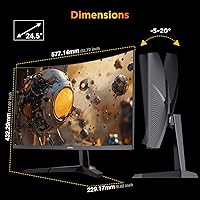
The stand is sturdy enough to hold the display steady without wobble during desk vibrations, and the tilt range of -5° to 20° covers most casual viewing angles without requiring any tools to adjust.
The absence of height adjustment, swivel, or pivot is a genuine pain point that surfaces consistently in feedback — users who work long sessions and care about proper neck and eye alignment frequently end up buying a separate monitor arm just to compensate for what the included stand cannot do.
Eye Comfort
81%
19%
Flicker-Free backlighting made a noticeable difference for users logging late-night study or gaming sessions, with several specifically mentioning reduced headaches compared to their previous displays. The Blue Light Filter mode is adjustable and genuinely useful for wind-down use.
At maximum brightness, some users sensitive to eye fatigue still found extended sessions tiring, and the Blue Light Filter mode does shift white balance toward warmer tones in a way that noticeably affects color accuracy during gaming.
Build Quality
72%
28%
For the price, the monitor feels solidly assembled — the panel housing does not flex or creak, and the matte finish resists fingerprints reasonably well. First impressions from unboxing were broadly positive across the user base.
The plastic materials feel noticeably budget-grade on close inspection, and a few buyers reported minor cosmetic imperfections on the bezel or stand straight out of the box. It does not feel fragile, but it does not feel premium either.
Connectivity
77%
23%
Having both HDMI 2.0 and DisplayPort 1.4 available gives users meaningful flexibility — PC gamers can use DisplayPort for maximum refresh rate while simultaneously keeping a console connected through HDMI without unplugging anything.
The port selection stops there — no USB hub, no audio output jack, and no USB-C means users with modern laptops or complex desk setups will need additional adapters or a separate hub, which feels like an omission at any price point.
OSD & Menu Usability
63%
37%
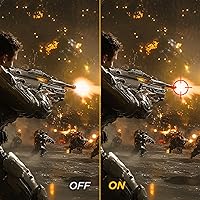
The on-screen display includes a useful set of gaming-specific presets — FPS, racing, and RPG modes — along with a crosshair overlay and timer that competitive players genuinely use, making the feature set feel purpose-built.
Navigation using the physical rear buttons is awkward and unintuitive, particularly for first-time users trying to dial in color settings. Several buyers described spending far longer than expected just to locate and adjust basic settings like brightness and contrast.
Setup & Installation
83%
Assembly is straightforward — the stand clicks into the panel without tools, and most users reported being up and running within ten minutes of opening the box. Included cables make the initial connection hassle-free.
The instruction manual is minimal, which caught some less experienced buyers off guard when trying to configure refresh rate settings in Windows or enable Adaptive Sync for the first time without a reference guide.
Brightness & Visibility
58%
42%
In a controlled or dimly lit gaming environment, 250 cd/m² is sufficient — the image looks clean and well-lit for evening sessions, and the matte coating helps reduce distracting glare from nearby light sources.
In a bright room or near a window, the display struggles noticeably — the image washes out and loses contrast in a way that makes daytime use genuinely uncomfortable. This is a hard ceiling that no software setting can work around.
Warranty & Support
61%
39%
KOORUI's support team receives generally positive mentions for responsiveness when issues do arise, and the three-year accessory warranty is a reassuring safety net for stand or cable failures down the road.
The one-year panel warranty is shorter than the two-to-three year coverage offered by many competitors, and the split warranty structure genuinely confused a portion of buyers who assumed the full unit was covered for three years — a transparency issue KOORUI should address more clearly.

Suitable for:

The KOORUI G2511XC 25-inch Curved Gaming Monitor is a strong fit for competitive gamers who want a high refresh rate experience without spending heavily — particularly those focused on FPS titles or racing games where fluid, tear-free motion matters far more than pixel-perfect sharpness. First-time upgraders stepping up from a flat or 60Hz display will likely find the jump to 240Hz and a curved panel genuinely impactful. Students and home office workers who game in the evenings will appreciate the Flicker-Free and Blue Light Filter features, which make long screen sessions more comfortable. Xbox console players can connect directly via HDMI 2.0 with zero fuss. Anyone working with a smaller desk footprint will also find the 25-inch size a practical, well-proportioned choice that does not crowd the workspace.
Not suitable for:

Buyers who care about pixel density and visual sharpness should think carefully before committing to this curved gaming monitor — at 25 inches with a 1080p panel, fine detail and text clarity fall short of what a QHD display at a similar size would offer. Content creators, photo editors, or anyone doing color-critical work professionally will also find limitations, since even with 90% DCI-P3 coverage, the 250 nits brightness cap makes HDR largely cosmetic rather than functional. If ergonomics are a priority, the stand's tilt-only design is a genuine drawback — there is no height adjustment or swivel, which can be frustrating over long sessions at a fixed desk. Users expecting a fully adjustable setup should budget for a separate monitor arm. Finally, those wanting a large-format immersive display for single-player cinematic gaming will likely find 25 inches underwhelming compared to 27-inch or 32-inch curved alternatives.

Specifications

  • Screen Size: The display measures 25 inches diagonally, offering a compact footprint well-suited to standard and smaller desk setups.
  • Panel Curvature: A 1500R curvature radius wraps the screen around the viewer's natural field of vision for a more enveloping single-monitor experience.
  • Resolution: Native resolution is 1920x1080 pixels (Full HD), delivering crisp visuals optimized for high refresh rate performance rather than pixel density.
  • Refresh Rate: The panel runs at a native 240Hz, enabling significantly smoother motion rendering in fast-paced games compared to standard 144Hz displays.
  • Response Time: A 1ms MPRT response time minimizes ghosting and motion blur during rapid on-screen movement.
  • Color Gamut: Coverage reaches 90% of the DCI-P3 color space, producing more saturated and lifelike colors than typical entry-level panels.
  • HDR Support: HDR10 is supported, though the 250 cd/m² peak brightness limits the practical impact of high dynamic range content.
  • Brightness: Maximum brightness is rated at 250 cd/m², which is adequate for moderately lit rooms but can appear washed out in bright or sunlit environments.
  • Contrast Ratio: A 3000:1 static contrast ratio delivers noticeably deep blacks and bright highlights relative to most displays in this price tier.
  • Connectivity: The monitor includes one HDMI 2.0 port and one DisplayPort 1.4, covering both modern PC and current-generation console connections.
  • Sync Technology: Adaptive Sync is built in and functions with both AMD FreeSync-compatible and NVIDIA G-Sync-compatible graphics cards without requiring additional setup.
  • Eye Care: Flicker-Free backlighting and a built-in Blue Light Filter are included to reduce eye fatigue during extended viewing or gaming sessions.
  • Stand Adjustment: The included stand supports tilt adjustment between -5° and 20° only; height, swivel, and pivot adjustments are not available.
  • VESA Mount: The display is VESA-compatible with a 75x75mm hole pattern, allowing use with most third-party monitor arms and wall mounts.
  • Dimensions: The full unit with stand measures 21.93 inches wide, 17.02 inches tall, and 9.02 inches deep.
  • Weight: Total unit weight including the stand is 10.18 pounds, making it manageable for a single person to install or reposition.
  • Surface Type: The screen uses a matte anti-glare coating that reduces reflections from ambient light sources.
  • Aspect Ratio: The panel uses a standard 16:9 widescreen aspect ratio, compatible with all common PC resolutions and console output formats.
  • Game Modes: Built-in OSD presets include FPS, racing (RCG), RPG, Crosshair overlay, and an on-screen Timer mode for competitive play.
  • Warranty: KOORUI provides a 1-year warranty covering the display panel and a separate 3-year warranty covering accessories such as the stand and cables.

Related Reviews

KOORUI G3221SC 32″ Curved QHD Gaming Monitor
69%
83%
Picture Quality
81%
Gaming Performance
86%
Value for Money
41%
HDR Performance
67%
Color Accuracy
More
Sceptre C255B-FWT240 25-inch Curved Gaming Monitor
76%
93%
Motion Clarity & Refresh Performance
88%
Response Time & Ghosting Control
91%
Value for Money
86%
Adaptive Sync & Tear-Free Performance
82%
Panel Curvature & Immersion
More
Skytech Gaming Moonshadow 27-inch Curved Gaming Monitor
83%
88%
Image Quality
91%
Refresh Rate Performance
86%
Adaptive-Sync
83%
VA Panel Contrast
84%
Stand & Ergonomics
More
KOORUI G2721E 27-inch Gaming Monitor
78%
93%
Refresh Rate Performance
88%
Image Clarity & Resolution
84%
Color Accuracy
81%
Motion Handling
52%
HDR Quality
More
KOORUI E2411K 24-inch Gaming Monitor
76%
91%
Value for Money
83%
Gaming Performance
74%
Image & Color Quality
88%
Refresh Rate & Smoothness
81%
Eye Comfort
More
Amzfast AMZG49C7U 49-inch Curved Ultrawide Gaming Monitor
76%
88%
Image Clarity
81%
Refresh Rate Performance
84%
Color Accuracy
53%
HDR Quality
91%
Curvature & Immersion
More
Amzfast AMZG25F6F 25-inch 320Hz Gaming Monitor
70%
88%
Refresh Rate Performance
83%
Panel Clarity & Motion
77%
Color Accuracy
91%
Value for Money
61%
Build Quality
More
Sealan 27-inch Curved Gaming Monitor
82%
85%
Display Quality
90%
Ease of Setup
91%
Value for Money
87%
Performance in Gaming
83%
Color Accuracy
More
Sealan 24-Inch Curved Gaming Monitor
86%
92%
Gaming Performance
88%
Visual Quality
91%
Refresh Rate Smoothness
85%
Design & Build
87%
Eye Care Features
More
KOORUI GN02 27-inch 240Hz Gaming Monitor
87%
91%
Gaming Performance
89%
Display Quality
88%
Color Accuracy
93%
Response Time
85%
Ergonomics and Design
More

FAQ

It works with both. The Adaptive Sync implementation on this curved gaming monitor is compatible with NVIDIA G-Sync-compatible mode as well as AMD FreeSync setups. You may need to enable G-Sync Compatible mode in the NVIDIA control panel, but once done it functions reliably.

To get the full 240Hz at 1080p, you will want to use the DisplayPort 1.4 connection. HDMI 2.0 can support 240Hz at 1080p in theory, but DisplayPort is the more reliable path and is generally recommended for competitive gaming use.

Honestly, manage your expectations here. With a peak brightness of only 250 cd/m², the HDR effect is subtle at best. You will notice a slight boost in contrast and color pop, but this is nowhere near the HDR experience you would get on a high-brightness OLED or mini-LED panel. It is a nice extra, not a headline feature.

The stand gets the job done for basic use, but it only tilts — there is no height adjustment, swivel, or pivot. If you spend long hours at a desk and care about proper ergonomics, a VESA monitor arm is a worthwhile investment since this display uses the standard 75x75mm pattern.

Yes, it connects to Xbox via HDMI 2.0 without any issues. For PS5, the same applies, though neither console currently outputs at 240Hz — you would be capped at the console's maximum supported frame rate. For console gaming the monitor still performs well, particularly the fast response time.

Not blurry, but noticeably less sharp than a QHD or 4K display at the same size. For gaming it looks fine since you are typically sitting at a normal viewing distance. For reading small text or working with detailed documents for hours, some people do find the lower pixel density slightly tiring compared to higher-resolution panels.

Several users have noted that the default color settings are a bit oversaturated or slightly cool straight out of the box. Spending five minutes in the OSD to adjust brightness, contrast, and color temperature makes a noticeable difference. It is not a dealbreaker, but a quick manual tweak is recommended before settling in.

The OSD uses physical buttons on the back-bottom edge of the panel, which is fairly typical for this price range. Navigation is functional but not the most intuitive — it takes a few minutes to get your bearings. Once you have set your preferred game mode and brightness, you rarely need to go back in.

KOORUI splits the warranty unusually: the display panel itself is covered for one year, while accessories like the stand and cables carry a three-year warranty. The one-year panel coverage is on the shorter side compared to some competitors that offer two or three years. Make sure you keep your proof of purchase handy.

At 1500R it is a genuinely noticeable curve, especially on a 25-inch screen at typical desk viewing distances of around two feet. It is not extreme — you will not feel disoriented — but it does add a real sense of depth and wrap that a flat panel lacks. Most users find it comfortable and prefer it after a short adjustment period.