Overview

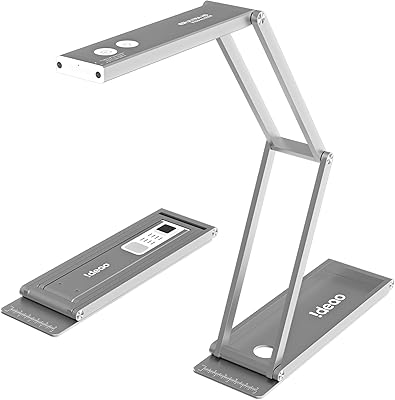
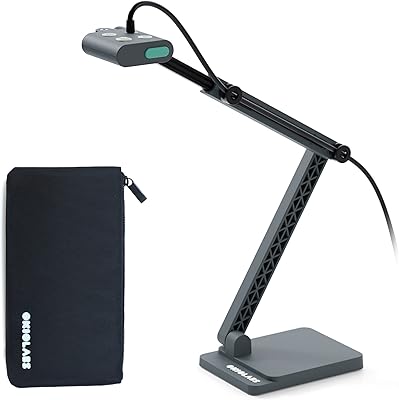
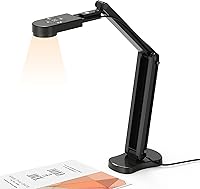
The Kitchbai KB-700 4K USB Document Camera sits comfortably in the mid-range visualizer space, targeting teachers and remote workers who need reliable overhead capture without a steep learning curve. What sets it apart from cheaper alternatives is its foldable, compact design — folded down, it takes up barely any desk space and fits into a bag without fuss. Plug it in via USB-C and it works immediately on Windows, macOS, or Chrome OS, no driver installation needed. The 8MP sensor and 4K-grade resolution put it a clear notch above entry-level classroom cameras, though as with any tool in this category, there are a few trade-offs worth knowing before you buy.
Features & Benefits

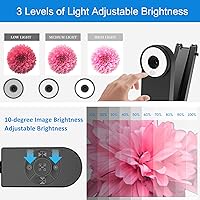
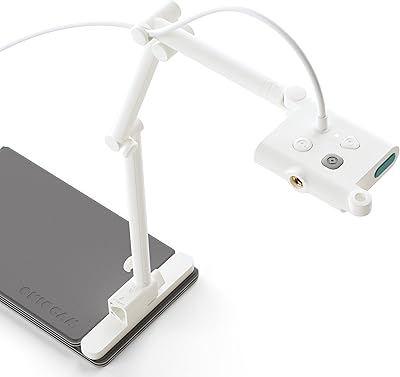
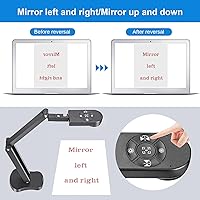
The 8MP CMOS sensor delivers crisp, detailed images at 30 frames per second — enough clarity to show fine print on a worksheet without blurring during live demos. One feature that genuinely stands out is the manual image invert button. When you hold up a document facing your students, it appears mirrored on screen; one press flips it correctly without any software gymnastics. The three-level LED lighting handles dimly lit classrooms without washing out colors. Coverage extends to A3-size pages, so full textbook spreads fit in frame easily. The multi-joint arm swivels to capture 3D objects too. Dual built-in microphones help in a pinch, though they are not a replacement for a dedicated mic.

Best For

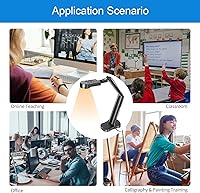
This document camera makes the most sense for K-12 and college teachers running hybrid or remote classes who regularly need to show physical materials — printed handouts, textbook pages, or lab specimens — to students on screen. Small business trainers who demo products or printed contracts over Zoom will also find it practical. It works well for home office users who want a single device handling both video calls and overhead document capture. Because it folds flat and weighs under two pounds, it suits anyone who moves between rooms or buildings. Plug-and-play Chromebook support makes it especially appealing to schools already operating in the Google ecosystem.

User Feedback

With over 530 ratings averaging 4.5 stars, the KB-700 earns its reputation on image sharpness and effortless setup — most buyers report being up and running within minutes. The physical invert button draws specific praise from teachers who rely on it daily. On the critical side, some users note that the autofocus can hesitate when objects shift under the lens quickly, which becomes noticeable during fast-paced demos. Microphone quality gets mixed feedback — usable for casual calls, but underwhelming with background noise present. A handful of buyers mention the arm feels stiff initially, and others wished the cable were longer. Compatibility issues are rare but have surfaced occasionally with older macOS builds.

Pros

  • Plug-and-play setup works instantly on Windows, macOS, and Chromebook — no drivers, no configuration headaches.
  • The physical image invert button corrects mirrored documents in one press, a genuine time-saver mid-lesson.
  • 8MP resolution delivers sharp, readable text even on densely printed A3-size pages.
  • Three LED brightness levels handle dim classrooms and bright window-lit rooms without touching any software settings.
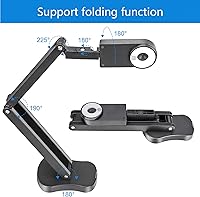
  • The foldable arm collapses flat for easy bag packing between classrooms or off-site training sessions.
  • A3 coverage area fits full double-page textbook spreads in a single frame without repositioning.
  • Works reliably with Zoom, Teams, Google Meet, and Skype right out of the box.
  • The multi-joint arm supports both flat document capture and angled 3D object shooting.
  • Built-in dual microphones handle quiet home office calls without requiring extra hardware.
  • Competitive image quality at this price tier outperforms most entry-level classroom visualizers.

Cons

  • Autofocus hunts and briefly loses lock when objects are moved quickly under the lens during live demos.
  • Built-in microphones struggle noticeably in noisy classrooms or open-plan office environments.
  • The arm joints are stiff out of the box, making precise angle micro-adjustments frustrating over a long teaching day.
  • The included USB-C cable is short, limiting desk placement flexibility depending on port location.
  • No protective sleeve or carry case is included, making solo transport riskier for frequent movers.
  • Slight image softness appears at the frame edges when shooting at maximum A3 coverage distance.
  • Occasional autofocus instability has been reported in macro shooting mode with very close subjects.
  • Some users on older macOS builds experienced intermittent recognition issues requiring an app restart to resolve.

Ratings

The Kitchbai KB-700 4K USB Document Camera has been rated across more than 530 verified global purchases, with our AI scoring system filtering out incentivized and bot-generated feedback to surface what genuine buyers actually experience day to day. Scores reflect both the consistent strengths teachers and remote workers praise and the real friction points that show up repeatedly across classroom and home office settings. Nothing here is rounded up to look good — the numbers reflect an honest cross-section of real-world satisfaction.
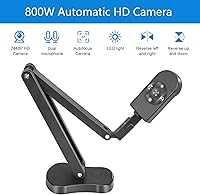
Image Clarity
88%
Most users are genuinely impressed by how sharp text appears when projecting printed materials during live lessons. Fine print on a worksheet comes through cleanly at typical viewing distances, and the 8MP output holds up well compared to cheaper visualizers in the same category.
A small but consistent group of users notes that image quality drops slightly in low-contrast situations — pale text on off-white paper being the most common example. It is not a dealbreaker, but the sensor does show its limits in edge-case lighting conditions.
Autofocus Performance
67%
33%
For static documents laid flat on a desk, the autofocus locks quickly and stays put without wandering. Teachers who position their materials deliberately and hold them steady report a smooth, stable image that is easy to follow on screen.
The autofocus struggles noticeably when objects move under the lens mid-demo — a recurring complaint from science teachers and trainers who frequently reposition specimens or products. The camera can hunt briefly before settling, which feels disruptive during fast-paced live presentations.
Ease of Setup
94%
Plug-and-play performance is one of the most praised aspects across the review base. Buyers consistently report the camera is recognized instantly by Windows, macOS, and Chromebook systems with zero driver installation, making classroom deployment genuinely low-stress.
A very small number of users on older macOS builds and specific Linux configurations report inconsistent recognition on first plug-in. These cases are rare, but they exist and are worth noting for IT coordinators managing non-standard school environments.
Image Invert Function
91%
The physical invert button is a standout feature that teachers specifically call out in reviews. Flipping a document to face students and correcting the mirror image with one press — rather than digging through software menus mid-lesson — is a time-saver that experienced educators genuinely appreciate.
The invert control only works along fixed axes, so highly unconventional camera angles can still produce orientations the button does not fully correct. This affects only a minority of users with unusual mounting setups, but it does come up occasionally.
LED Lighting
79%
21%
The three brightness levels give users real flexibility across different room conditions. Several reviewers specifically mention using the lowest setting in sun-lit rooms to avoid glare and the highest in windowless classrooms, finding the range practical for everyday use.
At maximum brightness, a few buyers observe slight color washout on brightly colored documents, and the LEDs can create a hot spot at very close shooting distances. It covers most situations well, but it is not a substitute for good ambient room lighting.
Build Quality
73%
27%
The overall construction feels solid enough for daily classroom use, and the folding mechanism holds its position reliably once adjusted. Several teachers who carry the camera between rooms daily report no signs of wear after months of regular use.
The arm joint is notably stiff out of the box, which frustrated a handful of users who expected smoother articulation. Cable connection points also feel slightly less robust than the main body, and a small number of buyers mentioned wishing the plastic finish felt less hollow.
Portability & Form Factor
86%
Folded flat, the KB-700 slips into a laptop bag without consuming much space, and its sub-two-pound weight makes carrying it between classrooms or to off-site training sessions genuinely practical. The compact footprint when deployed also avoids cluttering a shared teaching desk.
The unfolded arm is on the taller side, which can be mildly awkward on desks with low overhead shelving. A few users also noted that the folded form, while compact, does not come with a protective sleeve or case, making solo transport slightly risky.
Microphone Quality
61%
39%
For one-on-one calls or quiet home offices, the built-in dual microphones deliver acceptable voice clarity without needing a separate device. Users in small, acoustically decent rooms report that meeting participants can hear them clearly without extra hardware.
In noisy environments — busy classrooms, open-plan offices — the microphones pick up significant background noise. Multiple reviewers recommend pairing the KB-700 with a dedicated USB microphone for any professional or large-group scenario where audio quality actually matters.
Coverage Area
87%
The A3 coverage area is one of the more practical specs for teachers. Full double-page textbook spreads, large engineering diagrams, and A3 worksheets all fit within frame without requiring awkward repositioning of the arm, which adds real efficiency to fast-moving lessons.
Capturing the full A3 area requires raising the arm to its maximum height, which can reduce stability slightly on uneven surfaces. A small number of users also note that the edges of the frame show mild softness at maximum coverage distance.
Frame Rate & Video Smoothness
83%
At 30fps the video feed is smooth enough for live demonstrations involving hand movement and page turning. Viewers on the receiving end of Zoom and Meet calls consistently describe the footage as clear and natural rather than choppy or delayed.
Under demanding system conditions — older laptops running multiple applications simultaneously — a few users report occasional frame drops. The camera itself performs well, but it does require a reasonably capable host computer to sustain consistent output.
Software Compatibility
85%
Compatibility with Zoom, Google Meet, Microsoft Teams, and Skype is broadly reliable out of the box, with no additional configuration needed for most users. Chromebook users in particular appreciate how painlessly the KB-700 integrates into Google Workspace-based teaching environments.
A handful of users report initial recognition issues with certain versions of Teams on macOS, requiring an application restart before the camera appears as an option. TikTok live compatibility also produced inconsistent results for a small group of content creators.
Cable & Connectivity
71%
29%
USB-C connectivity is the right call for modern setups, and the included cable handles data and power in one without any noticeable latency or signal degradation during extended sessions. Most users connect directly to a laptop without needing a hub.
The included cable is on the shorter side, which restricts desk placement flexibility when the USB port is on the far side of a workstation. Several users mention buying a longer third-party USB-C cable as a near-immediate fix, which is a minor but genuine inconvenience.
Value for Money
89%
For what this classroom visualizer offers — genuine 8MP output, physical invert control, foldable design, and broad OS compatibility — buyers consistently feel the asking price is fair. It competes credibly with options that cost significantly more while covering the core needs of most educators.
Users who push it into semi-professional territory — extended recording sessions, demanding lighting conditions, noisy environments — occasionally feel they have outgrown it quickly. For those power users, the price-to-performance ratio starts to feel less convincing against pricier dedicated visualizers.
Arm Flexibility & Angle Range
76%
24%
The multi-joint design allows the camera head to be positioned for both overhead flat document capture and angled 3D object shooting, which is a practical range for science demos, art reviews, and product training sessions. Most users find a comfortable working angle quickly.
The joints resist fine micro-adjustments, which makes dialing in a very precise angle more fiddly than it should be. A few users who need the arm repositioned frequently throughout a lesson find the stiffness tiring over a full teaching day.

Suitable for:

The Kitchbai KB-700 4K USB Document Camera is a strong fit for K-12 and college teachers who regularly need to show physical materials — textbook pages, handwritten notes, lab specimens — to students over Zoom, Google Meet, or Microsoft Teams. Its plug-and-play USB-C connection means no IT support is required to get it running, which matters enormously in school environments where setup time is scarce. The foldable arm and sub-two-pound weight make it practical for teachers who move between classrooms or carry it home for hybrid teaching days. Small business trainers who demo printed contracts, product samples, or physical reference materials on video calls will also find the image clarity and A3 coverage genuinely useful. Home office workers who occasionally need to share paperwork or handwritten sketches over video — without buying a separate scanner — will appreciate how much ground this one device covers. If you are operating on a Chromebook in a Google Workspace environment, compatibility is particularly smooth and reliable.
Not suitable for:

The Kitchbai KB-700 4K USB Document Camera is not the right tool for buyers who need professional-grade video capture for content creation, product photography, or high-stakes broadcast scenarios. The autofocus system, while adequate for static documents, noticeably struggles when objects move quickly under the lens — a real limitation for anyone running fast-paced, hands-on science demos or frequently repositioning items mid-session. Users who rely on audio quality for large-group presentations or noisy classroom environments will find the built-in microphones fall short, and a separate dedicated microphone will quickly become necessary. The arm joints are stiff and resist fine adjustments, which wears on users who need to reposition the camera frequently throughout a long teaching day. Those expecting a fully polished premium build — smooth articulation, a generous cable length, or a protective carry case included in the box — may find the physical package underwhelming relative to their expectations.
Specifications

  • Brand & Model: Manufactured by Kitchbai under the model designation KB-700.
  • Sensor: Uses a 1/3-inch CMOS image sensor capable of capturing up to 8 megapixels per frame.
  • Resolution: Maximum output resolution is 3264 x 2448 pixels (8MP) at up to 30 frames per second.
  • Video Standard: Outputs ultra-high-definition video at 2448P, commonly marketed as 4K-equivalent for document cameras.
  • Coverage Area: Maximum shooting area covers A3-size documents, measuring approximately 16.5 x 11.6 inches when the arm is fully extended.
  • Macro Focus Range: Supports macro focusing from as close as 10 cm (approximately 3.94 inches) to infinity.
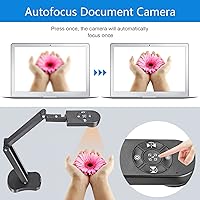
  • Focus Control: Single-press autofocus button locks focus on demand; the camera does not continuously hunt once focus is set.
  • Shooting Modes: Offers two shooting modes: standard automatic exposure and a dedicated macro mode for close-up capture.
  • Image Invert: Physical buttons allow manual image inversion along both horizontal (left/right) and vertical (up/down) axes.
  • LED Lighting: Built-in LED fill light with three manually selectable brightness levels to compensate for varied ambient lighting conditions.
  • Microphones: Dual silicon microphones with hardware-level noise reduction are embedded in the camera body.
  • Connectivity: Connects via USB-C with plug-and-play operation; no driver installation is required on supported operating systems.
  • OS Compatibility: Compatible with Windows 7, 8, 10, and 11; macOS 10.11 and higher; and Chrome OS version 38.00 and above.
  • App Support: Works natively with Zoom, Microsoft Teams, Google Meet, Skype, and TikTok without additional configuration.
  • Dimensions: Measures 4.72 x 2.36 x 22.44 inches when fully unfolded and deployed for use.
  • Weight: Complete unit weighs 1.94 pounds, making it light enough for daily carry between rooms or locations.
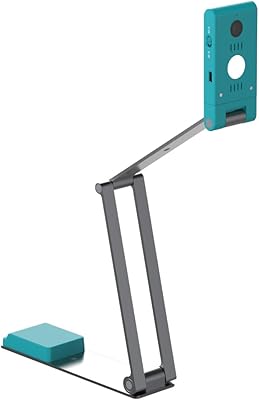
  • Design: Features a foldable multi-joint arm that collapses into a compact form for storage and transport.
  • Exposure Control: Exposure is managed automatically by the camera, with manual brightness compensation available via the LED controls.
  • Cable Included: Ships with a USB-C cable; cable length has been noted by users as relatively short for flexible desk placement.
  • Color: Available in black with a matte finish across the main body and arm assembly.

Related Reviews

Ideao DC400 4K USB Document Camera
86%
89%
Image Quality
93%
Portability & Design
71%
OCR Functionality
86%
Video Performance
90%
Ease of Setup
More
OKIOLABS OKIOCAM T-4K
79%
91%
Image Quality
94%
Ease of Setup
88%
Portability & Design
89%
Viewing Area Coverage
83%
OKIOPoint AI Pointer
More
PAKOTOO PA-800 USB Document Camera
73%
72%
Image Clarity
78%
Build Quality & Arm Stability
74%
LED Fill Light Performance
53%
Ease of Setup
69%
Autofocus Reliability
More
OKIOCAM S-4K
OKIOCAM S-4K
77%
88%
Image Quality
93%
Portability & Design
94%
Ease of Setup
82%
OKIOPoint AI Pointer
71%
Software & Companion App
More
HUE HD Pro Document Camera
80%
94%
Ease of Setup
78%
Image Quality
82%
Built-in Lighting
73%
Manual Focus
81%
Build Quality & Durability
More
IRIScan Visualizer Webcam Document Camera v7 4K-13MP
86%
88%
Overall Performance
92%
Image Quality (4K Resolution)
85%
Portability & Design
91%
Ease of Setup
77%
Software & OCR Functionality
More
OKIOCAM S2 Pro
OKIOCAM S2 Pro
79%
88%
Image Quality
84%
Build Quality
91%
Ease of Setup
79%
OKIOPoint Smart Pointer
62%
Software Experience
More
ELP USB4KCAM01H 4K USB/HDMI Camera (5-50mm 10X Zoom)
77%
78%
Image Sharpness & Clarity
83%
Optical Zoom Performance
61%
Low-Light Performance
91%
Plug-and-Play Compatibility
86%
Dual USB + HDMI Output
More
ROQIOO A9
ROQIOO A9
67%
83%
Value for Money
61%
Image Quality
58%
Video Quality
81%
Flip Screen Usability
54%
Build Quality & Durability
More
WESECUU Poe Security Camera System 4K, 4-Camera Set
82%
90%
AI Detection Accuracy
85%
Night Vision Clarity
95%
Installation Ease
88%
Storage Capacity
65%
Mobile App Performance
More

FAQ

No, the Kitchbai KB-700 4K USB Document Camera is fully plug-and-play. Just connect it to your computer via the included USB-C cable and your operating system — whether Windows, macOS, or Chrome OS — will recognize it automatically. No disc, no download, no IT support needed.
Yes, and this is actually one of the stronger use cases for this camera. Chrome OS compatibility is reliable, and the KB-700 shows up as a standard camera source in both Zoom and Google Meet without any setup steps. Teachers in Google Workspace environments in particular report a smooth experience.

When you hold a document up toward the camera or position it facing your students, it often appears mirrored or upside down on screen. The invert buttons — one for left/right, one for up/down — let you flip the image with a single press directly on the camera body, without touching any app settings. For teachers who regularly flip between showing documents and facing their class, this saves real time during lessons.

Once you press the focus button and it locks onto your subject, it stays put — the camera does not continuously hunt for focus. The issue some users report is when you move an object under the lens after it has already focused; the camera may take a moment to re-lock cleanly. If you work with mostly static documents, this will rarely bother you.

For quiet home offices or small room setups, the dual microphones are adequate and pick up voice clearly enough for meetings. In a real classroom environment with background noise — student movement, HVAC, hallway sounds — they do struggle. If audio quality matters for your setup, consider this camera a solid visual tool and add a dedicated USB microphone for voice.

Yes, the multi-joint arm can be angled to shoot 3D objects placed beneath the camera head, making it useful for science demos, product training, or showing physical specimens. The macro mode helps with close-up detail work down to about 10 cm from the lens.

The three brightness levels cover most realistic classroom conditions reasonably well. The highest setting is strong enough for rooms with no natural light, though very large spaces with high ceilings will need supplemental lighting. A small number of users find the maximum setting creates slight glare on glossy paper, so some experimentation with the middle level is worthwhile.

It is genuinely portable for daily classroom use. The arm folds flat, the whole unit weighs under two pounds, and it fits in a standard laptop bag without taking up much space. The one caveat is that it does not come with a protective case or sleeve, so wrapping it in something soft is worth considering if you carry it loose in a bag.

At full arm extension the camera covers an A3-size area, which is approximately 16.5 x 11.6 inches. That is large enough for full double-page textbook spreads, oversized worksheets, and standard engineering drawing paper. Smaller documents like A4 or US Letter pages sit well within that range with room to spare.

Compatibility is solid for the vast majority of users, but a small number of people on older macOS versions and certain Microsoft Teams configurations have reported that the camera was not recognized until they restarted the application. Linux is not officially supported. If your school or workplace uses a locked-down or non-standard OS environment, it is worth checking with IT before purchasing.