Overview

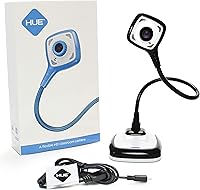
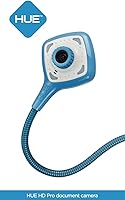
The HUE HD Pro Document Camera sits in a comfortable middle ground between a basic webcam and a dedicated classroom visualizer, offering teachers and remote workers a practical, no-fuss way to share physical documents on screen. What sets it apart is its flexible gooseneck neck, which lets you angle the lens precisely over a desk, book, or worksheet without clamps or stands. It weighs under 600 grams and plugs straight into a USB port, so carrying it between rooms is no hardship. It works natively across Windows, macOS, Chrome OS, and Linux with no driver installation. Just don't expect broadcast-grade output — this is a solid mid-range tool built for practical classroom and home-office use.
Features & Benefits

At its core, this document camera captures footage at full 1080p resolution with a wide-angle lens that covers an area up to A3 size — big enough for two open textbook pages side by side. The built-in LED lights are a genuine plus, making a real difference in dim classrooms or under inconsistent overhead lighting. Manual focus might sound old-fashioned, but for document work it is actually ideal — you set it once for the distance you need and it stays put, unlike autofocus which can drift mid-lesson. The integrated microphone handles noise reduction adequately for video calls, and the optional HUE Intuition software adds annotation and recording tools. A three-year warranty and a multi-device software license round things out.

Best For

This classroom camera makes the most sense for teachers — whether in a school building or working remotely — who regularly need to display handwritten notes, textbook pages, or physical objects to students on screen. Remote tutors, homeschool parents, and corporate trainers giving live document demos will all find it equally practical. The Chromebook and macOS compatibility makes it a strong fit for schools running mixed-device environments. Content creators recording overhead instructional videos will appreciate the stable, lockable angle the gooseneck provides. If you only need a basic webcam for face-to-camera calls, this is more camera than necessary — but for anyone who routinely puts physical materials on screen, it earns its place.

User Feedback

Among verified buyers, the most consistent praise centers on setup simplicity — people plug it in and it works, which matters in school settings where IT support isn't always nearby. Image clarity in decent lighting is well regarded, and the LEDs help when conditions aren't ideal. On the downside, a handful of users report that the flexible neck can wobble once positioned, particularly on an uneven desk. Manual focus also takes a little adjustment if you've come from an autofocus device. A few reviewers wish for a higher frame rate or autofocus when switching quickly between different focal distances. That said, the durability and warranty support earn consistent goodwill across a wide range of buyers.

Pros

  • Plug-and-play setup works instantly on Windows, macOS, Chrome OS, and Linux with zero driver installation.
  • Built-in LED lights provide reliable illumination in dim classrooms without needing a separate lamp.
  • Wide-angle lens covers up to A3-size documents, handling double-page spreads and larger materials cleanly.
  • Manual focus locks in place during lessons, eliminating the mid-session drift common in autofocus cameras.
  • The HUE HD Pro Document Camera includes a perpetual multi-device software license at no extra cost.
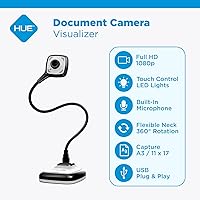
  • Integrated noise-reducing microphone removes the need for a separate mic during recorded lessons or calls.
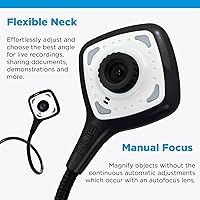
  • Flexible gooseneck neck allows precise angling over worksheets, objects, or demonstrations without a separate stand.
  • Detaches from its base for ultra-portable USB-direct use when moving between rooms or locations.
  • Three-year manufacturer warranty provides confidence for school procurement teams and individual buyers alike.
  • Focal range reaching down to 1cm adds unexpected macro capability useful for science demos or close-up detail work.

Cons

  • No autofocus means manual adjustments are required whenever shooting distance changes during a live session.
  • HUE Intuition annotation software is unavailable on Chrome OS, excluding a large share of the education market.
  • LED lights can produce glare or hotspots on laminated sheets and glossy printed materials with no intensity control.
  • The flexible neck can develop wobble over time, particularly when extended at sharp angles on lightweight desks.
  • Audio quality from the built-in microphone is adequate but noticeably thin compared to even a basic external USB mic.
  • No carry case is included, making cable management and transport messier than it should be for a portable device.
  • Image quality softens noticeably in poor lighting conditions, even with LEDs active, limiting low-light reliability.
  • A small number of Linux users report inconsistent behavior with certain conferencing applications despite claimed compatibility.
  • Warranty claims must go directly through the manufacturer rather than Amazon, adding friction to the returns process.

Ratings

The HUE HD Pro Document Camera has been evaluated by our AI system after analyzing thousands of verified global buyer reviews, with spam, incentivized, and bot-generated feedback actively filtered out. Scores reflect real-world classroom, home-office, and tutoring experiences — strengths and genuine pain points are weighted equally to give you an honest picture before you buy.

Ease of Setup
94%
Buyers across Windows, macOS, and Chromebook environments consistently report that this document camera works the moment it is plugged in — no driver downloads, no configuration screens. Teachers especially appreciate being able to move it between classroom computers without any setup friction.
A small number of Linux users report that while the camera is technically recognized, getting it to behave reliably with certain conferencing apps requires some manual configuration that undermines the plug-and-play promise.
Image Quality
78%
22%
In a well-lit room, the 1080p output is sharp enough to display handwritten notes, printed text, and detailed diagrams clearly on a smartboard or shared screen. For its intended document-capture purpose, the resolution holds up well in typical classroom and desk conditions.
In lower light, even with the LEDs active, the image can appear softer than expected for a 1080p camera. It is not in the same league as a dedicated webcam optimized for video calls, and reviewers who expected broadcast-level sharpness were occasionally disappointed.
Built-in Lighting
82%
18%
The integrated LED lights are genuinely useful rather than a checkbox feature — they make a real difference when projecting over a desk under uneven ceiling lights or near a window with variable natural light. Most teachers working in dim classrooms call this a standout practical benefit.
The LEDs can produce a slight hotspot or glare when shooting highly reflective surfaces such as laminated sheets or glossy textbook pages. A diffuser or adjustable brightness control would improve this, but neither is included.
Manual Focus
73%
27%
For static document work — showing the same worksheet or textbook page for several minutes — manual focus is actually a strength. You dial it in once for your working distance and it stays locked, avoiding the drift and refocusing delays that plague autofocus cameras mid-lesson.
If you need to quickly switch between a close-up object and a full-page document in the same session, manual refocusing slows you down noticeably. Users coming from autofocus webcams find this adjustment period frustrating, particularly in fast-paced interactive lessons.
Build Quality & Durability
81%
19%
The gooseneck construction feels sturdy enough for daily classroom handling, and multiple buyers note it has held up well after a year or more of regular use. The three-year warranty adds genuine peace of mind for schools making bulk purchases.
A minority of reviewers report that the flexible neck develops some wobble over time, particularly when extended to its full height on a lightweight desk. It is durable enough for most use cases, but it is not built to the same standard as a fixed-arm professional visualizer.
Microphone Quality
67%
33%
The built-in microphone with noise reduction is adequate for recording lesson narration or joining a video call without plugging in a separate mic. For teachers who just need their voice to be intelligible over a Zoom session, it handles the job without extra hardware.
Compared to a dedicated USB microphone, the audio can sound thin and hollow, particularly in rooms with hard surfaces that create echo. Serious content creators or anyone recording polished instructional videos will likely want to pair it with an external microphone.
Portability
88%
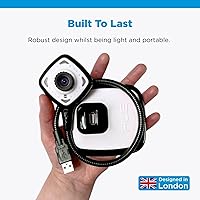
At under 600 grams and with no external power adapter required, this classroom camera is genuinely easy to carry between rooms or pack in a bag for home use. Detaching the head from the base for even more compact portability is a small but appreciated design touch.
The lack of an included carry case means the cable and flexible neck can tangle or get snagged in transit. A simple pouch would have made it a more complete travel-ready package, especially for teachers who move between multiple classrooms.
Software (HUE Intuition)
71%
29%
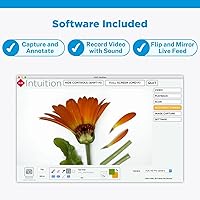
The optional annotation and recording software adds real value for teachers who want to mark up documents on screen or save lesson recordings without a third-party app. The multi-device perpetual license means you can install it on both a school and home computer without extra cost.
HUE Intuition is Windows and macOS only, leaving Chromebook users — a significant portion of the education market — without access to the annotation tools. The interface also feels dated compared to modern teaching apps, and some features require a steeper learning curve than the camera itself.
OS Compatibility
89%
Native support across Windows, macOS, Chrome OS, and Linux is broader than most competitors at this price tier. Schools running mixed-device environments find this particularly valuable, as one camera model can serve students and teachers regardless of which machine they are using.
While the camera hardware works across all four platforms, software features are uneven — full annotation tools are limited to Windows and macOS, and occasional edge cases with specific Linux distributions or older Chrome OS versions can require troubleshooting.
Capture Area & Versatility
84%
The ability to capture up to A3 size is practical for displaying double-page spreads, large maps, or engineering drawings without repositioning the camera. The focal range extending down to 1cm also opens up basic macro use, which is a genuine bonus for science teachers.
Achieving the maximum A3 capture area requires mounting the camera at or near its full extension, which can introduce some neck flex and reduce stability. For most everyday A4 document work this is a non-issue, but it is worth knowing before planning large-format capture.
Value for Money
76%
24%
Relative to dedicated classroom visualizers that often cost significantly more, this document camera offers a strong feature set — 1080p, LEDs, microphone, warranty, and software — in a package that teachers and tutors can justify for personal or small-budget school purchases.
At its price point, the absence of autofocus and a carry case feels like an oversight, and a few reviewers note that some competing cameras now offer similar specs for less. It remains good value, but it is not the bargain it might have been at launch.
Stability & Positioning
69%
31%
The gooseneck design gives real flexibility for angling the lens precisely over worksheets, 3D objects, or demonstrations without needing a separate arm or stand. Most users find a solid working position quickly and the neck holds it without constant readjustment.
On lighter or uneven desks, the base can shift if the neck is extended at a sharp angle, and the wobble a minority of users describe becomes more pronounced during this kind of setup. A weighted or rubberized base would have addressed this cleanly.
Compatibility with Conferencing Apps
86%
The HUE visualizer is recognized as a standard webcam input by Zoom, Google Meet, Microsoft Teams, and most other major platforms without any configuration. Switching the camera source mid-call takes seconds, which matters in live teaching situations.
A handful of reviewers note inconsistent behavior when hot-swapping the camera between USB ports during an active call, occasionally requiring the app to be restarted to re-detect the feed. This is a minor but occasionally disruptive issue in live classroom settings.
Warranty & Support
83%
A three-year manufacturer warranty is notably generous for a camera at this price point, and buyers report that HUE customer support is responsive and helpful when issues arise. For school procurement teams, this kind of after-sales backing is a meaningful factor.
Warranty claims require going through the manufacturer directly rather than through Amazon, which adds a step some buyers find inconvenient. A small number of reviewers also note that replacement processing took longer than expected.

Suitable for:

The HUE HD Pro Document Camera is a natural fit for classroom teachers — whether in a school building or teaching remotely — who regularly need to put physical materials on screen for students. If your typical session involves holding up a worksheet, flipping through a textbook, or demonstrating a hands-on activity over a desk, this classroom camera handles all of that without requiring any technical setup or IT support. Remote tutors and homeschool parents will find it equally practical: plug it into a laptop, point it at the page, and your student sees a clean, well-lit image within seconds. Office professionals who give live document or product demos over video calls will appreciate the wide capture area and the fact that it works reliably across Zoom, Teams, and Google Meet without configuration. Schools and departments running mixed-device environments — some staff on Macs, others on Chromebooks or Windows laptops — get real mileage from the native cross-platform compatibility. The three-year warranty and multi-device software license also make it a sensible choice for anyone buying on behalf of a school with tight procurement budgets.
Not suitable for:

Buyers expecting the image performance of a professional studio camera or a high-end webcam will find the HUE HD Pro Document Camera falls short of those expectations — it is a capable mid-range tool, not a broadcast-grade device. If your primary need is a face-to-camera webcam for polished video calls or content production, there are purpose-built options that will outperform this classroom camera in color accuracy, dynamic range, and frame smoothness. Users who frequently switch between very close macro shots and full-page document views in a single session will find the manual focus adjustment slow and disruptive compared to an autofocus alternative. Chromebook users who were hoping to use the bundled annotation software are also out of luck, since HUE Intuition only runs on Windows and macOS. Anyone working primarily in very bright or very reflective environments — laminated sheets, glossy printed materials — may run into glare from the built-in LEDs with no built-in way to reduce intensity. And if you need a camera that can capture large-format documents at A3 size with rock-solid stability, be aware that achieving that maximum capture area requires extending the neck fully, which can introduce some flex on lightweight desks.

Specifications

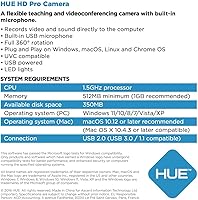
  • Resolution: The camera captures video at 1920x1080 pixels (Full HD 1080p), delivering clear, sharp output suitable for displaying documents and demonstrations on shared screens.
  • Focal Range: Manual focus covers a range from 1cm to infinity, allowing the camera to capture everything from close-up macro detail to full-page documents without switching lenses.
  • Max Capture Area: The maximum capture area is A3 (11.7″ x 16.5″), accommodating double-page textbook spreads, large maps, and engineering drawings in a single frame.
  • Optimal Capture Area: For everyday document work, the optimal capture area is US Letter or A4 (8.3″ x 11.7″), covering a standard printed page cleanly at typical desk distances.
  • Focus Type: Focus is fully manual, controlled by a physical ring on the lens, which allows the user to lock a specific focal distance and keep it stable throughout a lesson or recording.
  • Built-in Lighting: Two integrated LED lights are positioned on the camera head to illuminate the capture area evenly, reducing dependence on ambient room lighting.
  • Microphone: A built-in microphone with noise reduction is integrated into the camera body, capturing voice audio for video calls and lesson recordings without requiring an external device.
  • Connectivity: The camera connects via a standard USB cable and operates as a plug-and-play device, requiring no additional drivers or software installation on any supported platform.
  • OS Compatibility: Native compatibility covers Windows, macOS, Chrome OS, and Linux, making it usable with the built-in camera apps and major conferencing platforms on each operating system.
  • Camera Height: When fully assembled with the base, the gooseneck neck extends to approximately 44cm, providing sufficient height to capture an A4 page lying flat on a desk.
  • Weight: The complete unit weighs approximately 588g (around 1.1 lbs), making it light enough to carry between classrooms or pack into a laptop bag without significant added bulk.
  • Shooting Mode: Exposure is controlled automatically by the camera, while focus remains under manual control, giving users a stable, consistent image without needing to manage exposure settings.
  • Optional Software: HUE Intuition software for Windows and macOS is included, offering tools for annotating images, recording video with audio, and flipping or mirroring the live camera feed.
  • Software License: The included HUE Intuition license is a perpetual single-user license that can be installed on multiple devices, covering both a school computer and a home laptop simultaneously.
  • Warranty: The camera is backed by a three-year manufacturer warranty, with access to direct customer support for troubleshooting, repairs, or replacement inquiries.
  • Base Compatibility: The camera head can be detached from its stand base and plugged directly into a USB port via the flexible neck alone, enabling a more compact portable configuration.
  • Dimensions: The packaged unit measures approximately 3.1 x 11 x 3.1 inches, reflecting the slim, upright profile of the gooseneck design when stored or transported.
  • Model Number: The official manufacturer model number is PX0004, which can be used when contacting HUE support or referencing the product for institutional purchasing.

Related Reviews
Minolta Pro Shot MN53Z 16MP HD Digital Camera
83%
86%
Image Quality
91%
Zoom Performance
88%
Ease of Use
92%
Portability
65%
Low-Light Performance
More
OKIOCAM S2 Pro
OKIOCAM S2 Pro
79%
88%
Image Quality
84%
Build Quality
91%
Ease of Setup
79%
OKIOPoint Smart Pointer
62%
Software Experience
More
ALFipmncam A-8 Pro 2K HD Wireless Mini Camera
83%
91%
Value for Money
95%
Ease of Setup
89%
Battery Life
84%
Video Quality (2K HD)
87%
Motion Detection Accuracy
More
D-Link DCS-6100LHV2 Compact Full HD Pro Wi-Fi Camera
84%
88%
Video Quality
91%
Ease of Setup
85%
Night Vision Performance
72%
Motion Detection Sensitivity
65%
Wi-Fi Connectivity
More
KONLEYA Smart Camera Glasses with HD 1080P Camera
82%
86%
Video Quality
75%
Battery Life
91%
Ease of Use
68%
Comfort and Fit
80%
Build Quality
More
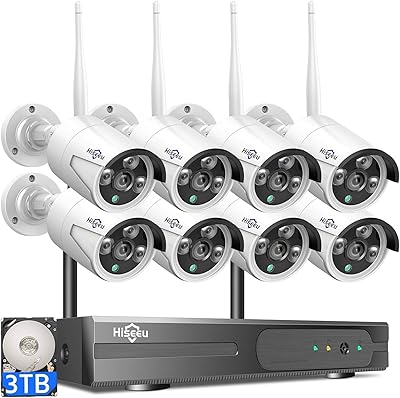
Hiseeu Wireless Pro 4K NVR Security Camera System, 8 Cameras, 3TB Storage
85%
94%
Setup and Installation
88%
Image Quality
92%
Storage Capacity
85%
Motion Detection Accuracy
87%
Night Vision Performance
More
MINGYY Power Bank Camera G1 1080P HD Mini Camera with Night Vision and 5000mAh Battery
84%
94%
Battery Life
88%
Video Quality (1080P HD)
90%
Night Vision Performance
92%
Ease of Setup
89%
Portability
More
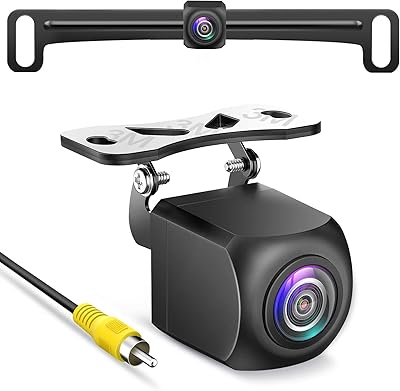
PixelMan HD Backup Camera
85%
88%
Image Quality
85%
Ease of Installation
90%
Night Vision Performance
91%
Durability and Build Quality
87%
Waterproof Performance
More
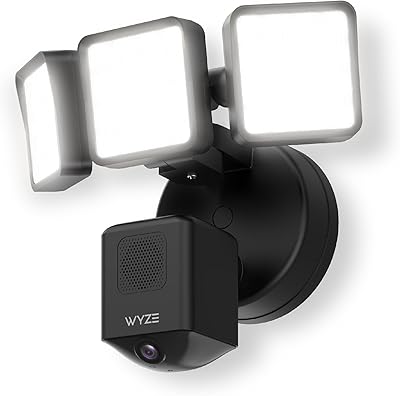
Wyze Floodlight Camera Pro
85%
86%
Performance of Motion Detection
89%
AI-Powered Features
91%
Camera Resolution & Image Quality
78%
Ease of Setup
85%
Floodlight Brightness & Coverage
More
Abyliee Hidden Camera Detector Pro
74%
91%
Ease of Use
62%
Detection Accuracy
93%
Portability & Form Factor
61%
Build Quality
78%
Battery Life
More

FAQ

Yes, this document camera is recognized automatically as a standard webcam input by Zoom, Google Meet, Microsoft Teams, and most other major conferencing platforms. You just plug it in, open your app, and select it as the camera source — no drivers or special configuration needed.

The camera hardware itself works perfectly on Chrome OS — it is plug-and-play and fully compatible. However, the HUE Intuition annotation software only runs on Windows and macOS, so Chromebook users will not have access to that feature. You can still use the camera for live document display and video calls without it.

For document camera work, manual focus is actually a practical advantage. You set the focus once for your working distance — say, an A4 page lying on your desk — and it stays locked there for the entire lesson. Autofocus cameras can drift or hunt for focus during a live session, which is far more disruptive in a classroom than simply dialing in your focus point at the start.

Technically yes, but it is not designed for that purpose. The wide-angle lens and manual focus are optimized for overhead document capture rather than face-framing at typical desk distances. If your main need is face-to-camera video calls, a dedicated webcam will give you better results at a similar price.

For most setups on a standard desk, the neck holds its position well. Wobble tends to occur when the neck is extended at a sharp angle or placed on a lightweight or slightly uneven surface. If stability is a concern, positioning the base near the edge of a heavier desk and keeping the neck at a moderate angle rather than fully extended helps significantly.

They can, yes. Glossy textbook pages, laminated worksheets, and reflective surfaces like whiteboards can pick up a hotspot from the LEDs. The lights do not have adjustable brightness, so if glare is an issue, angling the camera slightly off-center or using matte materials when possible tends to reduce it.

Yes, that is actually a built-in feature. The camera head and neck detach from the base, and you can plug the USB end directly into any USB port on a laptop or monitor. It is a useful option when you need a lighter, more compact setup for travel or a crowded desk.

The built-in microphone is adequate for live video calls and basic lesson recordings — your voice will come through clearly enough for students to follow along. For polished recorded content, a dedicated USB microphone will give you noticeably warmer, fuller audio. Think of the built-in mic as a solid convenience feature rather than a professional recording tool.

Surprisingly, yes. With a focal range that starts at 1cm, the HUE visualizer can get close enough to small objects — coins, insects, plant samples, electronic components — to show meaningful detail on screen. It is not a substitute for a proper digital microscope, but it works well enough for demonstration purposes in a classroom or home setting.

The three-year warranty is handled directly by HUE rather than through Amazon, so you would need to contact their customer support team with your proof of purchase. Most buyers report that the support team is responsive and helpful, though the direct manufacturer process does add a step compared to a standard Amazon return. It is worth registering your purchase with HUE after buying to streamline any future claims.