Overview

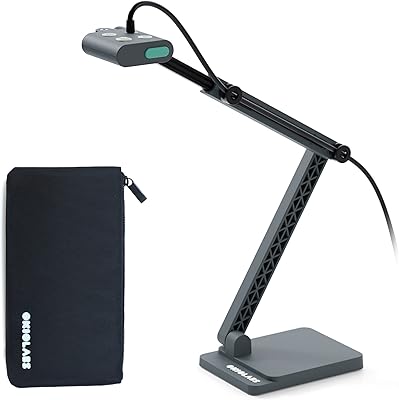
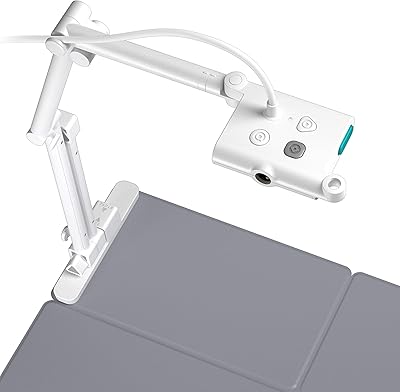
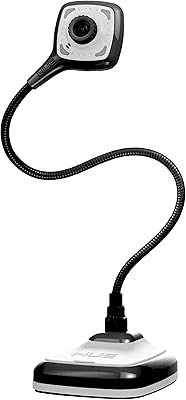
The PAKOTOO PA-800 USB Document Camera is a compact 3-in-1 tool that handles document capture, live webcam streaming, and presentation duties without requiring multiple devices. The flexible hose arm bends and holds position across a wide range of angles, letting you point it at an A3-sized worksheet, a physical textbook, or straight ahead for a standard video call. Connectivity is via USB-C, which modern MacBook users will appreciate — no dongles needed. For educators working with tight budgets, this classroom webcam sits at an accessible price point while delivering enough functionality to run a full remote lesson comfortably.
Features & Benefits

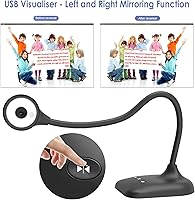
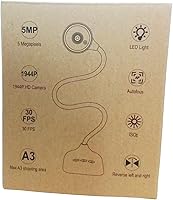
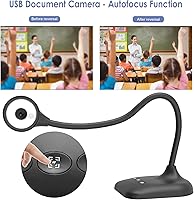
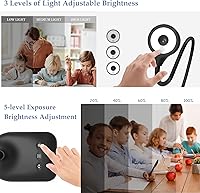
At 5 megapixels with a 30fps output, this document camera delivers sharp-enough live footage for classroom use — not cinematic, but clear enough for reading handwritten notes or printed text in real time. The three-level LED fill light handles dim environments reasonably well, and the five-level exposure control gives you real flexibility rather than forcing you to rely on auto-correction alone. A single press of the autofocus button locks focus mid-lesson without interrupting your flow. The left/right mirroring and image inversion options are genuinely useful for displaying physical documents to remote viewers, and dual built-in mics reduce the need for a separate audio device.

Best For

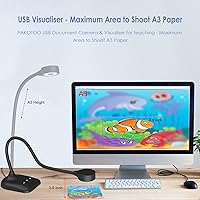
This classroom webcam makes the most sense for K-12 teachers, tutors, and homeschool educators who need one device to cover document display, video calling, and basic audio without spending heavily on separate hardware. The A3 capture range is wide enough for most standard worksheets and books, and the macro capability down to about 3.94 inches works well for showing small objects or close-up diagrams mid-lesson. It also suits MacBook and USB-C laptop users who want a clean, adapter-free connection. Small business owners running product walkthroughs over Zoom or Teams will find it functional, though professionals with demanding image quality needs should look at higher-tier options.

User Feedback

Buyers generally respond well to the arm flexibility, noting it holds its angle during repeated repositioning without drooping — a practical concern in any classroom setting. Teachers tend to appreciate the LED lighting as sufficient for typical room conditions. Where feedback gets mixed is software setup: the PAKOTOO visualiser is not plug-and-play, and users who skipped setup instructions often blame the hardware when the fix is simply selecting the correct USB Camera input in their system. Microphone quality draws criticism in louder environments, and some buyers find the image resolution modest against pricier options — though most consider the trade-off reasonable for the price tier.

Pros

  • A3 document capture range covers textbooks, worksheets, and large reference materials in a single shot.
  • The gooseneck arm holds its angle reliably through repeated repositioning across a full school day.
  • Three LED brightness levels provide usable fill light without requiring a separate desktop lamp.
  • One-touch autofocus locks quickly during live sessions without any software navigation.
  • Five-level manual exposure control gives more fine-tuning flexibility than most cameras at this price.
  • USB-C cable is included, so MacBook users can connect directly without an adapter.
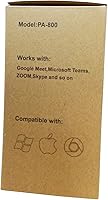
  • Works across Zoom, Google Meet, Microsoft Teams, OBS, and TikTok once correctly configured.
  • Left/right mirroring and image inversion are accessible via physical buttons, keeping adjustments fast mid-lesson.
  • Macro focus down to roughly 3.94 inches supports close-up object demonstrations without additional attachments.
  • Compact folding design fits into a bag for teachers who move between classrooms or work locations.

Cons

  • Not plug-and-play — requires manual input selection in system settings, which catches many buyers off guard.
  • Microphone performance degrades noticeably in rooms with HVAC noise, student movement, or ambient sound.
  • Image quality shows its limits when capturing fine text or dense illustrations compared to pricier alternatives.
  • LED lighting casts a cool tone that can skew document color accuracy at maximum brightness.
  • No continuous autofocus means any arm adjustment during a live demo requires a manual refocus press.
  • Exposure settings reset every time the camera is disconnected, with no memory function available.
  • The arm base is small enough that aggressive lateral extension can cause the unit to tip on a cluttered desk.
  • Button labeling is small and non-intuitive, leading to accidental mirroring or inversion toggles mid-session.
  • No protective case or lens cover is included, leaving the hardware exposed during bag transport.
  • Color reproduction under mixed or shifting natural light can appear flat without manual exposure correction.

Ratings

The scores below for the PAKOTOO PA-800 USB Document Camera were generated by AI after analyzing verified buyer reviews from multiple global markets, with spam, bot-submitted, and incentivized feedback actively filtered out. The result is an honest, balanced picture of where this classroom webcam genuinely delivers and where real users hit frustrating walls. Both the strengths that keep teachers coming back and the recurring pain points that cost it stars are reflected transparently in every category.
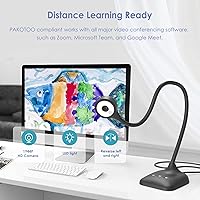
Image Clarity
72%
28%
For its price tier, the 5MP sensor produces footage that is sharp enough to read handwritten notes and printed worksheets clearly during a Zoom lesson. Teachers working with standard classroom materials — textbooks, assignment sheets, diagrams — generally find the output more than adequate for daily remote instruction.
Users who have handled pricier document cameras notice the gap in fine detail, particularly when capturing small text or dense illustrations. Color reproduction under mixed lighting can appear slightly flat, and the camera does not perform as well when asked to stream high-contrast graphics with precision.
Build Quality & Arm Stability
78%
22%
The flexible gooseneck arm is a genuine strong point — buyers consistently mention that it holds its position well after repeated repositioning throughout a school day, which is not a given at this price level. The overall chassis feels solid enough for regular desk use without feeling like it will snap under normal handling.
A subset of users report that the arm gradually loosens with heavy daily use over several months, eventually failing to hold certain angles without drifting. The plastic finish looks functional rather than premium, and the base footprint is small enough that the camera can tip if the arm is extended too far to one side.
LED Fill Light Performance
74%
26%
The three brightness levels cover most typical classroom and home office situations well. Teachers running lessons from poorly lit spare rooms or basement setups appreciate having a dedicated light source built in, as it visibly reduces washed-out or shadowy footage without requiring a separate ring light.
At maximum brightness, the LEDs introduce a slightly cool, clinical tone that can make document colors appear less accurate than they are in person. The light spread is also fairly narrow, so objects positioned toward the edges of the capture frame may still show uneven illumination.
Ease of Setup
53%
47%
Once correctly configured, the camera runs reliably across Windows, macOS, and Chromebook without additional drivers. Users who follow the setup step of manually selecting the USB Camera input in their system report a smooth experience from that point forward.
The not-plug-and-play requirement catches a significant number of buyers off guard, and this single friction point generates a disproportionate share of one-star reviews. The instruction clarity in the included documentation is inconsistent, and users who are less technically confident sometimes spend considerable time troubleshooting a problem that has a simple fix.
Autofocus Reliability
69%
31%
The one-touch autofocus button is genuinely practical during live lessons — pressing it once locks focus quickly without requiring the user to pause or navigate any software menu. For static documents and objects, it performs consistently and accurately across most lighting conditions.
Continuous autofocus is not available, so any movement of the arm or subject requires a manual refocus press. Users demonstrating physical objects that they move frequently find this interrupts lesson flow more than expected, and focus in very low light conditions can hunt before locking.
Microphone Quality
57%
43%
Having dual mics built into the unit is a practical convenience that removes the need for a separate USB microphone for basic remote lessons. In quiet, controlled home environments, voice pickup is clear enough for standard video calls without post-processing.
In real classroom environments with ambient noise — HVAC systems, student movement, hallway sounds — the mics struggle noticeably. Audio can sound thin or pick up significant background hum, and several buyers with moderate expectations still switched to a dedicated microphone after a few weeks of use.
Compatibility & Software Support
83%
The camera works reliably with Zoom, Google Meet, Microsoft Teams, OBS, and even TikTok once set up correctly. The USB-C cable inclusion means MacBook users can connect directly without an adapter, which several reviewers flagged as a genuine convenience they did not expect at this price.
Chromebook compatibility, while broadly supported, occasionally requires users to grant specific permissions that are not immediately obvious. A small number of Windows users on older OS versions report inconsistent recognition after system updates, requiring them to re-select the camera input.
Exposure Control
76%
24%
The five-level manual exposure adjustment is more granular than what most competing cameras at this price offer. Teachers shooting in rooms with inconsistent natural light — afternoon sun shifting through windows, for example — find being able to quickly dial exposure up or down without entering software settings genuinely useful.
The exposure controls are hardware buttons without any visual feedback indicator on-screen, so new users sometimes overshoot and have to cycle back through levels to find the right setting. There is no memory function, meaning exposure resets each time the device is reconnected.
Image Mirroring & Inversion
81%
19%
Left/right mirroring and manual image inversion work reliably and are accessible via physical buttons, which keeps the experience practical during a live session. Tutors who write on paper and flip the view for remote students find this feature works exactly as intended.
The button labeling on the unit is small and not immediately intuitive for first-time users, leading to some accidental toggling mid-lesson. Users who regularly switch between document mode and webcam mode need a moment to reorient, as the optimal image settings differ between the two uses.
Macro Capture Performance
71%
29%
The ability to focus on objects as close as roughly 3.94 inches is a meaningful feature for science teachers, craftspeople, or tutors demonstrating small physical items. At that range, the camera resolves enough detail to make close-up product or specimen walkthroughs genuinely viable.
Macro performance is noticeably dependent on stable lighting — without the LEDs engaged, close-up shots in dim conditions tend to lose sharpness quickly. The minimum focus distance also means users need to position the arm with some precision, which can feel fiddly on a cluttered desk.
Value for Money
82%
18%
Relative to what this classroom webcam actually delivers — A3 document capture, built-in lighting, dual mics, mirroring controls, and USB-C connectivity — the price is fair and arguably strong for the feature set. Budget-conscious educators who need a single device rather than a collection of separate tools get real utility here.
Buyers who approach this expecting performance close to dedicated document cameras costing two or three times more will feel shortchanged, particularly on image quality and microphone output. It earns its value within its category, but only if expectations are calibrated to its actual market tier.
Portability & Form Factor
77%
23%
At under a pound and with a folding arm design, this document camera is compact enough to pack into a bag for teachers who move between classrooms or work from multiple locations. The footprint on a desk is small, which matters in crowded teaching setups.
The folded form factor, while portable, is not the most protective — the arm joints and lens are exposed without any case or cover included. Users who travel with it regularly report minor cosmetic wear appearing faster than expected on the flexible neck section.
Frame Rate & Streaming Smoothness
74%
26%
At 30fps, live document streaming stays smooth enough that remote viewers do not experience the choppy playback that plagues cheaper cameras running at lower rates. For Zoom lessons and recorded instructional content, the footage holds up well under normal broadband conditions.
The 30fps ceiling means the camera is not suited to capturing fast movement with any fluidity, which limits use cases outside of static document display. Bandwidth-constrained users also report that the camera's higher resolution output can strain older routers, occasionally forcing a quality downgrade in the conferencing software.

Suitable for:

The PAKOTOO PA-800 USB Document Camera is a practical fit for K-12 teachers, homeschool educators, and tutors who need a single device to cover document display, video calling, and basic audio without juggling multiple peripherals. If your typical session involves holding up a worksheet, flipping to a textbook page, or showing a small object to remote students over Zoom or Google Meet, this classroom webcam handles those tasks reliably within its price tier. MacBook and other USB-C laptop users get a particular convenience here — the included cable means no adapter hunting before a lesson starts. It also works well for small business owners or independent tutors running product walkthroughs, where broadcast-quality imaging is not a requirement but clear, stable footage is. Anyone who needs macro capture down to about 3.94 inches for close-up demonstrations — science educators, craft tutors, repair instructors — will find the capability genuinely useful rather than a gimmick.
Not suitable for:

The PAKOTOO PA-800 USB Document Camera is not the right tool for buyers expecting plug-and-play simplicity straight out of the box — setup requires manually selecting the correct input in your system, and skipping that step is the most common source of frustration in user reviews. Professionals who need broadcast-ready image quality, accurate color reproduction, or fine detail capture for high-resolution graphics will find the 5MP output falls short compared to dedicated document cameras at higher price points. Teachers working in loud classrooms or open-plan environments should be cautious: the built-in microphones struggle with ambient noise and may require a supplementary audio solution. If your workflow depends on smooth continuous autofocus while moving objects around — live science experiments, hands-on craft demonstrations — the manual refocus button will interrupt your pace more than you would like. And buyers who need a device that folds into a protective carry case or withstands heavy daily transport should know there is no included cover, leaving the lens and arm joints exposed during travel.
Specifications

  • Brand & Model: Manufactured by PAKOTOO under model number PA-800.
  • Sensor: Uses a 1/3-inch CMOS image sensor for light capture and noise reduction in varied lighting conditions.
  • Resolution: Maximum still and video resolution is 2594x1944 pixels, equivalent to 5 megapixels.
  • Frame Rate: Streams live video at up to 30 frames per second for smooth real-time display.
  • Lens & Focus: One-touch autofocus button triggers a single focus pass; continuous autofocus is not available.
  • Macro Range: Minimum focus distance is approximately 10 cm (3.94 inches), suitable for close-up object capture.
  • Document Coverage: Maximum capture area accommodates A3-format documents, covering standard textbooks and large worksheets.
  • LED Fill Light: Built-in LED array offers three selectable brightness levels to compensate for low or inconsistent ambient lighting.
  • Exposure Control: Manual exposure adjustment spans five discrete levels, controlled via a dedicated hardware button on the unit.
  • Image Functions: Physical buttons provide left/right mirroring and manual 180-degree image inversion directly on the device.
  • Microphones: Two built-in microphones are integrated into the unit for capturing voice audio during video calls or recordings.
  • Connectivity: Connects via USB-C cable, which is included in the box; a USB-A adapter is not included.
  • Compatibility: Works with Windows PCs, macOS, and Chromebooks without additional driver installation after correct input selection.
  • Software Support: Compatible with Zoom, Google Meet, Microsoft Teams, OBS Studio, and TikTok for live streaming and conferencing.
  • Arm Design: Flexible gooseneck hose arm allows 360-degree repositioning and is designed to hold a set angle under normal use.
  • Weight: Complete unit weighs 14.8 ounces, light enough for portable use between classroom locations.
  • Dimensions: Folded footprint measures 7.2 x 5.87 x 3.94 inches, fitting comfortably on a standard teacher's desk.
  • Color: Available in black only as of the current product listing.
  • Setup Requirement: Device is not plug-and-play; users must manually select USB Camera as the input source within their operating system or conferencing app.
  • Included Accessories: Package includes the document camera unit and one USB-C cable; no carry case, USB-A adapter, or software disc is included.

Related Reviews
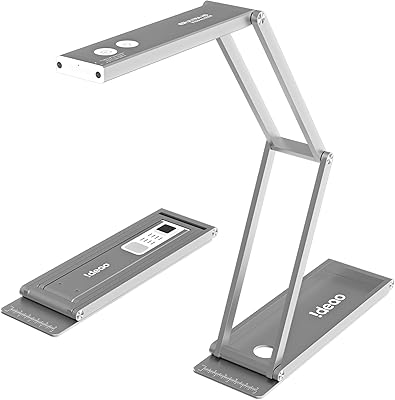
Ideao DC400 4K USB Document Camera
86%
89%
Image Quality
93%
Portability & Design
71%
OCR Functionality
86%
Video Performance
90%
Ease of Setup
More
HUE HD Pro Document Camera
80%
94%
Ease of Setup
78%
Image Quality
82%
Built-in Lighting
73%
Manual Focus
81%
Build Quality & Durability
More
Kitchbai KB-700 4K USB Document Camera
81%
88%
Image Clarity
67%
Autofocus Performance
94%
Ease of Setup
91%
Image Invert Function
79%
LED Lighting
More
OKIOLABS OKIOCAM T-4K
79%
91%
Image Quality
94%
Ease of Setup
88%
Portability & Design
89%
Viewing Area Coverage
83%
OKIOPoint AI Pointer
More
OKIOCAM S2 Pro
OKIOCAM S2 Pro
79%
88%
Image Quality
84%
Build Quality
91%
Ease of Setup
79%
OKIOPoint Smart Pointer
62%
Software Experience
More
Arducam IMX179 Autofocus USB Camera
84%
94%
Image Quality
91%
Autofocus Accuracy
88%
Ease of Integration
90%
Operating System Compatibility
83%
Build and Durability
More
LIBREFLY Hidden Camera USB Charger
83%
87%
Ease of Use
91%
Video Quality
78%
Motion Detection Accuracy
85%
Connectivity & App Experience
94%
Design & Discretion
More
OKIOCAM S-4K
OKIOCAM S-4K
77%
88%
Image Quality
93%
Portability & Design
94%
Ease of Setup
82%
OKIOPoint AI Pointer
71%
Software & Companion App
More
OKIOLABS OKIOCAM T Plus USB Camera
85%
88%
Ease of Setup
91%
Image Clarity
94%
Portability/Size
90%
Interactivity Features (Dry-Erase Board)
83%
Build Quality
More
IPEVO VZ-R
IPEVO VZ-R
86%
93%
Image Clarity
88%
Physical Build Quality
91%
HDMI Connectivity
94%
Ease of Setup
87%
Onboard Controls
More

FAQ

It does not work completely automatically the way a plug-and-play webcam does. Once you plug it in, you need to go into your video conferencing app or your computer's camera settings and manually select USB Camera as the active input. No driver download is required, but skipping that selection step is the most common reason people think the camera is broken when it is actually fine.

Yes, a USB-C cable is included in the box, so it connects directly to any MacBook or laptop with a USB-C port. If your computer only has USB-A ports, you will need a separate adapter since one is not included.

It genuinely works both ways. You can flip the gooseneck arm to point the lens forward and use it as a standard webcam for meetings, then rotate it downward when you need to show a document or object. The dual built-in mics also mean you do not need a separate microphone for basic calls.

You press the focus button once and it locks onto whatever is in frame at that moment. It works quickly and accurately for static documents. The limitation is that it does not refocus continuously, so if you move the arm or swap out what you are showing, you need to press the button again to get a sharp image.

For typical classroom handwriting on standard paper, yes — the 5MP sensor produces clear enough footage that students can read along comfortably during a Zoom session. Where it starts to show its limits is with very fine print, dense graphics, or situations where you need precise color accuracy. For the price, the output is solid; just do not compare it to a dedicated camera costing three times more.

Probably not for standard overhead lighting. The built-in LEDs are most useful in dimly lit home offices, windowless rooms, or situations where you are working in the evening. In a brightly lit classroom, you can leave the LEDs off entirely and the camera handles the ambient light reasonably well using the manual exposure controls.

Mirroring flips the image horizontally, which is useful when you are writing on paper and want the text to appear correctly oriented on your students' screens rather than reversed. The inversion function rotates the image 180 degrees, helpful when the arm is positioned in an unusual angle. Both functions are controlled by physical buttons on the unit, so you can toggle them mid-lesson without opening any software.

Most users find it holds position well under normal daily use, which is the main thing you need during a live session. Over several months of heavy daily repositioning, some users report the joint loosening slightly. It is not a precision instrument, but for a typical teaching setup where you adjust it once and leave it, it performs reliably.

Yes, Chromebook compatibility is supported. You will need to make sure the browser or app has permission to access the camera, and you should select the USB Camera from within Google Meet's settings after plugging in. Some school-managed Chromebooks have camera permission restrictions set by the district IT department, so it is worth checking that first if you run into issues.

The built-in mics are functional for quiet environments but genuinely struggle in rooms with HVAC noise, echoing walls, or student movement. There is no hardware fix for that on this unit. The practical solution most teachers use is pairing this document camera with a separate USB desk microphone positioned closer to them, which dramatically improves audio quality without adding much cost.