Ideao DC400 4K USB Document Camera


Overview
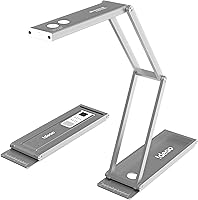
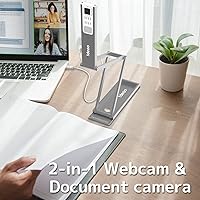
The Ideao DC400 4K USB Document Camera is one of the more practical mid-range devices you'll find if you need a single tool that handles overhead document capture, front-facing video calls, and basic document scanning without carrying three separate gadgets. Built around a 13MP Sony sensor, it delivers genuinely sharp imagery for its price tier. Fold it flat and it's roughly as thin as a smartphone — a detail that matters if you're packing a bag for school or a client meeting. It won't outperform a dedicated professional webcam or a proper flatbed scanner, but that's not what this 3-in-1 camera is designed to do.
Features & Benefits
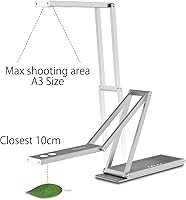
The DC400 shoots at 4K/30fps when you want maximum detail — say, capturing a dense diagram or a full page of fine print — and switches to 1080p/60fps for smoother motion during live demos or video calls. The articulating arm gives you a full A3-size shooting area, which means an open book or a large diagram fits in frame without cropping. It can also focus as close as 10 centimeters, genuinely useful for macro-level detail on small objects. The built-in noise-reduction microphone handles most classroom and home-office environments well enough that you won't feel compelled to plug in a separate mic. The IDEAOCAM Chrome extension adds handy extras like stop-motion capture and Google Classroom integration.
Best For
This document camera makes the most sense for teachers and tutors who regularly need to put physical worksheets, textbook pages, or handwritten notes on screen for remote students. It's equally useful for remote professionals who want to cut down on gear — one device covers both the video call and the occasional need to digitize a signed contract or sketch. Students who submit handwritten work digitally will appreciate being able to photograph a notebook page without hunting down a scanner. Crafters and small sellers will find the macro focus capability surprisingly useful for close-up shots. And if you travel frequently, the fact that the DC400 folds to half an inch thick and comes with a pouch is a genuine convenience.
User Feedback
Sitting at 4.0 out of 5 stars across over 260 ratings, the DC400 earns its keep but isn't without complaints. Buyers consistently praise the image sharpness and the flexibility of switching between overhead and webcam orientations — two things the device genuinely delivers on. The recurring frustration is a mirrored video issue that shows up in certain conferencing apps; Ideao acknowledges this in their own listing and points to tutorial videos as a fix, which is helpful but still an extra step. A few users also note that the arm feels a little unstable when fully extended. The OCR feature works well for clean printed text but struggles with cursive or messy handwriting, so manage expectations there.
Pros
- Covers three functions — document camera, webcam, and scanner — in a single, compact device.
- The Sony 13MP sensor delivers genuinely sharp, clear imagery for the price tier.
- Folds down to roughly smartphone thickness and includes a travel pouch for easy portability.
- Shoots at 4K for maximum detail or 1080p/60fps for smoother live video, giving you flexibility depending on the task.
- The A3-size shooting area is large enough to capture a full open book or oversized diagram in one frame.
- Built-in noise-reduction microphone handles most home-office and classroom environments without needing an extra mic.
- Macro focus capability at 10 cm makes it genuinely useful for close-up product shots and fine detail work.
- IDEAOCAM Chrome extension adds practical extras like stop-motion capture and Google Classroom integration.
- Compatible with Windows, Mac, and Chromebook — no hunting for drivers on most common setups.
- OCR support across 100-plus languages makes it a useful digitizing tool for multilingual classrooms and workplaces.
Cons
- A mirrored video bug appears in certain conferencing apps and requires a manual workaround to fix.
- The arm feels noticeably less stable when fully extended, which can be an issue during active live sessions.
- OCR accuracy drops significantly with handwriting, cursive, or densely formatted documents.
- The IDEAOCAM Chrome extension works well for basic tasks but feels underdeveloped compared to dedicated scanning software.
- At 13.4 oz, it is light overall, but the arm-and-head design can feel slightly top-heavy on some desk surfaces.
- Not a substitute for a dedicated webcam if sharp, consistent video quality for professional content creation is the priority.
- The built-in LED lamp, while helpful, may produce uneven lighting on reflective or glossy document surfaces.
- High-volume document digitizing workflows will quickly outpace what this 3-in-1 camera can handle comfortably.
Ratings
The scores below reflect our AI-powered analysis of verified global user reviews for the Ideao DC400 4K USB Document Camera, with spam, bot activity, and incentivized feedback actively filtered out to ensure the results reflect genuine buyer experiences. Each category is scored independently, capturing both the strengths that earned real praise and the friction points that frustrated real users. Nothing has been smoothed over — the ratings reflect the full picture.
Image & Video Quality
Portability & Form Factor
Versatility & Shooting Modes
Arm Stability
OCR Accuracy
Webcam Performance
Microphone Quality
Software & App Ecosystem
Ease of Setup
Macro & Close-Up Capability
Build Quality & Materials
Compatibility
Value for Money
LED Lighting
Suitable for:
The Ideao DC400 4K USB Document Camera is a strong fit for anyone whose daily routine sits at the intersection of teaching, remote work, and on-the-go productivity. Teachers and tutors who regularly need to put physical materials — textbooks, handwritten notes, diagrams — on screen for remote or hybrid students will get real mileage out of the overhead shooting mode, which covers a full A3-size area without cropping. Students who need to digitize handwritten assignments or annotate physical textbooks for submission will find this a more practical tool than hunting down a flatbed scanner. Remote professionals who want to trim their desk setup down to one device that handles both video calls and occasional document capture will appreciate the flexibility. Crafters, small product sellers, and hobbyists who need close-up macro shots for documentation or listings will also find the 10 cm minimum focus distance genuinely useful. If you travel frequently and need a capable camera that folds down to roughly the thickness of a smartphone and slips into a pouch, the DC400 is one of the few options in this category that takes portability seriously.
Not suitable for:
The Ideao DC400 4K USB Document Camera is not the right tool if you need a dedicated device that excels in one specific area rather than covering several adequately. If your priority is the absolute best video quality for client-facing calls or content creation, a purpose-built webcam will outperform this 3-in-1 camera at a similar or lower price. Users who rely on high-volume document scanning with consistent accuracy — think legal offices, archivists, or anyone processing hundreds of pages regularly — will find a proper flatbed scanner far more reliable and efficient. The OCR feature, while a nice addition, works best with clean printed text and tends to struggle with handwriting or complex layouts, so it should not be your primary reason for buying. Anyone sensitive to software quirks should also know that a mirrored video issue has been reported in certain conferencing apps, and while a workaround exists, it adds friction that some users will find frustrating. Finally, if arm stability under heavy or prolonged use is a concern, the fully extended position has been noted as slightly wobbly by some buyers.
Specifications
- Image Sensor: Equipped with a 13MP Sony sensor that forms the hardware foundation for the camera's still image and video quality.
- Max Resolution: Captures still images at up to 3840x2880 pixels and streams video at 4K/30fps for maximum detail in overhead or document mode.
- HD Video Mode: Supports 1080p at 60fps for smoother, higher frame-rate video suited to live demonstrations and video calls.
- Shooting Area: Covers a full A3-size area of 17.3″ x 13″ when the arm is fully extended overhead, fitting an entire open book in a single frame.
- Macro Focus: Focuses at a minimum distance of 10 cm, enabling close-up capture of small objects, fine text, and product details.
- Field of View: Offers an 82-degree field of view, providing wide coverage for both overhead document capture and front-facing webcam use.
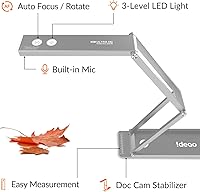
- Autofocus: Uses an AFS (Auto Focus Single) autofocus system that locks focus automatically when shooting documents or objects.
- Microphone: Features a built-in AI noise-reduction microphone designed to filter out ambient background sound during calls and recordings.
- LED Lighting: Includes a built-in LED lamp to supplement ambient lighting when capturing documents or objects in lower-light environments.
- Connectivity: Connects to a host device via USB, with no additional power adapter required for standard operation.
- Dimensions: Measures 8.66 x 2.6 x 0.51 inches when folded flat, making it roughly as thin as a modern smartphone for easy transport.
- Weight: Weighs 13.4 oz (approximately 0.83 lbs), keeping the overall carry load minimal whether in a backpack or laptop bag.
- OS Support: Compatible with Windows, Mac, and Chromebook operating systems without requiring third-party driver installation on most setups.
- Software: Works with the IDEAOCAM Chrome extension, which adds zoom, snapshots, stop-motion recording, and Google Drive or Google Classroom integration.
- OCR Support: Built-in OCR functionality supports over 100 languages, allowing printed text to be converted into searchable PDFs or editable documents.
- Included Accessories: Ships with a dedicated travel pouch for protective storage and convenient transport when carrying the camera between locations.
Related Reviews
Kitchbai KB-700 4K USB Document Camera
OKIOLABS OKIOCAM T-4K
OKIOCAM S-4K
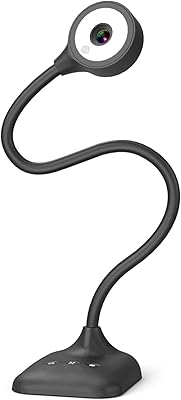
PAKOTOO PA-800 USB Document Camera
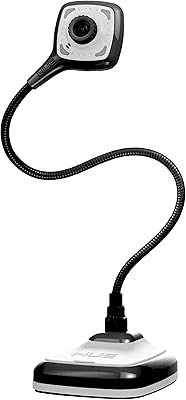
HUE HD Pro Document Camera
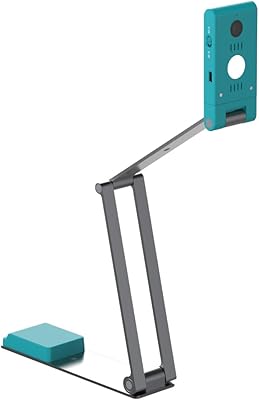
IRIScan Visualizer V7 4K Document Camera
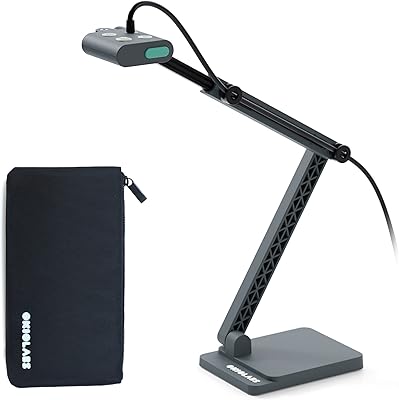
OKIOCAM S2 Pro
ELP USB4KCAM01H 4K USB/HDMI Camera (5-50mm 10X Zoom)
ROQIOO A9