Overview

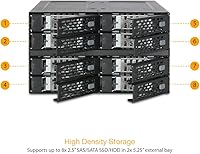
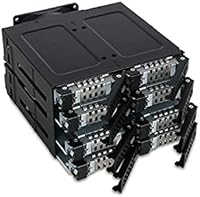
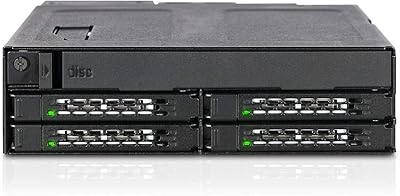
The ICY DOCK ToughArmor MB508SP-B 8-Bay Drive Enclosure is a purpose-built storage solution for power users who need to pack eight 2.5″ drives into just two standard 5.25″ optical bays. This is the kind of hardware that belongs in a workstation, a small server, or a serious homelab build — not a casual desktop upgrade. The all-metal chassis signals it was built for demanding environments, and the hot-swap design means drive management does not require downtime. Connectivity runs through two MiniSAS HD (SFF-8643) ports, the right interface for this density tier. If you are not already familiar with SAS infrastructure, expect a real learning curve before your first drive goes live.
Features & Benefits

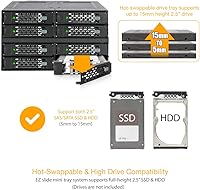
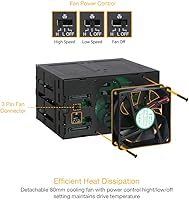
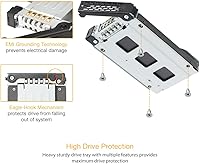
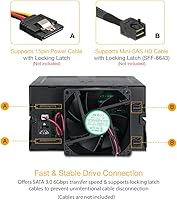
The ToughArmor MB508SP-B supports both SATA 3.0 and SAS 3.0, giving it genuine flexibility across drive types — SATA tops out at 6Gbps, while SAS 3.0 reaches 12Gbps on a single channel. Drive compatibility is broad: any 2.5″ unit from 5mm to 15mm in height will fit, covering thin SSDs and thicker spinning HDDs alike. Enterprise favorites like Seagate Exos, HGST Ultrastar, and Toshiba SAS drives are explicitly supported. Power comes from two standard SATA 15-pin connectors — nothing proprietary. The 80mm adjustable fan handles thermals reasonably well in dense configurations, though it does contribute some noise at higher speed settings, which is worth factoring in for quieter builds.

Best For

This 8-bay hot-swap enclosure is a natural fit for anyone who has already maxed out their available drive bays and needs more storage without adding an external box to the desk. Think video editors sitting on terabytes of project files, homelab builders running a local NAS or backup server, or IT staff managing a small business workstation that needs hot-swap redundancy without a full rack setup. It also makes strong sense for users reclaiming unused optical bays for active storage — exactly the use case this was designed around. One firm prerequisite: you will need a compatible SAS HBA card, sold separately, and that cost should factor into your total budget from the start.

User Feedback

Across more than 400 verified ratings, this drive backplane module holds a 4.5-star average — a score that actually holds up when you read through the individual reviews. Buyers consistently praise the solid metal construction, the reliable tray locking mechanism, and how well it handles real enterprise SAS drives straight away. Where people run into friction is on the setup side: the requirement for a dedicated SAS HBA card is not always obvious at purchase, and several users note the fan becomes audible when pushed to higher speeds. Neither issue is a dealbreaker for the intended audience, but both are worth knowing before you buy, particularly if SAS infrastructure is new territory for you.

Pros

  • Packs 8 x 2.5″ drives into just two 5.25″ bays, an exceptional density ratio for tower builds.
  • Hot-swap support across all 8 bays means drive replacements never require a full system shutdown.
  • Works with both SATA 3.0 and SAS 3.0 drives, covering a wide range of consumer and enterprise hardware.
  • Explicitly compatible with enterprise SAS drives from Seagate, HGST, Toshiba, Dell, and HPE.
  • Accepts 2.5″ drives from 5mm to 15mm height, so thin SSDs and thicker HDDs both fit without adapters.
  • Standard SATA 15-pin power connectors mean no proprietary cables or hard-to-source adapters.
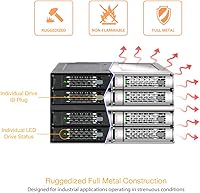
  • All-metal construction feels durable and holds up well in high-uptime, always-on server environments.
  • The 80mm fan with adjustable speed gives useful thermal control for dense, heat-generating drive configs.
  • Ranked #198 in Enclosures on Amazon with a 4.5-star average across over 400 real-world buyers.
  • Reclaims otherwise wasted optical drive bays and puts them to genuinely productive storage use.

Cons

  • A SAS HBA card is required but not included — a significant hidden cost that catches many buyers off guard.
  • Setup complexity is real; users unfamiliar with SAS wiring or backplane configuration will face a steep learning curve.
  • The 80mm fan becomes noticeably audible at higher speed settings, which is a drawback in quiet office or home environments.
  • Requires two free 5.25″ external bays, which rules out many modern compact or slim chassis builds.
  • SAS 3.0 speed tops out at 12Gbps on a single channel only — multi-channel configurations are not supported.
  • The total investment, including the required HBA card, is substantially higher than the enclosure price alone suggests.
  • Drive trays are specific to this unit, so sourcing replacements could be inconvenient if one is lost or damaged.
  • No included instructions for SAS HBA pairing or firmware guidance, which frustrates users new to the ecosystem.

Ratings

The scores below for the ICY DOCK ToughArmor MB508SP-B 8-Bay Drive Enclosure were generated by our AI engine after analyzing hundreds of verified global buyer reviews, actively filtering out incentivized, duplicate, and bot-generated submissions. Each category reflects the real distribution of praise and frustration found across confirmed purchases, with no category artificially inflated to flatter the product.
Build Quality
93%
The all-metal chassis is one of the most consistently praised aspects across buyer reviews. Users running this in always-on server environments and dense homelab towers report that the enclosure shows no flex, rattling, or degradation even after years of continuous operation. The drive trays feel purposefully machined, not stamped-out plastic.
A small number of buyers noted that individual tray latch tolerances can vary slightly unit to unit, occasionally requiring a firm push to seat properly. This is a minor manufacturing consistency issue rather than a structural flaw, but it surfaces often enough to mention.
Hot-Swap Reliability
91%
For IT professionals and homelab operators who need to swap failing drives without scheduling system downtime, the hot-swap mechanism here performs exactly as advertised. Users managing backup servers and RAID arrays report clean, error-free insertions and removals across hundreds of swap cycles without a single backplane-side failure.
Hot-swap performance is entirely dependent on the SAS HBA card and OS configuration — the enclosure cannot guarantee hot-plug behavior on its own. A handful of users who did not configure their HBA correctly reported unexpected drive drop events, which were later traced back to controller settings rather than the enclosure itself.
Drive Compatibility
89%
The range of supported drives is genuinely broad — SATA SSDs, 2.5″ HDDs, and enterprise SAS drives from Seagate, HGST, Toshiba, Dell, and HPE all work reliably. Video editors using high-capacity 2.5″ spinning drives and storage admins running Seagate Exos arrays both report solid, trouble-free compatibility right from initial installation.
Some users attempting to use less common or older SAS-1 drives encountered inconsistent recognition, and a few niche third-party SAS drive models produced warnings under certain HBA firmware versions. The explicitly supported drive list is solid, but compatibility with edge-case hardware is not guaranteed.
Installation Experience
58%
42%
For buyers who already have a SAS HBA card installed and understand SFF-8643 cabling, the physical installation is straightforward — the enclosure slots cleanly into dual 5.25″ bays and the backplane connections are logically laid out. Experienced homelab and IT users generally report getting drives recognized within an hour of starting.
For anyone new to SAS infrastructure, the setup curve is steep. The requirement for a separate HBA card is not prominently communicated at purchase, and the enclosure ships with minimal guidance on pairing or firmware configuration. Several frustrated buyers left negative reviews that were ultimately the result of missing or misconfigured HBA hardware rather than any fault of the enclosure itself.
Thermal Management
74%
26%
The built-in 80mm fan does a competent job keeping drive temperatures in check during sustained read/write workloads, which is meaningful when all 8 bays are populated with spinning HDDs generating real heat. Users running video backup workflows or continuous NAS operations report stable drive temperatures without requiring supplemental chassis fans aimed directly at the enclosure.
At higher fan speed settings, the noise output is noticeable enough to bother users in home office or quiet studio environments. The fan speed adjustment helps, but dialing it down too far in a warm chassis can push drive temps into ranges that some enterprise drives flag in their SMART data.
Fan Noise
61%
39%
At low to moderate speed settings the fan noise is tolerable and comparable to other metal drive enclosures in this class. Users in server rooms or utility closets where ambient noise is already present rarely flag this as a concern, and the adjustable speed control at least gives some degree of user autonomy.
In quiet environments — a home office, a desktop workstation next to a desk — the fan becomes a recurring complaint at higher settings. Unlike chassis fans, the enclosure fan runs continuously whenever the system is on, and there is no zero-RPM mode, which some buyers expected at this price point.
Value for Money
78%
22%
When evaluated on a cost-per-bay basis against alternatives at this density, the ToughArmor MB508SP-B holds up well. Users who needed 8 hot-swap bays without buying a rackmount chassis found this a meaningfully cheaper path that still delivered reliable, enterprise-adjacent performance. The metal build also gives it a longevity argument that cheaper plastic alternatives cannot match.
The total cost of ownership is higher than the enclosure price alone implies — a quality SAS HBA card adds a substantial sum on top. Buyers who did not account for that upfront sometimes felt the overall investment was harder to justify, especially for lighter storage workloads that would not leverage the SAS 3.0 bandwidth.
SAS Performance
83%
Under SAS 3.0 with a capable HBA, this drive backplane module delivers throughput that satisfies demanding workloads — users running sequential backup jobs across multiple Seagate Exos or HGST Ultrastar drives report no bottlenecking at the enclosure level. For dense storage arrays where sustained transfer rates matter, the SFF-8643 interface holds its own.
The 12Gbps ceiling applies to each SFF-8643 port on a single channel, so it is shared across 4 drives per port rather than dedicated per drive. At very high simultaneous multi-drive loads, bandwidth-sensitive users may notice throughput tapering, though for most real-world workloads this remains a theoretical rather than practical limitation.
Chassis Compatibility
71%
29%
The standard dual 5.25″ form factor means this enclosure fits naturally into most full-tower and mid-tower PC cases that still include external optical bay slots. Users migrating from optical drives to active storage in aging but spacious workstation towers find the fit clean and the mounting hardware sufficient.
Modern cases increasingly omit 5.25″ bays entirely, which simply disqualifies this enclosure for a growing portion of desktop PC owners. Users who did not verify their chassis bay count before purchasing account for a disproportionate share of return complaints, which points to a gap between product assumptions and the current PC case market.
Cable Management
66%
34%
Using standard SATA 15-pin power connectors keeps the power side of the wiring familiar and manageable for anyone with prior PC building experience. The dual SFF-8643 data connections consolidate what would otherwise be 8 individual drive cables into two clean runs back to the HBA, which experienced builders appreciate in a dense build.
SFF-8643 cables are thicker and less flexible than standard SATA data cables, which can make routing inside smaller mid-tower cases genuinely awkward. Some users also found that sourcing high-quality SFF-8643 cables of the right length required extra effort and additional cost beyond the enclosure itself.
Documentation & Support
55%
45%
ICY DOCK has an established product support presence, and users who contacted them directly generally reported getting useful guidance. The brand is well known in storage circles, and the broader homelab community has produced supplementary setup guides that fill in where the official documentation falls short.
The included documentation is sparse for a product that requires SAS infrastructure knowledge to deploy correctly. There is no detailed HBA pairing guide, no firmware recommendation list, and no troubleshooting flowchart — gaps that directly contribute to the frustrating setup experiences reported by less experienced buyers.
Tray Design & Usability
81%
19%
The tool-free or minimal-tool tray design makes drive installation and removal quick once the system is up and running. Homelab users who regularly rotate drives for backup or testing purposes appreciate that the tray mechanism does not require screwdrivers for every swap, keeping routine maintenance efficient.
The trays are proprietary to the MB508SP-B family, meaning a lost or broken tray requires sourcing a specific replacement part rather than grabbing any generic caddy. For users running this in a production environment, keeping a spare tray on hand is advisable but adds a small ongoing cost consideration.
Reliability Over Time
88%
Long-term buyers who have run this 8-bay hot-swap enclosure in continuous workstation or server operation for two or more years report stable behavior with no backplane degradation, connector wear, or unexpected drive dropouts attributable to the enclosure hardware. The metal construction appears to translate directly into durable long-term performance.
There are occasional reports of fan bearing noise developing after extended use at high speeds, suggesting the fan motor may not be rated for indefinitely continuous full-speed operation. This is not a widespread complaint, but it is worth monitoring fan acoustics as the unit ages in a 24/7 deployment.

Suitable for:

The ICY DOCK ToughArmor MB508SP-B 8-Bay Drive Enclosure was built for a specific type of buyer, and if you fit the profile, it is hard to beat at this tier. IT professionals managing small business servers will appreciate the hot-swap capability, which lets them pull and replace a failing drive without scheduling downtime. Homelab builders who have already exhausted their motherboard SATA ports and want to centralize dense 2.5″ storage inside their tower will find this a practical, space-efficient solution. Video editors sitting on large raw footage libraries, or backup administrators running local redundancy arrays, will benefit from the broad drive compatibility — both spinning 2.5″ HDDs and SSDs fit, including enterprise-grade SAS drives from major vendors. If you already own a SAS HBA card or have one budgeted, this enclosure slots into that infrastructure cleanly and punches well above the typical consumer storage accessory.
Not suitable for:

The ICY DOCK ToughArmor MB508SP-B 8-Bay Drive Enclosure is genuinely not the right purchase for someone new to SAS-based storage infrastructure. A compatible SAS HBA card is a hard requirement — it is not included, and it adds meaningful cost that first-time buyers sometimes overlook entirely. Users who just want to add a couple of extra drives to a gaming PC or a basic home desktop will find this enclosure over-engineered and over-budget for that purpose. The installation process assumes familiarity with backplane wiring, SFF-8643 connectors, and drive bay configuration, so anyone expecting a simple plug-in experience is likely to be frustrated. It is also worth noting that if your chassis does not have two free 5.25″ external bays, this unit simply will not fit — measure your available space before buying.
Specifications

  • Model Number: The unit is officially designated MB508SP-B by ICY DOCK (ICYDOCK).
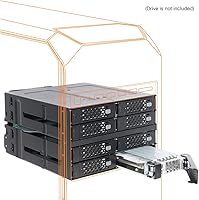
  • Drive Bays: Accommodates 8 x 2.5″ SATA or SAS hard drives and SSDs simultaneously.
  • Bay Requirement: Occupies 2 x external 5.25″ drive bays in a standard desktop tower or workstation chassis.
  • Host Interface: Connects to the host system via 2 x MiniSAS HD ports (SFF-8643), one port serving 4 drives each.
  • SATA Support: Supports SATA 3.0 at transfer speeds of up to 6Gbps per drive.
  • SAS Support: Supports SAS 3.0 at up to 12Gbps on a single channel per SFF-8643 port.
  • Drive Height: Accepts 2.5″ drives ranging from 5mm to 15mm in height, covering slim SSDs and full-height HDDs.
  • Power Connector: Draws power from 2 x standard SATA 15-pin connectors, with no proprietary power adapter required.
  • Hot-Swap: All 8 drive bays support true hot-swap operation, allowing drives to be removed or inserted without powering down the system.
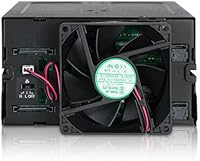
  • Cooling: A single 80mm fan with adjustable speed settings provides active airflow across all installed drives.
  • Build Material: The enclosure chassis and drive trays are constructed from metal for rigidity and thermal conductivity.
  • Dimensions: The unit measures 5.75 x 7.7 x 8.5 inches, sized to fit standard dual 5.25″ bay openings.
  • Weight: The enclosure weighs approximately 3.22 pounds (around 1460g) without drives installed.
  • SAS Drive Support: Verified compatible with enterprise SAS drives including Seagate Exos, HGST Ultrastar C series, Toshiba, Dell, and HPE branded units.
  • Platform: Designed for use in PC-based workstations and servers running standard ATX or similar tower chassis.
  • Drive Form Factor: Exclusively supports 2.5″ form factor drives; 3.5″ drives are not compatible with this enclosure.
  • Release Date: The MB508SP-B was first made available in November 2018 and remains in active production.
  • Manufacturer: Designed and manufactured by ICYDOCK, a brand specializing in storage enclosures and mobile racks.

Related Reviews

ICY DOCK ToughArmor MB998SP-B 8-Bay 2.5” SATA/SAS HDD/SSD Mobile Rack Enclosure for 5.25″ Bay
87%
91%
Performance
88%
Cooling Efficiency
89%
Build Quality
93%
Ease of Installation
72%
Noise Level
More
ICY DOCK ToughArmor MB604SPO-B 4 Bay 2.5 SSD/HDD & Optical Disk Drive Enclosure
85%
88%
Build Quality
85%
Cooling Performance
91%
Ease of Installation
87%
Value for Money
89%
Compatibility with Drives
More
ICY DOCK ToughArmor MB924IP-B 24-Bay 2.5″ SAS/SATA HDD/SSD Mobile Rack Enclosure
85%
93%
Storage Capacity
88%
Build Quality
85%
Cooling Performance
80%
Ease of Setup
91%
Connectivity & Compatibility
More
ICY DOCK flexiDOCK MB830SP-B 3-Bay 3.5 Inch SATA/SAS HDD Docking Enclosure
83%
93%
Ease of Installation
88%
Build Quality
87%
Performance & Speed
79%
Cooling Efficiency
65%
Noise Levels
More
IO CREST 8-Bay Tool-Less SATA Hard Drive Enclosure, 22TB Capacity
86%
89%
Value for Money
93%
Ease of Installation
88%
Performance (Speed/Transfer Rate)
85%
Build Quality and Durability
90%
Cooling and Noise Management
More
IO CREST SY-ENC50129 8-Bay USB4 40Gbps SATA Enclosure
76%
88%
Build Quality
83%
Drive Compatibility
86%
USB4 Interface & Compatibility
71%
Real-World Transfer Speed
74%
Fan Noise & Thermal Management
More
IO CREST SY-ENC50119 8-Bay External HDD Enclosure
75%
83%
Build Quality
79%
Drive Compatibility
76%
Thermal Management
68%
Fan Noise
71%
USB 3.0 Transfer Performance
More
Cenmate Dual Bay Hard Drive Enclosure
78%
83%
Build Quality
78%
Cooling Performance
76%
Transfer Speed
86%
Hot-Swap Functionality
91%
Ease of Installation
More
Cenmate 10 Bay Hard Drive Enclosure with Cooling Fan
82%
89%
Performance
94%
Ease of Installation
78%
Cooling Efficiency
85%
Data Transfer Speed
83%
Build Quality
More
QNAP TL-D800C 8-Bay JBOD Storage Enclosure
71%
83%
Build Quality
78%
Drive Compatibility
74%
USB 3.2 Gen 2 Throughput
51%
JBOD Architecture Clarity
57%
NAS Integration
More

FAQ

You will need a separate SAS HBA (host bus adapter) card installed in your PC — this is a hard requirement and it is not included with the enclosure. The ToughArmor MB508SP-B connects to that card via two MiniSAS HD (SFF-8643) cables, which may also need to be purchased separately depending on your setup. Factor that additional cost into your budget before ordering.

Regular SATA SSDs work just fine in this enclosure — it supports both SATA 3.0 and SAS 3.0 drives interchangeably across all 8 bays. You can mix SATA SSDs, SATA HDDs, and SAS drives in the same unit without any hardware changes. Just be aware that SATA drives will run at up to 6Gbps, not the 12Gbps ceiling available to SAS 3.0 drives.

Yes, the drive trays are designed to accommodate 2.5″ drives from 5mm all the way up to 15mm in height. That range covers most consumer and enterprise 2.5″ HDDs, including the thicker high-capacity spinning drives. Slim 5mm SSDs fit equally well, so you have a lot of flexibility in what you install.

At lower speed settings, the 80mm fan is reasonably quiet for a metal storage enclosure. However, if the drives run warm and the fan ramps up, it becomes noticeable — some users in quiet environments have flagged this as a concern. If noise matters to you, plan your chassis airflow carefully to keep drive temperatures down and the fan speed low.

Hot-swap functionality on the ICY DOCK ToughArmor MB508SP-B 8-Bay Drive Enclosure is consistently praised by real users as one of its strongest points. The drive trays have a positive latch mechanism that holds drives securely, and the backplane handles insertion and removal without system interruption — provided your HBA and OS support hot-swap, which most modern setups do.
Cards using the LSI SAS 3008 controller — such as the Broadcom 9300-8i or the Dell H330 in IT mode — are widely reported to work reliably with this enclosure. Any HBA with SFF-8643 (MiniSAS HD) ports and proper SAS 3.0 support should be compatible. If you are running RAID, make sure your card supports the RAID level you need, as this enclosure itself is a pass-through backplane with no onboard RAID logic.

No — this drive backplane module requires two adjacent 5.25″ external bays to mount correctly. It is sized precisely for that dual-bay footprint. If your chassis only has one bay available, this particular enclosure will not fit, and you would need to look at a single-bay alternative with fewer drive slots.

Yes, this is one of the use cases it was specifically designed for. ICY DOCK explicitly lists Seagate Exos, HGST Ultrastar C series, and other enterprise SAS drives as supported. The metal build helps with heat dissipation, and the adjustable fan provides active cooling — both important factors for always-on workloads. Just make sure your system PSU has enough headroom to power 8 active drives simultaneously.

The enclosure itself is OS-agnostic — it is purely a hardware backplane and has no drivers of its own. What matters is whether your SAS HBA card has driver support for your OS, which for Linux is generally excellent with popular cards like the LSI 9300 series. Linux users running FreeNAS, TrueNAS, Proxmox, or plain Ubuntu should have no issues, assuming the HBA is properly supported.

ICY DOCK does sell replacement trays for their ToughArmor line, but you should verify compatibility with the MB508SP-B model specifically before ordering, as tray designs can vary between product families. Reaching out to ICY DOCK support directly is the safest way to confirm the correct part number. It is worth keeping a spare tray on hand if this enclosure is in a production environment.