Overview

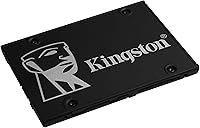
The Kingston KC600 2TB SATA SSD is Kingston's answer to the massive pool of users still running mechanical hard drives in perfectly good machines. Two terabytes hits a practical sweet spot — enough space for an operating system, years of documents, a photo library, and a game collection without constantly juggling what stays and what goes. This Kingston drive sits comfortably in the mid-range SATA tier, where it squares off against similarly priced options from Samsung, Crucial, and WD. With over 1,600 real-world ratings averaging 4.6 stars, there's a meaningful track record here that goes well beyond marketing claims.

Features & Benefits

The standout feature most buyers overlook is hardware-level encryption. The KC600 2TB uses AES 256-bit encryption baked directly into the drive's controller, meaning your data stays protected without any software overhead or performance penalty — useful for anyone handling sensitive files on a shared machine. The drive relies on 3D TLC NAND, a mature flash technology that balances write endurance with cost efficiency and holds up well under typical daily workloads. The SATA III interface caps out around 550 MB/s reads, which won't impress NVMe converts, but for everyday computing, office tasks, and general storage it's more than sufficient.

Best For

This SATA upgrade makes the most sense for anyone still running a spinning hard drive in a laptop or desktop that has plenty of life left in it. The jump from HDD to SSD remains one of the biggest performance leaps you can make, and the KC600 2TB delivers that boost plus enough room to avoid feeling storage-constrained. It's also a solid pick for home office users who handle sensitive documents and want encryption without involving an IT consultant. Students and creative hobbyists juggling large video files, photo archives, or project folders will find two terabytes goes a long way as a primary or backup drive.

User Feedback

Across well over a thousand verified purchases, the pattern is consistent: buyers are satisfied, and most say so emphatically. Easy installation and a noticeable speed improvement over whatever old drive came before it are the two things that come up again and again. A handful of users note that Kingston's bundled software is basic at best, and a few mention the drive doesn't ship with a mounting bracket for thinner laptop bays — a small but real omission. Long-term reviewers who've used this Kingston drive for a year or more tend to report continued reliable performance, which is reassuring. Encryption features rarely surface in reviews, suggesting most buyers simply don't need them — but they're there if you do.

Pros

  • Upgrading from a hard drive to this Kingston drive produces an immediately noticeable improvement in boot times and file access.
  • Two terabytes of capacity is genuinely generous for a primary drive, leaving room to grow over several years.
  • Hardware-level AES 256-bit encryption protects sensitive data without slowing the drive down or requiring software.
  • The 2.5-inch form factor drops straight into most laptops and desktops with zero modification.
  • A 4.6-star average across more than 1,600 real purchases points to consistent, dependable performance in everyday use.
  • 3D TLC NAND holds up well under typical daily workloads, making long-term reliability a realistic expectation.
  • Kingston's broad compatibility means it works with virtually any SATA-equipped PC without driver headaches.
  • Works equally well as a secondary bulk storage drive alongside an existing NVMe boot drive.
  • Quiet operation — no moving parts means no noise and no vibration, unlike a traditional hard drive.
  • TCG Opal support is a genuine plus for small business users who need compliant data security without dedicated IT resources.

Cons

  • SATA III tops out around 550 MB/s — a hard ceiling that NVMe drives cleared years ago.
  • No mounting bracket is included, which can be a problem in laptops or cases that need one for a proper fit.
  • The bundled Kingston SSD Manager software is functional but basic compared to what some competing brands offer.
  • Encryption features require compatible software and a supported system to activate, which adds setup complexity for non-technical users.
  • Not a practical choice for Mac users, as eDrive integration is built around Windows environments.
  • The drive has been on the market since early 2020, meaning newer competing options may offer better value per gigabyte at the same price point.
  • No NVMe or PCIe option in this product line means buyers who outgrow SATA will need a full platform switch.
  • Packaging has drawn occasional complaints — some buyers report the drive arriving with minimal protective cushioning.

Ratings

The Kingston KC600 2TB SATA SSD earns its strong reputation across more than 1,600 verified global purchases, and the scores below reflect what real buyers actually experienced — not marketing promises. Our AI has analyzed that feedback systematically, filtering out incentivized reviews and bot activity, to surface genuine patterns in both satisfaction and frustration. The result is an honest, balanced scorecard that highlights where this Kingston drive genuinely excels and where it falls short for certain buyers.

Value for Money
83%
For a 2TB internal SSD from a well-established brand with a five-year warranty, most buyers feel they are getting a fair deal. The combination of capacity, encryption features, and Kingston's reliability track record makes the price feel justified compared to lesser-known alternatives at similar price points.
Buyers who compare it closely against current NVMe options at similar prices sometimes feel the value proposition is narrowing. The SATA interface ceiling means you are paying a mid-range price for technology that is no longer cutting-edge, which sits uncomfortably for spec-conscious shoppers.
Read/Write Performance
74%
26%
For everyday computing — booting Windows, loading applications, transferring documents and photos — this SATA upgrade delivers a dramatic improvement over mechanical hard drives. Users consistently report that daily responsiveness feels snappy and that file operations no longer feel like a waiting game.
Anyone coming from an NVMe drive will immediately notice the ceiling. Sequential speeds top out around 550 MB/s, which lags far behind modern M.2 options, and users handling large video files or doing frequent large transfers will feel that limitation in real workflows.
Installation Ease
91%
Buyers across skill levels — from first-time upgraders to seasoned builders — consistently praise how straightforward the physical installation is. The standard 2.5-inch form factor means it drops into most laptops and desktops with nothing more than a screwdriver, and Windows detects it without any driver hunting.
A meaningful subset of buyers flagged the absence of a mounting bracket as a genuine inconvenience, particularly for desktop cases that require a 3.5-inch adapter sled. It is a small omission but one that forces an extra purchase that most competing drives also skip.
Long-Term Reliability
88%
Users who have owned this Kingston drive for a year or more consistently return to leave positive updates, noting that performance has not degraded noticeably over sustained daily use. The 3D TLC NAND and Kingston's five-year warranty together give buyers reasonable confidence that this is not a short-life purchase.
A small but notable number of reviewers reported drive failures within the first year, which, while statistically rare given the volume of sales, is enough to flag. Dead-on-arrival units and early failures are the primary driver of the one-star reviews in the pool.
Hardware Encryption
77%
23%
For home office users and small businesses handling sensitive data, the built-in AES 256-bit encryption is a meaningful differentiator that removes the need for software-based solutions. TCG Opal and eDrive support means IT administrators can manage the drive inside compliant security frameworks without additional hardware.
The majority of everyday buyers never activate or even explore the encryption features, which makes them largely invisible value for the typical consumer. Setup requires compatible software and some technical familiarity, which is a real barrier for non-technical users who might benefit most from it.
Noise & Vibration
97%
Being a solid-state drive, the KC600 2TB produces absolutely no operational noise or vibration under any workload. Users upgrading from aging mechanical drives frequently call this out as one of the most immediately satisfying changes — a quieter machine makes a real difference in home office and study environments.
There is genuinely little to criticize here by design, though a very small number of users have noted coil whine from surrounding components becoming more audible once the hard drive noise is gone — an indirect and system-specific issue rather than a flaw with the drive itself.
Capacity Satisfaction
92%
Two terabytes gives most users comfortable headroom for years of accumulation — operating system, applications, a photo library, games, and documents without constantly managing what stays and what goes. Students and creative hobbyists in particular find this capacity genuinely liberating compared to the 256GB or 512GB drives common in budget laptops.
A niche group of users — primarily those working with raw video footage or very large game libraries — found that even 2TB fills faster than expected and wished a larger capacity option were more accessible. The 2TB is generous for most, but power users will eventually feel the ceiling.
Compatibility
89%
The SATA III interface and 2.5-inch form factor are about as universal as storage connections get, and buyers report virtually zero compatibility issues across a wide range of laptop and desktop hardware spanning over a decade of SATA-equipped machines. Windows detection is automatic in every case reviewed.
Mac users encounter a specific limitation: while the drive works as storage on macOS without issue, the eDrive and TCG Opal encryption features are Windows-only in practical terms. This makes the KC600 2TB a slightly less complete package for anyone outside the Windows ecosystem.
Software Bundle
51%
49%
Kingston SSD Manager covers the essential bases — drive health monitoring, firmware updates, and access to encryption management — and it is freely downloadable. For users who simply want to keep an eye on drive health, it does the job without being intrusive or requiring registration.
The software is widely considered barebones by buyers who expected a polished cloning utility or a more intuitive dashboard. Competitors like Samsung include fully featured migration tools in the box, and the absence of reliable cloning software is a recurring source of frustration for first-time upgraders.
Packaging & Unboxing
62%
38%
The drive arrives in a compact, straightforward retail package that does its job. For buyers who ordered online and planned to install immediately, the no-frills packaging means less waste and a faster path to getting the drive in the machine.
A handful of reviewers noted that the protective packaging felt insufficient for a storage device, with minimal cushioning inside the retail box. A small number reported cosmetic marks on arrival, and the overall unboxing experience feels noticeably less premium than what Samsung or Crucial offer at comparable prices.
Thermal Management
81%
19%
Under typical daily workloads — web browsing, office applications, media playback — the KC600 2TB runs cool and requires no active cooling. The low power draw and efficient NAND contribute to a drive that stays well within comfortable operating temperatures in most system configurations.
Under sustained heavy write loads, such as large file migrations or continuous backup operations, temperatures can climb more noticeably. Users in thermally constrained laptop builds — particularly slim ultrabooks with poor airflow — have reported occasional throttling during extended high-load sessions.
Brand Trust
86%
Kingston has been a recognizable name in memory and storage for decades, and buyers consistently cite brand familiarity as part of their purchase confidence. The five-year warranty reinforces that reputation and gives buyers a meaningful safety net that smaller brands cannot always match.
A segment of more technically informed buyers feels Kingston's consumer SSD lineup has not kept pace with the innovation coming from Samsung or WD in recent years. The KC600 2TB is a solid but conservative product, and buyers who track storage benchmarks closely may feel Kingston is coasting on brand equity.
Boot & Load Times
85%
Users consistently report that Windows boots in well under 30 seconds after switching from a mechanical drive, and application load times that previously tested patience now feel nearly instant. For everyday users, this is often the single most tangible benefit they notice in the first week of ownership.
While the improvement over a hard drive is dramatic, the KC600 2TB does not consistently match the boot and load time results of NVMe-equipped systems in real-world testing. Users who have experienced both back-to-back tend to notice the gap, particularly in cold-boot scenarios on high-spec machines.

Suitable for:

The Kingston KC600 2TB SATA SSD is a strong match for anyone still running a mechanical hard drive in an otherwise capable desktop or laptop — the performance difference will feel dramatic, and the 2TB capacity means you won't be rationing space immediately after the upgrade. Home office workers and small business users handling sensitive documents will appreciate the built-in hardware encryption, which protects data at the drive level without requiring third-party software or any technical setup. Students and creative hobbyists who accumulate large libraries of photos, videos, or project files will find two terabytes gives them real breathing room for years. It also works well as a secondary internal drive for users who already have a faster NVMe boot drive and want bulk SATA storage alongside it. For anyone whose priority is reliability, broad compatibility, and a trusted brand name over bleeding-edge speed, this Kingston drive checks the right boxes.

Not suitable for:

The Kingston KC600 2TB SATA SSD is not the right call if raw throughput is a priority — enthusiasts building or upgrading a modern system with an M.2 slot should spend their budget on an NVMe drive instead, where real-world speeds can be three to five times higher. Gamers who care about load times in the latest titles will feel the SATA ceiling more acutely than office users, and for that audience the KC600 2TB is a compromise rather than a solution. Mac users should also approach with caution, as the eDrive encryption feature is designed around the Windows ecosystem and may not integrate cleanly outside it. If you need a portable or external storage option, this is an internal-only drive and requires a separate enclosure to work that way. Finally, buyers who want a complete out-of-the-box kit including mounting hardware for a specific chassis may need to source a bracket separately, which adds a small but real friction to the installation process.

Specifications

  • Capacity: The drive offers 2048 GB (2TB) of usable storage, suitable for operating systems, large media libraries, and application installs.
  • Interface: It connects via SATA III at up to 6 Gb/s, compatible with any desktop or laptop that has a standard SATA port.
  • Form Factor: The 2.5-inch housing fits directly into laptop drive bays and desktop caddies without adapters in most cases.
  • NAND Type: 3D TLC (Triple-Level Cell) NAND flash is used, offering a practical balance of write endurance and cost efficiency for everyday workloads.
  • Encryption: AES 256-bit hardware encryption is built into the controller, keeping data protected at the drive level with no software performance penalty.
  • Security Standards: The drive supports TCG Opal 2.0 and Microsoft eDrive, enabling compatibility with enterprise-grade security management tools on Windows systems.
  • Sequential Read: Rated sequential read speeds reach up to 550 MB/s under optimal conditions, which is near the practical ceiling for SATA III.
  • Sequential Write: Sequential write speeds are rated up to 520 MB/s, sufficient for fast file transfers, installations, and general desktop productivity.
  • Dimensions: The drive measures approximately 3.94 x 2.75 x 0.28 inches, keeping it compact enough for slim laptop bays.
  • Weight: At just 0.705 ounces, this Kingston drive adds virtually no meaningful mass to a laptop or desktop build.
  • Installation Type: Designed exclusively for internal installation; it is not intended for external or portable use without a separately purchased enclosure.
  • Compatible Systems: Officially compatible with Windows-based desktops and laptops; broad SATA motherboard support covers systems dating back well over a decade.
  • Brand: Manufactured by Kingston Digital, Inc., one of the longest-established names in consumer and enterprise flash storage.
  • Model Number: The exact model identifier is SKC600/2048G, useful for warranty registration and verifying compatibility with system builders.
  • Launch Date: The KC600 series was first made available in January 2020, giving it several years of real-world reliability data from actual users.
  • Warranty: Kingston backs the KC600 series with a five-year limited warranty, which is competitive within the SATA SSD category.
  • Power Source: The drive draws power directly from the host system via the SATA power connector; no external power supply is required.
  • Sales Rank: Ranked #655 in the Internal Solid State Drives category on Amazon, reflecting consistent and sustained buyer interest over time.
  • User Rating: Holds a 4.6 out of 5 star average across more than 1,668 verified ratings, indicating a high level of buyer satisfaction.
  • Software: Kingston SSD Manager is available as a free download for drive health monitoring, firmware updates, and encryption management on Windows.

Related Reviews
Kingston XS1000 2TB SSD
88%
94%
Performance
90%
Portability
93%
Speed (Read/Write)
88%
Build Quality
91%
Ease of Use (Plug & Play)
More
fanxiang S101 2TB 2.5″ Internal SSD
76%
88%
Value for Money
91%
Boot Time Improvement
58%
Sustained Write Speed
92%
Installation Ease
62%
Brand Reliability
More
Vansuny 2TB SATA III Internal SSD
75%
91%
Value for Money
84%
Read/Write Performance
89%
Installation Ease
88%
Compatibility
57%
Brand Trust
More
Kingston KC600 512GB mSATA Internal SSD
82%
83%
Read/Write Performance
78%
Compatibility
91%
Ease of Installation
88%
Build Quality & Durability
86%
Hardware Encryption
More
ORICO Y20 2TB SATA SSD
75%
91%
Value for Money
78%
Read & Write Speed
74%
Installation Ease
76%
Build Quality
63%
Long-Term Reliability
More
Ediloca ES106 2TB Internal SSD
77%
83%
Read/Write Performance
88%
Value for Money
79%
Installation Experience
76%
Build & Durability
67%
Long-Term Reliability
More
RAOYI 2TB PCIe Gen4 M.2 NVMe SSD
77%
91%
Value for Money
84%
Read Speed Performance
73%
Write Speed Performance
93%
PS5 Compatibility
88%
Ease of Installation
More
ORICO Y20M 2TB M.2 SATA SSD
81%
88%
Value for Money
83%
Compatibility Clarity
79%
Read & Write Speed
91%
Installation Experience
74%
Long-term Reliability
More
Kingston KC600 1TB SATA3 2.5″ SSD
85%
88%
Performance
91%
Speed and Responsiveness
85%
Ease of Installation
87%
Durability and Build Quality
89%
Data Security
More
SAN ZANG MASTER S500 2TB SATA SSD
75%
88%
Value for Money
81%
Read Speed Performance
92%
Installation Ease
89%
Compatibility
61%
Brand Reliability
More

FAQ

Almost certainly yes. As long as your laptop has a 2.5-inch SATA drive bay — which the vast majority of laptops made in the last 15 years do — this Kingston drive will slot right in. The only thing to check is whether your laptop uses a thinner 7mm or standard 9.5mm bay, and confirm the drive's height fits accordingly.

The hardware encryption is always active at the controller level, but to actually manage it — setting a password, enabling TCG Opal or eDrive compliance — you need compatible software like BitLocker on Windows or a third-party Opal management tool. For most home users who just want a fast drive, you can ignore the encryption features entirely and the drive works normally out of the box.

It depends on what you store. For most people — documents, photos, a few games, standard software — 2TB is more than enough for several years without feeling cramped. If you're a video editor or keep large raw photo archives, you'll appreciate having the headroom. If you're on a tight budget and primarily web browsing and office work, a 1TB model might suit you just as well.

NVMe drives are significantly faster on paper, often hitting 3,000 to 7,000 MB/s compared to SATA's roughly 550 MB/s ceiling. In practice, for everyday tasks like booting Windows, opening apps, or transferring files, the difference is real but not dramatic for most users. SATA makes a lot of sense if your machine doesn't have an M.2 slot, or if you're using it as a secondary storage drive where raw speed isn't the priority.

Kingston offers its own SSD Manager utility for drive health and firmware management, but for full drive cloning you'll typically need a third-party tool. Macrium Reflect Free and Acronis True Image (which Kingston has bundled with some products historically) are commonly used options. It's worth checking Kingston's website at the time of purchase to see what's currently included or recommended.

Yes, that works fine. The KC600 2TB is an internal SATA drive by design, but a standard 2.5-inch SATA USB enclosure — widely available for under twenty dollars — will let you use it as portable external storage. Just note that the USB connection will limit speeds to whatever the enclosure supports, typically USB 3.0 at around 400 MB/s.

No, and this is a genuine limitation that a few buyers have flagged. Kingston ships the drive itself and documentation, but no mounting bracket or adapter for desktop sleds. If your desktop case requires a 3.5-inch to 2.5-inch adapter bracket, you'll need to pick one up separately — they're inexpensive and widely available.

Completely silent. Solid state drives have no moving parts, so there's no spinning noise, no clicking, and no vibration. If you're upgrading from a mechanical drive, the absence of noise is one of the first things you'll notice, and it makes a real difference in quieter work environments.

For typical home or office use, several years of daily use is a realistic expectation. 3D TLC NAND has improved significantly in durability, and Kingston's five-year warranty reflects reasonable confidence in the drive's longevity. Buyers who have owned the KC600 2TB for a year or more consistently report no reliability issues, which is a good sign for day-to-day trust.

The drive itself is hardware-agnostic — SATA is a universal standard, and macOS will recognize and use it for storage without any issue. The caveat is the eDrive encryption feature, which is specifically a Windows ecosystem technology and won't function the same way on a Mac. If you're a Mac user who just wants extra reliable storage and doesn't need the Windows-specific encryption tools, the KC600 2TB works fine.