Kingston KC3000 1TB NVMe SSD
Overview
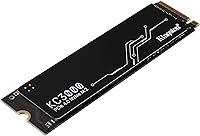
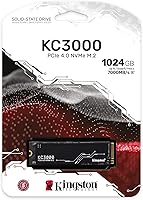
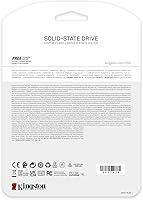
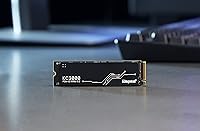
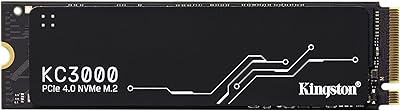
The Kingston KC3000 1TB NVMe SSD sits at the upper end of Kingston's storage lineup, targeting enthusiasts and power users ready to leave SATA and older PCIe 3.0 drives behind. Its standard M.2 2280 form factor means it slots into virtually any modern desktop motherboard or upgradeable laptop without fuss. What sets it apart physically from many bare-board competitors is the graphene aluminum heat spreader — a low-profile thermal solution that matters more than it might seem. Honest caveat: the headline speeds are real, but you'll only hit them on a PCIe 4.0 platform. Against the Samsung 980 Pro and WD Black SN850, it holds its own on price.
Features & Benefits
At its core, this Kingston NVMe drive pushes sequential reads to 7,000 MB/s and writes to 6,000 MB/s — figures that translate into near-instant large file transfers and noticeably snappier project load times in demanding applications. The 3D TLC NAND paired with an SLC write cache keeps routine workloads fast without constant cache exhaustion. For anyone running the drive in a tight chassis, the graphene heat spreader does real work, reducing the thermal throttling that plagues thinner bare modules under sustained load. Security is covered too: XTS-AES 256-bit encryption is baked in at the hardware level. Round it out with a 600 TBW endurance rating and a five-year warranty, and the long-term value case is straightforward.
Best For
The KC3000 1TB is squarely aimed at builders running AMD Ryzen 5000 or 7000 series, or Intel 12th-gen platforms and newer — anyone with a PCIe 4.0 motherboard who wants to squeeze out full bandwidth. Content creators shuffling large RAW files or video editors working with 4K timelines will notice the throughput advantage in practice. It also makes a compelling laptop upgrade; if you have an open M.2 2280 slot and a factory SATA or PCIe 3.0 drive, the speed difference is significant. And if you handle sensitive data and prefer not to lean on software encryption alone, the hardware-level AES support is a genuine selling point that not every drive in this price range offers.
User Feedback
Across more than 3,500 ratings, this PCIe 4.0 SSD holds a 4.7-star average — a score that carries real weight when you factor in the volume of verified buyers. People most commonly praise boot and load times, particularly those stepping up from older SATA drives. The heat spreader also earns specific mentions from users in compact builds who previously dealt with throttling problems. On the flip side, buyers on PCIe 3.0 boards occasionally point out that real-world speeds fall noticeably short of the advertised ceiling — not a flaw, but worth knowing before you buy. Migration gets positive marks too. Dead-on-arrival incidents are seldom reported, and long-term reliability commentary skews consistently favorable.
Pros
- Hits up to 7,000 MB/s sequential read on PCIe 4.0 platforms, making large file transfers genuinely fast in practice.
- The graphene aluminum heat spreader keeps temperatures in check during long rendering or gaming sessions without requiring extra cooling.
- Hardware-level XTS-AES 256-bit encryption is included at no extra cost, a real plus for security-conscious users.
- A 600 TBW endurance rating and five-year warranty make the Kingston KC3000 1TB NVMe SSD a confident long-term investment.
- Standard M.2 2280 form factor ensures broad compatibility across desktops and most upgradeable laptops.
- Consistently earns a 4.7-star average across more than 3,500 verified buyers — a trust signal that is hard to fake at that volume.
- Migration and cloning tools are accessible through Kingston's software partnership, lowering the barrier for first-time upgraders.
- Delivers PCIe 4.0 performance at a price that undercuts many comparable flagship drives by a meaningful margin.
- Dead-on-arrival and early failure reports are rare, pointing to solid manufacturing quality control.
Cons
- Full advertised speeds require a PCIe 4.0 motherboard — buyers on older platforms will see significantly reduced throughput.
- Random read/write performance lags behind premium competitors like the Samsung 980 Pro under heavy mixed workloads.
- The SLC write cache eventually saturates during very large sustained writes, after which speeds drop to native TLC rates.
- No included mounting screw or thermal pad — small omissions, but annoying if your board does not already supply them.
- Laptop compatibility depends entirely on the specific model; some ultrabooks lack an accessible or compatible M.2 slot.
- The heat spreader adds a small amount of thickness, which can create clearance issues in tightly packed multi-drive setups.
- Not an ideal choice for workloads dominated by small random file access, where the performance advantage over cheaper drives narrows considerably.
- PCIe 3.0 users effectively pay for a performance headroom they cannot access without a platform upgrade.
Ratings
Our AI-generated scores for the Kingston KC3000 1TB NVMe SSD are built from a global analysis of verified buyer reviews, with spam, incentivized submissions, and bot-generated feedback actively filtered out before scoring. Each category score reflects both where this drive genuinely delivers and where real trade-offs exist, giving you a transparent, balanced picture rather than a promotional summary.
Sequential Read Speed
Sequential Write Speed
Random I/O Performance
Thermal Management
Value for Money
Build Quality
Compatibility
Installation Experience
Long-term Reliability
Security Features
Migration Tools
Warranty & Support
Power Efficiency
Platform Versatility
Suitable for:
The Kingston KC3000 1TB NVMe SSD is purpose-built for anyone running a modern PCIe 4.0 platform — think AMD Ryzen 5000 or 7000 series, or Intel 12th-gen and newer — who wants to push storage performance without spending flagship money. Video editors and content creators moving large files daily will get tangible, practical benefits from the high sequential throughput, not just benchmark bragging rights. Developers compiling large codebases or data analysts shuffling hefty datasets will also appreciate how much faster sustained transfers feel compared to a SATA or PCIe 3.0 drive. Laptop owners with an open M.2 2280 slot and a sluggish factory-installed drive will find this a straightforward, high-impact upgrade. Anyone who needs hardware-level encryption baked in — rather than relying on OS-level software solutions — gets that here without paying extra for it.
Not suitable for:
If your motherboard only supports PCIe 3.0, the KC3000 1TB will still work, but you will leave a significant portion of its advertised performance on the table — sequential speeds will be cut roughly in half, and at that point, more affordable PCIe 3.0 drives offer comparable real-world results for less money. Users doing primarily random read/write workloads, such as running virtual machines or database operations with small, mixed file sizes, will find that this drive's advantages over cheaper alternatives largely disappear, since those tasks favor strong random IOPS over raw sequential throughput. Buyers after the absolute top tier in every benchmark category may find that the Samsung 980 Pro or WD Black SN850 edges it out in sustained random performance, particularly under heavy mixed workloads. It is also not the right fit for anyone building in an ultra-compact form factor that requires a shorter M.2 2242 drive, since this one is strictly 2280.
Specifications
- Interface: Uses a PCIe 4.0 x4 NVMe interface, which delivers peak bandwidth on compatible motherboards while remaining backward compatible with PCIe 3.0 slots at reduced speeds.
- Form Factor: Follows the standard M.2 2280 form factor, measuring 80mm in length, which fits the vast majority of desktop motherboards and upgradeable laptops.
- Capacity: Provides 1TB (1,024 GB) of usable storage, with additional capacities available in the same KC3000 product line up to 4,096 GB.
- Sequential Read: Rated for sequential read speeds up to 7,000 MB/s on a PCIe 4.0 platform under controlled benchmark conditions.
- Sequential Write: Rated for sequential write speeds up to 6,000 MB/s on a PCIe 4.0 platform, making it well-suited to large sustained file transfers.
- NAND Type: Built on 3D TLC (Triple-Level Cell) NAND flash, which balances cost, density, and acceptable write endurance for consumer and prosumer workloads.
- Write Cache: Employs an SLC (Single-Level Cell) write cache to accelerate burst write performance during typical day-to-day tasks before falling back to native TLC speeds under heavy sustained load.
- Endurance: Carries a 600 TBW (terabytes written) endurance rating for the 1TB variant, supporting years of heavy use before approaching the rated wear limit.
- Encryption: Supports full-drive hardware encryption using the XTS-AES 256-bit standard, enabling secure data protection without relying on software-based solutions.
- Heat Spreader: Ships with a low-profile graphene aluminum heat spreader pre-installed, designed to dissipate heat and reduce thermal throttling during sustained workloads.
- Warranty: Backed by a five-year limited manufacturer warranty, which is standard for drives in this performance tier and reflects Kingston's confidence in long-term reliability.
- Weight: The drive weighs approximately 0.16 oz (4.5 g) with the heat spreader installed, adding negligible mass to any build.
- Dimensions: Physical dimensions measure 0.87 x 3.15 x 3.15 inches, consistent with the M.2 2280 standard footprint.
- Compatible Platforms: Confirmed compatible with PCIe 4.0 and PCIe 3.0 desktops and laptops, though peak rated speeds are only achievable on PCIe 4.0 host platforms.
- Installation Type: Designed for internal installation as a primary or secondary drive; no external enclosure or adapter is required for standard M.2 slots.
Related Reviews
Kingston NV2 1TB NVMe SSD
Kingston NV3 1TB NVMe SSD
Kingston KC3000 4TB NVMe M.2 SSD
Kingston KC3000 512GB NVMe M.2 SSD
Kingston OM3PGP41024P-A0 1TB M.2 2230 SSD
Kingston Fury Renegade 1TB NVMe M.2 SSD

RONGSHU RS001 1TB NVMe SSD

WD_BLACK 1TB SN7100 NVMe SSD
Ridata E801 512GB NVMe M.2 SSD