Overview

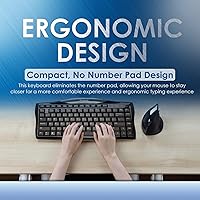
The Evoluent EKB Compact Wired Keyboard is a tenkeyless office keyboard from Evoluent, a brand that has built its reputation around ergonomic peripherals like vertical mice. The core idea is straightforward: drop the numeric pad, and your mouse naturally sits much closer to your body, reducing lateral arm reach and the shoulder tension that accumulates over a long workday. The design has been on the market since 2012 — a long run for any peripheral, and a quiet sign it has earned repeat customers. This is a mid-range, practical tool aimed at desk workers, not gamers or enthusiast typists chasing premium switches.
Features & Benefits

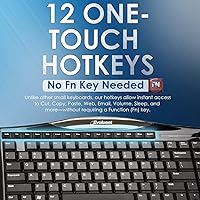
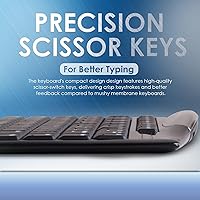
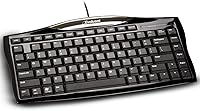
The most practical thing about this compact Evoluent keyboard is the absence of a number pad — it sounds minor, but it genuinely changes how your arm rests when reaching for the mouse. The scissor-switch keys offer a low, flat travel reminiscent of a quality laptop keyboard: quiet enough for an open office, with just enough resistance to keep fast typists accurate. Twelve dedicated hotkeys handle media and shortcuts directly, no function-layer gymnastics required. At roughly 12.5″ long and weighing just over a pound, it fits comfortably on a crowded desk and is light enough to pack for travel without a second thought.

Best For

This ergonomic wired keyboard makes the most sense for people who spend long hours mousing — think data analysts, designers, and administrative staff who clock serious time with a pointer. It is also a solid pick for anyone working at a small desk who needs full typing capability without a full-size footprint. If you have been put off by the complexity of split or ortholinear boards but still want better arm positioning, this sits in a practical middle ground. Wired-only users will appreciate the no-fuss USB connection. That said, if you rarely use a mouse, the ergonomic case for this board weakens considerably.

User Feedback

The tenkeyless Evoluent board holds a 4.2-star average across over 150 ratings, which tells a fairly consistent story: buyers who chose it for ergonomic reasons tend to be satisfied, and many report a noticeable difference in arm and shoulder comfort after switching. The build quality draws praise for this price tier — it feels solid without being heavy. Recurring criticism centers on the scissor switches feeling too shallow for anyone coming from a mechanical keyboard. A handful of buyers also wish for a wireless option, and opinions on hotkey placement are genuinely mixed depending on workflow. Surviving essentially unchanged since 2012 speaks to quiet, durable reliability.

Pros

  • Removing the number pad measurably shortens the reach to your mouse, reducing shoulder strain over a long workday.
  • The scissor-switch keys are quiet enough for open offices or shared spaces without sacrificing typing accuracy.
  • Twelve dedicated hotkeys work instantly with no function-layer toggle, keeping your workflow moving.
  • Plug-and-play USB setup means it works the moment you plug it in — no drivers, no software.
  • At just over a pound, this ergonomic wired keyboard is easy to carry between workstations or slip into a bag.
  • The low-profile key height feels immediately familiar to anyone used to typing on a modern laptop.
  • A design that has stayed in production since 2012 suggests real-world durability and a reliable supply of units.
  • The compact footprint frees up meaningful desk space without requiring any sacrifice in key count for standard typing.

Cons

  • No wireless option limits flexibility for users who prefer a cable-free desk or multi-device Bluetooth switching.
  • Scissor switches feel shallow and flat to anyone accustomed to mechanical keyboards with proper tactile feedback.
  • The plastic construction, while adequate, does not feel premium at this price point compared to some rivals.
  • Hotkey placement has drawn mixed reactions — the layout does not suit every workflow equally well.
  • No backlit keys makes this a poor choice for anyone who types in dim lighting conditions.
  • There is no dedicated software or remapping utility, so what you see is exactly what you get.
  • The fixed USB cable cannot be detached, which complicates storage and means cable damage requires replacing the whole board.
  • No Mac-specific key labeling or layout adjustments, which can trip up macOS users despite basic USB compatibility.

Ratings

Our AI rating system analyzed verified global buyer reviews for the Evoluent EKB Compact Wired Keyboard, actively filtering out incentivized, bot-generated, and low-signal feedback to surface what real long-term users actually think. The scores below reflect a transparent synthesis of both the genuine strengths and the recurring frustrations reported across hundreds of real-world desk setups. Whether this ergonomic wired keyboard earns a place on your desk depends a lot on your specific workflow, and these scorecards are designed to help you figure that out honestly.

Ergonomic Design
84%
The tenkeyless layout is the entire value proposition here, and for heavy mouse users it delivers. Shifting the mouse several inches closer to the body visibly changes the resting angle of the shoulder, and many buyers working eight-plus hour days at a desk have called out this positional improvement as the reason they keep coming back to this board.
The ergonomic benefit is highly dependent on how you use your computer. If you rarely reach for a mouse or already work on a compact desk where positioning is not a constraint, the core advantage of this design simply does not apply, and the keyboard becomes harder to justify over cheaper tenkeyless alternatives.
Typing Feel
67%
33%
For office use and everyday document work, the scissor switches are quiet and stable enough that most non-enthusiast typists will not think twice about them. The low profile keys feel immediately familiar to anyone who has typed on a modern laptop for years, which lowers the adjustment period considerably.
Anyone coming from a mechanical keyboard will notice the shallowness immediately. The switches offer minimal tactile feedback and virtually no audible confirmation on actuation, which some users described as feeling mushy or imprecise during extended typing sessions. This is arguably the most common reason buyers feel lukewarm after purchase.
Build Quality
73%
27%
The chassis is solid enough that it does not flex or creak under normal typing pressure, which is more than you can say for some keyboards at this price tier. Users who have owned this compact Evoluent keyboard for several years generally report no key failures, yellowing, or structural cracking — a reassuring signal given the plastic construction.
The all-plastic body does feel modest in hand, especially if you are comparing it to aluminum-decked competitors. At this price point, buyers reasonably expect something that feels a bit more substantial, and the lightweight chassis can give a first impression of fragility even when the long-term durability record suggests otherwise.
Hotkey Usability
61%
39%
Having twelve dedicated top-row hotkeys that fire without any function-layer toggle is genuinely convenient for users whose workflow involves frequent media control or volume adjustment. There is no relearning required — the keys do exactly what the labels say, every time, without hunting for a secondary input.
The fixed layout is the real limitation. You cannot remap these keys, so if your workflow does not align with the default assignments, they are effectively dead real estate on the board. Several buyers noted that the specific shortcuts chosen do not match common productivity applications, leaving useful key positions wasted.
Connectivity & Setup
91%
Plug-and-play USB means it is genuinely ready in seconds. There are no drivers to hunt down, no Bluetooth pairing sequences, and no firmware updates to worry about. For IT-managed office environments where installing software is restricted, that kind of immediate compatibility is actually a meaningful practical advantage.
The integrated, non-detachable cable is the main friction point here. You cannot swap in a longer cord if your setup needs it, and if the cable sustains damage at the connector — a real risk with repeated desk repositioning — the entire board becomes unusable with no repair option available.
Value for Money
69%
31%
For buyers who genuinely need the ergonomic mouse-positioning benefit and want a wired, no-fuss office keyboard, the price feels reasonable given the specific niche it fills. The tenkeyless Evoluent board does something very few keyboards in this range bother to address explicitly, and that focused purpose carries real value for the right buyer.
Evaluated purely as a typing tool without the ergonomic angle, the price is harder to defend. Competing tenkeyless boards with better switch options, detachable cables, and more modern aesthetics exist at similar or lower price points. Buyers who do not prioritize the mouse-proximity benefit will likely feel the cost is not fully justified.
Desk Space Efficiency
88%
At 12.5 inches wide, this ergonomic wired keyboard frees up a meaningful strip of horizontal desk space compared to any full-size board with a number pad. For users working at a small home office desk or a shared corporate workstation, reclaiming that 4 to 5 inches of surface area has real, daily utility.
The depth of roughly 6.5 inches is not dramatically smaller than many full-size keyboards, so users hoping for a dramatically more compact overall footprint may be slightly underwhelmed. The space savings are almost entirely in the width, which matters specifically for mouse positioning — not for general desk tidiness.
Portability
79%
21%
Weighing just 1.1 pounds and measuring under 13 inches across, this is easy to drop into a laptop bag for commuting or to carry between a home desk and an office workstation. The slim profile means it does not add awkward bulk when packed alongside a laptop.
The fixed cable creates a small but real packaging annoyance — you cannot detach it for a cleaner pack, and coiling it repeatedly risks wear over time. Business travelers who move setups daily may find this cable management friction adds up in ways that a wireless board would eliminate entirely.
Noise Level
83%
The scissor switches produce a soft, dampened keystroke that sits comfortably in open-plan office environments. Colleagues are unlikely to notice, and the keyboard is quiet enough for video calls without generating distracting background clatter.
The sound profile, while quiet, lacks the satisfying thock or click that some typists find motivating during long writing sessions. This is a matter of personal preference, but buyers who associate good typing with some degree of auditory feedback will find the silence of this board more numbing than peaceful.
Wireless Flexibility
22%
78%
There is nothing positive to say here from a wireless standpoint — this keyboard is wired by design, and for users who specifically want a reliable, latency-free connection without battery management, that is exactly what it delivers consistently.
There is no wireless or Bluetooth option at all, and no variant of this model exists that changes that. For users with multi-device setups, a clean cable-free desk, or a tendency to work away from a fixed workstation, this limitation is a hard dealbreaker that no amount of ergonomic benefit can offset.
Compatibility
76%
24%
As a standard USB HID device, this compact Evoluent keyboard connects and works immediately on virtually any modern operating system that supports plug-and-play USB input. Windows users in particular get the full intended experience with all hotkeys functioning as labeled.
Mac users will encounter layout mismatches and unlabeled modifier key differences that require some mental remapping. There is no Mac-specific key legend, no included key swap set, and no software utility to remap the layout, which makes the macOS experience noticeably rougher than on Windows.
Aesthetic & Design
58%
42%
The clean black matte finish and low-profile silhouette are understated enough to fit into most desk setups without looking out of place. The modern, minimal styling avoids the gamer-aesthetic that some office buyers actively want to avoid.
The design has not meaningfully changed since 2012, and it shows. There is no RGB option, no variety of color finishes, and the key font and cap styling look noticeably dated next to current competitors. For buyers who care about desk aesthetics as much as functionality, this board is difficult to get excited about visually.

Suitable for:

The Evoluent EKB Compact Wired Keyboard was designed with a very specific person in mind: someone who spends most of their workday with a hand on the mouse and has started to feel the toll of that extended arm reach in their shoulder or upper back. Office workers — analysts, writers, administrative staff, designers — who log long hours at a desk will find the tenkeyless layout genuinely changes their resting arm position for the better. It also appeals strongly to anyone working on a smaller desk or in a shared workspace where surface area is at a premium. Laptop users who want an external keyboard without a bulky full-size board will find the compact footprint and low-profile keys familiar and comfortable. If you have been curious about ergonomic keyboards but feel intimidated by split boards or radical layouts, this ergonomic wired keyboard is a sensible, low-commitment starting point that asks almost nothing of you in terms of adaptation.

Not suitable for:

The Evoluent EKB Compact Wired Keyboard is a poor fit for anyone who types on a number pad regularly — accountants, data entry professionals, and spreadsheet-heavy users will find the omission genuinely disruptive rather than a benefit. Mechanical keyboard enthusiasts should also look elsewhere; the scissor switches are quiet and serviceable, but they offer none of the tactile depth or switch-swapping flexibility that that community prizes. Wireless is simply not an option here, so if you need a clean, cable-free desk or work across multiple devices with Bluetooth switching, this board will frustrate you. Gamers will find no features tailored to their needs — no anti-ghosting marketing, no RGB, no programmable macros beyond the fixed hotkeys. And if your work setup already positions your mouse naturally close to your body, the core ergonomic argument for buying this compact Evoluent keyboard largely disappears.
Specifications

  • Brand: Manufactured by Evoluent, a company specializing in ergonomic computer peripherals including vertical mice and compact keyboards.
  • Model Number: The official model identifier for this keyboard is EKB.
  • Form Factor: Tenkeyless layout omits the numeric pad entirely, keeping the overall board width significantly narrower than a standard full-size keyboard.
  • Dimensions: The keyboard measures 12.5″ in length, 6.5″ in width, and approximately 0.5″ in height at its lowest profile point.
  • Weight: The unit weighs 1.1 pounds, making it light enough to carry between workstations or pack in a laptop bag without adding meaningful bulk.
  • Switch Type: Keys use a scissor-switch mechanism, which provides a shallow, stable actuation similar in feel to a quality laptop keyboard.
  • Key Profile: Ultra-low profile key height reduces the angle at which the wrists rest during typing, minimizing upward wrist extension.
  • Hotkeys: Twelve dedicated one-touch hotkeys are built into the top row for media controls and common shortcuts, requiring no secondary function key press.
  • Connectivity: Connects via a built-in USB cable using standard plug-and-play HID protocol, requiring no driver installation on compatible operating systems.
  • Cable Type: The USB cable is integrated and non-detachable, meaning it cannot be swapped out if damaged or replaced with a longer cord.
  • Color: Available in black with a matte plastic finish across the key deck and chassis.
  • Material: The body and key caps are constructed from plastic, which keeps the overall weight low but limits the premium feel of the chassis.
  • Compatible Devices: Designed for use with laptops and desktop computers that have a standard USB Type-A port.
  • OS Compatibility: Functions as a standard USB HID keyboard and is primarily oriented toward Windows-based systems, with basic compatibility on other USB HID-compliant platforms.
  • Market Rank: Holds a Best Sellers Rank of approximately #685 in the Computer Keyboards category on Amazon at the time of this listing.
  • First Available: This product was first listed for sale in February 2012, giving it over a decade of continuous market presence.
  • Ratings: Holds an average customer rating of 4.2 out of 5 stars based on 154 ratings at the time of review.

Related Reviews
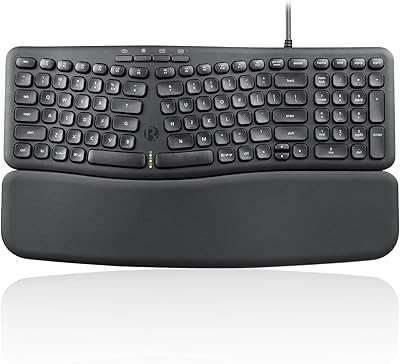
Perixx PERIBOARD-536 Ergonomic Compact Wired Keyboard
67%
67%
Ergonomic Comfort
58%
Typing Experience
78%
Noise Level
63%
Wrist Rest Quality
54%
Build Quality
More
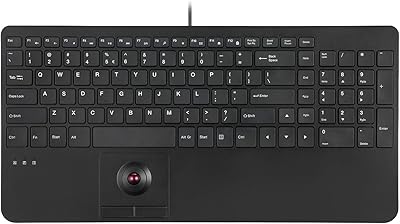
Perixx PERIBOARD-538 Wired Trackball Keyboard
74%
93%
Space Efficiency
78%
Typing Experience
62%
Trackball Usability
81%
Build Quality
83%
Keycap Durability
More
Macally SLIMKEYCA Compact Wired Keyboard
77%
83%
Typing Experience
68%
Build Quality
89%
Value for Money
92%
Mac Compatibility
57%
Keycap Durability
More
Azio Retro Compact Mechanical Keyboard
73%
91%
Build Quality
94%
Aesthetic Design
83%
Typing Experience
58%
Noise Level
71%
Wireless Performance
More
X9 Performance X9ERGOKEY Ergonomic Split Keyboard
77%
83%
Ergonomic Comfort
67%
Wrist Rest Quality
61%
Key Feel & Typing Experience
58%
Build Quality & Durability
88%
Layout & Key Coverage
More
Microsoft Designer Compact Bluetooth Keyboard
78%
78%
Build Quality
72%
Typing Experience
69%
Bluetooth Connectivity
93%
Battery Life
81%
Multi-Device Pairing
More
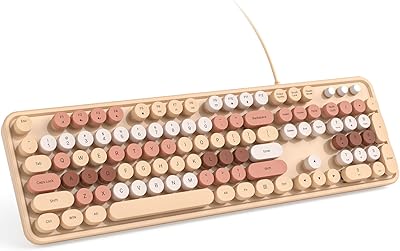
KNOWSQT Wired Computer Keyboard
85%
89%
Design & Aesthetics
83%
Typing Experience
94%
Ease of Setup
88%
Build Quality
70%
Key Press Feel
More
Keychron C2 Full-Size Hot-Swap Mechanical Keyboard
75%
83%
Build Quality
81%
Switch Feel & Performance
88%
Hot-Swap Functionality
79%
Mac Compatibility
62%
Keycap Quality
More
HP 400 Backlit Wired Keyboard
77%
67%
Typing Experience
83%
Backlight Quality
71%
Build Quality
88%
Portability
86%
Connectivity & Compatibility
More
X9 Performance X9BLKEYLP7CB Wired Keyboard and Mouse Combo
77%
88%
Key Readability
83%
Backlight Effectiveness
94%
Ease of Setup
71%
Mouse Comfort
62%
Build Quality
More

FAQ

It will function on a Mac as a basic USB HID keyboard since macOS recognizes standard plug-and-play USB devices. That said, the key labels and hotkey assignments are designed around Windows conventions, so some hotkeys may not map the way you expect on macOS. Most standard typing keys will work fine, but power users on Mac may find the experience a little rough around the edges.

No software or drivers are required. You plug it in and it works immediately on any system that supports standard USB HID keyboards, which covers essentially every modern Windows PC and most other platforms.

Very different. The scissor switches on this compact Evoluent keyboard are quiet and shallow — closer in feel to a good laptop keyboard than to any mechanical switch. If you are used to the tactile bump or audible click of a mechanical board, these will feel flat by comparison. For everyday office typing they are perfectly functional, but enthusiasts looking for satisfying key feedback will likely be disappointed.

Unfortunately, no. The cable is fixed and non-detachable, so if it becomes frayed or damaged at the connector, you would need to replace the entire keyboard. It is worth handling the cable with care and avoiding sharp bends near the exit point.

No, there is no key backlighting of any kind. If you regularly work in a dim room or low-light environment and rely on seeing the key labels, this could be a real inconvenience.

The honest answer is that it depends on your specific setup. Removing the number pad does move the mouse meaningfully closer to your body, which shortens the lateral reach of your right arm. Many users report this makes a noticeable difference in shoulder and upper-arm comfort during long sessions. It is a positional improvement, though — not a medical treatment — and results will vary based on your desk height, chair, and overall posture.

No. This is a wired-only keyboard with no wireless variant available. If a cable-free setup is important to you, you will need to look at a different product entirely.

The board has been on the market since 2012 with essentially the same design, which suggests it does not have widespread durability failures that would have pulled it off the market. User feedback does not flag early key failures or chassis cracking as common complaints. The plastic build is modest, but it appears to hold up adequately under normal office use.

Opinions vary depending on how you work. The twelve one-touch hotkeys cover media playback, volume, and a handful of other shortcuts that many office users hit regularly. Because they are dedicated keys rather than a secondary function layer, they genuinely do save a key combination. That said, they are fixed — you cannot remap them — so if the default assignments do not match your workflow, they just take up space.

A typical full-size keyboard with a number pad runs somewhere around 17 to 18 inches wide. The tenkeyless Evoluent board comes in at 12.5 inches, so you are saving roughly 4 to 5 inches of horizontal desk space. That is enough to shift a standard mouse significantly closer to your centerline, which is the whole point of the design.

Where to Buy