Lenovo Legion K510 Mini Pro Mechanical Keyboard
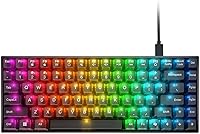
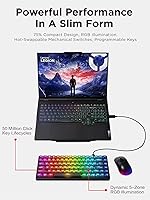
Lenovo Legion K510 Mini Pro Mechanical Keyboard — image 1

Lenovo Legion K510 Mini Pro Mechanical Keyboard — image 2
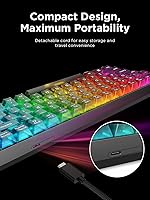
Lenovo Legion K510 Mini Pro Mechanical Keyboard — image 3
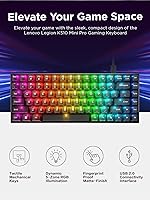
Lenovo Legion K510 Mini Pro Mechanical Keyboard — image 4
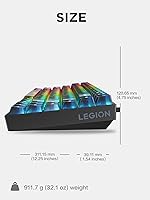
Lenovo Legion K510 Mini Pro Mechanical Keyboard — image 5

Lenovo Legion K510 Mini Pro Mechanical Keyboard — image 6
Lenovo Legion K510 Mini Pro Mechanical Keyboard — image 7
80%
20%

Overview

The Lenovo Legion K510 Mini Pro Mechanical Keyboard is Lenovo's calculated push into the 75% keyboard market, landing in the mid-range tier alongside names like Keychron, Akko, and Redragon. What the compact form actually gets right is keeping arrow keys intact alongside the full function row — a combination that many 65% and 60% boards sacrifice and that buyers often miss more than they expect. The translucent keycaps with their matte top coating make for a distinctive look that really comes alive under the RGB lighting without veering into gimmick territory. Throw in a detachable cable and you've got a board that travels well and doesn't add unnecessary wire chaos to your desk.

Features & Benefits

The most practically valuable thing about this compact mechanical board is the hot-swap support — pull switches out, drop new ones in, no soldering required. That capability usually shows up in keyboards that cost significantly more, which makes it legitimately worth calling out here. The RGB setup covers five zones with ten built-in modes, and it hooks into Microsoft Dynamic Lighting for hands-free sync with other compatible Windows devices. Lenovo rates the switches at 50 million clicks, so durability over years of heavy use shouldn't be a concern. The detachable 1.8-meter cable terminates in USB-C at the keyboard end, a practical choice for modern setups. Programmable keys and a Copilot shortcut add utility for Windows users, though customization depth does tie you to Lenovo's own software.

Best For

This 75% gaming keyboard sits in a sweet spot for a pretty specific buyer profile. If you game but also work at the same desk, the retained function row and arrow keys mean you're not fighting an awkward layout every time you open a spreadsheet or reach for a shortcut. For anyone already running a Lenovo Legion setup — a Legion laptop, a compatible monitor — the Dynamic Lighting integration clicks into place without manual configuration. It's also a solid entry point for people new to mechanical keyboards who want something plug-and-play from a brand they trust, without diving into the enthusiast end of the hobby. One honest caveat: this is a wired-only board, and that's a real consideration if a cable-free desk matters to you.

User Feedback

The K510 Mini Pro has cleared 5,700 ratings with a 4.4-star average, which is a healthy signal for a listing that's less than two years old. Buyers consistently mention build quality and typing feel as highlights — there's genuine appreciation for the tactile feedback and how the board holds up during long sessions. Many users treat it as an everyday work keyboard as much as a gaming one, which speaks well of the layout decision. On the flip side, the software dependency is a recurring complaint — those wanting deep customization without Lenovo's app find the experience limiting. The lack of wireless also surfaces often as a wish-list item. Switch acoustics fall somewhere in the middle: not silent, but far from disruptive.

Pros

  • Hot-swappable switches let you change the typing feel down the line without any tools or soldering.
  • The 75% layout keeps arrow keys and the full function row, avoiding the layout compromises of smaller boards.
  • Microsoft Dynamic Lighting support makes RGB sync with compatible Windows devices genuinely hands-off.
  • A 50-million-click switch rating means you're unlikely to face wear issues for years of heavy use.
  • The detachable USB-C cable reduces desk clutter and makes the board much easier to pack up and travel with.
  • At its price point, hot-swap support is uncommon — it adds real long-term value without a premium cost.
  • Over 5,700 ratings averaging 4.4 stars reflects consistent buyer satisfaction across a broad user base.
  • The compact mechanical board works well as a hybrid daily driver for both work tasks and gaming sessions.
  • Plug-and-play setup with no driver requirement for basic use makes onboarding quick and painless.
  • Translucent keycaps with a matte finish give the RGB lighting a polished look without feeling overdone.

Cons

  • No wireless option exists, which is a meaningful gap as cable-free setups become more common at this price tier.
  • Customization depth is limited to Lenovo's own software, which creates friction for non-Windows users or those preferring open tools.
  • The exact switch model is not disclosed in product listings, making it harder to know the sound and feel profile before buying.
  • Users wanting truly silent keystrokes will find tactile mechanical switches louder than expected in shared spaces.
  • Keycap quality is mid-range and may disappoint buyers used to PBT double-shot caps found on competing boards.
  • The software dependency for advanced features means the experience is notably better for Lenovo ecosystem users than for everyone else.
  • At two pounds, the board is heavier than some ultra-portable 75% competitors aimed at frequent travelers.
  • No per-key remapping outside of Lenovo's application limits portability of custom configurations to other machines.

Ratings

The Lenovo Legion K510 Mini Pro Mechanical Keyboard scores below are generated by our AI review engine after analyzing thousands of verified buyer reviews worldwide, with spam, bot-submitted, and incentivized feedback actively filtered out. The result is an honest, category-by-category breakdown that reflects what real users praised and where they ran into friction — nothing smoothed over.

Build Quality
83%
Most buyers come away impressed by how solid this compact mechanical board feels for its price tier. The chassis doesn't flex noticeably during heavy typing sessions, and the matte finish holds up well against fingerprints and daily handling — something users who keep their desk gear for years tend to appreciate.
A handful of reviewers note that the keycap material feels slightly thin compared to PBT options on competing boards in the same price range. It's not a dealbreaker, but buyers expecting flagship-level construction from a mid-range board may find the plastics underwhelming on close inspection.
Typing Feel
81%
19%
The tactile bump on each keystroke is well-received across a wide range of users — from coders grinding through long work sessions to gamers who need confident, repeatable key registration. Multiple reviewers specifically mention how natural the transition felt coming from membrane keyboards.
The switch sound profile divides opinion. In quieter environments like shared offices or late-night setups, the audible feedback is noticeable enough to draw comments. Those who specifically wanted a quieter tactile experience would have benefited from more switch variety at purchase.
Hot-Swap Feature
91%
This is one of the most consistently praised aspects across user reviews, particularly because hot-swap support is rarely included at this price point. Buyers who have gone through the process report it being straightforward — pull, swap, done — making switch experimentation genuinely accessible rather than theoretical.
The board doesn't ship with a switch puller tool, which means first-time users may need to source one separately before getting started. It's a minor omission, but one that occasionally catches beginners off guard when they first try to take advantage of the feature.
RGB Lighting
86%
The translucent keycaps do a noticeably better job of diffusing the backlight evenly compared to standard opaque caps, and users building Legion-themed setups particularly appreciate how the 10 preset modes cover both subtle and bold lighting preferences. Microsoft Dynamic Lighting sync works reliably for those in a compatible Windows ecosystem.
The 5-zone lighting setup means the RGB is not truly per-switch programmable without the Lenovo software, and even with it, the customization depth is shallower than what dedicated tools like VIA or QMK offer on competitor boards. Enthusiasts who want granular control per key will find this limiting.
Software Experience
58%
42%
For users already running Lenovo hardware on Windows, the Lenovo Accessory and Display Manager integrates reasonably well and covers the basics — key remapping, lighting customization, and Copilot shortcut configuration — without requiring a steep learning curve.
Non-Lenovo users and those on non-Windows systems find the software experience frustrating or simply non-functional. Reviews frequently flag that advanced features are locked behind the app, and the app itself has drawn complaints about stability and update frequency. It's one of the more consistent pain points in the feedback pool.
Layout & Key Coverage
89%
Retaining arrow keys and a full function row in a 75% form factor is the single biggest reason many buyers chose this board over smaller alternatives. Users who code, use creative applications, or play games with heavy function-key bindings consistently call this out as the layout decision that sold them.
The 75% layout still means some symbol and navigation keys are shifted to Fn layers compared to a full-size board, which takes a short adjustment period. A small number of buyers — mostly those upgrading from full-size keyboards — found the transition slightly jarring for the first week of use.
Value for Money
78%
22%
Hot-swap switches, per-key RGB, a detachable USB-C cable, and a well-known gaming brand behind it — taken together, the feature-to-price ratio is genuinely competitive for buyers shopping in this tier. For someone buying their first mechanical keyboard, it's a hard package to argue against.
Once you factor in that wireless alternatives and more switch-agnostic boards exist at similar or slightly higher prices, the value calculation gets tighter. Buyers who discover those options after purchasing sometimes feel they could have gotten more flexibility for a marginally higher spend.
Cable & Connectivity
77%
23%
The detachable cable is a practical inclusion that most users appreciate — it reduces desk clutter, makes the board easier to pack away, and the USB-C connection at the keyboard end is the right call for a modern peripheral. The 1.8-meter length covers most desk configurations comfortably.
There is no wireless option whatsoever, and this is a recurring complaint from buyers who expected it at this price tier. As cable-free gaming peripherals become more common, the wired-only design is increasingly noted as a limitation rather than just a neutral spec.
Portability
74%
26%
The compact footprint genuinely makes this easier to slide into a bag alongside a laptop, and the detachable cable means one less thing to snag or tangle. Buyers who move between home and office setups appreciate not having to leave a full-size board at each location.
At 2 pounds, the K510 Mini Pro is on the heavier end for a 75% board, and that weight is noticeable if you're actually carrying it in a bag regularly. Ultra-portable alternatives in the same category are meaningfully lighter, which matters to anyone who commutes with their peripherals.
Durability
85%
The 50-million-click switch rating gives buyers legitimate confidence in the board's longevity, and early long-term users report no noticeable switch degradation after months of daily use. The chassis construction also holds up well under consistent pressure without developing wobble or creaking.
Keycap legend durability over extended periods is less certain, as the translucent caps with matte coating may show wear on high-frequency keys faster than PBT double-shot alternatives. This is a common trade-off at this price tier, but it's worth noting for buyers who keep peripherals for three or more years.
Setup & Ease of Use
88%
Plug-and-play functionality out of the box is a genuine strength — no driver installation required for basic use, and the preset RGB modes are accessible via Fn shortcuts without touching any software. For a beginner's first mechanical keyboard, the onboarding experience is about as frictionless as it gets.
Users who want anything beyond the default configuration quickly hit the software wall, and getting Lenovo Accessory and Display Manager set up smoothly isn't always a linear experience. A few reviewers also note the Fn layer labeling on keycaps isn't always intuitive without consulting the manual.
Compatibility
71%
29%
For Windows PC and laptop users — which covers the majority of the gaming audience — compatibility is solid and the Copilot key integration works as advertised. Basic USB functionality also works on other operating systems without issue for typing and standard key inputs.
Mac users and Linux users are effectively second-class citizens here. Without software support outside Windows, advanced features simply don't function, and the Copilot key serves no purpose outside the Microsoft ecosystem. This significantly narrows the board's appeal for cross-platform households.
Aesthetics
82%
18%
The translucent-over-matte keycap design is a genuinely distinctive look in a market crowded with opaque black boards. When backlit, the effect is clean and controlled rather than garish — buyers who want RGB presence without a toy-like appearance tend to land here satisfied.
The overall color options are limited to a single black-and-translucent variant, which won't satisfy buyers looking for more personality or alternative colorways. For a keyboard competing in a segment where boutique options offer wide color variety, the single-option aesthetic can feel restrictive.

Suitable for:

The Lenovo Legion K510 Mini Pro Mechanical Keyboard is a strong match for people who want a smaller footprint on their desk without giving up the keys they actually use every day. The 75% layout hits a practical sweet spot — you keep the function row and arrow keys, which means it handles spreadsheets, coding shortcuts, and in-game key bindings without the frustrating workarounds that 60% boards demand. If you're already in the Legion ecosystem with a compatible laptop or monitor, the Microsoft Dynamic Lighting support makes RGB sync genuinely effortless rather than a manual configuration headache. Beginners moving from membrane to mechanical will find this a low-friction entry point — it's a recognizable brand, it works out of the box, and the hot-swap capability means you can experiment with different switch feels later without buying a whole new keyboard. Dual-use setups where the same desk serves both gaming sessions and a full workday are exactly where this board earns its place.

Not suitable for:

Buyers who need or strongly prefer a wireless setup should look elsewhere — the Lenovo Legion K510 Mini Pro Mechanical Keyboard is wired only, and at a price point where wireless competitors do exist, that's a real trade-off worth weighing carefully. If you're an enthusiast who wants deep per-key remapping, macro scripting, or onboard memory profiles, the customization ceiling here is modest and locked behind Lenovo's own software, which adds friction for anyone not running a Windows machine or who prefers open-source tools like VIA or QMK. Users who favor a quieter office environment should also think twice — tactile mechanical switches produce noticeable sound, and the listing doesn't specify the exact switch model, so there's limited certainty about the precise noise profile before you buy. Anyone expecting flagship-level build materials or premium keycaps out of the box will find this sits firmly in mid-range territory, not above it.

Specifications

  • Layout: 75% compact US layout with 84 keys, retaining both the function row and dedicated arrow keys.
  • Switch Type: Tactile mechanical switches with hot-swap support, allowing switch replacement without soldering.
  • Key Lifecycle: Switches are rated for up to 50 million clicks, indicating long-term durability under heavy daily use.
  • RGB Lighting: 5-zone RGB illumination with per-key 16.8 million color support and 10 built-in lighting presets.
  • Dynamic Lighting: Compatible with Microsoft Dynamic Lighting for system-synchronized RGB effects across supported Windows peripherals.
  • Cable: Includes a 1.8m detachable cable with a USB-C connector at the keyboard end and USB-A at the host end.
  • Connectivity: USB 2.0 interface; wired only with no Bluetooth or wireless mode available.
  • Dimensions: The board measures 12.25″ long, 4.75″ wide, and 1.54″ tall.
  • Weight: The keyboard weighs 2 pounds, which is moderate for a compact wired mechanical board.
  • Keycap Finish: Translucent keycaps feature a matte top coating for a fingerprint-resistant surface and consistent RGB light diffusion.
  • Color: Available in black with translucent keycap housings that allow RGB backlighting to pass through clearly.
  • Software: Full customization requires Lenovo Accessory and Display Manager, a Windows-based application for key remapping and lighting control.
  • Special Keys: Includes a dedicated Microsoft Copilot key, Fn-layer multimedia controls, and user-programmable key support.
  • Compatible Devices: Designed for use with Windows laptops and desktop PCs; basic plug-and-play functionality works on most USB-enabled computers.
  • Power Source: Powered entirely via the USB connection; no batteries or external power supply are required.
  • Model Number: Official Lenovo model number is GY41P80859, also marketed under the K510 Mini series identifier.
  • Manufacturer: Designed and sold by Lenovo under their Legion gaming peripherals line.
  • Availability Date: This keyboard was first made available for purchase in July 2024.

Related Reviews
AULA F75 Pro
AULA F75 Pro
82%
91%
Typing Sound & Feel
83%
Build Quality & Construction
89%
Hot-Swap & Customizability
86%
Wireless Performance
82%
Battery Life
More
Lenovo Preferred Pro II Wired USB Keyboard
78%
83%
Typing Comfort
78%
Build Quality
88%
Typing Noise
93%
Setup & Compatibility
89%
Value for Money
More
SteelSeries Apex Pro Mini HyperMagnetic Gaming Keyboard
86%
94%
Performance
88%
Build Quality
91%
Customizability
93%
Portability
78%
Software Experience
More
Ducky One 3 Mini 60% Mechanical Keyboard
81%
91%
Build Quality
88%
Typing Sound & Acoustics
86%
Switch Feel
93%
Hot-Swap Functionality
89%
Keycap Quality
More
Lenovo Legion K310 Gaming Keyboard
75%
91%
Typing Noise Level
84%
Value for Money
72%
Build Quality
67%
RGB Lighting Quality
69%
Gaming Performance
More
GravaStar Mercury K1 Pro Mechanical Gaming Keyboard

80%
91%
Build Quality
88%
Typing Feel
86%
Switch Performance
79%
Wireless Reliability
74%
Battery Life
More
Lenovo Legion Pro 7i Gaming Laptop 2025, Intel Ultra 9, RTX 5080 16GB, 32GB RAM, 1TB SSD

86%
94%
Gaming Performance
92%
Display Quality
89%
Cooling Efficiency
88%
Build Quality
91%
Multitasking Performance
More
Beelink Mini S12 Pro (N100, 16GB, 500GB)
83%
83%
Everyday Performance
91%
Value for Money
76%
Build Quality & Design
84%
Thermal Management & Noise
88%
Connectivity & Ports
More
Gigi Mini Pro Kit
Gigi Mini Pro Kit
83%
88%
Ease of Use
85%
Effectiveness
90%
Suitability for Sensitive Skin
87%
Portability
84%
Waxing Results
More
AULA S99 Pro Wireless Membrane Keyboard
75%
88%
Multi-Device Connectivity
81%
Wireless Stability
63%
Typing Feel
67%
Build Quality
84%
Rotary Knob
More

FAQ

The basic typing and media functions will work on a Mac since it connects via standard USB, but the Copilot key and any advanced customization through Lenovo's software are Windows-specific. If you're on a Mac and want full control over lighting and key remapping, you'll be limited. It's really designed with Windows users in mind.

Hot-swappable means you can pull the existing switches out and push new ones in without any soldering. You typically just need a small switch puller tool — sometimes included with enthusiast boards, though you may need to buy one separately for a few dollars. It's a straightforward process and a great way to experiment with different switch feels over time.

It holds up well for all-day typing. The 75% layout keeps the function row and arrow keys intact, so productivity tasks like writing, coding, and spreadsheet work don't require awkward workarounds. A lot of buyers report using it as their main work keyboard as much as a gaming one.

The board ships with tactile mechanical switches, which means you'll feel a noticeable bump on each keystroke without the loud click of a clicky switch. The exact switch brand or model isn't officially disclosed in the product listing, so if you're particular about a specific switch brand, that's worth investigating before buying.

Yes — out of the box it works plug-and-play for typing, gaming, and the preset RGB modes without installing anything. The Lenovo Accessory and Display Manager software is only needed if you want to remap keys, create custom lighting profiles, or dig into more advanced settings.

Tactile switches are noticeably louder than membrane keyboards and quieter than clicky switches, but they're still audible in quiet environments. If you share a space and noise is a real concern, you'd want to either look at a board with silent switches or plan to swap the switches out using the hot-swap feature after purchase.

Yes, the keyboard has 10 prebuilt lighting modes accessible via Fn key shortcuts directly on the board. You don't need the Lenovo app running just to have RGB effects. The software is only required if you want to customize those lighting zones or sync with Microsoft Dynamic Lighting.

The cable is detachable and uses a USB-C connector at the keyboard end, which is a practical choice for a modern setup. The other end is USB-A for plugging into your PC. The included cable is 1.8 meters long, which is enough reach for most desk configurations.

The K510 Mini Pro's biggest advantage over many same-price Keychron models is the hot-swap support, which Keychron doesn't always include at this tier. Keychron tends to offer more switch variety upfront and Mac compatibility out of the box, while this board leans harder into the Windows and Legion ecosystem. If wireless matters to you, Keychron has options here that the K510 Mini Pro simply doesn't.

The keycaps can be removed with a standard keycap puller for cleaning underneath. For the keycap surfaces themselves, a slightly damp microfiber cloth works well — the matte finish resists smudging but does collect dust over time. Since the switches are hot-swappable, the switch plate is also more accessible than on soldered boards, making a thorough cleaning less of a chore.

Where to Buy