Overview

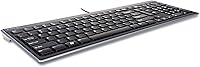
The Kensington K72357USA Slim Wired Keyboard is one of those quietly reliable desk tools that has earned a genuine reputation over years on the market. It targets home office workers and everyday desktop users who want something thinner and quieter than the average bundled keyboard. The scissor-switch mechanism gives it a feel far closer to a modern laptop keyboard than traditional membrane boards — a meaningful upgrade for anyone logging serious typing hours. Plug it into any Windows or Mac machine and it simply works, no driver installation required. That kind of no-fuss simplicity still counts for a lot.
Features & Benefits

At just 0.75 inches tall, the slim profile is immediately noticeable — there is no wrist-jarring drop from desk surface to key height that you get with chunkier boards. The scissor-key switches deliver satisfying tactile feedback without the noise that irritates coworkers or housemates. Having a full numeric keypad built into a board this thin is genuinely practical, especially for spreadsheet work or regular data entry. The one-touch shortcut keys for email and media controls are convenient once you learn their positions. And because it runs over a standard USB connection, there are no batteries to replace and no wireless dropouts to troubleshoot.

Best For

This slim keyboard earns its place on desks where quiet and practicality matter more than flashy features. It suits shared office environments where clicky switches would be an annoyance, or home setups where space is limited and a low-profile board just makes sense. The plug-and-play compatibility across Windows and Mac is a natural fit for anyone who regularly switches platforms. People who depend on a numeric keypad but find full mechanical boards too bulky will appreciate the balance here. This is not built for hardcore gaming — it is a productivity tool, straightforward and dependable.

User Feedback

Owners of the Kensington wired keyboard tend to leave detailed, long-term reviews, which says something about the loyalty it generates. Quiet keystrokes get praised repeatedly as a genuine advantage in shared spaces, and long-term durability holds up well across multi-year accounts. That said, a few recurring issues are worth knowing before you buy. The light weight — a plus for portability — can cause sliding on glossy desk surfaces, so pairing it with a mat is a smart move. Some buyers also mention the media shortcut keys take a short adjustment period to learn. The cable length is functional but tight for larger desk setups, so measure your reach before committing.

Pros

  • Scissor-switch keys deliver a noticeably quieter and crisper typing experience than standard membrane keyboards.
  • The slim 0.75-inch profile keeps your desk uncluttered without sacrificing a single key from the full layout.
  • A full numeric keypad is built in — rare at this price point among low-profile boards.
  • Plug-and-play USB connectivity works instantly on both Windows and Mac, no drivers needed.
  • No batteries required, eliminating dead-key surprises during critical work moments.
  • Adjustable tilt stands let you raise the back edge for a more comfortable typing angle.
  • The understated matte black finish looks clean across a wide range of desk setups.
  • Long-term durability is well-reported, with many users still typing on the same board after several years.
  • One-touch shortcut keys for email and media controls become genuinely time-saving once the muscle memory sets in.
  • Cross-platform reliability makes this scissor-key board a practical option for mixed Windows and Mac households.

Cons

  • The keyboard slides on smooth or polished desk surfaces, especially during fast, heavy typing sessions.
  • Cable length is on the short side, which can be a real problem for larger or unconventional desk configurations.
  • No backlighting of any kind makes typing in dim or dark environments unnecessarily difficult.
  • The lightweight chassis creates a slightly hollow feel underhand that does not inspire premium confidence.
  • Media and function shortcut keys have a learning curve that catches new users off guard regularly.
  • The single available tilt angle limits ergonomic adjustability for taller users or those with specific wrist needs.
  • Keycap labels for secondary functions are small and not always easy to read at a glance.
  • No software utility or key remapping support is provided, limiting customization to what is printed on the keys.
  • The rubber feet are too few and too small to reliably anchor the board on non-textured surfaces.
  • No spill resistance is mentioned, which is a practical gap for users who keep drinks at their desk.

Ratings

The Kensington K72357USA Slim Wired Keyboard has been scored by our AI system after processing verified purchase reviews from buyers across North America, Europe, and Asia-Pacific — with spam, incentivized posts, and bot activity actively filtered out before analysis. The result is an honest, composite picture of how this slim scissor-key board performs in real home offices, shared workspaces, and dual-platform desk setups. Both the genuine strengths and the recurring frustrations are reflected transparently in every category below.
Typing Feel & Key Response
83%
The scissor-switch mechanism consistently impresses users coming from basic membrane keyboards. Most describe the feedback as noticeably crisper and more laptop-like — satisfying without being loud. Long typing sessions feel less tiring than on the spongy bundled keyboards that typically ship with desktop PCs.
Enthusiasts accustomed to mechanical switches will find the tactile feedback underwhelming by comparison. A small but vocal group of typists reports that the key travel feels slightly shallow, which takes adjustment for those with a heavier typing style.
Noise Level
88%
Quiet keystrokes are arguably this keyboard's single most praised trait. Office users in open-plan environments and remote workers on video calls consistently call out how unobtrusive the typing sound is. It handles hours of continuous use without generating the distracting clatter of standard dome-switch boards.
It is not completely silent — at higher typing speeds, some key bottoming-out noise is noticeable in very quiet rooms. Users expecting a near-silent experience comparable to premium quiet mechanical boards may find it falls just short of that standard.
Build Quality & Durability
77%
23%
Multiple reviewers have used this slim keyboard for two, three, or even four years without significant key degradation or structural failure. The keycaps retain their labeling well over time, and the overall frame holds up reliably under daily office workloads. For the price tier, the longevity is genuinely above expectation.
The chassis feels noticeably light and slightly hollow under the hands — not cheaply made, but far from the solid, premium feel of higher-end boards. Some users report minor flex in the middle of the board when pressing keys with moderate force.
Slim Profile & Desk Footprint
91%
At just 0.75 inches tall, this is one of the flattest full-size keyboards available at this price point, and buyers notice immediately. It fits neatly on crowded desks without dominating the workspace, and the low wrist angle reduces the need for a separate wrist rest for many users.
The slim profile, while a visual win, contributes directly to the desk-sliding issue. On glass, lacquered wood, or polished surfaces, the board shifts noticeably during vigorous typing. The rubber feet help, but they are not adequate on every surface type.
Numeric Keypad Usability
84%
Including a full numeric keypad on a board this thin is a genuinely practical decision that competitors at this tier often skip. Accountants, data entry workers, and spreadsheet-heavy users frequently mention this as a key reason they chose this board over slimmer tenkeyless alternatives.
The keypad keys are slightly compressed compared to a traditional full-size layout, which can cause mis-presses for users with wider hands until muscle memory adjusts. A few reviewers note the numpad area feels marginally less responsive than the main typing cluster.
Ergonomics & Tilt Adjustment
71%
29%
The integrated tilt stands allow for a meaningful angle change that suits users who prefer a slightly raised back edge. For shorter typing sessions, the adjustment makes a real difference in wrist comfort and is quick to deploy without tools.
Only one tilt angle is available, which limits personalization. Taller users or those with specific ergonomic requirements often find the single raised position insufficient, and there is no palm rest included to compensate for the elevated typing angle.
Compatibility & Plug-and-Play Setup
93%
Buyers on both Windows and Mac platforms report zero setup friction — plug in the USB cable and it works immediately, every time. This cross-platform reliability is a meaningful advantage for users who share keyboards between machines or work in mixed-OS environments.
The keyboard lacks any dedicated macOS-specific key labeling, which can confuse new Mac users mapping function behaviors. Advanced key remapping requires third-party software, as no configuration utility is provided by Kensington.
Shortcut & Media Keys
66%
34%
The one-touch email and media control keys are genuinely useful once learned, covering volume, playback, and launching common applications without multi-key combinations. Regular users report building muscle memory for these shortcuts within a week of daily use.
The learning curve is real — several reviewers describe accidentally triggering media keys while reaching for function keys during their first few weeks. The key labeling for secondary functions is small and not always intuitive, particularly for older users.
Cable Quality & Length
62%
38%
The wired USB connection is rock-solid, with zero input lag or connectivity dropouts reported across a wide range of reviews. For users frustrated by wireless keyboard pairing issues or battery drain, this dependability is a meaningful selling point.
The cable length is the most consistently flagged hardware limitation. Users with tower PCs stored under or beside large desks often find the cable barely reaches comfortably. There is no braiding or reinforcement at the stress points, which raises durability concerns over years of use.
Stability on Desk Surface
58%
42%
On textured surfaces, fabric desk mats, or matte-finish desks, the rubber feet perform adequately and the board stays put through normal typing. Users who already own a desk mat rarely mention sliding as an issue.
On smooth or polished surfaces — which are common in modern home offices — the keyboard slides with frustrating regularity. The lightweight chassis compounds this, and the rubber feet are too small and too few to fully compensate. This is a recurring complaint across many one and two-star reviews.
Value for Money
86%
Relative to what you get — scissor switches, a numeric keypad, cross-platform compatibility, and a recognizable brand — the price represents solid value. Most buyers feel the balance between cost and daily-use quality is fair, especially compared to cheaper no-name alternatives at a similar price.
There are a handful of competing keyboards from brands like Logitech in the same price range that offer additional features like spill resistance or dedicated media dials. Buyers who shop around carefully may find comparable or better options for a similar outlay.
Aesthetics & Desk Presence
74%
26%
The understated matte black finish looks clean on most desk setups and does not attract fingerprints as aggressively as glossy alternatives. The low profile gives it a modern, uncluttered appearance that suits both home and professional environments.
The design is purely functional — there is no backlight, no RGB option, and no color variants to speak of. Users who care about desk aesthetics or need to type in dim conditions will find the complete absence of any key illumination a notable drawback.
Weight & Portability
69%
31%
At 2.1 pounds, it is light enough to move between rooms or toss in a bag without much thought. Users who occasionally bring a keyboard to different workstations find it manageable to transport, particularly given its slim form factor.
The lightness that aids portability is the same quality that creates desk-stability problems during use. It is also not ruggedized for travel in any way — no carrying pouch, no reinforced corners — so frequent transporters should handle it carefully.

Suitable for:

The Kensington K72357USA Slim Wired Keyboard is a strong fit for home office workers and everyday desktop users who want a meaningful typing upgrade without committing to the noise or cost of a mechanical keyboard. If you spend several hours a day writing emails, building spreadsheets, or working through documents, the scissor-switch keys will feel immediately more comfortable and responsive than the membrane board that likely came bundled with your PC. It suits open-plan offices and shared home workspaces particularly well, where keeping noise to a minimum is a genuine daily concern rather than a minor preference. Users who switch regularly between Windows and Mac machines will appreciate that it just works on both platforms the moment it is plugged in. Anyone who relies on a numeric keypad for data entry or financial work — but finds full mechanical boards too bulky or loud — will find the balance here genuinely practical. It also makes good sense for desk setups where space is tight, since the low profile frees up room without forcing you to give up any keys.

Not suitable for:

The Kensington K72357USA Slim Wired Keyboard is not the right choice for users who prioritize tactile intensity or audible click feedback in their typing experience — mechanical switch enthusiasts will find the scissor keys underwhelming by comparison, regardless of how well-suited they are to office use. Gamers should also look elsewhere; this board was built for productivity, not fast-action input, and the media shortcut layout is not optimized for gaming scenarios. If your desk has a glass, lacquered, or polished surface and you do not own a desk mat, the lightweight chassis will likely frustrate you with its tendency to shift during active typing. Users with tower PCs stored at floor level or on the far side of a large desk may find the cable length limiting, as it offers little slack for unconventional setups. Those who type in low-light conditions regularly will notice the complete absence of any key backlighting, which is a genuine functional gap rather than a cosmetic one. Finally, buyers who want a keyboard with long-term configurability, onboard macro support, or software customization will find this board too basic for those needs.

Specifications

  • Brand: Manufactured by Kensington, a company with a long-established reputation in office peripherals and computer accessories.
  • Model Number: The official model identifier for this keyboard is K72357USA.
  • Key Type: Scissor-switch keys provide a stable, low-travel typing mechanism that closely mirrors the feel of a modern laptop keyboard.
  • Profile Height: The keyboard measures just 0.75 inches at its thinnest point, making it one of the slimmest full-size wired boards available.
  • Dimensions: Overall footprint is 17.6″ long by 7.5″ wide by 1.5″ tall, offering a compact desktop presence despite the full-size layout.
  • Weight: The keyboard weighs 2.1 pounds, which is light enough for easy repositioning but contributes to some sliding on smooth surfaces.
  • Layout: Full-size QWERTY layout with an integrated numeric keypad and dedicated one-touch shortcut keys for email and media controls.
  • Tilt Adjustment: Two integrated tilt stands flip out from the underside to raise the rear of the keyboard to approximately a 30-degree angle.
  • Connectivity: Connects via a standard USB-A wired connection with no wireless pairing, no dongle, and no battery requirement.
  • Compatibility: Officially supports Windows 10, 8.1, 8, and 7, as well as Mac OS X 10.6 and all later versions of macOS.
  • Driver Requirement: No software installation or driver download is needed; the keyboard is recognized as a standard HID input device on all supported platforms.
  • Backlighting: No key backlighting is present; the board is designed for well-lit office and home desk environments.
  • Color: Available in matte black, which resists visible fingerprint smudging better than glossy-finish alternatives.
  • Shortcut Keys: Includes one-touch keys for launching email, controlling media playback, and adjusting volume without requiring function-key combinations.
  • Numeric Keypad: A full numeric keypad is integrated into the right side of the board, supporting standard number entry and calculator-style input.
  • Cable: The keyboard connects via a fixed, non-detachable USB cable; exact cable length is approximately 5 feet based on user-reported measurements.
  • Warranty: Kensington typically backs this product with a one-year limited hardware warranty covering manufacturing defects under normal use conditions.
  • First Available: This model was first made available for purchase in September 2010, giving it an extended track record of real-world user feedback.

Related Reviews
Macally ACEKEYSG
Macally ACEKEYSG
77%
78%
Typing Comfort
72%
Build Quality
91%
Mac Compatibility
83%
Windows Compatibility
88%
Numeric Keypad
More
Kensington Pro Fit Ergonomic Wired Keyboard K75400US
87%
88%
Ergonomics & Comfort
85%
Build Quality & Durability
90%
Key Noise & Quietness
91%
Wrist Support & Comfort
80%
Spill Resistance
More
X9 Performance X9ERGOKEY Ergonomic Split Keyboard
77%
83%
Ergonomic Comfort
67%
Wrist Rest Quality
61%
Key Feel & Typing Experience
58%
Build Quality & Durability
88%
Layout & Key Coverage
More
Evoluent Wired Compact Keyboard
86%
91%
Ergonomics and Comfort
88%
Build Quality and Durability
85%
Typing Experience
93%
Portability and Size
96%
Setup and Installation
More
KNOWSQT Wired Computer Keyboard
85%
89%
Design & Aesthetics
83%
Typing Experience
94%
Ease of Setup
88%
Build Quality
70%
Key Press Feel
More
Macally SLIMKEYCA Wired Keyboard
88%
87%
Typing Comfort
90%
Build Quality
93%
Compactness & Space Saving
95%
Ease of Setup
85%
Key Responsiveness
More
Keychron C2 Wired Mechanical Keyboard
84%
91%
Typing Experience
89%
Build Quality
88%
Customization Options
84%
Ergonomics
90%
Compatibility
More
Acebaff CK140U Wired Keyboard for Mac
85%
91%
Typing Experience
88%
Ergonomics
84%
Build Quality
95%
Ease of Setup
90%
Compatibility
More
X9 Performance X9BLKEYLP7CB Wired Keyboard and Mouse Combo
77%
88%
Key Readability
83%
Backlight Effectiveness
94%
Ease of Setup
71%
Mouse Comfort
62%
Build Quality
More
MCSaite Super Mini 78-Key USB Keyboard
78%
91%
Portability & Size
94%
Ease of Setup
61%
Typing Experience
72%
Build Quality
68%
Cable Quality & Length
More

FAQ

Yes, it does. The Kensington K72357USA Slim Wired Keyboard is plug-and-play on both Windows and Mac — no drivers, no setup utility, nothing to install. Just connect the USB cable and start typing. Keep in mind that some key labels reflect Windows conventions, so Mac users may need a moment to get oriented with modifier keys.

Noticeably quieter. The scissor-switch mechanism produces a soft, muted keystroke sound rather than the hollow clacking you get from most membrane keyboards bundled with desktop PCs. It is not completely silent, but in a shared office or on a video call, the difference is meaningful enough that coworkers rarely notice it.

It can, especially on smooth or polished surfaces like glass or lacquered wood. The rubber feet help, but the lightweight build means it does not anchor itself the way heavier keyboards do. If you have a desk mat or a textured surface, sliding is rarely an issue. Without one, you may find yourself nudging it back into position periodically.

For most standard desk configurations with the computer tower nearby or on the desk surface, the cable is adequate. However, if your tower is on the floor, behind a monitor, or at the far end of a wide desk, you may find it a bit short. It is worth measuring your intended setup before assuming it will reach comfortably.

Yes, and this is one of its more practical strengths. Switching between machines is simply a matter of unplugging and re-plugging the USB cable. No mode-switching or configuration is needed. Some users keep it connected to a USB switch to toggle between two machines, and that works reliably as well.

Very similar, which is intentional. The scissor-switch keys have the same kind of stable, controlled travel that laptop keyboards are known for. If you spend a lot of time on a laptop and find the transition to a clunky desktop keyboard jarring, this slim keyboard will feel immediately familiar and comfortable.

No, there is no backlighting at all. If you regularly work in low-light environments or need to type in a darkened room, this is a genuine limitation to consider. It is purely a daylight or well-lit office board.

It has a full integrated numeric keypad built into the right side of the board. You do not need to buy anything separately. This is actually one of the reasons many users choose it specifically — full-size layout and numpad in a slim form factor is a combination that is harder to find than you might expect.

Quite durable for its price range. A solid portion of reviewers mention using the same unit for two to four years without key failures or fading keycap labels. It is not built to the standard of a heavy-duty mechanical keyboard, but for regular office workloads, it holds up well over time.

Basic media controls — volume, playback, mute — generally work on Mac without any additional setup. However, application-specific shortcuts like the email launch key may behave differently or require remapping depending on your macOS version and default app configuration. Most users find the core media controls function reliably on both platforms.