Overview

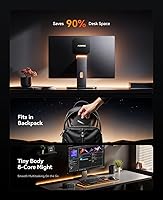
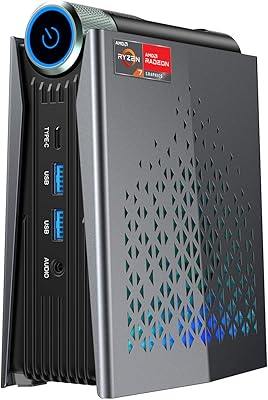
The ACEMAGICIAN Kron Mini K1 Mini PC is a compact desktop that punches above its weight class for everyday home and office use. Measuring just over five inches square and barely an inch and a half tall, it disappears behind a monitor or tucks neatly onto a crowded desk. Inside sits AMD Ryzen 7 7730U — a processor that genuinely competes with chips found in machines costing noticeably more. Windows 11 Pro comes pre-installed, so there is no activation headache straight out of the box. For anyone shopping the mid-range mini PC segment, the Kron K1 earns a serious look.

Features & Benefits

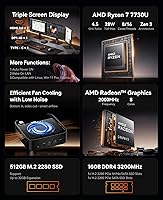
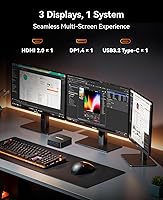
The Ryzen 7 7730U's eight cores and sixteen threads handle browser-heavy workloads, video calls, and light content creation without much strain. At its base the chip runs at 2GHz, but scales to 4.5GHz when needed, keeping things responsive under real conditions. The 16GB DDR4 3200MHz RAM runs in dual-channel configuration — which meaningfully benefits the integrated Radeon graphics — and can be expanded all the way to 64GB as your needs grow. Storage is a fast M.2 SSD, and the triple display setup via HDMI, DisplayPort, and USB-C supports up to 4K resolution. Six USB 3.0 ports and WiFi 6 round out a surprisingly well-connected little machine.

Best For

This compact desktop is a natural fit for remote workers and students who want a genuine desktop experience without giving up half their desk to a tower. It handles multi-monitor productivity well — think spreadsheets on one screen, research on another, and a video call on the third. The integrated Radeon graphics can manage older games and casual titles at modest settings, but anyone expecting to run demanding modern releases should look elsewhere; expectations need to be realistic here. It also works nicely as a home media center given its 4K playback support. Coming from an underpowered laptop or older mini PC, the Kron K1 offers a noticeable jump in everyday responsiveness.

User Feedback

Buyers generally come away impressed with how capable this mini PC feels for its size, especially for web-based work and video streaming. The Windows 11 Pro setup gets consistent praise for being straightforward and hassle-free. On the flip side, a recurring concern is fan noise under sustained load — the compact chassis leaves little room for aggressive cooling, so extended rendering or heavy multitasking can get audible. Some users note that accessing internals for upgrades takes patience, even though the upgrade path itself is a genuine long-term advantage. Build quality feedback is mixed: most find it acceptably solid, but the plastic shell will not impress buyers accustomed to premium metal-bodied hardware.

Pros

  • The Ryzen 7 7730U handles everyday multitasking and productivity work with noticeably more headroom than budget mini PCs
  • Triple 4K display output from a machine this small is a genuine and practical advantage for multi-monitor setups
  • Windows 11 Pro comes pre-installed and ready to use, skipping activation hassles from day one
  • RAM is expandable up to 64GB, making this compact desktop a more future-proof buy than most in its class
  • WiFi 6 and Bluetooth 5.2 keep wireless connections fast and reliable without needing a dongle or adapter
  • Six USB 3.0 ports mean you rarely have to choose which peripherals to leave unplugged
  • The M.2 SSD slot is upgradeable, giving you a clear path to more storage down the road
  • At its size, the Kron K1 fits behind a monitor or under a desk without any awkward cable management gymnastics
  • Gigabit Ethernet provides a solid wired option for those who prioritize network stability over wireless convenience

Cons

  • Integrated graphics hit a hard ceiling with modern or graphically demanding games — casual titles only
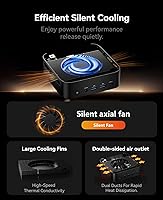
  • Fan noise becomes noticeable during sustained heavy workloads given the tight thermal constraints of the chassis
  • The plastic build feels functional rather than premium, which may disappoint buyers used to metal-bodied machines
  • 512GB of base storage fills up faster than expected once apps, files, and system updates accumulate
  • Accessing the internals for upgrades requires some patience and comfort with disassembly — not truly tool-free
  • No Thunderbolt support limits high-bandwidth peripheral options compared to some competing mini PCs
  • The included accessories are basic; buyers may need to source their own display cables depending on monitor connections
  • Thermal throttling under prolonged heavy loads can reduce the processor performance advantage the specs suggest

Ratings

Our AI rating system analyzed verified global buyer reviews for the ACEMAGICIAN Kron Mini K1 Mini PC, actively filtering out incentivized, spam, and bot-generated feedback to surface what real users genuinely experienced. Scores reflect a balanced synthesis of recurring praise and persistent frustrations across thousands of ownership accounts worldwide. Both the standout strengths and the honest shortcomings are transparently represented in every category below.

Everyday Performance
83%
Users consistently report that browsing, video calls, document editing, and multitasking feel snappy and responsive in day-to-day use. The Ryzen 7 7730U handles dozens of open browser tabs alongside office applications without the sluggishness people experienced on older or cheaper machines.
Performance under sustained heavier workloads — like extended video transcoding or running multiple demanding applications simultaneously — shows signs of thermal throttling that chip away at the spec-sheet promise. A few users noted that the machine felt noticeably slower after prolonged intensive sessions.
Gaming Capability
54%
46%
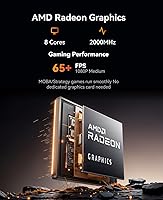
Casual and older titles run acceptably well, and users playing games like older strategy titles, indie games, or retro emulation generally came away satisfied. The integrated Radeon graphics with 8 compute units perform better than bare-minimum integrated solutions found on cheaper chips.
Modern AAA titles are largely off the table at playable settings, and buyers who expected more from the gaming claim were frequently disappointed. Without a discrete GPU and no upgrade path for one, this compact desktop hits a hard ceiling that frustrates anyone hoping to use it as even a secondary gaming rig.
Thermal Management
61%
39%
During light workloads the machine stays cool and quiet, making it a pleasant presence on a desk or in a living room media setup. The cooling system does its job well within the design parameters of normal productivity use.
The compact chassis leaves limited room for heat dissipation, and fan noise becomes clearly audible under sustained load. Several users flagged thermal throttling during extended sessions, suggesting the cooling solution is tuned for typical rather than peak workloads.
Display & Connectivity
89%
Triple 4K output from a machine this size is a genuine highlight, and users running two or three monitor setups praised how straightforward the configuration was. Having HDMI 2.0, DisplayPort, and USB-C all active simultaneously is a capability many competing mini PCs in this range simply do not offer.
Some users needed adapters for certain monitor configurations, particularly for older displays that lack DisplayPort or USB-C inputs, which added unexpected cost and setup friction. A small number of buyers also reported needing to adjust display settings manually to achieve stable 4K output on all three screens.
Value for Money
78%
22%
Relative to other mini PCs in this price tier, the Kron K1 delivers a processor and feature set that would cost meaningfully more in a competing brand. The inclusion of Windows 11 Pro rather than Home adds real tangible value for business and power users.
At its price point, buyers have higher expectations around build quality and out-of-box accessory completeness, both of which fall slightly short. Users who were comparing it against slightly pricier options with discrete graphics sometimes felt the value proposition weakened for anything beyond pure productivity.
Build Quality
63%
37%
The chassis holds together well and port connections feel solid and secure during normal desktop use. Most users who set it up and left it stationary found the construction more than adequate for a machine that simply sits on a desk.
The all-plastic body feels noticeably lightweight in hand, and buyers accustomed to metal-chassis mini PCs from premium brands described it as feeling inexpensive. A handful of users noted minor fit-and-finish inconsistencies, particularly around panel seams and button responsiveness.
Setup Experience
87%
Windows 11 Pro arriving pre-installed and pre-activated is a genuine time-saver, and the majority of buyers reported being up and running within minutes of unboxing. Driver stability out of the box received consistent praise, with very few reports of missing drivers or activation issues.
A small segment of users encountered driver update prompts or initial configuration quirks specific to the AMD integrated graphics that required a manual fix. The included documentation is minimal, which can leave less experienced users unsure of how to proceed with initial BIOS or display settings.
Wireless Performance
84%
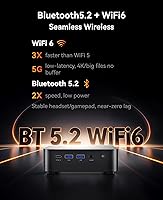
WiFi 6 delivers a noticeably stable and fast wireless experience, particularly in homes with a modern router — users working from home on video calls or transferring large files over the network reported very few dropped connections or latency spikes. Bluetooth 5.2 pairing with keyboards, mice, and headsets was described as reliable.
A small number of users in dense apartment environments or with older WiFi 6 routers noted occasional inconsistency, though it is hard to separate device behavior from network environment in those cases. Range at the far edges of larger homes was occasionally flagged as weaker than expected.
Upgradeability
76%
24%
The ability to push RAM all the way to 64GB and swap the M.2 SSD gives this compact desktop a longer useful life than sealed competitors, and technically confident users appreciated having that headroom available. Several buyers mentioned buying the base configuration with the explicit plan to upgrade storage later.
Opening the chassis is not a casual task — it requires tools and some confidence with PC hardware, and reassembly is fiddly enough that less experienced users hesitated. There is no secondary M.2 slot in most reported configurations, so SSD expansion means replacing rather than supplementing the existing drive.
Port Selection
82%
18%
Six USB 3.0 ports is a genuinely generous count for a mini PC this small, and most users found they could connect all their everyday peripherals without needing a hub. Gigabit Ethernet alongside WiFi 6 gives buyers real flexibility in how they connect to their network.
The absence of Thunderbolt or USB4 limits high-bandwidth peripheral options, which matters to users wanting to connect external GPUs, fast NVMe enclosures, or high-resolution docks. There is also no USB-C front-facing port reported, which reduces convenience for quick device connections.
Noise Level
66%
34%
At idle and during typical productivity tasks, the fan noise is low enough that most users in a normal office environment simply did not notice it. For a media center or living room setup running video playback, it stays comfortably quiet.
Once workloads ramp up, the fan spins audibly, and users in quiet home office environments described it as distracting during longer work sessions. The noise pattern is inconsistent — some users report it cycling up and down repeatedly, which is arguably more annoying than a steady fan hum.
Included Accessories
49%
51%
The power adapter is included and functions reliably, and buyers who already owned their own display cables and peripherals found the minimal bundle perfectly acceptable for the price.
Buyers who expected display cables, a keyboard, or even a mouse were frequently disappointed to find only the bare essentials in the box. For a machine marketed partly at first-time desktop buyers upgrading from a laptop, the accessory gap adds unexpected upfront cost.
Software & OS
81%
19%
Windows 11 Pro is the right call for the target audience, offering BitLocker, Remote Desktop, and group policy features that Home lacks — users in small business or hybrid work environments specifically called this out as a deciding factor. The installation is clean with minimal bloatware reported.
A handful of users flagged AMD-specific driver update processes as slightly more involved than expected on a pre-built machine, particularly around Radeon graphics settings. A few noted that the out-of-box Windows experience prompted multiple large update downloads before the system felt fully current.

Suitable for:

The ACEMAGICIAN Kron Mini K1 Mini PC is a strong match for remote workers, students, and home office users who want a capable desktop without sacrificing desk space. If your daily workload revolves around web browsing, video conferencing, document editing, or spreadsheet work across multiple monitors, this compact desktop handles all of it without breaking a sweat. The triple display output is a genuine practical advantage for anyone who benefits from screen real estate — researchers, coders, and analysts in particular will appreciate running three monitors from a machine this small. Users coming from an underpowered laptop or an aging low-spec mini PC will feel a real difference in everyday responsiveness. The ability to expand RAM up to 64GB and swap the M.2 SSD also means this machine can grow with you over time, which adds meaningful long-term value at its price point.

Not suitable for:

Buyers expecting a capable gaming machine should think carefully before committing to the Kron K1. The integrated Radeon graphics handle light, older, or less demanding titles reasonably well, but anything modern and graphically intensive will hit a hard ceiling fast — there is no discrete GPU option here, and no upgrade path for one. Video editors, 3D artists, or anyone running GPU-accelerated software will likely find the integrated graphics frustrating for professional workloads. The compact chassis also has thermal limits; users who plan to push the processor hard for extended periods should be aware that sustained performance may be constrained by heat and fan noise. If you need a primary machine for serious creative work or modern gaming, this compact desktop is not the right tool, and spending more on a system with a dedicated GPU will serve you better.

Specifications

  • Processor: AMD Ryzen 7 7730U with 8 cores and 16 threads, base clock of 2.0GHz and boost up to 4.5GHz.
  • RAM: 16GB DDR4 SDRAM running at 3200MHz in dual-channel configuration, expandable up to 64GB.
  • Storage: 512GB M.2 SSD with significantly faster read and write speeds than standard 2.5-inch SATA drives.
  • GPU: AMD Radeon Integrated Graphics with 8 compute units running at up to 2000MHz, sharing system RAM.
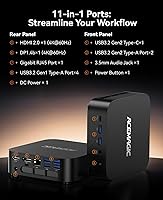
  • Display Output: Three simultaneous outputs supported via one HDMI 2.0, one DisplayPort, and one USB-C port, all capable of 4K UHD resolution.
  • Wireless: WiFi 6 (802.11ax) with support for lower latency and higher throughput compared to WiFi 5 on congested networks.
  • Bluetooth: Bluetooth 5.2 for connecting peripherals such as keyboards, mice, headphones, and speakers.
  • Ethernet: Single RJ45 port supporting 10/100/1000Mbps wired LAN connections for stable, high-speed networking.
  • USB Ports: Six USB 3.0 Type-A ports for connecting external drives, peripherals, hubs, and accessories simultaneously.
  • Operating System: Windows 11 Pro comes pre-installed and pre-activated, ready to use immediately after first boot.
  • Dimensions: The unit measures 5.04 x 5.04 x 1.61 inches, making it one of the more compact mini PC form factors available.
  • Weight: The machine weighs 2.72 pounds, light enough to mount behind a monitor using a standard VESA adapter bracket.
  • Color: Available in black with a matte plastic chassis finish.
  • Form Factor: Mini PC desktop designed for placement on a desk, shelf, or VESA-mounted behind a compatible monitor.
  • Memory Speed: DDR4 RAM operates at 3200MHz, which provides a measurable advantage for integrated GPU performance over slower 2666MHz modules.
  • Chipset: AMD-based platform chipset fully compatible with the Ryzen 7000-series mobile processor architecture.
  • Power: The system uses an external power adapter typical of mini PC designs, keeping the unit itself compact and fanless in standby.

Related Reviews
ACEMAGICIAN S3A Mini PC (Ryzen 7 5875U, 32GB, 1TB)

79%
91%
Value for Money
88%
Processing Performance
63%
Gaming Capability
89%
Memory & Storage
61%
Thermal Management & Cooling
More
ACEMAGICIAN S3A 32GB 1TB Gaming Mini PC
78%
84%
Everyday Performance
58%
Gaming Capability
81%
Value for Money
67%
Thermal Management
91%
Connectivity & Ports
More
Beelink Mini S12 Pro (N100, 16GB, 500GB)

83%
83%
Everyday Performance
91%
Value for Money
76%
Build Quality & Design
84%
Thermal Management & Noise
88%
Connectivity & Ports
More
Beelink Mini S12 Mini PC
78%
88%
Value for Money
82%
Performance for Daily Tasks
79%
Build Quality & Design
91%
Dual Monitor Support
84%
Thermal Management & Noise
More
Beelink ME Mini PC
Beelink ME Mini PC
87%
88%
Performance
91%
Connectivity
85%
Storage Expansion
95%
Power Efficiency
90%
Noise Levels
More
FUNYET STARSHIP N95 512GB Mini PC
74%
83%
Value for Money
72%
Performance
58%
Storage Speed
91%
Port Selection
88%
Display Output
More
Beelink EQi13 Pro (32GB/500GB)
83%
88%
Processing Performance
91%
Memory & Multitasking
86%
Storage Speed & Expandability
74%
Thermal Management & Noise
93%
Networking Capabilities
More
Intel NUC5CPYH Mini PC Barebone
74%
81%
Value for Money
53%
Performance
88%
Build Quality & Form Factor
91%
Assembly & Upgrade Ease
58%
Thermal Management
More
GEEKOM AX8 Pro Mini PC
85%
90%
Performance
87%
Value for Money
83%
Build Quality
80%
Cooling System
92%
Portability/Size
More
MINISFORUM UM870 Slim Mini PC (Barebone)
80%
88%
CPU Performance
74%
Integrated Graphics
91%
Build Quality & Design
93%
Connectivity & I/O
89%
Multi-Monitor Support
More

FAQ

It is a real, functional feature. The Kron K1 has three physical video outputs — HDMI 2.0, DisplayPort, and USB-C — and all three can drive independent displays simultaneously at up to 4K resolution. You will need monitors with the matching input ports, and depending on your setup you may need an adapter for the USB-C connection.

It requires opening the chassis, which involves removing a few screws and carefully separating the shell. It is not a tool-free process, but it is manageable for anyone comfortable with basic PC hardware. The RAM slots support up to 64GB total, and the M.2 slot accepts standard NVMe drives, so upgrade options are genuinely wide open.

It depends on what you mean by casual gaming. Older titles, indie games, and less graphically demanding games run fine. The integrated Radeon graphics with 8 compute units are a step above the bare minimum, but modern AAA titles at acceptable frame rates are not realistic without a discrete GPU, which this machine cannot accommodate. Go in with realistic expectations and you will not be disappointed.

During light tasks like browsing, streaming, or office work, the fan stays quiet and is easy to ignore. Under sustained heavier loads — long video exports, extended gaming sessions, or large file operations — the fan becomes audible. It is not disruptive, but in a quiet room you will notice it. Thermal throttling under prolonged peak workloads is also a possibility given the compact chassis.

It comes pre-installed and pre-activated. You should be able to boot it, complete the standard Windows setup wizard, and start using it without entering any license key or purchasing anything extra.

Yes, and it handles that use case well. It outputs 4K video over HDMI 2.0, so connecting it directly to a 4K TV is straightforward. Streaming services, local media playback, and general smart TV-style functionality all work without issue. Bluetooth 5.2 also makes it easy to pair a wireless keyboard or remote for couch-friendly control.

There are six USB 3.0 Type-A ports, and yes, they are all the same generation so you are not stuck with slower ports on the back versus the front. Six ports is generous for a machine this small, and in practice most users will not need a hub for everyday peripheral setups.

Absolutely. The WiFi 6 radio is capable enough for video calls, streaming, large file downloads, and remote desktop work without needing a wired connection. That said, if you have an ethernet port nearby and want the most consistent connection possible for things like NAS transfers or VPN use, the gigabit LAN port is there for you.

The chassis is plastic, and it does feel that way if you are handling it next to a metal-bodied machine. That said, it is not flimsy — it holds together well and the port connections feel secure. For a machine that mostly sits on a desk or behind a monitor and does not get moved around, the build quality is appropriate for the price tier.

The box typically includes the mini PC unit, a power adapter, and a basic quick-start guide. Do not expect display cables, a keyboard, or a mouse to be included — you will need to supply your own peripherals and cables. Some buyers have noted the included accessories are minimal, so it is worth having your cables ready before the unit arrives.