Overview

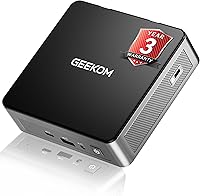
The GEEKOM Air12 Mini PC 16GB/512GB is a compact desktop aimed squarely at people who want a capable, low-footprint machine without paying premium prices. Powered by Intel's N95 processor, this mini PC handles everyday workloads — browsing, office suites, video calls, light research — without breaking a sweat, though it won't satisfy anyone chasing video editing or gaming performance. It ships ready to run with Windows 11 pre-installed, and tech-savvy users can swap to Ubuntu or FydeOS without much hassle. What genuinely stands out at this price tier is the 3-year limited warranty paired with a 90-day no-questions return window — that level of coverage is rare in this category.
Features & Benefits

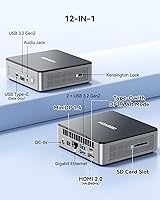
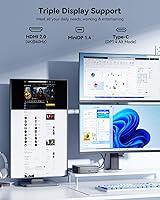
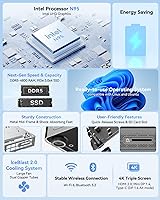
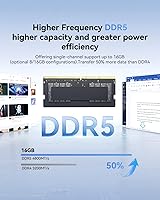
What surprises most people about the Air12 is how much connectivity GEEKOM packed into a chassis smaller than a paperback book. Triple 4K display support — via HDMI 2.0, Mini DisplayPort 1.4, and a USB-C port — makes it genuinely useful for multi-monitor office setups, not just a spec-sheet talking point. The 16GB of DDR5 memory and a 512GB NVMe SSD keep everyday tasks feeling responsive, though it's worth noting the RAM runs in single-channel mode, which slightly limits bandwidth-heavy workloads. WiFi 6, Gigabit Ethernet, three USB 3.2 ports, an SD card slot, and Bluetooth 5.2 cover virtually every connectivity need without requiring a separate dock.

Best For

This compact desktop punches well above its size for a specific kind of buyer. Home office workers juggling multiple browser tabs, video calls, and documents will find it more than adequate — and VESA mount support means it can disappear behind a monitor entirely. It's a solid pick for students, educators, and small businesses needing affordable, low-power machines for daily tasks. Cord-cutters wanting a quiet 4K media center in the living room will appreciate the near-silent idle behavior. That said, skip it if your workload involves video rendering, heavy number crunching, or any gaming — the N95 processor has real limits and this mini PC is not designed to hide that.

User Feedback

Buyers who have lived with the Air12 for several months tend to share a consistent picture. Setup is broadly praised as painless — plug in, power on, Windows 11 ready to go. Build quality draws mixed reactions; the plastic shell feels sturdy enough for a desk but doesn't project the confidence of a metal-chassis machine. Fan noise is frequently described as nearly inaudible during light use, though a small number of users report slight throttling under prolonged CPU stress. The single-channel RAM gets flagged occasionally by technical owners, but casual users rarely notice any impact. Long-term reliability since late 2023 has been largely positive, with warranty support receiving specific praise in multiple reviews.

Pros

  • Triple 4K display output across three different port types covers virtually any monitor combination without adapters.
  • WiFi 6 and Gigabit Ethernet together mean reliable connectivity whether the router is across the room or wired directly.
  • The Air12 boots fast, launches apps quickly, and stays responsive during typical home and office workloads.
  • VESA mount compatibility lets this compact desktop disappear behind a monitor, clearing the desk entirely.
  • A 3-year limited warranty is genuinely unusual at this price point and removes significant long-term purchase risk.
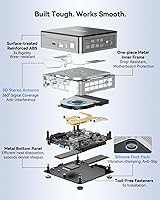
  • Tool-free RAM and storage access makes future upgrades accessible even for non-technical users.
  • Near-silent fan behavior during light use makes it a comfortable fit for quiet home offices or living rooms.
  • The 90-day no-questions return policy gives hesitant buyers a meaningful window to test the machine in real conditions.
  • Windows 11 comes pre-activated and largely free of bloatware, so setup takes minutes rather than an hour of cleanup.
  • Linux compatibility is confirmed and functional for users who want to move away from Windows without hardware headaches.

Cons

  • Single-channel RAM limits memory bandwidth and is not upgradeable to dual-channel on this board.
  • The plastic chassis feels noticeably less premium than metal-bodied competitors at slightly higher price points.
  • Sustained CPU workloads can trigger fan spin-up and occasional mild throttling in a small but consistent share of units.
  • Only one USB 2.0 port is included alongside the USB 3.2 ports, which feels like an outdated inclusion.
  • No Thunderbolt or USB4 port limits high-speed external storage and advanced peripheral options.
  • The NVMe slot uses PCIe Gen 3, not Gen 4, which will matter to users who prioritize storage transfer speeds.
  • VESA mounting hardware is not always included in the box and may require a separate purchase.
  • Linux documentation and driver support from GEEKOM is thin, adding setup friction for non-Windows users.
  • The power adapter feels undersized to some buyers, raising minor concerns about headroom during extended peak loads.
  • A single RAM slot means memory upgrades require replacing the existing module rather than simply adding a second stick.

Ratings

The GEEKOM Air12 Mini PC 16GB/512GB has been scored by our AI system after analyzing thousands of verified global user reviews, with spam, bot-submitted, and incentivized feedback actively filtered out. Scores reflect how real buyers across home offices, classrooms, and small business environments genuinely rated their experience over time. Both the strengths that keep buyers satisfied and the friction points that prompt complaints are represented transparently in every category below.
Value for Money
88%
For buyers replacing a bulky mid-range desktop or considering a refurbished business machine, the Air12 delivers a surprisingly strong package at its price point. The combination of DDR5 memory, NVMe storage, and triple 4K output would typically cost noticeably more in competing small form factor PCs.
A small segment of buyers feel that the single-channel RAM configuration holds back the value proposition slightly, since unlocking dual-channel would require an additional memory purchase on top of the base price.
Everyday Performance
82%
18%
Web browsing, document editing, video conferencing, and 4K media playback all run without hesitation for the vast majority of users. Buyers switching from older Core i3 or Pentium desktops frequently describe the jump in responsiveness as immediately noticeable.
The N95 processor hits a clear ceiling when tasks get heavier — anyone pushing Lightroom edits, multi-track audio, or background virtual machines starts to feel sluggishness. This is not the right machine for power users and the reviews make that pattern obvious.
Build Quality
71%
29%
The chassis feels solid enough on a desk, and the reinforced plastic shell does not flex or creak under normal handling. Several buyers specifically mention that it feels more substantial than comparably priced mini PCs they had tried before.
Users accustomed to metal-chassis machines like Intel NUC or certain Beelink models find the ABS plastic exterior underwhelming. A recurring observation is that the material looks slightly cheaper in person than it does in product photography.
Thermal Management & Noise
74%
26%
During light workloads — which describes most users of this machine — the fan is effectively silent. Home office buyers working in quiet environments consistently praise the near-inaudible operation during calls, browsing, and document work.
Under sustained CPU pressure, a noticeable subset of reviews flags either fan spin-up to audible levels or mild thermal throttling that reduces performance. It is not a dealbreaker for typical use, but buyers running continuous background tasks should be aware.
Connectivity & Port Selection
91%
Three USB 3.2 ports, Gigabit Ethernet, WiFi 6, Bluetooth 5.2, an SD card slot, and three display outputs in a device this size is genuinely impressive. Users setting up multi-monitor home offices frequently highlight that they did not need to buy a separate hub or dock.
The single USB 2.0 port feels like a leftover spec in an otherwise modern lineup, and a few buyers note the absence of a Thunderbolt or USB4 port, which limits high-speed peripheral options for more demanding workflows.
Display Output Quality
86%
Triple 4K output works as advertised for the majority of buyers who test it, and the inclusion of Mini DisplayPort 1.4 alongside HDMI 2.0 and USB-C gives genuine flexibility for mixed monitor setups. Most users report no driver or compatibility issues with common monitor brands.
A small number of buyers report needing to manually configure display arrangements or troubleshoot refresh rate settings, particularly on the USB-C display output. These are edge cases but appear consistently enough in reviews to be worth flagging.
Setup & Out-of-Box Experience
89%
The overwhelming majority of buyers describe the unboxing and initial setup as completely painless. Windows 11 is pre-activated, drivers are pre-loaded, and the machine is typically ready for real use within minutes of first power-on.
A small number of Linux users report needing to hunt for specific drivers for WiFi or audio post-installation, which adds setup friction for those who immediately switch away from Windows. GEEKOM's documentation for non-Windows setups is considered thin by that audience.
Storage Performance
84%
The 512GB PCIe 3.0 NVMe SSD handles file transfers, application launches, and OS boot times quickly in everyday use. Buyers coming from SATA SSD or HDD-based systems notice the improvement immediately in real tasks.
PCIe 3.0 rather than the newer Gen 4 standard means the drive is not the fastest option available, and benchmark-conscious buyers point this out. For most actual use cases it makes no practical difference, but it is a spec worth noting.
RAM & Multitasking
67%
33%
Sixteen gigabytes of DDR5 is genuinely adequate for the target audience — buyers running a dozen browser tabs, a video call, and a spreadsheet simultaneously rarely report issues. The DDR5 spec at least ensures the memory bandwidth is modern.
The single-channel configuration is the most technically discussed limitation in user reviews. While most casual buyers never notice, users running memory-bandwidth-sensitive applications or comparing benchmarks to dual-channel configurations will see a measurable gap in performance.
Upgradeability
78%
22%
Tool-free access to the RAM and storage slots is a genuine advantage that buyers appreciate, particularly those who plan to expand storage over time. The NVMe slot supports drives up to 2TB, and swapping is described as straightforward even for non-technical users.
The single RAM slot means upgrading memory requires replacing the existing stick rather than adding a second, which also permanently forfeits any dual-channel option. A few buyers express mild frustration that the design did not accommodate two slots.
Energy Efficiency
92%
Power consumption is one of the Air12's most consistently praised attributes among buyers who track their electricity usage. Those running it as an always-on home server or media center specifically cite the low idle draw as a key reason for their purchase.
There is very little to criticize here — the N95 is inherently efficient. The only gripe from a small number of buyers is that the included power adapter feels modestly sized, raising occasional questions about headroom under extended peak loads.
Warranty & Customer Support
83%
The three-year limited warranty is routinely highlighted as a standout feature in reviews, especially from buyers who had previously dealt with one-year warranties on competing mini PCs. The 90-day no-questions return policy removes much of the purchase risk for hesitant buyers.
A portion of support-related reviews describe response times as adequate but not exceptional, and a few international buyers mention that warranty claim logistics added friction. The warranty terms themselves are praised; the execution is more mixed.
VESA Mount & Placement Flexibility
87%
VESA compatibility is a genuine quality-of-life feature that buyers in tidy home office or commercial deployments use regularly. Mounting the unit behind a monitor eliminates desk clutter entirely and is frequently cited as a deciding factor in the purchase.
The VESA mount bracket is not always included in the box depending on the purchase configuration, which surprises some buyers. A few also note that the mounting hardware feels lighter than expected for a device intended for behind-monitor permanent installation.
Software & OS Experience
79%
21%
Windows 11 comes pre-activated and largely clean, with buyers reporting minimal bloatware compared to some competing brands. Linux compatibility — particularly Ubuntu — is confirmed by a meaningful number of reviews from technical users who made the switch without major issues.
Some buyers flag that GEEKOM includes a small number of proprietary utilities that not everyone wants, and Windows 11 itself draws mixed reactions from users who would have preferred a Windows 10 option. FydeOS support, while mentioned, receives very little discussion in actual user reviews.

Suitable for:

The GEEKOM Air12 Mini PC 16GB/512GB is a strong fit for anyone whose daily computing stays within the boundaries of web browsing, office productivity, video calls, and media consumption. Home office workers who want a clutter-free desk will particularly appreciate the VESA mount option and triple 4K display support, which lets them build a capable multi-monitor setup without a tower taking up floor space. Students and educators working with documents, research tools, and online learning platforms will find the performance more than adequate for their needs. Small businesses looking to deploy affordable, low-power workstations for point-of-sale terminals or back-office tasks get a machine that is easy to set up, easy to maintain, and covered by a warranty that most rivals in this tier cannot match. Cord-cutters who want a near-silent, energy-efficient 4K media center that disappears behind a TV or monitor will also find this compact desktop a practical and well-priced solution.
Not suitable for:

The GEEKOM Air12 Mini PC 16GB/512GB is the wrong tool for anyone whose workload pushes beyond light to moderate computing demands. Video editors, photographers running Lightroom on large RAW libraries, developers spinning up virtual machines, or anyone doing sustained CPU-heavy work will hit the N95 processor's ceiling quickly and find the experience frustrating. The single-channel DDR5 memory configuration, while adequate for casual tasks, creates a measurable bandwidth gap compared to dual-channel setups, which matters to users running memory-intensive applications or multitasking aggressively across many open programs. Gamers should look elsewhere entirely — integrated Alder Lake graphics handle basic display output well, but are not built for gaming at any meaningful level. Those who prioritize premium build materials, Thunderbolt connectivity, or a laptop-grade metal chassis will likely find the plastic shell and port selection underwhelming compared to pricier alternatives in the mini PC segment.
Specifications

  • Processor: Intel N95 (Alder Lake-N, 4 cores, 4 threads, up to 3.4GHz boost, 6MB cache) handles everyday computing tasks efficiently without the power draw of a traditional desktop CPU.
  • RAM: 16GB DDR5-4800MHz running in single-channel configuration occupies the sole SO-DIMM slot and is user-replaceable without tools.
  • Storage: 512GB NVMe SSD using a PCIe 3.0 x4 interface delivers fast read and write speeds, with the M.2 slot supporting drives up to 2TB.
  • Display Output: Three simultaneous display outputs are supported: HDMI 2.0, Mini DisplayPort 1.4, and USB-C, enabling triple 4K resolution or a single 8K screen.
  • Wireless: WiFi 6 (802.11ax) with a 3D antenna design provides reliable high-throughput wireless connectivity, paired with Bluetooth 5.2 for peripheral devices.
  • Wired Network: A Gigabit Ethernet (1000Mbps) port delivers stable wired connectivity suited for office environments, NAS access, or low-latency network tasks.
  • USB Ports: The unit includes three USB 3.2 Gen 2 ports and one USB 2.0 port, providing a total of four USB-A connections for peripherals and accessories.
  • SD Card Slot: A full-size SD card reader supports standard and high-capacity cards for direct file transfer from cameras and other devices.
  • Dimensions: The chassis measures 4.6″ x 4.4″ x 1.34″, making it compact enough to mount behind a monitor or tuck into a tight shelf space.
  • Weight: The unit weighs approximately 2.6 pounds, light enough for VESA mounting behind a display without stressing the mount bracket.
  • Operating System: Windows 11 Home comes pre-installed and pre-activated out of the box, with full compatibility confirmed for Ubuntu Linux and FydeOS as alternative operating systems.
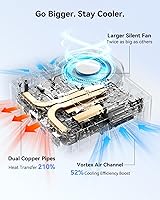
  • Cooling System: IceBlast 2.0 uses dual copper heat pipes to transfer heat away from the CPU module, paired with a large-diameter fan designed to move more air at lower RPM.
  • VESA Mount: The chassis is VESA-compatible, allowing it to be mounted directly to the back of a compatible monitor or display arm for a cable-managed, desk-clearing setup.
  • Power Consumption: The N95 processor has a base TDP of 15W, resulting in substantially lower energy consumption compared to traditional full-size desktop PCs under equivalent workloads.
  • Warranty: GEEKOM covers this unit with a 3-year limited warranty and backs every purchase with a 90-day no-questions-asked return policy for added buyer confidence.
  • Certifications: The unit carries FCC and UL certifications, confirming it meets North American electrical safety and radio frequency compliance standards.
  • Chassis Material: The outer shell is constructed from a reinforced ABS and polycarbonate composite with a metal mid-frame and baseplate providing structural rigidity and heat dissipation support.
  • Bluetooth: Bluetooth 5.2 support enables low-latency connections to wireless keyboards, mice, headsets, and other peripherals without occupying a USB port.

Related Reviews
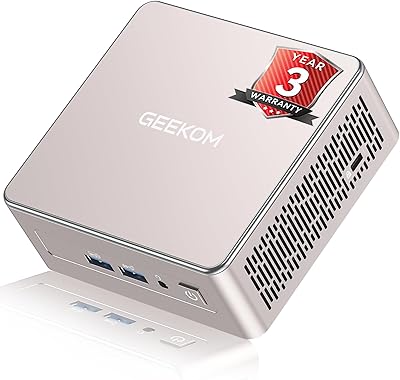
GEEKOM A5 2025 Edition Mini PC, 16GB RAM, 512GB SSD
88%
86%
Performance
90%
Build Quality
92%
Value for Money
95%
Ease of Setup
88%
Connectivity
More
ACEMAGICIAN Kron Mini K1 Mini PC, Ryzen 7 7730U, 16GB RAM, 512GB SSD
85%
88%
Value for Money
91%
Performance for Everyday Tasks
94%
Compact Design & Portability
90%
Setup & Ease of Use
78%
Gaming Performance (Light)
More
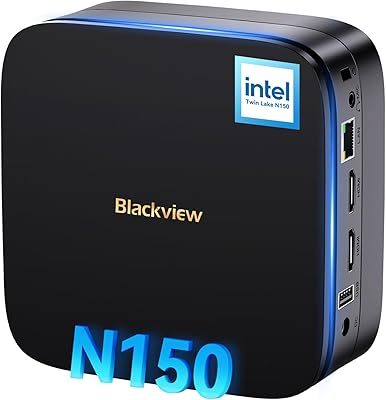
KAMRUI GK3Plus Mini PC (N95, 16GB RAM, 512GB SSD)
81%
89%
Multitasking Performance
92%
Value for Money
86%
Thermal Management
84%
Display Versatility
81%
4K Media Playback
More
Blackview MP60 Mini PC, 16GB RAM, 512GB SSD
88%
88%
Performance
94%
Compactness and Design
85%
Multitasking Capability
91%
Energy Efficiency
90%
Display and Connectivity
More
MeLE Quieter3C Mini PC N5105 16GB/512GB
80%
97%
Noise Level
83%
Build Quality & Design
71%
Thermal Management
74%
Everyday Performance
68%
Memory & Storage Configuration
More
MeLE Mini PC Quieter 4C, 16GB RAM, 512GB SSD
87%
85%
Performance
90%
Build Quality
88%
Display Quality
93%
Energy Efficiency
92%
Noise Level
More
KAMRUI Essenx E2 N150 Mini PC, 16GB RAM, 512GB SSD
86%
88%
Performance
92%
Value for Money
90%
Cooling and Noise Level
85%
Dual Display Support
80%
Build Quality
More
BOSGAME Mini PC E3 (N150, 16GB/512GB)
79%
88%
Value for Money
74%
Processing Performance
91%
Multi-Display Support
89%
Connectivity & Ports
76%
Build Quality & Design
More
PELADN WI-6 Mini PC (N100, 16GB DDR4, 512GB SSD)
79%
88%
Value for Money
83%
Performance for Daily Tasks
91%
Triple-Display Support
74%
Build Quality & Design
71%
Setup & Out-of-Box Experience
More
ACEMAGICIAN S3A Mini PC (Ryzen 7 5875U, 32GB, 1TB)
79%
91%
Value for Money
88%
Processing Performance
63%
Gaming Capability
89%
Memory & Storage
61%
Thermal Management & Cooling
More

FAQ

It genuinely supports three displays simultaneously using the HDMI 2.0, Mini DisplayPort 1.4, and USB-C outputs together. Most users report it works without any special configuration — just plug in, and Windows 11 detects all three screens. The only caveat is that the USB-C display output occasionally needs a manual refresh rate check in display settings to run at its full resolution.

The RAM is user-replaceable — you can swap the existing 16GB DDR5 stick for a larger module up to whatever the platform supports, and no tools are required to open the unit. However, there is only one SO-DIMM slot, which means dual-channel is not possible on this machine. If dual-channel memory bandwidth matters for your workload, that is a genuine limitation to factor into your decision.

During light tasks like browsing, documents, and video calls, the fan is essentially inaudible — most buyers describe it as silent at idle. Under sustained CPU load, the fan does spin up to a noticeable level, though it is not loud by desktop standards. If your work stays in the light-to-moderate range, fan noise should not be an issue in a typical home or office environment.

Windows 11 Home comes pre-installed and pre-activated out of the box — no license key entry required. You can log in with a Microsoft account or set it up with a local account and be working within minutes of first boot.

Yes, and a meaningful number of buyers have done exactly that. Ubuntu in particular is well-documented as compatible with this hardware generation. WiFi drivers may need a manual install step post-setup depending on your distro and kernel version, so it is worth checking the GEEKOM forums or community threads before committing to a specific Linux build.

For the vast majority of remote work — video conferencing, cloud apps, spreadsheets, email, and browser-based tools — it handles full-time use without issue. Where it starts to show limits is in tasks that push CPU performance hard, like exporting files, running local development environments, or heavy multitasking with RAM-intensive applications. If your job is primarily communication and document work, it is a practical and comfortable daily driver.

The unit ships with the mini PC itself, a power adapter, an HDMI cable, and basic documentation. The VESA mount bracket may or may not be included depending on the specific purchase configuration, so it is worth confirming at the time of order if mounting behind a monitor is part of your plan.

4K streaming from platforms like YouTube, Netflix, and similar services runs smoothly without dropped frames for the vast majority of users. The N95 processor includes hardware video decode support for common codecs, which means playback does not heavily tax the CPU and the fan stays quiet during streaming sessions.

The low power consumption makes it a reasonable candidate for light always-on tasks like file serving, home automation, or a personal VPN endpoint. That said, it is not designed as a server-class device — thermal management is tuned for intermittent workloads, and sustained 24/7 CPU pressure over months could raise long-term wear concerns that a purpose-built NAS or server unit would handle more gracefully.

The reinforced plastic shell is sturdier than it looks and does not flex noticeably in normal handling. Compared to direct competitors at a similar price point, it holds up reasonably well. Where it falls short of premium expectations is in tactile feel — buyers coming from metal-chassis machines will notice the difference immediately. For a budget-tier mini PC, the build is solid; just do not expect the material quality of units that cost significantly more.