Overview

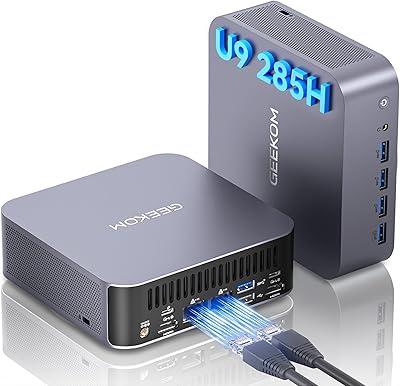
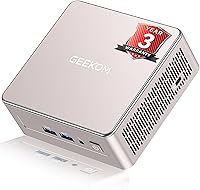
The GEEKOM A5 2025 Edition Mini PC arrives at a moment when compact desktops have genuinely grown up, and this one makes a solid case for the category. Powering it is an AMD Ryzen 5 7430U — a processor that handles spreadsheets, video calls, and browser-heavy workflows without complaint. The chassis fits in the palm of your hand at 4.6×4.4×1.9 inches, tucking neatly behind a monitor or sitting quietly on a crowded desk. Windows 11 Pro comes pre-installed, which matters if you need BitLocker, Remote Desktop, or domain support out of the box. Just set expectations right: this is a strong productivity and media machine, not a gaming rig.
Features & Benefits

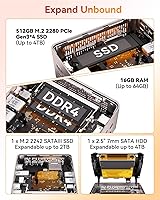
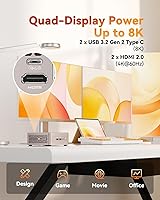
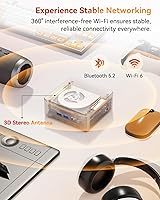
This mini PC ships with 16GB DDR4 RAM and a 512GB NVMe SSD, which covers most office and creative workloads without any immediate upgrades. Both are expandable — RAM can reach 64GB, and a secondary M.2 slot plus a 2.5-inch drive bay push total storage capacity to around 10TB if needed. Connecting up to four monitors via dual HDMI and dual USB-C ports works reliably for multi-screen setups, with 8K output technically possible through the Type-C interface, though few will actually need that. Wi-Fi 6 and Bluetooth 5.2 handle modern peripherals well, and the three-year warranty gives business buyers a meaningful layer of long-term protection.

Best For

The GEEKOM A5 2025 is a natural choice for home office workers and remote professionals who want a tidy setup without sacrificing real computing capability. Its multi-monitor support makes it practical for analysts, developers, and content reviewers working across several windows at once. Small businesses benefit from the certified hardware and Windows Pro licensing, which simplifies IT management and meets common compliance requirements. It also fits nicely into classrooms, medical offices, and retail environments where a quiet, compact machine is valued. Expect solid 4K media playback too. Where it falls short is GPU-intensive work — heavy rendering or anything leaning hard on graphics will hit the integrated chip's ceiling quickly.

User Feedback

Buyers generally come away satisfied, with setup speed and quiet operation drawing the most consistent praise. The chassis feels more solid than what you would expect at this price tier, and people who have upgraded the RAM or storage specifically call out how easy the tool-free access makes the process. Value-for-money sentiment is broadly positive compared to similarly specced rivals. That said, some users report noticeable fan spin-up during sustained CPU loads — think long video exports or extended compile runs — and temperatures can creep up under pressure. A small number of buyers noted occasional hiccups when running four displays simultaneously, though most multi-monitor users report no issues worth flagging.

Pros

  • AMD Ryzen 5 7430U handles everyday multitasking, video calls, and office workloads without hesitation.
  • 16GB of DDR4 RAM is genuinely useful out of the box, with room to grow up to 64GB.
  • Tool-free access to storage and RAM slots makes upgrades straightforward, even for non-technical users.
  • Windows 11 Pro pre-installed adds real value for business users who need BitLocker or Remote Desktop.
  • Supporting up to four displays simultaneously is a rare and practical feature at this price tier.
  • Wi-Fi 6 delivers noticeably more stable connections than older standards, especially in busy wireless environments.
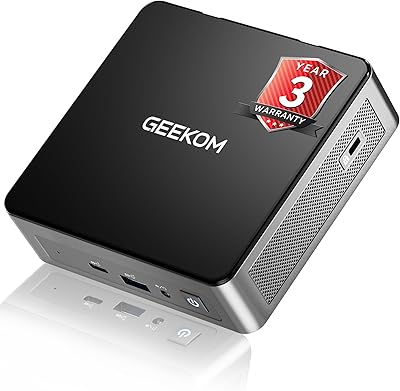
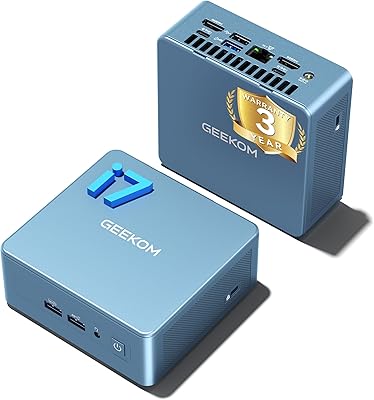
  • The three-year warranty is longer than most competitors offer and reflects confidence in the hardware.
  • A 90-day return window gives buyers meaningful time to evaluate the machine in real conditions.
  • The compact chassis runs quietly under typical workloads, making it unobtrusive in shared or quiet spaces.
  • Expandable storage up to 10TB total means this mini PC can grow with a user's needs over time.

Cons

  • Sustained CPU loads can cause fan noise and thermal throttling, which affects long rendering or compile tasks.
  • DDR4 memory, while expandable, is an older standard compared to DDR5 options now appearing in rival mini PCs.
  • The single USB 2.0 port feels like a relic and can be a bottleneck when connecting older peripherals.
  • Integrated graphics mean this compact desktop is genuinely unsuitable for any GPU-accelerated software.
  • Running all four displays simultaneously has occasionally caused stability issues for a subset of users.
  • The 512GB base SSD fills up faster than expected once Windows updates, apps, and media are factored in.
  • No Thunderbolt support limits high-bandwidth peripheral options for creative professionals.
  • Heat management under prolonged heavy use requires adequate desk ventilation — tight enclosed spaces are a problem.
  • The rose gold color option is polarizing and may not suit professional or neutral office aesthetics.
  • Business pricing requires contacting the brand directly, which adds friction for bulk procurement decisions.

Ratings

The scores below were generated by our AI system after analyzing thousands of verified global user reviews for the GEEKOM A5 2025 Edition Mini PC, with spam, bot activity, and incentivized feedback actively filtered out. Each category reflects the honest distribution of real buyer experiences — strengths and frustrations weighted equally. Where users consistently agreed, scores trend high; where opinions diverged or pain points recurred, that tension is reflected too.

Performance for Daily Use
88%
For the workloads this compact desktop is actually built for — browser-heavy sessions, Office suites, video calls, and light multitasking — users consistently report that it keeps up without hesitation. Buyers running dual-monitor home office setups in particular note that the Ryzen 5 7430U rarely feels like the bottleneck.
Push it into sustained CPU-heavy territory — large file compressions, extended code compilations, or back-to-back video exports — and thermal throttling becomes a real factor. A handful of users noted performance dips during long uninterrupted workloads that a desktop-class chip simply would not exhibit.
Build Quality
83%
Most buyers are genuinely surprised by how solid this mini PC feels in hand. The reinforced ABS and polycarbonate shell with its metal internal frame gives it a rigidity that feels several tiers above typical plastic mini PCs, and the vibration-damping feet add a subtle but noticeable sense of quality.
A minority of buyers found the external finish — particularly in the rose gold colorway — prone to light scuffing and fingerprints over time. The overall chassis is sturdy, but the lid and underside panels feel slightly less premium than the mid-frame assembly when pressed or flexed.
Thermal Management
67%
33%
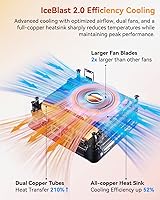
Under typical office conditions — documents, streaming, browser tabs — the GEEKOM A5 2025 runs quietly and warm rather than hot. Users in lightly loaded environments often go weeks without noticing the fan at all, which speaks well to the thermal design for its intended use case.
This is where the most consistent criticism surfaces. Users running sustained workloads report that temperatures climb quickly and the fan ramps up audibly. A few buyers noted that placing the unit in a partially enclosed space — even a monitor arm mount with limited airflow — accelerated throttling noticeably.
Value for Money
84%
When buyers factor in the included Windows 11 Pro license, the three-year warranty, and the tool-free upgrade path, the overall package holds up well against comparable mini PCs at similar price points. Many users noted that equivalent configurations from other brands often cost meaningfully more or come with shorter coverage.
A segment of buyers feel the DDR4 memory standard — rather than DDR5 — is a concession that will age the machine faster than its price point warrants. A few also noted that finding the base 512GB SSD insufficient sooner than expected added an unplanned upgrade cost early in ownership.
Multi-Monitor Support
76%
24%
Running two or three displays works reliably for the vast majority of users, and those using this compact desktop for trading dashboards, development environments, or content review workflows consistently praise the flexibility of having both HDMI and USB-C output options in such a small unit.
The four-display configuration is where confidence slips. A recurring subset of users reported display flickering, one monitor failing to be recognized, or general instability when all four ports were in active use. It works for some, but it is not the bulletproof quad-screen experience the spec sheet implies.
Setup & Out-of-Box Experience
91%
Buyers routinely highlight how fast and painless initial setup is. Windows 11 Pro boots fully configured, drivers are pre-loaded, and most users report being up and running with peripherals connected within 15 to 20 minutes of unboxing — a genuine time-saver for business deployments.
Some users encountered minor driver update prompts immediately after first boot that added a bit of friction to the otherwise smooth experience. A small number of buyers also noted that the included accessory documentation could be more thorough for less technically confident users.
Upgradeability
87%
The tool-free upgrade design is a practical differentiator that users actually use. Buyers who expanded RAM or swapped in a larger SSD describe the process as straightforward and accessible even without technical confidence, which adds real long-term value to the purchase.
The secondary M.2 slot is the smaller 2242 form factor, which limits drive selection compared to the more common 2280 standard. Buyers expecting to drop in any spare M.2 SSD they have on hand have occasionally been caught off guard by this compatibility nuance.
Noise Level
79%
21%
For everyday use this mini PC is genuinely quiet. Home office users and media consumers who run it as an always-on desktop report that it blends into the background almost entirely during light to moderate workloads, which is a meaningful quality-of-life advantage in shared spaces.
Fan noise under load is the trade-off, and it is noticeable. The fan profile seems to ramp up abruptly rather than gradually, which some users find more jarring than a consistently moderate noise floor would be. In quiet meeting environments, the spin-up during a CPU spike can be distracting.
Wireless Connectivity
86%
Wi-Fi 6 performs noticeably better than the older standards found in competing mini PCs at this tier. Users doing large file transfers, 4K streaming, and video conferencing simultaneously report stable throughput without the intermittent dropouts that plagued older wireless hardware.
Bluetooth 5.2 is solid for keyboards and headphones but a small number of users noted occasional re-pairing events with certain wireless mice after the system woke from sleep — a minor but recurring annoyance that appears to affect specific peripheral brands more than others.
Graphics & Display Output
62%
38%
For the workloads this machine targets — 4K video playback, light photo editing in tools like Lightroom, and standard desktop display output — the integrated Radeon Vega 7 graphics perform adequately. Media enthusiasts using this as a home theater PC are generally satisfied with the visual output quality.
Outside of those use cases, the GPU is a real ceiling. Users who attempted moderate gaming or any GPU-accelerated creative work ran into frame rate issues and slow render times quickly. The integrated graphics simply cannot serve buyers whose workflows lean on dedicated GPU resources, and the product should not be marketed otherwise.
Port Selection
71%
29%
Five USB 3.0/3.2 ports cover most practical needs well, and having both USB-C and full-size HDMI options gives users meaningful flexibility when connecting monitors, docks, and peripherals without needing an adapter hub from day one.
The single USB 2.0 port is a frustration for users with older peripherals, and the absence of Thunderbolt limits high-bandwidth connectivity for those who use external SSDs or professional audio interfaces. There is also no SD card slot, which catches media users off guard.
Warranty & Support
82%
18%
The three-year limited warranty is a genuine differentiator in the mini PC category, where one-year coverage is the norm. Buyers who have interacted with the aftersales team describe response times as reasonable, and the 90-day return window provides a meaningful safety net for those evaluating the hardware long-term.
A handful of users reported that warranty claim processing took longer than expected, particularly for international buyers. Support quality appears to vary depending on the channel and region, so buyers outside major markets should verify the support pathway before committing to a business-scale deployment.
Software & OS Experience
78%
22%
Getting a genuine Windows 11 Pro license included is a real practical benefit, particularly for business users who need BitLocker, Group Policy, or domain functionality. Users setting this up in IT-managed environments specifically call out the Pro license as simplifying their deployment checklist.
Some buyers noted a modest amount of pre-installed manufacturer software that needed to be removed before the system felt fully clean. Nothing severe, but it is a minor setup friction point that slightly dilutes the otherwise polished out-of-box experience for users who prefer a clean Windows install.
Size & Portability
89%
At 2.2 pounds and smaller than most hardcover books, this mini PC fits into setups where a traditional desktop simply cannot. Users who travel between offices or need to relocate their workstation frequently treat the compact form factor as a core part of why they chose this over a larger machine.
The small footprint is almost entirely a positive, with the one practical caveat being that VESA mounting hardware is not always included in the box. Users planning to mount it directly behind a monitor sometimes need to source a compatible bracket separately, which adds a small additional step to setup.

Suitable for:

The GEEKOM A5 2025 Edition Mini PC is a strong fit for anyone who needs a capable, low-footprint desktop without the bulk of a traditional tower. Remote workers and home office professionals will appreciate the clean desk setup it enables, especially paired with two or three monitors for side-by-side productivity. Small businesses and IT managers looking to deploy reliable, Windows Pro-licensed hardware across multiple desks will find the certified build and three-year warranty genuinely useful rather than just a checkbox. It also works well in space-constrained environments like classrooms, medical reception desks, or retail kiosks where a quiet, manageable machine is more valuable than raw power. Media consumers who want smooth 4K playback without running a full desktop PC will find this compact desktop punches well above what its size suggests.
Not suitable for:

If your workload leans heavily on GPU performance — video rendering, 3D modeling, machine learning, or any serious gaming — the GEEKOM A5 2025 Edition Mini PC will frustrate you quickly. The integrated AMD Radeon Vega graphics are competent for display output and light creative tasks, but they are not built to carry sustained graphical workloads. Power users who regularly push CPU-intensive applications for hours at a stretch may also run into thermal throttling, which can affect sustained performance in ways that occasional use simply will not reveal. Anyone expecting a plug-and-play gaming machine, even at a casual level, should look elsewhere. Similarly, buyers who need extensive legacy port options or a built-in optical drive will find the compact form factor works against them here.
Specifications

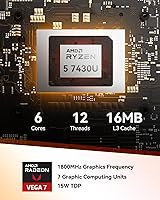
  • Processor: AMD Ryzen 5 7430U with up to 4.3 GHz boost clock handles everyday computing, light creative tasks, and multitasking without bottlenecks.
  • RAM: 16GB DDR4-3200 MHz memory comes installed as standard, with support for expansion up to 64GB for more demanding workloads.
  • Primary Storage: A 512GB PCIe NVMe SSD provides fast boot times and application loading, with upgrade potential up to 4TB in the same slot.
  • Extra Storage: An additional M.2 2242 slot and a 2.5-inch HDD bay allow total storage expansion up to approximately 10TB.
  • Graphics: AMD Radeon RX Vega 7 integrated graphics support multi-display output and 4K media playback but are not designed for GPU-intensive workloads.
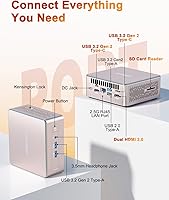
  • Display Output: Two HDMI ports and two USB 3.2 Gen 2 Type-C ports enable simultaneous connection of up to four external displays.
  • Max Resolution: The Type-C interface supports a maximum output resolution of 8K (7680×4320) for compatible monitors.
  • Wireless: Wi-Fi 6 and Bluetooth 5.2 are built in, providing faster wireless throughput and more stable peripheral connections than previous generation standards.
  • USB Ports: The unit includes five USB 3.0/3.2 ports and one USB 2.0 port for connecting a range of peripherals and storage devices.
  • Dimensions: The chassis measures 4.6 × 4.4 × 1.9 inches, making it compact enough to mount behind a monitor or sit unobtrusively on a desk.
  • Weight: At 2.2 pounds, this mini PC is light enough to relocate easily between workspaces or mount with a standard VESA adapter.
  • Operating System: Windows 11 Pro comes pre-installed, including features like BitLocker encryption, Remote Desktop, and domain join support.
  • Chassis Build: The enclosure uses a reinforced ABS and polycarbonate shell with a metal mid-frame and baseplate for structural rigidity and heat dissipation.
  • Power Draw: The system operates at approximately 45 watts under load, keeping electricity consumption low compared to traditional desktop towers.
  • Memory Type: DDR4 SDRAM running at 3200 MHz is used for system memory, a mature and widely compatible standard.
  • Warranty: A 3-year limited warranty covers defects in design and craftsmanship, which is notably longer than the 1-year coverage typical in this category.
  • Return Policy: Purchases come with a 90-day no-questions-asked return window, giving buyers extended time to evaluate the machine in real use.
  • Certifications: The unit carries FCC, UL, and ENERGY STAR certifications, meeting standard requirements for commercial and business deployment.
  • Storage Interface: The primary SSD connects via PCIe x4, delivering read and write speeds significantly faster than older SATA-based drives.
  • Color Option: The reviewed configuration is available in a rose gold finish, which may not suit all professional or neutral office environments.

Related Reviews
Blackview MP60 Mini PC 2025
86%
87%
Performance
91%
Value for Money
93%
Noise Reduction & Cooling Efficiency
89%
Connectivity (Wi-Fi & Ethernet)
85%
Build Quality & Design
More
GEEKOM AX8 Pro Mini PC
85%
90%
Performance
87%
Value for Money
83%
Build Quality
80%
Cooling System
92%
Portability/Size
More
GEEKOM GT2 Mega Mini PC
84%
93%
CPU Performance
67%
GPU & Graphics
88%
AI & NPU Capability
71%
Thermal Management
91%
RAM & Memory
More
GEEKOM Mini IT12 (i7-1280P, 32GB/1TB)
84%
91%
Out-of-Box Experience
88%
CPU Performance
86%
Memory & Storage Speed
71%
Thermal Management & Fan Noise
93%
Display & Connectivity
More
GEEKOM Air12 Mini PC 16GB/512GB
82%
88%
Value for Money
82%
Everyday Performance
71%
Build Quality
74%
Thermal Management & Noise
91%
Connectivity & Port Selection
More
GEEKOM GT1 Mega AI Mini PC, 32GB RAM, 2TB SSD
87%
93%
Performance
88%
Graphics Quality
85%
Build Quality
91%
Multitasking Efficiency
84%
Cooling System Efficiency
More
GEEKOM A8 Mini PC with AMD Ryzen 9 8945HS, 32GB RAM, 2TB SSD
87%
93%
Performance
88%
Build Quality
90%
Usability
89%
Connectivity Options
80%
Cooling System Efficiency
More
GEEKOM A6 Mini PC 32GB/1TB
83%
88%
CPU Performance
67%
Thermal Management
91%
Build Quality
86%
RAM & Memory Performance
89%
Storage Speed
More
GEEKOM MEGAMINI G1 Mini PC (i9-13900HK, RTX 4060, 32GB DDR5, 2TB SSD)

80%
88%
Thermal Management
83%
Gaming Performance
91%
CPU Responsiveness
86%
Build Quality & Design
89%
Connectivity & Port Selection
More
Beelink Mini S12 Pro (N100, 16GB, 500GB)
83%
83%
Everyday Performance
91%
Value for Money
76%
Build Quality & Design
84%
Thermal Management & Noise
88%
Connectivity & Ports
More

FAQ

Four-monitor support is real and works through the two HDMI ports and two USB-C ports. In practice, most users running three screens report no issues. Running all four simultaneously is possible, but a small number of buyers have noted occasional display instability in that configuration, so it is worth testing before committing to a full four-screen setup.

Yes, for the vast majority of remote work scenarios it holds up well. Video calls, browser tabs, Office apps, light project management tools — the Ryzen 5 7430U handles all of that without straining. If your job involves sustained video encoding or running heavy local AI models, you may hit limits, but for typical knowledge worker tasks it is a solid daily driver.

During everyday tasks like browsing, document editing, or video streaming, the fan is barely noticeable. It does spin up under heavier CPU loads — extended compilation, large file transfers, or sustained exports — but it settles back down quickly once the workload eases. Compared to a standard desktop, it is genuinely quiet in normal use.

Yes, and no tools are required. The design specifically supports tool-free access to the internals, so swapping or adding RAM is straightforward. Just make sure you are using compatible DDR4 SO-DIMM modules, and keep in mind the maximum supported capacity is 64GB.

Windows 11 Pro comes pre-installed and fully licensed — you do not need to purchase anything extra. This is one of the more practical aspects of the package, especially for business buyers who would otherwise need to factor in OS licensing costs separately.

It can manage older or less demanding games reasonably well. Titles from a few years back at modest settings are generally playable. That said, the integrated Radeon Vega 7 graphics are not built for gaming, and anything released in the last two or three years at medium-to-high settings will likely disappoint. Do not buy this expecting a gaming machine.

Absolutely — this is actually one of the better use cases for this compact desktop. It handles 4K streaming from services like Netflix, YouTube, and Plex without any issues, and the HDMI output makes hooking it up to a modern TV straightforward. The low power draw and quiet fan make it well-suited to a living room setup.

The three-year limited warranty covers manufacturing defects in both design and components, which gives you meaningful coverage beyond the standard one year most competitors offer. There is also a dedicated aftersales support team. For the first 90 days, you can return it outright with no explanation required, which is a reassuring safety net for an online hardware purchase.

For a lot of users it will be fine to start, but Windows 11, regular updates, and a typical suite of applications can quietly consume 100GB or more before you know it. The good news is that adding storage is easy — there is a secondary M.2 slot and a 2.5-inch bay, so you can expand without replacing anything. If you have a large media library or work with big files regularly, plan to add storage sooner rather than later.

For standard office use — emails, documents, web apps, video calls — it runs reliably through long workdays without issue. The main thing to watch is airflow around the unit; tucking it in an enclosed cabinet or covering the vents will cause it to run warmer and eventually throttle. Give it a few inches of clearance and it holds up well as an always-on workstation.