Overview

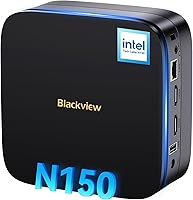
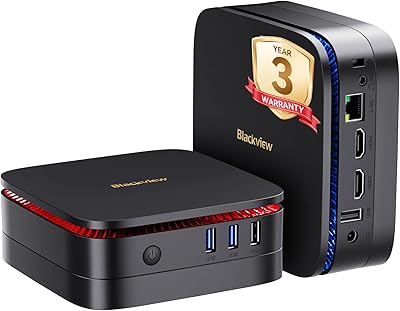
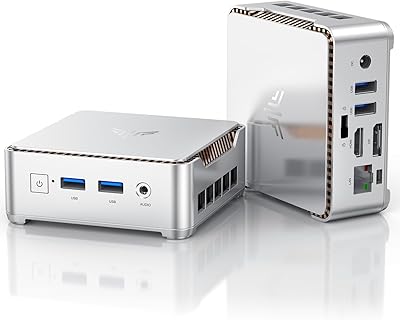
The Blackview MP60 16GB/512GB Mini PC sits in a competitive spot where budget meets practical capability — a compact desktop aimed squarely at home office workers, students, and small businesses who want real Windows performance without a tower eating up their desk. The Intel N150 Twin Lake processor is a meaningful step up from the older N95 and N100 chips, offering noticeably better throughput for everyday computing. At roughly the size of a thick paperback, the MP60 can even mount behind a monitor via the included VESA bracket. The 3-year warranty is genuinely rare at this price tier. Just be clear-eyed going in: this is an everyday workhorse, not a machine for gaming or heavy video editing.
Features & Benefits

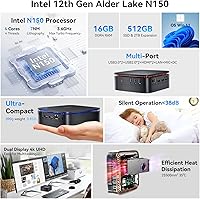
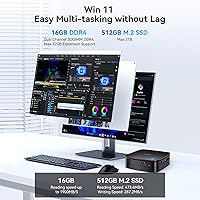
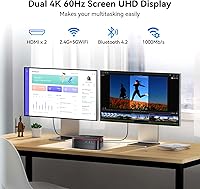
The N150 CPU runs at up to 3.6GHz across four cores with a 6MB cache, and in practice that translates to handling a dozen browser tabs, a Zoom call, and a spreadsheet simultaneously without hesitation. Paired with 16GB of DDR4 RAM and a fast PCIe SSD, cold boots finish in seconds and file access feels snappy. The dual HDMI outputs both push 4K at 60Hz — a genuine productivity boost for anyone running two monitors. Connectivity covers Gigabit Ethernet and Wi-Fi 5, though it is worth noting that Wi-Fi 6 is absent and Bluetooth 4.2 is a couple of generations behind current standards. Windows 11 Pro comes pre-installed with BitLocker encryption and Remote Desktop ready to go, which matters if you are managing a small fleet or working remotely.

Best For

This compact desktop punches above its weight for specific use cases. Home office workers who want a dual-monitor 4K setup without sacrificing desk space will find the VESA mount and dual HDMI outputs genuinely useful. Small businesses and schools looking to deploy affordable, centrally manageable Windows 11 Pro machines should take a close look — the built-in Remote Desktop and security features make light IT management realistic. Media center use is another natural fit: the machine is quiet enough for a living room. If you are currently running an aging Celeron or early Pentium system, the performance difference is substantial. Hardcore gamers or anyone doing 3D rendering, however, should look elsewhere — integrated graphics have a real ceiling.

User Feedback

Owners consistently mention how fast the MP60 feels right out of the box — boot speed and responsiveness draw particular praise, especially from people migrating off older hardware. The compact build and reliability of the dual 4K outputs also earn positive marks. That said, critical feedback does surface. A handful of users expected Wi-Fi 6 at this price point and found the older standard limiting in busier wireless environments. Thermal management draws mixed opinions: light loads stay quiet, but sustained workloads can push the fan to a noticeable hum. Out-of-box Windows activation has been smooth for most, though some flagged minor driver hiccups. The warranty support from Blackview's U.S. team is generally rated positively across user reports.

Pros

  • The Intel N150 CPU handles everyday multitasking — browser tabs, video calls, spreadsheets — without breaking a sweat.
  • Dual 4K HDMI outputs at 60Hz make this a genuinely capable dual-monitor productivity machine.
  • 16GB of RAM gives real breathing room compared to the 8GB configurations common at this price point.
  • The PCIe SSD delivers fast boot times and snappy file access that feels punchy for the category.
  • Windows 11 Pro comes pre-installed and legitimately activated, with BitLocker and Remote Desktop ready out of the box.
  • A 3-year warranty is unusually generous for a mini PC in this segment and adds meaningful long-term peace of mind.
  • The VESA mount lets you hide the unit behind a monitor, keeping your desk clean without extra effort.
  • Gigabit Ethernet ensures rock-solid wired connectivity for video calls and large file transfers.
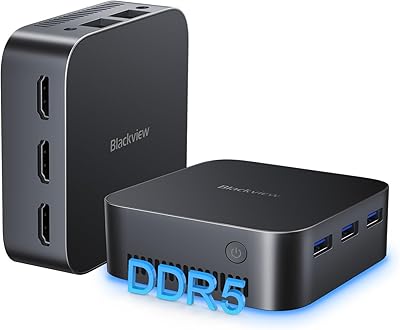
  • The compact footprint — smaller than most paperbacks — makes it practical for tight desks, media cabinets, or mounted installs.
  • A secondary 2.5-inch SATA bay allows storage expansion up to 2TB without replacing the main drive.

Cons

  • Wi-Fi 5 is two generations behind Wi-Fi 6, which is a noticeable omission in 2025 for wireless-dependent users.
  • Bluetooth 4.2 may cause compatibility or performance issues with newer wireless peripherals and headsets.
  • The cooling fan can become audible under sustained workloads, which undermines the quiet-operation marketing.
  • Integrated graphics have a hard ceiling — no gaming, no GPU-accelerated creative work, and no external GPU support.
  • Only two USB 3.0 ports are included; power users with multiple peripherals will likely need a hub immediately.
  • No DisplayPort output means buyers must confirm monitor compatibility before purchasing.
  • Minor driver hiccups at first boot have been reported by some users, requiring a round of Windows Update before everything settles.
  • Blackview is a relatively niche brand in Western markets, which may raise concerns about long-term parts and software support.
  • The included HDMI cable is a basic single unit — running dual 4K monitors requires a second cable purchased separately.
  • No Thunderbolt or USB4 support limits future expandability for users who may want docking station setups down the road.

Ratings

The scores below for the Blackview MP60 16GB/512GB Mini PC were generated by our AI engine after systematically analyzing verified global buyer reviews, actively filtering out incentivized, bot-generated, and duplicate submissions to surface only authentic user experiences. Each category reflects the full spectrum of real-world feedback — strengths and frustrations alike — so you can make a genuinely informed decision before buying.
Everyday Performance
83%
Users consistently report that the MP60 handles the realities of a busy office day without complaint — juggling 15 or more browser tabs, a running video call, and a spreadsheet simultaneously is well within its comfort zone. The N150 CPU delivers a noticeable step up from older N95 and N100-based machines that buyers were upgrading from.
Performance headroom runs thin once workloads stray beyond office tasks — longer export jobs, large media libraries, or multiple heavy applications running concurrently will expose the processor's limits. Users doing anything computationally sustained report slowdowns that a mid-range laptop with a higher-TDP chip handles more gracefully.
Boot & Storage Speed
88%
The PCIe SSD makes a strong first impression — cold boot to the Windows desktop in under 15 seconds is a commonly cited experience, and application launch times feel snappy for a machine at this price point. File transfers and large downloads land on the drive quickly, and day-to-day file access has virtually no perceptible lag.
The 512GB capacity fills up faster than many buyers anticipate, particularly on machines running Windows 11 Pro with a growing library of apps and documents. Without using the secondary SATA bay, some users found themselves managing storage carefully within the first few months of ownership.
Dual Monitor & Display Output
86%
Running two monitors at full 4K resolution is one of the MP60's most praised practical features — buyers setting up home office dual-display workspaces report that both outputs work reliably right out of the box without additional configuration. For financial dashboards, side-by-side document work, or media consumption on a large screen, the output quality is genuinely strong.
The absence of a DisplayPort connector limits monitor compatibility for users whose displays lack HDMI inputs, and only one cable is included, so a second HDMI purchase is necessary for a true dual-screen setup. A small subset of users also noted that certain ultrawide monitors required manual resolution adjustments to display correctly.
Value for Money
84%
Buyers repeatedly highlight that the combination of 16GB RAM, a PCIe SSD, genuine Windows 11 Pro, a VESA mount, and a 3-year warranty in one package is difficult to match at this price tier. For users replacing an aging office desktop or setting up a secondary workstation, the overall package feels like a fair trade.
Competing units from brands with stronger retail recognition have started closing the gap, and a few buyers felt the wireless specifications — Wi-Fi 5 and Bluetooth 4.2 — do not justify the full price when newer standards are available on some rivals. Those who need a more future-proof wireless stack may feel the value calculation shifts slightly.
Wireless Connectivity
61%
39%
For users on standard home or small office networks, Wi-Fi 5 delivers reliable throughput sufficient for video calls, cloud syncing, and general web use. In environments with a strong 5GHz signal and moderate network traffic, most buyers report no day-to-day connectivity problems.
Wi-Fi 5 is genuinely behind the curve in 2025, and buyers with Wi-Fi 6 or 6E routers in dense wireless environments notice that the MP60 does not take full advantage of their network infrastructure. Bluetooth 4.2 is similarly aging — a handful of users reported pairing inconsistencies with newer wireless headsets and peripherals that expect Bluetooth 5.0 or above.
Thermal Management & Noise
71%
29%
During routine workloads — email, web browsing, video streaming, and light document work — the cooling system stays quiet enough that most users in shared office environments are not bothered by it. The copper heat pipe design does appear to keep sustained CPU temperatures from reaching throttle-inducing levels under moderate stress.
Under prolonged heavy tasks such as large file compression, extended system updates, or antivirus full scans, the fan becomes clearly audible — not disruptive, but enough to notice in a quiet room. Users who purchased the machine specifically for its whisper-quiet marketing have been the most vocal about this discrepancy under real-world sustained load.
Build Quality & Design
74%
26%
The chassis feels more solid than the price point might suggest — the plastic shell has minimal flex and the overall construction inspires reasonable confidence for a compact desktop meant to stay on a desk or mount behind a monitor. The LED status indicator is a small but genuinely useful functional touch.
The materials are clearly plastic throughout, and the finish attracts fingerprints and dust fairly readily in everyday use. A few buyers noted that the unit feels lightweight in a way that occasionally reads as slightly cheap when picked up, though this has not translated into reported durability issues.
Port Selection & Expandability
69%
31%
Having four USB Type-A ports — split between USB 3.0 and 2.0 — covers the basics for keyboard, mouse, and a USB drive without immediately requiring a hub. The secondary 2.5-inch SATA bay is a meaningful expandability option that many competing units at this price omit entirely.
Four USB ports runs thin quickly for users with a more connected desk setup — a printer, external drive, USB audio interface, and webcam can exhaust them in one sitting. There is no USB-C port, no Thunderbolt support, and no SD card slot, which limits flexibility for users whose peripherals rely on these increasingly common connections.
Windows 11 Pro Experience
81%
19%
The vast majority of buyers confirm that Windows 11 Pro activates cleanly and immediately on first boot, with BitLocker and Remote Desktop available without any additional licensing steps. For small business operators or remote workers who need these enterprise-grade features without paying extra, this is a real practical win.
A smaller but consistent segment of users reported needing to run Windows Update immediately out of the box to resolve driver gaps — particularly for audio and network adapters. The initial setup experience is not universally plug-and-play, which may trip up less technically confident buyers.
Setup & Out-of-Box Experience
78%
22%
Most buyers describe a straightforward setup process — connect the power adapter, plug in an HDMI cable and peripherals, and the machine boots into Windows 11 Pro setup within minutes. The included VESA mount and hardware make monitor-mounting a genuine no-tools-required process for most standard monitors.
The included user manual is minimal, and non-technical buyers occasionally find the initial driver update process confusing without guidance. The box includes only one HDMI cable, which catches dual-monitor buyers off guard if they have not planned ahead.
Warranty & Support
82%
18%
A 3-year warranty is a meaningful differentiator that buyers notice and appreciate — it signals a level of manufacturer confidence that most competitors at this price tier do not match. User reports on Blackview's U.S.-based support responsiveness are generally positive, with most warranty interactions described as resolved without prolonged back-and-forth.
Blackview does not have the same established service infrastructure as larger brands, so buyers in more remote areas or with complex warranty claims have occasionally reported slower resolution timelines. The 90-day return window, while useful, sits at the lower end of what some competing platforms offer.
Media Playback
85%
4K video playback from streaming services and local files runs without stuttering or dropped frames in typical testing scenarios, making the MP60 a capable living room or meeting room media machine. The integrated Intel graphics handle H.264 and H.265 decoding efficiently, keeping CPU load low during playback.
HDR support depends entirely on the connected monitor or TV and is not guaranteed across all display combinations. Users attempting to play back very high-bitrate local 8K files or use the machine as a full Plex transcoding server reported that the experience pushed the hardware noticeably harder than expected.
Compact Footprint & VESA Mount
89%
Buyers who mounted the MP60 behind their monitor consistently describe it as a transformative desk decluttering experience — the unit essentially disappears, leaving only the monitor, keyboard, and mouse visible. At under a pound, repositioning or reinstalling it takes seconds, which is a genuine convenience for shared or multi-purpose spaces.
The VESA mount hardware included covers standard patterns well, but buyers with non-standard or proprietary monitor mounting systems occasionally needed additional adapters not included in the box. The compact chassis also means internal airflow is tighter than in a standard desktop tower, contributing to the fan-spin behavior under sustained load.

Suitable for:

The Blackview MP60 16GB/512GB Mini PC is a strong fit for home office workers who want a clean, uncluttered desk without sacrificing real computing capability — particularly those who rely on dual monitors for their daily workflow. Remote workers and small business operators will appreciate the genuine Windows 11 Pro license, which brings BitLocker encryption and Remote Desktop support without any extra software cost or activation headaches. Schools and small IT departments looking to deploy affordable, manageable desktops at scale will find the value proposition hard to ignore. If you are still running a machine built around an older Celeron or early Pentium processor, the performance difference here is tangible enough to feel like a significant upgrade. The included VESA mount makes it easy to tuck the unit behind a monitor, which is a practical bonus for anyone working in a tight space or building a tidy media center setup.
Not suitable for:

The Blackview MP60 16GB/512GB Mini PC is not the right call if your workload involves anything graphically intensive — the integrated Intel graphics can drive two 4K displays cleanly, but 3D rendering, video editing, and modern PC gaming are firmly outside its comfort zone. Buyers who prioritize cutting-edge wireless connectivity should also pause: Wi-Fi 5 and Bluetooth 4.2 are functional but noticeably behind current standards, and in dense wireless environments or with newer Bluetooth peripherals, that gap can become a real frustration. Power users who routinely push sustained heavy workloads — think long encoding jobs or large dataset processing — may find that the fan becomes audible under prolonged stress, which undercuts the quiet-operation appeal. If your work demands a DisplayPort connection, this machine does not offer one, so monitor compatibility is something to verify upfront. Anyone expecting a premium build with silent passive cooling should temper those expectations; this is a budget-tier machine that delivers solid value within clear limits.
Specifications

  • Processor: Intel Twin Lake N150 CPU with 4 cores, 4 threads, up to 3.6GHz boost clock, and 6MB L3 cache.
  • RAM: 16GB DDR4 SDRAM provides comfortable headroom for multitasking across browser-heavy and office workloads.
  • Storage: 512GB M.2 2280 PCIe SSD handles fast boot times and file access, with a secondary 2.5-inch SATA bay supporting up to 2TB expansion.
  • Graphics: Intel integrated graphics with 24 execution units and a max dynamic frequency of 1000MHz — sufficient for 4K display output but not for gaming or GPU-intensive tasks.
  • Display Output: Dual HDMI 1.4b ports support resolutions up to 4096x2160 at 60Hz, enabling a true dual-4K monitor setup.
  • Wireless: Wi-Fi 5 (802.11ac) and Bluetooth 4.2 provide wireless connectivity, though both standards are behind the current Wi-Fi 6 and Bluetooth 5.x generation.
  • Wired Network: A single Gigabit Ethernet (RJ45) port delivers stable, high-speed wired internet for video calls and large file transfers.
  • USB Ports: Four USB Type-A ports total: two USB 3.0 Gen1 (5Gbps) and two USB 2.0 (480Mbps) for peripherals and storage devices.
  • Audio: One 3.5mm combo audio jack supports headphones or a headset directly without requiring an external adapter.
  • Operating System: Genuine Windows 11 Pro comes pre-installed, including BitLocker encryption, Remote Desktop, and standard business security features.
  • Dimensions: The unit measures 4.6″ x 4.4″ x 1.34″ and weighs approximately 0.85 lbs, making it one of the more compact options in its class.
  • Cooling: A copper heat pipe paired with an active fan provides a total heat dissipation area of 16,800mm², balancing thermal performance with relatively quiet operation under light loads.
  • LED Indicator: An onboard LED glows blue during normal operation and switches to red in sleep mode, giving at-a-glance system status without any software.
  • Warranty: Covered by a 3-year limited warranty and a 90-day no-hassle return policy, with dedicated U.S.-based customer support.
  • In the Box: Package includes the mini PC unit, a power adapter, one HDMI cable, a VESA mount with mounting screws, and a printed user manual.
  • Power: Engineered for low power consumption, drawing significantly less electricity than a traditional desktop tower under equivalent workloads.
  • Expandability: The secondary 2.5-inch SATA slot accepts standard SSDs or HDDs, allowing internal storage to grow beyond the factory configuration without replacing the primary drive.

Related Reviews
Blackview MP80 N97 512GB Mini PC

78%
82%
Everyday Performance
88%
Value for Money
86%
RAM & Storage
91%
Display & Output
83%
Connectivity & Ports
More
ACEMAGICIAN Kron Mini K1 Mini PC
73%
83%
Everyday Performance
54%
Gaming Capability
61%
Thermal Management
89%
Display & Connectivity
78%
Value for Money
More
Blackview MP60 Mini PC 2025
86%
87%
Performance
91%
Value for Money
93%
Noise Reduction & Cooling Efficiency
89%
Connectivity (Wi-Fi & Ethernet)
85%
Build Quality & Design
More
KAMRUI GK3Plus Mini PC (N95, 16GB RAM, 512GB SSD)
81%
89%
Multitasking Performance
92%
Value for Money
86%
Thermal Management
84%
Display Versatility
81%
4K Media Playback
More
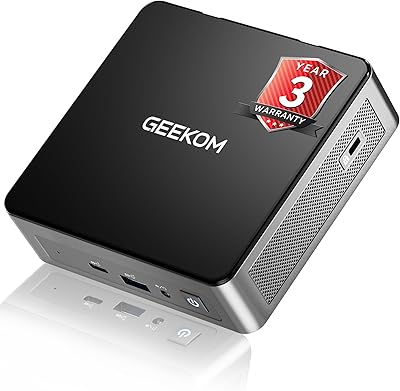
GEEKOM Air12 Mini PC 16GB/512GB
82%
88%
Value for Money
82%
Everyday Performance
71%
Build Quality
74%
Thermal Management & Noise
91%
Connectivity & Port Selection
More
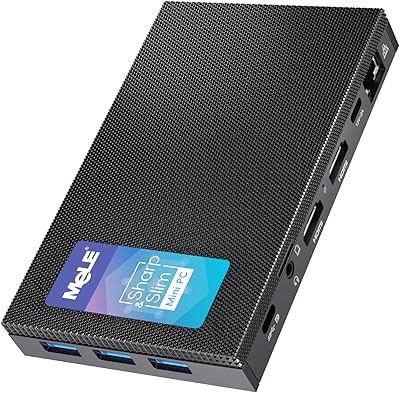
MeLE Mini PC Quieter 4C, 16GB RAM, 512GB SSD
87%
85%
Performance
90%
Build Quality
88%
Display Quality
93%
Energy Efficiency
92%
Noise Level
More
MeLE Quieter3C Mini PC N5105 16GB/512GB
80%
97%
Noise Level
83%
Build Quality & Design
71%
Thermal Management
74%
Everyday Performance
68%
Memory & Storage Configuration
More
GEEKOM A5 2025 Edition Mini PC
80%
88%
Performance for Daily Use
83%
Build Quality
67%
Thermal Management
84%
Value for Money
76%
Multi-Monitor Support
More
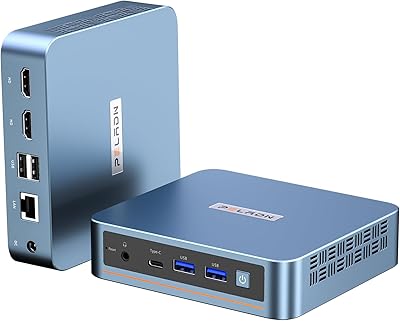
PELADN WI-6 Mini PC (N100, 16GB DDR4, 512GB SSD)
79%
88%
Value for Money
83%
Performance for Daily Tasks
91%
Triple-Display Support
74%
Build Quality & Design
71%
Setup & Out-of-Box Experience
More
KAMRUI Essenx E2 N150 16GB Mini PC
78%
83%
Everyday Performance
79%
Multitasking & RAM
88%
Display & Dual Monitor Support
76%
Build Quality & Design
71%
Thermal Management & Fan Noise
More

FAQ

Yes — both HDMI ports support up to 4096x2160 at 60Hz simultaneously, so you can run a true dual-4K extended desktop. Just keep in mind you will need a second HDMI cable, since only one is included in the box.

Blackview states that Windows 11 Pro is pre-installed with a genuine license. Most users report clean activation straight out of the box, though running Windows Update immediately after setup is always a smart move to pull in the latest drivers and security patches.

For typical office tasks — web browsing, video calls, document editing — the MP60 stays impressively quiet. Where things get more noticeable is during sustained heavy workloads like extended downloads, antivirus scans, or prolonged system updates, where the fan will spin up audibly. It is not disruptive in most office environments, but it is not passively silent either.

You have two good options. The M.2 PCIe slot holds the factory SSD, and there is also a 2.5-inch SATA bay inside the chassis that accepts a standard SSD or HDD up to 2TB. So you can add a secondary drive without touching the existing one — a practical upgrade path if you accumulate a lot of local files.

It works well for that use case. The integrated graphics handle 4K video playback cleanly, the unit is compact enough to tuck into an entertainment cabinet, and under light media playback it runs quietly. Just make sure your TV has an HDMI input that supports 4K, and you are set.

Yes, this is one of its stronger suits. The N150 processor and 16GB of RAM handle Zoom, Teams, or Google Meet comfortably — even with other tabs and documents open in the background. Pairing it with a Gigabit Ethernet connection rather than relying on Wi-Fi 5 will give you the most stable call quality.

That is a fair criticism. Wi-Fi 6 and Bluetooth 5.x have been standard on most new devices for a few years now, and the MP60 does trail behind on this front. For most home and office setups it will not be a daily problem — especially if you use a wired Ethernet connection — but if you rely heavily on wireless and have a Wi-Fi 6 router or newer Bluetooth peripherals, this is a genuine limitation worth factoring into your decision.

Absolutely — a VESA mounting bracket and screws are included in the box specifically for this purpose. It fits standard VESA patterns on most monitors, so you can bolt it to the back and effectively make the PC disappear from your desk entirely. It is a thoughtful inclusion that many competing units charge extra for or omit completely.

The unit comes with a 3-year limited warranty and a separate 90-day return window. Blackview operates U.S.-based customer support, and general user feedback on warranty responsiveness is positive. For a mini PC at this price point, three years of coverage is notably better than the one-year standard most competitors offer, so it does add real long-term reassurance.

Light, occasional photo editing in Lightroom — importing, basic adjustments, exporting — is within reach, but do not expect the experience to feel fast or fluid when working with large RAW files or applying heavy edits to batches. The integrated GPU does not accelerate Lightroom the way a dedicated graphics card would, so rendering previews and exports will take noticeably longer than on a machine with discrete graphics. For occasional casual edits it is usable; for serious photography work it will frustrate you.