Overview

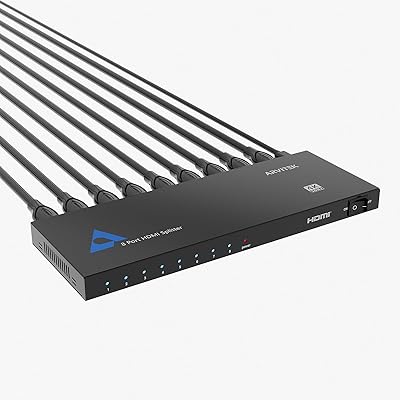
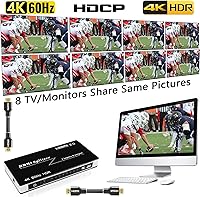
The KAGO B042-8 1x8 HDMI Splitter is a mid-range distribution hub built for anyone who needs to push a single video source out to eight displays at once — think a sports bar running the same game on every screen, or a trainer projecting slides across multiple rooms. One thing to clarify before buying: this device mirrors your source to all eight outputs identically. It does not extend or span content across screens the way a multi-display extender would. With HDMI 2.0 and HDCP 2.2 on board, it handles protected content and modern resolutions better than cheaper alternatives at this price tier. Setup is plug-and-play, and a power supply is included in the box.
Features & Benefits

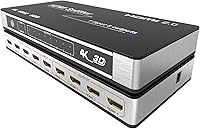
At its core, this 8-port HDMI splitter supports 4K at 60Hz, backed by 18 gigabits per second of bandwidth to handle demanding content without compromising quality. HDCP 2.2 compliance is a genuine practical win: you can split a Blu-ray player or a streaming stick running protected content without the signal getting blocked downstream. Audio is well-covered, with support for lossless formats including Dolby TrueHD and DTS-HD alongside Dolby AC3 and DTS. Input cables up to 10 meters and output cables up to 15 meters per port give you real flexibility for larger room installations. The unit itself is compact and light enough to sit cleanly on a shelf or slot into a rack without much fuss.

Best For

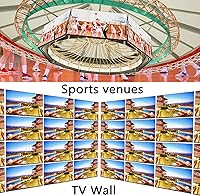
This distribution hub is built for commercial and institutional environments where one consistent feed needs to reach many screens reliably. A bar or restaurant showing live sports, a gym looping entertainment content, a church displaying presentation slides and video during services — these are the natural homes for this splitter. Classrooms and conference rooms benefit too, especially when a presenter wants every monitor in the room showing the same thing without dealing with wireless latency or finicky adapters. Digital signage operators running identical content loops across multiple panels will find it dependable in day-to-day use. Home theater use is possible, though most home setups would rarely call for eight simultaneous outputs.

User Feedback

With a 4.2-star average across a modest number of ratings, the KAGO splitter earns broadly positive marks — though the sample size means some patterns are still developing. Buyers consistently highlight the straightforward setup experience, with most reporting all eight displays running within minutes and no drivers required. Build quality is generally regarded as solid for the price. The most common complaint centers on resolution handshake issues with certain TV brands, where a display occasionally struggles to lock onto the correct signal. A handful of users have also questioned whether the included power supply is sufficient when all eight ports are fully active, and heat buildup during extended always-on use is worth watching.

Pros

  • Distributes one source to eight displays simultaneously with no driver installation needed.
  • HDCP 2.2 support means protected streaming and Blu-ray content passes through without being blocked.
  • Full 4K at 60Hz output covers virtually every modern commercial display on the market.
  • Wide audio format support includes lossless Dolby TrueHD and DTS-HD for audio-critical setups.
  • Output cables up to 15 meters per port give real flexibility in larger rooms and venues.
  • Compact, lightweight chassis fits cleanly on a shelf, rack, or AV cart without dominating the space.
  • Included power supply means the unit is ready to run straight out of the box.
  • Most users report all eight screens running within minutes of unboxing — minimal setup friction.
  • Solid build quality for the price tier holds up well in permanent, semi-professional installations.
  • One-year warranty provides baseline coverage for commercial buyers who need documented protection.

Cons

  • Resolution handshake failures occur more frequently when mixing display brands or model years across the eight ports.
  • The unit runs noticeably warm under full eight-port load, raising concerns for always-on deployments.
  • Included power supply may be insufficient when all eight outputs are simultaneously active with demanding displays.
  • No per-port indicator lights make troubleshooting a single failing output a tedious trial-and-error process.
  • Real-world 4K consistency depends heavily on cable quality in a way the product listing does not adequately communicate.
  • No mounting hardware is included, which is a practical gap for clean rack or wall installations in professional venues.
  • One non-HDCP 2.2 display in the chain can force all outputs to a lower compatibility level, affecting every screen.
  • Long-term durability data is limited given the product's relatively recent availability and modest review sample size.
  • Customer support response quality is inconsistent, which matters in commercial settings where downtime is costly.

Ratings

The KAGO B042-8 1x8 HDMI Splitter has been scored below by our AI system after processing verified buyer reviews from multiple global markets, with spam, bot-generated, and incentivized feedback actively filtered out. Ratings reflect the honest consensus of real-world users across commercial, educational, and home installation contexts. Both the strengths that keep buyers satisfied and the friction points that trigger returns or complaints are transparently represented in every category.
Signal Distribution Reliability
83%
Most buyers running this distribution hub in bars, gyms, and classrooms report consistent, stable output across all eight ports during extended sessions. The signal holds well under normal operating conditions when quality HDMI cables and compatible source devices are used.
A recurring subset of users — particularly those mixing older and newer display brands — report intermittent dropouts or one port going dark without warning. These issues tend to surface after hours of continuous use rather than at initial setup.
4K Performance
76%
24%
When the source device, cables, and displays all support HDMI 2.0 properly, the picture quality at full 4K resolution is genuinely clean and sharp. Users running modern streaming sticks or gaming consoles into compatible TVs generally get exactly what the specs promise.
Real-world 4K results vary more than the spec sheet suggests. Cable quality plays a significant role, and some users find that not all eight outputs reliably lock onto 4K simultaneously — a few ports occasionally defaulting to 1080p depending on the connected display.
HDCP 2.2 Compatibility
79%
21%
For buyers specifically trying to split protected content from Blu-ray players or streaming devices, HDCP 2.2 support is the deciding factor, and this splitter handles it better than many competitors at the same price point. Church AV setups and hospitality venues report fewer content-protection errors than with budget alternatives.
HDCP handshake failures do occur, particularly when mixing displays of different generations or brands. A few users found that connecting one non-HDCP 2.2 display in the chain caused the entire output chain to fall back to a lower protection level, affecting all screens.
Ease of Setup
88%
The plug-and-play experience is one of this unit's clearest strengths. The overwhelming majority of buyers report having all eight displays running within minutes, with zero driver installation required and no configuration menus to navigate — a real advantage in fast-paced commercial installs.
The small minority of users who do hit setup issues tend to struggle without any onscreen diagnostic feedback. There is no indicator per port to tell you which output is the problem, so troubleshooting a stubborn display requires trial and error with cables and devices.
Build Quality
74%
26%
The enclosure feels substantially better than entry-level plastic splitters, with a more rigid chassis that holds up reasonably well in permanent wall-mount or rack installations. Port connectors feel snug rather than loose, which matters when cables stay plugged in for months at a time.
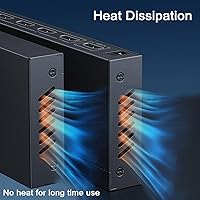
At full eight-port load, the unit runs noticeably warm during extended use — a concern flagged by buyers running it 24/7 in digital signage applications. The chassis offers no ventilation slots, which makes heat dissipation a long-term question mark for always-on deployments.
Audio Format Support
81%
19%
Support for lossless audio formats including Dolby TrueHD and DTS-HD is a genuine plus for home theater users or conference room setups where audio quality matters. Most buyers distributing audio-heavy content report clean, uncompressed passthrough without noticeable degradation.
Audio sync issues have been mentioned by a small number of users, particularly when the source device is switching between audio formats mid-stream. These cases seem tied to specific source hardware rather than the splitter itself, but they are worth noting for live AV applications.
Cable Length Flexibility
78%
22%
Allowing output cables up to 15 meters per port gives installers meaningful freedom in larger rooms, such as gyms or auditoriums where displays are spread across a wide area. Buyers appreciate not being forced into short cable runs that limit screen placement.
Signal integrity at longer cable runs is dependent on cable quality in a way that the product listing undersells. Users pushing toward the upper end of the rated lengths with generic cables report occasional signal instability, and premium cables add cost that factors into the overall value calculation.
Power Supply Adequacy
67%
33%
For most standard installations running five or six active outputs, the included power supply performs without issue. Buyers in classroom and conference room settings — where not all eight ports are always in use — report no power-related complaints.
Under full eight-port load, particularly with power-hungry displays or long cable runs, some users question whether the included adapter delivers sufficient stable power. A handful of buyers replaced it with a higher-rated third-party supply and reported improved consistency as a result.
Resolution Handshake Consistency
62%
38%
When all connected displays are from the same generation and brand, resolution negotiation tends to be smooth and automatic. Buyers running eight identical commercial monitors in a signage setup report the cleanest handshake experience.
Mixing display brands or model years is where this splitter shows its biggest weakness. Several users report that one display forcing a lower resolution causes all outputs to follow suit, and resolving these conflicts often requires rebooting the entire chain — disruptive in live settings.
Thermal Management
58%
42%
For intermittent daily use — say, a school AV cart powered on during class hours and off afterward — heat accumulation is not a meaningful issue. The unit stays within acceptable temperature ranges under those conditions.
Continuous 24-hour operation, common in digital signage and hospitality environments, generates sustained warmth that concerned several long-term users. Without active cooling or ventilation, buyers running always-on installations should consider airflow around the unit carefully.
Value for Money
73%
27%
Among HDMI 2.0 splitters offering eight outputs with HDCP 2.2 support, this unit sits in a reasonable position on the price-to-feature spectrum. For buyers who need all eight ports reliably and want protected-content compatibility, the price reflects a genuine step up from no-name alternatives.
Buyers who only need four or five outputs may feel they are overpaying for ports they will never use, and competitors at lower price points cover that use case adequately. The value proposition is strongest specifically when all eight outputs are actually needed.
Long-Term Durability
66%
34%
Users who have owned this distribution hub for six months or more in moderate-use environments — offices, classrooms, small venues — generally report continued stable operation without degradation. The connector ports hold up well to cables being swapped occasionally.
The longer-term reliability picture is harder to assess given the product's relatively recent market entry and a still-modest review sample. A portion of buyers reporting issues do so after several months of use, suggesting durability questions that the current review volume cannot fully resolve.
Compact Form Factor
84%
The physical footprint is genuinely practical for permanent installs. Rack-mounting, shelf-placement, or even simple cable-management runs are all straightforward given the size and weight. AV integrators and IT staff appreciate not having to engineer around a bulky unit.
While compact, the unit lacks any mounting hardware in the box, so buyers who want a clean rack or wall installation need to source brackets separately. For a device marketed toward professional venues, this is a minor but real omission.
Warranty and Support
69%
31%
A one-year warranty is a reasonable baseline for this category, and buyers who have contacted KAGO support report responses that are at least functional. For commercial buyers who need documented coverage, the warranty provides basic reassurance.
Support quality feedback is mixed. Some users describe slow response times and generic troubleshooting scripts that do not address their specific setup issues. For professional installations where downtime is costly, reliance on the warranty alone may not be a sufficient safety net.

Suitable for:

The KAGO B042-8 1x8 HDMI Splitter is the right call for anyone who needs to push a single video source to multiple screens simultaneously without complexity. Bar and restaurant owners showing live sports across eight TVs, gym operators looping content on wall-mounted displays, and church AV teams projecting the same feed to overflow rooms are all squarely in the target audience. Classroom instructors and corporate trainers who want every monitor in the room showing identical content will find the plug-and-play setup refreshingly straightforward — no IT department required. Digital signage operators running consistent content loops across multiple panels in retail or hospitality environments get reliable, always-on performance for the price. If you genuinely need all eight outputs and your source, cables, and displays are reasonably modern and compatible, this distribution hub delivers solid value without demanding expert configuration.
Not suitable for:

If what you actually need is to extend your desktop across multiple monitors — showing different content on each screen — the KAGO B042-8 1x8 HDMI Splitter is the wrong tool entirely, and buying it for that purpose is the single most common reason for returns in this category. This device mirrors one source to all outputs; it cannot create a multi-screen workspace the way a display adapter or video card with multiple outputs can. Buyers with a mixed bag of older and newer TVs from different brands should also proceed with caution, as resolution handshake inconsistencies become more likely in those setups. Anyone planning a continuous 24-hour always-on deployment — think permanent digital signage in a retail window — should factor in the unit's heat buildup under sustained full load before committing. Finally, if you only need three or four outputs, there are better-value options at lower price points that do not charge for ports you will never use.
Specifications

  • Configuration: Routes one HDMI source to eight separate displays simultaneously, with all outputs mirroring the same content.
  • HDMI Version: Built on HDMI 2.0, which supports the bandwidth needed for 4K resolution at high frame rates.
  • Max Resolution: Supports video output up to 4K (3840x2160) at 60Hz across all connected displays.
  • Bandwidth: Delivers up to 18 Gbps of data throughput, sufficient for uncompressed 4K HDR content.
  • HDCP Compliance: Fully compliant with HDCP 2.2, enabling passthrough of copy-protected content from streaming devices and Blu-ray players.
  • Color Depth: Supports 36-bit deep color for richer color gradients on compatible displays and source material.
  • Audio Formats: Passes through DTS-HD, Dolby TrueHD, LPCM 7.1, DTS, Dolby AC3, and DSD audio formats without compression.
  • 3D Support: Compatible with 3D signal output for source devices and displays that support the 3D HDMI standard.
  • Input Cable Length: Supports source-to-splitter input cables up to 10 meters (approximately 33 feet) in length.
  • Output Cable Length: Each of the eight output ports supports cables up to 15 meters (approximately 49 feet) to reach distant displays.
  • Dimensions: The unit measures 8.58 x 3.94 x 1.1 inches, compact enough for shelf placement or rack integration.
  • Weight: Weighs 1.15 pounds, making it easy to mount or reposition without specialized hardware.
  • Power Supply: Comes with an external power adapter included in the box; no bus-powered operation from the source device.
  • Installation: Plug-and-play operation with no driver installation or software configuration required on any connected device.
  • Compatible Sources: Works with PCs, laptops, streaming sticks, gaming consoles, Blu-ray players, and any other device with a standard HDMI output.
  • Compatible Displays: Connects to televisions, monitors, projectors, and other HDMI-equipped displays regardless of brand.
  • Model Number: Manufacturer model number is B042-8, produced by Yunzuo under the KAGO brand.
  • Warranty: Covered by a one-year manufacturer warranty with support provided directly through KAGO.

Related Reviews

Arvitek 1x8 HDMI Splitter
82%
92%
Ease of Setup
88%
Build Quality
87%
Compatibility with Devices
85%
Performance (Resolution & Speed)
84%
Durability
More
KAGO 4K801 HDMI Switch 8-in-1
79%
93%
Ease of Setup
88%
Signal Stability
71%
4K Video Performance
58%
PS5 & Modern Console Compatibility
76%
Remote Control Usability
More
OREI UHD18-EX115-K 4K 1x8 HDMI Extender Splitter
84%
88%
Performance
91%
Signal Quality
93%
Installation & Setup
85%
Range & Connectivity
68%
IR Control Range
More
Eyoyo EM08B 8″ Monitor
75%
91%
Input Versatility
88%
BNC Connectivity
84%
Setup & Plug-and-Play Experience
82%
Mirror Flip Functionality
76%
Image Clarity for Surveillance Use
More
TCNEWCL KS-801 8-Port HDMI KVM Switch
78%
88%
Ease of Setup
91%
Port Capacity & Scalability
74%
Video Quality & Resolution
69%
Switching Speed & Reliability
83%
IR Remote Control
More
KAGO A072 7-Port HDMI Switch 4K@60Hz
79%
88%
Build Quality
93%
Port Count & Versatility
74%
4K & HDR Signal Integrity
86%
Remote Control Usability
41%
Auto-Switching Capability
More
MT-VIKI MT-801HK-C 8-Port HDMI KVM Switch
78%
83%
Value for Money
88%
Ease of Setup
76%
Build Quality
69%
Switching Performance
71%
Display Quality
More
DiamondTiger 4K801 8-Port HDMI Switch
72%
93%
Ease of Setup
88%
Remote Control Usability
79%
Build Quality
67%
Video Resolution Performance
41%
PS5 Compatibility
More
AIMIBO 1-to-8 Wireless HDMI Extender
71%
78%
Wireless Range & Stability
86%
Multi-Screen Distribution
71%
KVM Functionality
67%
Initial Setup Experience
73%
IR Remote Passback
More
GREATHTEK 8-Port HDMI KVM Switch
71%
91%
Ease of Setup
78%
Switching Reliability
74%
Video Quality
63%
Build Quality
67%
USB Peripheral Sharing
More

FAQ

Every connected display shows exactly the same content — this is a splitter, not a multi-output graphics adapter. If you need different content on each screen, you would need a dedicated video card with multiple outputs or a separate video distribution system. The KAGO B042-8 1x8 HDMI Splitter is specifically designed for mirroring one source across all eight outputs simultaneously.

Yes, and HDCP 2.2 compliance is exactly why this distribution hub handles that scenario better than cheaper alternatives. Netflix, Amazon Prime, and Blu-ray players all rely on HDCP copy protection, and a splitter without HDCP 2.2 will block or drop the signal. Just make sure all eight connected TVs also support HDCP 2.2, since one non-compliant display in the chain can affect all outputs.

No installation required at all. You plug in the power supply, connect your source to the input, run HDMI cables to your displays, and everything should come up automatically. Most users report all eight screens running within a few minutes of unpacking.

It will work, but all eight outputs will output at the same resolution, so the entire chain typically negotiates down to the lowest common denominator. If one display only supports 1080p, the others may also output at 1080p rather than 4K. For best results, try to use displays of similar capability, or check whether your source device allows you to force a fixed output resolution.

The input cable from your source can run up to 10 meters, and each output cable can go up to 15 meters. That gives you a reasonable range for most commercial room layouts. At those longer distances, cable quality matters more than people expect — a cheap cable near its length limit will cause signal instability, so invest in decent cables for the longer runs.

For most setups running six or fewer outputs, the included adapter handles things without issue. When all eight ports are active — especially with longer cables and power-hungry displays — some users have reported upgrading to a higher-rated third-party power supply for more consistent performance. It is worth testing with the included supply first, but if you see flickering or ports dropping out, that is the first thing to swap.

Technically yes, but heat is a factor to keep in mind. The unit does not have ventilation slots, so it runs warm under sustained full load. If you are running it always-on, make sure there is some airflow around it and it is not enclosed in a tight cabinet. Several users in permanent signage installs have flagged heat buildup as a long-term concern worth monitoring.

It can, and this is one of the more commonly reported issues with this 8-port HDMI splitter. Mixing brands or display generations sometimes causes resolution handshake failures, where one TV struggles to agree on a signal format and causes disruption across other outputs. It tends to work better when all connected displays are similar in spec and manufacture year. If you do hit issues, rebooting the whole chain — source first, then splitter, then displays — often clears it.

Dolby TrueHD and DTS-HD are both supported, which covers the lossless formats used by Blu-ray and high-end streaming content. Full Dolby Atmos object-based audio depends on both your source device and your AV receiver or soundbar supporting it end-to-end — the splitter passes the signal, but it does not decode or process audio itself. If your source and receiver both support Atmos over HDMI 2.0, it should pass through correctly.

You get the splitter unit itself, an external power supply, and a user manual. HDMI cables are not included, so you will need to source those separately for both the input and all eight output connections.