Overview

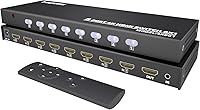
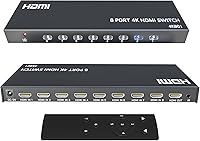
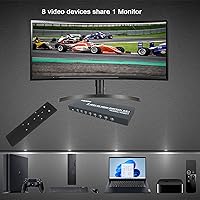
The KAGO 4K801 HDMI Switch 8-in-1 sits in a practical middle ground — capable enough for demanding home setups, yet priced well below AV matrix territory that most households never actually need. What immediately separates it from cheaper alternatives is its metal enclosure, which feels noticeably sturdier and runs cooler during long sessions. The included IR remote is a small but real convenience that budget options frequently omit. Setup is genuinely straightforward: plug your sources in, connect your display, and you are done — no drivers required, no configuration menus, no fuss. For anyone drowning in HDMI cables behind their TV stand, this KAGO switch offers a clean, no-nonsense way to reclaim that space.
Features & Benefits

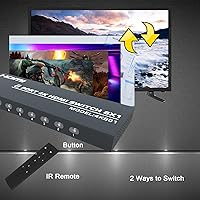
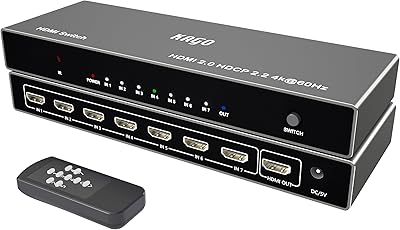
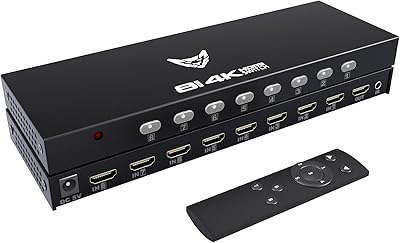
The 8-port switch handles up to eight HDMI sources at once, routing them to one display with auto-detection per port — each active input gets its own LED indicator, so you always know what is live. Resolution support hits 4K at 30Hz, which is solid for movies and streaming but worth flagging for competitive gamers where that ceiling can feel limiting. For 1080p content, it runs comfortably at 60Hz. Audio pass-through covers DTS-HD, Dolby TrueHD, and LPCM, making it a reasonable fit for home theater setups. You can switch inputs from the front panel or via the IR remote, and signal stability during transitions holds up well under normal use.

Best For

This HDMI switcher makes the most sense for people who have genuinely run out of HDMI ports. Think a living room TV paired with a PS4, an Xbox, a Roku, a Blu-ray player, and a laptop — all competing for that single input slot. It is also a solid pick for small conference rooms where presenters need to swap sources without pulling cables. Gamers running older consoles alongside a PC on one monitor will find it equally practical. The audience that should pause is PS5 owners: Sony's console defaults to 4K60Hz output, and this switch caps at 4K at 30Hz, requiring a manual resolution adjustment in PS5 settings before it works correctly.

User Feedback

Buyers generally come away satisfied, with the most repeated positives being easy setup and a remote that holds up reliably across a room without requiring a direct line of sight. Signal stability earns consistent praise — most users report no flickering or dropouts during routine use. On the critical side, PS5 owners occasionally discover the 30Hz ceiling only after unboxing, causing frustration that reading the specs beforehand would have avoided. Some buyers also note the remote's IR sensitivity can be finicky at steep angles. Durability feedback trends positive; the metal build earns a level of trust that plastic-housed alternatives at comparable prices rarely manage. Overall, satisfaction runs notably high relative to what you are paying.

Pros

  • Eight HDMI inputs in one box eliminates port shortages on virtually any TV or monitor setup.
  • Metal enclosure feels noticeably more durable than plastic-bodied competitors at similar prices.
  • Plug-and-play operation means no drivers, no apps, and no configuration headaches.
  • Included IR remote lets you switch inputs from across the room without touching the unit.
  • Auto-detection with per-port LED indicators makes it instantly clear which sources are active.
  • HDR and Dolby TrueHD audio pass-through work reliably for home theater use cases.
  • 1080p at 60Hz runs cleanly, covering the majority of everyday streaming and gaming needs.
  • The 8-port switch holds a strong sales rank, reflecting broad, sustained buyer satisfaction.
  • CR2 remote battery is included in the box — a small but genuinely appreciated detail.
  • Signal stability during routine switching draws consistent praise across buyer reviews.

Cons

  • 4K output is capped at 30Hz, making fast-motion content and competitive gaming noticeably less fluid.
  • PS5 users must manually adjust console output resolution before the switch will function correctly.
  • IR remote loses reliability at steep angles, frustrating users with non-direct line-of-sight placement.
  • Some units show slightly loose HDMI port tolerances that can cause intermittent signal issues over time.
  • At 9.1 inches long, the unit is bulkier than product images imply and can be awkward in tight shelves.
  • HDCP handshake delays when mixing old and new source devices can stretch switching pauses to several seconds.
  • The instruction sheet does not address common setup edge cases, leading to avoidable confusion for first-time users.
  • LEDs have no brightness control, which can be distracting in darkened home theater or bedroom environments.

Ratings

The KAGO 4K801 HDMI Switch 8-in-1 has been scored by our AI system after parsing verified buyer reviews from multiple global markets, with spam, bot-generated, and incentivized feedback actively filtered out before analysis. The scores below reflect a balanced picture — genuine strengths are recognized, but real frustrations from everyday users are weighted just as honestly. Whether you are shopping for a home theater consolidation or a tidy office setup, the category breakdowns here are designed to surface exactly what matters before you buy.
Ease of Setup
93%
Users consistently describe unpacking and getting everything running in under five minutes. There are no drivers, no app pairing, and no configuration menus — you plug sources in, connect the output display, and the switch identifies active ports on its own. For people who dread setting up new hardware, that experience carries real weight.
A small number of buyers report that the LED indicator behavior confused them initially, since only port 1 lights up when no devices are detected. The manual does not explain this clearly, leading some users to assume the unit was defective before figuring it out through trial and error.
Signal Stability
88%
The majority of buyers note rock-solid signal performance during normal daily use — no flickering during streaming, no dropouts when switching between a console and a laptop. Users running the switch through long viewing sessions report that the output stays clean and consistent, which is the baseline expectation for any switcher at this tier.
A handful of users encountered brief signal handshake delays when switching between devices that use different HDCP versions. This is not universal, but it appears more frequently when mixing older and newer sources on the same unit, suggesting the HDCP negotiation logic is not completely airtight.
4K Video Performance
71%
29%
For 4K content at 30Hz — streaming movies, watching Blu-ray rips, browsing photos on a large TV — the picture quality is genuinely good. HDR pass-through works as expected on compatible displays, and the image holds up well without visible compression artifacts during normal passive viewing.
The 30Hz ceiling on 4K is a meaningful limitation that trips up buyers who do not read the specs carefully. Motion-heavy content like sports or fast-paced gaming at 4K feels noticeably less fluid compared to a 60Hz-capable device. This cap is not a defect — it is a deliberate hardware trade-off — but it disappoints users expecting full 4K60Hz performance.
PS5 & Modern Console Compatibility
58%
42%
PS4, PS3, Xbox 360, and Xbox One all work without any adjustments. Buyers running older console lineups alongside a PC report zero compatibility friction, and the switch handles those combinations reliably across extended gaming sessions.
PS5 users face a mandatory workaround: the console must be manually set to output at or below 4K30Hz before the switch will pass the signal cleanly. This catches a significant number of buyers off guard post-purchase. It is not a dealbreaker for everyone, but it is an extra friction step that Sony's flagship console should not require on a product at this price point.
Remote Control Usability
76%
24%
The included IR remote works well within a typical living room or conference room distance, and most buyers appreciate having it at all given that competing units at similar prices often omit one entirely. Switching inputs from the couch without walking to the unit is a convenience that users mention repeatedly in positive reviews.
The IR receiver has a narrower acceptance angle than buyers expect. If you are not pointing the remote with reasonable directness at the unit, it misses commands. Users who mount the switch behind a TV or inside a cabinet report noticeably reduced reliability, and there is no Bluetooth or RF alternative to compensate.
Build Quality
84%
The metal enclosure makes an immediately positive impression compared to the all-plastic shells common on budget switches. It feels dense and stable on a shelf, does not flex under cable tension, and runs only slightly warm even after hours of continuous use, suggesting passive thermal performance is adequate for the design.
Port tolerances on a few units drew complaints about HDMI connectors fitting slightly loosely. This appears to affect a minority of units rather than the full production run, but it is worth checking early — a connector that wobbles under the weight of a stiff cable can cause intermittent signal issues over time.
Input Switching Speed
79%
21%
For most use cases — switching between a streaming stick and a gaming console, or toggling between two laptops in a meeting — the transition happens fast enough that it does not disrupt workflow. Buyers doing casual multi-device setups rarely flag switching lag as a problem in their reviews.
When switching to a device that takes a moment to re-establish HDCP handshaking, the black screen pause stretches to two or three seconds. This is not unusual for passive HDMI switchers, but users upgrading from active matrix switchers sometimes find it jarring, especially in professional presentation environments.
Audio Pass-Through
82%
18%
DTS-HD and Dolby TrueHD pass-through both function correctly when feeding an AV receiver or soundbar that supports those formats. Home theater users report that the audio arrives without degradation, and lip-sync is not an issue in normal viewing conditions.
A small subset of buyers using budget HDMI cables longer than 15 feet noticed occasional audio dropouts, which cleared up after they switched to higher-quality cables. The switch itself is likely not at fault in those cases, but the product documentation could be clearer about cable quality requirements.
Value for Money
86%
Eight inputs at this price point is genuinely hard to argue with when the realistic alternatives are either far fewer ports or a significantly larger investment in a full matrix switcher. For buyers who simply need more inputs without enterprise-grade features, the math works clearly in this switch's favor.
Buyers expecting 4K60Hz performance based on the marketing imagery sometimes feel misled once they encounter the 30Hz cap. That gap between perceived and actual value is the primary driver of negative reviews — not the hardware itself, but the expectation mismatch it creates.
LED Port Indicators
77%
23%
Having a dedicated LED per port is a genuinely useful touch that cheaper 4-port switches skip. At a glance you can tell which sources are live without pressing anything, which matters when you have eight devices connected and cannot remember which port your laptop is on.
The LEDs are on the bright side for users who place the switch in a bedroom or darkened home theater space. There is no brightness adjustment, and a few buyers mention the glow is noticeable enough to be mildly distracting during movie playback in a dark room.
Cable Management Impact
81%
19%
The whole point of an 8-in-1 switch is taming cable chaos, and this unit delivers on that premise. Buyers who previously had multiple HDMI cables snaking out from behind a TV report a noticeably cleaner setup after consolidating everything into one box.
The unit itself is 9.1 inches long, which is larger than many buyers anticipate based on product photos. In tight AV cabinet shelves or cramped media consoles, fitting it alongside other components requires some planning, and the rear port density means cables cluster together at the back.
Compatibility Breadth
89%
Beyond gaming consoles, buyers report clean operation with streaming sticks, projectors, laptops, desktop PCs, DVD and Blu-ray players, and even older set-top boxes. The wide device compatibility earns frequent praise from users who run mixed-vintage equipment where compatibility surprises are common.
A few users with very old HDMI 1.0 or 1.1 era source devices noted occasional handshake failures. This is at the extreme low end of legacy hardware and affects very few buyers, but it is worth knowing if you are working with pre-2010 equipment.
Documentation & Packaging
63%
37%
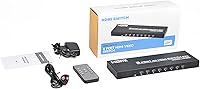
The unit arrives well-packaged with no transit damage reported commonly in reviews. The remote battery is included in the box, which is a small but appreciated detail that avoids an immediate trip to find a CR2 cell before using it.
The included instruction sheet is thin and does not address common edge cases like the PS5 resolution workaround or the LED behavior when no devices are connected. Several avoidable negative reviews trace directly back to questions the manual could have answered with one additional paragraph.
Thermal Management
80%
20%
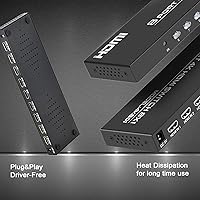
The metal body doubles as a passive heatsink, and buyers who leave the unit on continuously report that it stays at a manageable warmth rather than running hot. For always-on home theater setups where the switch never gets powered down, that thermal stability matters more than it might seem.
There is no ventilation beyond the enclosure itself, so in enclosed cabinet spaces with poor airflow the unit runs warmer than in open-shelf installations. No buyer has reported heat-related failure in published reviews, but it is sensible to avoid boxing it in tightly.

Suitable for:

The KAGO 4K801 HDMI Switch 8-in-1 is built for anyone who has genuinely maxed out the HDMI ports on their TV or monitor and needs a practical, no-fuss solution without spending serious money on a full AV matrix. Home theater owners juggling a PS4, an Xbox, a Roku, a Blu-ray player, and a laptop will find the eight-port capacity a genuine relief rather than a marginal upgrade. It also fits naturally into small conference rooms and classroom setups where multiple presenters need to swap laptop connections quickly without pulling cables. Older-generation gamers running PS3, Xbox 360, or original Xbox One consoles alongside a desktop PC will have zero compatibility friction. Budget-conscious buyers who want more than the typical four-port switcher can offer — but do not need bidirectional matrix routing — land squarely in this product's wheelhouse. If your priority is reducing cable clutter and gaining the convenience of a remote, this KAGO switch delivers that without unnecessary complexity.
Not suitable for:

Buyers expecting full 4K at 60Hz throughput should look elsewhere — the hard cap at 4K30Hz is not a firmware issue or a fixable limitation, it is the hardware ceiling, and no update will change that. PS5 owners are the most directly affected group: Sony's console defaults to 4K60Hz output, which means every PS5 user must manually drop the console's resolution in the system settings before this switcher will work correctly, and that is an irritating extra step that should not exist for a current-generation console. Competitive gamers in general — anyone who cares about input lag, high refresh rates, or 1080p120 support — will find this 8-port switch a poor match for their needs. Users who need to route one source to multiple displays simultaneously should also pass, since this is strictly a many-to-one device with no output splitting capability. Finally, anyone planning to mount the unit inside a sealed AV cabinet should factor in that the passive metal cooling works best with reasonable airflow around it, and the physical footprint at 9.1 inches long is larger than the product photos tend to suggest.

Specifications

  • Input Ports: The unit provides 8 HDMI input ports, allowing up to eight source devices to be connected simultaneously.
  • Output Ports: A single HDMI output port routes the selected source signal to one display device such as a TV, monitor, or projector.
  • Max Resolution: Maximum supported output resolution is 3840x2160 (4K UHD) at 30Hz refresh rate.
  • 1080p Support: Full HD 1080p content is supported at up to 60Hz, covering the majority of gaming and streaming use cases.
  • HDR Support: HDR (High Dynamic Range) video pass-through is supported for compatible source and display combinations.
  • 3D Video: 3D video formats are supported, enabling pass-through from 3D Blu-ray players and compatible sources.
  • Audio Formats: Supported audio formats include DTS-HD Master Audio, Dolby TrueHD, Dolby AC3, DSD, and LPCM.
  • HDCP Compliance: The switch is HDCP compliant, ensuring compatibility with copy-protected content from streaming devices and Blu-ray players.
  • Control Methods: Input selection can be performed via a front-panel push button or the included infrared remote control.
  • Remote Battery: The IR remote operates on a single CR2 battery, which is included in the box.
  • Enclosure Material: The outer housing is constructed from metal, providing passive heat dissipation and improved durability over plastic alternatives.
  • Dimensions: The unit measures 9.1 x 3 x 1.1 inches (length x width x height), making it a relatively long but slim form factor.
  • Weight: The switch weighs 1.19 pounds, which is typical for a metal-encased passive HDMI switcher of this input count.
  • Cable Requirement: For reliable signal transmission, high-quality HDMI cables no longer than 50 feet are recommended.
  • Power Requirement: The switch is bus-powered through its HDMI connections and does not require a separate power adapter under normal operating conditions.
  • Auto-Detection: The unit automatically identifies connected HDMI devices and activates the corresponding port LED indicator upon detection.
  • Plug and Play: No software installation, drivers, or configuration menus are required — the switch operates immediately upon connection.
  • Brand & Model: Manufactured by Siying and sold under the KAGO brand with model number 4K801, first available in July 2022.

Related Reviews
KAGO B042-8 1x8 HDMI Splitter
74%
83%
Signal Distribution Reliability
76%
4K Performance
79%
HDCP 2.2 Compatibility
88%
Ease of Setup
74%
Build Quality
More
KAGO A072 7-Port HDMI Switch 4K@60Hz
79%
88%
Build Quality
93%
Port Count & Versatility
74%
4K & HDR Signal Integrity
86%
Remote Control Usability
41%
Auto-Switching Capability
More
AVIDGRAM HDMI 2.1 Switch 5-in-1
86%
91%
Performance
88%
Ease of Use
93%
Compatibility with Devices
90%
Video Quality (8K/4K)
89%
Audio Quality (Dolby TrueHD/DTS-HD)
More
FERRISA 8K HDMI 2.1 Switch 4-in-1
77%
91%
Ease of Setup
78%
Auto-Switching Reliability
88%
4K@120Hz Performance
61%
8K Signal Stability
74%
Remote Control Usability
More
TCNEWCL KS-801 8-Port HDMI KVM Switch
78%
88%
Ease of Setup
91%
Port Capacity & Scalability
74%
Video Quality & Resolution
69%
Switching Speed & Reliability
83%
IR Remote Control
More
Alxum SJW-KM201B 2-Port HDMI KVM Switch
69%
93%
Ease of Setup
88%
Video Output Quality
79%
Switching Speed & Reliability
74%
Remote Controller Usefulness
76%
USB Hub Performance
More
MT-VIKI MT-801HK-C 8-Port HDMI KVM Switch
78%
83%
Value for Money
88%
Ease of Setup
76%
Build Quality
69%
Switching Performance
71%
Display Quality
More
DiamondTiger 4K801 8-Port HDMI Switch
72%
93%
Ease of Setup
88%
Remote Control Usability
79%
Build Quality
67%
Video Resolution Performance
41%
PS5 Compatibility
More
UGREEN 2-Computer HDMI KVM Switch
72%
84%
Ease of Setup
78%
Video Quality
71%
Switching Reliability
88%
Desktop Controller
69%
USB Peripheral Sharing
More
NAWEN HDMI KVM Switch 4 Computers 1 Monitor
86%
89%
Performance
93%
Resolution Support (8K/4K)
91%
Ease of Setup
85%
USB 3.0 Performance
87%
Switching Reliability
More

FAQ

It will work with a PS5, but there is an important catch: the PS5 defaults to 4K at 60Hz output, and this switch only supports 4K up to 30Hz. Before connecting, you need to go into the PS5 system settings and manually lower the output resolution to 4K30Hz or 1080p. Once you do that, it works fine — but it is a step you have to take every time you change the setting, so keep that in mind.

In most setups, no. The switch draws power passively through the HDMI connections from the connected source devices, so no separate power adapter is required. If you run into a situation where all connected sources are low-power devices, you may occasionally see instability, but the vast majority of users never need an external power supply.

No — this is strictly an 8-in-1 switcher, meaning it routes one of eight inputs to a single output. It does not split or distribute a signal to multiple displays simultaneously. If you need one-source-to-many-displays functionality, you would need an HDMI splitter, which is a different type of device.

For most device combinations, the switch happens in about one to two seconds. When switching between devices that use different HDCP versions — for example, an older DVD player and a newer streaming stick — the handshake negotiation can occasionally stretch the black-screen pause to two or three seconds. It is not instant, but it is fast enough for everyday use.

Yes, as long as your projector has a standard HDMI input it will work without any special configuration. Connect the switch's output port to your projector's HDMI input, connect your sources to the eight input ports, and select inputs normally via the button or remote.

Nothing will happen — the switch only allows selection of ports that have an active, detected HDMI device connected. When no devices are plugged in, only the port 1 LED stays lit and pressing other buttons does not trigger a switch. This confuses some users at first, but it is intentional behavior designed to prevent blank-screen switching.

Generally not well. The IR remote requires a relatively direct line of sight to the receiver on the front of the unit. Cabinet glass sometimes passes IR signals, but solid wood doors will block it entirely. If you plan to store the switch inside a closed cabinet, you would need an IR extender or repeater system to maintain remote functionality.

Based on user feedback and the metal enclosure design, continuous operation is not a problem in open-shelf environments. The metal body handles passive heat dissipation adequately under normal load. That said, avoid placing it in a sealed cabinet with no airflow, as heat can build up over long sessions in confined spaces.

The manufacturer recommends using cables no longer than 50 feet for reliable signal transmission. In practice, the shorter and higher quality your cables are, the more stable the signal — especially at 4K resolution. Using very long or cheap cables at 4K can introduce flickering or handshake failures that are often mistaken for a switcher problem.

The switch does auto-detect which devices are connected and lights the corresponding LED, but it does not automatically switch the active output to a newly powered-on device. You still need to manually select the input you want using either the front button or the remote. If you want true auto-switching behavior based on device power state, you would need a more advanced active switcher.