Overview

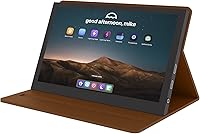
The JUN-ELECTRON 7-inch Portable IPS Touchscreen Monitor is a compact display built squarely for hobbyists, makers, and anyone who needs a lightweight secondary screen without hauling around bulky hardware. Released in early 2024 by a relatively new but active brand, it arrives with a leather protective case that folds into a stand — a genuinely thoughtful inclusion at this price tier. Connection runs through a Mini HDMI port, keeping compatibility broad across a wide range of everyday devices. It is unpretentious, practical, and clearly built with the DIY crowd in mind rather than mainstream desktop users.
Features & Benefits

The IPS panel covers a 178° viewing angle, meaning colors stay consistent whether you are looking at the screen head-on or from the side — useful when sharing a Pi project with someone next to you. Touch response sits in the 3–5 ms range with five-point capacitive tracking, so swiping and pinching feel snappy rather than laggy. Brightness hits 500 nits and adjusts manually, which helps in dimmer workspaces. The glossy screen surface does make colors pop, but expect noticeable reflections near windows or under harsh overhead lighting — a real trade-off worth knowing before buying. Power runs off a standard 5V USB connection, keeping the setup refreshingly simple.

Best For

This mini touchscreen was clearly designed with Raspberry Pi users and tinkerers in mind. If you are running a Pi 4 headless setup or building a home automation dashboard, this is an obvious fit — it pairs quickly, the touch layer works without heavy configuration, and the folding case means it sits upright on your desk right away. Travelers wanting a minimal secondary display for a laptop will also find it practical; at just under a pound, it barely adds weight to a bag. That said, the 1024×600 resolution is functional for basic tasks but not comfortable for spreadsheets or dense multi-window workflows.

User Feedback

With a 4.3-star average across roughly 89 reviews, the 7-inch portable display has earned a reasonably warm reception for a brand only on the market since early 2024. Buyers frequently highlight easy Raspberry Pi pairing and responsive touch as genuine strengths. On the flip side, the leather case draws mixed opinions — some find it sturdy and versatile, while others note the hinge feels flimsy with repeated folding. A handful of reviews mention occasional friction getting the Mini HDMI to register on first connection. On balance, value for money is the dominant theme; buyers seem to know what they are getting into and largely appreciate the trade-offs.

Pros

  • Pairs with Raspberry Pi 4 quickly and reliably, making it one of the easier small displays to get running out of the box.
  • Five-point capacitive touch is genuinely responsive, not the sluggish afterthought you find on cheaper panels in this size range.
  • 178-degree IPS viewing angle keeps colors accurate whether you are looking straight on or from the side.
  • 500 nits of adjustable brightness gives you enough headroom to use this compact IPS monitor comfortably in moderately lit spaces.
  • The included leather case doubles as a multi-angle stand, saving you from buying a separate mount immediately.
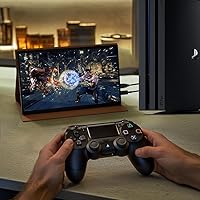
  • Mini HDMI compatibility spans a wide range of devices — laptops, game consoles, and single-board computers all connect without adapters.
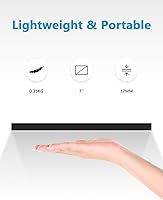
  • At roughly 15 ounces, this mini touchscreen is light enough to drop in a backpack without thinking twice.
  • Powered over 5V USB, so no proprietary power brick is needed — one less cable to track down.
  • For the price tier, the IPS color consistency is noticeably better than TN alternatives in the same category.

Cons

  • The glossy screen surface picks up glare aggressively near windows or bright overhead lights, with no matte alternative available.
  • 1024×600 resolution becomes visibly limiting if you try to run a modern desktop environment with multiple open windows.
  • The leather case hinge feels flimsy with repeated folding and may loosen or degrade over time with daily use.
  • Some buyers report the Mini HDMI connection occasionally fails to register on first plug-in, requiring a replug or reboot.
  • JUN-ELECTRON is a newer brand with a limited review pool, making long-term reliability harder to assess with confidence.
  • No built-in speakers are included, so audio output requires a separate solution if your use case needs sound.
  • The 1.71:1 aspect ratio is non-standard and can cause awkward letterboxing with some video content and console outputs.
  • Driver or configuration friction has been flagged by a subset of users on non-Pi operating systems.
  • At 15.5 ounces, the combined weight with the leather case is noticeable if you carry it alongside a full laptop daily.

Ratings

Our editorial team used AI to analyze verified buyer reviews for the JUN-ELECTRON 7-inch Portable IPS Touchscreen Monitor from across global marketplaces, actively filtering out incentivized, duplicate, and bot-generated submissions to surface what real users actually experience. The scores below reflect a transparent picture of both the genuine strengths and the frustrations that show up repeatedly in honest feedback. No category has been softened — where buyers struggled, the numbers say so.
Raspberry Pi Compatibility
88%
Hobbyists consistently report that the display pairs with Raspberry Pi 4 and 3B+ quickly, often without any manual driver work under Raspberry Pi OS. For anyone building a headless Pi setup or a small media server dashboard, getting a working screen in minutes rather than hours is a meaningful win.
A subset of users on alternative Linux distributions or older Pi models ran into configuration friction, particularly getting touch input recognized alongside video output. The Mini HDMI dependency also means first-time Pi users need to source the right cable separately, which occasionally catches people off guard.
Touch Responsiveness
83%
The five-point capacitive layer performs well above what buyers expect at this price point — swiping through menus, pinching to zoom in a browser, and tapping small interface elements all feel snappy rather than delayed. Users building kiosk-style or home automation interfaces gave this aspect particularly strong marks.
A few users noted that palm rejection is not reliable, which makes resting your hand on the screen while typing awkward. Accuracy also degrades slightly near the very edges of the panel, an issue that shows up more when using on-screen keyboards for extended input sessions.
Display Quality
76%
24%
The IPS panel delivers noticeably better color consistency than TN alternatives common in this size and price bracket — colors hold up well when viewed from an angle, which matters when sharing a Pi project or demoing something to a colleague sitting beside you. Brightness at 500 nits is enough for normal indoor use.
The 1024×600 resolution is the most divisive aspect of this display. Users who expected crisp text for coding or spreadsheet work were disappointed, and the glossy surface compounds the issue in brighter rooms by layering reflections over an already modest pixel density.
Glare & Reflectivity
54%
46%
In controlled indoor environments — a dim workshop, a desk away from windows — the glossy panel is manageable and the colors look vivid as a result. Users who set this up in a dedicated maker space or basement lab rarely flagged glare as a serious problem.
Near windows or under harsh overhead fluorescent lighting, the reflections are significant and distracting. Multiple buyers specifically called this out as their top frustration, and there is no matte finish option or anti-glare coating to fall back on. It is the single most commonly cited visual complaint in the review pool.
Portability
86%
At 15.5 ounces with the case attached, the display is light enough to slip into a laptop bag without adding meaningful bulk. Remote workers and travelers who wanted a second screen on the road appreciated not having to pack a separate stand or worry about finding a flat surface to lean it against.
The weight is still noticeable if you are already carrying a full laptop and accessories for an extended trip. A few users also found that the case adds enough thickness to make it slightly awkward to pack flat without a dedicated sleeve or padded compartment.
Included Case & Stand
67%
33%
Including a leather folding case and stand in the box is a genuinely practical touch — most competing displays in this range ship as bare panels. Being able to set a stable viewing angle right out of the box without hunting for a separate mount saves both money and setup time.
The hinge mechanism on the case is the recurring weak point. Users who frequently adjust the viewing angle report it loosening within weeks of regular use. The leather itself is clearly synthetic and feels budget-grade on close inspection, and a handful of buyers found it arrived with minor alignment issues.
HDMI Connectivity
73%
27%
The Mini HDMI input covers a wide device range — laptops, Raspberry Pi boards, PS4, Xbox, and more all connect through the same port without needing adapters beyond a standard cable. For users who switch the display between a Pi and a laptop, a single cable swap is all it takes.
Some buyers reported that the display occasionally fails to register on first connection, requiring an unplug and replug or a device reboot to establish signal. The single-input design also means there is no quick way to switch between two connected sources without physically swapping cables.
Brightness Control
78%
22%
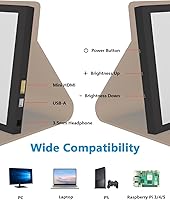
Manual brightness adjustment via physical controls gives users a direct way to tune the screen for different environments without digging into software menus. Lowering brightness for late-night Pi tinkering in a dark room is straightforward and responsive.
The adjustment controls themselves are small physical buttons that some users found fiddly, especially when the unit is mounted in an enclosure or tucked into a tight DIY setup. There is no automatic ambient brightness adjustment, so users in changing-light environments have to manage it manually throughout the day.
Setup Experience
81%
19%
Out-of-the-box setup for common use cases — Pi display, laptop secondary screen — is reported as genuinely straightforward by most buyers. The case doubles as a stand immediately, so there is very little time between opening the box and having a working display in front of you.
Users on Windows occasionally needed to navigate display scaling settings to get the 1024×600 resolution looking right, as Windows sometimes defaults to a blurry scaled mode. Driver situations on non-mainstream operating systems added friction for a minority of technically confident users who expected plug-and-play behavior.
Value for Money
84%
Buyers consistently frame this as a fair deal for the niche it targets — a hobbyist-grade touchscreen that does what it advertises without demanding a premium price. For Raspberry Pi projects and DIY displays, the combination of IPS touch and a bundled case at this price tier is hard to match directly.
Users who bought it expecting productivity-monitor performance felt the value equation shift quickly once they saw the resolution limitations in daily use. If your use case is anything more demanding than a Pi dashboard or a secondary glance-screen, the money is better spent elsewhere.
Build Quality
63%
37%
The panel itself feels solid, and the bezel construction is adequate for a device meant to live on a workbench or inside a Pi enclosure. Most buyers who handle it with reasonable care report no structural issues with the screen unit itself after months of use.
The overall construction feel is clearly budget-tier — plastics have visible flex, and the case accessories do not inspire long-term confidence. Users who dropped it even from modest heights reported corner damage that the leather case only partially absorbed, suggesting the fall resistance claims are optimistic.
Viewing Angle Performance
82%
18%
The 178-degree IPS viewing angle is not just a spec number here — users building shared dashboards or demo setups genuinely notice the difference versus cheaper TN panels, where color shifts become obvious as soon as someone leans slightly off-axis.
While horizontal angle performance is strong, a few users noted that extreme vertical angles — looking almost straight down at a flat-mounted display — still showed some color shift. This is a minor IPS characteristic rather than a product defect, but worth knowing for ceiling-mount or unusual orientation projects.
Multi-Device Switching
58%
42%
The broad device compatibility list — covering Pi boards, laptops, and game consoles — does make this a versatile display for users who want one small screen to serve multiple setups. Swapping between a Pi and a laptop took seconds in most reported use cases.
With only a single Mini HDMI input and no input switching built in, managing more than one connected device at a time means physically swapping cables. There is no KVM-style convenience here, and the port itself shows wear potential with frequent cable changes, which is a real concern for multi-device hobbyists.
Brand Reliability
61%
39%
JUN-ELECTRON has accumulated a 4.3-star average across its early review pool, which is a reasonable starting point for a brand entering the market in 2024. Buyers who received a defective unit generally reported responsive seller communication through the Amazon channel.
With fewer than 100 reviews at the time of writing, the reliability picture is still thin. Long-term durability data simply does not exist yet for this brand, and buyers who prioritize established warranty support and proven track records will find the limited history a genuine reason for hesitation.

Suitable for:

The JUN-ELECTRON 7-inch Portable IPS Touchscreen Monitor is an easy recommendation for Raspberry Pi enthusiasts who need a dedicated, no-fuss display for their single-board computer projects without spending serious money. Hobbyists building home automation panels, media dashboards, or kiosk-style interfaces will find the touch layer genuinely useful rather than just a gimmick. Students tinkering with electronics or learning Linux on a Pi will appreciate how quickly this display gets up and running — it does not demand hours of driver hunting. Travelers and remote workers who want a lightweight backup screen to extend their laptop setup will also get real mileage out of it, especially given how little it weighs in a bag. The bundled leather case and stand mean you are not scrambling for a separate mount on day one.
Not suitable for:

If you are hoping to use the JUN-ELECTRON 7-inch Portable IPS Touchscreen Monitor as a primary productivity monitor, you will likely walk away frustrated. The 1024×600 resolution is workable for terminal windows and simple dashboards, but it is genuinely cramped for spreadsheets, coding side-by-side, or any workflow that relies on screen real estate. Users who work frequently near bright windows or under strong overhead lighting should also think twice — the glossy panel picks up reflections readily, and no matte option exists here. Those who value long-term brand support and an established warranty track record may feel uneasy with a newer, less well-known manufacturer. Buyers expecting premium build quality on par with established monitor brands will find the plastics and case hinge feel noticeably budget-grade under close inspection.
Specifications

  • Screen Size: The display measures 7 inches diagonally, making it compact enough for portable use without being too small to interact with comfortably.
  • Resolution: The panel outputs at 1024×600 pixels, which is adequate for dashboards, terminals, and media playback but not suited to dense productivity layouts.
  • Panel Type: An IPS (In-Plane Switching) panel is used, delivering consistent color accuracy across wide viewing angles compared to cheaper TN alternatives.
  • Viewing Angle: The IPS panel supports a 178° viewing angle both horizontally and vertically, so colors and contrast hold up well when viewed from the side.
  • Brightness: Peak brightness is rated at 500 nits, with a manual adjustment function to dial it down for comfortable use in dim environments.
  • Touch Input: Five-point capacitive touch is supported with a reported response time of 3–5 ms, enabling responsive swipe, pinch, and tap gestures.
  • Screen Surface: The panel uses a glossy surface finish, which enhances color vibrancy but increases reflectivity in brightly lit rooms.
  • Video Input: A single Mini HDMI port serves as the primary video input, requiring a Mini HDMI cable or appropriate adapter for connection.
  • Power Input: The display is powered via a 5V USB connection, eliminating the need for a proprietary power brick or dedicated wall adapter.
  • Aspect Ratio: The screen uses a 1.71:1 aspect ratio, which is non-standard and may result in letterboxing with certain video formats or console outputs.
  • Weight: The unit weighs 15.5 ounces including the leather case, which is light enough for bag carry but noticeable alongside a full laptop setup.
  • Compatibility: Confirmed compatible devices include Raspberry Pi 4/3/2/1/3B+, Banana Pi, standard laptops and PCs, PS3, PS4, Xbox, and most HDMI-capable sources.
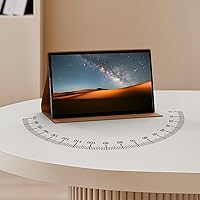
  • Included Accessory: A leather folding case and stand is included in the box, providing scratch and drop protection as well as a built-in adjustable viewing angle.
  • Brand: Manufactured by JUN-ELECTRON, a consumer electronics brand that entered this product category in early 2024.
  • Availability: The product became available in April 2024 and carries an ASIN of B0D1KHZSL2 on the Amazon marketplace.
  • Voltage: The display operates at 5 volts DC, consistent with standard USB power sources including power banks and USB wall chargers.

Related Reviews

Lrtzcbi 14-inch Portable Touchscreen Monitor
74%
88%
Value for Money
79%
Image Quality
72%
Touch Responsiveness
91%
Portability
58%
Kickstand Stability
More
Kenowa 13.3-inch Touchscreen Portable Monitor
68%
86%
Value for Money
78%
Display Quality
71%
Privacy Screen Effectiveness
67%
Touchscreen Performance
88%
Portability
More
Yasoca 7-inch Portable HD 1080P Monitor
82%
87%
Display Quality
93%
Portability
85%
Ease of Use
82%
Input Connectivity
80%
Build Quality
More
Prechen 12.3 Inch Touchscreen Portable Monitor
84%
88%
Display Quality
93%
Portability & Size
79%
Touchscreen Responsiveness
84%
Build Quality
91%
Ease of Setup
More
Magedok MG140-FT02 14-Inch Portable Touchscreen Monitor
74%
91%
Portability
74%
Display Quality
77%
Color Accuracy
63%
Touchscreen Responsiveness
79%
Connectivity & Compatibility
More
Wstirhy 9.7-Inch Portable Monitor
75%
91%
Port Versatility
86%
Connectivity & Setup Ease
61%
Display Resolution
67%
Build Quality
74%
Image Brightness & Clarity
More
ViewSonic TD1656-2K 16-inch Touchscreen Portable Monitor
80%
93%
Display Sharpness
74%
Touch Responsiveness
91%
USB-C Connectivity
88%
Portability
86%
Build Quality
More
Ingnok YN02D 15.6-inch Portable Monitor
76%
93%
Portability & Form Factor
81%
Display Clarity
62%
Brightness & Visibility
89%
Setup & Plug-and-Play Experience
71%
Color Accuracy
More
FEELWORLD LUT7 7″ Field Monitor
77%
91%
Daylight Visibility
84%
Image Clarity
53%
Build Quality
71%
Touchscreen Usability
88%
Monitoring Scope Suite
More
Magedok 16-inch 4K OLED Touchscreen Portable Monitor
85%
91%
Display Quality
89%
Portability
75%
Touchscreen Performance
65%
Brightness in Bright Environments
88%
Gaming Performance
More

FAQ

For most users, yes. Connect it via Mini HDMI, power it over USB, and the Pi should detect the display automatically. Touch functionality may need a USB data cable connected to the Pi in addition to the power connection — check your Pi OS settings if touch does not register immediately.

On Raspberry Pi OS, touch typically works without additional drivers. On Windows laptops, it usually registers as a standard HID touch device. A small number of users on less common operating systems have reported needing to locate drivers manually, so it is worth keeping that in mind if you are running a niche Linux distribution.

The product listing does not confirm a Mini HDMI cable is included — only the leather case and stand are explicitly listed as bundled accessories. Plan to have a Mini HDMI cable or a full-size HDMI to Mini HDMI adapter on hand before you set it up.

It is noticeable. If you are using the 7-inch portable display near a window or under strong overhead lighting, reflections can be distracting. In a reasonably controlled indoor environment — a typical desk setup away from direct light — it is manageable. Just do not expect the low-glare experience you get from a matte panel.

Yes, you can extend or mirror your Windows desktop to this compact IPS monitor via Mini HDMI. Keep in mind the 1024×600 resolution will feel tight for anything beyond a simple task window or media player — it works, but it is not comfortable for serious multitasking.

It is serviceable for light, occasional use, but the hinge mechanism is not built for heavy daily folding. If you plan to open and adjust it multiple times a day over many months, the hinge may loosen. For a stationary desk setup where you set the angle once and leave it, it holds up fine.

Yes, both are listed as compatible via the Mini HDMI connection. That said, at 1024×600 resolution you are not getting a high-fidelity gaming experience — it is more practical for a compact portable setup or a secondary display than a primary gaming screen.

Yes, the 5V USB power requirement means a standard power bank will run it without any issues. This makes it genuinely portable for field use or travel, as long as your power bank has enough output current to drive both the display and any connected device.

For simple navigation, tapping app icons, and scrolling, the capacitive touch layer is accurate and responsive. Typing on an on-screen keyboard at length is possible but not comfortable given the 7-inch size — most users in this space tend to pair it with a small Bluetooth keyboard for text input.

The 500-nit brightness rating is reasonably strong for a display this size and price. In a typical indoor environment it is easy to see clearly, and the manual adjustment lets you fine-tune it without diving into software menus. Direct sunlight or very bright outdoor conditions would wash it out, but that is true of most non-ruggedized portable displays.