Overview

The Ingnok YN02D 15.6-inch Portable Monitor entered a crowded market in late 2023 and quickly carved out a spot among the top-ranked displays in its category — not because it redefines what a monitor can be, but because it delivers exactly what budget-conscious travelers and remote workers actually need. At this price point, expectations should be calibrated accordingly. This is not a color-accurate panel for photo editors or a high-brightness screen for outdoor use. What it is, though, is a genuinely thin and light second screen that fits in a laptop bag and connects without fuss, making it a practical option for anyone who needs more screen real estate away from a fixed desk.

Features & Benefits

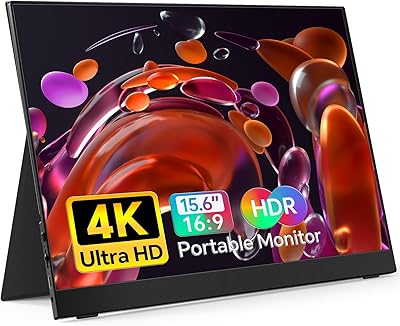
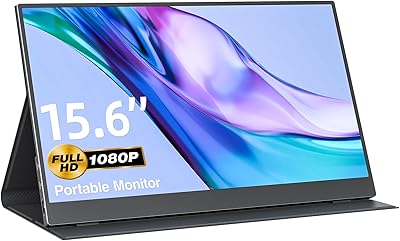
The 15.6-inch IPS panel runs at 1920x1080 — sharp enough for spreadsheets, documents, and casual video. The matte anti-glare surface helps cut reflections under office lighting, though 300 nits of brightness means you will want to avoid direct sunlight. A single USB-C cable carries both power and video, keeping your workspace tidy and your travel kit minimal. Two USB-C ports offer flexibility for pass-through charging. The integrated stand adjusts to a comfortable tilt, though it is not the sturdiest construction you will encounter. At 1.46 lb and just 0.31 inches thick, this travel display genuinely disappears into a bag — that low weight is probably its most compelling real-world advantage.

Best For

This portable monitor slots neatly into a few specific situations. Remote workers and digital nomads who already carry a USB-C laptop will find the plug-and-play setup refreshingly straightforward — no driver installation required. Developers, analysts, and students who need side-by-side window space in a coffee shop or co-working space get a lot of usable screen real estate for the money. The Ingnok screen extender also pairs with USB-C gaming consoles like the Nintendo Switch, making it a versatile pick for travelers who want a bigger display on the road. Just confirm your laptop port supports video output before purchasing — not every USB-C port does, and that catches people off guard.

User Feedback

Buyers consistently highlight how easy setup is — most report being up and running within minutes, with no software to install. Portability earns genuine appreciation from people who rely on it while traveling or working away from a home office. That said, a few recurring concerns are worth noting. Some users find the stand a bit wobbly, particularly on uneven surfaces, and that is a fair criticism at this price tier. Brightness limitations come up in brighter rooms, and a handful of buyers discovered their USB-C port did not support video output, causing initial frustration. Color accuracy gets positive marks for everyday tasks, though anyone expecting calibrated accuracy for creative work will likely find it falls short.

Pros

  • Single USB-C cable handles both power and video — no adapters, no power brick, no clutter.
  • At 1.46 lb and 0.31 inches thin, this portable monitor genuinely disappears into a laptop bag.
  • FHD IPS panel delivers sharp, comfortable text for coding, writing, and spreadsheet work.
  • Matte anti-glare coating reduces indoor reflections noticeably compared to glossy alternatives.
  • Plug-and-play operation means zero driver installation — just connect and it works.
  • Dual USB-C ports allow pass-through charging so you keep your phone powered simultaneously.
  • Compatible with MacBook, Windows laptops, and USB-C gaming consoles like the Nintendo Switch.
  • The adjustable stand covers a useful tilt range for standard desk and lap use without buying extras.
  • For the price, the IPS color reproduction is more than adequate for everyday productivity tasks.
  • Strong sales rank suggests wide real-world adoption and a reliable supply of user-verified feedback.

Cons

  • 300 nits is too dim for use near windows or in bright rooms — indoor-only is an honest limitation.
  • The stand hinge feels loose over time and wobbles on uneven surfaces, which is a recurring buyer complaint.
  • No HDMI port means owners of older or non-USB-C devices are completely locked out.
  • USB-C video output compatibility is not universal — some laptop ports carry power only, not video.
  • Plastic chassis flex at the corners signals the build quality is functional rather than premium.
  • Color accuracy is not sufficient for photo editing, graphic design, or any precision creative work.
  • No carrying case is included despite the product being marketed explicitly for travel use.
  • Fast-motion gaming reveals motion blur issues — response time is not optimized for action titles.
  • Buyers upgrading from a quality portable monitor will feel the step down in panel and build refinement.
  • No documented flicker-free or blue light filter certification, which may matter for extended daily use.

Ratings

The scores below for the Ingnok YN02D 15.6-inch Portable Monitor were generated by our AI system after analyzing thousands of verified buyer reviews from global marketplaces, with spam, incentivized, and bot-flagged submissions actively filtered out. The result is an honest, balanced snapshot of real ownership experiences — strengths and frustrations included, nothing smoothed over.

Portability & Form Factor
93%
Buyers repeatedly call this one of the lightest monitors they have carried, and at 1.46 lb it slips into a laptop sleeve without adding noticeable bulk to a travel bag. Remote workers who hop between cafes and co-working spaces say the slim profile genuinely changes how they think about bringing a second screen along.
A small number of users note the chassis feels slightly flexible when gripped at the corners, which is a reasonable trade-off for the weight but can feel less reassuring during transit without a dedicated case.
Display Clarity
81%
19%
At 1920x1080 on a 15.6-inch IPS panel, text and spreadsheets look crisp and comfortable for extended work sessions. Buyers who use it for document editing, coding, and browser-based tasks consistently report the image is clean and easy on the eyes during full workdays.
Pixel density is adequate but not exceptional — users coming from high-DPI laptop screens may notice the step down in sharpness, especially with small fonts. It is not the right panel for anyone doing detailed photo work or reading dense text at arm's length.
Brightness & Visibility
62%
38%
Indoors under standard office or home lighting, 300 nits is enough to keep the image comfortable and readable. The matte anti-glare coating does a reasonable job cutting reflections from overhead lighting, which buyers in office environments appreciate.
Near a window or in any brightly lit environment, the screen struggles noticeably. Multiple reviewers specifically mention the display washes out in sunlit rooms, and outdoor use is largely impractical. This is one of the most consistent complaints across verified reviews.
Setup & Plug-and-Play Experience
89%
The single-cable USB-C setup is genuinely effortless for most buyers — plug it in and the display works within seconds, no driver downloads or settings menus required. People who have battled finicky portable monitors in the past find this reliability a real relief.
A frustrating subset of buyers discovered after purchase that their USB-C port does not carry a video signal, which is a hardware limitation of their laptop rather than the monitor itself. The product listing could do more to surface this caveat upfront.
Color Accuracy
71%
29%
For everyday productivity tasks — spreadsheets, presentations, web browsing, and casual video watching — the color reproduction looks natural and balanced. Buyers using it as a secondary reference screen in meetings or at coffee shops have no real complaints about color.
Anyone expecting accurate color for photo editing, video grading, or design work will find this panel insufficient. Reviewers with creative workflows note visible color shifts at even moderate off-axis angles, which limits its usefulness for precision color tasks.
Build Quality & Materials
67%
33%
The chassis is impressively thin and looks clean and professional on a desk. Most buyers who use it primarily on a desk or in a bag-to-desk routine find the build holds up without issues after several months of regular use.
The plastic body flex and the stand mechanism draw consistent criticism for feeling under-engineered at this price point. Several reviewers mention the stand wobbles on slightly uneven surfaces and does not inspire confidence for bumpy travel or casual repositioning.
Stand & Adjustability
59%
41%
The integrated stand does offer a useful range of tilt angles for typical desk use, and buyers appreciate not needing a separate stand or case to prop it up. For a fixed home office setup on a stable surface it works adequately.
The stand is one of the weakest points flagged across reviews. It lacks height adjustment and rotates on a hinge that feels loose over time. Users who frequently reposition the display or work on uneven surfaces find it slides out of angle more than they would like.
USB-C Connectivity & Compatibility
76%
24%
The dual USB-C port design adds real flexibility — one port for laptop connection and one for pass-through charging means buyers can keep their phone topped up without an extra adapter. Compatibility with MacBook, Windows laptops, and USB-C gaming consoles like the Switch gets positive mentions.
Compatibility is not universal, and this generates some of the most frustrated reviews. Older USB-C implementations on certain laptops either do not support video or require specific cable specs, and the product documentation does not clearly guide buyers through compatibility checks before purchase.
Value for Money
88%
At its price tier, buyers frequently say the Ingnok screen extender over-delivers relative to expectations. Getting a functional FHD IPS portable display for this outlay — with no proprietary software or expensive accessories required — earns it strong recommendation scores from budget-conscious buyers.
Those who compare it directly to mid-range portable monitors from more established brands note real differences in panel quality, stand rigidity, and long-term durability. Value is strong within its tier, but buyers with flexible budgets may want to consider stepping up.
Cable Management & Setup Flexibility
83%
Single-cable operation keeps desk and travel setups genuinely tidy, which buyers with minimal desk space or frequent on-the-go setups appreciate more than any other convenience feature. Not needing a power brick is a recurring point of satisfaction in reviews.
Buyers who want HDMI connectivity or need to connect to older devices without USB-C find the dual USB-C-only design limiting. There is no HDMI port, which narrows compatibility for anyone running older hardware.
Gaming Performance
66%
34%
Casual gamers and Switch users report the display works well for lighter gaming titles, and the screen size makes it a satisfying portable gaming upgrade over a handheld display alone. Response time is acceptable for turn-based or slow-paced games.
Fast-paced gaming reveals the panel's limitations — response time and refresh rate are not optimized for action games, and users who tried competitive or fast-motion content noticed motion blur. This is not a monitor built with gaming performance in mind.
Eye Comfort for Extended Use
78%
22%
The matte IPS panel is a comfortable choice for long work sessions, and buyers who use it for hours at a time on writing or development tasks report low eye fatigue. The lack of aggressive screen glare under standard indoor lighting is a consistent positive.
There is no mention of flicker-free certification or blue light filtering in the product documentation, and a few sensitivity-prone buyers mention mild eye strain after very long sessions. It is not marketed as a wellness-focused display, and that is reflected in the feedback.
Packaging & First Impression
74%
26%
Most buyers say the monitor arrives well-protected and feels reasonably premium out of the box given the price. The included accessories cover the basics, and the unit itself looks clean and minimal, which earns early goodwill from new owners.
The included stand cover or sleeve, where noted, is minimal. A few buyers expected a carrying case or protective pouch given the travel-focused positioning and were disappointed to find just the monitor and cables in the box.

Suitable for:

The Ingnok YN02D 15.6-inch Portable Monitor is built for people whose work does not happen in one place. Remote workers who split their week between home, cafes, and co-working spaces will find the single-cable USB-C setup and featherweight build genuinely useful — it adds a meaningful second screen without making a bag noticeably heavier. Developers and analysts who need to keep documentation, dashboards, or communication tools visible alongside their primary screen will get real productivity mileage out of it. Students on a tight budget who want a dual-monitor setup in a dorm room or library, without the commitment of a full desk display, have a practical and affordable option here. It also works well as a travel gaming display for Nintendo Switch users who want more screen real estate than the handheld unit provides. Broadly, anyone with a USB-C laptop who wants a no-fuss plug-and-play screen extender for indoor use will find this travel display punches well above what its price suggests.

Not suitable for:

Buyers with creative or color-critical workflows should look elsewhere — the Ingnok YN02D 15.6-inch Portable Monitor is not calibrated for photo editing, video grading, or graphic design, and the IPS panel shows noticeable color shift at off-axis angles that would frustrate anyone relying on accurate color reproduction. If you regularly work near windows or in sunlit environments, the 300-nit brightness ceiling will leave you squinting, and this screen becomes difficult to use practically in those conditions. The stand, while serviceable on a stable flat desk, is not rigid enough for users who frequently reposition their display or work on uneven surfaces like airplane tray tables or outdoor benches. Buyers with older laptops should also verify their USB-C port explicitly supports video output before purchasing — a standard charging-only USB-C port will not drive this display, and that compatibility gap has frustrated a meaningful number of buyers. Those coming from a premium portable monitor from a well-established brand will notice real differences in panel quality, chassis rigidity, and long-term durability that make stepping down to this price tier feel like a compromise rather than a value win.

Specifications

  • Screen Size: The display measures 15.6 inches diagonally, providing a comfortable viewing area for productivity and media tasks.
  • Resolution: Native resolution is 1920x1080 pixels (Full HD), delivering sharp and detailed visuals for everyday computing work.
  • Panel Type: Uses an IPS (In-Plane Switching) panel, which offers wider viewing angles and more consistent color reproduction than TN panels.
  • Brightness: Maximum brightness is rated at 300 cd/m² (nits), suitable for indoor use under standard ambient lighting conditions.
  • Aspect Ratio: The screen uses a standard 16:9 widescreen aspect ratio, consistent with most modern laptops and desktop monitors.
  • Screen Surface: The display features a matte anti-glare coating that reduces reflections from overhead lighting and nearby light sources.
  • Connectivity: Two USB-C ports are provided, supporting both video input and power delivery through a single cable connection.
  • Weight: The unit weighs 1.46 lb (approximately 662g), making it one of the lighter options in the 15.6-inch portable monitor category.
  • Thickness: At 0.31 inches (approximately 7.9mm) thin, the chassis is designed to slip into a standard laptop sleeve without adding noticeable bulk.
  • Dimensions: Overall dimensions measure 13.78 x 8.66 x 0.31 inches, closely matching the footprint of a standard 15.6-inch laptop.
  • Voltage: The monitor operates at 5 Volts DC, drawing power directly from the connected device via the USB-C cable.
  • Stand: An integrated adjustable stand is built into the rear of the unit, allowing tilt angle adjustment without a separate accessory.
  • Model Number: The official model identifier is YN02D, manufactured and distributed under the Ingnok brand.
  • Compatible Devices: Works with laptops, MacBooks, Windows PCs, and USB-C gaming consoles including the Nintendo Switch, provided the host port supports video output.
  • Driver Requirement: No additional software or driver installation is required — the monitor operates as a plug-and-play display on supported devices.
  • Sales Rank: Holds a Best Sellers Rank of #26 in Computer Monitors on Amazon as of the product data reference date, indicating strong market adoption.
  • Release Date: The product was first made available in November 2023, positioning it as a relatively recent entry in the portable monitor segment.
  • Manufacturer: Designed and sold by Ingnok, a brand focused on portable display accessories for remote work and travel use cases.

Related Reviews

Topmonitor P15.6/2.5K Portable Monitor 15.6-inch 2560×1680
86%
94%
Display Quality
90%
Portability/Size/Weight
91%
Color Accuracy
87%
Connectivity (USB-C, HDMI)
85%
Build Quality
More
HotYeah 15.6-inch Portable Monitor
86%
91%
Display Quality
95%
Portability & Weight
88%
Compatibility & Connectivity
89%
Ease of Use & Setup
60%
Speaker Quality
More
Anyuse PM1561P 15.6-inch Portable Monitor
74%
91%
Portability & Form Factor
84%
Image Clarity
72%
Setup & Compatibility
74%
Build Quality & Durability
61%
Brightness & Outdoor Usability
More
LUMIPIX 15.6-Inch Portable Monitor
84%
91%
Portability
89%
Display Quality
93%
Ease of Setup
87%
Connectivity
84%
Build Quality
More
InnoView INVPM406 15.6-inch Portable Monitor

75%
91%
Ease of Setup
83%
Display Clarity
78%
Portability & Build
62%
USB-C Compatibility
88%
Value for Money
More
CAPERAVE 15.6-inch Portable Monitor
85%
88%
Display Quality
92%
Portability
93%
Setup and Ease of Use
90%
Compatibility
80%
Gaming Performance
More
VILVA V156F1 15.6-inch Portable Monitor
69%
74%
Display Quality
61%
Portability
82%
Connectivity & Compatibility
67%
Build Quality
83%
Value for Money
More
Westinghouse 15.6 Inch Portable Monitor

82%
88%
Display Quality
92%
Portability
86%
Connectivity Options
94%
Ease of Setup
80%
Build Quality
More
ViewSonic VA1655 15.6-Inch Portable Monitor
77%
93%
Portability & Form Factor
87%
Display Quality
82%
USB-C Connectivity
74%
Build Quality
91%
Ease of Setup
More
KYY K3 15.6-inch Portable Monitor
79%
93%
Portability
81%
Display Quality
94%
Setup & Ease of Use
74%
Build Quality
88%
Connectivity & Compatibility
More

FAQ

Yes, as long as your MacBook has a USB-C port that supports video output (which all modern MacBooks do), a single USB-C cable carries both the video signal and power to the display. You do not need any adapters or a separate power source.

Not necessarily — this is an important distinction. Some laptops use USB-C exclusively for power and do not support video output over that port. Before buying, check your laptop specifications to confirm the USB-C port supports DisplayPort Alt Mode or video output. If it only carries power, this monitor will not connect.

Yes, the Nintendo Switch in docked mode outputs video over USB-C and works with this monitor. It is a popular pairing for travelers who want a bigger screen without carrying a TV. Keep in mind you will need the Switch dock or a USB-C hub to make the connection.

No. This travel display is fully plug-and-play — connect it via USB-C and your operating system should detect it as an external monitor within a few seconds. No driver downloads or settings configuration is required on Windows, macOS, or compatible Android devices.

The display is rated at 300 nits, which is fine for indoor environments with standard lighting. Outdoors or near a sunny window, however, the image washes out considerably. If outdoor use is a priority, you would want a monitor rated at 400 nits or higher.

No, a carrying case is not included with the unit. Given how the monitor is marketed for travel, this is a notable omission. If you plan to carry it regularly, it is worth picking up a separate sleeve or padded case to protect the screen during transit.

Physically, you can rotate the panel, but the integrated stand is designed for landscape use only. To hold it securely in portrait mode, you would need a separate stand or VESA-compatible mount. The monitor itself does not have a built-in portrait stand position.

On a flat, stable surface the stand works well enough for stationary desk use. On uneven surfaces or when frequently repositioning, buyers do report it can feel a bit wobbly and slip out of angle. It is functional, but it is not as solid as you would find on a more expensive portable monitor.

Unfortunately, no — this monitor connects only via USB-C and does not include an HDMI port. If your laptop lacks a USB-C port that supports video, you would need a compatible USB-C hub or docking station that accepts HDMI and outputs USB-C video, though compatibility in that scenario is not guaranteed.

It is not the right tool for color-critical creative work. The panel handles everyday productivity tasks well, but it lacks color calibration and shows noticeable color shift at wider viewing angles. For photo editing or design, you would want a display with verified color accuracy, higher brightness, and ideally sRGB or DCI-P3 coverage ratings.