Overview

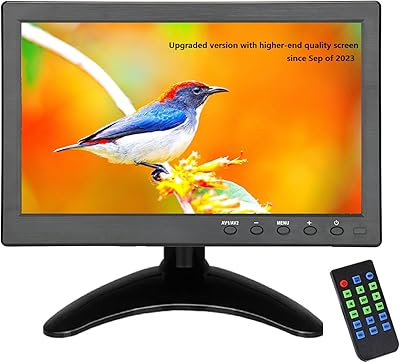
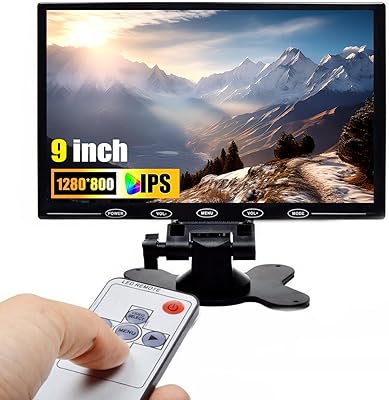
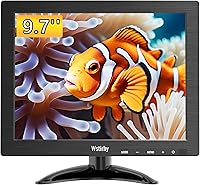
The Wstirhy 9.7-Inch Portable Monitor is a compact, no-frills display that occupies a genuinely unusual niche in today’s monitor market — a 4:3 aspect ratio at under 10 inches. Most screens have gone widescreen and stayed there, so this mini display stands out simply by being different. Wstirhy isn’t a household name, but this compact monitor has quietly climbed the rankings in the Security Monitors & Displays category on Amazon since its late 2024 launch. At under 2.5 pounds, it’s easy to move around, and the dual mounting support — desktop stand or VESA wall mount — gives you genuine flexibility in how and where you use it.
Features & Benefits

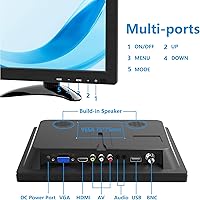
What really sets this small secondary screen apart from similar compact options is its port selection. HDMI, VGA, BNC, AV, and USB inputs on a display barely larger than a tablet is genuinely impressive — most monitors this size offer two inputs at best. The BNC connection alone makes it practical for legacy CCTV systems without adapters. Resolution sits at 1024x768, which is honest and functional rather than impressive; text and UI elements look clean, but don’t expect crisp video playback. Brightness at 300 cd/m² handles typical indoor environments comfortably, and the 178-degree viewing angle means the image holds up even when viewed from the side. The included remote and built-in speakers are useful bonuses.

Best For

This compact monitor genuinely shines in specific contexts. Raspberry Pi hobbyists will appreciate the multi-input flexibility — plug in via HDMI and you’re up and running in minutes, no configuration gymnastics needed. Security installers or DIY home monitoring fans benefit directly from that BNC port, which eliminates the need for signal converters when connecting analog cameras. If your desk is tight on space or you just want a small supplemental screen for reference material while working, this mini display handles that role well. It’s also worth considering for retro computing enthusiasts who still run VGA-only machines. Travelers who need a secondary screen on the road will find the sub-2.5-pound weight easy to live with.

User Feedback

Buyers consistently praise the variety of input ports, with many noting that plug-and-play setup was faster and less frustrating than expected for a budget device. The 4:3 ratio divides opinion — some find it ideal for older software interfaces or vertical-scrolling tasks, while others wish it were widescreen for modern content. Build quality gets mixed reviews; the stand can feel a bit wobbly on uneven surfaces, and some buyers note the glossy screen picks up reflections in brighter rooms. Speaker quality is basic but functional for notifications or ambient use. Overall, the out-of-box experience earns solid marks, with clear packaging and included cables that cover most connection scenarios right away.

Pros

  • BNC input is a rare and practical feature that works directly with analog CCTV cameras, no adapters needed.
  • Five input types on a single compact screen covers more connection scenarios than almost any rival at this size.
  • Plug-and-play setup with Raspberry Pi via HDMI typically takes under two minutes with no driver installation.
  • At under 2.5 pounds, this small secondary screen is genuinely easy to pack and carry between locations.
  • Dual mounting support means you can use it on a desk today and move it to a wall bracket tomorrow.
  • Flicker-free panel with blue light reduction makes extended monitoring sessions less fatiguing than expected for a budget display.
  • Included HDMI cable and power cable mean you are ready to connect right out of the box.
  • Remote control allows input switching and volume adjustment without touching the unit, useful for fixed security installations.
  • The 4:3 format is a deliberate fit for legacy software and older system interfaces, not an oversight.
  • 178-degree viewing angle holds up well when the display is mounted at an angle or shared across a small workspace.

Cons

  • The desktop stand wobbles on uneven surfaces and feels noticeably flimsy given the overall weight of the display.
  • 1024x768 resolution shows its limits quickly when rendering modern web content or any high-definition video.
  • The glossy screen surface catches reflections aggressively in bright rooms or near windows.
  • Built-in speakers max out at a thin, quiet output that most users find insufficient for anything beyond basic system sounds.
  • USB port is limited to flash drive media playback only, not a full-function data or charging port.
  • Auto-input detection is slow when switching between sources, often requiring a manual cycle through the remote.
  • No carrying case or protective sleeve is included, which is a real gap for buyers who plan to travel with it.
  • The remote control requires precise aiming at the sensor and reportedly becomes less responsive after extended use.
  • On-screen menu navigation and the brief user manual leave non-obvious input configurations, like BNC or AV, poorly explained.
  • Contrast ratio of 600:1 produces dark scenes that look more gray than black, which is noticeable during video playback.

Ratings

The Wstirhy 9.7-Inch Portable Monitor has been evaluated by our AI rating system after analyzing verified global buyer reviews, with spam, bot activity, and incentivized feedback actively filtered out. The scores below reflect an honest, balanced picture of where this compact display genuinely delivers and where it falls short. Both enthusiastic praise and recurring frustrations from real users are factored into every category.

Port Versatility
91%
Buyers consistently call out the port selection as the standout reason they chose this display over alternatives. Having HDMI, VGA, BNC, AV, and USB inputs on a sub-10-inch screen is almost unheard of at this price tier, and users working with analog CCTV cameras or legacy hardware praised the BNC connection specifically for eliminating the need for signal adapters.
A handful of users noted that the USB port is limited to media playback from a flash drive rather than functioning as a full data or power input, which surprised some buyers expecting broader USB utility. The port labeling on the unit itself is also reported as small and hard to read in low-light environments.
Connectivity & Setup Ease
86%
Most buyers described a refreshingly quick setup experience, with the included HDMI cable allowing plug-and-play connection to laptops and Raspberry Pi boards in under a minute. Users appreciated that no driver installation was required, and the remote control made input switching straightforward without digging through on-screen menus manually.
A recurring complaint involves the auto-input detection being slow to respond when switching between sources, occasionally requiring a manual input cycle via the remote. A small number of buyers also reported that the VGA signal occasionally required manual resolution adjustment on the source device to display correctly.
Display Resolution
61%
39%
For the specific tasks this small secondary screen is designed for, the 1024x768 XGA resolution proves adequate. Users monitoring security feeds, running Raspberry Pi projects, or using it as a reference display for code or documentation found the image legible and functional without noticeable pixelation at normal viewing distances.
Anyone expecting modern display clarity will be disappointed. The resolution ceiling shows clearly when viewing HD video or working with fine-detail content, and several buyers noted that text rendering in browsers can look soft compared to even a basic 1080p screen. This is a known limitation of the panel, not a defect, but it catches some buyers off guard.
Build Quality
67%
33%
The chassis feels reasonably solid for a budget compact display, and the glossy front panel is scratch-resistant enough to survive regular handling and light travel. Several users who purchased it for desk use noted no flex or creaking after weeks of daily use, which exceeded expectations given the price point.
The desktop stand is the most commonly cited weak point in user reviews, described as feeling flimsy and slightly prone to wobbling on uneven desk surfaces. The overall plastic construction, while functional, does not inspire confidence during transport, and a few buyers mentioned the stand bracket feels loose out of the box.
Image Brightness & Clarity
74%
26%
At 300 cd/m², indoor brightness is genuinely comfortable, and users working in typical office or home lighting conditions reported no issues with visibility. The 178-degree viewing angle was appreciated by users who use the display in shared workspaces or at angles, with minimal color shift when viewed from the side.
In naturally bright rooms or near windows, the glossy panel surface creates noticeable reflections that reduce overall clarity. A few buyers also pointed out that the 600:1 contrast ratio, while acceptable, results in blacks that look more dark gray in darker scenes, which is noticeable during video playback.
Portability & Weight
83%
At 2.46 pounds and a compact 11x10-inch footprint, this mini display is genuinely easy to carry. Remote workers and makers who bring it between locations praised how little bag space it consumes, and the lightweight construction made it practical for temporary desk setups at co-working spaces or on travel assignments.
The lack of a carrying case or sleeve in the box means buyers need to source their own padding for transport, which a number of users flagged as an oversight. The glossy screen surface also picks up fingerprints quickly and needs wiping down before use after being packed loosely.
Mounting Flexibility
78%
22%
The dual mounting system, combining an adjustable desktop stand with 75x75mm VESA compatibility, gives buyers real options for permanent or temporary setups. Users who mounted it on monitor arms or wall brackets for security monitoring applications found the VESA pattern solid and well-aligned.
The adjustable stand only tilts along a single axis, so portrait orientation or significant tilt adjustments are not possible without a third-party VESA arm. A few buyers also noted the stand base is narrower than ideal, which contributes to its tendency to wobble slightly when the desk surface is not perfectly flat.
Remote Control
69%
31%
The bundled remote control was a pleasant surprise for buyers who expected to manage everything through on-unit buttons alone. Users monitoring security feeds from across a room found the ability to switch inputs and adjust volume remotely genuinely useful in daily practice.
The remote feels lightweight and plasticky, and some buyers reported needing to aim it precisely at the sensor for reliable response, particularly from wider angles. Battery life and longevity of the remote itself were questioned by a few users who noticed inconsistent performance after several weeks of regular use.
Built-in Speakers
54%
46%
For a compact display with no premium audio ambitions, the built-in speakers do cover basic needs like system sounds, notification audio, and light media use. Users who deployed this screen as part of a Raspberry Pi kiosk or dashboard setup found the audio output adequate for those low-demand scenarios.
Anyone expecting useful audio quality will be let down. Volume headroom is limited, and the sound is noticeably thin and tinny at anything above half volume. Most buyers who cared about audio at all ended up routing sound to external speakers or headphones, treating the built-in speakers as a backup at best.
Value for Money
82%
18%
Given the port diversity and dual mounting options, most buyers concluded this compact monitor punches above its weight for the specific niches it targets. Hobbyists, security DIYers, and Raspberry Pi users in particular consistently described it as a cost-effective solution that would have cost significantly more from established brands.
Buyers purchasing it for general computing or media consumption as a primary display tend to find the value proposition weaker, since the resolution limits its usefulness for mainstream tasks. Expectations shaped by modern monitor standards can make the overall package feel underwhelming if the buyer is not squarely in the target use case.
Aspect Ratio Suitability
71%
29%
The 4:3 format is a deliberate and useful choice for legacy software, older CCTV interfaces, and Raspberry Pi console output, all of which map naturally to a square-ish display. Users coming from those specific contexts found it more appropriate than a widescreen monitor with black bars or stretched images.
For any modern content consumption, web browsing, or general-purpose secondary screen use, the 4:3 ratio introduces noticeable letterboxing when watching video and a slightly dated feel to the desktop workspace. Several buyers admitted they underestimated how much the aspect ratio would affect day-to-day comfort.
Flicker-Free & Eye Comfort
77%
23%
Users who clocked extended hours in front of this small secondary screen for coding, monitoring, or reading noted that eye fatigue was not a significant issue, which they credited to the flicker-free panel and blue light reduction. For a budget device, these features are meaningful and not always guaranteed at this price range.
The glossy surface counteracts some of the eye comfort benefits in bright environments, requiring users to position the screen carefully relative to light sources. A matte panel option would have made the eye comfort story considerably stronger, and a few long-session users mentioned mild reflective glare as a persistent minor annoyance.
Out-of-Box Experience
79%
21%
Packaging was consistently described as tidy and protective, with the monitor arriving in good condition across the reviews surveyed. The inclusion of an HDMI cable, power cable, and user manual in the box meant most buyers were operational within minutes without sourcing additional accessories.
The user manual is brief and primarily covers basic menu navigation, leaving some buyers without clear guidance for less common input configurations like BNC or AV. A more detailed setup guide for the niche use cases this display is marketed toward would meaningfully improve the first-hour experience for new buyers.

Suitable for:

The Wstirhy 9.7-Inch Portable Monitor is built for a specific kind of buyer, and if you fall into that group, it delivers real, practical value. Raspberry Pi enthusiasts will find it particularly well-matched, since it accepts HDMI input natively, requires no driver setup, and its 4:3 panel maps cleanly to classic Pi output resolutions. Security hobbyists and small-scale CCTV installers will appreciate the BNC input, which almost nothing else at this screen size offers, making it a genuinely useful monitor for analog camera systems without needing signal converters. Makers, tinkerers, and retro computing fans who still work with VGA or AV sources will find this compact monitor covers legacy connections that modern displays have dropped entirely. It also works well as a lightweight secondary screen for remote workers or travelers who need a portable reference display for documentation, terminal windows, or system dashboards on the go. If your desk is tight on space and you just want a small, functional supplemental display for low-demand tasks, this mini display fits that role without overcomplicating things.

Not suitable for:

The Wstirhy 9.7-Inch Portable Monitor is not a good fit for buyers who expect modern display performance or plan to use it as a primary screen for daily computing. The 1024x768 resolution is a real ceiling, and anyone who spends significant time browsing the web, editing documents, or watching video content will find the image noticeably soft and limiting compared to even an entry-level 1080p display. The 4:3 aspect ratio reinforces this gap, introducing letterboxing on virtually all modern video formats and making standard widescreen workflows feel cramped. Buyers who care about audio should also look elsewhere, as the built-in speakers are thin and quiet enough that most users end up routing sound externally anyway. The glossy panel is a meaningful drawback for anyone working near windows or in brightly lit rooms, where reflections can become a persistent distraction. If you are shopping for a general-purpose portable monitor for productivity or media, there are purpose-built 1080p travel monitors in a similar price range that will serve those needs considerably better.

Specifications

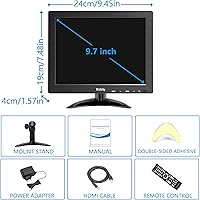
  • Screen Size: The display measures 9.7 inches diagonally, making it one of the smaller standalone monitors available for desktop or portable use.
  • Resolution: Native resolution is 1024x768 pixels (XGA), delivering a pixel density suited to text, UI interfaces, and security feeds rather than high-definition media.
  • Aspect Ratio: The panel uses a 4:3 aspect ratio, a format increasingly rare in modern monitors but well-matched to legacy software, CCTV interfaces, and classic computing outputs.
  • Brightness: Peak brightness is rated at 300 cd/m², which is adequate for typical indoor ambient lighting conditions.
  • Contrast Ratio: The contrast ratio is 600:1, producing acceptable depth for everyday monitoring tasks while showing some gray lift in darker scenes.
  • Viewing Angle: The panel supports a 178-degree viewing angle both horizontally and vertically, keeping image quality stable when viewed from off-center positions.
  • Refresh Rate: The display operates at a standard 60Hz refresh rate, appropriate for static monitoring, UI work, and general secondary screen use.
  • Video Inputs: Connectivity includes HDMI, VGA, BNC, AV composite, and USB media playback, covering a wide range of modern and legacy source devices.
  • USB Ports: One USB-A port is included, supporting direct playback of photos and video files from a flash drive rather than functioning as a data or power interface.
  • Built-in Audio: Two small built-in speakers are integrated into the unit, providing basic audio output without requiring external accessories.
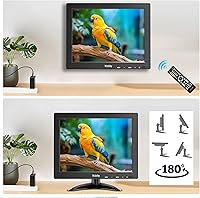
  • Remote Control: A handheld remote control is included in the box, enabling input selection, volume adjustment, and menu navigation from a distance.
  • VESA Mount: The monitor features 75x75mm VESA mounting holes on the rear, compatible with standard wall brackets and monitor arms.
  • Desktop Stand: An adjustable-angle desktop stand is included, allowing the display to be tilted for comfortable viewing without additional hardware.
  • Dimensions: The overall unit measures approximately 11x2x10 inches, keeping the physical footprint compact on a desk or in a bag.
  • Weight: The monitor weighs 2.46 pounds, making it light enough to carry between locations without significant added load.
  • Screen Surface: The panel uses a glossy screen surface, which enhances color vibrancy but increases reflectivity in bright lighting environments.
  • Eye Care: The display includes both blue light reduction and flicker-free technology to reduce visual fatigue during extended use sessions.
  • Box Contents: The package includes the monitor, one HDMI-to-HDMI cable, a power cable, a remote control, and a printed user manual.

Related Reviews
Yasoca 7-inch Portable HD 1080P Monitor
82%
87%
Display Quality
93%
Portability
85%
Ease of Use
82%
Input Connectivity
80%
Build Quality
More
Geimrsy GY-S75-1 7.7-inch Portable Teleprompter
73%
81%
Value for Money
88%
Portability & Form Factor
84%
Ease of Setup
67%
Beam Splitter Glass Quality
63%
Remote Control Functionality
More
AYY 15-inch Portable Monitor
86%
91%
Display Quality
94%
Portability/Size/Weight
88%
Ease of Setup
85%
Build Quality/Durability
90%
Color Accuracy
More
LONCEVON 7-inch LCD Monitor
81%
88%
Portability
92%
Value for Money
75%
Display Quality
70%
Brightness
80%
Connectivity
More
Hosyond 7-inch Small Monitor
83%
92%
Portability & Size
87%
Display Quality
90%
Input Options & Connectivity
58%
Sound Quality
89%
Value for Money
More
CAMECHO 9 Inch LCD Monitor
82%
89%
Value for Money
78%
Display Quality
92%
Portability
84%
Ease of Use
88%
Mounting Flexibility
More
Magedok T089B 8.9-inch Touchscreen Monitor
74%
84%
Touch Accuracy
81%
Display Brightness
78%
Image Sharpness
51%
Color Accuracy
62%
USB-C Connectivity
More
VILVA V156F1 15.6-inch Portable Monitor
69%
74%
Display Quality
61%
Portability
82%
Connectivity & Compatibility
67%
Build Quality
83%
Value for Money
More
KEEPTIME 14-inch 2K Portable Monitor
84%
89%
Display Quality
94%
Portability
87%
Connectivity Options
91%
Ease of Setup
62%
Audio Performance
More
Yoidesu 7-Inch Portable Digital TV
85%
91%
Portability
88%
Display Quality
84%
Battery Life
95%
Ease of Setup
85%
Connectivity (USB/SD Card)
More

FAQ

Yes, and it is one of the more straightforward setups you can do with this compact monitor. Connect the included HDMI cable from your Pi to the monitor, power both on, and the display should detect the signal automatically. No drivers are needed, and most Raspberry Pi models output a resolution compatible with the 1024x768 panel without any manual configuration.

Yes, the BNC input is a genuine feature here, not just a label. You can run a standard coaxial cable from an analog CCTV camera directly into the BNC port and get a live feed without any signal converter in between. This is one of the main reasons security hobbyists and small installation setups gravitate toward this particular display.

It depends heavily on what you mean by everyday use. For terminal windows, security monitoring, Raspberry Pi projects, or a quick reference screen next to your main display, 1024x768 is perfectly readable and functional. If you plan to use it for web browsing, watching video, or working in detail-heavy applications, the resolution will feel limiting compared to a modern 1080p screen, and you should factor that in before buying.

No, the USB port on this mini display is specifically for media playback from a flash drive, meaning you can browse photos or play video files stored on a USB stick. It does not function as a data hub or a charging port, which surprises some buyers who assume broader USB utility.

The stand gets the job done on a flat, even surface, but it is not the most rigid piece of hardware included in the box. On a perfectly level desk it holds the display at a usable angle without drama, but if your workspace has any texture or unevenness, you may notice some wobble. For a more permanent or stable setup, mounting on a VESA arm is the better route.

The 75x75mm VESA pattern on the rear makes wall mounting straightforward with any compatible bracket sold separately. You will need to source the bracket yourself since none is included, but the mount holes are properly threaded and align with standard hardware. It is a clean option for permanent security monitor installs or space-saving desk-free setups.

For light use like notification sounds, basic system audio, or background reference content, the speakers are functional. But they are quiet and noticeably thin at higher volumes, so if audio quality matters at all for your setup, plan on connecting external speakers or headphones. Most buyers who care about sound treat the built-in speakers as a backup rather than a primary option.

It works, and it is genuinely useful for setups where the monitor is mounted at a distance, like a wall-mounted security display. That said, it requires fairly direct aim at the IR sensor to respond consistently, and some users report it becomes slightly less reliable after a few weeks of regular use. For close-range desk use, you will probably end up just using the on-unit buttons instead.

If your desk is near a window or directly under overhead lighting, reflections can be distracting enough to require repositioning the display. In a controlled indoor environment with indirect lighting, the glossy surface is manageable and the colors benefit from it. A matte screen would have been a more practical choice for general use, so this is something to keep in mind depending on your room setup.

The monitor itself does not have a built-in pivot mechanism, so physical portrait rotation is not directly supported by the included stand. You can rotate the display on a VESA arm if the arm supports it, and you would then need to adjust your source device output to match. For most use cases this monitor is intended for, landscape orientation is the practical default.