ViewSonic TD1656-2K 16-inch Touchscreen Portable Monitor

ViewSonic TD1656-2K 16-inch Touchscreen Portable Monitor — image 1

ViewSonic TD1656-2K 16-inch Touchscreen Portable Monitor — image 2
ViewSonic TD1656-2K 16-inch Touchscreen Portable Monitor — image 3
ViewSonic TD1656-2K 16-inch Touchscreen Portable Monitor — image 4
ViewSonic TD1656-2K 16-inch Touchscreen Portable Monitor — image 5
ViewSonic TD1656-2K 16-inch Touchscreen Portable Monitor — image 6
ViewSonic TD1656-2K 16-inch Touchscreen Portable Monitor — image 7

ViewSonic TD1656-2K 16-inch Touchscreen Portable Monitor — image 8
ViewSonic TD1656-2K 16-inch Touchscreen Portable Monitor — image 9
80%
20%

Overview

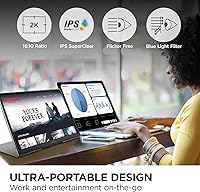
The ViewSonic TD1656-2K 16-inch Touchscreen Portable Monitor enters a crowded field with a clear pitch: sharper resolution and touch input for professionals who refuse to compromise when working away from their desk. Most portable monitors max out at 1080p; this one runs a 2560x1600 WQXGA IPS panel, which is a meaningful jump in clarity for spreadsheets, design files, and dense text. The 16:10 aspect ratio adds extra vertical space that widescreen alternatives simply don’t offer, making it noticeably better for long document sessions. Factor in the bundled smart cover, integrated stand, and 65W USB-C delivery, and you have a complete, self-sufficient kit. At this price tier, expectations are high — and they should be.

Features & Benefits

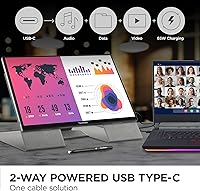
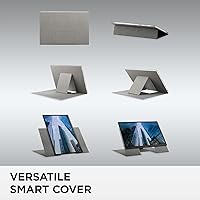
The 10-point multi-touch display handles swiping and annotation naturally — fluid enough for navigating apps and marking up PDFs, though it suits broad gestures more than fine-line drawing. The two-way USB-C setup is genuinely practical: one cable feeds video and data to the monitor while simultaneously pushing 65W back to your laptop, which simplifies any crowded desk or conference table situation. The magnetic smart cover folds into a stand that holds steady in both portrait and landscape orientations. Mac users should know that full gesture support requires installing ViewSonic’s vTouch driver — it is not automatic out of the box. The matte anti-glare coating handles bright rooms well, with only a minor trade-off in color punch versus glossy alternatives.

Best For

This 16-inch travel monitor is a strong match for remote workers who regularly set up in client offices, hotel rooms, or co-working spaces and need a reliable second screen without hauling a bulky kit. Consultants who present from a laptop will appreciate having sharp, touch-enabled screen space ready to go. It’s also a natural fit for designers and digital note-takers who benefit from a high-resolution canvas with touch input. Mac users in particular get real value here through the vTouch gesture driver. Students in architecture, engineering, or design programs who move between classrooms and studios will find the compact self-contained package hard to beat at this resolution level.

User Feedback

With a 4.3-star average across more than a thousand ratings, the ViewSonic TD1656-2K earns strong marks mainly on display sharpness and build quality. Buyers consistently praise the cover-stand convenience and the simplicity of the single-cable USB-C connection. The positive feedback feels grounded — people who bought it for work productivity seem quite satisfied. On the critical side, some users report touch calibration drift over time, and a handful of Mac buyers mention friction with the vTouch driver installation. The 60Hz refresh rate draws occasional complaints from users accustomed to higher-refresh displays. Overall, most reviewers feel the price is justified, though budget-conscious buyers sometimes question whether touch functionality alone warrants the premium over a non-touch alternative.

Pros

  • The 2560x1600 IPS panel delivers noticeably sharper text and detail than the 1080p portable monitors most people are used to.
  • A 16:10 aspect ratio gives you meaningfully more vertical screen space, which matters daily for documents and spreadsheets.
  • Two-way 65W USB-C means one cable handles video, data, and laptop charging simultaneously — a real convenience on cluttered desks.
  • The magnetic smart cover doubles as a sturdy stand in both portrait and landscape, so you never need to pack a separate stand.
  • At 2.8 lbs and 0.39 inches thick, this 16-inch travel monitor competes well on portability against similarly sized rivals.
  • 10-point multi-touch works reliably for annotation, app navigation, and PDF markup without noticeable lag.
  • Mac users who install the vTouch driver get a full range of gesture controls rarely available on external portable displays.
  • A matte anti-glare surface keeps the screen readable in bright offices, conference rooms, and near windows.
  • The 3-year warranty with US-based support is a meaningful advantage over lesser-known portable monitor brands.
  • Over 1,000 buyer ratings averaging 4.3 stars reflects consistent real-world satisfaction across a broad range of use cases.

Cons

  • Mac touch functionality requires a manual driver installation — it does not work automatically out of the box.
  • Some users report touch calibration drift after extended use, which can require occasional recalibration.
  • The 60Hz refresh rate feels limiting for anyone accustomed to 120Hz or higher displays, even for everyday scrolling.
  • The matte coating reduces color vibrancy compared to glossy panels, which matters for color-critical creative work.
  • The smart cover stand offers limited angle adjustment compared to monitors with articulating kickstands or VESA mounts.
  • No HDMI or DisplayPort input means users without a USB-C video output on their laptop need an adapter.
  • At this price point, the lack of HDR support may disappoint buyers expecting a premium multimedia experience.
  • Touch precision is not refined enough for detailed stylus-based illustration, limiting its appeal to digital artists with fine-line workflows.

Ratings

The scores below reflect an AI-driven analysis of verified global user reviews for the ViewSonic TD1656-2K 16-inch Touchscreen Portable Monitor, with spam, incentivized, and bot-flagged submissions actively filtered out to ensure the ratings represent genuine buyer experiences. Each category captures both what real users consistently praised and the frustrations they reported in honest detail, so you can weigh the trade-offs before committing to a purchase.

Display Sharpness
93%
The 2560x1600 WQXGA resolution earns consistent praise from professionals who use this monitor daily for design, writing, and spreadsheet work. Buyers frequently note how much more readable dense text and fine UI elements are compared to the 1080p portable monitors they replaced.
A small number of users who work extensively with color-graded video feel the matte coating introduces a slight haze that mutes the perceived sharpness at certain viewing angles. This is a minor trade-off rather than a flaw, but color-critical professionals may notice it.
Touch Responsiveness
74%
26%
For annotation, PDF markup, and general navigation, the 10-point touch layer performs reliably and responds quickly enough that most users describe it as natural and smooth. Remote workers who use it for whiteboarding sessions or signing documents in client meetings report it handles those tasks well.
Touch calibration drift is a recurring complaint in longer-term reviews, with some users reporting that accuracy degrades after weeks of use and requires manual recalibration. Fine-detail work like precise illustration is noticeably limited, and the experience falls short of dedicated pen-display tablets in that respect.
USB-C Connectivity
91%
The two-way 65W USB-C setup is one of the most frequently praised practical features, especially among users who hate cable clutter. Being able to run video, data, and laptop charging through a single cable makes setup at temporary workspaces genuinely fast and clean.
The monitor relies exclusively on USB-C, so users with older laptops that lack a USB-C video output need an adapter, which some buyers only discover after unboxing. A few users also report that not all third-party USB-C cables reliably deliver the full 65W passthrough, requiring use of the included cable.
Portability
88%
At 2.8 lbs and under 0.4 inches thick, this 16-inch travel monitor sits comfortably in a laptop bag alongside a notebook and charger without feeling burdensome. Business travelers and daily commuters consistently mention that it does not add meaningful fatigue to their carry compared to thinner but lower-spec alternatives.
A handful of users who carry ultralight setups — thin laptop, minimal accessories — note that 2.8 lbs is still noticeable over a full day of transit. It is lighter than most comparable 16-inch monitors, but it is not quite in the same weight class as smaller 13-inch portable displays.
Build Quality
86%
The chassis feels solid and premium for a portable device, and the magnetic smart cover attachment mechanism draws positive comments for its satisfying snap and consistent hold. Users who travel frequently report no signs of flex, creak, or wear after months of regular use.
Some users feel the hinge mechanism built into the smart cover stand could be more rigid at shallower angles, with the monitor shifting slightly on smooth surfaces when accidentally nudged. The cover itself, while functional, feels slightly less premium than the monitor body it protects.
MacOS Compatibility
69%
31%
Once the vTouch driver is correctly installed, Mac users report a genuinely capable gesture experience that extends macOS touch navigation to an external display in a way most portable monitors simply cannot offer. For MacBook users who rely heavily on trackpad gestures, this is a meaningful differentiator.
The driver installation requirement catches a significant number of Mac buyers off guard, and some users report initial setup confusion or compatibility hiccups on newer macOS versions. Without the driver, touch does not function at all on macOS, which feels like an unnecessary barrier for a premium device.
Stand Versatility
78%
22%
Supporting both portrait and landscape orientations without any additional accessories is a practical advantage that users who switch between reading-focused and work-focused layouts genuinely appreciate. The integrated design means there is no loose stand piece to forget or lose during travel.
The range of tilt angles is narrower than what a dedicated kickstand or VESA-mounted arm would provide, and users who prefer very low or very steep viewing angles will find themselves working around the cover’s fixed positions. There is no height adjustment, which matters for ergonomics in longer seated sessions.
Anti-Glare Performance
81%
19%
In typical office environments, coffee shops, and rooms with overhead lighting, the matte surface handles reflections notably better than glossy portable monitors, and users who work near windows specifically call this out as a reason they chose this display over competing options.
The coating does introduce a slight texture to the image that some users describe as a soft or milky quality, particularly when viewing high-contrast content or dark scenes. Buyers who prioritize vivid, punchy visuals for media consumption may find it less satisfying than a glossy alternative.
Refresh Rate
58%
42%
For the core productivity, design, and annotation use cases this monitor targets, 60Hz is perfectly adequate and the vast majority of professional users report no issues with everyday scrolling, typing, and creative work at this refresh rate.
Users who previously owned 120Hz or higher displays consistently flag 60Hz as a perceptible downgrade, with scrolling and cursor movement feeling comparatively sluggish. It is the most cited technical limitation in critical reviews and is a genuine dealbreaker for anyone who uses a portable monitor for gaming or video editing with motion-heavy playback.
Value for Money
72%
28%
Buyers who specifically needed touch input combined with a high-resolution panel and self-contained stand generally feel the price is justified, noting that comparable combinations of features are hard to find in a single portable package at any lower price point.
Users who primarily needed a non-touch second screen frequently express regret, feeling the touch premium was not worth it for their workflow. Compared to capable 1080p portable monitors available at a much lower price, buyers who do not actively use touch functionality feel the value proposition weakens considerably.
Color Accuracy
77%
23%
For everyday design work, photo review, and presentation tasks, the IPS panel delivers consistent, pleasing color reproduction that users describe as natural and well-balanced out of the box without requiring significant calibration. Web designers and UI professionals report it as reliable for their daily workflow.
Users with color-critical professional needs — print design, video color grading, or photographic retouching — note that the matte coating and the absence of a factory calibration report leave some uncertainty about accuracy at the edges of the color gamut. It is solid but not a professional colorimeter-grade display.
Setup Experience
83%
On Windows, setup is genuinely plug-and-play: connect a USB-C cable, and the monitor is immediately recognized with full touch functionality active. Most Windows users describe the initial experience as effortless, which adds to the appeal for non-technical buyers.
The experience on macOS is a two-step process that requires driver installation before touch works at all, and a small percentage of users report that driver updates lag behind major macOS releases, causing temporary touch loss after system upgrades. ViewSonic’s support team resolves most of these cases, but it adds friction.
Warranty & Support
84%
A 3-year warranty backed by a US-based support team is meaningfully better than the 1-year coverage common among competing portable monitor brands, and buyers who needed to contact support report generally prompt and knowledgeable responses that resolved their issues.
A small number of users mention longer-than-expected wait times during peak periods and some inconsistency in support quality depending on the representative. International buyers outside the US note that the US-centric support structure can create minor friction for warranty claims.

Suitable for:

The ViewSonic TD1656-2K 16-inch Touchscreen Portable Monitor is purpose-built for mobile professionals who genuinely need more than a basic second screen on the road. Remote workers and consultants who bounce between client sites, co-working spaces, and home offices will find the all-in-one package — sharp display, integrated stand, and single-cable power — cuts setup time to almost nothing. The 2560x1600 resolution and 16:10 aspect ratio make a real difference for anyone working with design files, dense spreadsheets, or long documents, where a typical 1080p portable monitor starts to feel cramped. Digital artists and annotators who want touch input on a high-resolution canvas will get practical value from the 10-point screen, particularly for markup and navigation tasks. Mac users who take the time to install the vTouch driver unlock a genuinely responsive gesture experience that few portable monitors can match. Students in visually demanding fields like architecture or engineering also have a compelling case here, especially if they move frequently between studios and classrooms.

Not suitable for:

Buyers hoping for a straightforward plug-and-play experience on macOS should go in with realistic expectations — the ViewSonic TD1656-2K 16-inch Touchscreen Portable Monitor requires a manual driver installation to unlock full touch and gesture functionality, which some users find frustrating and time-consuming. Anyone who uses their monitor primarily for gaming or video consumption will likely find the 60Hz refresh rate a limiting factor, particularly if they are coming from a 120Hz or higher display. The touch layer, while capable for annotation and broad gestures, is not the right tool for fine-line digital illustration that demands stylus precision, so professional illustrators may want to look elsewhere. Budget-conscious buyers who only occasionally work away from a primary setup may struggle to justify the premium over simpler, non-touch portable monitors that cost considerably less. And if sheer color vibrancy is a top priority — for color-grading video, for instance — the matte anti-glare coating does soften the image compared to a glossy panel.

Specifications

  • Screen Size: The display measures 16 inches diagonally, offering a generous working area that sits between compact 13-inch travel monitors and bulkier 17-inch panels.
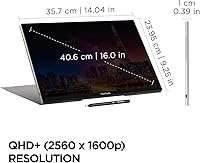
  • Resolution: Native resolution is 2560x1600 (WQXGA), delivering noticeably sharper text and finer detail than standard 1080p portable displays.
  • Aspect Ratio: The 16:10 aspect ratio provides more vertical screen real estate than the common 16:9 format, which is particularly useful for documents, code editors, and design applications.
  • Panel Type: An IPS panel is used, which ensures consistent color accuracy and wide viewing angles compared to TN alternatives common in lower-cost portable monitors.
  • Touch Input: Supports 10-point multi-touch input, enabling natural gestures, annotation, and app navigation directly on screen.
  • Refresh Rate: The display runs at a 60Hz refresh rate, which is standard for productivity and creative work but not suited for high-refresh gaming or motion-intensive tasks.
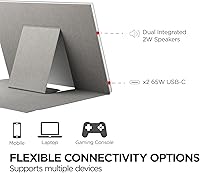
  • USB-C Ports: Two USB-C ports support two-way video, data, and power delivery, allowing the monitor to both receive power and pass up to 65W of charging through to a connected laptop.
  • Power Delivery: 65W passthrough charging means users can power the monitor via the included adapter and simultaneously charge a compatible laptop through the same cable chain.
  • Weight: The unit weighs 2.8 lbs, placing it on par with mid-range portable monitors of similar screen size and making it practical for daily bag carry.
  • Thickness: At 0.39 inches thin, the monitor slides easily into a laptop sleeve or slim bag without adding meaningful bulk to a travel kit.
  • Dimensions: Physical dimensions are 14.04 x 9.25 x 0.39 inches, giving a clear sense of desk footprint when deployed in portrait or landscape orientation.
  • Screen Surface: The matte anti-glare coating reduces reflections in bright environments such as offices and coffee shops, though it slightly softens color vibrancy versus a glossy panel.
  • Stand System: A detachable magnetic smart cover is included and folds into a built-in stand supporting both portrait and landscape orientations without requiring a separate accessory.
  • OS Compatibility: Compatible with Windows and macOS; full multi-touch gesture support on macOS requires installation of ViewSonic’s vTouch driver, which is not pre-installed.
  • Warranty: Covered by a 3-year manufacturer warranty backed by a US-based customer service team, which is above average for the portable monitor category.
  • Color: The unit ships in black with a matching smart cover, offering a professional appearance suitable for business and creative environments.
  • Input Ports: Connectivity is limited to USB-C inputs; there is no HDMI or DisplayPort, so users with older laptops lacking USB-C video output will need an adapter.
  • First Available: The product was first listed in July 2024, making it a relatively recent release with an actively maintained firmware and driver ecosystem.

Related Reviews
ViewSonic VG1656-2K 16-inch Portable Monitor
86%
94%
Portability & Weight
90%
Display Quality & Resolution
85%
Setup & Installation
88%
Build Quality & Durability
72%
Gaming Performance
More
Magedok 16-inch 4K OLED Touchscreen Portable Monitor
85%
91%
Display Quality
89%
Portability
75%
Touchscreen Performance
65%
Brightness in Bright Environments
88%
Gaming Performance
More
Eyoyo EM12-2K 12-inch 2K Portable Monitor
75%
88%
Image Sharpness
79%
Color Accuracy
83%
Build Quality
91%
Portability
67%
Stand & Mounting Versatility
More
Upperizon 16″ 2K Portable Monitor
85%
92%
Display Quality
90%
Portability & Size
87%
Ease of Setup
89%
Gaming Performance
94%
Color Accuracy
More
ViewSonic VS3225-2K 32-inch QHD IPS Monitor
78%
88%
Image Clarity
81%
Color Accuracy
86%
Eye Comfort
83%
Build & Design
51%
Stand & Ergonomics
More
Pisichen 27-Inch 2K QHD Touchscreen Monitor
72%
88%
Image Clarity
83%
Touch Responsiveness
81%
Value for Money
69%
Build Quality
52%
Ergonomics & Adjustability
More
UPERFECT 1602K 16″ 2K Portable Gaming Monitor
79%
91%
Display Clarity
88%
Gaming Performance
93%
Portability & Form Factor
84%
Connectivity
67%
Stand & Cover
More
ViewSonic VP2756-2K 27-inch QHD IPS Monitor
81%
93%
Color Accuracy
88%
Panel Sharpness
91%
USB-C Connectivity
54%
Refresh Rate
86%
Ergonomics
More
Lrtzcbi 14-inch Portable Touchscreen Monitor
74%
88%
Value for Money
79%
Image Quality
72%
Touch Responsiveness
91%
Portability
58%
Kickstand Stability
More
KEEPTIME 14-inch 2K Portable Monitor
84%
89%
Display Quality
94%
Portability
87%
Connectivity Options
91%
Ease of Setup
62%
Audio Performance
More

FAQ

Yes, and this is worth knowing before you buy. The monitor connects and displays video automatically on macOS, but touch and gesture functionality require you to download and install ViewSonic’s vTouch driver separately. It is not pre-installed or automatic. The process is straightforward, but it is an extra step that surprises some Mac users who expect plug-and-play touch support.

Yes, that is exactly how the two-way USB-C system works. When you connect the included power adapter to the monitor, it can pass up to 65W of charging power through to your laptop over the same USB-C cable that carries video and data. For most ultrabooks and mid-range laptops, 65W is enough to maintain or slowly charge the battery during use.

The magnetic smart cover folds into a stand that holds the monitor firmly in both landscape and portrait positions. It is not as adjustable as a full articulating arm, but for typical desk and table use it is stable and reliable. Just be aware that fine angle adjustment options are limited compared to monitors with dedicated kickstands.

Compatibility with tablets depends on the device’s ability to output video over USB-C. Many modern iPads and Android tablets support this, but touch pass-through functionality back to the tablet is generally not supported in these configurations. For basic extended display use, it often works, but you should verify your specific tablet model supports USB-C video output before purchasing.

The difference is quite visible, especially for text-heavy work like coding, writing, or spreadsheets. Characters appear sharper and you can fit meaningfully more content on screen before needing to scroll. For design and photo editing tasks the extra resolution also reveals finer detail. If you have been using a 1080p travel monitor, the step up feels immediate.

It can run games, but it is not optimized for gaming. The 60Hz refresh rate is the main limitation — anyone accustomed to 120Hz or higher displays will notice the difference in motion smoothness. For casual or turn-based gaming it is perfectly fine, but for fast-paced or competitive gaming this 16-inch travel monitor would feel restrictive.

ViewSonic does sell replacement accessories for their monitor lineup, so it is worth contacting their support team or checking their official site for availability. That said, the monitor still functions fully without the cover — you would just need a third-party stand or a surface to prop it against, since there is no built-in kickstand independent of the cover.

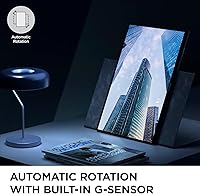
Yes, portrait orientation is fully supported. The smart cover stand accommodates vertical positioning, and you can rotate the display output in your operating system settings to match. Portrait mode is particularly useful for reading long documents, browsing web pages, or viewing tall code files without constant scrolling.

The monitor supports 10-point finger touch natively. Passive styluses that mimic finger contact may work to varying degrees, but there is no dedicated active stylus support or pressure sensitivity built in. For broad annotation, signing PDFs, or sketching rough ideas it is practical, but for precision illustration work that demands fine line control it is not the right tool.

The matte anti-glare coating does a reasonable job of cutting reflections in bright indoor environments like offices near windows or well-lit conference rooms. Direct outdoor sunlight is a different story — like most portable monitors, it struggles in those conditions. For typical indoor professional use, the matte surface is a genuine advantage over glossy-panel alternatives.

Where to Buy