Overview

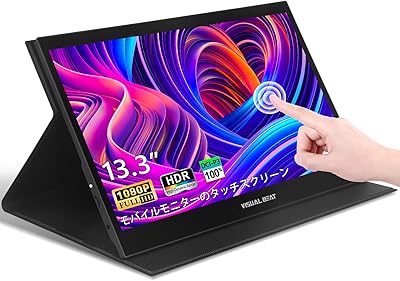
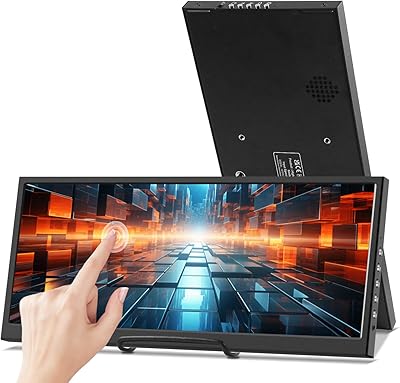
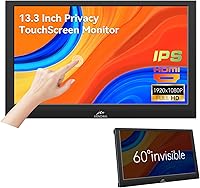
The Kenowa 13.3-inch Touchscreen Portable Monitor is a budget-friendly second screen from Shenzhen-based Kenowa — a brand most buyers won't recognize by name, but one that has quietly built a foothold in the crowded portable display market. What sets it apart from similarly priced rivals is what's included in the box: an adjustable stand, a privacy filter, and a built-in speaker are all standard, not paid upgrades. At 2.61 lbs and roughly the size of a hardcover book, this portable touchscreen display fits into most laptop bags without complaint. It launched in mid-2024 and has earned a respectable rank among Amazon's computer monitors — not a bestseller, but clearly not ignored either.
Features & Benefits

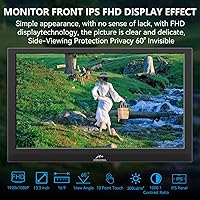
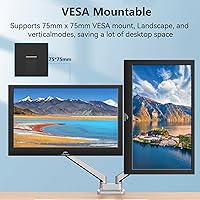
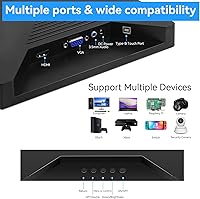
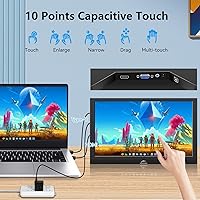
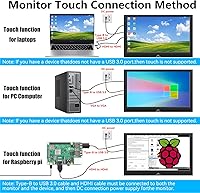
The IPS panel delivers a clean 1920x1080 image at 300 nits — plenty bright for office lighting, though the glossy screen surface can turn into a mirror near windows or under harsh fluorescent lights, so outdoor use is a real trade-off. The 10-point touch layer works reliably on Windows and Raspberry Pi OS but may need a driver workaround on macOS. Having a built-in speaker means one fewer cable when you're on a video call. HDMI and VGA inputs give older laptops a connection option that USB-C-only monitors can't offer, though buyers with newer machines should double-check their port situation. The 75x75mm VESA mount is a quiet bonus for desk setups.

Best For

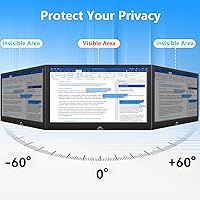
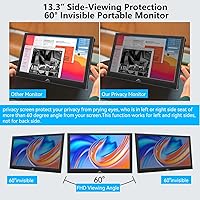
This compact second screen earns its keep most for people who regularly work in public — think airport lounges, co-working spaces, or coffee shops where shoulder-surfing is a genuine concern. The built-in privacy filter handles that without adding bulk. Raspberry Pi hobbyists will appreciate having a touchscreen they can actually connect and use without hunting for compatible accessories. Frequent travelers who are tired of packing a separate stand and Bluetooth speaker will find the bundled hardware genuinely convenient. That said, buyers with modern USB-C-only laptops should pause — the lack of a USB-C input is a real compatibility gap worth solving before purchase.

User Feedback

Buyers tend to land in one of two camps. Those who value all-in-one convenience — stand, privacy filter, speaker included — see the Kenowa monitor as a smart buy that avoids the nickel-and-dime accessory shopping that other portable displays require. The image quality draws consistent praise for indoor environments. The recurring complaints, though, are worth noting: some users find the privacy filter dims the display noticeably even when viewed straight on, and a handful report that the stand wobbles under extended use. Touch performance on non-Windows systems is hit or miss without manual driver setup. Overall, verified buyer sentiment skews positive, with most criticisms falling into manageable trade-offs rather than dealbreakers.

Pros

  • Stand, privacy filter, and speaker are all included — no extra purchases needed out of the box.
  • The IPS FHD panel delivers sharp, vibrant images for everyday productivity and media indoors.
  • At under 3 lbs, this compact second screen is light enough to carry daily without rethinking your bag.
  • HDMI and VGA inputs make it compatible with a wide range of older laptops and desktop setups.
  • The built-in privacy screen is a real, functional feature — not just a marketing checkbox.
  • 10-point touch works reliably on Windows and Raspberry Pi OS for hands-on workflows.
  • VESA 75x75mm mount support means it can be integrated into a more permanent desk setup if needed.
  • The built-in speaker handles video calls and casual audio without needing a separate Bluetooth device.
  • At its price point, the feature-to-cost ratio is hard to match among similarly sized portable displays.

Cons

  • No USB-C input is a significant gap for users of modern ultrabooks and MacBooks.
  • The glossy panel creates noticeable glare near windows or under bright overhead lighting.
  • The privacy filter can dim the display for the primary viewer, not just side-angle observers.
  • Touch functionality on macOS requires manual driver setup and may still underperform after configuration.
  • The built-in stand has reported wobble issues during extended use, raising durability concerns.
  • Kenowa has limited brand recognition and no well-documented customer support or warranty track record.
  • 300 nits brightness is adequate indoors but falls short for bright outdoor or high-ambient-light environments.
  • No USB-C means no single-cable power-and-display setups that many travelers now rely on.

Ratings

The scores below for the Kenowa 13.3-inch Touchscreen Portable Monitor were generated by our AI system after systematically analyzing verified global buyer reviews, actively filtering out incentivized, repeated, and bot-flagged submissions to surface only authentic user experiences. This compact second screen attracted feedback from remote workers, students, and hardware hobbyists across multiple markets, giving us a well-rounded picture of real-world performance. Both the genuine strengths and the recurring frustrations are transparently reflected in every score you see here.
Value for Money
86%
Among buyers who compared it against similarly priced portable displays, the bundled combination of privacy filter, adjustable stand, and built-in speaker consistently stood out as a differentiator. Most felt they were getting more hardware per dollar than competing options that charge extra for each accessory separately.
A subset of buyers felt the overall build quality did not quite match the implied value, particularly around the stand mechanism. Those who had owned more established brands occasionally noted that the savings come with visible material trade-offs that show up after weeks of daily use.
Display Quality
78%
22%
Indoor image quality received consistent praise — colors look vivid and text stays sharp at 1080p on a 13.3-inch panel, which makes spreadsheet work, coding, and video calls visually comfortable. The IPS panel's wider viewing angles were appreciated by users who share their screen during presentations.
The 300-nit brightness cap becomes a real limitation in bright rooms or near sunlit windows. Several users working in naturally lit spaces reported that the screen can look washed out during afternoon hours, limiting the practical environments where this display performs well.
Privacy Screen Effectiveness
71%
29%
For the core audience — people working in cafes, airports, or open-plan offices — the built-in privacy filter performed its intended job, meaningfully restricting what side-angle observers could see without requiring any extra accessories or setup steps.
A recurring complaint is that the privacy filter reduces perceived brightness for the primary viewer as well, not just for bystanders. Several buyers noted that the dimming effect is noticeable enough to be mildly frustrating during extended work sessions, especially in lower-light environments.
Touchscreen Performance
67%
33%
On Windows machines, the 10-point touch layer worked reliably out of the box for most users — tapping, scrolling, and two-finger zoom all registered accurately enough for daily productivity tasks and light stylus use during presentations.
macOS touch support was a consistent pain point, requiring manual driver installation with no guarantee of stable results. Raspberry Pi users had better experiences overall, but touch latency was occasionally mentioned as slightly behind what you would expect from a tablet-grade display.
Portability
88%
At 2.61 lbs and with its own stand built in, this compact second screen genuinely fits into a standard laptop bag without awkward bulk or extra packing decisions. Commuters and frequent travelers repeatedly highlighted how little friction the monitor added to their daily carry.
The 1.18-inch depth is slightly thicker than the slimmest portable monitors on the market, which matters to minimalist packers. A small number of users also noted that the built-in stand does not fold completely flat, adding marginal thickness when packed.
Build Quality
62%
38%
The overall construction feels adequate for light travel use — the chassis does not flex dramatically under pressure, and the screen bezel holds together without obvious gaps or creaking during normal handling. For occasional desk-to-bag transitions, it holds up reasonably well.
The stand mechanism attracted the most build criticism — multiple buyers described it as wobbly under regular touch input, which undermines confidence during active use. The plastic quality reads as budget-tier up close, and several users expressed concern about long-term durability after sustained daily use.
Connectivity
59%
41%
HDMI and VGA coverage means this display works with a broader range of older laptops and desktop setups than many modern portable monitors that have gone USB-C exclusive. For users with legacy hardware, that dual-input flexibility is a genuine practical advantage.
The complete absence of USB-C is a real problem for a growing share of buyers whose laptops have dropped HDMI in favor of Thunderbolt and USB-C ports. Those users must carry an adapter just to connect the monitor, which partially undermines the convenience argument for portable use.
Setup & Compatibility
73%
27%
Windows users generally reported a straightforward plug-and-play experience over HDMI with no driver installation required. Raspberry Pi compatibility was similarly smooth for most tinkerers, making it a practical choice for Pi-based project builds without a complex configuration process.
Non-Windows setups introduced friction — macOS touch required third-party drivers, and some Linux configurations needed manual input source adjustments. A handful of buyers mentioned the on-screen menu navigation for input switching was less intuitive than expected for a first-time setup.
Speaker Quality
61%
39%
For video calls in quiet rooms, the built-in speaker delivers clear enough voice audio to make it a functional replacement for earbuds in a pinch. The fact that it exists at all in this price tier and form factor was seen as a net positive by most buyers who used it regularly for meetings.
Audio quality drops off noticeably for music or any content requiring dynamic range — bass is essentially absent and volume peaks are modest. Buyers who expected anything beyond basic call audio came away disappointed, and a few noted audible distortion when pushed to higher volume levels.
Glare & Reflections
53%
47%
In a controlled indoor environment with overhead diffused lighting, the glossy panel's color punch and contrast ratio are genuinely enjoyable — content looks richer and more saturated than a comparable matte panel would produce in the same conditions.
Outside or near windows, the glossy coating becomes a liability. Multiple users described the screen as turning reflective enough to make focused work uncomfortable without repositioning, and the issue compounds with the already modest 300-nit ceiling, leaving little headroom to outshine ambient light.
Stand Usability
64%
36%
The adjustable stand removes the need to prop the monitor against books or carry a separate folding stand, which frequent travelers genuinely valued. The range of tilt angles covers most typical desk and lap-based working positions adequately.
Stability during touch interaction is the weak link — the stand rocks more than users expected when tapping the screen repeatedly. At lower tilt angles in particular, the monitor tends to shift position during active use, which becomes more noticeable the more you rely on the touchscreen.
Privacy Filter Brightness Impact
57%
43%
For users who primarily care about protecting sensitive data in crowded environments and can accept a dimmer picture, the filter delivers on its core promise without any extra setup or removable overlay accessories to manage.
The brightness reduction from the integrated filter is meaningful enough that some buyers wished it were removable or toggleable. Working in an already dim space while the filter cuts luminance further can make extended screen sessions genuinely eye-straining over time.
VESA Mount Utility
79%
21%
The 75x75mm VESA holes on the rear give buyers the option to convert this portable display into a semi-permanent secondary monitor on a desk arm, a flexibility that most competing portable monitors in this tier do not offer at all.
The VESA hardware itself is not included, so buyers who want to use a monitor arm need to source compatible screws separately. The mount holes are present but not prominently documented, meaning some users only discover this feature after purchase.
Cross-Platform Touch Support
55%
45%
Out of the box, Windows 10 and 11 recognized the touch layer immediately with no manual configuration needed — a smooth experience that the majority of the target audience will encounter first and find satisfying.
Cross-platform touch reliability drops sharply outside Windows. macOS support is driver-dependent and inconsistent, Linux results vary by distribution, and even on Raspberry Pi OS there are occasional lag reports under heavier graphical loads. Buyers expecting universal plug-and-play touch will be let down.

Suitable for:

The Kenowa 13.3-inch Touchscreen Portable Monitor is a strong fit for remote workers and freelancers who regularly work in cafes, airports, or shared offices where privacy matters — the built-in privacy filter genuinely addresses a real-world concern without requiring an awkward clip-on accessory. Frequent travelers who are tired of packing a separate stand, speaker, and display will appreciate that all three are bundled into a single bag-friendly unit weighing under 3 lbs. Students juggling research, spreadsheets, or coding on the go get a capable second screen without a high financial commitment. Raspberry Pi hobbyists and hardware tinkerers will find the HDMI input and touch support particularly useful for prototyping and project builds. Anyone still running an older laptop with legacy ports will also find the HDMI and VGA connectivity refreshingly practical in a market increasingly dominated by USB-C-only displays.
Not suitable for:

The Kenowa 13.3-inch Touchscreen Portable Monitor is not the right pick for buyers whose laptops have dropped HDMI and VGA in favor of USB-C or Thunderbolt — without an adapter, they simply cannot connect. Creative professionals who need accurate color reproduction or high brightness for outdoor shoots will find 300 nits and a glossy panel limiting under direct light. Mac users expecting plug-and-play touch support may run into driver friction, making the touchscreen more of a hassle than a convenience on Apple hardware. Anyone prioritizing long-term brand support, firmware updates, or a well-established warranty process should approach Kenowa with caution, as it is a relatively unknown manufacturer with limited service infrastructure. If you plan to use this as a primary monitor for extended daily sessions, the stand durability and privacy filter brightness reduction may become genuinely frustrating over time.
Specifications

  • Screen Size: The display measures 13.3 inches diagonally, offering a practical balance between portability and usable screen real estate.
  • Resolution: The panel renders at 1920x1080 pixels (FHD), delivering sharp text and clear detail for productivity and media tasks.
  • Panel Type: An IPS panel is used, providing wider viewing angles and more consistent color reproduction compared to TN alternatives.
  • Brightness: Peak brightness is rated at 300 nits, which is sufficient for indoor use but may struggle in high-ambient-light environments.
  • Touch Input: The display supports 10-point capacitive touch, enabling multi-finger gestures and direct screen interaction without a mouse.
  • Screen Surface: The panel has a glossy finish, which enhances color vibrancy indoors but can produce noticeable reflections near windows or bright lights.
  • Connectivity: The monitor connects via HDMI and VGA inputs; there is no USB-C or DisplayPort option available on this model.
  • Privacy Screen: A built-in privacy filter is integrated into the display to restrict side-angle viewing and shield on-screen content from bystanders.
  • Audio: A built-in speaker is included, providing basic audio output suitable for video calls and casual media playback without external gear.
  • Stand: An adjustable built-in stand is attached to the rear of the monitor, allowing the viewing angle to be repositioned for ergonomic comfort.
  • VESA Mount: The rear panel includes standard 75x75mm VESA mounting holes, enabling the monitor to be attached to compatible monitor arms or wall brackets.
  • Aspect Ratio: The display supports both 16:9 and 4:3 aspect ratios, offering flexibility for different content types and legacy display configurations.
  • Dimensions: The unit measures 12.8 x 7.8 x 1.18 inches, keeping the footprint compact enough to fit in most standard laptop sleeves and bags.
  • Weight: At 2.61 lbs, the monitor is light enough for daily commuting without adding significant load to a travel bag.
  • Power: The monitor operates on 12V DC power; a power adapter or compatible USB power delivery source is required for operation.
  • Compatibility: The monitor is designed to work with Windows PCs, laptops, and Raspberry Pi devices; macOS touch support may require additional driver configuration.
  • Manufacturer: The product is manufactured by Shenzhen Kenowa Electronics Co., LTD, a Chinese electronics company specializing in portable display solutions.
  • Model Number: The official model number is K-13.3-T-fangkp-1080p-us, as listed in Amazon product documentation.
  • Availability Date: This monitor first became available for purchase in June 2024, making it a relatively recent addition to the portable display market.

Related Reviews

Visual Beat R13PMT101 13.3-inch Portable Touchscreen Monitor
85%
89%
Display Quality
92%
Portability & Weight
88%
Touchscreen Responsiveness
94%
Ease of Setup
85%
Brightness & Visibility
More
Prechen 12.3 Inch Touchscreen Portable Monitor
84%
88%
Display Quality
93%
Portability & Size
79%
Touchscreen Responsiveness
84%
Build Quality
91%
Ease of Setup
More
Kenowa 17.3″ Portable Monitor
81%
72%
Display Quality
89%
Portability & Design
85%
Ease of Use
80%
Compatibility
65%
Speakers Sound Quality
More
INNOCN 13K1F 13.3″ OLED Portable Monitor
76%
93%
Picture Quality
91%
Color Accuracy
89%
Portability
84%
Setup & Compatibility
88%
Value for Money
More
Lrtzcbi 14-inch Portable Touchscreen Monitor
74%
88%
Value for Money
79%
Image Quality
72%
Touch Responsiveness
91%
Portability
58%
Kickstand Stability
More
Haiway 13.3-inch Security Monitor
85%
88%
Display Quality
92%
Ease of Setup
85%
Connectivity
79%
Build Quality
90%
Energy Efficiency
More
KEEPTIME 13.3″ 4K Portable Monitor
83%
94%
Display Quality
91%
Portability/Size/Weight
90%
Ease of Setup
86%
Build Quality
60%
Battery Life
More
Verbatim 17.3″ Portable Touchscreen Monitor
84%
91%
Display Quality
94%
Portability & Weight
88%
Touchscreen Responsiveness
89%
Connectivity Options
84%
Build Quality & Durability
More
Yodoit 17.3-inch Portable Monitor
86%
89%
Display Quality
94%
Portability
92%
Setup and Installation
85%
Build Quality
87%
Gaming Performance
More
Intehill U13ZT 13.4-inch 4K Portable Monitor
77%
93%
Display Sharpness
89%
Color Accuracy
74%
Touch Responsiveness
82%
Brightness & Glare Handling
88%
Build Quality
More

FAQ

It can connect to a MacBook via HDMI, so basic display output works fine. The catch is touch functionality — on macOS, the 10-point touch layer is not natively supported and typically requires a third-party driver to function, with mixed results. If you only need a second screen and not touch input, it should work without too much fuss.

Yes, and it is actually one of the stronger use cases for this display. The HDMI input connects directly to a Raspberry Pi, and touch input is generally recognized without complex setup on Raspberry Pi OS. It has become a popular pairing for Pi-based projects and kiosks.

Honestly, yes — to a degree. Built-in privacy filters work by narrowing the viewing cone, which inherently reduces some brightness for the primary viewer as well. At 300 nits the panel is not exceptionally bright to begin with, so in a dim office this is unlikely to be a problem, but in a bright environment it can feel a little underwhelming. It is a real trade-off worth knowing about before you buy.

Not directly. The Kenowa 13.3-inch Touchscreen Portable Monitor only offers HDMI and VGA inputs, so there is no native USB-C connection. You would need a USB-C to HDMI adapter, which adds a small cost and an extra cable to manage. If single-cable simplicity matters to you, a USB-C native portable monitor might be a better fit.
It is functional and adjusts reasonably well, but it is not the most rigid stand on the market. Several users have noted that it can wobble slightly when touched, especially at shallower angles. For light use at a desk it holds up, but if you are a frequent touchscreen user who taps the screen often, expect some movement.

Kenowa typically includes an HDMI cable in the box, along with a power cable, but it is worth checking the specific listing for your region as bundle contents can vary. A VGA cable is generally not included, so if you plan to connect via VGA you will likely need to supply your own.

It handles voice calls well enough in a quiet environment — the audio is clear for speech even if it lacks bass and volume depth. For casual YouTube or background music it does the job, but do not expect anything close to dedicated external speakers. The real value is simply not needing to carry earbuds or a Bluetooth speaker just for a quick meeting.

Yes. The back of the monitor has standard 75x75mm VESA mounting holes, so any compatible monitor arm or wall bracket will fit. Just note that the VESA hardware itself is not included in the box, so you will need to source the appropriate screws and mount separately.

It can be. Glossy panels look great in controlled lighting with rich, punchy colors, but they pick up reflections from windows, overhead lights, and anything bright behind you. If your workspace has a window directly in your line of sight or behind you, glare will likely become a regular annoyance. Positioning matters a lot with this display.

Kenowa is a smaller, less established brand with limited documented support infrastructure compared to names like ASUS or LG. Warranty terms are typically handled through the Amazon listing or the seller directly, so it is worth reviewing those details before purchasing. If long-term manufacturer support or a local service center matters to you, that is a real consideration with a brand at this tier.