Overview

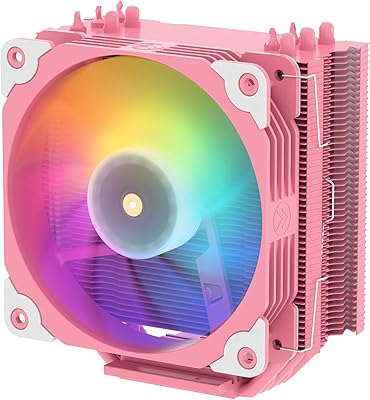
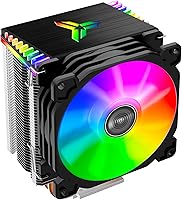
The Jonsbo CR-1400 RGB CPU Air Cooler is a compact tower cooler that punches above its price class for builders who want decent cooling and some visual flair without breaking the bank. Its slim black profile fits comfortably in most mid-tower cases, and the illuminated top nameplate gives it a polished look that stock coolers simply cannot match. Broad socket support — covering current Intel LGA 1700 and 1851 platforms alongside AMD AM4 and AM5 — means it adapts to a wide range of modern builds. Just go in with clear expectations: this is a 92mm single-fan cooler best suited to stock-clocked or lightly loaded processors, not a chip you are planning to push hard.
Features & Benefits

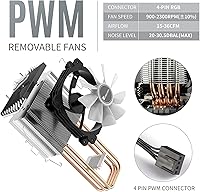
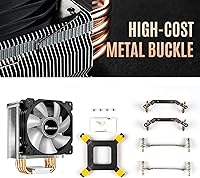
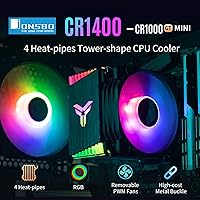
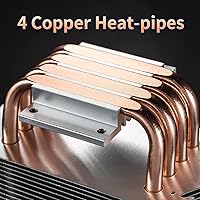
At the heart of this Jonsbo cooler are four direct-contact copper heat pipes that pull heat away from the CPU die and push it into a 41-fin aluminum stack. The fins use a slight bending technique that helps channel airflow more effectively than a flat-stack design would. The removable 92mm PWM fan is held in place by metal fasteners rather than plastic clips, which makes cleaning or swapping fans far less annoying down the road. Under PWM control, the fan spins between a near-silent baseline and a max of 2300 RPM — you will rarely notice it during casual use. Installation hardware for both Intel and AMD sockets is included, and the process is refreshingly straightforward.

Best For

The CR-1400 is a natural fit for budget-conscious PC builders who want their rig to look good under a windowed side panel without spending a lot on cooling hardware. It is particularly well-suited to processors in the 65W TDP range — think a Ryzen 5 or a non-K Intel Core i5 running at stock speeds. If you are working inside a mid-tower with limited vertical clearance, the compact height is unlikely to fight with tall RAM sticks. First-time builders will appreciate how forgiving the mounting process is. It also works well in secondary or HTPC builds where keeping things quiet matters more than chasing the absolute lowest temperatures.

User Feedback

Across a large pool of buyer reviews, this RGB air cooler holds a strong 4.5-star rating, and the recurring themes are fairly consistent. Most owners highlight how much quieter it runs compared to the stock cooler their CPU shipped with, and idle temps on everyday tasks are genuinely solid. Where it draws criticism is thermal headroom — a handful of users report that under prolonged heavy workloads or in warm ambient conditions, temperatures can creep higher than expected. The RGB lighting earns real praise for its looks, though some buyers on older motherboards found it cycles through colors without offering addressable control. A few builders on LGA1700 and AM5 mentioned minor bracket confusion, nothing serious, but worth reading the manual before you start.

Pros

  • Runs near-silently during everyday tasks — most users cannot hear it over typical room noise.
  • A noticeable step up from stock box coolers in both temperature and noise at stock CPU speeds.
  • Four direct-contact copper heat pipes deliver real thermal performance for a cooler at this price.
  • Metal fan fasteners make cleaning and fan replacement far easier than competing plastic-clip designs.
  • RGB fan and illuminated nameplate look sharp through a tempered glass panel without spending extra.
  • Broad socket support covers modern AM5, AM4, LGA1700, and LGA1851 platforms right out of the box.
  • Compact footprint rarely conflicts with tall RAM modules in standard mid-tower cases.
  • Installation is beginner-friendly — all mounting hardware is included and the process is straightforward.
  • PWM control lets the motherboard manage fan speed dynamically, keeping noise low under light loads.

Cons

  • Thermal headroom disappears fast under sustained heavy workloads or in warm ambient environments.
  • The RGB cycles through colors automatically and cannot be locked to a single hue on most motherboards.
  • No ARGB ecosystem integration — expect it to be out of sync with iCUE, Armoury Crate, or similar software.
  • The included thermal paste is basic quality; performance-focused users should apply their own.
  • The instruction manual lacks clear guidance for AM5 and LGA1700 bracket orientation, causing installation confusion.
  • Fan noise ramps up abruptly rather than gradually when workloads spike toward the 2300 RPM ceiling.
  • Base plate finish can be slightly rough out of the box, which may affect thermal paste spread and contact quality.
  • Fan fastener tension varies slightly between units — some feel too tight or too loose on first installation.
  • Not a practical option for white or monochrome builds since no alternate colorway is available.

Ratings

The Jonsbo CR-1400 RGB CPU Air Cooler has been evaluated by our AI system after analyzing thousands of verified global buyer reviews, with spam, bot-generated, and incentivized submissions actively filtered out. The scores below reflect a balanced picture of where this Jonsbo cooler genuinely delivers and where real-world users ran into limitations. Both the strengths and the recurring frustrations are represented transparently across every category.

Thermal Performance
72%
28%
For stock-clocked processors in the 65W range — a Ryzen 5 5600 or a Core i5-12400, for example — the CR-1400 keeps temperatures comfortably in check during everyday workloads like browsing, office tasks, and light gaming. Buyers consistently report a meaningful improvement over stock box coolers.
Push the CPU harder with sustained rendering, heavy multitasking, or warm ambient temperatures and the thermal headroom gets thin quickly. Users pairing it with higher-TDP chips or running workloads that spike over 80W for extended periods often see temperatures climb to uncomfortable levels.
Noise Level
84%
At idle and during light use, the fan runs near-silently — most users in quiet rooms say they cannot hear it over typical background noise. PWM control keeps the fan slow and unobtrusive for the majority of desktop computing scenarios, which is a genuine quality-of-life win at this price.
When workload spikes push the fan toward its 2300 RPM ceiling, it becomes noticeably audible. It is not loud by any objective measure, but the shift from near-silent to spinning hard is more abrupt than some users expected, especially in otherwise quiet builds.
Value for Money
91%
Buyers routinely describe this as one of the best-looking and best-performing coolers available at its price tier. Getting four copper heat pipes, a PWM fan, metal fasteners, and RGB lighting for what amounts to the cost of a fast-food meal for two is genuinely hard to argue with for a light-duty build.
The value equation only holds if your expectations are calibrated correctly. Buyers who purchased it expecting performance close to a premium 120mm tower cooler were disappointed — the gap is real, and ignoring it leads to buyer regret.
RGB Lighting Quality
78%
22%
The rainbow RGB effect on the fan blades and the illuminated top nameplate genuinely look sharp through a windowed side panel. At this price point, getting any RGB at all with decent brightness and smooth color cycling is something buyers noticed and appreciated.
The lighting is not addressable RGB in the traditional sense — on many motherboards, you cannot sync it with your system lighting ecosystem or lock it to a single color. It cycles through colors on its own, which some users found charming but others found limiting or mismatched with their build's aesthetic.
Build Quality & Materials
76%
24%
The metal fan fasteners are a standout detail that buyers specifically call out — they feel more durable than the plastic clips found on competing coolers at similar prices. The fin stack feels solid, and the copper heat pipes show no signs of cheap construction.
Some users noticed minor roughness on the base plate contact surface, which can affect thermal paste spread and slightly limit heat transfer efficiency. The overall finish is good for the price but does not compare to premium cooler brands where machining tolerances are tighter.
Installation Experience
81%
19%
First-time builders are the biggest fans of the installation process. The included hardware covers both Intel and AMD platforms without requiring a trip to find extra parts, and the mounting mechanism clicks into place without needing a second pair of hands or special tools.
A subset of users on newer platforms — specifically LGA1700 and AM5 — reported minor confusion with bracket orientation that the manual did not address clearly enough. Nothing catastrophic, but it cost some people extra time and second-guessing during their first install.
Socket Compatibility
88%
The compatibility list is genuinely broad, spanning current-gen Intel LGA1851 and LGA1700 through legacy 775, plus AMD AM5, AM4, and older FM and AM platforms. For builders working with a mix of machines or repurposing older hardware, this versatility is a practical plus.
While the socket list is long on paper, real-world reports suggest that the mounting quality and bracket fit vary slightly between platforms. The experience on AM4 tends to be the smoothest; AM5 and LGA1851 users occasionally encounter minor fitment quirks.
Fan Removability & Maintenance
83%
Being able to slide the fan off the heatsink without tools — and having it held by metal fasteners rather than plastic clips that snap and break — makes periodic cleaning genuinely easy. Buyers in dusty environments appreciated being able to pull the fan and blow out the fins without a full disassembly.
A small number of users found the fastener tension slightly inconsistent between units, with the fan feeling either too snug or slightly loose on first fit. It is a minor complaint, but it suggests some variance in manufacturing tolerances from batch to batch.
RAM Clearance
79%
21%
The compact 92mm fan footprint and modest tower height mean this cooler rarely conflicts with taller RAM modules. Buyers with mid-towers running standard-height DDR4 or DDR5 kits reported zero clearance issues, which is something larger coolers cannot always guarantee.
Extremely tall enthusiast RAM with oversized heatspreaders — particularly kits designed for aesthetics over thermals — can get close. It is not a common problem, but users with very tall DDR5 modules should measure their specific RAM height before assuming it will fit cleanly.
PWM Fan Control
74%
26%
PWM responsiveness is solid — the fan reacts to motherboard fan curves with reasonable accuracy, and buyers who set a conservative fan curve report the cooler staying whisper-quiet during office use. The 4-pin header support gives modern motherboards full dynamic control.
The fan curve response can feel slightly coarse compared to premium fans — transitions between speed steps are occasionally more noticeable as an audible jump than a smooth ramp. Users who set aggressive fan curves for performance also found the noise jump at high RPM a bit sudden.
Fin Stack & Airflow Design
71%
29%
The 41-fin count with the bending technique does measurably improve airflow density compared to straight-fin designs at the same physical size. This contributes to the CR-1400 punching slightly above its class in heat dissipation for a 92mm cooler.
At the end of the day, 36 CFM through a compact fin stack is a physics ceiling that no engineering workaround fully overcomes. Users should not expect this airflow figure to compete with 120mm or 140mm fans, no matter how well the fins are shaped.
Aesthetic Design
82%
18%
The all-black tower finish pairs well with modern dark-themed builds, and the illuminated nameplate on top looks intentional rather than an afterthought. Buyers who care about their system's appearance through a tempered glass panel consistently mention the cooler as a visual highlight.
The aesthetic is somewhat one-note — there is no option for a white variant or alternate fan colors, which limits it for builders going for bright or monochrome system themes. The rainbow RGB can also feel visually busy if the rest of the build uses a controlled single-color lighting scheme.
Overclocking Suitability
41%
59%
For very light and conservative overclocks on power-efficient chips — bumping a Ryzen 5 by a small margin, for instance — the CR-1400 can handle it if ambient temperatures are cool and the case airflow is good. Some technically minded users got away with modest tweaks.
This cooler is not built for overclocking, and buyers who tried it learned that lesson quickly. Under sustained elevated power draw, temperatures spike fast, thermal throttling kicks in, and the fan noise becomes a constant reminder that the hardware is working beyond its comfort zone.
Packaging & Unboxing
77%
23%
The cooler arrives well-protected, and buyers report that the fan pre-attached with metal fasteners survives shipping intact — something that occasionally fails with plastic-clipped designs. Mounting hardware is bagged and labeled clearly enough that most users found the right bracket without having to re-read the manual repeatedly.
The instruction manual is functional but thin on detail, particularly around the newer socket mounting sequences. A few buyers mentioned the thermal paste situation — it is not pre-applied, and the included paste, while usable, is not premium quality, meaning performance-focused users will want to supply their own.

Suitable for:

The Jonsbo CR-1400 RGB CPU Air Cooler is a genuinely smart pick for budget-conscious builders who want their system to look good without overspending on cooling hardware. It fits best in builds centered around 65W TDP processors — a Ryzen 5 5600, a Core i5-12400, or similar chips that run at stock speeds and do not demand extreme heat dissipation. First-time builders will find the installation process forgiving, since the included mounting kit covers both current Intel and AMD platforms without requiring extra parts or complicated steps. The compact tower height also makes it a reliable option inside mid-tower cases where RAM clearance or case width might rule out a larger dual-tower cooler. Secondary machines, home office PCs, and HTPC builds are natural homes for this cooler, where keeping noise low and the build tidy matters more than chasing the lowest possible temperatures.
Not suitable for:

If you are planning to overclock, run a high-TDP processor, or regularly push your CPU through sustained heavy workloads like video encoding or 3D rendering, the Jonsbo CR-1400 RGB CPU Air Cooler is the wrong tool for the job. The 92mm fan and compact fin stack simply do not have enough thermal headroom to keep up with processors that regularly draw well above 65W for extended periods — you will hit thermal throttling before you hit your performance ceiling. Builders who want full addressable RGB control synced across their entire system through software like iCUE or Armoury Crate will likely find the rainbow cycling effect limiting, since it does not behave as a true ARGB device on most motherboards. Anyone building a workstation or gaming rig around a power-hungry chip — a Core i7 K-series, a Ryzen 9, or anything with an aggressive power limit — should budget for a larger 120mm or 240mm solution instead. The CR-1400 is honest about what it is, and buyers who respect that boundary will be satisfied; those who push past it will not.
Specifications

  • Fan Size: The cooler uses a single 92mm PWM fan that adjusts speed dynamically based on CPU temperature signals from the motherboard.
  • Heat Pipes: Four 6mm direct-contact copper heat pipes run from the base plate directly to the aluminum fin stack, bypassing any intermediate block.
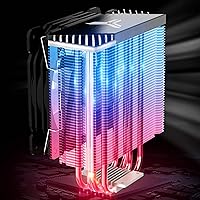
  • Fin Stack: The heatsink comprises 41 aluminum fins shaped with a bending technique to improve airflow channeling and surface-area contact efficiency.
  • Max Fan Speed: Under full PWM load, the fan reaches a maximum rotational speed of 2300 RPM.
  • Airflow: The fan delivers up to 36 CFM of airflow at its peak rotational speed.
  • Noise Level: At idle and low load speeds, the fan operates at approximately 20 dB, which falls below the threshold of typical ambient room noise.
  • TDP Support: Jonsbo rates this cooler for processors with a thermal design power of up to 130W, though real-world sustained performance is best at or below 65W.
  • Voltage: The fan operates at a standard 12V DC supply, compatible with all modern desktop motherboards.
  • Connector Type: The fan includes both 3-pin and 4-pin PWM connector support, allowing full speed control on PWM-capable motherboard headers.
  • Dimensions: The cooler measures 3.66″ in length, 3.07″ in width, and 4.96″ in height, making it compatible with most standard mid-tower cases.
  • Weight: The complete unit weighs 1.31 pounds, light enough to avoid placing meaningful stress on the motherboard socket area.
  • Intel Sockets: Compatible Intel sockets include LGA1851, LGA1700, LGA1200, LGA1156, LGA1155, LGA1151, LGA1150, and the legacy LGA775.
  • AMD Sockets: Compatible AMD sockets include AM5, AM4, AM3+, AM3, AM2+, AM2, FM2+, FM2, and FM1, covering both current-gen and legacy platforms.
  • RGB Lighting: The fan features rainbow RGB LEDs along its blades, and the top of the heatsink tower includes an illuminated nameplate that cycles through colors.
  • RGB Control: The RGB connects via the motherboard fan or LED header but does not support addressable RGB protocols, so per-zone color control is not available on most boards.
  • Base Material: The cooler base and heat pipes are made from copper, while the fin stack and fan fastener clips are constructed from aluminum and metal alloys respectively.
  • Fan Fasteners: The fan is secured to the heatsink using metal fasteners rather than plastic clips, reducing the risk of breakage during removal or cleaning.
  • Thermal Paste: Thermal paste is not pre-applied to the base plate and must be applied separately during installation; basic paste is included in the box.
  • Cooling Method: This is an air-cooling solution using convective airflow through a tower heatsink — no liquid, pump, or radiator is involved.
  • Color Option: The unit is available in a black finish only, with no white or alternate colorway currently offered by Jonsbo.

Related Reviews

Cooler Master i71C RGB Intel Low-Profile CPU Air Cooler
84%
88%
Cooling Performance
91%
Noise Level
85%
RGB Customization
89%
Build Quality
75%
Installation Ease
More
Cooler Master Hyper 212 Halo CPU Air Cooler
84%
88%
Cooling Performance
91%
Noise Level
85%
Ease of Installation
89%
Build Quality
80%
RGB Aesthetics
More
Cooler Master Hyper 212 Black CPU Cooler
79%
83%
Thermal Performance
79%
Noise Level
93%
Value for Money
76%
Installation Experience
81%
Build Quality
More
Cooler Master i70C Low-Profile CPU Cooler
78%
72%
Thermal Performance
88%
Noise Level
93%
Form Factor & Fit
86%
Installation Ease
78%
ARGB Lighting
More
Cooler Master MasterAir MA824 Stealth CPU Cooler
81%
88%
Thermal Performance
91%
Noise Level
93%
RAM Clearance
72%
Installation Experience
89%
Build Quality & Materials
More
Cooler Master MasterLiquid ML240L V2 AIO Cooler
77%
78%
Thermal Performance
91%
Installation Experience
63%
Pump Noise & Vibration
82%
Fan Performance
88%
ARGB Lighting
More
Cooler Master Hyper 622 Halo Dual Tower CPU Cooler
82%
83%
Thermal Performance
88%
Noise Level
89%
Ease of Installation
67%
RAM Clearance
86%
Build Quality
More
NZXT T120 CPU Air Cooler
82%
74%
Thermal Performance
88%
Noise Level
93%
Ease of Installation
91%
Aesthetics & Design
86%
Value for Money
More
Thermalright PS120SE CPU Air Cooler
80%
89%
Thermal Performance
86%
Noise Level
93%
Value for Money
74%
Build Quality
81%
Ease of Installation
More
Vetroo V5 CPU Air Cooler
82%
73%
Thermal Performance
84%
Noise Level
91%
Value for Money
71%
Build Quality
88%
ARGB Lighting Quality
More

FAQ

Yes, the Jonsbo CR-1400 RGB CPU Air Cooler officially supports the AM5 socket. That said, a handful of users found the bracket orientation for AM5 a bit ambiguous in the manual, so it is worth reading the instructions carefully before you start. Once mounted correctly, it holds securely and works well with stock-clocked Ryzen 7000 chips in the 65W range.

Almost certainly yes. At just under 5 inches tall, the CR-1400 is compact enough to fit comfortably in the vast majority of mid-tower cases. RAM clearance is rarely a problem either, since the 92mm fan does not overhang far past the fin stack edges. If you are in a particularly tight mini-ITX case, double-check your case specs, but for standard mid-towers this cooler fits without fuss.

Not really — and this is an important distinction to understand before buying. The RGB on this cooler is not addressable, meaning it cycles through a rainbow pattern on its own and does not communicate with ARGB ecosystems like Corsair iCUE, ASUS Armoury Crate, or MSI Mystic Light. You can control fan speed through your motherboard header, but the lighting color cannot be fixed or synchronized with the rest of your build through software.

Yes, it handles those chips comfortably at stock. Both the Ryzen 5 5600 and the Core i5-12400 are 65W TDP processors that do not run particularly hot under normal workloads, and the CR-1400 keeps them well within safe temperature ranges for everyday tasks, gaming, and light creative work. If you are not overclocking, this cooler is genuinely well-matched to chips in that class.

It is one of the easier coolers to install at this price point. The box includes mounting brackets for both Intel and AMD platforms, and you do not need any specialized tools. Most first-time builders complete the installation without any real trouble. The main area where people stumble is the bracket orientation for newer sockets like LGA1700 or AM5 — the manual could be clearer on that — but a quick look at a video walkthrough solves it immediately.

At idle, you will barely notice it — around 20 dB is genuinely quiet for a cooling fan. Under moderate load, it stays unobtrusive. Where it becomes noticeable is when a CPU spike pushes the fan toward its 2300 RPM maximum; at that point, it is audible but not distractingly loud. The transition between quiet and fast can feel a bit abrupt rather than gradual, so dialing in a custom fan curve on your motherboard helps smooth things out.

Yes, and this is one of the genuinely practical design choices on this cooler. The fan slides off the heatsink and is held in place by metal fasteners rather than fragile plastic clips, so you can remove it without tools and without worrying about snapping something. For dusty environments where you want to blow out the fins every few months, this makes maintenance a lot less annoying than it is on most budget coolers.

It depends on the chip and the duration of the workload. For short rendering jobs or occasional CPU-heavy tasks on a mid-range 65W processor, it handles things reasonably well. For sustained, extended workloads — long video encodes, overnight renders, heavy multitasking for hours — it starts to run out of thermal headroom, especially if your case airflow is not great or ambient temperatures are warm. If your CPU is frequently pegged at 100% for long periods, a larger 120mm cooler would serve you better.

Basic thermal paste is included in the box, so you are not left stranded on your first build. That said, the included paste is entry-level quality — it will work fine for most users running stock-clocked processors. If you want to squeeze the best possible temperatures out of the cooler, picking up a small tube of quality thermal compound separately is worth the small extra cost.

Most users report idle temperatures dropping by roughly 5 to 10 degrees Celsius compared to stock AMD or Intel box coolers, with similar improvements under moderate load. The bigger gain is on the noise side — the CR-1400 tends to run significantly quieter than the stock coolers that ship with most processors, which many buyers find is the more noticeable real-world improvement day to day.

Where to Buy