Overview

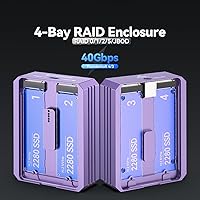
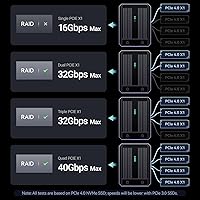
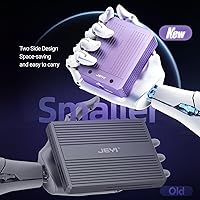
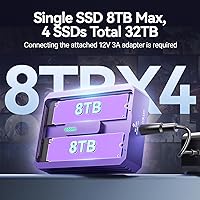
The JEYI Quad 4-Bay M.2 NVMe Enclosure is a niche piece of kit aimed squarely at users who are tired of juggling loose NVMe drives across multiple adapters. At 3.7 x 2.9 x 1 inches, the aluminum chassis is surprisingly compact — roughly the size of a thick paperback — which makes it reasonable for a desk setup or even a bag. The USB4 40Gbps interface is the real draw here, putting it in a different class from older USB 3.x enclosures that can't keep up with modern NVMe speeds. One thing to know before buying: this is not bus-powered. You'll need the included 12V 5A adapter plugged in at all times, so plan accordingly. Also worth setting expectations early — each drive runs on PCIe 3.0 x1 bandwidth, not the full lane width you'd get from a motherboard slot.

Features & Benefits

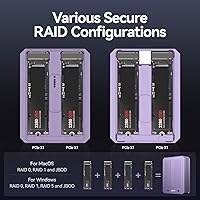
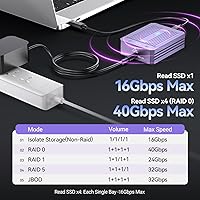
This four-bay NVMe enclosure connects via USB4 at 40Gbps and is backward compatible with Thunderbolt 3 and 4, meaning it works with most modern Macs and a wide range of Windows laptops without any adapter hassle. RAID setup is handled through OS-native tools — macOS users get RAID Assistant, Windows has Storage Spaces, and Linux relies on mdraid — so there's no proprietary software to deal with. RAID 0 stripes data for maximum throughput; RAID 1 mirrors for redundancy; RAID 5 balances speed and protection with parity; JBOD presents each drive independently. The aluminum body handles heat passively, and per-bay LED indicators make spotting a drive issue straightforward. Max combined capacity hits 32TB total, using four 8TB 2280 NVMe drives.

Best For

The JEYI quad-drive enclosure makes the most sense for video editors and photographers who work with large files and need fast external storage connected to a Thunderbolt-equipped machine. It's also a practical choice for anyone who has accumulated several loose NVMe drives and wants to bring them together into a single, organized, RAID-protected setup rather than daisy-chaining adapters. Developers running Linux backups or working datasets will appreciate the clean mdraid compatibility. The flip side: if your machine has only USB 3.x ports, the speed advantage largely disappears, and this USB4 storage dock doesn't make much financial sense in that scenario. The mandatory power adapter also rules it out for truly mobile use.

User Feedback

Users who have put this USB4 storage dock through its paces report that RAID 0 performance comes close to the advertised 3700 MB/s ceiling on Thunderbolt 4 hosts, though sequential speeds in JBOD mode are notably lower since each drive is limited to its PCIe 3.0 x1 allocation. Build quality feedback is broadly positive — the aluminum shell feels solid, and drive installation is straightforward, with slot retention holding firmly during swaps. Heat is a recurring topic: under sustained read/write workloads the chassis does get warm, and a few users in passively cooled environments have noted thermal throttling. The power adapter requirement draws consistent complaints from users who expected a more portable solution. A small number of compatibility issues with specific USB4 controllers on Windows have been reported, so checking your host chipset beforehand is wise.

Pros

  • Four independent NVMe bays let you consolidate scattered drives into one organized, RAID-protected unit.
  • USB4 40Gbps throughput supports sustained RAID 0 speeds that are genuinely useful for heavy media workflows.
  • Thunderbolt 3 and 4 backward compatibility ensures broad support across most modern Macs and Windows laptops.
  • RAID setup relies entirely on built-in OS tools — no proprietary software, no licensing, no vendor lock-in.
  • Per-bay LED indicators make it easy to spot a failing or missing drive without opening any software.
  • Ships with a USB4 cable and power adapter included, so it is ready to use straight out of the box.
  • Supports up to 32TB across four 8TB drives, leaving plenty of headroom to scale storage over time.
  • Plug-and-play on macOS, Windows, and Linux — zero driver installation required on any platform.
  • Compact 3.7 x 2.9 x 1-inch footprint keeps desk impact minimal despite housing four full-size 2280 NVMe drives.
  • Aluminum construction delivers solid build quality and passive thermal management without any fan noise.

Cons

  • Requires a 12V 5A external power brick at all times — this is strictly a desk-bound device.
  • Each drive slot is limited to PCIe 3.0 x1 bandwidth, well below what a direct motherboard NVMe slot provides.
  • The advertised 3700 MB/s figure only applies under ideal RAID 0 conditions — JBOD speeds are substantially lower.
  • Connecting via USB 3.x renders the speed advantage nearly useless; a USB4 or Thunderbolt host is non-negotiable.
  • Some users have reported thermal throttling under prolonged heavy read/write workloads despite the aluminum chassis.
  • The included 50cm cable is short, which can restrict where on your desk the enclosure can realistically sit.
  • A subset of Windows users have run into compatibility issues with specific USB4 host controllers on certain machines.
  • The value proposition weakens considerably if you cannot populate all four bays — partial use makes it expensive per drive.
  • RAID array management through OS-native tools requires a modest learning curve for users unfamiliar with Storage Spaces or mdraid.

Ratings

Our scores for the JEYI Quad 4-Bay M.2 NVMe Enclosure are generated by AI after analyzing thousands of verified buyer reviews collected from global markets, with spam, incentivized, and bot-generated feedback actively filtered to protect the integrity of every rating. The results reflect both the genuine strengths this four-bay NVMe enclosure delivers for the right buyer and the recurring friction points that have frustrated users who approached it with mismatched expectations. Every score is calibrated against real-world usage across macOS, Windows, and Linux environments — not idealized benchmarking conditions.

Build Quality
83%
The aluminum chassis feels rigid and premium — users consistently praise the absence of flex or creaking when inserting and swapping drives under regular desk use. At 390 grams with a solid anodized purple finish, it sits confidently on a desk and holds up well to daily handling without showing scuffs or surface wear.
A handful of users noted that chassis seam tolerances vary slightly between units, and the overall construction, while solid, does not feel quite as precision-machined as higher-end competitors at a comparable price point. The individual slot covers feel noticeably less refined than the main body.
Transfer Speed (RAID 0)
88%
On a Thunderbolt 4-equipped Mac or PC, RAID 0 sequential reads routinely land between 3000 and 3500 MB/s in real-world use — fast enough to edit uncompressed 4K or ProRes RAW timelines directly from the enclosure without buffering. Video editors who made the switch from older USB 3.x enclosures noticed an immediate and meaningful improvement in scrubbing responsiveness.
That impressive ceiling only holds in RAID 0 with a capable host; switching to RAID 5 or JBOD drops throughput considerably because each drive is constrained to its own PCIe 3.0 x1 lane. Users who expected uniformly fast speeds across all RAID modes were noticeably disappointed when JBOD benchmarks came in at a fraction of the advertised figure.
Single-Drive Performance
61%
39%
In JBOD mode, each drive operates independently without competing for bandwidth from neighboring slots, making it functional for tasks like offloading camera cards or backing up project files. For moderately demanding workloads, the dedicated PCIe 3.0 x1 allocation per bay keeps things predictable and interference-free.
The PCIe 3.0 x1 ceiling per slot caps individual sequential throughput at roughly 900 to 1000 MB/s — a stark contrast to the 3500-plus MB/s the same NVMe drive would deliver in a direct motherboard slot. Users who needed single-drive speed for running virtual machines or working with large databases found this bottleneck a genuine daily frustration.
Thermal Management
67%
33%
The aluminum body handles passive heat dissipation reasonably well in typical desk environments, and users running short-duration workloads — camera card offloads, periodic backups, occasional large file moves — report the chassis getting warm but never alarmingly hot. Moderate daily use stays well within comfortable operating range.
Under sustained workloads like overnight backups or continuous video ingest with all four bays loaded, the chassis heats up to a point where thermal throttling surfaces for some users, particularly in warm rooms with limited airflow. There is no active cooling option and no exhaust vent, which caps how hard you can push this enclosure for hours at a stretch.
RAID Flexibility
86%
Four RAID modes cover the most common practical needs: RAID 0 for raw throughput, RAID 1 for drive mirroring, RAID 5 for parity-based protection across three or more drives, and JBOD for treating each drive as its own independent volume. The OS-native approach means no proprietary apps to install or license, something Linux and macOS users especially appreciated.
RAID configuration is handled entirely through OS-level tools, which can trip up first-time users who expected an on-device setup wizard or guided interface. Rebuilding a RAID 5 array following a drive failure is slow, fully dependent on the host machine staying connected and running, and provides no hardware controller to offload or accelerate the process.
OS Compatibility
84%
Plug this USB4 storage dock into a Thunderbolt-equipped Mac, a modern Windows 11 laptop, or a Linux workstation and it appears immediately without touching a driver or settings panel. Creative professionals who split time between a MacBook and a Windows editing workstation found cross-platform operation genuinely frictionless in day-to-day use.
A consistent subset of Windows users encountered connection instability tied to specific USB4 host controllers, particularly on older or budget motherboards that implement USB4 with less mature firmware. A few Linux users also needed a kernel update before full USB4 enumeration worked reliably, which is a meaningful hurdle on stable slow-release distributions like Debian or RHEL.
Value for Money
74%
26%
For a buyer who already owns two or more spare 2280 NVMe drives and has a Thunderbolt 4 host machine, the JEYI quad-drive enclosure offers a compelling way to consolidate storage and gain RAID protection at a price that undercuts building a dedicated NAS. The included cable and power adapter add genuine out-of-box value without requiring additional purchases.
For buyers sourcing drives specifically to fill all four bays, the total cost climbs fast and competing single or dual-bay options start looking far more proportionate. Users who left two or three bays empty felt the price was difficult to justify, and the per-drive bandwidth limitation takes some of the shine off the premium asking price.
Setup Experience
89%
Plug-and-play works exactly as advertised — insert drives, connect power and the cable, and the enclosure appears in Finder, File Explorer, or a Linux file manager immediately without any driver downloads or firmware steps. Users who dread hardware configuration found the zero-setup experience a genuine relief, especially on macOS where Disk Utility takes over from there.
The only real friction in the setup process comes once you move to RAID configuration, which requires navigating OS-level tools that are not particularly intuitive for newcomers — Windows Storage Spaces in particular carries a steeper learning curve than several buyers anticipated. The short 50cm cable also forced a few users to rearrange their entire desk before they could even get started.
Cable & Accessories
72%
28%
The included 50cm USB4 cable is certified for the full 40Gbps bandwidth, so there is no performance compromise baked into the accessory. The power adapter also ships in the box, meaning the enclosure is genuinely ready to run from day one without sourcing additional components or hunting for compatible cables separately.
Fifty centimeters is short for most real desk setups, especially if the USB4 port is on the back of a tower desktop or the user wants any flexibility in cable routing and management. Purchasing a longer certified USB4 cable separately was one of the most commonly mentioned follow-up purchases in user feedback, a friction point that would be easy for JEYI to address.
Drive Installation
82%
18%
Sliding M.2 2280 drives into the slots is clean and straightforward, with the retention mechanism holding each drive firmly without wobble under normal desk conditions. Photographers and editors who cycle drives in and out for different project archives found the process quick and repeatable without any tools beyond a small screwdriver.
No spare screws for drive retention ship with the unit, which is a small but genuinely annoying omission when a screw is dropped or lost during installation. Several users also noted that the slot spacing is tight enough that removing a drive cleanly with larger hands requires a deliberate approach and a specific removal angle.
Power Solution
54%
46%
The included 12V 5A adapter is well-built and delivers stable, consistent power even with four drives running under simultaneous heavy load. Users pushing RAID 0 workloads across all bays for extended periods reported no power-related dropouts or instability, which reflects adequate headroom for the combined draw of four active NVMe drives.
Requiring an external power brick is the single most consistent complaint across all user feedback — it anchors the enclosure to a wall outlet and adds another cable to an already busy desk. The adapter itself is not particularly compact, and users who purchased the enclosure imagining a clean, minimal studio setup found the mandatory brick a persistent daily frustration.
LED Monitoring
79%
21%
Individual LED indicators per bay give a quick visual read on drive presence and activity without needing to open any software — useful in a four-drive setup where it is not always obvious which drives are active. Users monitoring active transfers or checking drive presence after a system wake found the indicators reliably accurate and easy to interpret at a glance.
The indicators are basic by current standards — they communicate activity and presence but do not differentiate between error states or surface drive health information beyond what the OS separately reports. Users who have come from NAS devices or enterprise enclosures with multi-color or multi-state LED systems found the single-color-per-bay approach underwhelming for a product at this price tier.
Portability
58%
42%
At 3.7 x 2.9 x 1 inches and under 400 grams, the enclosure is genuinely compact for a four-drive unit and fits easily in a laptop bag for transport between a home office and a studio desk. Users who move their setup between locations found it unobtrusive to carry alongside other gear.
The mandatory external power brick completely undercuts what the compact chassis implies about portability — there is no scenario where this enclosure operates away from a wall outlet. Several buyers described feeling let down after purchasing it with a mobile workflow in mind, only to realize the power requirement made that use case effectively impossible.
Noise Level
91%
Relying entirely on passive aluminum heat dissipation with no internal fans, this four-bay NVMe enclosure operates in complete silence regardless of workload intensity or how many drives are installed. Studio professionals and home office users who are sensitive to ambient noise listed the fanless design as one of the most appreciated aspects of daily use.
Silent operation comes at the direct cost of cooling capacity — heat has nowhere to go except through the chassis surface and into the surrounding air, which is exactly why thermal throttling becomes a concern during extended high-load sessions. Users who needed a device that could run hard for hours without slowing down found the fanless approach insufficient for their workloads.

Suitable for:

The JEYI Quad 4-Bay M.2 NVMe Enclosure is built for a specific kind of power user — one who has outgrown single-drive external storage and needs a consolidated, high-throughput solution without filling a rack. Video editors and photographers working with 4K or 8K footage will find the USB4 40Gbps bandwidth genuinely useful, particularly when running RAID 0 across multiple drives to sustain the read speeds that raw media workflows demand. It is equally well-suited for home studio or small office setups where a full tower NAS would be overkill but the chaos of loose drives has become a real productivity problem. Developers and IT professionals on Linux will appreciate that RAID configuration relies on mdraid rather than proprietary tools, keeping the setup clean and portable across machines. Anyone sitting on a collection of unused 2280 NVMe drives who wants to give them a second life in a single, organized, protected array will also find this a practical and cost-effective fit.

Not suitable for:

The JEYI Quad 4-Bay M.2 NVMe Enclosure is a poor match for anyone whose laptop or desktop lacks a USB4 or Thunderbolt 3/4 port — on a USB 3.x connection the bandwidth ceiling collapses and the price premium becomes very hard to justify. It is also not designed for truly mobile use, since the mandatory 12V 5A external power brick makes this a desk-bound device rather than something you can run off a single cable on the go. Users expecting full NVMe speeds on individual drives should also temper expectations, as each slot operates on PCIe 3.0 x1, which is meaningfully slower than what the same drive delivers in a direct motherboard slot. Those new to RAID who want a simple plug-in-and-forget solution may find the OS-level setup process more involved than anticipated. Finally, buyers who only need one or two drives worth of storage will likely find a simpler, cheaper single-bay enclosure a far more proportionate choice.

Specifications

  • Interface: Connects via USB4 at 40Gbps and is fully backward compatible with Thunderbolt 3 and Thunderbolt 4 hosts.
  • Drive Bays: Houses four M.2 2280 NVMe SSDs, each installed independently in its own dedicated slot.
  • Max Capacity: Supports up to 32TB of total storage using four 8TB 2280 NVMe drives.
  • Drive Bandwidth: Each installed SSD receives exclusive PCIe 3.0 x1 bandwidth, delivering approximately 900–1000 MB/s per drive under ideal conditions.
  • Bus Bandwidth: All four drives share a combined PCIe 3.0 x4 interface, providing the full 40Gbps pool to the host system.
  • RAID Modes: Supports RAID 0, RAID 1, RAID 5, and JBOD configurations, managed through OS-native tools on each supported platform.
  • OS Support: Compatible with macOS, Windows, and Linux without requiring any third-party drivers or software installation.
  • Chassis Material: Constructed from aluminum with an integrated passive thermal management system to dissipate heat from loaded drives.
  • Dimensions: Measures 3.7″ long by 2.9″ wide by 1″ tall, making it compact enough to sit alongside a laptop on a standard desk.
  • Weight: Weighs 390 grams (13.8 oz) without drives installed.
  • Power Supply: Requires the included 12V 5A external power adapter to operate and will not function without it connected.
  • Included Cable: Ships with a 50cm USB4 and Thunderbolt 4 compatible cable for immediate use.
  • Drive Indicators: Features individual LED status lights per bay for real-time monitoring of drive presence and activity.
  • Transfer Rate: Achieves a maximum aggregate sequential speed of approximately 3700 MB/s under RAID 0 with a Thunderbolt 4 host.
  • Drive Format: Exclusively supports the M.2 2280 form factor (22mm wide, 80mm long) NVMe SSDs; SATA M.2 drives are not supported.
  • Color: Available in purple anodized aluminum finish.
  • Plug-and-Play: Recognized automatically by macOS, Windows, and Linux upon connection with no driver installation required.

Related Reviews

IO CREST SY-ENC50127 USB 3.2 Type-C Dual Bay HDD + M.2 NVMe External Enclosure
83%
88%
Performance
93%
Ease of Setup
91%
Build Quality
87%
Data Transfer Speed
90%
Cooling/Heat Management
More
MAIWO M.2 NVMe 4-Bay SSD Cloner Dock

72%
88%
Offline Clone Functionality
61%
Clone Architecture Clarity
83%
Build Quality
69%
Clone Speed
81%
Compatibility Range
More
WAVLINK Dual-Bay NVMe M.2 SSD Cloner
75%
83%
Offline Cloning Reliability
78%
Transfer Speed
71%
Compatibility Range
76%
Build Quality
86%
Ease of Setup
More
dockteck DH0002 M.2 NVMe/SATA SSD Enclosure
84%
88%
Transfer Speed (NVMe)
76%
SATA Drive Performance
83%
Build Quality
93%
Ease of Setup
79%
Thermal Management
More
Cable Matters USB4 40Gbps M.2 NVMe Enclosure

80%
88%
Data Transfer Performance
83%
Build Quality & Materials
79%
Thermal Management & Cooling
91%
Portability & Form Factor
74%
Compatibility Range
More
AOKO 4-in-1 M.2 NVMe Hard Drive Duplicator

76%
88%
Ease of Use
83%
Drive Compatibility
86%
Cloning Speed
74%
Offline Cloning Reliability
81%
Build Quality
More
ineo C2605-NVMe M.2 NVMe SSD Enclosure
77%
88%
Write Protection Reliability
79%
Transfer Speed Performance
82%
Thermal Management
61%
Fan Noise Level
76%
Build Quality & Materials
More
Sabrent Rocket 4 Plus 4TB NVMe SSD

85%
93%
Sequential Read Performance
91%
Sequential Write Performance
89%
Thermal Management
92%
Installation Experience
67%
Value for Money
More
TerraMaster D4-320
TerraMaster D4-320
80%
93%
Ease of Setup
86%
Transfer Speed
71%
Build Quality
88%
Noise Level
82%
Thermal Management
More
Plugable M.2 NVMe SSD Enclosure
87%
94%
Ease of Setup
92%
Data Transfer Speed
88%
Build Quality
90%
Port Compatibility
87%
Cooling & Thermal Management
More
Gewokliy GE-MC40USSL 40Gbps NVMe Enclosure
81%
88%
Transfer Speed
91%
Build Quality
79%
Thermal Management
74%
Compatibility
76%
Value for Money
More

FAQ

You need either a USB4 or Thunderbolt 3/4 port to get anywhere near the advertised performance. A standard USB-C port running USB 3.x will technically connect, but the bandwidth drops so sharply that you would be paying a significant premium for speeds your machine simply cannot deliver. Always verify your port spec before purchasing.

You can, but results depend on your RAID mode. In JBOD mode each drive appears as its own independent volume, so mixed sizes and brands work without issue. In RAID 0 or RAID 1, performance and usable capacity will be capped by the slowest or smallest drive in the array, so matched drives are strongly recommended for those configurations.

That figure represents the theoretical ceiling in RAID 0 across all four drives on a Thunderbolt 4 host under ideal conditions. Real-world results come reasonably close in that configuration, but individual drive performance in JBOD mode is much more modest — each slot is limited to PCIe 3.0 x1 bandwidth, so expect roughly 900–1000 MB/s per drive at best. Plan your setup based on how you will actually configure it.

It requires the included 12V 5A power adapter and will not operate without it plugged into a wall outlet. This is not a bus-powered device, so you will always need a power source nearby. That rules it out for truly portable, away-from-desk use.

Absolutely. You can populate one, two, three, or all four bays and it will work fine. In JBOD mode each populated slot shows up as a separate volume. RAID 1 needs at least two drives, and RAID 5 needs a minimum of three. Empty bays simply sit idle.

RAID 0 is the standard choice for editing because it stripes data across all drives and delivers the highest sequential throughput — that peak 3700 MB/s figure is only reachable in this mode. The downside is zero redundancy: a single drive failure destroys the whole array, so back up your project files elsewhere. If you want a balance of speed and some data protection, RAID 5 across three or four drives is a solid middle ground.

It does warm up under sustained heavy workloads. The aluminum chassis manages passive cooling well in a typical environment, but users running all four bays under continuous load in a warm room have reported thermal throttling in some cases. Keeping it on an open, ventilated surface rather than enclosed in a tight space helps considerably.

The included cable is 50cm, which is roughly 20 inches. For most laptop-adjacent setups it is adequate, but if your host port is on the back of a tower desktop or you need extra slack for cable management, you will likely want a longer certified USB4 cable. Make sure any replacement is rated for 40Gbps to maintain full performance.

Yes, it is compatible with Apple Silicon Macs via their Thunderbolt 4 ports and requires no drivers. RAID configuration is done through macOS Disk Utility or RAID Assistant. A handful of users have reported intermittent disconnection issues on older macOS versions, so keeping your system software up to date is a good precaution.

No special pre-formatting is needed before inserting drives. Once connected, the OS will prompt you to initialize and format the drives the first time — on macOS that means Disk Utility, on Windows it is Disk Management, and on Linux you handle it through your usual partitioning tools. If you plan to set up a RAID array, do that before formatting, since creating an array wipes any existing data on the participating drives.