Overview

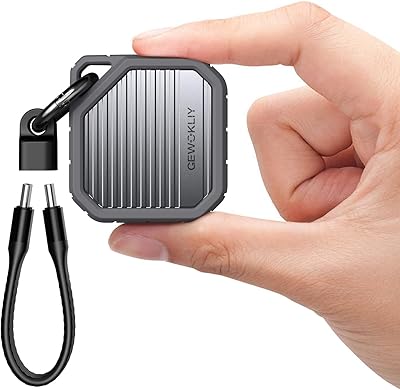
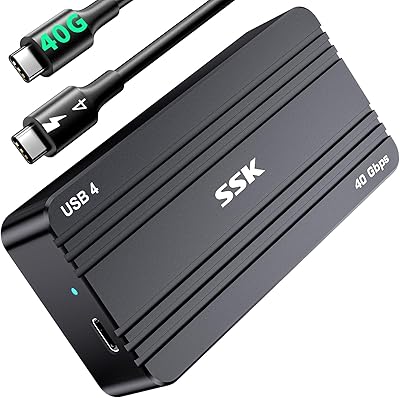
The Gewokliy GE-MC40USSL 40Gbps NVMe Enclosure entered the market in December 2024, competing in a space where most buyers are tired of choosing between speed and portability. This aluminum NVMe enclosure is built around a Thunderbolt 4 interface, which means you get desktop-class transfer performance in something smaller than a paperback book. Worth noting upfront: no SSD is included, and SATA or mSATA drives won't work here — only NVMe. With a 4.4-star rating from 125 reviews, it's still early days for this product, but the initial reception is solid enough to take seriously.

Features & Benefits

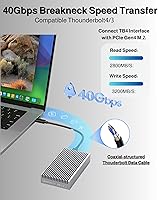
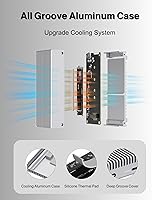
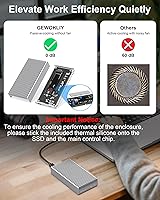
The headline spec is 40Gbps via Thunderbolt 4, and that number has real meaning in day-to-day use — think moving a 50GB video project in under 20 seconds, or running an OS off an external drive without the usual lag. That speed is made possible by the underlying PCIe Gen 4 architecture, so the enclosure's performance ceiling depends heavily on which NVMe drive you install. Cooling is handled passively through the grooved aluminum shell and pre-applied thermal pads, with no fan involved. S.M.A.R.T. monitoring and TRIM support give you visibility into drive health over time — a useful feature that cheap enclosures often skip. It also works without drivers on Windows, macOS, Linux, and Android.

Best For

This Thunderbolt 4 enclosure is a natural fit for video editors and photographers who regularly shuffle large files between machines — raw footage and high-resolution photo libraries can chew through hours on a slower connection. It also makes a strong case as an external boot drive for Mac and PC power users who want their system to feel snappier without cracking open a chassis. Travelers and remote workers will appreciate that it fits in a jacket pocket without issue. Gamers moving large game libraries between systems will find it useful too. That said, if you're coming from a USB 3.0 enclosure, the speed difference here is dramatic and immediately noticeable.

User Feedback

With only 125 ratings so far, it's fair to treat current impressions as early-adopter feedback rather than a settled verdict. On the positive side, buyers consistently highlight the enclosure's solid build and the fact that speeds hold up reliably when paired with a proper Thunderbolt 4 port. The aluminum body gets warm under heavy loads — not hot enough to be alarming, but worth knowing if you plan on sustained transfers. The most common frustration involves port confusion: plug this into a standard USB-C port and you won't see 40Gbps — you'll be capped at USB 3.2 rates. Compatibility edge cases with certain Windows laptops have also surfaced occasionally, so checking your host port spec before buying is genuinely important.

Pros

  • Full 40Gbps throughput is achievable when paired with a proper Thunderbolt 4 host port.
  • The solid aluminum build feels noticeably more premium than plastic rivals in the same category.
  • Completely silent operation — no fan, no vibration, no mechanical noise whatsoever.
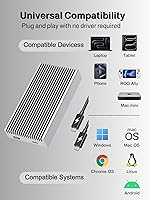
  • Works out of the box on Windows, macOS, Linux, and Android with zero driver setup.
  • S.M.A.R.T. monitoring lets you keep an eye on drive health without third-party software.
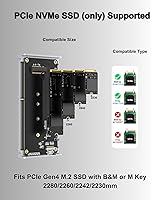
  • Supports NVMe drives across four common form factors, including compact 2230 models used in handhelds.
  • TRIM support helps maintain long-term SSD performance, not just out-of-the-box speed.
  • Small enough to slip into a jacket pocket without adding meaningful bulk to your bag.
  • Backward compatibility with Thunderbolt 3 and USB 3.x ports makes it usable across older machines.
  • Includes a 40Gbps-rated USB-C cable, thermal pads, and a screwdriver — nothing critical left to buy separately.

Cons

  • Achieving advertised speeds strictly requires a Thunderbolt 4 port — a detail easy to overlook before buying.
  • No SSD is included, so your real upfront cost is meaningfully higher than the enclosure price alone.
  • The review base is still small and recent, making it harder to assess long-term reliability with confidence.
  • The aluminum shell can get noticeably warm during sustained heavy transfers, even without hitting dangerous temperatures.
  • SATA M.2, NGFF, and mSATA drives are completely unsupported, limiting reuse of older storage hardware.
  • A handful of early users have reported compatibility quirks with specific Windows laptop configurations.
  • No USB-A cable or adapter is included, which can be limiting on older desktops with no USB-C ports.
  • Brand recognition is limited, and post-purchase customer support experience is largely unproven at this stage.

Ratings

The scores below for the Gewokliy GE-MC40USSL 40Gbps NVMe Enclosure were produced by our AI rating engine after analyzing verified global buyer reviews, actively filtering out incentivized submissions, bot patterns, and unverified one-liners. Each category reflects a transparent synthesis of both what users genuinely praised and the recurring frustrations that surfaced across real-world usage scenarios.

Transfer Speed
88%
Users who plugged this aluminum NVMe enclosure into a true Thunderbolt 4 port consistently reported fast, sustained transfer rates that matched expectations for PCIe Gen 4 drives — moving large video project folders in seconds rather than minutes was the most frequently cited benefit. For editors and power users, the speed difference over their previous USB 3.0 setups felt dramatic.
The catch is significant: speed scores drop sharply among buyers who connected the enclosure to standard USB-C ports expecting 40Gbps and were disappointed by the capped USB 3.2 throughput. This port-dependency issue accounts for a notable slice of lower ratings and reflects a gap between marketing expectations and real-world setup realities.
Build Quality
91%
The full aluminum alloy shell consistently impressed buyers who were used to plastic enclosures — it feels solid and premium in hand, with a grooved surface that gives it a purposeful, industrial look rather than a toy-like finish. Several users specifically noted it survived drops and daily bag-tossing without cosmetic damage.
A small number of buyers reported minor fit and finish inconsistencies, such as slightly uneven seam gaps between the two halves of the enclosure. These were aesthetic complaints rather than functional ones, but they stood out given the otherwise polished construction.
Thermal Management
79%
21%
The passive cooling design works better than many users expected — running sustained transfers without any fan noise is a genuine advantage for quiet office or studio environments. The aluminum shell distributes heat effectively enough that most users reported no thermal throttling during typical workflows.
Under prolonged heavy loads — think multi-gigabyte backups or extended file migrations — the enclosure gets noticeably warm to the touch, which made some users uneasy even if temperatures stayed within safe limits. A few buyers also reported that improperly applying the thermal pads during installation led to warmer-than-expected operation.
Compatibility
74%
26%
Across macOS, Windows, Linux, and Android, the plug-and-play experience worked reliably for the majority of buyers — no driver hunting, no system reboots required. Mac users with Apple Silicon machines were among the most satisfied, reporting a frictionless experience from first connection.
Compatibility friction showed up most on certain Windows laptops where Thunderbolt port implementation varies by manufacturer, with a handful of buyers reporting the device not being recognized consistently. Android compatibility, while advertised, produced more mixed results depending on the host device's USB controller.
Value for Money
76%
24%
For buyers who have a Thunderbolt 4 machine and install a capable NVMe drive, the enclosure delivers a genuinely compelling cost-per-performance ratio compared to branded alternatives at significantly higher prices. The included 40Gbps cable and thermal pads add real value to the package.
The value proposition weakens considerably for anyone whose host device lacks a Thunderbolt 4 port — at that point, they are paying a premium for bandwidth they cannot access. The additional cost of purchasing an NVMe drive separately also means the total investment is higher than the enclosure price suggests at first glance.
Setup & Installation
83%
Most buyers found the physical installation of an NVMe drive straightforward — the included screwdriver, screws, and quick start guide covered what they needed, and the enclosure opened cleanly without requiring force. The no-driver OS recognition made the software side of setup essentially effortless.
First-timers unfamiliar with M.2 drive installation occasionally found the thermal pad application step confusing, and the quick start guide's visuals were described by some as too minimal for true beginners. A more detailed illustrated guide would reduce setup anxiety for less technical buyers.
Portability
93%
This is genuinely one of the enclosure's clearest strengths — it is small enough to disappear into a jacket pocket or a bag side compartment, and the aluminum build means it does not feel fragile during transit. Remote workers and frequent travelers repeatedly highlighted this as a defining reason they chose it over bulkier alternatives.
The enclosure's weight, while not heavy, is noticeably denser than plastic alternatives due to the aluminum construction, which a small number of ultralight-focused travelers flagged as a minor inconvenience. It is a trivial trade-off for most, but worth knowing.
Noise Level
97%
Completely silent operation is about as close to a perfect score as any product category gets, and the fanless design of the Gewokliy enclosure delivers exactly that. Users who work in recording studios, quiet home offices, or shared workspaces specifically called out the absence of fan noise as a genuine quality-of-life improvement.
There is essentially nothing negative to report here — silence is silence. The only theoretical concern is that without active airflow, thermal limits under extreme sustained workloads are managed entirely by the passive system, but this did not produce audible or operational issues for the vast majority of users.
Drive Compatibility Range
71%
29%
Supporting four NVMe form factors — from the compact 2230 used in handhelds up to the standard 2280 — gives buyers real flexibility in choosing or reusing a drive. M-key and B+M-key support covers the overwhelming majority of consumer NVMe drives currently on the market.
The hard exclusion of SATA M.2, NGFF, and mSATA drives is a genuine limitation for buyers trying to repurpose older storage hardware, and this came up repeatedly as an unpleasant discovery post-purchase. The listing is clear about this, but the frustration it generates still meaningfully impacts perception of versatility.
S.M.A.R.T. & TRIM Support
82%
18%
Having S.M.A.R.T. monitoring accessible through standard tools like CrystalDiskInfo or DriveDx is something budget enclosures often strip out, and buyers who use this as a primary or near-primary storage device appreciated the ability to track drive health proactively. TRIM support helps maintain write performance over time rather than letting it degrade.
These features matter most to technically aware users — casual buyers rarely use or notice them. A few users reported that S.M.A.R.T. data was not consistently accessible when connected via non-Thunderbolt USB ports, which limits the utility of this feature for anyone not running a full Thunderbolt 4 setup.
Cable Quality
78%
22%
Including a 40Gbps-rated coaxial USB-C cable in the box is a meaningful addition — quality Thunderbolt cables are expensive separately, and buyers appreciated not having to source one immediately. The cable felt robust and seated securely in both the enclosure and host ports.
The cable length was flagged as limiting by users who needed to position the enclosure further from their machine, such as on a separate desk surface or monitor stand. A longer cable option or a second length included in the box would address this without adding significant cost.
Brand Trust & Longevity
62%
38%
Early buyers reported positive first impressions and no immediate reliability failures, which is an encouraging starting point for a brand with limited market history. The product launched in December 2024, and the growing review count suggests it is gaining traction among informed buyers.
Gewokliy does not carry the long-term reliability track record of established storage brands, and with only 125 ratings at this stage, there is simply not enough longitudinal data to assess durability over one or two years of daily use. Buyers prioritizing long-term peace of mind may prefer a more established name.
Packaging & Unboxing
84%
The velvet drawstring gift bag was a small but appreciated touch that elevated the unboxing experience beyond what buyers expected at this price tier. Everything arrived well-organized, and the inclusion of a screwdriver meant buyers could get started immediately without rummaging through a toolbox.
The quick start guide, while functional, was considered sparse by buyers who were new to M.2 enclosures and wanted more explicit guidance on thermal pad placement and drive installation orientation. A QR code linking to a video tutorial would meaningfully improve the experience for non-technical users.

Suitable for:

The Gewokliy GE-MC40USSL 40Gbps NVMe Enclosure is built for people who genuinely need fast external storage and have the hardware to back it up. Video editors shuttling 4K or 8K raw footage between workstations will notice the difference immediately — what used to be a coffee-break transfer becomes a few seconds of waiting. Photographers working with large RAW libraries, power users running an external boot drive on a MacBook or Windows laptop with Thunderbolt 4, and remote workers who carry everything in a single bag will all find real, practical value here. Gamers who want to move large game installs between machines without waiting around are another strong match. The fanless aluminum build also makes it a smart choice for anyone who works in quiet environments where a spinning fan would be genuinely disruptive.

Not suitable for:

If your laptop or desktop only has standard USB-C ports — not Thunderbolt 4 or even Thunderbolt 3 — this enclosure will still work, but you will never see the speeds it is marketed for; you will be capped at USB 3.2 rates, which makes the purchase hard to justify at this price point. Buyers looking to reuse an old SATA M.2 or mSATA drive should look elsewhere entirely, since the Gewokliy GE-MC40USSL 40Gbps NVMe Enclosure is strictly NVMe-only. It is also worth remembering that no SSD is included, so the total cost of getting up and running is higher than the enclosure price alone suggests. Anyone on a tight budget who does not have a demanding storage workload would be better served by a more affordable USB 3.2 enclosure. Finally, users expecting a mature product with years of community troubleshooting behind it should be aware this is a recent release with a still-developing review base.

Specifications

  • Model Number: This enclosure carries the manufacturer model designation GE-MC40USSL.
  • Primary Interface: Connects via Thunderbolt 4, supporting a maximum data transfer rate of 40Gbps when paired with a compatible Thunderbolt 4 host port.
  • Backward Compatibility: Also works with Thunderbolt 3, USB 3.2, USB 3.1, and USB 3.0 ports, though transfer speeds will be limited by the host interface in each case.
  • Drive Protocol: Supports NVMe M-key and B+M-key solid-state drives only; SATA M.2, NGFF, and mSATA drives are not compatible.
  • Form Factors: Accommodates NVMe drives in 2230, 2242, 2260, and 2280mm lengths.
  • Max Drive Capacity: Supports NVMe drives with a maximum rated capacity of 8TB.
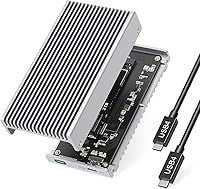
  • Enclosure Material: Constructed from full aluminum alloy with a grooved outer surface to aid passive heat dissipation.
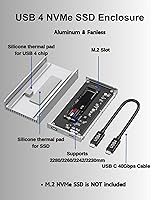
  • Cooling System: Uses a fully passive cooling design combining the aluminum shell, an internal heat sink, and pre-applied silicone thermal pads — no fan is present.
  • OS Compatibility: Works without driver installation on Windows, macOS, Linux, and Android operating systems.
  • Health Monitoring: Supports S.M.A.R.T. technology for real-time drive health monitoring and the TRIM command for sustained SSD performance over time.
  • Included Cable: Ships with one USB-C coaxial cable rated for 40Gbps data transfer.
  • Package Contents: Box includes the enclosure, 40Gbps USB-C cable, silicone thermal pads, screwdriver, screws, quick start guide, and a velvet drawstring gift bag.
  • SSD Included: No SSD is included; buyers must purchase and install an NVMe drive separately.
  • Package Dimensions: The retail package measures 5.83 x 3.19 x 1.46 inches.
  • Item Weight: The enclosure weighs 12.3 oz as shipped in its packaging.
  • LED Indicator: An integrated LED light indicates operational status during active data transfers and device connections.
  • Max Devices: Designed to house and operate a single M.2 NVMe drive at a time.
  • Availability Date: This enclosure became available for purchase in December 2024, making it a relatively recent product with a growing user base.

Related Reviews
GRAUGEAR G-M2U4-40G-F USB4 NVMe SSD Enclosure
71%
88%
Thermal Performance
83%
Transfer Speed
91%
Build Quality
54%
Setup & Ease of Use
72%
Compatibility
More
JEYI Quad 4-Bay M.2 NVMe Enclosure
76%
83%
Build Quality
88%
Transfer Speed (RAID 0)
61%
Single-Drive Performance
67%
Thermal Management
86%
RAID Flexibility
More
GEWOKLIY Ge-MC13 M.2 2230 NVMe SSD Enclosure
78%
83%
Transfer Speed
88%
Build Quality
79%
Compatibility
67%
Thermal Management
92%
Ease of Setup
More
WAVLINK 40Gbps NVMe M.2 Enclosure 4TB

85%
93%
Data Transfer Speed
90%
Ease of Setup
88%
Build Quality & Durability
76%
Thermal Performance
82%
Compatibility
More
WAVLINK U41F USB4 NVMe SSD Enclosure
82%
88%
Transfer Speed Performance
91%
Build Quality
74%
Thermal Management
78%
Compatibility Range
93%
Ease of Installation
More
StarLinker 40Gbps M.2 NVMe SSD Enclosure 8TB
87%
94%
Performance
89%
Build Quality
92%
Transfer Speed
90%
Ease of Setup
88%
Portability
More
V VCOM 40Gbps M.2 NVMe SSD Enclosure
82%
88%
Transfer Speed Performance
91%
Build Quality
89%
Value for Money
72%
Compatibility Range
58%
Out-of-Box Completeness
More
MAIWO USB4 40Gbps M.2 NVMe SSD Enclosure
80%
91%
Transfer Speed Performance
88%
Thermal Management
84%
Build Quality
67%
Fan Noise
93%
Ease of Installation
More
MOKiN 40Gbps M.2 NVMe Enclosure with Cooling Fan
86%
93%
Data Transfer Speed
89%
Cooling Efficiency
87%
Portability
91%
Compatibility with Devices
85%
Build Quality
More
Inateck FE2028 M.2 NVMe SSD Enclosure
79%
88%
Transfer Speed
84%
Build Quality
62%
Compatibility
93%
Installation Ease
72%
Thermal Management
More

FAQ

Not unless those USB-C ports are specifically Thunderbolt 4. The 40Gbps speed is a Thunderbolt 4 capability — standard USB-C, even USB 3.2, tops out well below that. Check your laptop specs carefully before buying; if you only have USB-C without Thunderbolt support, you will see USB 3.2 speeds at best.

Yes, Apple Silicon MacBooks with Thunderbolt 4 ports are among the best host devices for this enclosure. It is plug-and-play on macOS with no driver required, and the full 40Gbps bandwidth is accessible through those ports.

Unfortunately, no. The Gewokliy GE-MC40USSL 40Gbps NVMe Enclosure only supports NVMe drives — SATA M.2, NGFF, and mSATA drives are electrically incompatible with this enclosure. If you are looking to reuse a SATA M.2 drive, you will need a different type of enclosure.

It does get warm — that is actually the aluminum shell doing its job, pulling heat away from the drive. Under heavy sustained loads, the case can feel noticeably warm to the touch, but users have not generally reported temperatures that cause concern or thermal throttling. The included thermal pads are important here, so make sure they are properly applied during installation.

No. It is fully plug-and-play on Windows, macOS, Linux, and Android. Just plug it in and your operating system will recognize it without any additional setup.

It fits the four most common M.2 NVMe lengths: 2230, 2242, 2260, and 2280mm. The 2280 size is the most widely available, and the 2230 is commonly found in devices like the Steam Deck, so you have solid flexibility in drive selection.

A 40Gbps-rated USB-C coaxial cable is included in the box, so you do not need to buy one separately. This is worth noting because third-party Thunderbolt 4 cables can be expensive, and not all USB-C cables support 40Gbps speeds.

Yes, and this is actually one of the strongest use cases for this aluminum NVMe enclosure. With a fast NVMe drive installed, booting an OS externally over Thunderbolt 4 feels far more responsive than it would over USB 3.0 or even USB 3.2. Just make sure your machine supports external booting from Thunderbolt devices.

The enclosure has an LED indicator that lights up when the device is connected and active. Beyond that, because it supports S.M.A.R.T. monitoring, you can use free tools like CrystalDiskInfo on Windows or DriveDx on macOS to confirm the drive is recognized and healthy. Running a quick speed test with a tool like AJA or BlackMagic Disk Speed Test will also confirm you are getting expected throughput.

The Gewokliy enclosure is rated up to 8TB capacity, so physically and electrically it can handle large-capacity NVMe drives. Keep in mind that actual performance will depend on the specific drive you install — the enclosure sets the ceiling, but the drive determines how close you get to it.