Overview

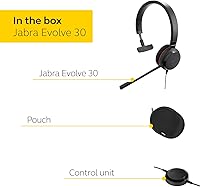
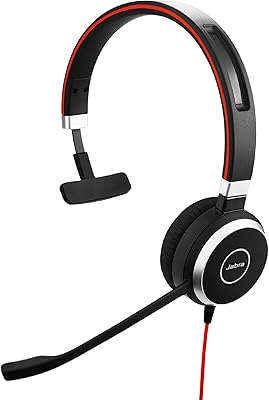
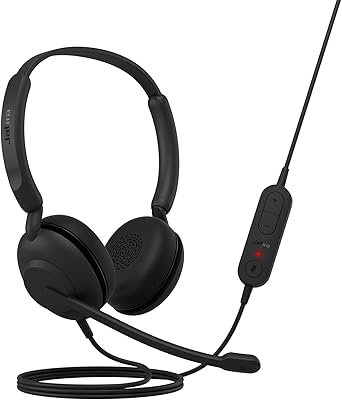
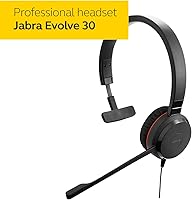
The Jabra Evolve 30 II Mono UC Headset is built for one job: making office calls clearer without a lot of extra fuss. It's a wired design, so you plug it in and you're working within seconds, no pairing screens or app downloads involved. You can connect through USB or a standard 3.5 mm jack, which means it plays nicely with most desk phones, laptops, and softphone setups already in use at a typical office. Jabra positions it as a no-frills entry in the Evolve family, and that shows in the price and the focus. It's clearly aimed at people who spend their day on calls rather than music, like support agents and remote employees who need a dependable single-ear option.
Features & Benefits

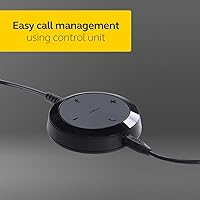
What stands out most with this headset is the noise-cancelling microphone, which does a solid job filtering out keyboard clatter, office chatter, and other background noise during calls. The ear cushion has a leather-feel finish that stays comfortable even after a few hours of wear, and the over-ear design keeps it secure without clamping too tight. Controls sit right on the unit itself, so adjusting volume or hitting mute takes a quick touch rather than fumbling through a menu. Setup is genuinely plug-and-play; most unified communications platforms recognize it instantly without drivers or extra software. The retractable cable is a small but appreciated touch, since it keeps cords from tangling at a busy desk, and at just 5.6 ounces, this mono headset never feels heavy during a full day of calls.

Best For

This wired headset makes the most sense for people whose calls are the actual job, not background noise. Call center agents and customer support teams running UC platforms will appreciate the straightforward setup and the mic quality, especially in shared office environments where background noise is constant. Remote workers who spend hours in video meetings will also like having one ear free to hear a doorbell, a coworker, or a kid in the next room. It's a smart pick for anyone who's grown tired of charging Bluetooth headsets or dealing with dropped wireless connections mid-call. If budget matters more than wireless freedom, this is a no-nonsense choice rather than a flashy one, and it covers the basics without asking you to pay for features you won't use.

User Feedback

Feedback on this mono headset tends to be pretty consistent across reviewers. People often mention how clear they sound on the other end of the line, crediting the noise-cancelling mic for cutting through home or office background noise. Comfort gets praised too, with several buyers surprised at how wearable it stays through long shifts despite being a single-ear design. The most common complaint is the obvious one: it's wired, so there's no walking away from your desk mid-call, which can feel limiting if you're used to wireless freedom. A few users also note that mono-only sound isn't great for music or casual listening, though that was never really the point. Overall, the consensus leans positive, with most buyers satisfied with the value and call performance it provides.

Pros

  • Noise-cancelling microphone keeps calls clear even in noisy offices
  • Leather-feel ear cushion stays comfortable through long workdays
  • Plug-and-play setup means no drivers or extra software needed
  • On-headset controls make muting and volume adjustments quick and easy
  • Lightweight build at 5.6 ounces barely feels noticeable while worn
  • Retractable cable helps keep your desk free of tangled cords
  • Works with both USB and 3.5 mm jack for wide compatibility
  • Single-ear design lets you stay aware of your surroundings during calls
  • Reliable wired connection avoids the dropouts common with Bluetooth headsets

Cons

  • Wired-only design means you're tethered to your desk during calls
  • Mono sound isn't suited for music or casual audio listening
  • Lacks active noise cancellation found on pricier headsets
  • Not water resistant, so it's risky to use near spills or sweat
  • No wireless or Bluetooth option for those wanting more flexibility
  • Switching between multiple devices requires manually unplugging and replugging each time
  • Build feels basic compared to higher-end professional headset options
  • Limited to a single ear, which some find awkward for casual use

Ratings

Our scores for the Jabra Evolve 30 II Mono UC Headset are generated by AI after analyzing thousands of verified user reviews from buyers worldwide, with spam, bot activity, and incentivized feedback actively filtered out. The result is a transparent breakdown that reflects both what people genuinely love about this mono headset and the real friction points they've run into. Think of it as a distilled summary of honest, hands-on experience rather than a polished marketing pitch.
Call Audio Clarity
88%
Users consistently mention that voices come through clean and easy to understand, even in busy open offices or home setups with background noise. Support agents fielding back-to-back calls often note that listeners on the other end rarely ask them to repeat themselves.
A handful of users feel the clarity, while solid, doesn't quite match pricier headsets with active noise cancellation. In very loud environments like open call centers, some background hum can still bleed through occasionally.
Microphone Noise Cancellation
84%
The noise-cancelling microphone gets repeated praise for filtering out keyboard typing, HVAC hum, and general office chatter during calls. Remote workers with noisy households also report fewer interruptions from background sound bleeding into meetings.
It's not flawless against sudden loud noises like dogs barking or doors slamming nearby. A few users in particularly noisy environments still had to step away from background activity for important calls.
Comfort for Long Wear
81%
19%
The leather-feel ear cushion gets credit for staying comfortable through multi-hour shifts, which matters a lot for call center agents and remote employees in back-to-back meetings all day. Several users mention forgetting they're even wearing it after a while.
Being a single-ear design, a small portion of users find the asymmetry slightly odd at first, especially during very long sessions. Pressure on one ear over many hours can feel uneven compared to a balanced over-ear stereo design.
Build Quality
79%
21%
Buyers frequently describe the control unit and headband as sturdy for the price point, holding up well to daily desk use over months of regular wear. The retractable cable design also gets noted as a thoughtful touch that resists tangling.
Some users note the plastic components feel a bit basic compared to premium business headsets, and the materials don't feel as substantial. It's clearly built to a budget, which shows in small ways over extended use.
Setup & Compatibility
86%
The plug-and-play nature of this wired headset is a major win for non-technical users, since it just works with most UC platforms straight out of the box. IT teams managing multiple workstations especially appreciate not having to install extra drivers.
Users with USB-C-only laptops sometimes need an adapter, which isn't included and can catch first-time buyers off guard. A small number of niche software setups required minor troubleshooting before recognizing the device.
Controls & Usability
82%
18%
The on-headset touch controls for mute and volume are described as intuitive once you get used to their placement, letting users adjust calls without looking away from their screen. This is especially handy during video meetings.
A few first-time users mention a brief learning curve finding the right spot to tap, occasionally muting by accident. The lack of tactile buttons means some prefer a more traditional physical switch.
Cable Management
77%
23%
The retractable cable feature earns consistent praise for keeping desks tidy and avoiding the tangled mess common with standard wired headsets. It's a small detail that several reviewers specifically called out as unexpectedly useful.
Being wired at all means there's an inherent limit to how far you can move from your desk, which some find restrictive during quick errands mid-call. A few users wish the cable were a bit longer for larger desk setups.
Portability & Mobility
58%
42%
For people who mostly work from one fixed desk, the lack of wireless freedom isn't a big deal, and the lightweight 5.6-ounce build makes it easy to carry between home and office. Packing it for travel is simple given its compact size.
The biggest recurring complaint is the wired-only design, which limits movement during calls and rules out walking around while talking. Anyone needing to roam during a workday will find this a real constraint.
Value for Money
85%
Budget-conscious buyers frequently highlight that this wired headset delivers solid call quality and comfort without the premium price tag of wireless competitors. For basic professional use, many feel it covers everything needed without overspending.
Those wanting wireless freedom or advanced features like active noise cancellation may feel the value drops if those extras matter to them personally. It's a strong budget pick, but it's clearly not a do-everything device.
Versatility (Calls vs Music)
46%
54%
For its intended purpose, professional calling, this mono headset performs exactly as expected without unnecessary extras getting in the way. Users focused purely on call quality don't seem to miss stereo sound at all.
Anyone hoping to double it up for music listening or media consumption will likely be disappointed, since mono audio feels flat and unbalanced outside of calls. It's clearly a single-purpose tool rather than an all-around headset.
Durability Over Time
76%
24%
Many long-term users report the headset holding up well after months of daily desk use, with the control unit remaining responsive and the cable resisting fraying. Office workers using it five days a week often mention minimal wear.
A smaller group of reviewers mention the ear cushion showing signs of wear faster than expected with very heavy daily use. As with most budget headsets, longevity seems tied closely to how gently it's handled.
Customer Support Experience
73%
27%
Buyers who needed to contact Jabra for warranty questions generally describe the process as straightforward, with clear instructions included in the box. The included warranty statement gives some peace of mind for a budget purchase.
A few users mention response times for support inquiries being slower than expected, particularly for non-urgent questions. It's not a major pain point, but it isn't a standout strength either.

Suitable for:

The Jabra Evolve 30 II Mono UC Headset makes the most sense for people whose day revolves around phone and video calls rather than entertainment. Call center agents and customer support reps will benefit from the noise-cancelling mic, especially in shared offices where background chatter is constant. Remote workers who sit through back-to-back video meetings will likely appreciate keeping one ear open to hear someone at the door or a coworker walking by. It also suits anyone who's grown frustrated with charging Bluetooth headsets or dealing with random wireless dropouts during important calls. Budget-conscious buyers who just need a dependable, no-nonsense wired option for daily UC platform use will find it covers the basics well. Anyone setting up a home office on a tight budget should find it a practical, low-risk pick.

Not suitable for:

This wired headset is not a good match for anyone who needs to move freely around a room while talking, since there's no wireless freedom here at all. Music lovers or anyone wanting immersive sound should look elsewhere, as the mono design means audio comes through one ear only, which feels limiting outside of calls. Buyers focused on premium build materials or advanced features like active noise cancellation will likely find the Jabra Evolve 30 II Mono UC Headset too basic for their expectations. It's also not ideal for people who frequently switch between multiple devices throughout the day, since constant unplugging and replugging gets old fast. If staying tethered to a desk is a dealbreaker, this isn't the right pick.

Specifications

  • Connectivity: It connects via USB or a 3.5 mm jack, allowing it to work with most computers, desk phones, and softphone setups.
  • Ear Placement: The headset uses an over-ear, single-sided (mono) design that covers one ear while leaving the other free.
  • Microphone: A noise-cancelling microphone is built into the boom arm to reduce background noise during calls.
  • Ear Cushion Material: The ear cushion has a leather-feel finish intended for comfortable extended wear.
  • Impedance: The driver has an impedance rating of 32 Ohm.
  • Sensitivity: The headset has a sensitivity rating of 93.6 dB.
  • Cable Type: It includes a retractable cable feature designed to reduce cord clutter at a desk.
  • Weight: The headset weighs approximately 5.6 ounces.
  • Controls: On-headset touch controls allow quick access to mute and volume adjustment.
  • Audio Driver: It uses a dynamic driver to produce sound.
  • Water Resistance: The headset is not rated for water resistance.
  • Included Components: The package includes the headset, accessories, and a warranty statement.
  • Setup Type: It is designed for plug-and-play use without requiring additional software for most UC platforms.
  • Color: The headset is finished in black.
  • Recommended Use: It is intended primarily for professional calling, with secondary use for music listening.

Related Reviews

Jabra Evolve 40 UC Mono Wired Headset
79%
91%
Call Audio Quality
78%
Comfort & Wearability
93%
UC Platform Compatibility
67%
Passive Noise Isolation
88%
Build Quality & Durability
More
Jabra Evolve2 30 UC Mono USB-C
78%
88%
Microphone Clarity
74%
Passive Noise Isolation
71%
Comfort & Wearability
82%
Build Quality
93%
USB-C Compatibility & Setup
More
Jabra Evolve 20 UC Stereo
81%
91%
Microphone Clarity
86%
All-Day Comfort
88%
Call Control Usability
93%
UC Platform Compatibility
74%
Build Quality & Durability
More
Jabra Motion UC Bluetooth Headset
76%
91%
Call Audio Quality
74%
Comfort & Fit
89%
PC Connectivity
78%
Battery Life
88%
Platform Compatibility
More
Jabra Stealth UC Bluetooth Headset
84%
89%
Sound Quality
90%
Comfort & Fit
76%
Battery Life
85%
Noise Cancellation
80%
Voice Control Functionality
More
Jabra Evolve 10
Jabra Evolve 10
77%
83%
Microphone Clarity
78%
Comfort & Wearability
62%
Build Quality
71%
Audio Playback Quality
94%
Ease of Setup
More
Jabra Engage 65 Mono Wireless Headset
82%
88%
Wireless Range & Stability
91%
Microphone Clarity
93%
Battery Life
74%
Comfort Over Long Shifts
67%
Value for Money
More
Jabra PRO 920 Mono Wireless Desk Headset
79%
91%
Wireless Range & Stability
88%
Microphone Clarity
72%
Comfort & Wearability
84%
Call Audio Quality
89%
Peak Stop & Hearing Protection
More
Jabra Evolve 65 MS Stereo Wireless Headset
81%
91%
Microphone Quality
88%
Wireless Connectivity Stability
87%
Battery Life
72%
Comfort & Wearability
84%
Call Audio Clarity (Receive)
More
Yealink WH66 DECT Wireless Headset
77%
91%
Call Audio Clarity
88%
DECT Wireless Range
79%
Battery Life
74%
Touch Screen Usability
83%
Comfort During Extended Wear
More

FAQ

Yes, in most cases you just plug it in via USB or the 3.5 mm jack and it works right away. Most unified communications platforms recognize it automatically. You shouldn't need to download drivers for basic functionality.

This mono headset only covers one ear, so audio plays through that single side. It's intentional for call-focused use since it lets you stay aware of your surroundings. If you want sound in both ears, you'd want a stereo headset instead.

You technically can, but it's not really built for that. Since it's mono, you'll only hear audio in one ear, which makes for a flat, unbalanced listening experience. It's best suited for calls rather than casual music listening.

The headset itself uses a standard USB connector, so if your computer only has USB-C ports, you may need an adapter. Checking your device's ports before buying is a good idea to avoid compatibility surprises.

The cable is designed with a retractable feature to help manage length and reduce clutter. Exact cable length isn't specified by the manufacturer, but it's built for typical desk distances rather than roaming around a room.

The product details don't specify replacement cushions being sold separately, so this isn't something we can confirm. If cushion longevity is a major concern, it's worth checking with Jabra support directly.

Many users report that the leather-feel cushion stays comfortable through long workdays, even with the mono design. Comfort can vary a bit by head size and personal preference, but feedback on this front has generally been positive.

Yes, the noise-cancelling microphone is one of the most praised features, and it does a solid job filtering out typical office or home background noise. It won't eliminate every sound, but it noticeably improves clarity on calls.

Yes, the Jabra Evolve 30 II Mono UC Headset is designed to work with leading UC platforms including Zoom and Microsoft Teams without extra configuration. As long as your software can recognize a standard USB or 3.5 mm headset, it should work fine.
You'll need to physically unplug it from one device and plug it into the other, since there's no wireless switching feature here. It's a quick process, but it does mean a bit of manual effort if you're juggling multiple devices regularly.