Overview

The Jabra Evolve 20 UC Stereo has been a quiet constant in the office headset market since its 2014 debut, and the fact that it still ranks inside the top 100 computer headsets says something real. This is not a flashy device aimed at audiophiles — it is a UC-certified workhorse built for professionals who spend hours on calls every day. Jabra designed it around one core promise: reliable, clear communication without fuss. Plug it into a USB port and it works, no drivers or setup ritual required. For a mid-range wired headset, that kind of plug-and-play simplicity is genuinely appreciated in busy office environments.
Features & Benefits

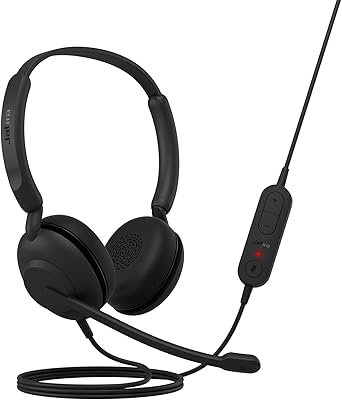
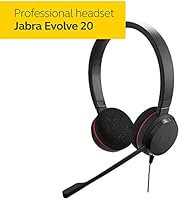
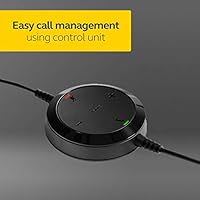
The noise-cancelling boom microphone is where this Jabra headset earns its keep in open-plan offices. It isolates your voice clearly even when colleagues are talking nearby, and it folds neatly into the headband when you step away from your desk. The in-line control unit puts volume, mute, and call management right at your fingertips — no alt-tabbing to find a software toggle mid-conversation. At just 5 ounces, the Evolve 20 UC sits comfortably through long shifts, and the over-ear foam cushions spread pressure evenly rather than concentrating it on the ear canal. It covers the full 20 Hz to 20,000 Hz range, so background music sounds decent between calls too.

Best For

This wired office headset makes the most sense for people whose primary job revolves around calls — whether that is a contact center agent handling back-to-back conversations or a remote employee running daily video standups. If your workflow runs through a softphone on Windows or Mac, UC platform certification means Teams, Cisco, and others will recognize it without configuration headaches. It also suits IT managers looking to deploy a standardized headset fleet across a team without breaking the budget. One honest caveat: if you need to move around freely while on calls, the wired connection is a real limitation — this headset rewards those who stay at their desk.

User Feedback

Long-term owners consistently highlight two things: microphone clarity and all-day wearability. People who use this headset for six-plus hour shifts report that their callers rarely notice background noise, which speaks to how well the mic performs in real conditions. The call control unit also gets regular praise for how intuitive it feels after just a day of use. That said, the foam ear cups attract some fair criticism — in warmer offices they can feel stuffy after a few hours, and over many months of daily use the cushions tend to compress and lose their original softness. Replacement pads are available but add a small ongoing cost worth factoring in.

Pros

  • UC platform certification works out of the box with Teams, Cisco, and other major softphone systems.
  • Plug-and-play USB setup requires zero driver installation on Windows or Mac.
  • The noise-cancelling boom mic keeps background office chatter from reaching the other person on the call.
  • At 5 ounces, this Jabra headset causes no meaningful fatigue even across full 8-hour shifts.
  • The in-line control unit makes muting or adjusting volume completely instinctive within the first day of use.
  • Passive noise isolation from the over-ear cushions meaningfully reduces keyboard and ambient distractions.
  • Boom arm folds flush against the headband when not in use, keeping the desk tidy.
  • Covers a full 20 Hz to 20,000 Hz frequency range, making it serviceable for music and video audio too.
  • Sustained top-100 ranking in its category over a decade reflects consistently strong buyer satisfaction.
  • One of the few UC-certified headsets available at a genuinely mid-range price point.

Cons

  • The thin, non-braided cable is prone to kinking near the USB connector with daily coiling and uncoiling.
  • Foam ear cushions compress noticeably after six to nine months of heavy daily use.
  • No active noise cancellation means loud environments will overwhelm the passive isolation limit.
  • The in-line control unit buttons lack tactile depth, causing occasional misfires during fast call handling.
  • Foam ear cups trap heat in warm offices, becoming uncomfortable by midday in summer months.
  • The wired design restricts movement — standing up or stepping away mid-call is a constant minor frustration.
  • Plastic construction shows wear and headband creaking becomes noticeable after 12 to 18 months of use.
  • Bass response and stereo width fall short for anyone using the headset primarily as a music listening device.

Ratings

The Jabra Evolve 20 UC Stereo was scored by our AI engine after parsing thousands of verified global buyer reviews, with spam, incentivized submissions, and bot activity filtered out before any score was calculated. The result reflects where this wired office headset genuinely excels and where real users have run into friction — no softening of the rough edges. Both the strengths that keep it a top-seller and the recurring complaints that surface after months of daily use are transparently built into every number below.
Microphone Clarity
91%
Call agents and remote workers consistently report that colleagues and clients can hear them sharply, even in open offices with ambient chatter. The directional boom mic isolates the speaker's voice well enough that most users stop worrying about background noise within the first week of use.
In very loud environments — think busy call floors with hard floors and no acoustic treatment — some users notice the passive noise rejection reaches its ceiling and bleed-through becomes audible to the other party. It handles typical office noise well but is not engineered for warehouse or factory settings.
All-Day Comfort
86%
At just 5 ounces, this Jabra headset barely registers on the head during long shifts, and the over-ear foam cushions distribute pressure in a way that avoids the soreness that cheaper on-ear models cause by hour three. Long-term reviewers doing six-plus hour days frequently cite comfort as the primary reason they stick with it.
The foam cushions are adequate but not exceptional — in warmer offices or during summer months, heat buildup becomes a genuine nuisance by midday. A small but consistent group of users with larger ears also find the cup size slightly restrictive during extended wear.
Call Control Usability
88%
The in-line control unit places volume, mute, and call answer/end exactly where your hand naturally rests on the cable, making mid-call adjustments instinctive after just one day. Users managing back-to-back calls particularly appreciate being able to mute without alt-tabbing to a softphone interface.
The control unit is plasticky and the buttons lack tactile depth, which means occasional misfires when grabbing the cable quickly. A handful of reviewers note that the unit can spin on the cable, making button orientation briefly confusing during fast-paced call handling.
UC Platform Compatibility
93%
Certification across Microsoft Teams, Cisco, Avaya, and other leading UC platforms means IT departments can deploy this wired office headset across a mixed-software team with zero configuration surprises. Plug it into USB and the softphone recognizes it immediately — a genuine time-saver when onboarding new staff.
Compatibility is solid with certified platforms but users running niche or legacy VOIP software occasionally report that call controls do not map correctly. The headset works as an audio device in those cases, but the one-touch call management functions may not respond as expected.
Build Quality & Durability
74%
26%
The headset feels sturdy enough for daily desk use, and the folding boom arm has a satisfying click that holds its position reliably. Most users report no mechanical failures within the first year of regular use, which is reassuring for teams buying in bulk.
The plastic construction shows its mid-range positioning after 12 to 18 months of heavy use — headband creaking and hinge looseness are recurring complaints in longer-term reviews. The cable, while functional, is not braided or reinforced, making it susceptible to kinking near the USB connector over time.
Ear Cushion Longevity
61%
39%
Out of the box the foam cushions feel plush enough and hold their shape well for the first several months. Replacement pads are available and straightforward to swap, which gives the headset a longer useful life if users are willing to maintain it.
This is where consistent long-term dissatisfaction surfaces — the foam compresses noticeably within six to nine months of daily use, reducing both comfort and passive noise isolation. Users who wear this headset for seven or eight hours a day should budget for replacement cushions roughly once a year.
Sound Quality for Music
69%
31%
The full-range dynamic driver covers 20 Hz to 20,000 Hz, which means background music during lighter work periods sounds clear and acceptably warm — noticeably better than basic call-only headsets in the same tier. It handles podcasts and video conference audio with clean, fatigue-free reproduction.
Bass response is moderate at best, and stereo separation lacks the width audiophiles or music-focused buyers would expect. This is a voice-first headset that can handle music, not a music headset that also handles voice — buyers shopping for listening quality will be underwhelmed.
Plug-and-Play Setup
96%
USB connection means no drivers, no Bluetooth pairing rituals, and no software installation — plug it in and it works on Windows and Mac alike. IT managers deploying dozens of units at once particularly value how little hand-holding the setup process requires.
There is essentially no setup complexity, which is entirely by design. The only minor friction reported is that some users on locked-down corporate machines occasionally need IT to approve a new USB audio device, which is a network policy issue rather than a hardware flaw.
Weight & Portability
83%
Five ounces is genuinely light for an over-ear headset with a boom arm, and users who move between desks or hot-desk across an office appreciate how little space it takes up in a bag. The boom arm folds flush against the headband for a compact profile during transport.
The cable length, while practical at a desk, becomes slightly awkward when moving around — there is no cable management system built in. Users who frequently walk to a printer or grab documents while on a call find the cord length either too generous or a minor trip hazard.
Value for Money
89%
At its price point, UC certification alone would justify the cost for most business buyers — comparable certified headsets from other brands often cost meaningfully more. The fact that it has sustained a top-100 ranking in its category for over a decade reflects genuine buyer satisfaction with the price-to-performance ratio.
The cushion longevity issue does erode the value equation over time — factor in one or two sets of replacement pads and the effective lifetime cost creeps up. Buyers comparing it to cheaper non-certified alternatives will also need to weigh whether UC platform integration actually matters for their specific workflow.
Noise Isolation (Passive)
77%
23%
The over-ear design and foam cushioning do a reasonable job of muffling high-frequency ambient noise like keyboard clatter and HVAC hum, helping users maintain focus during calls without reaching for a volume button. Several reviewers in shared office environments note it reduces distraction meaningfully compared to on-ear alternatives.
There is no active noise cancellation, and the passive isolation has a clear ceiling — low-frequency rumble from nearby foot traffic or open-plan offices with hard surfaces will pass through. Users in genuinely loud environments should treat the noise isolation as a supplement to good positioning, not a substitute for it.
Microphone Boom Arm Design
82%
18%
The boom arm is flexible enough to position precisely at the right distance from the mouth without fiddling repeatedly, and it folds back snugly into the headband when you step away from the desk. That small detail makes daily use feel considered rather than just functional.
The boom arm is not as robust as those on higher-end models — it holds its position well under normal use but a few reviewers note it gradually loses tension after prolonged repositioning. It is also not as precisely adjustable as rigid gooseneck designs found on more expensive professional headsets.
Cable Quality
63%
37%
The cable is a practical length for desk use and does not create constant tension on the USB port during normal seated work. It is long enough to allow some movement between the chair and keyboard without feeling tethered.
The cable is thin and non-braided, which is the most common hardware criticism in long-term reviews. Kinking near the USB plug is a real failure point for users who coil and uncoil the cable daily, and a small percentage of reviewers report audio dropouts attributed to cable wear after 12 to 18 months.

Suitable for:

The Jabra Evolve 20 UC Stereo is built for professionals whose workday is defined by calls — call center agents, customer support reps, and remote employees who spend the bulk of their hours in Microsoft Teams, Cisco, or similar softphone environments will find it fits their workflow almost immediately. Because it is USB plug-and-play, it is equally practical for IT administrators who need to roll out a standardized headset across an entire team without dealing with driver installation or pairing procedures on every machine. Budget-conscious buyers who specifically require UC platform certification — a credential that typically pushes headset prices much higher — get genuine enterprise-grade compatibility at a mid-range cost. Workers who hot-desk or share workstations will appreciate how lightweight and compact this wired office headset is; it tucks into a bag without fuss and connects to any new machine in seconds. People who have had bad experiences with Bluetooth dropouts or audio lag on calls will also find the reliability of a direct USB connection genuinely refreshing for day-to-day use.

Not suitable for:

The Jabra Evolve 20 UC Stereo is a poor match for anyone who needs freedom of movement during calls — there is no wireless option, and the cable, while functional, will become a physical constraint the moment you regularly step away from your desk mid-conversation. Buyers working in genuinely loud environments, like factory floors, open warehouses, or high-traffic public spaces, should also look elsewhere; the passive noise isolation has a clear ceiling, and without active noise cancellation, significant background rumble will reach both the user and the person on the other end. Music enthusiasts or anyone purchasing a headset primarily for listening rather than communication will be underwhelmed by the audio depth and stereo width — this is a voice-first device that tolerates music, not the other way around. If cushion longevity matters to you and you wear headsets for seven or eight hours daily without interruption, be prepared for the foam to lose its shape within several months, which adds a small but real maintenance cost to ownership. Finally, users who need highly precise boom arm adjustability or premium build materials will quickly notice that this headset reflects its mid-range pricing in the plastic construction and cable quality.

Specifications

  • Connection: The headset connects via USB-A, requiring no drivers or additional software on Windows or Mac computers.
  • Driver Type: Audio is delivered through dynamic drivers, tuned to prioritize voice clarity while maintaining a listenable range for music.
  • Frequency Range: The headset covers 20 Hz to 20,000 Hz, supporting both natural voice reproduction and general-purpose audio.
  • Impedance: Rated at 32 Ohm, the headset is optimized for direct USB-powered use without requiring an external amplifier.
  • Sensitivity: Speaker sensitivity is 94 dB, providing adequate loudness at moderate volume levels for typical office environments.
  • Microphone Type: A directional noise-cancelling boom arm microphone is included, designed to isolate the speaker's voice and reduce ambient background noise.
  • Ear Design: The over-ear, on-head form factor positions foam cushions around the ear to reduce high-frequency ambient sound passively.
  • Cushion Material: Ear cushions are made from foam and are replaceable, though replacement pads are sold separately.
  • Weight: The complete headset weighs 5 ounces, making it one of the lighter options in the over-ear professional headset category.
  • Inline Controls: A dedicated in-line control unit provides physical buttons for call answer and end, mute toggle, and volume adjustment.
  • Active Noise Cancellation: Active noise cancellation is not included; noise reduction is achieved passively through the over-ear cushion design and directional microphone.
  • Wireless: The headset is wired only, with no Bluetooth or DECT wireless connectivity option available on this model.
  • UC Certification: The headset is certified for use with major unified communications platforms including Microsoft Teams, Cisco, and other leading UC software environments.
  • Busylight: No integrated busylight indicator is present on this model; that feature is reserved for higher-tier Evolve series headsets.
  • Boom Arm: The boom arm is flexible and folds back flush against the headband when not in use, keeping a tidy profile at the desk.
  • Cable: The attached USB cable is non-braided and fixed to the headset, with no quick-disconnect or detachable cable option.
  • Platform Support: The headset is compatible with Windows and macOS computers and works with all major softphone applications via standard USB audio.
  • Product Dimensions: The headset measures approximately 3.56 x 2.79 x 0.54 inches when folded, making it compact enough to fit in most laptop bags.
  • Market Availability: First released in September 2014, the headset has remained in continuous production and holds a top-100 ranking in the Computer Headsets category.
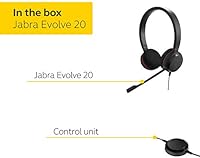
  • Included Items: The package includes the headset unit, accessories, and a warranty statement; no charging stand, carrying case, or extra ear pads are included.

Related Reviews

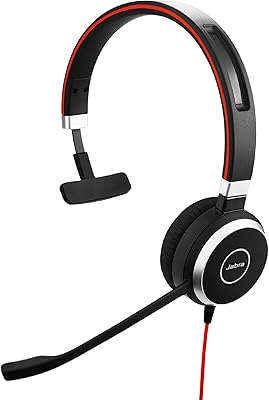
Jabra Evolve 40 UC Mono Headset
84%
89%
Sound Quality
92%
Comfort for Long Calls
85%
Busylight Functionality
84%
Build Quality
80%
Noise Cancellation
More
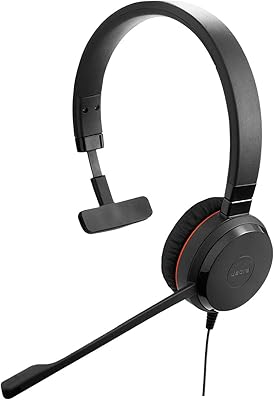
Jabra Evolve 30 II UC Mono Wired Headset
85%
89%
Comfort for Extended Use
92%
Call Quality & Microphone Performance
95%
Ease of Use & Setup
72%
Noise Cancellation Effectiveness
78%
Build Quality & Durability
More
Jabra Evolve 10
Jabra Evolve 10
77%
83%
Microphone Clarity
78%
Comfort & Wearability
62%
Build Quality
71%
Audio Playback Quality
94%
Ease of Setup
More
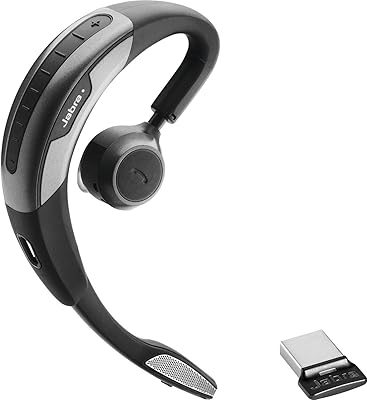
Jabra Motion UC Wireless Headset
84%
92%
Comfort and Fit
88%
Sound Quality and Clarity
85%
Battery Life
90%
Noise Cancellation Performance
80%
Connectivity and Integration
More
Jabra Stealth UC Bluetooth Headset
84%
89%
Sound Quality
90%
Comfort & Fit
76%
Battery Life
85%
Noise Cancellation
80%
Voice Control Functionality
More
Jabra Evolve2 85 MS Stereo Headset
86%
91%
Sound Quality
94%
Noise Cancellation Performance
88%
Comfort for Long Hours
90%
Battery Life
95%
Integration with Microsoft Teams
More
Jabra Evolve2 55 Stereo
79%
91%
Call & Microphone Quality
71%
Active Noise Cancellation
78%
Wearing Comfort
88%
Battery Life
74%
Dual-Device Connectivity
More
Jabra Speak 510 UC Bluetooth Speakerphone
86%
89%
Sound Quality
92%
Battery Life
88%
Ease of Use
85%
Build Quality
90%
Portability
More
Jabra Engage 50 Stereo Wired Headset
88%
94%
Call Clarity
90%
Noise Cancellation Effectiveness
88%
Comfort for Long Use
93%
Microphone Quality
85%
Build Quality
More
Jabra Evolve 65 MS Wireless Headset
86%
92%
Sound Quality
89%
Battery Life
88%
Comfort for Extended Use
85%
Noise Cancellation
75%
Bluetooth Range
More

FAQ

Yes, the Jabra Evolve 20 UC Stereo is UC-certified, which means Teams recognizes it automatically when you plug it into a USB port. You do not need to install any software or configure audio settings manually — it simply shows up as your default audio device and the call controls work as expected.
No drivers are required. Just plug the USB connector into your Windows or Mac computer and the operating system recognizes it as a standard USB audio device within seconds. This makes it particularly practical for IT teams deploying headsets at scale or for employees who do not have admin rights on their work machines.

For most open offices it performs well — the directional boom mic filters out keyboard noise, nearby conversations, and general office hum effectively. That said, it relies on passive noise cancellation only, so if your environment is exceptionally loud, callers may occasionally pick up background noise during the busiest periods of the day.

It handles music perfectly fine for background listening while you work — the full 20 Hz to 20,000 Hz frequency range means it does not sound tinny or flat on audio content. Just do not expect deep bass or wide stereo imaging; it is a voice-first device that tolerates music well rather than a dedicated listening headset.

Most users find the cushions stay comfortable for the first six months of full-day use before they begin to noticeably compress and soften. If you wear the headset seven or eight hours a day without breaks, plan on replacing the foam pads roughly once a year — replacement cushions are available separately from Jabra and are easy to swap out.

Absolutely — because it uses USB with no pairing or software configuration required, you can simply unplug it from one machine and plug it into another and it works immediately. This is one of the practical reasons teams standardize on this wired office headset for shared workstations.

This specific model is wired only. Jabra does make wireless options in the Evolve series — the Evolve 65 and Evolve 75 are the wireless counterparts — but they sit at a higher price point. If freedom of movement during calls is important to you, those would be worth looking at instead.

For most users in climate-controlled offices, the foam cushions stay comfortable across a full workday. A minority of reviewers in warmer environments or during summer months do report some heat buildup by midday, which is a common trade-off with over-ear foam rather than leatherette padding. If you run warm or work in a hot office, this is worth keeping in mind.

Yes, the boom arm is flexible and can be repositioned to suit your preferred mic-to-mouth distance. It holds its angle well under normal use, though it is not as precisely lockable as rigid gooseneck designs on higher-end professional headsets. The arm also folds back neatly into the headband when you want to take a break from calls.

The UC version is certified across a broad range of unified communications platforms including Cisco, Avaya, and others, in addition to Microsoft Teams. The MS-certified version is optimized specifically for the Microsoft ecosystem. If your organization uses a mix of platforms or you want maximum flexibility, the UC variant is generally the safer choice.