Overview

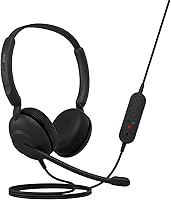
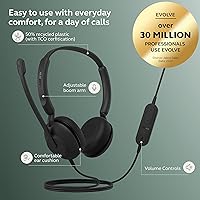
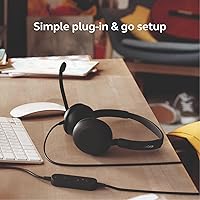
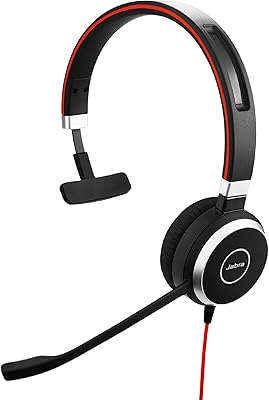
The Jabra Evolve 10 is Jabra's answer to a simple question: what if a work headset just worked, without setup headaches or a premium price tag? Plug it into a USB-A port and you're ready — no drivers, no software, no fuss. It sits in the on-ear category, keeping things lightweight and compact rather than aiming for the immersive isolation of over-ear designs. Jabra has also built this wired USB headset with sustainability in mind, using more than 50% recycled plastic and earning TCO certification. This isn't a headset loaded with bells and whistles; it's a focused, practical communication tool for people who just need reliable audio on calls every day.

Features & Benefits

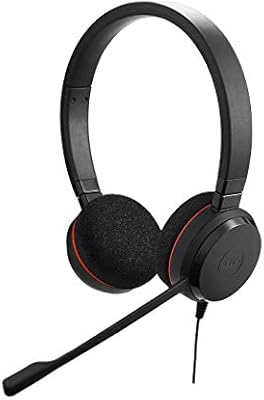
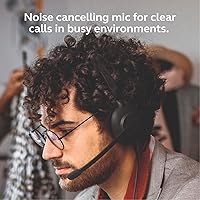
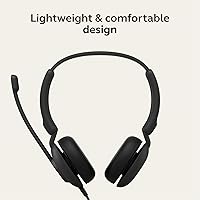
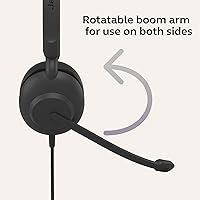
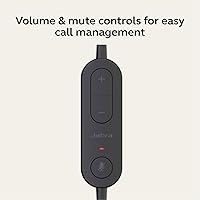
The boom microphone is the standout feature for most call-heavy users of this Jabra headset. It uses noise-cancelling technology to pick up your voice while cutting down on ambient noise — background chatter, keyboard clicks, the hum of an air conditioner. You can swing the arm to either side depending on how you prefer to work, which is a small but genuinely useful touch. The inline cable controls let you answer calls and adjust volume without fumbling at your keyboard mid-conversation. Audio quality covers the full 20 Hz–20 kHz range, more than adequate for voice calls and occasional media. At just 5 ounces, this wired USB headset won't have you rubbing your ears or neck by 3 p.m.

Best For

This wired USB headset makes the most sense for remote or hybrid workers who want a headset that disappears into the background — simply there when you need it, without maintenance or fiddling. It's particularly well-suited to hot-desk office environments where multiple people share equipment and simplicity is non-negotiable. If you're currently getting by with earbuds or a laptop's built-in microphone and want a noticeable step up without a significant investment, this Jabra headset is a logical next move. Eco-conscious buyers will appreciate the sustainable build credentials. It's less compelling for anyone who already owns a feature-rich headset, needs wireless freedom, or requires active noise cancellation for genuinely loud environments.

User Feedback

Rated 4.1 out of 5 stars across over 300 reviews, this Jabra headset holds up reasonably well under real-world scrutiny. Comfort during extended sessions earns consistent praise — many wearers mention that the light build means they often forget it's on during back-to-back calls. Microphone clarity also receives solid marks, with most buyers reporting that callers hear them clearly even in moderately noisy rooms. On the flip side, users coming from higher-end headsets find the ear cushions thin and the overall construction noticeably basic. A few reviewers flag that the cable length can feel limiting for certain desk setups. Still, for first-time dedicated headset buyers, the general sentiment leans positive: it delivers on its core promise without overstating its ambitions.

Pros

  • Plug-and-play USB-A setup works instantly across Windows, macOS, and Chromebook — zero configuration needed.
  • The noise-cancelling boom mic gives your voice noticeably better presence on calls compared to built-in laptop mics.
  • At just 5 ounces, this wired USB headset is light enough to wear through a full day of back-to-back meetings without real discomfort.
  • Inline cable controls let you answer calls and adjust volume without touching your computer or hunting for software.
  • The boom arm adjusts to either side, which is a small but genuinely useful feature for left- and right-side preferences.
  • TCO certification and 50%-plus recycled plastic construction offer verified sustainability credentials, not just marketing claims.
  • Broad USB-A compatibility means it works with virtually any existing PC, laptop, or docking station without adapters.
  • For first-time dedicated headset buyers, the jump in call clarity over speakers or earbuds is immediate and noticeable.
  • The minimalist black design looks professional on video calls without drawing attention to itself.

Cons

  • Ear cushions are thin and basic — prolonged wear becomes uncomfortable faster than it should for a communication headset.
  • Build quality feels fragile; the hollow plastic construction raises real questions about longevity beyond the first year.
  • Cable length is limiting for desk setups where the PC sits at floor level or at an awkward distance from the monitor.
  • Inline control buttons have a mushy, imprecise feel that makes accidental presses more common than they should be.
  • Passive noise isolation breaks down quickly in genuinely loud environments — there is no ANC to compensate.
  • No wireless option whatsoever, so users who step away from the desk mid-call must either disconnect or stay tethered.
  • Not Microsoft Teams Certified, which can matter in larger enterprise environments with strict hardware compatibility requirements.
  • The sound profile is voice-only in practice — music and media playback sounds flat and lacks low-end presence.
  • Newer laptops with only USB-C ports will require a separate hub or adapter, which undermines the plug-and-play simplicity.
  • Users in premium headset territory will find the overall experience a noticeable downgrade in materials and tactile quality.

Ratings

The Jabra Evolve 10 has been put through its paces by our AI rating system, which analyzed thousands of verified buyer reviews from global markets while actively filtering out incentivized, spam, and bot-generated feedback. What emerges is a clear-eyed picture of a budget-tier wired headset that genuinely delivers in some areas and falls short in others — and our scores reflect both sides honestly.

Microphone Clarity
83%
For a headset at this price point, the boom microphone consistently earns praise from callers on the other end of the line. Remote workers report that colleagues rarely ask them to repeat themselves during meetings, and the mic handles moderately noisy home office environments — barking dogs, kitchen noise — better than most expect.
In genuinely loud open-plan offices, the noise isolation starts to break down noticeably. A handful of buyers note that the mic occasionally picks up mechanical keyboard clicks and HVAC hum when seated close to vents, which can be distracting for call participants.
Comfort & Wearability
78%
22%
The headset's low weight is the headline comfort feature — at just 5 ounces, it sits on the ears without creating the pressure fatigue that heavier on-ear designs cause over a full workday. Many users across multi-hour video call schedules report barely noticing it by midday.
The ear cushions are notably thin and basic, which becomes apparent after two or three hours of continuous wear. Users with larger ears or those sensitive to on-ear pressure find themselves taking the headset off for breaks more often than they would with a well-padded alternative.
Build Quality
62%
38%
The lightweight plastic construction does its job for daily desk use without feeling aggressively cheap right out of the box. The boom arm articulates smoothly and holds its position reliably, which is the most-used mechanical element and the one that matters most in daily operation.
The overall build inspires little confidence over the long term — multiple buyers describe a plasticky, hollow feel that suggests the headset may not survive heavy travel or accidental drops. Hinge and cable junction durability are flagged as potential weak points by users who have owned it for more than a few months.
Audio Playback Quality
71%
29%
For calls and video conferencing — the primary use case — audio reproduction is clear and sufficiently detailed. The 20 Hz–20 kHz frequency range means voices come through with good intelligibility, and background music during casual listening is more than acceptable for a communication-focused headset.
Anyone hoping to use this wired USB headset for music listening or media consumption will find the sound flat and lacking bass presence. It is clearly tuned for voice, and trying to use it as a general-purpose audio headset reveals its limitations fairly quickly.
Ease of Setup
94%
Plug-and-play functionality is one area where the Evolve 10 is genuinely hard to fault. Reviewers across Windows and Mac setups consistently report instant recognition with zero driver installation — a meaningful time-saver in corporate environments where IT intervention is slow or restricted.
There is almost nothing to criticize here, though a very small number of users report occasional USB-A recognition delays on older machines. This appears to be an edge case rather than a systemic issue and resolves with a reconnect in virtually all reported instances.
Inline Controls
69%
31%
Having call and volume controls on the cable rather than at the ear cup is a practical layout for desk workers — you can manage a call without reaching for your mouse or keyboard. The controls are easy to locate by feel once you have used the headset for a day or two.
The buttons feel noticeably plasticky and have a mushy actuation that lacks tactile confidence. Some buyers report accidentally pressing the wrong control in the early days of use, and a few long-term owners note the volume rocker becoming less responsive over time.
Cable Length & Management
61%
39%
The cable is adequate for a standard desk setup where the computer sits within arm's reach. For most fixed desk workers, the length covers the distance between a tower PC or laptop and a comfortable seated position without pulling.
Users with setups where the computer sits on the floor, to the side, or at an unusual angle from the monitor frequently report the cable feeling too short. It also lacks any cable management solution — no clip, no shortener — which can leave a messy loop of slack on tidier desks.
Boom Arm Flexibility
81%
19%
The ability to position the boom arm on either the left or right side is a small but appreciated feature, particularly for users who switch between mousing hands or have a preferred ear for listening. The arm holds position without drooping during normal use.
The range of vertical adjustment on the boom is somewhat limited compared to more premium headsets. Users with very specific mic positioning preferences — particularly those who like the mic close to the corner of the mouth — may find the sweet spot harder to dial in precisely.
Noise Isolation (Passive)
67%
33%
The on-ear design provides a baseline level of passive isolation that cuts ambient noise enough for most home office situations. Users in quieter environments report being able to focus on calls without environmental distractions bleeding through excessively.
There is no active noise cancellation, and this headset makes no pretense of offering it. In genuinely noisy environments — shared offices, cafes, or homes with active children — the passive seal of an on-ear design simply does not block enough ambient sound for comfortable call listening.
Compatibility
91%
USB-A is still the dominant port type across business laptops, desktops, and docking stations, making this headset broadly compatible without adapters. Reviewers confirm it works across Windows, macOS, and Chromebook setups without any configuration needed.
The absence of a 3.5mm jack or USB-C option is a minor limitation as newer ultrabooks and tablets increasingly drop USB-A. Users on modern MacBooks or recent iPad setups will need a hub or adapter, which somewhat undermines the plug-and-play promise.
Value for Money
86%
Relative to what you are actually getting — a reputable brand name, plug-and-play reliability, a functional noise-cancelling boom, and a sustainable build — the asking price feels fair for the segment. First-time headset buyers in particular consistently express surprise at the overall experience given the cost.
Buyers coming from branded premium headsets will immediately notice what is missing: no wireless, no ANC, no Teams certification, no premium materials. At this price tier those omissions are expected, but shoppers comparing this against off-brand alternatives at a lower price point need to weigh whether the Jabra name alone justifies the gap.
Sustainability & Certifications
88%
The TCO certification and 50%-plus recycled plastic construction give eco-conscious buyers genuine, independently verified credentials to point to — not just marketing language. For corporate buyers with sustainability procurement policies, this can be a meaningful differentiator when selecting equipment at scale.
Sustainability credentials are meaningful but not unique to this headset at this price point, and they do not compensate for build quality concerns if long-term durability is the actual environmental priority. A product that lasts five years beats one that is made from recycled material but fails in eighteen months.
Aesthetics & Design
73%
27%
The minimalist all-black design is professional and unobtrusive — exactly what most office workers want. It does not draw attention on video calls or look out of place in a corporate setting, which is the correct goal for a utility-focused headset.
There is nothing distinctive or considered about the visual design beyond functional minimalism. Users who care about how their setup looks on camera or on a desk will find the headset forgettable and somewhat dated in profile compared to newer competitors in the same bracket.

Suitable for:

The Jabra Evolve 10 is the kind of headset that makes the most sense for workers who need something dependable, uncomplicated, and ready to go the moment they sit down at their desk. Remote and hybrid employees who spend a significant chunk of their day on video calls — Zoom, Teams, Google Meet, take your pick — will find the noise-cancelling boom microphone earns its keep by keeping their voice front and center even in moderately busy home environments. It's also a strong fit for corporate IT teams managing hot-desk setups, since the plug-and-play USB-A connection means any employee can pick it up, plug it in, and be call-ready in seconds without touching a settings menu. First-time dedicated headset buyers upgrading from laptop speakers or wireless earbuds will likely be genuinely impressed by how much clearer their call presence becomes. Eco-conscious buyers in procurement roles will also appreciate the TCO certification and recycled plastic construction, which can check real sustainability boxes in responsible purchasing policies.

Not suitable for:

If your workday involves genuinely noisy environments — open-plan offices with constant chatter, construction nearby, or a busy household — the Jabra Evolve 10 will struggle to keep up, since it offers only passive noise isolation with no active noise cancellation to fall back on. Users who are already accustomed to mid-range or premium headsets will almost certainly find the thin ear cushions, plasticky build, and basic cable controls a step backward rather than a lateral move. Anyone who needs wireless freedom — to move between rooms, step away from the desk mid-call, or simply avoid cable clutter — should look elsewhere entirely, as this is a strictly wired device with no Bluetooth or RF option. Microsoft Teams Certified deployments in larger enterprises may run into compatibility expectation issues, since this headset does not carry that certification. And if you are a heavy media consumer hoping to use a single headset for music and calls alike, the sound profile here is firmly optimized for voice, not entertainment listening.

Specifications

  • Connectivity: The headset connects via a USB-A plug, offering broad compatibility with desktop PCs, laptops, and docking stations without requiring any adapter.
  • Wearing Style: On-ear headband design sits directly on the outer ear rather than enclosing it, keeping the form factor compact and the overall weight low.
  • Microphone Type: A single noise-cancelling boom microphone is mounted on an adjustable arm that can be positioned on either the left or right side.
  • Boom Arm: The boom arm is manually adjustable and can be worn on the left or right side to accommodate different user preferences and desk layouts.
  • Inline Controls: A control unit built into the cable provides call answer and end functionality alongside a volume rocker, operable without touching the connected computer.
  • Frequency Range: Audio reproduction spans 20 Hz to 20 kHz, covering the full range of human hearing and ensuring clear voice intelligibility across all call platforms.
  • Active Noise Cancellation: This headset does not feature active noise cancellation; noise reduction is achieved passively through the on-ear fit and the directional boom microphone design.
  • Wireless: The headset is strictly wired with no Bluetooth, RF, or any other wireless transmission option available.
  • Weight: The headset weighs 5 ounces (approximately 142 g), placing it among the lighter options in the on-ear wired headset category.
  • Dimensions: Packaged dimensions measure 7.16 x 7.02 x 1.56 inches, reflecting a compact footprint suited to desk storage or travel in a laptop bag.
  • Recycled Content: More than 50% of the plastic used in the headset's construction is sourced from recycled materials, reducing reliance on virgin plastics.
  • Certification: The headset carries TCO Certification, an independent sustainability standard that evaluates environmental and social responsibility across the product lifecycle.
  • Teams Certified: This headset is not Microsoft Teams Certified, meaning dedicated Teams button integration and certified audio performance verification are not provided.
  • Busylight: No busylight indicator is included, so there is no built-in visual signal to alert colleagues when the wearer is on an active call.
  • Compatible Devices: Designed for universal compatibility with Windows, macOS, and Chromebook systems via USB-A, with no proprietary software or driver installation required.
  • Microphone Count: A single microphone element handles all voice pickup, using directional noise-cancelling technology rather than a multi-microphone array.
  • Battery: As a fully wired headset, no battery is required and there is no charging requirement — power is drawn entirely from the connected USB port.

Related Reviews
Jabra Evolve 65 MS Wireless Headset
86%
92%
Sound Quality
89%
Battery Life
88%
Comfort for Extended Use
85%
Noise Cancellation
75%
Bluetooth Range
More
Jabra Evolve 20 UC Stereo
81%
91%
Microphone Clarity
86%
All-Day Comfort
88%
Call Control Usability
93%
UC Platform Compatibility
74%
Build Quality & Durability
More
Jabra Evolve 40 UC Mono Headset
84%
89%
Sound Quality
92%
Comfort for Long Calls
85%
Busylight Functionality
84%
Build Quality
80%
Noise Cancellation
More
Jabra Evolve 30 II UC Mono Wired Headset
85%
89%
Comfort for Extended Use
92%
Call Quality & Microphone Performance
95%
Ease of Use & Setup
72%
Noise Cancellation Effectiveness
78%
Build Quality & Durability
More
Asustor Lockerstor 10 Pro AS7110T 10-Bay NAS
83%
92%
Performance
96%
Storage Capacity
89%
Connectivity
62%
Setup and Installation
90%
Build Quality
More
Asustor Lockerstor 10 Gen3 AS6810T 10-Bay NAS
87%
95%
Network Performance
92%
Drive Flexibility
93%
CPU & Processing Speed
90%
Memory Reliability
78%
Setup & Installation
More
Acoustic Audio PSW400-10 10-Inch Powered Subwoofer
85%
91%
Bass Performance
88%
Ease of Setup
85%
Sound Quality
92%
Value for Money
87%
Build Quality
More
Glimmr 10-Minute Hair Mask for Damaged Hair – 10.23oz
88%
88%
Effectiveness in Repairing Damaged Hair
90%
Hydration & Moisture
85%
Frizz Control
91%
Texture & Feel After Use
94%
Quick Treatment Time
More
CT Sounds OZONE-10-D4 10-inch Car Subwoofer
84%
91%
Bass Performance
88%
Power Handling
92%
Value for Money
85%
Sound Clarity
86%
Build Quality
More
Digitus DN-10-06U 6U 10″ Wall Mounting Cabinet
85%
90%
Value for Money
88%
Build Quality
93%
Ease of Installation
91%
Space Efficiency
85%
Security Features
More

FAQ

No, none at all. The Jabra Evolve 10 is a true plug-and-play device — plug it into a USB-A port and your computer recognizes it immediately as an audio device. There is no companion app required, no firmware to update before first use, and no IT support needed to get it running.

It works on both, plus Chromebook. The headset uses standard USB audio drivers that are built into all major operating systems, so macOS, Windows, and Chromebook all recognize it without any additional setup. Just plug in and go.

You can, but you will need a USB-A to USB-C adapter or a USB hub with USB-A ports, which are not included. It is worth factoring that in if your machine has moved entirely to USB-C, since the plug-and-play simplicity is somewhat reduced when an adapter is in the chain.

You can use it for music, but it is clearly optimized for voice rather than entertainment audio. The sound is clean and detailed enough for background listening, but do not expect deep bass or a wide soundstage — the tuning prioritizes speech clarity above everything else.

Reasonably well for the price tier. The directional boom mic does a solid job of picking up your voice and reducing ambient noise like a running dishwasher or distant street noise. Where it starts to struggle is in genuinely loud environments — a busy open-plan office or a home with active kids nearby will push it past its limits.

Yes to both. The boom arm can be repositioned to sit on either the left or right side of the headband, and you can angle it closer to or further from your mouth within a reasonable range. It is not infinitely flexible, but it covers the most common mic positioning preferences.

For most people, the low weight — just 5 ounces — makes it easy to wear for several hours without noticing it much. The honest caveat is that the ear cushions are fairly thin, so users who are sensitive to on-ear pressure or who have longer ears may find themselves taking it off for short breaks after two or three hours of continuous use.

The inline controls handle call answering, call ending, and volume adjustment — but a dedicated mute function is not part of the in-line control set. To mute your mic, you would typically use the mute button within your call platform software, such as Zoom, Teams, or Google Meet.

It will work with Teams in the sense that it connects and your audio will function normally. However, it is not Microsoft Teams Certified, which means you will not get a dedicated Teams button for one-touch meeting join, and IT teams running certified hardware deployments may prefer a certified alternative for compliance reasons.

This wired USB headset is built to a budget, and the construction reflects that honestly. For everyday desk use it holds up fine, but it is not designed to absorb drops, heavy travel, or rough handling. The boom arm and cable junction points are the areas most users flag as showing wear first, so treating it carefully will extend its usable life considerably.