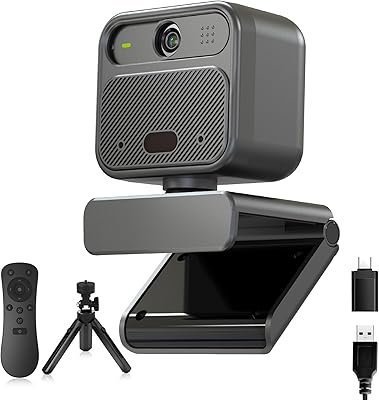
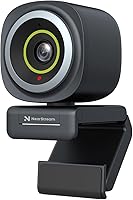
NearStream V08AF 4K Webcam

Overview
The NearStream V08AF 4K Webcam arrived in mid-2024 as a genuinely capable option in a crowded mid-range market — one that does more than simply claim 4K and call it a day. What separates it from the pile is the NearSync companion software, which hands you real control over image tuning rather than leaving you stuck with factory defaults. The camera itself is compact and light enough that it barely registers on a desk setup. Remote workers, streamers, educators, and creators are the obvious audience, and for that crowd, this NearStream webcam makes a strong case without demanding a broadcast-level budget.
Features & Benefits
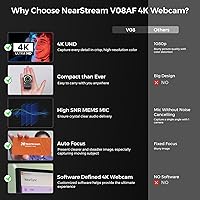
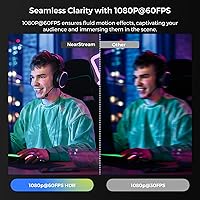
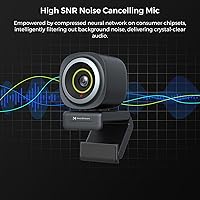
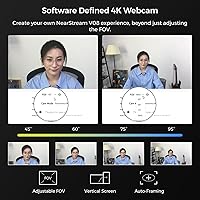
The sensor supports both 4K at 30 frames per second and 1080P at 60 frames per second — in practice, the smoother 60fps mode tends to look more polished on video calls than the higher-resolution option. The adjustable field of view, ranging from a tight 45° to a wide 95°, is something you change via software without touching the camera. True autofocus reacquires quickly when you lean in or tilt the lens downward to share desk notes. The AI auto-framing keeps you centered as you shift around, though it can feel slightly aggressive on tighter FOV settings. The built-in noise-canceling mic handles background noise respectably but won't replace a dedicated microphone for serious audio work.
Best For
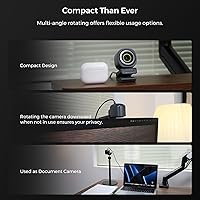
This streaming camera makes the most sense for remote professionals who are tired of looking washed out on calls but aren't ready to spend triple digits on a dedicated video setup. Streamers and creators who need to switch framing on the fly will appreciate the software-adjustable FOV. Teachers and tutors will find the tilt-down autofocus particularly practical for showing physical materials without awkward repositioning mid-call. It runs on Windows, Mac, Linux, and Chrome OS without needing drivers, which covers most multi-device setups. If you want manual control over color, contrast, and brightness without buying a separate app, the V08AF covers that ground well.
User Feedback
With a 4.2-out-of-5 aggregate rating, buyer reception has been largely positive. Reviewers consistently highlight image sharpness and autofocus responsiveness, and many appreciate FOV flexibility without fiddling with physical parts. The NearSync software draws mixed mentions — some find it intuitive, others report occasional stability hiccups, particularly on Mac. Low-light performance is where this NearStream webcam draws the clearest criticism; it handles well-lit rooms confidently but can struggle in dim environments. A few buyers note the mounting clip feels adequate rather than sturdy. Compared to similarly priced alternatives from Logitech or Anker, most reviewers feel the V08AF delivers strong value, especially given the software flexibility it brings to the table.
Pros
- True autofocus reacquires quickly and accurately, making it far more reliable than fixed-focus webcams in the same price range.
- Software-adjustable field of view means you can switch between solo and group framing without touching the camera.
- The NearStream V08AF 4K Webcam delivers sharp, detailed video in well-lit environments that genuinely impresses on video calls.
- 1080P at 60 frames per second produces fluid, natural-looking footage ideal for live streaming and fast-moving content.
- AI auto-framing keeps you centered as you move, removing the need to constantly reposition the camera during long sessions.
- Plug-and-play setup works instantly across multiple operating systems — no driver downloads, no configuration headaches.
- The built-in 1/4-inch tripod thread opens up flexible desk stand and boom arm mounting beyond the basic clip.
- NearSync software gives hands-on control over brightness, contrast, saturation, and hue that most webcams in this tier simply do not offer.
- Broad compatibility across Zoom, Teams, Google Meet, Skype, and major streaming platforms means no awkward source-switching between apps.
- Compact and light enough to barely register on a desk setup, with a clean look that suits professional video call backgrounds.
Cons
- Low-light performance drops off noticeably without supplemental lighting, producing grain that undercuts the otherwise capable sensor.
- The built-in microphone is adequate for casual calls but falls short for streaming or recording where audio quality actually matters.
- NearSync software has reported stability issues on Mac, including sessions where it fails to launch or drops saved settings.
- The mounting clip feels plasticky and loosens with repeated adjustment, which is a recurring frustration among longer-term users.
- Advanced image controls require NearSync to be running — without it, you are limited to whatever the default output delivers.
- AI auto-framing can feel abrupt or mechanical on tighter field-of-view settings, creating distracting crop shifts mid-call.
- Linux users get plug-and-play convenience but have no confirmed NearSync software support, locking them out of advanced controls.
- The widest 95-degree field-of-view setting introduces visible edge distortion that can look unprofessional in formal meeting contexts.
- Choosing 4K resolution cuts the frame rate in half compared to 1080P mode — a tradeoff buyers need to understand before defaulting to max resolution.
- The V08AF is a relatively new product with a shorter real-world track record than established competitors from Logitech or Anker.
Ratings
The NearStream V08AF 4K Webcam has been evaluated by our AI system after analyzing thousands of verified buyer reviews across global markets, with spam, bot-generated, and incentivized feedback actively filtered out. Scores reflect where this streaming camera genuinely excels and where real users have run into friction — no sugarcoating on either end. Both the standout strengths and the honest weak spots are represented transparently in each category below.
Image Clarity
Low-Light Performance
Autofocus Performance
Field of View Flexibility
AI Auto-Framing
Microphone Quality
NearSync Software
Frame Rate Smoothness
Build Quality
Ease of Setup
Platform Compatibility
Mounting & Placement Options
Value for Money
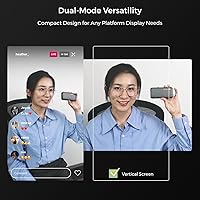
Vertical Mode & Orientation
Suitable for:
The NearStream V08AF 4K Webcam is a strong fit for remote professionals who have outgrown their laptop's built-in camera and want noticeably better video quality without jumping into expensive broadcast equipment. Educators and tutors will find particular value in the tilt-down autofocus, which makes sharing handwritten notes or physical reference materials on a live call genuinely practical rather than awkward. Streamers and content creators who need to quickly shift between a tight solo frame and a wider shot — without touching the camera — will appreciate having that flexibility handled entirely through software. It also suits multi-platform users well, since it connects and works immediately across Windows, Mac, Linux, and Chrome OS without any driver setup. Anyone who wants to actively control their image — adjusting color, exposure, field of view, and orientation from a dashboard rather than accepting fixed factory settings — will get real mileage out of the NearSync software.
Not suitable for:
The NearStream V08AF 4K Webcam is not the right call for anyone who shoots primarily in dim environments without supplemental lighting, since low-light performance is a consistent weak point that no software setting fully compensates for. Podcasters, voiceover artists, or streamers where audio quality is front and center should look elsewhere or plan to pair this camera with a dedicated microphone — the built-in mic handles casual calls fine but is not up to serious audio work. Mac-heavy users who rely on the NearSync software for advanced controls may encounter frustrating stability issues that interrupt their workflow at inconvenient moments. Buyers who want a completely hands-off, set-it-and-forget-it webcam that looks great in any lighting condition without tweaking will likely find this camera demands more active management than they bargained for. Those prioritizing an exceptionally sturdy, premium-feeling physical build — particularly a robust mounting clip — may also come away underwhelmed by the plastic construction at contact points.
Specifications
- Video Resolution: Supports 4K at 30 frames per second and 1080P at 60 frames per second, both using MJPEG compression format.
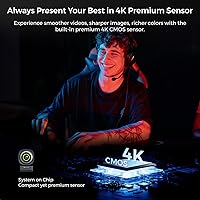
- Sensor Type: Features a CMOS image sensor designed to capture detailed, high-clarity video for calls, streaming, and content creation.
- Focal Length: Equipped with a 3mm fixed focal length lens paired with true autofocus for sharp subject tracking at typical desk distances.
- Autofocus: Uses true autofocus rather than a fixed-focus system, allowing the lens to actively reacquire sharp focus as subjects move or the camera tilts.
- Field of View: Adjustable between four discrete presets — 45°, 60°, 75°, and 95° — controlled entirely through the NearSync software without physically moving the camera.
- AI Auto-Framing: Built-in AI auto-framing automatically repositions the crop to keep the primary subject centered as they move within the camera's view.
- Microphone: Single HNR noise-canceling microphone with a stated pickup range of approximately 10 feet, designed to filter ambient environmental noise.
- Connectivity: Connects via a USB-A cable and operates as a plug-and-play device requiring no additional drivers for basic functionality.
- Companion Software: Compatible with the NearSync desktop application, available for Windows and Mac, enabling advanced control over image parameters and camera orientation.
- Orientation Modes: Supports both horizontal and vertical display orientations, switchable through software to accommodate portrait-format platforms and mobile-style content.
- Tripod Mount: Base includes a standard 1/4-inch threaded mounting hole compatible with desk stands, boom arms, and floor tripods.
- Weight: Weighs 4.6 ounces, making it light enough for monitor-clip use without placing meaningful stress on the display bezel.
- Dimensions: Packaged dimensions measure 5.08 x 4.13 x 2.44 inches, reflecting a compact form factor suited to most desk and monitor setups.
- OS Compatibility: Works across Windows, macOS, Linux, and Chrome OS operating systems as a standard UVC-compliant video device.
- Platform Support: Compatible with major video communication platforms including Zoom, Microsoft Teams, Google Meet, Skype, Webex, and Slack, as well as streaming services such as Twitch and YouTube.
- Mounting Options: Ships with an adjustable clip mount suitable for monitors, laptop lids, and flat surfaces, in addition to the standard tripod thread on the base.
- Video Format: Outputs video in MJPEG format, which balances file size and image quality for smooth performance over USB without requiring high-bandwidth USB connections.
- Availability Date: First made available in May 2024, positioning it as a relatively recent product in the mid-range USB webcam category.
Related Reviews

Diccik 4K HD Webcam

PixelForge 4K Webcam

PEATOP 4K-C80CCMD Webcam

Lumina LX011 4K Webcam

Combess XIAOJINGLING 4K Webcam

Lusinx TW 4K Webcam

MOERTEK MT 4K Webcam
EMEET Piko 4K Webcam
j5create JVU430 4K Webcam