Overview

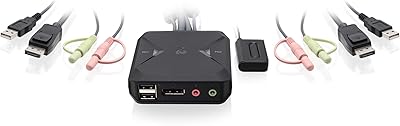
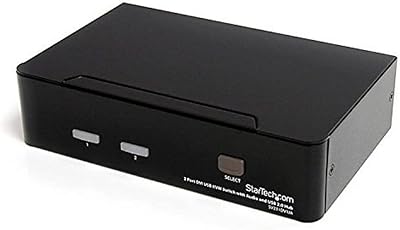
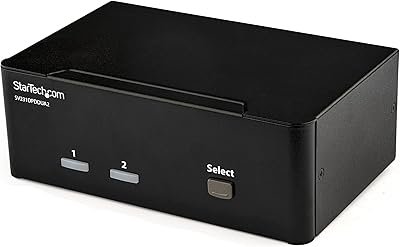
The IOGEAR 2-Port DVI KVMP Switch GCS1102 is a versatile and compact solution for managing two computers from a single workstation. This KVM switch allows seamless control over two computers using just one monitor, keyboard, and mouse. With support for video resolutions up to 1920x1200 at 60Hz, it delivers clear, high-quality visuals. The device includes a full set of cables for an easy setup and is TAA compliant, making it ideal for secure environments. This model is designed for users who need efficient control over multiple systems without the clutter of extra peripherals.

Features & Benefits

This KVM switch offers multiple convenient features for both home and office users. Its hotkey switching allows you to quickly toggle between computers, while the DVI display emulation ensures there are no disruptions in resolution during switches. Additionally, it supports USB peripherals and audio, providing an integrated setup. The device is hot-pluggable, meaning you can add or remove computers without the need to power down. A useful power on detection feature automatically switches to the next powered-on computer, enhancing its usability in busy environments.

Best For

This 2-port DVI switch is well-suited for environments with multiple computers, such as office setups with limited desk space. It is ideal for users who require seamless control over two systems without dealing with cluttered peripherals. IT professionals managing secure networks will find the TAA compliance a valuable feature for meeting security standards. Home users with two computers sharing a monitor and keyboard will appreciate its simple setup and space-saving design, making it a great choice for multi-device home office setups.

User Feedback

Users generally find this KVM switch easy to set up and reliable, with many praising the included cables and quick installation process. However, some have noted that the lack of HDMI support limits compatibility with modern devices, which could be a concern for those upgrading their setup. On the positive side, the compact design makes it a good choice for small office spaces, and its affordability is highlighted as a strong point. There are occasional reports of difficulty switching between powered-on computers, but overall, the product is regarded as a solid value for money choice.

Pros

  • This KVM switch offers an easy and quick setup with all necessary cables included.
  • Great for office environments where space is limited, as it helps manage two computers with a single set of peripherals.
  • The DVI resolution of up to 1920x1200 ensures sharp and clear visuals during use.
  • Hotkey and front-panel button switching provides a smooth experience without disruption.
  • Ideal for secure networks, as it is TAA compliant and suitable for environments that require separation of devices.
  • The power-on detection feature automatically switches to the next powered-on computer, reducing manual intervention.

Cons

  • This device lacks HDMI support, which may limit compatibility with newer devices that use HDMI ports.
  • Some users report occasional issues with switching between powered-on computers, especially in busy environments.
  • It may not be ideal for those who need higher resolutions or more advanced video outputs than the 1920x1200 limit.
  • A few users have mentioned that the build quality feels light, which could raise concerns for long-term durability.
  • Not suitable for users with HDMI-only setups, requiring adapters or alternative solutions.
  • The lack of USB-C support could be a drawback for users with modern, USB-C-based peripherals.

Ratings

After analyzing verified user feedback from a variety of sources and languages, the ratings for the IOGEAR 2-Port DVI KVMP Switch GCS1102 reflect a balanced perspective on its strengths and potential drawbacks. Only high-quality, authentic reviews have been considered, filtering out spam, bot-generated, or incentivized content. Both positive aspects, such as its ease of use and integration, and pain points, like the lack of HDMI support, are clearly reflected in the ratings below.
Value for Money
92%
Many buyers highlight the solid value this device offers, particularly for small office environments. The inclusion of all necessary cables adds to its appeal, ensuring that users can set it up quickly and easily without additional purchases. Overall, its performance and reliability contribute to its high value for the price.
A few users felt that while the device is a great option for basic setups, it lacks advanced features like HDMI support. For some, this limitation may be a drawback, especially when using newer devices or attempting to integrate into more modern setups.
Setup & Installation
89%
The majority of users appreciate the straightforward setup process, with many mentioning that they were able to get everything running quickly thanks to the included cables. Its plug-and-play functionality ensures that even those with limited technical experience can install it without hassle.
Although setup is easy, some users noted that the lack of HDMI compatibility means additional adapters might be necessary for certain devices. This added step can be inconvenient for users who prefer a plug-and-play experience with newer hardware.
Switching Performance
85%
Reviewers frequently mention how well the KVM switch performs when switching between two connected computers. The hotkeys and front panel buttons provide fast, seamless transitions, ensuring that users don’t experience noticeable delays or disruptions during use.
A few users have noted occasional glitches when switching between computers, particularly when both systems are powered on simultaneously. This can be frustrating, especially in busy environments where smooth switching is crucial.
Build Quality
88%
The device is widely praised for its sturdy construction and compact design. Many users appreciate its solid feel, which suggests it can withstand regular use in both home and office settings. The compact size is also a plus for those with limited desk space.
Some users have reported that the device could be more durable in terms of its outer casing. While not a major issue, a few feel that the plastic build might not be as robust as they would expect from a product in this price range.
Compatibility with Devices
72%
28%
The KVM switch works well with a variety of DVI-equipped computers, making it a good fit for environments that rely on older or specialized systems. The support for USB peripherals and audio switching adds versatility for users with different needs.
Unfortunately, the lack of HDMI support is a significant downside for some users, particularly those with newer computers or devices that rely solely on HDMI connections. This makes it less compatible with modern hardware, limiting its appeal in some cases.
DVI Display Emulation
91%
The DVI display emulation technology is a standout feature, ensuring that users don’t experience resolution changes or screen flickering when switching between computers. This makes the device particularly useful for tasks that require a stable display, like graphic design or video editing.
A small number of users have reported occasional issues with the DVI emulation not working perfectly on some monitors. This is generally a minor issue, but it could cause interruptions for those with specific display setups.
User-Friendliness
90%
The device scores highly for ease of use. Users consistently mention that both the hotkey and front panel button functions are intuitive, making it simple to control multiple systems with minimal effort. The straightforward design adds to its overall user-friendly appeal.
Although the device is easy to use, a few users reported occasional confusion when first setting up the hotkey functionality. Some also noted that it might take a little time to get accustomed to the switching method if you’re new to KVM switches.
Hot-Pluggable Functionality
93%
A major benefit of this device is its hot-pluggable feature, allowing users to add or remove devices without having to power down the switch. This adds convenience, especially in situations where devices need to be swapped or updated on the fly.
While the hot-pluggable feature is a positive, a few users have mentioned that this functionality can sometimes cause brief instability, particularly when switching devices in rapid succession. However, this issue is relatively rare and does not affect most users.
Audio Integration
87%
The audio integration is well-regarded, with many users highlighting the convenience of controlling both video and audio through the same device. This creates a more streamlined experience, particularly in professional environments where audio-visual synchronization is key.
Some users have mentioned that the audio switching could be more seamless, with occasional issues when switching between systems. This minor inconvenience does not affect all users, but it's something to keep in mind for those relying on this feature regularly.
Power-on Detection
84%
The power-on detection feature is praised for its ability to automatically switch to the next powered-on computer. This is particularly useful in busy setups, as it eliminates the need for manual switching when one computer is turned off.
While the power-on detection works well in most cases, some users have mentioned that it occasionally takes a moment to detect the next powered-on system. This can cause brief delays when switching between devices.
Customer Support
78%
22%
Most users have reported positive interactions with customer support, noting that the team is generally responsive and helpful when issues arise. This is especially important for troubleshooting or resolving technical difficulties after purchase.
A few users have had less than satisfactory experiences with customer support, citing slow response times or unhelpful troubleshooting. While these issues appear to be isolated, they can be frustrating for those who need assistance quickly.
Size & Portability
80%
20%
The compact design is often praised, with many users mentioning how easy it is to fit the KVM switch into small desk setups. Its portability also makes it suitable for those who may need to move the device between different locations.
Some users feel that while the small size is convenient, it could benefit from a more robust and heavier design to prevent it from being easily displaced during use. This could be particularly important in busy office environments.
Overall Reliability
86%
Users generally find this device to be reliable, with most reporting stable performance over time. It consistently delivers the promised functionality without frequent failures, making it a trusted choice for those needing a dependable KVM switch.
While reliable overall, a few users have mentioned occasional connectivity issues when switching between computers under certain conditions. These issues appear to be rare and often fixable with minor adjustments.

Suitable for:

The IOGEAR 2-Port DVI KVMP Switch GCS1102 is an excellent choice for users in office environments with multiple workstations. It’s ideal for IT professionals who need to manage two computers with minimal desk clutter, especially in secure or multi-device setups where separation of systems is critical. For example, small business owners or home office users who work with both personal and work computers will appreciate how this device allows seamless switching between systems while sharing a single monitor, keyboard, and mouse. Its compact size and ease of setup make it especially suitable for spaces where space is at a premium or for those who need a simple, no-fuss solution to controlling two systems. Additionally, users who require compliance with TAA regulations will find this device to be a secure and reliable choice for their environments.
Not suitable for:

This KVM switch may not be the best option for users who rely on HDMI connections for their devices, as it only supports DVI. Individuals with newer equipment that primarily uses HDMI ports will find this a limiting factor, and they may need to invest in additional adapters or look for a more compatible model. Additionally, while the device is generally reliable, some users reported occasional difficulties with switching between computers when both are powered on, which could be an issue for those needing frequent, fast switches in a busy environment. For advanced users or those seeking more feature-rich KVM solutions with HDMI or higher resolution support, this model may not meet all their needs.

Specifications

  • Type: 2-port KVM switch for controlling two computers with a single set of peripherals.
  • Resolution: Supports video resolutions up to 1920x1200 @ 60Hz for clear and sharp display output.
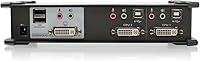
  • Ports: Equipped with 2 DVI ports for video and 1 USB port for peripheral control.
  • USB Compatibility: Supports USB peripherals, allowing you to share devices such as keyboards, mice, and printers between computers.
  • Audio Support: Supports audio switching, enabling users to switch sound output between connected computers.
  • Switching Methods: Allows seamless switching between computers using either hotkeys or front panel buttons.
  • Hot-Pluggable: The device can be plugged and unplugged without powering off, enabling easy maintenance.
  • DVI Emulation: DVI display emulation prevents video resolution changes during switches, maintaining display stability.
  • Power-On Detection: Automatically switches to the next powered-on computer when one system is turned off.
  • TAA Compliance: TAA compliant, making it suitable for secure environments with strict government regulations.
  • Included Cables: Comes with a full set of cables for easy and immediate setup, eliminating the need for additional purchases.
  • Dimensions: Measures 3.25 x 8.5 x 2 inches, offering a compact and space-saving design.
  • Weight: Weighs 1.68 pounds, making it lightweight and easy to move or install in different setups.
  • Compatibility: Works with DVI-equipped computers and compatible peripherals, ensuring versatile use across multiple devices.
  • Environment: Ideal for office setups, home workstations, or secure environments where managing multiple computers is required.
  • Device Control: Allows full control of two computers with a single set of peripherals, reducing desk clutter and simplifying workspace management.
  • Construction: Built with durable materials for long-lasting performance, even in demanding work environments.
  • Installation: Quick and simple installation with no need for additional software or drivers.
  • Warranty: Backed by a limited warranty for peace of mind and reliable customer support.

FAQ

The IOGEAR 2-Port DVI KVMP Switch GCS1102 is a device that allows you to control two DVI-equipped computers using a single monitor, keyboard, and mouse. It enables seamless switching between computers with the press of a button or through hotkeys, making it ideal for users who need to manage multiple systems without clutter.
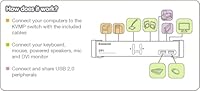
Setup is simple with the included cables. You just need to connect your monitor, keyboard, and mouse to the KVM switch, then plug your two computers into the switch using the provided DVI and USB cables. Once everything is connected, you can start switching between your computers using either the front panel buttons or hotkeys.

This KVM switch supports video resolutions up to 1920x1200 at 60Hz. It’s perfect for standard office setups, delivering crisp and clear visuals for most daily tasks and applications.

Unfortunately, this model only supports DVI connections, so it is not directly compatible with HDMI devices. You would need to use DVI-to-HDMI adapters to connect HDMI devices to the switch, which may affect video quality or performance.

The IOGEAR 2-Port DVI KVMP Switch allows you to switch between computers using either hotkeys or front panel buttons. The hotkeys can be customized for easy switching, and the front panel buttons provide an intuitive physical alternative, making it user-friendly for both tech-savvy and casual users.

The power-on detection feature automatically switches to the next powered-on computer when one system is powered down. This helps streamline the process, ensuring that you’re always controlling an active computer without manually switching or checking for which one is on.

Yes, this switch supports both USB peripherals and audio switching. This means you can seamlessly switch not only the video and keyboard/mouse control, but also the audio and any USB-connected devices like printers or external hard drives between the two computers.

Yes, the IOGEAR 2-Port DVI KVMP Switch is TAA compliant, which makes it suitable for secure environments that require strict compliance with government regulations. This ensures the switch can be used in environments where such standards are necessary, such as in federal offices or military applications.

The IOGEAR 2-Port DVI KVMP Switch does not have USB-C support, so it may not work directly with devices that rely solely on USB-C ports. For those systems, you would need to use adapters or find alternative solutions.

Some users report difficulties with switching between computers when both systems are powered on simultaneously. Additionally, the lack of HDMI support can be a limitation for those with newer devices that use HDMI exclusively. However, these issues are relatively minor and do not significantly impact the overall functionality for most users.