Overview

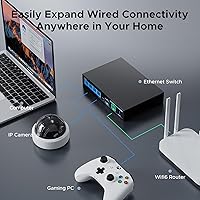
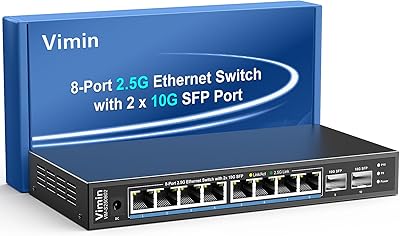
The TEROW 4-Port 2.5G 2-Port SFP+ Network Switch is one of the more practical ways to step into multi-gigabit networking without spending a lot. You get four 2.5GbE RJ45 ports alongside two 10G SFP+ uplink ports — a combination that is genuinely hard to find at this price point. There is no software to install, no web interface to configure, and no login screen to navigate. Plug in power, connect your cables, and you are running. The fanless metal chassis keeps things completely silent, which matters if this lives on your desk or in a living room cabinet. Just know going in: what you gain in simplicity, you give up in control.
Features & Benefits

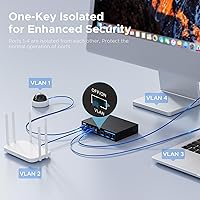
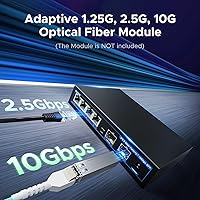
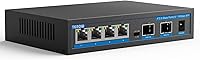
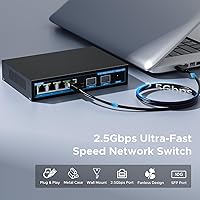
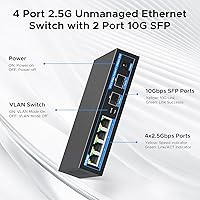
The four RJ45 ports handle everything from standard gigabit devices up to full 2.5Gbps connections, auto-negotiating speed without any manual configuration. The two SFP+ slots are where this switch punches above its weight — connect a fiber run to your router or a 10G-capable NAS and you have got a proper high-speed uplink without the cost of a fully managed unit. There is a one-key VLAN mode that isolates the RJ45 ports so they only talk through the SFP+ uplinks, useful for basic segmentation in a small office setup. The total switching capacity is substantial enough that all ports can run at full speed simultaneously without throttling each other. And because the housing is all metal with no internal fan, heat just dissipates passively.

Best For

This 2.5G switch makes the most sense for people who already have some multi-gig infrastructure in place — or are actively building toward it. If you are running a Wi-Fi 6 access point that supports 2.5G backhaul, this gives you a clean, affordable edge switch to tie it in. NAS users transferring large files across a local network will notice a real difference moving up from gigabit. It also fits well in quiet small office or retail settings where fan noise would be disruptive. If you need per-port management, traffic shaping, or complex VLAN rules, a managed switch is the right call. But for straightforward multi-gig connectivity without the added complexity, this hits the mark.

User Feedback

Across nearly 400 ratings, the TEROW switch holds a strong 4.4-star average, and the feedback paints a pretty consistent picture. Easy setup and stable link speeds come up repeatedly — buyers appreciate that it works straight out of the box, with no dropped connections or speed inconsistencies after extended use. Build quality gets consistent praise for something in this price range. On the critical side, some users flag limited VLAN flexibility; the one-key mode is a hardware toggle, not a true management feature. A handful of reviewers also report compatibility hiccups with certain third-party SFP+ modules or DAC cables, so confirming module support beforehand is worth the effort. Overall, long-term reliability looks solid based on the volume of positive follow-up comments.

Pros

  • Combines 2.5G copper ports with 10G SFP+ uplinks at a price point very few competitors match.
  • Plug-and-play setup means most users are up and running in under two minutes with no configuration required.
  • The fanless metal chassis runs completely silently — a genuine advantage for desk or living room deployments.
  • Non-blocking switching capacity means all ports can operate at full speed simultaneously without throttling.
  • Solid build quality for the price tier; the all-metal housing feels more robust than most plastic-bodied alternatives.
  • Fully compatible with Wi-Fi 6 and Wi-Fi 6E access points that support 2.5G wired backhaul connections.
  • Backward compatible with standard gigabit and fast ethernet devices, so existing equipment does not need replacing.
  • Long-term reliability feedback from buyers running the switch continuously for a year or more trends positively.
  • Compact footprint fits easily on a desk or media shelf without requiring rack mounting or extra hardware.

Cons

  • No web interface, CLI, or app — once it is running, there is no way to monitor or adjust anything.
  • The one-key VLAN mode is a single hardware toggle, not true per-port VLAN management.
  • Third-party SFP+ modules and some DAC cables do not always negotiate correctly, requiring trial and error.
  • The chassis runs noticeably warm under sustained load, which matters in poorly ventilated spaces.
  • No QoS controls mean the switch cannot prioritize latency-sensitive traffic like gaming or video calls.
  • The included power cable is on the short side, limiting placement flexibility near the outlet.
  • TEROW lacks the established brand track record of mature networking vendors, which affects long-term confidence.
  • No IGMP snooping support, which can create unnecessary multicast traffic across all ports in some setups.
  • Customer support documentation is thin, leaving buyers troubleshooting edge cases on their own.

Ratings

The TEROW 4-Port 2.5G 2-Port SFP+ Network Switch has been scored by our AI system after combing through hundreds of verified buyer reviews from global marketplaces, actively filtering out incentivized, bot-generated, and duplicate submissions. The scores below reflect where real users consistently agree — and where they push back — giving you an honest picture before you buy. Both the standout strengths and the genuine friction points are factored in, so you know exactly what you are getting.
Value for Money
93%
For a switch offering multi-gigabit RJ45 ports plus 10G SFP+ uplinks at this price tier, buyers repeatedly describe it as one of the most affordable entry points into real multi-gig networking. Home lab users especially appreciate getting SFP+ capability without stepping up to enterprise-priced hardware.
A small segment of buyers feel the value calculation shifts if you need any management features, since spending slightly more unlocks entry-level managed switches with far greater control. For purely unmanaged use cases though, the value argument holds up well.
Ease of Setup
96%
Users across all technical backgrounds consistently report that setup takes under two minutes — connect power, plug in cables, done. There is no driver to install, no app to pair, and no login portal to navigate, which makes it genuinely stress-free even for less technically confident buyers.
The flip side of zero configuration is zero flexibility. Users who later want to tweak anything — port priorities, traffic monitoring, or VLAN assignments beyond the basic hardware toggle — have no interface to do so, which can feel limiting as network needs grow.
Port Performance & Link Stability
88%
The RJ45 ports reliably negotiate 2.5Gbps on Cat5e and above cabling, and buyers running NAS transfers or large file moves between workstations consistently see speeds that reflect the jump from standard gigabit. Link stability over weeks and months of continuous use gets positive marks across the review base.
A handful of users report that certain older cables or marginal cabling runs cause the ports to fall back to gigabit speeds unexpectedly. This is not a switch defect per se, but it catches some buyers off guard when they do not see the full 2.5G throughput immediately.
SFP+ Port Compatibility
71%
29%
When paired with well-known SFP+ modules and standard DAC cables from reputable brands, the uplink ports perform reliably at 10G and integrate cleanly with routers and NAS units that share the same uplink standard. Users connecting to Synology or QNAP NAS hardware with matching modules report no issues.
Compatibility with third-party or off-brand SFP+ modules is the most frequently cited pain point in the review base. Some DAC cables also fail to negotiate properly, requiring buyers to source specific modules — an extra cost and hassle that is not obvious from the product listing alone.
Build Quality & Materials
84%
The all-metal housing feels noticeably more substantial than plastic-bodied alternatives at this price point. Buyers who have owned cheaper switches remark that the TEROW unit feels dense and well-assembled, and the finish holds up without scratching or warping even when tucked into a warm cabinet.
The unit runs warm to the touch under sustained load, and while passive cooling handles it adequately in most environments, buyers in poorly ventilated spots report the chassis getting quite hot. No thermal failures have been widely reported, but placement matters more than it would with a fan-cooled unit.
Noise Level
97%
Completely silent operation is one of the most praised qualities across the review base. Users who placed this in a home office, bedroom media cabinet, or living room setup specifically call out the fanless design as a deciding factor, and none report any audible coil whine or electrical noise either.
There is genuinely little to criticize here. The only theoretical concern is that fanless passive cooling puts a ceiling on how aggressively the hardware can be pushed in high-ambient-temperature environments, but for typical home and small office use this is not a real-world issue.
VLAN Functionality
52%
48%
The one-key VLAN hardware toggle is useful for a specific scenario: isolating all RJ45 devices so they can only communicate through the SFP+ uplinks rather than directly with each other. For small retail setups or basic guest network segmentation, this covers the need without any configuration.
Buyers who expected something resembling true VLAN management come away disappointed. There is no per-port VLAN assignment, no tagging support, and no way to create multiple isolated segments. It is a single hardware mode, not a management feature, and the listing does not always make that distinction clear enough.
Switching Throughput
89%
Users running multiple simultaneous high-bandwidth streams — NAS backup while gaming and streaming, for instance — report no noticeable congestion or slowdown across active ports. The non-blocking architecture means all ports can push near-full speed at the same time, which is a genuine advantage over cheaper switches that share bandwidth.
There is no way to verify or monitor internal throughput without traffic analysis tools on connected devices, so buyers have to take real-world performance as the benchmark. The hardware performs well in practice, but the lack of diagnostics means you cannot isolate the switch as a bottleneck if problems arise elsewhere.
Wi-Fi 6 AP Backhaul Suitability
86%
Home users deploying Wi-Fi 6 or Wi-Fi 6E access points with 2.5G uplink ports find this switch pairs cleanly, giving each AP a dedicated 2.5G wired backhaul connection without needing to step up to a pricier managed switch. It is a genuinely practical fit for multi-AP home networks.
The lack of IGMP snooping or QoS controls means heavy multicast traffic from multiple APs could theoretically create some inefficiency on the switch fabric. In practice most home deployments do not hit this ceiling, but enterprise-style AP management setups will feel the limitation.
Long-Term Reliability
81%
19%
Given the switch only became available in late 2023, the long-term data pool is still building, but buyers who have run it continuously for 12 or more months report stable, uninterrupted operation with no port failures or spontaneous reboots. That track record across a meaningful review volume is encouraging.
TEROW is a relatively young brand without the decades of field data that established networking names carry. Buyers who factor brand longevity and warranty confidence into purchase decisions may feel less assured, even if the current reliability data trends positively.
Physical Footprint & Form Factor
91%
The compact desktop dimensions make it easy to tuck next to a NAS tower, behind a monitor, or on a media shelf without dominating the space. Buyers appreciate that it sits flat and stable without needing rack mounting, and the understated black metal finish blends into most setups without drawing attention.
There are no mounting slots or VESA-compatible options for users who want to affix it to a desk underside or wall bracket. Buyers who prefer a cleaner, hidden installation have to improvise with adhesive mounts or cable management trays.
Documentation & Support
58%
42%
For a plug-and-play device, the documentation requirements are genuinely minimal, and most buyers never consult the included materials at all. The basic connection diagram covers the only real decision a user needs to make — whether to enable the VLAN mode or not.
Users who run into SFP+ module compatibility issues find the documentation nearly useless, and TEROW's direct customer support gets mixed reviews for response speed and technical depth. Buyers troubleshooting edge cases often rely on community forums rather than official channels.
Packaging & Included Accessories
67%
33%
The switch arrives well-protected and undamaged in the vast majority of reported cases. The inclusion of a power adapter means buyers can get running immediately without sourcing a separate supply, which is a small but appreciated detail at this price tier.
No SFP+ modules are included, which is standard for the category but still catches some less experienced buyers off guard. The power cable length is on the short side according to several reviewers, which can limit placement flexibility depending on where the nearest outlet sits.
Gaming & Low-Latency Use
77%
23%
For wired gaming connections, the switch introduces negligible latency and handles the bandwidth demands of modern online games and 4K game streaming without any perceptible stuttering. Console and PC users who replaced a basic gigabit switch with this unit report a noticeably smoother local network experience when also running a NAS or media server.
The absence of QoS prioritization means the switch cannot intelligently favor gaming traffic over a heavy file transfer happening simultaneously. In households with multiple heavy users, the network management has to happen upstream at the router level rather than at this switch.

Suitable for:

The TEROW 4-Port 2.5G 2-Port SFP+ Network Switch is a genuinely strong fit for anyone who has already committed to multi-gigabit networking but does not want to spend heavily on managed hardware to get there. Home lab users upgrading from a basic gigabit setup will find the combination of 2.5G copper ports and 10G SFP+ uplinks hits a practical sweet spot — enough bandwidth headroom for a NAS, a couple of workstations, and a Wi-Fi 6 access point all running simultaneously. NAS enthusiasts in particular will notice a meaningful real-world improvement when moving large media libraries or running frequent backups across the local network. Small offices and retail environments benefit from the fanless metal chassis, which runs silently and requires zero ongoing maintenance or configuration. If your router or core switch already has a 10G SFP+ port available, this switch slots in cleanly as an affordable edge device that does not complicate your setup.
Not suitable for:

Anyone who needs real network control should look elsewhere before considering the TEROW 4-Port 2.5G 2-Port SFP+ Network Switch. The one-key VLAN toggle is a hardware mode, not a management feature — you cannot assign ports to specific VLANs, apply traffic priorities, or monitor bandwidth usage in any way. IT administrators, even in very small businesses, who need per-port statistics, SNMP monitoring, or link aggregation will find this switch frustrating to work with long-term. Users planning to deploy third-party or budget SFP+ modules should do their homework first, since module compatibility is the most commonly reported friction point and there is no official compatibility list provided. If your setup involves more than a handful of devices, or if you anticipate needing to segment traffic meaningfully as your network grows, spending more on an entry-level managed switch is a smarter long-term investment than trying to work around the limitations here.

Specifications

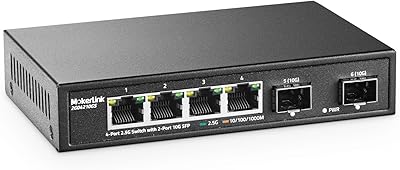
  • RJ45 Ports: Equipped with four 2.5GbE RJ45 ports that auto-negotiate across 10Mbps, 100Mbps, 1Gbps, and 2.5Gbps depending on the connected device.
  • SFP+ Ports: Includes two 10G SFP+ slots designed for fiber modules or DAC cables to connect high-speed uplinks to a router, NAS, or core switch.
  • Switching Capacity: Total non-blocking switching fabric runs at 60Gbps, allowing all ports to operate simultaneously at full rated speed without shared bandwidth bottlenecks.
  • VLAN Support: Features a single one-key hardware VLAN mode that isolates RJ45 ports so they communicate exclusively through the SFP+ uplinks rather than directly with each other.
  • Network Standard: Fully compliant with IEEE 802.3bz for 2.5G Base-T operation, ensuring interoperability with modern multi-gig network interface cards, access points, and NAS devices.
  • Auto MDI/MDIX: All RJ45 ports support automatic MDI/MDIX crossover detection, eliminating the need for crossover cables regardless of which devices are connected.
  • Chassis Material: The outer enclosure is constructed entirely from metal, providing structural rigidity, passive heat dissipation, and resistance to physical wear over time.
  • Cooling System: Uses fully passive fanless cooling with no moving parts, allowing silent operation in noise-sensitive environments such as home offices, bedrooms, and living rooms.
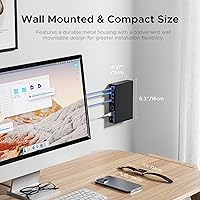
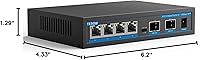
  • Dimensions: The unit measures 6.2″ in length, 4.33″ in width, and 1.29″ in height, making it compact enough for desk or shelf placement without a rack.
  • Weight: The switch weighs approximately 0.64 kg (1.41 lbs), keeping it light enough to reposition easily while still feeling solid and well-built in hand.
  • Maximum Power: Rated at a maximum draw of 120W under full operational load across all active ports and uplinks.
  • Interface Types: Supports two distinct physical interface standards: RJ45 copper for standard Ethernet cabling and SFP+ for fiber optic modules or direct-attach copper assemblies.
  • Setup Method: Operates as an unmanaged switch requiring no software installation, web interface login, or configuration of any kind — connection is sufficient to begin operation.
  • Speed Compatibility: Backward compatible with legacy 10Mbps and 100Mbps devices, ensuring the switch works alongside older hardware without requiring a full network upgrade.
  • Brand & Origin: Manufactured and sold under the TEROW brand, with this model first made available to consumers in September 2023.
  • Form Factor: Designed as a desktop unit intended for direct surface placement rather than rack or wall mounting, with no built-in mounting brackets included.
  • Included Items: The package includes the switch unit and a power adapter; no SFP+ modules or Ethernet cables are included in the box.
  • Color & Finish: Available in a matte black metal finish that blends neutrally into most desk, cabinet, or equipment shelf environments.

Related Reviews

MokerLink 4-Port 2.5G 10G SFP Network Switch
82%
91%
Value for Money
86%
Build Quality
93%
Ease of Setup
97%
Noise Level
67%
Thermal Performance
More
ienRon 6-Port 2.5Gb PoE Switch with 2-Port 10Gb SFP+
85%
86%
Performance
91%
Ease of Setup
88%
PoE Power Delivery
84%
Build Quality
93%
Fanless Operation
More
VIMIN 6-Port 2.5G Unmanaged Network Switch
83%
88%
Throughput Performance
84%
Build Quality
93%
Setup & Ease of Use
67%
SFP+ Port Usability
96%
Fanless Noise Level
More
NICGIGA S25-0801P 8-Port 2.5G PoE Switch
79%
88%
Network Performance
79%
PoE Reliability
84%
Build Quality
76%
Thermal Management
93%
Ease of Setup
More
ienRon 9-Port 2.5G 10G SFP Ethernet Switch
82%
88%
Throughput Performance
93%
Ease of Setup
82%
Build Quality
96%
Fanless Noise Level
77%
10G SFP+ Uplink Flexibility
More
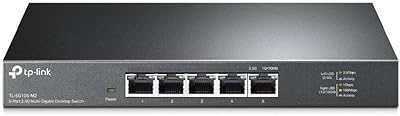
TP-Link TL-SG105-M2 5-Port 2.5G Unmanaged Switch
82%
91%
Throughput Performance
96%
Ease of Setup
88%
Build Quality
71%
Thermal Management
63%
Port Count & Expandability
More
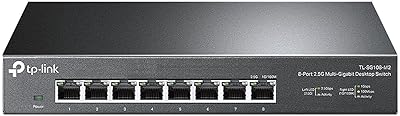
TP-Link TL-SG108-M2 8-Port 2.5G Multi-Gigabit Network Switch
89%
93%
Ease of Setup
89%
Network Performance
91%
Build Quality
96%
Noise Level (Fanless Design)
87%
Compatibility with Cat5e Cables
More
VIMIN 10-Port 2.5G Unmanaged Switch
79%
96%
Ease of Setup
89%
Port Performance
84%
Build Quality
67%
Thermal Management
71%
SFP Uplink Usability
More
BrosTrend 8-Port 2.5G Unmanaged Switch
83%
93%
Port Speed Consistency
96%
Ease of Setup
61%
Build Quality
74%
Thermal Performance
91%
Value for Money
More
Goalake 8-Port 2.5G Ethernet Switch
80%
91%
Port Count & Configuration
88%
Throughput & Switching Performance
93%
Ease of Setup
79%
Build Quality & Materials
96%
Fanless & Noise Level
More

FAQ

No, there is nothing to install and no account required. The TEROW 4-Port 2.5G 2-Port SFP+ Network Switch is fully unmanaged, meaning you plug in the power adapter, connect your devices with Ethernet cables, and it starts working immediately. There is no app, no web interface, and no login screen involved at any point.
Yes, Cat5e cabling supports 2.5G speeds over typical home and office cable run lengths, so you should not need to rewire anything in most setups. Cat6 and Cat6a will also work without any issues. The main variable is cable run length — very long runs on older or lower-quality Cat5e may cause the port to fall back to gigabit, but standard indoor runs are generally fine.

The switch works with standard 10G SFP+ modules including common SR and LR fiber optic transceivers, as well as 10G DAC (direct attach copper) cables for short-distance connections. Modules from well-known brands tend to negotiate reliably, but compatibility with budget or off-brand modules is inconsistent based on buyer reports. If you already own specific modules, it is worth checking community forums to confirm compatibility before purchasing.

Absolutely. If your Wi-Fi 6 or Wi-Fi 6E access point has a 2.5G Ethernet port — which most current-generation APs do — this switch will connect to it at full 2.5G speed. This is actually one of the most popular use cases for this switch, since it gives each AP a dedicated 2.5G backhaul connection without needing an expensive managed switch to do it.

The VLAN mode is a simple hardware toggle that changes how the ports communicate with each other. When enabled, the four RJ45 ports can only exchange traffic through the SFP+ uplinks rather than directly between themselves. This is useful in scenarios like a small office where you want connected devices to access a central server or the internet but not communicate with each other directly. Most home users will not need it and can simply leave it off.

Yes, noticeably. If your NAS has a 2.5G or 10G network port and your workstation has a 2.5G network card, this switch removes the gigabit bottleneck that limits transfers to around 125MB per second. Depending on your NAS drives and setup, you could see transfer rates two to two-and-a-half times faster than what a standard gigabit switch would allow.

The chassis does run warm under sustained load since there is no fan to actively move heat away. In a well-ventilated spot — on an open desk or shelf with some airflow around it — this is not a problem and no widespread overheating failures have been reported by buyers. If you plan to put it inside an enclosed cabinet or stack other equipment directly on top of it, make sure there is at least some passive airflow around the unit.

No, and this is worth being clear about before buying. The switch is completely unmanaged, which means there is no web interface, no SNMP support, no CLI, and no app. You cannot see link speeds, check error counts, monitor bandwidth usage, or change any settings remotely. If any of those capabilities matter to your setup, you will need a managed switch instead.

It works well in small business settings where the priority is reliable, low-maintenance multi-gig connectivity rather than network management. A quiet retail space, small studio, or boutique office with a handful of workstations and a NAS would be a practical fit. Businesses that need traffic shaping, port monitoring, or anything beyond basic plug-and-play connectivity will quickly feel the limitations of an unmanaged design.

Based on the broad pool of buyer reviews, long-term reliability trends positively. Users who have run the switch continuously for a year or more generally report stable link speeds with no spontaneous reboots or port failures. That said, TEROW is a relatively new brand without decades of field data behind it, so buyers who prioritize a proven long-term track record may prefer an established networking brand even if the cost is higher.