Overview

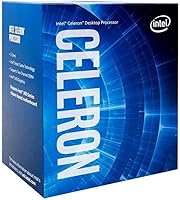
The Intel Celeron G5900 Desktop Processor sits at the bottom of Intel's 10th-generation Comet Lake desktop lineup — and that's not an insult. It's built for buyers who need a dependable, no-frills processor for light daily computing, not enthusiasts chasing benchmarks. The LGA1200 socket ties it to Intel's 400-series boards, which are widely available and affordable, but it's worth knowing this platform doesn't extend beyond 10th and 11th Gen chips, so upgrade headroom is limited. Released in 2020, this Celeron chip is getting long in the tooth, but for the right buyer at the right price, it still makes practical sense today.
Features & Benefits

Running two cores at a steady 3.4 GHz, this budget desktop processor isn't trying to compete with mid-range chips — it just needs to handle email, web browsing, spreadsheets, and video playback reliably. At 58 watts TDP, it runs cool enough to fit in a mini-ITX case or a compact office tower without worrying about heat. The Intel UHD Graphics 610 built in means you don't need a separate graphics card for standard display output — useful for builds where budget is tight. It also supports Intel Optane Memory, which can noticeably speed up a slow hard drive. A bundled cooler is included, trimming one more line item off the build cost.

Best For

This Celeron chip fits a pretty specific profile, and knowing that upfront saves frustration. It's a solid pick for home office desktops where the daily workload is email, video calls, and documents — nothing that taxes the processor. It also works well as a media center PC, handling Netflix, YouTube, and local video playback without breaking a sweat. Budget builders looking for an always-on utility box or lightweight NAS will appreciate its low power draw. If your existing LGA1200 board lost its processor, the G5900 is a practical swap without spending much. Just don't expect it to run games or handle anything compute-intensive.

User Feedback

With a 4.3-star average across 150 ratings, most buyers are satisfied — particularly those who went in with realistic expectations. People consistently mention reliability and trouble-free installation on H410 and B460 boards, with no compatibility headaches reported. The heat output earns frequent praise too, with several users noting the chip barely gets warm under typical loads. The criticism that does show up is predictable: once you have more than a handful of browser tabs open alongside another task, you start feeling the two-thread ceiling. A few buyers also note that spending a bit more on a Pentium Gold G6400 gets you hyperthreading — a legitimate trade-off worth considering.

Pros

  • Runs cool and quiet under typical loads, making it ideal for compact or fanless-style builds.
  • The included stock cooler saves budget builders from an extra purchase right out of the box.
  • Integrated UHD Graphics 610 outputs a clean display signal without requiring a dedicated GPU.
  • At 58 watts TDP, electricity costs for always-on machines stay genuinely low over time.
  • Compatible with widely available and affordable H410 and B460 motherboards.
  • Intel Optane Memory support can meaningfully accelerate an HDD-based system on a tight storage budget.
  • Installation is straightforward — users consistently report no compatibility surprises with supported boards.
  • Holds a solid 4.3-star average, reflecting real satisfaction among buyers who matched it to appropriate workloads.
  • A dependable choice for replacing a failed CPU in an existing LGA1200 system without a full rebuild.

Cons

  • Only two threads total means multitasking headroom runs out faster than most users expect.
  • No hyperthreading puts this Celeron chip at a disadvantage even compared to some older budget competitors.
  • The LGA1200 platform is a dead end — no upgrade path exists without replacing the motherboard too.
  • Integrated graphics are purely functional; anything beyond basic display output will disappoint.
  • The G5900 launched in 2020, so buyers are investing in aging silicon with no longevity runway.
  • Spending just a bit more on a Pentium Gold G6400 unlocks hyperthreading and a noticeably snappier feel.
  • Performance under simultaneous workloads — video call plus browser plus background tasks — can feel sluggish.
  • Not well-suited for households where computing needs might grow or shift within the next year or two.

Ratings

Our scores for the Intel Celeron G5900 Desktop Processor are generated by AI after systematically analyzing verified buyer reviews from across global markets, with spam, incentivized feedback, and bot-generated content actively filtered out before any category is scored. The result is a transparent, category-by-category breakdown that captures both what real users genuinely value about this chip and the limitations that surface repeatedly in honest feedback. No score has been softened to flatter the product — if a category falls short, the number reflects it.
Value for Money
71%
29%
For buyers with truly minimal workloads — a grandparent's web browsing machine, a corporate reception desk PC, or a dedicated document terminal — this Celeron chip delivers functional performance at a low entry cost. The bundled cooler removes one line item from the build budget, which genuinely matters at this price tier.
The value equation gets shaky when you compare it directly to slightly pricier alternatives like the Pentium Gold G6400, which offers hyperthreading for a modest premium. Buyers who stretched their budget just a little consistently reported feeling like they made a smarter long-term investment.
Raw Performance
52%
48%
At a locked 3.4 GHz, the G5900 handles single-threaded tasks with decent reliability — typing documents, loading web pages, or running a single application at a time feels acceptably smooth. Buyers who genuinely only need one thing running at once often reported being satisfied with the chip's speed in that limited context.
The moment you push this budget desktop processor beyond one active task, performance degrades noticeably. Running a video call while a browser update downloads in the background is enough to make the system feel sluggish, and more demanding single-threaded applications like photo editors also expose the processor's ceiling quickly.
Multitasking Capability
43%
57%
For genuinely single-task workflows — a dedicated point-of-sale terminal, a kiosk machine, or a document-only workstation — the G5900 handles one job at a time without visible strain. In tightly controlled environments, the two-thread limit rarely becomes an issue because the software stack never demands more than one active process simultaneously.
Two cores and two threads is simply not enough for any realistic multitasking scenario in 2024. Opening a video conference while managing email and keeping a browser open causes the system to visibly lag — an experience multiple buyers described as frustrating even by entry-level expectations. This is the chip's most significant real-world limitation.
Everyday Computing
74%
26%
For a household computer used mainly for reading articles, watching YouTube, writing emails, and occasional document editing, this budget desktop processor performs capably and without drama. Buyers who matched it to these specific use cases consistently reported a smooth, lag-free experience in their day-to-day routine.
Step outside those boundaries — open too many browser tabs, launch a software update in the background, or try running two applications simultaneously — and the experience starts to feel underpowered for what many consider basic modern computing. The chip's age also means newer browser engines and web applications increasingly stress its modest thread count.
Energy Efficiency
91%
For always-on machines like home servers, NAS boxes, or utility PCs that run 24 hours a day, the G5900's 58W power ceiling translates into genuinely low electricity costs over a full year of operation. Users building media centers or low-traffic home servers praised this efficiency as one of the chip's most compelling real-world advantages.
While the absolute power consumption is low, the performance-per-watt ratio is not exceptional compared to more modern architectures that deliver significantly more computing output at similar or lower energy levels. Buyers looking to maximize efficiency alongside meaningful performance may find newer budget options from both Intel and AMD more attractive.
Thermal Management
88%
Under normal office or light media workloads, this Celeron chip barely generates noticeable heat — the 58W TDP keeps operating temperatures low, which users in compact mini-ITX cases particularly appreciated. Several reviewers noted their system fans rarely spun up audibly during typical daily use, even over extended sessions.
The stock cooler, while adequate, is not exceptional — sustained loads push temperatures higher and the fan becomes audible in a quiet room. In very poorly ventilated cases temperatures remain manageable, but buyers should know the bundled cooler's heatsink is modest by design and offers no thermal headroom for anything strenuous.
Noise & Acoustics
82%
18%
Under everyday loads like web browsing, email, and video streaming, the bundled cooler runs at very low RPM and is virtually inaudible from a normal desk distance. Users building home office machines or living room media centers praised the near-silent operation during typical use, contributing to an unobtrusive daily experience.
Under any sustained workload that actually taxes the processor, the stock fan spins up to a speed that becomes clearly audible in a quiet room. The cooler is not engineered for silence — it simply happens to be quiet when the chip is barely working, which is most of the time for this target audience.
Stability & Reliability
86%
Long-term stability is one area where this Celeron chip genuinely earns its stripes. Buyers using it in always-on office machines, home servers, and media centers repeatedly mentioned months of continuous operation without crashes, thermal throttling, or system instability, which reflects Intel's manufacturing consistency at this tier.
A handful of verified buyers noted occasional instability on early-revision H410 boards that needed BIOS updates to run correctly. These cases appear board-specific rather than a chip defect, but they are worth flagging for budget builders who may purchase older board stock without checking the revision number.
Installation Experience
89%
Across a wide range of user reviews, the installation process drew consistent praise — the LGA1200 socket is well-documented, the cooler mounts cleanly, and the chip is recognized immediately by compatible 400-series boards on first boot. First-time builders specifically called out how painless the setup was compared to their expectations.
A small subset of users encountered BIOS update requirements on older board revisions before the chip was correctly recognized, creating unexpected hurdles for less experienced builders. This is a platform-level limitation rather than a chip fault, but it can still add friction and confusion during initial setup for inexperienced buyers.
Compatibility & Platform
76%
24%
The LGA1200 ecosystem is well-supported by a broad range of H410 and B460 boards from major brands, all available at low cost and easy to source. Real buyers reported clean, hassle-free compatibility between the G5900 and their chosen boards, with minimal BIOS complications on current board revisions.
The platform ceiling is a legitimate concern — LGA1200 supports only 10th and 11th-generation Intel desktop processors, and Intel has already moved on to newer sockets. Buyers investing in this platform today are building on architecture that has no forward upgrade path, which limits the long-term flexibility of the entire system.
Integrated Graphics
57%
43%
For the target audience of this chip — office PC users, basic media playback setups, and thin-client desktops — the UHD Graphics 610 does exactly what it needs to: drives a monitor, renders a desktop environment, and plays back standard video without requiring a dedicated GPU purchase, saving meaningful money at this build tier.
Beyond basic display duties, the UHD 610 struggles — light gaming, 4K streaming at high bitrates, and any GPU-accelerated task quickly expose its limits. Competing chips in a similar price range, including Intel's own Pentium Gold lineup, offer modestly better integrated graphical performance that is noticeably felt in media-heavy use.
Future-Proofing
38%
62%
If computing needs are genuinely static — a dedicated office machine, a digital signage display, or a fixed-purpose utility PC — the G5900 will serve that single role reliably for years without needing an upgrade. Buyers in truly stable, low-demand environments reported no frustration with the chip's longevity within its defined scope.
From a platform standpoint, this chip is a near-dead end. LGA1200 has no support for 12th-generation or newer processors, the Celeron brand is being phased out by Intel, and modern software is increasingly multi-threaded in ways that widen the performance gap over time. Buyers expecting to grow into the machine will be disappointed.
Out-of-Box Experience
83%
The retail package is complete and ready to go — the chip, cooler, and basic documentation are all included, meaning a first-time builder can be up and running without unexpected trips back to the store. Buyers consistently praised how uncomplicated the unboxing and initial setup experience felt compared to more complex hardware purchases.
The package is entirely functional but nothing more — documentation is minimal and the included guidance assumes some prior knowledge of PC assembly. Buyers who expected more hand-holding in the included materials found the experience underwhelming for a genuine first-time build, and had to rely on third-party guides to fill the gaps.
Storage Acceleration
67%
33%
For budget builds still running a traditional spinning hard drive, Intel Optane Memory support is a meaningful bonus — pairing this chip with a small Optane M.2 module measurably speeds up boot times and application launches, giving an HDD-based system an experience that approaches SSD responsiveness without the full SSD cost.
Optane Memory support only matters in a narrow set of circumstances: systems without an SSD and with a compatible M.2 slot available. Many H410 boards are sparse on M.2 connectivity, and Optane modules are increasingly difficult to find at retail. For the majority of buyers, this feature will go completely unused.

Suitable for:

The Intel Celeron G5900 Desktop Processor is a genuinely practical choice for anyone building or maintaining a desktop that will spend its life on light, predictable tasks. Home office workers who cycle through email, browser tabs, spreadsheets, and video calls all day will find it handles that routine without complaint. It also fits well in a dedicated media center box, where the job is playing local video files or streaming Netflix rather than transcoding or rendering anything. Its low 58-watt power draw makes it a smart candidate for always-on utility machines — think a lightweight NAS, a print server, or a household backup box where you want minimal electricity consumption. First-time builders on a strict budget get a functional daily driver without needing to add a graphics card or an aftermarket cooler. And if an existing LGA1200-based system lost its processor, the G5900 is an economical drop-in fix that avoids a full platform replacement.

Not suitable for:

Anyone with performance expectations beyond basic computing should look elsewhere before buying the Intel Celeron G5900 Desktop Processor. With only two cores and no hyperthreading, it will noticeably struggle once workloads start stacking — opening a video call while running a browser with multiple tabs and a background download is enough to expose its limits. Gamers should avoid it entirely; even older or lighter titles will be bottlenecked by the two-thread ceiling, and the integrated UHD Graphics 610 offers no meaningful gaming capability. Video editors, developers running local build pipelines, or anyone doing any kind of content creation work will find this chip frustratingly slow. It is also worth noting that the LGA1200 platform has a dead-end upgrade path — there is no higher-performance chip you can drop in later without switching motherboards entirely. Buyers with a little more flexibility in their budget should seriously consider stepping up to a Pentium Gold G6400 or even a Core i3, both of which deliver hyperthreading and a noticeably more responsive everyday experience.

Specifications

  • Manufacturer: This processor is designed and manufactured by Intel Corporation.
  • Model Number: The official Intel model identifier is BX80701G5900.
  • Generation: It belongs to Intel's 10th-generation Comet Lake desktop processor family, released in May 2020.
  • Core Count: The chip features 2 physical cores and 2 threads, with no hyperthreading support.
  • Base Clock Speed: The processor runs at a fixed base frequency of 3.4 GHz with no Turbo Boost capability.
  • Socket Type: It uses the LGA1200 socket, which is physically incompatible with both the older LGA1151 and newer LGA1700 platforms.
  • Chipset Support: Compatible Intel 400-series chipsets include H410, B460, H470, and Z490 motherboards.
  • TDP: The rated Thermal Design Power is 58W, allowing comfortable operation in compact or low-airflow enclosures.
  • Integrated Graphics: Intel UHD Graphics 610 is built in, providing basic display output without requiring a discrete GPU.
  • Memory Support: The processor supports dual-channel DDR4 memory at speeds up to 2666 MHz.
  • Optane Support: Intel Optane Memory is supported, allowing compatible M.2 Optane modules to accelerate HDD-based storage performance.
  • L3 Cache: The chip includes 2MB of Intel Smart Cache shared across both cores.
  • Cooler Included: A stock Intel cooler is included in the retail box, rated for the chip's 58W thermal output.
  • Package Weight: The retail package weighs 3.5 oz (approximately 99g) including the bundled cooler and accessories.
  • Customer Rating: It holds an average rating of 4.3 out of 5 stars based on 150 customer ratings on Amazon.

Related Reviews
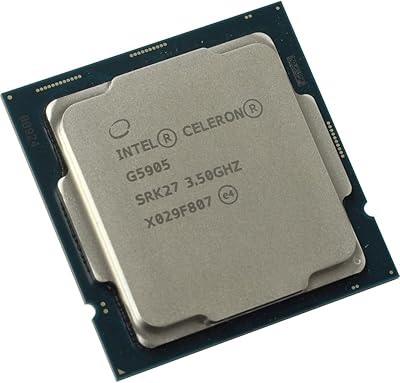
Intel Celeron G5905 Desktop Processor
61%
54%
Raw Processing Performance
47%
Multitasking Capability
88%
Thermal Performance & Heat Output
71%
Integrated Graphics
61%
Value for Money
More
Intel Core i3-9100F Desktop Processor
71%
88%
Value for Money
83%
Gaming Performance
84%
Thermal Performance
51%
Multi-Threaded Workloads
74%
Platform Compatibility
More
Intel Core i5-9400 Desktop Processor
69%
83%
Everyday Performance
78%
Gaming Performance
81%
Value for Money
74%
Thermal Management
77%
Power Efficiency
More
Intel Core i5-10400 Desktop Processor
76%
91%
Everyday Performance
88%
Multitasking Capability
93%
Value for Money
74%
Thermal Management
77%
Gaming Performance
More
Intel Core i7-10700F Desktop Processor
77%
91%
Multi-Threaded Performance
88%
Single-Core Responsiveness
84%
Value for Money
67%
Thermal Management
86%
Platform Compatibility
More
Intel Core i5-13600K Desktop Processor
79%
93%
Gaming Performance
88%
Multi-Threaded Throughput
61%
Thermal Management
91%
Value for Money
79%
Overclocking Headroom
More
Intel Core i9-10980XE Desktop Processor
84%
94%
Multi-core Performance
91%
Overclocking Capability
60%
Power Consumption
62%
Thermals (Heat Output)
88%
Compatibility (X299 & Optane)
More
Intel Core i7-11700K Desktop Processor
67%
88%
Gaming Performance
54%
Thermal Management
77%
Overclocking Headroom
63%
Value for Money
49%
Power Efficiency
More
Intel Core i9-9900K Desktop Processor
74%
91%
Gaming Performance
83%
Multi-Core Throughput
88%
Overclocking Headroom
61%
Thermal Management
77%
Platform Compatibility
More
Intel Core i5-12400 Desktop Processor
75%
86%
Gaming Performance
84%
Multitasking & Productivity
83%
Value for Money
87%
Thermal Management
67%
Platform Compatibility
More

FAQ

You need an Intel 400-series board with an LGA1200 socket — H410, B460, H470, and Z490 chipset boards all work. These are widely available and reasonably affordable. It is worth checking your specific board's compatibility list before buying, since some early boards may require a BIOS update to recognize 10th-generation processors.

It comes with a stock Intel cooler in the box, and for this chip that is genuinely sufficient. Given its modest 58W heat output, the bundled cooler keeps temperatures in check without any fuss. Budget builders can cross that line item off the list entirely.

Not really. The two-core, two-thread configuration combined with the Intel UHD Graphics 610 simply was not designed for gaming workloads. Even older or lighter titles will feel bottlenecked. If gaming is any part of your plan, this chip and platform are not the right starting point.

It supports dual-channel DDR4 at speeds up to 2666 MHz. Running two matched sticks in dual-channel configuration will give you the best memory bandwidth the platform can offer, which matters for the integrated graphics too.

There is some headroom. The LGA1200 platform supports both 10th and 11th-generation Intel desktop processors, so a move to a Core i3, i5, or i7 from either generation is possible if your board supports it. Beyond that, the socket is a dead end — no 12th-generation or newer Intel desktop chip fits LGA1200.

It depends on your storage setup. If your system runs on a traditional spinning hard drive, adding a small Optane Memory M.2 module can make the system feel noticeably more responsive by caching frequently used data. If you already have an SSD as your primary drive, Optane Memory adds no practical benefit and is not worth the extra spend.

The G6400 adds hyperthreading, giving it four threads versus two — and that difference is genuinely felt in everyday multitasking and lightly threaded tasks. The G5900 only makes clear sense if you find it at a meaningfully lower price or need a direct drop-in replacement for an existing LGA1200 build. For a fresh build, the G6400 is the more future-resistant choice.

For straightforward 4K streaming through a browser or a media application, it can manage reasonably well under the right conditions. High-bitrate local 4K files may stutter depending on the codec. For anything involving 4K editing or transcoding, this budget desktop processor is completely out of its depth.

For simple file serving, lightweight network storage, or streaming to a small number of devices, it works well. The low power consumption is a genuine advantage for machines that run around the clock. Just keep in mind it will not handle simultaneous transcoding of multiple streams without showing strain.

It depends on the situation. As a replacement for a dead chip in an existing LGA1200 system, it is a perfectly sensible and cost-effective fix. For a brand-new build, you should be honest about whether a slightly larger budget would put you on a more capable and longer-lived platform. For bare-minimum workloads on the tightest budgets, the G5900 still delivers what it promises — just know exactly what that is before you buy.

Where to Buy