Overview

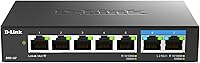
The D-Link DMS-107 7-Port 2.5G Unmanaged Switch sits in a practical sweet spot for home and small office users upgrading to Wi-Fi 6 but unwilling to pay for managed switch features they will never use. The hybrid port layout — two 2.5G ports paired with five standard Gigabit ports — covers most mixed-device setups without overcomplicating things. This D-Link switch ships with no software to install, no web interface to configure, and no fan to generate noise. Within the DMS family, it lands between the 5-port DMS-105 and the 8-port DMS-108, offering a middle ground on port count. Just be clear going in: unmanaged means simple, not sophisticated.
Features & Benefits

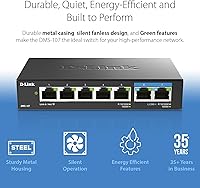
The standout spec on this multi-gig switch is the pair of 2.5Gbps ports, which is where you connect your Wi-Fi 6 router or a multi-gig NAS to avoid a Gigabit bottleneck on fast traffic. The remaining five ports auto-negotiate between 100Mb and 1Gbps, handling everything from smart TVs to desktop PCs without a second thought. 802.1p QoS automatically prioritizes latency-sensitive traffic across eight levels — handy for gaming or streaming, though it is worth noting this happens automatically; you cannot assign priorities manually per device. Flow control helps keep packet loss in check on busy links. The fanless metal chassis runs completely silent, and Energy-Efficient Ethernet trims idle power draw, keeping the unit at a modest 3.37 watts maximum.

Best For

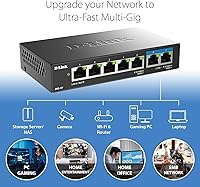
This D-Link switch is a natural fit for anyone running a Wi-Fi 6 router or access point who wants to push that 2.5G connection into the rest of their wired network without a large budget commitment. NAS owners get a direct multi-gig link to their storage device, which makes a real difference when moving large files across the local network. Gamers and streamers benefit from automatic QoS without ever touching a management interface. The silent, low-power operation makes it easy to tuck the DMS-107 into a living room or shared home office. Best of all, existing Cat5e or Cat6 cabling works perfectly — no rewiring required.

User Feedback

Buyer sentiment on this multi-gig switch skews strongly positive, with most reviewers noting how quickly it was up and running — plug it in and it works. The solid metal build earns consistent praise; it feels like a proper piece of kit rather than something budget and hollow. The main friction point that surfaces repeatedly is the two 2.5G port limit: buyers with three or more multi-gig devices quickly run short of fast ports. Some users also report the unit runs noticeably warm during extended use, though no one has flagged actual stability issues as a result. A small number of buyers wish the external power brick were more compact. For the price tier, though, most agree the overall value holds up well.

Pros

  • Plug-and-play setup means you are up and running in under a minute with no software, drivers, or configuration required.
  • Two 2.5Gbps ports let you connect a Wi-Fi 6 router and a multi-gig NAS simultaneously without either bottlenecking the other.
  • The all-metal chassis feels genuinely solid and durable, not like the hollow plastic found on cheaper alternatives.
  • Completely fanless operation makes this D-Link switch one of the quietest networking accessories you can put in a living space.
  • Automatic 802.1p QoS prioritizes gaming and streaming traffic without any manual setup on your part.
  • Flow control actively reduces dropped packets on busy links, improving connection stability across all connected devices.
  • Energy-Efficient Ethernet keeps idle power draw low, so leaving it on around the clock adds very little to your electricity bill.
  • Works with existing Cat5e and Cat6 cabling, so upgrading to multi-gig speeds does not require rewiring your home.
  • Per-port LED indicators make it easy to confirm at a glance which devices are connected and at what link speed.
  • Compact footprint at roughly 5.7 inches long means it tucks easily behind a router or onto a crowded desk.

Cons

  • Only two of the seven ports run at 2.5Gbps, which quickly becomes a limitation if you own three or more multi-gig devices.
  • The external power brick adds cable clutter and is bulkier than some buyers expect given the switch itself is so compact.
  • No management interface whatsoever means zero visibility into traffic, port status history, or network diagnostics.
  • The unit can run noticeably warm during sustained heavy use, which may concern users in enclosed or poorly ventilated spaces.
  • QoS prioritization is fully automatic with no way to assign specific priority rules to individual devices or ports.
  • No mounting hardware is included, so wall or rack mounting requires sourcing third-party brackets separately.
  • Switching capacity of 20Gbps is modest compared to some competing 7-port multi-gig switches at a similar price point.
  • The external 12V power supply is not easily replaceable from standard retail sources if it fails out of warranty.

Ratings

Our AI-generated scores for the D-Link DMS-107 7-Port 2.5G Unmanaged Switch are based on a deep analysis of verified buyer reviews from around the world, with spam, bot-generated, and incentivized feedback actively filtered out before scoring. Each category reflects what real users experienced after living with this switch day-to-day — not just out-of-the-box impressions. Both the standout strengths and the recurring frustrations are represented honestly in the scores below.
Ease of Setup
96%
Buyers consistently describe setup as genuinely effortless — plug in the power, connect the cables, and every device negotiates its own link speed automatically. There is no app to download, no firmware to flash on first boot, and no web interface to fumble through. For non-technical users, this is a significant relief.
A small number of buyers expected some form of indicator or confirmation that 2.5G was actually active on the multi-gig ports, and the LED behavior alone left them uncertain. There is no diagnostic tool or status page to verify link speed, which can be frustrating for first-timers.
Port Configuration Value
71%
29%
Seven ports in a compact chassis at this price tier is genuinely competitive, and the hybrid layout covers most mixed home network setups adequately. Connecting a Wi-Fi 6 router and a NAS simultaneously on the two 2.5G ports while running five Gigabit clients is a realistic, functional configuration for many households.
The fact that only 2 of the 7 ports are 2.5G-capable is a recurring source of disappointment for buyers who assumed a higher ratio. Users with three or more multi-gig devices — a NAS, a gaming PC, and an access point, for example — quickly discover this switch cannot serve all of them at full speed.
Build Quality
89%
The all-metal housing earns genuine appreciation from buyers who have dealt with flimsy plastic switches in the past. The unit feels dense and well-assembled for its weight, and the finish holds up well over months of continuous use sitting on a desk or shelf.
Some users note that the bottom of the unit gets noticeably warm during extended heavy use, and without rubber feet that grip firmly, the chassis can slide on smooth surfaces. The external power brick also feels like a mismatch in quality compared to the switch body itself.
Noise Level
97%
The fanless design delivers on its promise completely. Users who placed this switch in a bedroom, home office, or living room AV setup report zero audible noise under all conditions. Compared to fan-cooled switches at similar price points, the silence is one of the most frequently praised aspects in buyer reviews.
There is essentially no negative feedback on noise — the only adjacent complaint is that the passive cooling strategy causes the chassis to run warm, which a small number of users find slightly concerning even if it has not caused actual problems.
Thermal Management
66%
34%
In typical home deployments with reasonable airflow around the switch, passive cooling performs adequately and the unit runs stably for months without issue. The metal housing conducts and disperses heat better than plastic alternatives would, and most buyers in standard room-temperature environments report no heat-related problems.
Under sustained heavy load — particularly in enclosed spaces like networking cabinets or cramped shelves — the chassis gets quite warm to the touch. A subset of buyers expressed concern about long-term reliability under these conditions, and users in warmer climates mentioned the heat was more noticeable than they expected.
Multi-Gig Performance
88%
Users pairing this D-Link switch with a 2.5G NAS or Wi-Fi 6 router report real, measurable throughput improvements over their previous Gigabit-only setups. File transfers between a NAS and a desktop connected via the 2.5G ports consistently reflect the faster link speed in practice, not just on paper.
The two-port limitation on multi-gig connectivity means that any scenario requiring three or more 2.5G devices simultaneously is simply not supported. A few buyers also noted that getting a clean 2.5G link required ensuring their cable runs were in good condition, as marginal Cat5e cables occasionally dropped to 1G.
Value for Money
83%
At its price point, the DMS-107 compares favorably against competing 7-port multi-gig switches, particularly when factoring in the metal build, fanless design, and D-Link's brand reliability. Buyers who did their homework before purchasing consistently rate value positively, viewing the two 2.5G ports as a practical trade-off for the cost.
Buyers who did not research the port configuration carefully before purchasing tend to feel the price is harder to justify once they realize the 2.5G ports number only two. Compared to fully multi-gig 5-port alternatives, the value proposition requires careful matching to your actual use case.
QoS Effectiveness
62%
38%
For households where gaming and streaming traffic shares a connection with general browsing, the automatic 802.1p prioritization does appear to reduce latency spikes during congestion. Users running a console or streaming device on the same switch as several other clients report slightly smoother experiences compared to switches without any QoS.
The lack of any user-configurable QoS controls is a genuine limitation. Buyers who expected to assign priority rules to specific devices — a common feature on managed switches — were surprised to find that 802.1p on an unmanaged switch is fully automatic with no customization options whatsoever.
Power Efficiency
91%
At a maximum draw of 3.37 watts, this multi-gig switch costs almost nothing to run continuously. Users who leave networking gear on around the clock appreciate that Energy-Efficient Ethernet further reduces consumption during low-traffic periods, making the total running cost negligible over a year.
A small number of buyers expressed frustration that the power efficiency came at the cost of using an external power brick rather than a cleaner internal power solution. The adapter adds cable management overhead that feels unnecessary for a device this small.
Cable Compatibility
93%
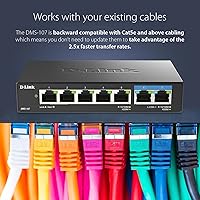
The backward compatibility with Cat5e and Cat6 cables is a practical advantage that removes a common barrier to upgrading. Most homes already have one of these cable types installed, and buyers consistently confirm that existing runs support 2.5G link speeds without any need for recabling.
A handful of users with older or lower-quality Cat5e runs found their 2.5G ports would only negotiate at 1Gbps, which suggests marginal cabling can be a limiting factor. This is not a switch deficiency per se, but it can catch buyers off guard if they assume any Cat5e cable will reliably hit 2.5G.
Status Indicators
74%
26%
Per-port LED indicators give a clear at-a-glance confirmation that each cable is connected and the link is active. For basic troubleshooting — identifying a bad cable or a disconnected device — the LEDs are practical and easy to read from a short distance.
The LEDs do not clearly differentiate between a 1G and a 2.5G link speed, which frustrates users trying to verify that their multi-gig connection is actually running at full speed. A speed-indicator LED, even a simple two-color one, would address a common buyer complaint at minimal cost.
Form Factor
88%
The compact footprint makes it easy to place almost anywhere — behind a router, on a media shelf, or alongside a NAS enclosure. At just over 10 ounces, it is light enough that a single piece of hook-and-loop fastener can mount it to the back of a desk without drama.
No mounting hardware is included in the box, so users who want a cleaner installation need to source their own brackets or adhesives. The external power supply also adds to the physical footprint once cabling is factored in.
Long-Term Reliability
81%
19%
Buyers who have owned this switch for a year or more consistently report stable, uninterrupted operation with no port failures or firmware issues to manage. The metal build and passive design remove the two most common failure points in cheaper switches — flex damage and fan motor wear.
The sample of long-term owners is still relatively small given the product's 2023 release date, so multi-year reliability data is limited. A few buyers flagged concerns about long-term passive cooling durability in warm environments, though no widespread failure pattern has emerged yet.

Suitable for:

The D-Link DMS-107 7-Port 2.5G Unmanaged Switch is purpose-built for home users and small office setups that have already invested in a Wi-Fi 6 router or access point and want their wired network to keep pace without a complicated setup process. If you own a multi-gig NAS and constantly feel like file transfers are slower than they should be, this switch gives you the direct 2.5G link that eliminates the Gigabit bottleneck between your storage and the rest of your devices. Gamers and streamers who want automatic traffic prioritization without ever logging into a management console will appreciate that QoS works in the background without any configuration. It also makes a strong case for home lab users or small offices where silence matters — no fan means no noise, full stop. Anyone still running Cat5e or Cat6 cables throughout their home can get multi-gig speeds without pulling new wire, which makes this a low-friction upgrade path.
Not suitable for:

Buyers who need more than two multi-gig connections will hit a wall fast, because only two of the seven ports on this switch run at 2.5Gbps — the remaining five are capped at standard Gigabit. If your setup includes three or more 2.5G devices, such as multiple Wi-Fi 6 access points, a NAS, and a gaming PC all needing fast links simultaneously, the DMS-107 simply does not scale to meet that demand and you should look at the DMS-106XT or DMS-108 instead. Network administrators or power users who need VLANs, port mirroring, link aggregation, or any form of traffic monitoring should skip unmanaged switches entirely — this D-Link switch offers none of those features by design. Environments with poor ventilation or high ambient temperatures should also exercise caution, as the fanless chassis relies entirely on passive cooling and can run warm under sustained load. If you need a switch that doubles as a managed network appliance, this is the wrong category of device altogether.

Specifications

  • Model: This switch carries the official D-Link model designation DMS-107, part of the multi-gigabit DMS unmanaged switch family.
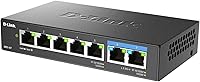
  • Total Ports: The unit provides 7 RJ45 ports in total: 2 running at up to 2.5Gbps and 5 running at up to 1Gbps.
  • 2.5G Ports: Two ports support multi-speed auto-negotiation across 100Mbps, 1Gbps, and 2.5Gbps, depending on the connected device's capability.
  • Gigabit Ports: Five ports auto-negotiate between 10Mbps, 100Mbps, and 1Gbps for backward compatibility with standard wired devices.
  • Switching Capacity: Total non-blocking switching capacity is 20Gbps, sufficient to handle simultaneous traffic across all ports without congestion.
  • QoS Standard: Traffic prioritization uses IEEE 802.1p with 8 priority queues, applied automatically without any user configuration.
  • Flow Control: IEEE 802.3x flow control is supported, reducing packet loss when connected devices send data faster than the switch can forward it.
  • Energy Efficiency: IEEE 802.3az Energy-Efficient Ethernet is implemented to reduce power consumption during periods of low or idle network activity.
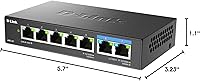
  • Housing: The enclosure is a compact all-metal chassis measuring 5.7″ long by 3.23″ wide by 1.1″ tall.
  • Weight: The switch weighs 10.4 ounces without the power supply, making it light enough to sit on a desk or shelf without issue.
  • Cooling: Cooling is entirely passive with no internal fan, relying on the metal housing to dissipate heat silently.
  • Power Supply: Power is delivered via an external adapter running at 12V DC, which is included in the box.
  • Max Power Draw: Under full load, the switch consumes a maximum of 3.37 watts, keeping ongoing electricity costs minimal.
  • Max Operating Temp: The switch is rated for operation in ambient temperatures up to 40°C (104°F), suitable for typical indoor environments.
  • Cable Support: All ports are compatible with Cat5e and Cat6 Ethernet cables; no upgraded cabling is required to achieve 2.5G link speeds.
  • LED Indicators: Each port has a dedicated LED indicator showing link status and activity, allowing quick visual confirmation of connected devices.
  • Setup: No software installation or configuration is required; the switch operates fully plug-and-play out of the box.
  • In The Box: The package includes the switch unit, an external power supply, and a quick installation guide.

Related Reviews
VIMIN 18-Port 2.5G Unmanaged Switch
87%
86%
Performance
92%
Ease of Setup
88%
Build Quality
94%
Fanless Design
85%
Compatibility with Devices
More
VIMIN 6-Port 2.5G Unmanaged Network Switch
83%
88%
Throughput Performance
84%
Build Quality
93%
Setup & Ease of Use
67%
SFP+ Port Usability
96%
Fanless Noise Level
More
TRENDnet TEG-S350 5-Port 2.5G Network Switch
78%
88%
Value for Money
91%
Network Performance
94%
Ease of Setup
86%
Build Quality
97%
Noise Level
More
Zyxel MG-105 5-Port 2.5G Unmanaged Switch
80%
93%
Network Performance
97%
Ease of Setup
89%
Value for Money
62%
Build Quality
98%
Noise Level
More
TP-Link TL-SG105-M2 5-Port 2.5G Unmanaged Switch
82%
91%
Throughput Performance
96%
Ease of Setup
88%
Build Quality
71%
Thermal Management
63%
Port Count & Expandability
More
TP-Link TL-SG108-M2 8-Port 2.5G Multi-Gigabit Network Switch
89%
93%
Ease of Setup
89%
Network Performance
91%
Build Quality
96%
Noise Level (Fanless Design)
87%
Compatibility with Cat5e Cables
More
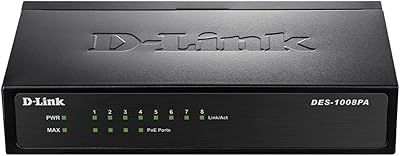
TEROW 4-Port 2.5G 2-Port SFP+ Network Switch
81%
93%
Value for Money
96%
Ease of Setup
88%
Port Performance & Link Stability
71%
SFP+ Port Compatibility
84%
Build Quality & Materials
More
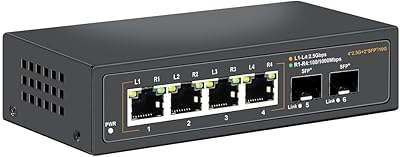
D-Link DES-1008PA 8-Port PoE Fast Ethernet Switch
82%
94%
Ease of Setup
88%
PoE Port Reliability
91%
Build Quality & Durability
58%
Network Speed & Throughput
97%
Noise Level
More
Davuaz 2.5G Unmanaged Ethernet Switch
87%
88%
Performance
93%
Ease of Setup
90%
Energy Efficiency
85%
Build Quality
72%
Compatibility with Devices
More
ienRon 6-Port 2.5Gb PoE Switch with 2-Port 10Gb SFP+
85%
86%
Performance
91%
Ease of Setup
88%
PoE Power Delivery
84%
Build Quality
93%
Fanless Operation
More

FAQ

No, and this is probably the most important thing to clarify before buying. Only 2 of the 7 ports run at 2.5Gbps. The remaining 5 are standard Gigabit ports, topping out at 1Gbps. If you need more than two 2.5G connections simultaneously, you should look at a different model in the DMS lineup.

Yes, it is fully compatible with Cat5e and Cat6 cables, which are the most common types found in homes and small offices. You do not need to upgrade your cabling to get 2.5G link speeds on the two multi-gig ports.

None at all. You plug it in, connect your devices, and it works. There is no web interface, no app, and no driver to install. The switch handles everything automatically, including negotiating the correct speed for each connected device.

Completely silent. The DMS-107 has no internal fan, so there is zero fan noise under any condition. The metal housing handles heat passively. It is a good fit for a bedroom, living room, or any space where noise is a concern.

Yes, provided your router has a 2.5G WAN or LAN port. Plug the router into one of the two 2.5G ports on the switch, and the link will negotiate at 2.5Gbps automatically. This is one of the most common use cases for this D-Link switch.

No. This is an unmanaged switch, which means it has no configuration interface and no support for VLANs, port mirroring, link aggregation, or any advanced traffic management features. If those capabilities matter to you, you need a managed switch instead.

It does run warm to the touch, especially on the top surface of the metal housing during extended periods of heavy use. That is normal for a fanless design — the chassis itself acts as the heatsink. As long as you leave some airflow around it and do not enclose it in a tight cabinet, it handles heat without stability issues in typical home environments.

The total switching capacity is 20Gbps, which is enough to handle traffic across all seven ports simultaneously without one port starving another. In practice, most home setups will never come close to saturating that capacity.

The switch uses IEEE 802.1p QoS with 8 priority levels, but it works entirely automatically — you cannot assign priority rules to specific devices or ports yourself. The switch reads priority tags already present in network packets and sorts traffic accordingly. For most home users, this is fine; for anyone who needs granular traffic shaping, it will feel limited.

The DMS-105 has 5 ports with all of them being multi-gig, so it is a better pick if you have fewer devices but need more 2.5G connections. The DMS-106XT steps up with 10G uplink capability. The DMS-108 adds an extra Gigabit port for larger setups. The 7-port model sits in the middle, trading some multi-gig port count for a lower price and a larger total port count.