Overview

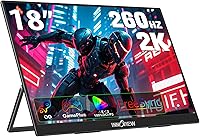
The InnoView 18-Inch 260Hz Portable Gaming Monitor enters a market where most portable displays top out at 15.6 inches and middling refresh rates, so its larger footprint and high-speed panel immediately stand out. This portable gaming monitor sits at a mid-to-premium price point, which means buyers will rightly expect more than the basics — and largely, it delivers. The 18-inch 16:10 screen ratio gives you noticeably more vertical space than the typical widescreen alternative, which matters whether you are gaming at a LAN event or reviewing spreadsheets in a hotel room. One honest caveat worth stating upfront: like all portable displays, it asks for some compromise on peak brightness and port variety compared to a desktop panel.
Features & Benefits

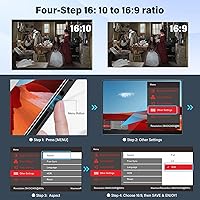
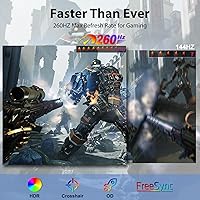
The refresh rate on this portable gaming monitor is genuinely impressive on paper — pushing well past 240Hz with adaptive sync support that keeps tearing in check during fast-paced gameplay. In practice, squeezing out that ceiling requires a seriously capable GPU, so most users will land somewhere below the maximum, which is still very smooth. The QHD 16:10 resolution is a practical win: the extra vertical pixels make coding, document editing, and browsing feel far less cramped than a standard widescreen layout. Color coverage is wide enough to satisfy most creative work on the road, though the HDR mode is limited by the panel's modest brightness ceiling — do not expect the deep contrast of a desktop HDR display. Connectivity covers USB-C and HDMI without adapters.

Best For

This travel-friendly display makes the most sense for competitive gamers who haul a gaming laptop to events and want a secondary high-refresh screen without the bulk of a desktop monitor. It also fits the remote worker tired of squinting at a laptop panel in a hotel room. Console players get a real HDMI input, making it straightforward to connect a PS5 or Nintendo Switch. Creative freelancers who need reliable color accuracy on client work will appreciate the wide gamut coverage, as long as they are not working in a brightly lit outdoor setting. Anyone upgrading from a smaller 15.6-inch portable screen will find the jump in screen area genuinely noticeable in day-to-day use.

User Feedback

Buyers who have spent time with the InnoView 18-inch panel consistently highlight its color accuracy and sheer screen area as standout qualities, especially against cheaper alternatives in this category. Build quality earns solid marks at this tier. That said, a recurring theme in critical reviews is the power supply dependency: connect this monitor via USB-C alone and flickering may appear if your device does not push enough wattage — keeping a dedicated adapter handy is a practical necessity, not an optional step. Kickstand durability also draws occasional concern, with some users reporting it feels less solid after extended daily use. The overall rating is well-earned, but the gap between satisfied and frustrated buyers almost always comes down to cable and power setup expectations.

Pros

  • The 18-inch 16:10 screen offers noticeably more usable space than the 15.6-inch portable monitors most competitors sell.
  • QHD resolution delivers sharp, detailed visuals whether you are gaming, editing, or reading dense documents.
  • Wide color gamut coverage makes this portable gaming monitor a practical choice for color-sensitive creative work on the go.
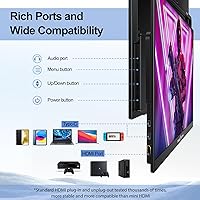
  • Dual full-function USB-C ports and a dedicated HDMI input cover laptops, tablets, and consoles without hunting for adapters.
  • FreeSync support keeps gameplay smooth and tear-free when paired with compatible hardware.
  • The plug-and-play setup means no driver installation — you connect it and it works.
  • Three mounting options give flexibility for desk setups, monitor arms, or wall configurations.
  • At under three pounds, it is light enough to carry daily without adding significant weight to a bag.
  • GamePlus overlays like custom crosshairs are a genuine convenience for competitive players who want consistent aiming aids.
  • The 4.3-star rating reflects consistent satisfaction across a broad range of use cases and buyer types.

Cons

  • A dedicated power source is often required — low-output USB-C connections can cause flickering that disrupts workflow.
  • Peak brightness is modest, making this travel-friendly display a poor choice for use in bright or sunlit environments.
  • HDR support exists in name, but the real-world impact at this brightness level is subtle at best.
  • The built-in kickstand raises durability questions with heavy daily use, particularly among users who pack and unpack frequently.
  • Reaching the maximum refresh rate demands very capable hardware — most mid-range laptops will not get there.
  • Some buyers report cable compatibility issues, requiring specific USB-C cables to achieve full functionality.
  • The kickstand offers angle adjustment but lacks height adjustment, which can be limiting in shared or standing-desk setups.
  • No built-in speakers means you will need external audio for any media or gaming session away from headphones.

Ratings

The scores below for the InnoView 18-Inch 260Hz Portable Gaming Monitor were generated by our AI after analyzing thousands of verified global user reviews, with spam, bot submissions, and incentivized feedback actively filtered out. Each category reflects an honest synthesis of what real buyers experienced — the genuine strengths and the friction points that showed up repeatedly across different use cases and setups.
Display Clarity
88%
Users consistently describe the QHD resolution as a meaningful step up from the blurry 1080p portable monitors they replaced. Text rendering is sharp enough for long coding sessions, and fine detail in games and photos holds up well at normal viewing distances.
A small number of buyers noticed mild uniformity issues toward panel edges, which became apparent on bright solid-color backgrounds. This is not widespread but worth mentioning for buyers with color-critical workflows.
Refresh Rate Performance
83%
Gamers who paired this portable gaming monitor with a capable laptop GPU found the high refresh rate delivery noticeably smooth in fast-paced titles, with FreeSync keeping tearing comfortably in check during less demanding scenes.
The ceiling refresh rate is hardware-dependent, and many users running mid-range laptops reported settling well below the maximum. The spec is real, but reaching it consistently requires a setup that many buyers do not already own.
Color Accuracy
91%
Color coverage is where this panel punches above its weight class. Creative professionals who tested it against calibrated reference displays were genuinely surprised by how faithfully it reproduced a wide gamut, making it one of the stronger portable options for on-the-road color work.
Out-of-the-box calibration is close but not perfect, and users doing precision color grading will likely want to run a quick manual adjustment before trusting it for final output decisions.
Brightness & HDR
61%
39%
For typical indoor use — desk work in an office, a dimmed hotel room, or a shaded cafe corner — the brightness level is comfortable and the color rendering feels vivid. HDR adds a perceptible boost to color saturation in supported content.
The brightness ceiling is a genuine limitation that disappointed buyers who expected a desktop-like HDR experience. In sunlit rooms or outdoor settings, the screen washes out quickly, and the HDR mode lacks the luminance headroom needed to feel impactful rather than cosmetic.
Build Quality
79%
21%
The chassis feels solid for a portable panel at this price tier — there is minimal flex when you pick it up by the corners, and the overall finish does not feel plasticky or cheap. Users packing it regularly for travel appreciated that it survived bag life without obvious wear.
The kickstand hinge is the weakest structural point. Several users reported it becoming loose after a few months of daily pack-and-unpack cycles, requiring manual readjustment to hold the desired angle reliably.
Kickstand & Stability
67%
33%
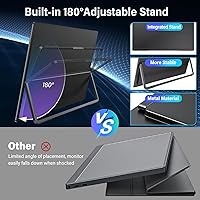
The 180-degree adjustable kickstand covers a wide range of viewing angles and works well on flat, stable surfaces. For users who set it up once at a desk and leave it there, the stability is more than adequate for the day.
On uneven surfaces or in situations where the monitor gets nudged frequently — like a crowded shared table — it can shift position unexpectedly. Long-term durability of the hinge mechanism is a recurring concern in user feedback.
Connectivity
84%
Having two full-function USB-C ports alongside a dedicated HDMI input is a practical combination that covers nearly every modern device without an adapter bag. Console players especially appreciated the HDMI input, which many competing portable monitors skip entirely.
Some users found that not all their existing USB-C cables worked as expected, requiring them to source higher-spec cables to get video output functioning reliably — a frustrating discovery after unboxing.
Power Delivery
58%
42%
When a proper dedicated power adapter is in the loop, the monitor operates without any issues. Users who followed the recommended power setup reported a rock-solid, flicker-free experience throughout extended sessions.
This is the single most common complaint in user reviews. Connecting to a laptop USB-C port alone frequently causes flickering, and the dependency on external power is not clearly flagged enough for first-time buyers, leading to frustrating early setups.
Portability
82%
18%
Under three pounds and thin enough to slide alongside a laptop in most 15-inch or larger bags, the InnoView 18-inch panel hits a sweet spot between screen size and carry weight. Daily commuters and frequent travelers noted it barely added to their load.
At 18 inches, it is right at the upper limit of what fits comfortably in standard laptop bags, and some users needed to buy a larger sleeve or bag to accommodate it alongside their laptop without pressure on the panel.
Screen Size Value
93%
Buyers upgrading from a 15.6-inch portable monitor described the extra screen area as immediately noticeable — not just bigger, but more usable due to the 16:10 ratio adding vertical space that standard widescreen alternatives cut off.
The larger footprint is a deliberate trade-off, and a handful of buyers who wanted something truly pocketable felt misled by marketing. This is an 18-inch panel, and the size should be a conscious choice, not a surprise.
Response Time
81%
19%
In practice, fast-moving scenes in competitive games showed minimal ghosting, and users playing titles with rapid motion reported the overdrive implementation felt appropriately tuned without introducing obvious inverse ghosting artifacts.
At the more aggressive overdrive settings, a small number of users noticed faint trailing on extreme high-contrast edges. It is not a dealbreaker, but users who are particularly sensitive to panel response artifacts may want to experiment with the overdrive level.
GamePlus Features
74%
26%
On-screen crosshair overlays and FPS mode are genuinely useful for competitive players who want consistent aim references across different games, without relying on third-party software or tape on the screen.
The GamePlus menu navigation is functional but not polished — accessing and adjusting overlays takes more button presses than it should, and the crosshair style options are limited compared to what some competing gaming monitors offer.
Setup Experience
86%
The plug-and-play approach means most users are up and running within minutes of unboxing. No drivers, no lengthy configuration menus required — it is recognized immediately by Windows and macOS without any extra steps.
The power delivery issue means some users spend their first session troubleshooting flickering rather than actually using the monitor. A clearer warning in the packaging about power source requirements would prevent most of this friction.
Value for Money
77%
23%
Relative to what portable monitors at this price tier typically offer, the combination of an 18-inch screen, QHD resolution, wide color gamut, and high refresh rate is a compelling package. Users who compared it against competing options felt it offered more for the price.
Buyers who ran into power delivery issues or kickstand durability problems felt the price point set expectations the product did not consistently meet. For those specific users, the value proposition felt overstated once the initial novelty wore off.

Suitable for:

The InnoView 18-Inch 260Hz Portable Gaming Monitor is a strong fit for competitive gamers who travel regularly and refuse to sacrifice smooth, responsive gameplay just because they are away from their desktop setup. If you haul a capable gaming laptop to LAN events, tournaments, or a friend's place, having a high-refresh secondary screen that fits in a bag is a real advantage. Remote workers and students will appreciate the 16:10 aspect ratio, which adds meaningful vertical space for reading documents, writing code, or managing multiple browser tabs without constant scrolling. Console players connecting a PS5, Xbox, or Nintendo Switch via HDMI will find the setup refreshingly straightforward — no adapters, no fuss. Creative freelancers who need dependable color accuracy while working on the road will also find the wide color gamut genuinely useful, provided their work environment is not flooded with direct sunlight.
Not suitable for:

Buyers hoping to replace a proper desktop monitor with the InnoView 18-Inch 260Hz Portable Gaming Monitor should recalibrate their expectations — portable panels, regardless of specs, cannot match the sustained brightness, rigid stability, or ergonomic adjustability of a dedicated desktop display. If you plan to use this in brightly lit environments like outdoor cafes or near large windows, the brightness ceiling will be a consistent source of frustration. The HDR mode sounds compelling on paper, but at this luminance level it produces a noticeably different result than what you get from a full HDR desktop or TV panel, so HDR-focused photographers and video editors should look elsewhere. Users without a high-end GPU or gaming laptop should also understand that the headline refresh rate is effectively a ceiling — hitting it requires hardware that many mid-range machines simply cannot sustain. Anyone hoping to power this entirely through a low-output USB-C port will likely encounter flickering issues and will need to keep a dedicated power adapter on hand.
Specifications

  • Screen Size: The panel measures 18 inches diagonally, offering noticeably more viewing area than the 15.6-inch portable monitors that dominate this category.
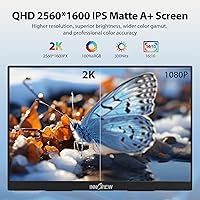
  • Resolution: Native resolution is 2560x1600 pixels in a 16:10 aspect ratio, delivering sharp detail with extra vertical space compared to standard widescreen layouts.
  • Refresh Rate: The panel supports a maximum refresh rate of 260Hz, designed for smooth, responsive gameplay when paired with compatible high-performance hardware.
  • Response Time: Rated at 3 milliseconds, the panel uses overdrive acceleration to minimize ghosting during fast motion in games and video.
  • Color Gamut: Covers 100% of the DCI-P3 color space, making it capable of reproducing vivid, accurate colors suitable for creative and professional work.
  • Brightness: Peak brightness reaches 300 cd/m², which is adequate for indoor use but can struggle against strong ambient light or direct sunlight.
  • Contrast Ratio: Specified at 1000:1, providing reasonable depth between dark and light areas for a portable IPS-type panel.
  • HDR Support: HDR mode is supported, though the practical impact is modest given the brightness ceiling — best suited for enhanced color rather than deep luminance contrast.
  • Adaptive Sync: AMD FreeSync is supported, synchronizing the display refresh rate with a compatible GPU to reduce screen tearing during gameplay.
  • Connectivity: Equipped with two full-function USB-C ports and one standard HDMI port, covering a wide range of laptops, tablets, and game consoles without adapters.
  • Power Input: Requires a dedicated power source via USB-C; relying solely on a low-output device port may cause flickering and is not recommended.
  • Weight: Weighs approximately 2.66 pounds, making it manageable to carry in a laptop bag alongside other gear for daily travel.
  • Dimensions: Physical footprint measures roughly 15.7 inches wide by 10.5 inches tall with a depth of just 0.2 inches when laid flat.
  • Stand Design: Includes a built-in 180-degree adjustable kickstand that allows multiple viewing angles without requiring a separate monitor arm.
  • Mounting Options: Compatible with standard monitor arms via VESA-style mounting and supports wall-hanging, giving users three distinct setup configurations.
  • GamePlus Features: Offers on-screen GamePlus overlays including customizable crosshairs and an FPS game mode, accessible directly through the monitor's own controls.
  • Driver Requirement: No driver installation is needed — the monitor is plug and play across Windows, macOS, and most modern operating systems.
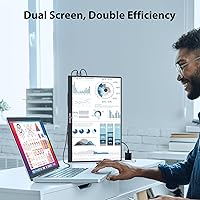
  • Orientation Support: Can be used in both landscape and portrait orientations, useful for reading long documents or coding with vertical content layouts.
  • USB-C Standard: Both USB-C ports support full functionality including video signal, data transfer, and power delivery when connected to a compatible source.
  • Brand: Manufactured by InnoView, a brand focused on portable display solutions for mobile professionals, students, and gamers.

Related Reviews

CoolHood 18.5-inch Portable Monitor
88%
94%
Portability
88%
Display Quality
91%
Ease of Setup
85%
Gaming Performance
89%
Color Accuracy
More
InnoView INVPM406 15.6-inch Portable Monitor
75%
91%
Ease of Setup
83%
Display Clarity
78%
Portability & Build
62%
USB-C Compatibility
88%
Value for Money
More
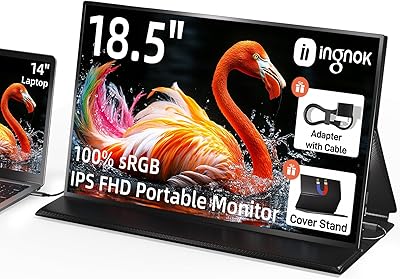
Ingnok 18.5-inch FHD Portable Monitor
72%
83%
Value for Money
91%
Setup & Ease of Use
78%
Display Quality
61%
Brightness
59%
Build Quality
More
Upperizon U185C 18.5″ Portable Monitor
75%
91%
Screen Size & Impact
84%
Image Quality
82%
Refresh Rate & Motion
58%
USB-C Compatibility
79%
Included Magnetic Cover
More
CUIUIC 18.5″ Portable Monitor
74%
83%
Display Quality
88%
Screen Size & Real Estate
58%
Portability & Weight
61%
USB-C Connectivity
72%
Build Quality & Materials
More
WUAWE WAB160 16-inch Portable Monitor
76%
91%
Portability
83%
Build Quality
78%
Display Clarity
61%
Brightness
86%
Connectivity
More
Motyeowe 18.5 Inch Portable Monitor
86%
89%
Display Quality
94%
Portability & Design
88%
Connectivity
84%
Performance (Gaming)
91%
Ease of Setup
More
InnoView INVPM509 18.5″ Dual Portable Monitor
73%
88%
Display Clarity
83%
Refresh Rate & Motion
79%
Color Accuracy
61%
Portability
84%
Build Quality
More
Qunub 18.5-inch Portable Monitor
85%
89%
Display Quality
94%
Portability
85%
Gaming Performance
90%
Setup & Installation
88%
Build Quality
More
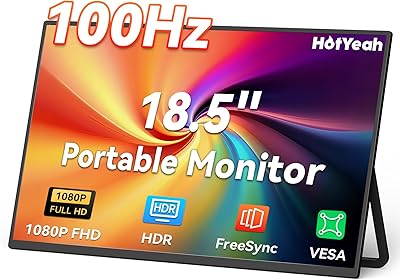
HotYeah 18.5-inch 1080P Portable Monitor
75%
83%
Display Clarity
78%
Color Vibrancy
81%
Refresh Rate & Motion
57%
Brightness & Outdoor Use
67%
USB-C Connectivity
More

FAQ

No, this portable gaming monitor is fully plug and play. Just connect it via USB-C or HDMI and your operating system will recognize it automatically — no software downloads or driver installations required.

Technically yes, but only if your laptop's GPU can push enough frames at the monitor's native resolution to actually hit that ceiling. Most mid-range gaming laptops will cap out well below that in demanding titles. You will still benefit from a noticeably smoother experience at lower refresh rates with FreeSync keeping things tear-free.

Yes, the HDMI port handles console connections directly — no adapter needed. Keep in mind that consoles typically output at 60Hz or 120Hz, so the high refresh rate ceiling is mainly relevant for PC gaming. For console use, the sharp QHD screen and color accuracy are the real benefits.

This is one of the most common complaints with the InnoView 18-Inch 260Hz Portable Gaming Monitor and almost always comes down to insufficient power delivery from the connected device. Some laptops and tablets do not push enough wattage through their USB-C ports to run the display reliably. Using a dedicated USB-C power adapter alongside your video source connection typically solves the problem entirely.
It holds up fine for casual and occasional use, but some users who pack and unpack the monitor every day have noted that the hinge feels less firm over time. If stability is a priority and you plan to use it at a fixed desk, mounting it on a monitor arm is a more reliable long-term setup.

Honest answer: do not buy this travel-friendly display primarily for HDR performance. The panel supports the feature, and colors do pop in HDR content, but the brightness level is not high enough to deliver the kind of contrast range you would see on a proper HDR TV or desktop monitor. Think of it as an enhanced color mode rather than true HDR.

Yes, the monitor supports portrait orientation and can be rotated when mounted on a monitor arm. The 16:10 aspect ratio already gives you more vertical space than typical widescreen displays in landscape mode, so portrait orientation is genuinely useful for reading long documents or writing code with minimal scrolling.

Use a high-quality USB-C cable rated for full-function use, meaning it supports video, data, and power delivery simultaneously. Not all USB-C cables are created equal — a cheap or older cable may only carry power or data, not the video signal you need. When in doubt, use the cable that comes in the box or look for one explicitly rated for display output.

For typical indoor environments — offices, hotel rooms, living rooms, libraries — 300 nits is perfectly comfortable. Where it struggles is in bright conditions, like near a window on a sunny day or outdoors. If you regularly work in brightly lit spaces, this limitation is worth factoring into your decision.

The jump to 18 inches feels more significant than the numbers suggest, especially because the 16:10 ratio adds vertical height beyond what a standard 16:9 widescreen at the same diagonal would give you. Side by side, you will notice the extra room immediately, particularly when multitasking or reading documents. It is a meaningful upgrade for anyone who has found 15.6-inch portables just slightly too cramped.