Overview

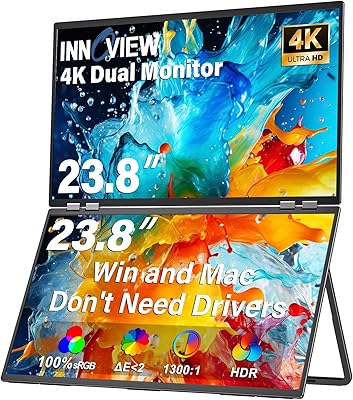
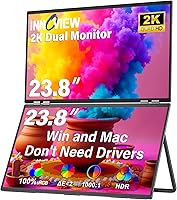
The InnoView INVPM609 23.8″ Dual Portable Monitor is a genuinely clever solution for anyone who wants two large screens on their desk without the hassle of buying, mounting, and cabling two separate monitors. Each panel measures 23.8 inches and runs at QHD 2K resolution — that is real working space, not a compromise. At a premium price point, it is a legitimate alternative to a traditional dual-monitor setup, and the math gets interesting when you factor in what you would spend on two quality displays plus a dual arm mount. Setup is plug-and-play with no drivers required, which matters more than you might think. Worth noting: InnoView themselves clarify this is designed for desk use, not commuting or travel.
Features & Benefits

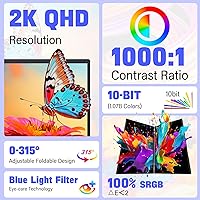
The 315-degree screen adjustment is one of this dual-display unit's most practical touches — you can flip one panel toward a colleague and switch to Duplicate Mode so they see exactly what you see, which is far more natural than rotating a laptop. Both displays cover 100% sRGB, so colors stay consistent and accurate whether you are grading photos, checking design comps, or reviewing footage. The matte surface handles office lighting well. You get three display modes — Extend, Duplicate, and Combine — switchable without rebooting, and connectivity covers USB-C, HDMI, and DisplayPort. No drivers, no configuration headaches, no compatibility guesswork.

Best For

The InnoView dual monitor setup makes the most sense for home-office professionals who want the screen real estate of a traditional two-monitor desk without the permanent footprint — fold it flat when you are done, open it when you need it. Designers and video editors will appreciate having both panels running at matched color accuracy simultaneously, which is not always guaranteed when mixing monitors from different brands. If you regularly present or walk clients through documents at your desk, the face-to-face flip is genuinely useful. Mac and Windows users both get the same experience. At nearly 13 pounds, though, this is a desk tool, not a travel companion.

User Feedback

Buyers consistently praise image sharpness across both panels — QHD resolution on 23.8-inch screens reads as genuinely crisp, and most users report colors looking accurate straight out of the box. The plug-and-play claim largely holds up across MacBooks and Windows machines alike. Where feedback gets more nuanced is around brightness: 300 nits is comfortable in a controlled indoor environment but can feel underwhelming beside a bright window. The 60Hz refresh rate draws little criticism from productivity-focused users, though anyone hoping to game on this folding dual-screen monitor will find it limiting. A few buyers flagged early hinge stiffness, but warranty support responses are generally described as prompt and accommodating.

Pros

  • Both 23.8-inch panels run at QHD 2K resolution, making text and detail noticeably sharper than a typical 1080p setup.
  • Matched 100% sRGB color gamut across both screens means consistent, accurate color without any per-monitor calibration headaches.
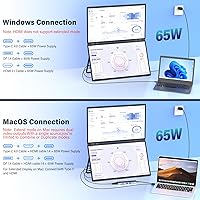
  • Plug-and-play over USB-C or HDMI — no drivers, no software, just connect and go on both Mac and Windows.
  • Three switchable display modes (Extend, Duplicate, Combine) give you real flexibility without rebooting or digging into display settings.
  • The 315-degree screen flip makes face-to-face collaboration at a single desk genuinely practical and intuitive.
  • Matte anti-glare coating handles typical office lighting well and reduces eye fatigue during long sessions.
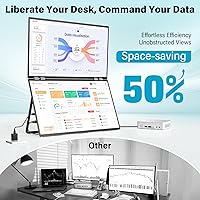
  • Folding the unit flat when not in use reclaims meaningful desk space — a real advantage in smaller home offices.
  • The 18-month warranty and 30-day no-questions return window provide solid purchase confidence for a premium-priced item.
  • One cohesive unit means no arm-mounting, no cable management across two separate displays, and no mismatched bezels.

Cons

  • At nearly 13 pounds, this folding dual-screen monitor is not something you will realistically carry between locations.
  • The 60Hz refresh rate rules it out for any serious gaming or high-motion video work.
  • 300 nits of brightness is adequate indoors but can look washed out near bright windows or in sunlit rooms.
  • Only two USB ports total limits connectivity options if your workflow involves multiple peripherals.
  • The premium price demands careful justification — buyers who already own two quality monitors may find the value case thin.
  • Some early buyers reported stiff hinges out of the box, which can make initial angle adjustments awkward.
  • The combined width when open requires a desk with meaningful depth and width — compact or L-shaped desks may feel cramped.
  • Because both screens share one unit, a hardware fault could affect your entire dual-display setup simultaneously.

Ratings

Our AI-generated scores for the InnoView INVPM609 23.8″ Dual Portable Monitor were produced by analyzing verified global buyer reviews, with spam, bot activity, and incentivized feedback actively filtered out before scoring. Each category reflects the full picture — what real users genuinely praised and where frustrations surfaced — so you can make a confident, clear-eyed purchase decision.
Display Clarity
88%
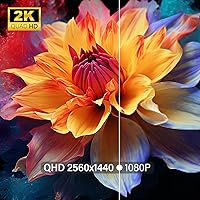
Buyers consistently single out the QHD 2K resolution as a meaningful step up from the 1080p monitors most are replacing. At 23.8 inches, the pixel density keeps text sharp and fine detail crisp — particularly appreciated by users who spend long hours reading code, editing documents, or reviewing design files.
A small number of users noticed minor uniformity variation toward the edges of one or both panels, which is not unusual at this size but worth mentioning. Under highly scrutinized conditions — like color-critical print design work — a hardware calibration tool is still advisable rather than relying solely on factory settings.
Color Accuracy
91%
The 100% sRGB coverage on both panels is one of the most consistently praised aspects across buyer feedback, especially among photographers and video editors who need both screens to match without manual intervention. Out-of-box color consistency between the two displays is notably reliable for a dual-panel unit in this category.
sRGB coverage is strong, but buyers working in wider color spaces — DCI-P3 or Adobe RGB — will find the gamut limiting for professional print or cinema-grade color work. No HDR support is noted, which is a gap for users who preview HDR content as part of their editing workflow.
Build Quality
74%
26%
The overall chassis feels solid for a foldable unit, and buyers generally report confidence in the structural rigidity when both panels are fully extended. The folding mechanism is described as robust rather than flimsy, which is reassuring given how frequently the hinges are used in daily open-and-close routines.
Hinge stiffness out of the box is a recurring complaint — several buyers found the initial adjustment force higher than expected, making early angle changes slightly awkward. A handful of longer-term users also raised questions about hinge longevity under daily use, though most reported no failures within the warranty period.
Brightness
63%
37%
For a standard home-office setup with overhead lighting and no direct sunlight exposure, 300 nits delivers a comfortable, glare-free viewing experience across both panels. The matte coating works well in tandem with this brightness level, keeping reflections diffused in moderately lit rooms.
In brighter environments — particularly desks placed near windows or in studios with strong overhead lighting — 300 nits shows its ceiling quickly. Users in sunlit rooms frequently mentioned needing to reposition their desk or add blinds to get a comfortable image, which is a practical inconvenience that should not be underestimated.
Setup Experience
93%
The plug-and-play experience is one of the most universally praised aspects of the InnoView dual monitor setup, with both Mac and Windows users reporting immediate recognition on connection with zero driver installation. Even less technically confident buyers described the setup process as taking under two minutes from unboxing to a working dual-screen workspace.
A small subset of Windows users reported needing to manually switch display modes through OS settings on first connection, which added a brief learning curve. HDMI-only connections on older laptops occasionally required users to experiment with cable orientation or port selection before both panels registered correctly.
Refresh Rate
61%
39%
For the core productivity and creative audience this unit targets — writers, designers, analysts, and video editors reviewing non-motion content — 60Hz is genuinely sufficient and never noticeable as a limitation in day-to-day use. Most buyers in those categories mentioned it was a complete non-issue for their workflows.
Gamers and motion-graphics professionals were notably less satisfied; 60Hz feels like an obvious ceiling when coming from 120Hz or 144Hz displays, and several buyers admitted wishing they had checked the refresh rate before purchasing. This single spec likely accounts for a meaningful portion of the negative reviews from users who bought without fully reading the specifications.
Connectivity
82%
18%
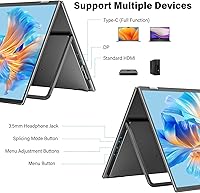
HDMI 2.1, USB-C 3.0, and DisplayPort 1.4 cover the connection needs of the vast majority of modern laptops and desktops, and users appreciated having multiple options rather than being locked into a single cable type. Single-cable USB-C setup in particular was praised for keeping the desk tidy.
With only two USB ports total on the unit, buyers who need to simultaneously connect peripherals — a hub, a keyboard, or a secondary input device — will hit a limit quickly. A few users also noted that the port placement on the unit required awkward cable routing depending on desk orientation.
Desk Space Efficiency
86%
The ability to fold the entire dual-screen setup flat when not in use is a practical advantage that buyers in smaller home offices genuinely appreciated — it transforms what is effectively a two-monitor setup into something that stores upright or flat without consuming permanent desk real estate.
When fully open, the footprint still demands a desk with meaningful width and depth, and buyers with compact or corner desks flagged that the unit felt cramped when extended. The folded dimensions are manageable, but the fully deployed configuration is not small.
Collaboration Features
79%
21%
The 315-degree screen flip combined with Duplicate Mode earned strong praise from users who regularly walk clients or colleagues through presentations at their desk — flipping one screen toward a visitor feels intuitive and removes the awkward laptop-spinning routine entirely. Several freelancers and consultants highlighted this as a workflow-changing feature.
Duplicate Mode works well for static presentations but is not ideal for extended collaborative sessions where both parties need to interact with content independently. The physical flip mechanism, while clever, works best at a fixed desk and loses its practical value entirely in any mobile or ad-hoc environment.
Display Mode Versatility
84%
Switching between Extend, Duplicate, and Combine modes without rebooting is a quality-of-life feature that buyers who move between different workflows throughout the day — say, solo coding in Extend mode and then a client call in Duplicate mode — found genuinely useful and well-implemented.
The Combine ultra-wide mode is an interesting option but requires some manual configuration to get window snapping and application scaling behaving predictably across the joined canvas. A few users reported that certain applications did not handle the combined resolution gracefully without tweaking OS display scaling settings.
Glare & Ergonomics
81%
19%
The matte anti-glare coating performs reliably in standard office conditions, and buyers working under overhead LED lighting reported very little distracting reflection across either panel. The 180-degree stand rotation adds meaningful flexibility for users who need to adjust viewing angle throughout a long workday.
The matte coating, while effective against glare, slightly softens image micro-contrast compared to a glossy panel — a trade-off most users accept readily but which is noticeable to buyers coming from high-end glossy displays. Stand adjustment at extreme angles can also introduce minor wobble on less stable desk surfaces.
Value for Money
69%
31%
Buyers who calculated the combined cost of two equivalent standalone 23.8-inch QHD monitors plus a dual-arm mount frequently concluded that this folding dual-screen monitor lands at a comparable or even favorable price point, particularly when desk space and setup complexity are factored in. For buyers replacing a messy multi-monitor arrangement, the all-in-one value case is legitimate.
For buyers who already own two capable monitors, the premium is harder to justify on pure performance terms — you are paying substantially for the form factor and convenience, not raw display specifications that would be otherwise difficult to source. At its price tier, competitors with higher refresh rates or HDR support exist, making comparison shopping essential before committing.
After-Sales Support
77%
23%
The 18-month warranty and 30-day no-questions return policy provide a level of purchase protection that buyers — particularly those spending at a premium tier — found reassuring. Users who contacted InnoView support described response times as reasonable and resolution outcomes as generally satisfactory.
A portion of warranty claimants noted that the resolution process required more back-and-forth communication than expected before a replacement or repair was authorized. International buyers outside core markets also flagged longer support response times, which is worth noting if you are purchasing from a region with limited local InnoView presence.

Suitable for:

The InnoView INVPM609 23.8″ Dual Portable Monitor is a strong fit for home-office professionals who want genuine dual-screen productivity without committing to a permanent two-monitor desk arrangement. If you work across multiple applications simultaneously — say, keeping a reference document open on one screen while writing or coding on the other — the foldable format means you get that workflow without the clutter of separate stands, arms, and cables. Designers and video editors will find the matched 100% sRGB color accuracy across both panels particularly valuable, since mismatched color profiles between two different monitors is a frustratingly common problem this unit sidesteps entirely. It also suits anyone who regularly presents work one-on-one at their desk, since flipping one screen toward a client or colleague is a genuinely practical feature rather than a gimmick. Mac and Windows users alike get the same driver-free experience, which removes a friction point that trips up a lot of dual-monitor setups.
Not suitable for:

The InnoView INVPM609 23.8″ Dual Portable Monitor, despite the word portable in its name, is not designed for commuters or frequent travelers — the manufacturer states this clearly, and at nearly 13 pounds it reinforces that point quickly. If your goal is a lightweight screen you can throw in a bag for coffee shops or co-working spaces, this is categorically the wrong tool. Gamers should also think carefully before buying: the 60Hz refresh rate is perfectly fine for productivity work but will feel like a ceiling to anyone used to 144Hz or higher. Users in very bright environments, like studios with large windows or outdoor-adjacent spaces, may find 300 nits of peak brightness insufficient for comfortable viewing. Finally, buyers on a tighter budget who already own two decent monitors should weigh the cost honestly — the premium here buys you convenience and a unified form factor, not raw display performance that would otherwise be hard to match.

Specifications

  • Screen Size: Each of the two panels measures 23.8 inches diagonally, giving you a combined dual-screen workspace on a single unit.
  • Resolution: Both screens run at 2560 x 1440 pixels (QHD 2K), delivering noticeably sharper text and detail than a standard 1080p display.
  • Color Gamut: Each panel covers 100% sRGB, ensuring consistent and accurate color reproduction across both displays simultaneously.
  • Refresh Rate: The unit operates at a 60Hz refresh rate, which is well-suited for productivity and creative work but not designed for high-frame-rate gaming.
  • Brightness: Peak brightness is rated at 300 nits, which is comfortable for indoor office environments under controlled lighting conditions.
  • Screen Surface: Both panels feature a matte anti-glare coating that reduces reflections and diffuses ambient light in typical office settings.
  • Aspect Ratio: Each screen uses a standard 16:9 widescreen aspect ratio, compatible with the vast majority of modern content and workflows.
  • Ports: Connectivity includes HDMI 2.1, USB-C 3.0, and DisplayPort 1.4, with a total of two USB ports on the unit.
  • Display Modes: Three modes are available — Extend, Duplicate, and Combine — all switchable without rebooting the connected computer.
  • Screen Adjustment: The screens support up to 315 degrees of flip adjustment, allowing one panel to be rotated toward a person sitting across the desk.
  • Stand Rotation: The stand supports 180-degree rotation, providing flexible positioning for different desk configurations and viewing angles.
  • OS Compatibility: The unit is compatible with both macOS and Windows operating systems out of the box, requiring no additional drivers or software.
  • Driver Requirement: Setup is fully plug-and-play — no driver installation is needed on either Mac or Windows machines.
  • Dimensions: When folded, the unit measures approximately 0.65 x 21.33 x 12.71 inches, making it reasonably compact for desk storage.
  • Weight: The complete unit weighs 12.82 pounds, which places it firmly in the category of desktop-only equipment rather than portable carry gear.
  • Model Number: The official model number for this unit is INVPM609, manufactured by InnoView.
  • Warranty: InnoView covers this unit with an 18-month full warranty against manufacturing defects and hardware failures.
  • Return Policy: A 30-day no-questions-asked return window is included, allowing buyers to evaluate the unit without financial risk.

Related Reviews

InnoView 23.8″ Dual Portable Monitor 4K
82%
91%
Display Quality
88%
Portability & Design
94%
Ease of Setup
87%
Connectivity Options
82%
Build Quality
More
InnoView PM608 23.8-inch 4K Portable Monitor
76%
91%
Image Sharpness
88%
Color Accuracy
54%
Portability & Weight
83%
Stand & Flexibility
76%
USB-C Connectivity
More
InnoView 23.8-inch 144Hz Portable Monitor
79%
88%
Display Quality
83%
Refresh Rate Performance
61%
Portability & Form Factor
86%
Stand & Ergonomics
79%
Connectivity & Compatibility
More
Setclod 23.8″ Portable Monitor
85%
87%
Display Quality
94%
Portability
92%
Ease of Setup
85%
Gaming Performance
72%
Build Quality
More
InnoView INVPM509 18.5″ Dual Portable Monitor
73%
88%
Display Clarity
83%
Refresh Rate & Motion
79%
Color Accuracy
61%
Portability
84%
Build Quality
More
Prechen 23.8″ Portable Touchscreen Monitor
84%
91%
Display Quality
88%
Portability & Design
75%
Touchscreen Performance
89%
Setup & Installation
93%
Color Accuracy
More
VisionOwl 23.8-Inch 2K Portable Monitor
87%
94%
Gaming Performance
92%
Display Quality
88%
Portability
90%
Build Quality
81%
Setup & Installation
More
Redalf 23.8-inch 2K 180Hz Portable Monitor
86%
88%
Display Quality
92%
Portability
90%
Gaming Performance
85%
Compatibility
91%
Ease of Setup
More
Acer KB242Y G0bi 23.8″ Monitor
85%
88%
Overall Performance
93%
Display Quality
86%
Gaming Experience
74%
Build Quality
82%
Ergonomics & Comfort
More
InnoView INVPM406 15.6-inch Portable Monitor
75%
91%
Ease of Setup
83%
Display Clarity
78%
Portability & Build
62%
USB-C Compatibility
88%
Value for Money
More

FAQ

It genuinely is plug-and-play — connect via USB-C or HDMI and your computer recognizes both screens immediately, on both Mac and Windows. No driver downloads, no setup utilities, no account registration required. It is one of the more friction-free dual-monitor setups available at this level.

Yes, the InnoView INVPM609 23.8″ Dual Portable Monitor works with MacBook Pro and other modern Macs that support USB-C or HDMI output. macOS handles the display detection automatically, and you can switch between Extend, Mirror, or combined modes from the standard display settings menu.

For the vast majority of office tasks — writing, coding, browsing, video calls, design work, and even casual video watching — 60Hz is completely fine. Where it becomes a genuine limitation is gaming or any workflow that benefits from high-frame-rate display, like motion graphics previewing at full frame rate. If your work is productivity-focused, you will not notice the ceiling.

Honestly, 300 nits is adequate for a shaded or controlled indoor environment, but it can feel underwhelming next to a bright window or in a sunlit room. If your desk gets direct natural light for several hours a day, you may find yourself squinting or adjusting your seating. It is worth factoring into your setup planning.

The name is a bit aspirational. At nearly 13 pounds, this folding dual-screen monitor is not something you will carry in a bag to a coffee shop — and InnoView themselves state it is designed for fixed desk use. Think of it as a space-saving desk unit rather than travel gear. It folds flat, which is useful for storage, but it is not a commuter product.

Yes, you can configure the connected display however you like through your operating system's display settings. You could extend across both, mirror one to the other, or in theory use the setup with a single active panel — though the physical design is clearly optimized for dual-screen use.

Early buyer feedback suggests the hinges can feel quite stiff when the unit is new, which makes the first few angle adjustments require more force than expected. Over time most users report the movement loosens to a more comfortable level. If you experience issues, InnoView's warranty and support process has generally been described as responsive by buyers who have needed to use it.

That is exactly what the 315-degree flip feature is designed for. You rotate one panel toward the person across your desk, switch to Duplicate Mode, and they see your screen in real time without you needing to turn your laptop or reposition anything. For one-on-one client presentations or collaborative review sessions, it works well in practice.

Both panels share the same 100% sRGB specification and come from the same production line, so out-of-box color matching between the two screens is generally consistent. Most design and editing users report not needing manual calibration, though if you have very precise color requirements you can always run a standard calibration profile through your OS display settings.

That is a fair concern with an integrated dual-screen unit. Unlike two separate monitors where a fault affects only one, a hardware issue with this dual-display unit could affect your entire setup at once. The 18-month warranty and 30-day return window provide a reasonable safety net, but it is worth factoring into your decision if display uptime is critical to your work.