Overview

The InnoView INVPM509 18.5″ Dual Portable Monitor takes a genuinely different approach to portable productivity by stacking two full-sized screens instead of offering just one. That dual-panel form factor immediately separates it from the crowded single-monitor travel accessories market. Windows users can plug in and get going without installing anything — one Type-C for signal, one for power. Mac users, however, should know upfront that extension mode requires a driver download; it is not optional. At its mid-to-premium price point, buyers are right to expect solid build quality and real performance. This is a capable travel workstation companion, but it will not replace a proper desktop setup.
Features & Benefits

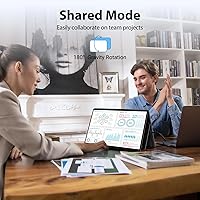
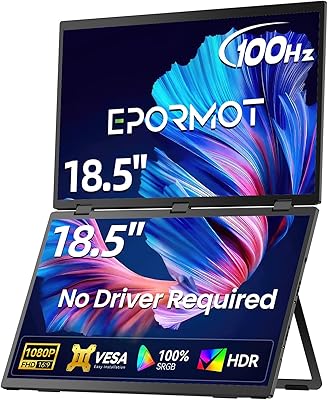
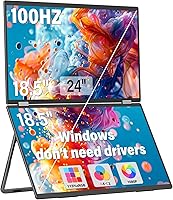
Each of the two 18.5-inch IPS A+ panels delivers 1080p at 100Hz, which means scrolling, video playback, and fast-moving data feel noticeably fluid rather than sluggish. The 115% sRGB color coverage is wide enough for casual creative work without overpromising studio-grade accuracy. Adjustability is genuinely impressive — the stand offers up to 180° of movement and a built-in gravity sensor handles auto-rotation when you tilt the display, a practical touch for presentations or reading. The built-in speakers cover a video call or background playlist without extra gear, though audiophiles will want headphones. One thing to know: HDMI connections are locked to splicing and duplication modes only — extension mode requires Type-C.

Best For

This stacked screen extender makes the most sense for people who genuinely need two screens on the road — analysts running comparisons, developers keeping a terminal open beside their editor, or students switching between source material and a document. Remote workers operating from hotels or co-working spaces will find it practical, as long as they are not packing ultralight. Mac users specifically need to factor in the driver download before buying; it is a minor friction point but worth knowing. If your workflow involves bouncing between browser tabs, spreadsheets, and communication apps simultaneously, this folding laptop monitor delivers that multi-window flexibility without being chained to a desk.

User Feedback

Buyers consistently praise the screen clarity and how straightforward the initial setup is — most Windows users report being up and running in minutes. The folding design earns positive mentions for feeling solid rather than flimsy. On the flip side, the 7-plus-pound weight draws regular comments from travelers who expected something lighter; it is noticeable in a bag. Some users also hit confusion around HDMI limitations before reading the fine print, so it is worth setting expectations early. Speaker feedback lands in the middle — functional for calls, not much else. A few buyers have raised questions about hinge longevity after extended daily use, which is worth watching over time.

Pros

  • Dual 18.5-inch panels give you genuinely usable screen real estate, not just a secondary thumbnail-sized display.
  • The 100Hz refresh rate makes everyday scrolling and video feel noticeably smoother than typical 60Hz portable monitors.
  • Windows plug-and-play setup via Type-C works without any driver installation, saving time out of the box.
  • The 115% sRGB coverage produces vibrant, accurate-enough colors for presentations, media, and casual creative tasks.
  • Auto-rotation via the built-in gravity sensor is a practical touch that works without digging through display settings.
  • The folding design feels solid rather than flimsy, and users report the build holds up well during regular travel.
  • Built-in speakers mean you can join a video call or watch a quick clip without hunting for headphones or a Bluetooth speaker.
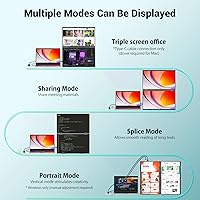
  • Three display modes — extension, splicing, and duplication — give flexibility depending on what your workflow needs.
  • An 18-month warranty and 30-day return policy provide a reasonable safety net at this price tier.

Cons

  • At over seven pounds, this stacked screen extender is noticeably heavy for travelers already managing a full laptop bag.
  • Mac users must download a driver to access extension mode via Type-C — it is not mentioned prominently enough before purchase.
  • HDMI connections are restricted to splicing and duplication only, which will frustrate users expecting full display flexibility.
  • Powering the setup requires two cables — one for signal and one for power — which adds desk clutter compared to true single-cable solutions.
  • Built-in speaker quality is mediocre at best and really only covers basic call audio, not anything you would actually want to listen to.
  • Long-term hinge durability remains a question mark, with some users flagging concerns after months of daily folding and unfolding.
  • The two-cable power requirement means you need the original adapter in the box — substitutions are not recommended per the manufacturer.
  • At its price point, buyers may expect a more refined software experience, but the Mac driver situation feels like an afterthought.

Ratings

The InnoView INVPM509 18.5″ Dual Portable Monitor has been evaluated by our AI system after analyzing thousands of verified global buyer reviews, with spam, bot-generated, and incentivized submissions actively filtered out. Scores reflect the full spectrum of real-world experience — from the aspects users consistently celebrate to the friction points that surface after weeks of daily use. Both strengths and honest shortcomings are transparently baked into every number below.

Display Clarity
88%
Users working across spreadsheets, code editors, and browser tabs frequently comment on how sharp and clean both panels look in daily use. The IPS A+ technology keeps colors consistent even when viewing from an angle, which matters when colleagues or clients glance at your screen during meetings.
A small segment of buyers note that at close viewing distances, the 1080p resolution on an 18.5-inch panel can look slightly softer than higher-density displays. Those coming from Retina-class MacBook screens may notice the difference during extended sessions.
Refresh Rate & Motion
83%
The 100Hz refresh rate is a genuine step up from the 60Hz panels found on most competing portable monitors, and users notice it when scrolling through long documents or watching video during breaks. Transitions feel responsive rather than sluggish, which reduces eye fatigue on long work days.
The refresh rate advantage is most relevant for productivity and casual media use — anyone expecting gaming-grade smoothness will find 100Hz on a portable IPS panel falls well short of that bar. A few users also report that achieving the full 100Hz requires the right cable and port combination.
Color Accuracy
79%
21%
The 115% sRGB coverage produces noticeably vivid colors for presentations, photo browsing, and general creative work, and most buyers find the out-of-box calibration acceptable without any manual adjustment. For remote workers editing marketing assets or reviewing design drafts, the color output is more than adequate.
Professional designers and photo editors expecting DCI-P3 or AdobeRGB coverage will find this stacked screen extender falls short of their workflow requirements. Color consistency across both panels is generally good but not perfectly matched, which can be visible when the same content spans both screens.
Portability
61%
39%
The folding form factor does a reasonable job of consolidating two 18.5-inch screens into a single carry unit, and users appreciate not needing a separate monitor bag or protective case for most trips. Hotel room and co-working space setups are genuinely achievable in under two minutes once you know the routine.
At just over seven pounds, this folding laptop monitor pushes into luggage-filler territory for anyone already carrying a laptop, charger, and other travel essentials. Multiple buyers specifically flag the weight as a dealbreaker for backpack-only travel, and it is heavier than most competing dual portable monitors on the market.
Build Quality
84%
The folding hinge mechanism draws consistent praise from buyers who expected a flimsy, cheap-feeling product and were pleasantly surprised by how solid the unit feels when opened and positioned. The overall construction inspires more confidence than the price point might suggest to first-time buyers.
Concerns about long-term hinge durability surface regularly among users who fold and unfold the unit multiple times daily over several months. It is not a widespread defect, but enough buyers have flagged it to warrant caution for anyone planning intensive daily travel use over a year or more.
Setup & Connectivity
77%
23%
Windows users consistently report a genuinely painless first-time setup — plug in both Type-C cables and the displays are recognized almost instantly, no driver hunting required. For a productivity tool aimed at people who do not want to troubleshoot, that experience delivers on its promise.
The two-cable requirement catches buyers off guard who assumed a single-cable solution, and juggling both cables on a cluttered hotel desk or cafe table is less elegant than it sounds. Mac users face an additional hurdle with the driver download required for extension mode, which several reviewers discovered only after unboxing.
Mac Compatibility
58%
42%
Once the required driver is downloaded and installed, Mac users report that the extension mode works reliably and the screens perform comparably to the Windows experience. For MacBook Pro users with Thunderbolt ports, the signal quality through Type-C is generally stable.
The driver requirement is a significant friction point that InnoView does not communicate prominently enough before purchase, and several Mac buyers felt misled by the no-driver-needed marketing language. HDMI-only Mac setups are locked out of extension mode entirely, which limits the monitor's usefulness for a meaningful portion of the Mac user base.
Stand & Adjustability
86%
The 180-degree gravity sensor that handles automatic screen rotation is a genuinely useful feature in practice — tilt the unit and the display adjusts without any trips into system settings. Remote workers who shift between landscape and reading orientations throughout the day find this saves real time.
The 90-degree portrait rotation mode requires a manual setting change in the OS display preferences, which breaks the otherwise hands-free adjustment experience. A small number of users also report that the stand can drift slightly on smooth desk surfaces when the screens are fully extended at wider angles.
Built-in Audio
47%
53%
For a quick video call or muting a notification sound on a secondary screen, the integrated speakers get the job done without requiring an additional audio device. Business travelers who forget their headphones at least have a fallback option for conference calls.
Audio quality is noticeably thin and low-volume, and buyers who expected even basic media playback quality from the speakers have been consistently disappointed. This is a convenience checkbox, not a genuine feature — anyone planning to watch video content with this dual portable monitor should bring headphones as standard practice.
HDMI Functionality
53%
47%
HDMI connectivity does work reliably for splicing and duplication use cases, which covers scenarios like presenting slides across both screens or mirroring your laptop display for a client walkthrough. The connection is stable and plug-in recognition is fast.
The restriction to splicing and duplication modes via HDMI is a real limitation that prevents users with HDMI-only laptops from getting the full dual-screen extended workspace the product is marketed around. This catches buyers off guard more than almost any other aspect of this folding laptop monitor.
Display Modes
74%
26%
Having three distinct display modes — extension, splicing, and duplication — gives the monitor genuine versatility across different work scenarios, and users who explore all three tend to find the right mode for their workflow quickly. The extension mode via Type-C is where most productivity users will spend the majority of their time.
The mode availability is heavily dependent on your connection type, and the matrix of what works with HDMI versus Type-C versus Mac versus Windows is confusing enough that several buyers needed to consult the manual or support before getting their preferred setup working. Clearer in-box documentation would reduce frustration significantly.
Value for Money
71%
29%
For buyers who genuinely need two screens on the road and have been tolerating a single small portable monitor, the stacked screen extender represents a meaningful productivity upgrade that is hard to replicate at a lower price point with comparable screen size. The 18-month warranty adds some reassurance to the investment.
At its mid-to-premium price, buyers reasonably expect a more polished out-of-box experience across all platforms, and the Mac driver situation and HDMI limitations feel like compromises that should have been resolved at this price tier. Competing single portable monitors of comparable quality come in significantly cheaper per screen.
Ease of Use
81%
19%
Day-to-day use for Windows users is straightforward once the initial setup is complete — fold out, connect both cables, and the screens are live. The gravity sensor rotation removes a step that most portable monitors require you to handle manually.
First-time setup for Mac users and the ongoing two-cable management process add a layer of daily friction that some buyers underestimated before purchasing. Cable organization in tight workspaces like airplane tray tables or small cafe tables is an ongoing minor annoyance reported by regular travelers.
Warranty & Support
76%
24%
The 18-month coverage period is longer than the standard one-year warranty offered by many portable monitor competitors, and buyers who have contacted InnoView support report generally responsive and helpful interactions. The 30-day return window gives first-time buyers reasonable time to evaluate the product properly.
The warranty explicitly excludes damage from misuse, which is a broad enough carve-out to create uncertainty for buyers whose unit develops issues after regular travel use. A few users noted that reaching the correct support channel required checking the branding printed on the back of the unit, which is not intuitive.

Suitable for:

The InnoView INVPM509 18.5″ Dual Portable Monitor is built for people whose work genuinely demands more screen real estate than a single laptop panel provides. Remote workers and road warriors who spend their days in hotel rooms or co-working spaces will get the most out of it — having two full-sized screens without lugging a second desktop monitor is a real convenience. Developers who keep code on one screen and documentation or a terminal on the other will feel right at home, as will data analysts who need to compare spreadsheets or dashboards side by side. Students juggling research, writing, and video lectures simultaneously will also find this stacked screen extender a worthwhile upgrade. Windows users in particular benefit from the no-driver setup, which keeps the experience straightforward and frustration-free from the first connection.

Not suitable for:

The InnoView INVPM509 18.5″ Dual Portable Monitor is a harder sell for anyone prioritizing ultralight travel above all else — at over seven pounds, it adds noticeable heft to a bag, and travelers who already watch every ounce will feel that. Mac users should go in with clear expectations: extension mode via Type-C is not available out of the box and requires downloading a driver, which is a friction point some buyers do not anticipate. Anyone hoping to use HDMI as their primary connection for a full multi-screen workflow will be disappointed, since HDMI limits you to splicing and duplication modes only. This folding laptop monitor is also not a fit for users wanting a desktop-quality color-accurate display for professional photo or video editing, as the panel specs serve productivity and media consumption rather than precision color work. Finally, buyers expecting premium standalone audio will want to look elsewhere — the built-in speakers are a convenience feature, not a selling point.
Specifications

  • Screen Size: Each of the two panels measures 18.5 inches diagonally, giving a combined stacked dual-screen setup.
  • Resolution: Both panels run at 1920x1080 Full HD, delivering sharp, detailed visuals for productivity and media use.
  • Refresh Rate: A 100Hz refresh rate provides smooth motion across both screens, noticeably better than standard 60Hz portable monitors.
  • Panel Type: IPS A+ panels are used for both screens, offering wide viewing angles and consistent color reproduction.
  • Color Gamut: The display covers 115% of the sRGB color space, producing vivid colors suitable for general creative and media work.
  • Aspect Ratio: Both panels use a standard 16:9 aspect ratio, matching most laptop displays and video content formats.
  • Screen Surface: A matte finish reduces glare and reflections, making the screens more comfortable to use in bright environments.
  • Connectivity: The monitor connects via two Type-C ports (one for signal, one for power) and also supports HDMI input.
  • Display Modes: Supports extension, splicing, and duplication modes via Type-C; HDMI connections are limited to splicing and duplication only.
  • Stand Adjustment: The stand offers up to 180° of tilt adjustment, paired with a 180° gravity sensor that enables automatic screen rotation.
  • Screen Rotation: Auto-rotation to 180° is supported on both Windows and Mac; 90° rotation is available but must be set manually in system settings.
  • Built-in Speakers: Both panels include integrated speakers suitable for video calls and light audio playback during travel.
  • Driver Requirement: No driver installation is needed for Windows users; Mac users must download a driver to access extension mode via Type-C.
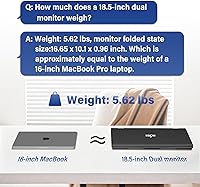
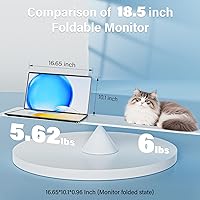
  • Dimensions: The unit measures 10.1 x 16.65 x 0.96 inches when folded, making it portable but not ultracompact by travel monitor standards.
  • Weight: The complete dual-screen unit weighs 7.09 pounds, which is heavier than single-panel portable monitors of comparable screen size.
  • Power Supply: The monitor must be powered using the original adapter included in the box; third-party substitutes are not recommended by the manufacturer.
  • OS Compatibility: Compatible with both Windows and macOS systems, though full functionality on Mac requires an additional driver download.
  • Warranty: InnoView provides an 18-month guarantee against manufacturing defects, plus a 30-day return window for eligible purchases.
  • Model Number: The official model identifier for this unit is INVPM509-02B, as listed on the product and manufacturer documentation.
  • First Available: This model became available in September 2024, placing it among the more recent entries in the dual portable monitor category.

Related Reviews

EPORMOT M185E11-J Portable Dual Monitor 18.5″
86%
90%
Display Quality
85%
Portability
93%
Setup & Installation
88%
Performance (Gaming & Productivity)
82%
Build Quality
More
VisionOwl 18.5-Inch 1080p Portable Monitor
77%
91%
Screen Size & Real Estate
83%
Display Clarity & Sharpness
78%
Color Accuracy & Vibrancy
81%
Refresh Rate & Motion Performance
89%
Connectivity & Setup Ease
More
Ingnok 18.5-inch FHD Portable Monitor
72%
83%
Value for Money
91%
Setup & Ease of Use
78%
Display Quality
61%
Brightness
59%
Build Quality
More
CoolHood 18.5-inch Portable Monitor
88%
94%
Portability
88%
Display Quality
91%
Ease of Setup
85%
Gaming Performance
89%
Color Accuracy
More
Qunub 18.5-inch Portable Monitor
85%
89%
Display Quality
94%
Portability
85%
Gaming Performance
90%
Setup & Installation
88%
Build Quality
More
HotYeah 18.5-inch 1080P Portable Monitor
75%
83%
Display Clarity
78%
Color Vibrancy
81%
Refresh Rate & Motion
57%
Brightness & Outdoor Use
67%
USB-C Connectivity
More
CUIUIC 18.5″ Portable Monitor
74%
83%
Display Quality
88%
Screen Size & Real Estate
58%
Portability & Weight
61%
USB-C Connectivity
72%
Build Quality & Materials
More
Upperizon 18.5-inch Portable Monitor
85%
89%
Display Quality
91%
Portability & Design
85%
Ease of Setup
88%
Color Accuracy
82%
Gaming Performance
More
Motyeowe 18.5 Inch Portable Monitor
86%
89%
Display Quality
94%
Portability & Design
88%
Connectivity
84%
Performance (Gaming)
91%
Ease of Setup
More
Cocopar 18.5-inch Portable Monitor
84%
90%
Display Quality
95%
Portability & Weight
88%
Gaming Performance
85%
Connectivity
80%
Build Quality
More

FAQ

No, Windows users can plug in and start working without installing any drivers. Connect one Type-C cable for the signal and a second one for power, and the monitor should be recognized automatically.

Yes, and this is worth knowing before you buy. The InnoView INVPM509 18.5″ Dual Portable Monitor requires a driver download on Mac if you want to use extension mode via Type-C. Without it, you are limited to mirroring or splicing. It is a straightforward download, but it is an extra step that Windows users do not have to deal with.
Not quite. When you connect via HDMI, you are limited to splicing and duplication modes only — you cannot use it for true screen extension. If you need independent extended displays, Type-C is the connection you want.

One Type-C cable carries the video signal, and the second one powers the display. Some laptops with high-power Type-C output might manage both functions over one cable, but InnoView specifically recommends using the included adapter for power to avoid issues. In practice, plan for two cables at your workstation.

It depends on your travel habits. If you pack light and already carry a laptop, charger, and other gear, adding seven-plus pounds is noticeable. It is manageable in a rolling bag or a well-padded laptop backpack, but this stacked screen extender is not something you will want to carry on long walking days.

They are fine for a video call or background audio, but that is about the ceiling of their capability. If you are planning to watch movies or listen to music seriously, a pair of headphones or a Bluetooth speaker will serve you much better.

Yes, 90-degree rotation is supported, but it requires a manual adjustment in your display settings rather than happening automatically. The gravity sensor handles the 180-degree flip on its own, but portrait mode is a manual setup step.

The primary connection relies on Type-C ports for both signal and full display functionality. If your laptop only has USB-A ports, you would need an adapter, and compatibility can vary — particularly for extension mode. Laptops with a full-featured USB-C or Thunderbolt port will have the most reliable experience.

The folding mechanism feels solid out of the box, and most short-term users report no issues. However, some buyers who use this folding laptop monitor daily over several months have raised questions about long-term hinge wear. It is a reasonable concern given the repeated folding involved in travel use, and something to monitor if you rely on it heavily every day.

The 30-day return window covers early issues, and the 18-month manufacturer warranty handles defects beyond that period. If you run into trouble, InnoView customer support is reachable through the contact details on the back of the unit. Just note that physical damage from misuse is not covered under the warranty.