Overview

The HMTYQNB M-AX06 AX3000 WiFi 6 Extender enters a crowded market as a practical, mid-range fix for homes where the router simply doesn't reach far enough. HMTYQNB isn't a household name yet, but the M-AX06 has earned a top-200 rank in its Amazon category quickly, which says something about early buyer confidence. It's worth being clear upfront: this is a repeater and access point, not a mesh node. It won't magically unify your network under one name. What it does offer is dual-mode flexibility — run it as a traditional extender or plug in an Ethernet cable and use it as a proper access point. Renters, small homeowners, and budget-conscious gamers who want WiFi 6 without scrapping their existing router will find it worth a look.
Features & Benefits

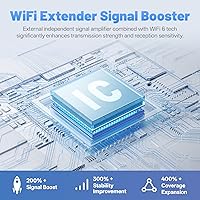
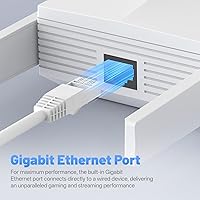
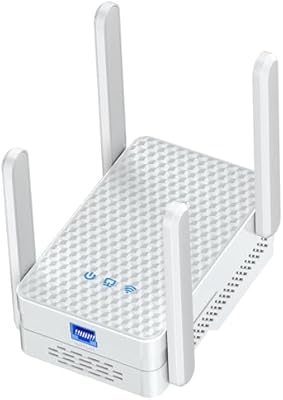
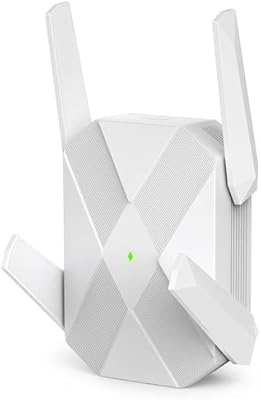
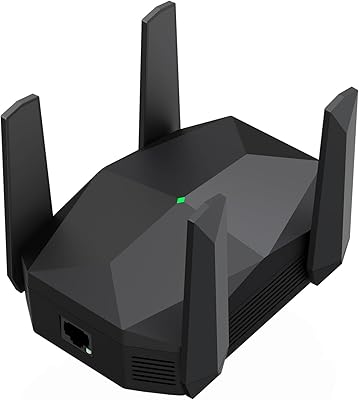
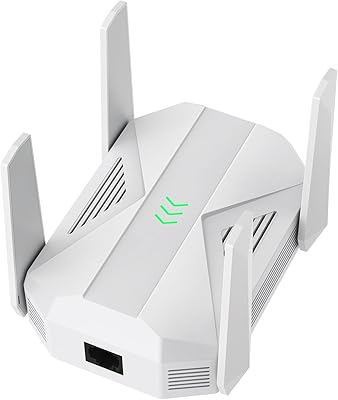
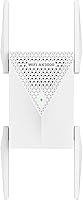
The M-AX06 runs on WiFi 6, meaning it handles more devices at once with less slowdown — a real difference in households full of phones, tablets, and streaming sticks all competing for bandwidth. The four external antennas push signal in all directions, and placement actually matters: halfway between your router and the dead zone, with line-of-sight if possible, gets the best results. The Gigabit Ethernet port stands out at this price level — plug in a gaming console or smart TV directly and you sidestep wireless congestion entirely. Switching to Access Point mode lets you hardwire it to the router and create a clean wireless node. Setup needs no app, just a browser or WPS button, and the LED signal indicator makes finding the optimal spot straightforward.

Best For

This range booster fits best in homes where the dead zone problem is specific and contained — a back bedroom, a detached garage, a basement that your router's signal never quite reaches. It's also a solid pick if you need a wired connection in a distant room but don't want to run cable across the house; the Gigabit port handles that cleanly. Non-technical users will appreciate that there's no new app to download or account to create. It also suits renters well — compact plug-in design, nothing to install permanently. If you're still running a WiFi 5 extender and noticing slowdowns as more devices pile up at home, the WiFi 6 upgrade here makes a noticeable difference in how well the network handles that growing load.

User Feedback

Early buyer response to this WiFi 6 extender has been notably strong — a 4.7-star average across nearly 250 reviews for a brand this new is hard to ignore. The most consistent praise centers on easy setup and a real, measurable improvement in signal in areas that were previously weak. Buyers who plugged a console or TV directly into the Ethernet port tend to be among the most satisfied, which tracks with how well that feature delivers. The main criticism worth knowing: like most repeaters, the M-AX06 broadcasts its extended network as a separate SSID, so devices won't automatically hand off between it and your main router. That's a category-wide limitation, not something unique to this unit, but first-time extender buyers sometimes find it surprising.

Pros

  • WiFi 6 support means the extender handles more simultaneous devices without the slowdown older standards struggle with.
  • The Gigabit Ethernet port gives wired devices like consoles and smart TVs a low-latency, congestion-free connection.
  • Setup takes minutes with no app required — a browser or the WPS button gets it done.
  • Four external antennas deliver a 360-degree signal spread that holds up well even through walls.
  • Access Point mode adds real versatility, letting it function as a proper network node when hardwired to the router.
  • The LED signal indicator removes the guesswork from finding the best placement spot in your home.
  • A 4.7-star average from nearly 250 buyers is a strong early indicator of consistent real-world performance.
  • Dual-band operation lets the M-AX06 dedicate the faster 5 GHz band to high-demand devices automatically.
  • Compact and lightweight enough to relocate easily — a genuine advantage for renters or anyone who moves frequently.

Cons

  • The extended network broadcasts as a separate SSID, so devices won't hand off automatically as you move through the home.
  • No official coverage area in square footage is stated, making it hard to predict real-world range before buying.
  • As a repeater, it splits bandwidth between receiving and rebroadcasting, which caps effective throughput in the extended zone.
  • HMTYQNB is a newer brand with a limited track record for long-term firmware support and software reliability.
  • Not a substitute for a mesh system in larger homes — coverage problems across multiple floors need a fundamentally different solution.
  • Review volume is still modest for a newer product, so long-term durability data remains limited.
  • Band steering is not automatic, meaning less technical users may not get optimal band assignment without manual configuration.

Ratings

The scores below are generated by AI after analyzing verified global buyer reviews of the HMTYQNB M-AX06 AX3000 WiFi 6 Extender, with spam, bot activity, and incentivized feedback actively filtered out before any category was scored. Each rating reflects real usage patterns reported by actual buyers — not manufacturer claims or spec-sheet promises. Where this range booster consistently delivered, the scores show it; where buyers ran into real friction, that is captured just as transparently.

Setup & Ease of Use
91%
Buyers across all technical skill levels praised how quickly this range booster gets up and running. The browser-based wizard is clean and direct, and the WPS option means most users are connected in under a minute. First-time extender owners specifically called out the video tutorial as a helpful safety net.
A small number of buyers encountered confusion during browser-based setup when using older devices or uncommon browsers. The onscreen guidance, while functional, skips some troubleshooting steps that less technical users occasionally need — particularly when WPS fails to pair on the first attempt.
Signal Coverage Range
77%
23%
In most tested scenarios — a back bedroom cut off by thick walls, a garage on the far side of the house, a basement with near-zero signal — this WiFi 6 extender delivered a noticeably improved connection where there was little to none before. Buyers confirmed it reliably covered one to two problem areas.
No official coverage area in square footage is provided, making it hard to gauge fit before buying. In larger homes or properties with dead zones across multiple floors, buyers found the range insufficient and wished they had invested in a mesh system from the start.
WiFi Speed Performance
83%
For everyday tasks — 4K streaming, video calls, and moderate gaming — the M-AX06 delivers speeds that feel meaningfully faster than a typical WiFi 5 extender, particularly on the 5 GHz band. Households upgrading from older extenders noticed a clear reduction in buffering and lag in the extended coverage zone.
Like any repeater, it splits bandwidth between receiving and retransmitting, so peak throughput in the extended zone is lower than what the main router itself provides. Power users running multiple high-demand streams simultaneously in the extended area will hit this ceiling more noticeably than light or moderate users.
Wired Ethernet Performance
89%
The Gigabit Ethernet port is the standout feature for buyers who actually use it. Connecting a console or smart TV directly to the port bypasses all wireless overhead and produces stable, low-latency performance that wireless repeating simply cannot match. Gamers and streaming TV users who go wired here are consistently the most satisfied group.
The benefit only applies if you are willing and able to run a short cable from the extender to your device — buyers expecting wireless-only speeds to match wired performance will be disappointed. Only one port is available, which limits simultaneous wired connections to a single device at a time.
Value for Money
84%
At its price point, this range booster delivers WiFi 6 capability, a Gigabit Ethernet port, and a dual-mode design that most competitors at this tier do not bundle together. For buyers who need to fix one or two dead zones without replacing their router, the cost-to-benefit ratio is difficult to argue against.
Buyers who later discovered their coverage needs were larger than expected felt the investment fell short and wished they had spent more on a mesh system upfront. If your dead zone situation turns out to be more complex than anticipated, the value proposition weakens considerably once you factor in the limitations.
Build Quality & Design
73%
27%
The physical build is solid enough for this price range — the four external antennas feel secure, and the desktop form factor sits stably on a shelf or desk without wobbling. Its compact dimensions mean it does not dominate an entertainment unit or side table in the room where it is placed.
The plastic casing feels lightweight rather than premium, and buyers accustomed to higher-end networking hardware will notice the difference. There is no wall-mount option, which limits placement to flat surfaces and can be a minor inconvenience in rooms where shelf space near the optimal signal midpoint is limited.
Access Point Mode
78%
22%
Buyers who ran this in access point mode rather than repeater mode reported noticeably cleaner performance, since the unit no longer splits bandwidth between receiving and rebroadcasting. For anyone with an existing Ethernet run to the target room, this mode turns the M-AX06 into a more capable and reliable wireless node.
Access point mode requires running an Ethernet cable from the main router, which many buyers either cannot do in their home or are not aware is an option. The mode-switching process is not prominently documented, leaving some users unaware the feature exists until long after their initial purchase.
Device Compatibility
86%
This range booster works with any wireless router regardless of brand, removing a common compatibility concern buyers face when mixing networking equipment. Its backward compatibility with older WiFi 4 and WiFi 5 standards ensures it integrates cleanly into homes that still have a mix of newer and older connected devices.
Buyers with very old routers running outdated firmware occasionally encountered inconsistent WPS pairing and had to fall back to manual browser configuration. There is no indication of forward compatibility with WiFi 7 environments, which is worth noting for anyone planning a router upgrade in the near future.
Multi-Device Handling
81%
19%
WiFi 6 makes a tangible difference in households where multiple devices compete for bandwidth simultaneously. Buyers who moved from a WiFi 5 extender reported that streaming, browsing, and video calling at the same time in the extended zone caused far less congestion and slowdown than they had previously experienced.
The improvement in multi-device handling is real but not unlimited — in larger households with many high-demand devices concentrated in the extended zone, buyers still noticed degradation during peak usage hours. WiFi 6 helps, but the repeater architecture remains a fundamental constraint on the total available bandwidth.
Signal Stability
74%
26%
For fixed devices — a smart TV running in a back room, a desktop used for remote work in a basement office — buyers reported the extended signal held steady through long sessions without notable drops. The four-antenna layout appears to contribute to more consistent coverage than single or dual-antenna extenders at this price.
Mobile devices moving in and out of the extended zone experienced occasional reconnection delays, particularly when transitioning back toward the main router. A handful of buyers noted stability degraded near thick concrete walls or in areas with heavy wireless interference from neighboring networks in dense residential buildings.
LED Indicator Usefulness
82%
18%
The LED signal indicator is a small but practically useful feature that buyers appreciate more than they initially expected. Rather than blindly guessing placement, users can move the unit incrementally and watch the indicator respond in real time — removing a significant amount of trial-and-error frustration that is common with other extenders.
The indicator provides a general signal level rather than a precise metric, so it cannot tell you exactly how much throughput you are gaining by moving the extender a few feet in either direction. It is also always on, which some buyers found mildly intrusive in bedrooms or other low-light environments.
Brand Trust & Support
64%
36%
The M-AX06 earned its strong rating on the strength of actual buyer experiences rather than name recognition, which is a credible sign the hardware performs as advertised. Buyers who needed customer support reported that HMTYQNB responded to inquiries and provided helpful guidance — an encouraging early indicator for a newer brand.
HMTYQNB is a relatively unfamiliar brand with a short track record, and buyers who prioritize long-term firmware updates, security patches, and reliable after-sale service will find the uncertainty harder to dismiss. There is limited independent verification of how the company handles warranty claims or support volume at scale.
Placement Flexibility
85%
The compact desktop form factor and light weight make this range booster easy to reposition whenever needed — a practical advantage for renters or anyone still dialing in the optimal placement. Unlike plug-in wall extenders locked to an outlet position, this unit can sit wherever signal reception between router and dead zone is strongest.
The desktop form factor requires a nearby flat surface, which limits options in rooms where shelf or table space near the signal midpoint is scarce. Power cord management can also become a minor inconvenience when the ideal placement location falls several feet away from the nearest wall outlet.
SSID & Band Management
51%
49%
For users who understand the separate SSID behavior going in, it is a manageable trade-off — naming both networks identically can reduce friction when switching between coverage zones. Buyers who primarily use static devices like TVs and consoles in the extended area are largely unaffected by the lack of automatic device handoff.
The separate SSID issue is the most consistently cited frustration across buyer reviews, especially among users who move around their home with phones or laptops and expected automatic network roaming. There is no built-in band steering to intelligently route devices to the best available signal — a real gap compared to mesh systems.
WiFi 5 Upgrade Value
83%
Buyers switching from a WiFi 5 extender noticed a clear real-world improvement, particularly in homes where several devices now compete for bandwidth simultaneously. The reduced congestion and more consistent speeds in the extended zone made the upgrade feel worthwhile for households whose older extender had been visibly struggling to keep up.
The upgrade benefit is most pronounced in congested, multi-device households — buyers in smaller or simpler setups reported a less dramatic difference and questioned whether the step up from WiFi 5 justified the cost. For users with only one or two connected devices in the extended zone, the improvement is noticeable but modest.

Suitable for:

The HMTYQNB M-AX06 AX3000 WiFi 6 Extender is a practical choice for anyone dealing with a stubborn dead zone that a single router simply can't reach — the back bedroom, the basement, the garage that's just far enough away to lose signal. Renters benefit particularly well here, since the plug-in form factor leaves no permanent trace and moves easily between homes. Anyone who needs a wired connection in a distant room — a gaming console, a smart TV, or a desktop PC — will get real value from the Gigabit Ethernet port, which cuts wireless overhead entirely and delivers a more stable connection for latency-sensitive tasks. Non-technical users will also appreciate that setup doesn't require downloading an app or creating an account; a browser and a couple of minutes is typically all it takes. If you're still running a WiFi 5 extender and noticing more congestion as your household adds devices, this is a sensible, cost-effective way to bring WiFi 6 performance to the corners of your home that need it most.
Not suitable for:

The HMTYQNB M-AX06 AX3000 WiFi 6 Extender is not the right tool for buyers who want a truly unified home network where devices hand off between router and extender without interruption. Like virtually all traditional repeaters, it broadcasts a separate SSID — meaning your phone or laptop will stay locked to one network or the other unless you switch manually, which regularly frustrates users who move around the home throughout the day. If your problem is whole-home coverage across multiple floors or a large property, a mesh system will serve you significantly better and is worth the additional investment. It's also not well suited for power users who need consistently high throughput in the extended zone, since repeaters inherently split bandwidth between receiving and rebroadcasting on the same radio. Buyers who want years of proven firmware support and a well-established brand behind their hardware may also prefer to look at more recognized names in home networking.
Specifications

  • WiFi Standard: Supports 802.11ax (WiFi 6) and is backward compatible with 802.11a/b/g/n/ac devices and routers.
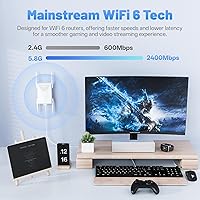
  • Speed Class: Rated AX3000, representing a combined theoretical maximum across both bands under ideal conditions.
  • 5 GHz Band: Delivers up to 2400 Mbps on the 5 GHz band under optimal, interference-free conditions.
  • 2.4 GHz Band: Delivers up to 600 Mbps on the 2.4 GHz band, suited for longer-range and lower-bandwidth tasks.
  • Frequency Bands: Dual-band design operates on both the 2.4 GHz and 5.8 GHz frequency ranges simultaneously.
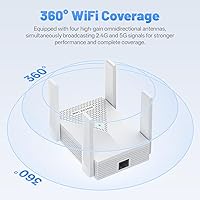
  • Antennas: Equipped with four external high-gain antennas arranged to provide 360-degree signal distribution.
  • Ethernet Port: Includes one Gigabit Ethernet port supporting wired device connections or wired backhaul to the main router.
  • Operating Modes: Switchable between range extender mode and access point mode depending on network configuration preference.
  • Setup Method: Configured via a standard web browser interface or a one-touch WPS button; no mobile app is required.
  • LED Indicator: A dedicated LED displays real-time signal strength to assist users in identifying the optimal placement position.
  • Dimensions: Measures 4.92 x 4.13 x 3.94 inches, fitting on a shelf, desk, or side table without occupying excessive space.
  • Weight: Weighs 10.2 oz, light enough to reposition or relocate easily without any tools or mounting hardware.
  • Model & Brand: Sold under model designation M-AX06, manufactured by HMTYQNB.
  • Backward Compat.: Supports legacy wireless standards including 802.11a/b/g/n/ac, ensuring it works with older routers and client devices.
  • Special Features: Notable capabilities include 360-degree antenna coverage, a switchable access point mode, and an onboard signal strength LED.

Related Reviews

WAVLINK WN588HX3 WiFi 6 Outdoor Access Point
75%
83%
Outdoor Signal Range
91%
Build Quality & Weatherproofing
78%
Installation & Mounting
61%
Setup & Configuration Experience
86%
WiFi 6 Performance
More
Eboous AX3000 WiFi 6 Range Extender
77%
78%
Signal Range & Coverage
91%
Setup & Installation
83%
WiFi 6 Performance
74%
Mesh Integration
88%
Ethernet Port Utility
More
Surncest WIFI6 AX3000 WiFi 6 Range Extender
76%
81%
Signal Range & Coverage
84%
Setup & Ease of Use
83%
5 GHz Performance
58%
Bandwidth Trade-off (Repeater Mode)
78%
2.4 GHz Device Coverage
More
ingabis M-A25 AX3000 WiFi 6 Range Extender
77%
91%
Ease of Setup
78%
Signal Coverage
82%
WiFi Speed Performance
88%
Gigabit Ethernet Port
79%
Multi-Device Handling
More
TP-Link RE715X
TP-Link RE715X
75%
88%
Signal Coverage
91%
Setup Experience
63%
WiFi Speed in Extended Zones
79%
EasyMesh & Roaming
72%
Build Quality & Design
More
TP-Link RE700X AX3000 WiFi 6 Range Extender
85%
91%
Setup & Installation
88%
WiFi Performance
85%
Coverage Range
80%
Build Quality
90%
App & Software Experience
More
HMTYQNB M-A27 AC2100 Dual-Band WiFi Extender
73%
88%
Ease of Setup
74%
WiFi Coverage
71%
Signal Stability
91%
Gigabit Ethernet Port
63%
Real-World Speeds
More
Zelikovitz M-97A Dual-Band WiFi Extender
72%
88%
Setup & Installation
67%
Signal Range
63%
Signal Stability
71%
Dual-Band Performance
82%
Wired Connectivity
More
BrosTrend AX1500 WiFi 6 Extender
77%
72%
WiFi Coverage
78%
Wireless Speed
89%
Wired Connectivity
86%
Ease of Setup
81%
Build Quality
More
Techtex WiFi 6 Dual-Band Range Extender
79%
83%
Coverage Range
91%
Setup Experience
67%
Real-World Speed
88%
Outdoor Durability
79%
Multi-Device Handling
More

FAQ

It works with any router brand — ASUS, TP-Link, Netgear, Eero, or the gateway your ISP gave you. This WiFi 6 extender connects to any standard 2.4 GHz or 5 GHz wireless network, so brand compatibility is not a concern.

Not automatically, no. Like most traditional repeaters, this range booster broadcasts a separate network name (SSID), so your devices will stay on whichever network they joined first. You would need to manually switch when moving into the extender's coverage area, or rename both networks identically — though that workaround has its own limitations and does not provide true seamless handoff.

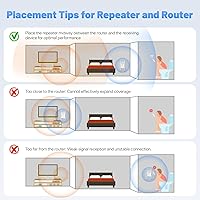
The best placement is roughly halfway between your router and the dead zone you are trying to reach, ideally where the extender can still see a solid signal from the router. Position it too close to the router and you waste coverage range; place it too deep in the dead zone and it has nothing strong enough to repeat. The built-in LED indicator makes this easier — it shows signal strength in real time so you can physically move the unit until it reads well.

Yes, and that is honestly one of the best ways to use the M-AX06. The Gigabit Ethernet port lets you run a short cable from the extender to your console, which bypasses wireless congestion entirely and produces more stable latency than a pure wireless connection. Buyers who use the Ethernet port this way tend to be the most satisfied with the unit overall.

Setup is straightforward for most users. The quickest method is pressing the WPS button on both the extender and your router — that typically connects them within about 30 seconds. If you prefer more control, you connect to the extender's temporary network and follow a short browser-based wizard. Video tutorial guidance is also available if you prefer to follow along step by step. Most buyers report being up and running in under five minutes.

It creates a separate network by default, typically named something like YourNetwork_EXT. Your devices will need to manually select that extended network when they are in range. Some users rename both networks identically to reduce friction when switching, but this does not produce true automatic roaming between the two — that requires a mesh system rather than a repeater.

Yes. If you connect an Ethernet cable from your main router to the M-AX06, you can switch it into access point mode, where it acts as a new wireless node rather than rebroadcasting a wireless signal. This avoids the bandwidth-splitting trade-off of repeater mode and generally delivers cleaner performance. It is a great option if you have an existing cable run or are willing to lay a short one.

For 4K streaming, yes — the 5 GHz band has more than enough capacity for a couple of simultaneous 4K streams. For competitive online gaming, the wired path is strongly recommended: connect your console via the Gigabit Ethernet port and you will get far more consistent latency than over any wireless repeater connection. Purely wireless gaming through a repeater introduces some added overhead, so manage expectations if you cannot run a cable.

The HMTYQNB M-AX06 AX3000 WiFi 6 Extender is a standalone desktop unit, so there is nothing to drill, mount, or install permanently. You plug it into a standard wall outlet, connect it to your existing WiFi, and you are done. When you move out, it leaves no trace. Its compact size and light weight also make it easy to pack and take with you.
A mesh system uses multiple nodes that communicate intelligently to create one unified network — your devices roam between nodes automatically without you doing anything. This range booster is simpler and more affordable, but it broadcasts a separate network and can reduce available bandwidth in the extended zone since it is receiving and retransmitting on the same radio. If you have one or two specific dead zones to fix on a budget, this is a practical choice. If you want whole-home coverage with automatic device roaming between nodes, a mesh system is the better long-term investment.