
Overview

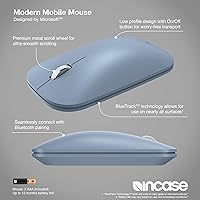
The Incase Modern Mobile Wireless Mouse is the result of an unusual co-branding arrangement — Microsoft actually designed it, which explains the clean, no-fuss engineering underneath the Incase label. The outcome is an ultra-slim travel mouse built for professionals who refuse to carry unnecessary gear. It connects purely via Bluetooth, so there is no USB dongle to misplace or sacrifice a port for. The ambidextrous layout means left-handed users are genuinely accommodated, not just tolerated as an afterthought. For anyone who finds full-size mice impractical on the road, this one earns an early spot in the conversation.

Features & Benefits

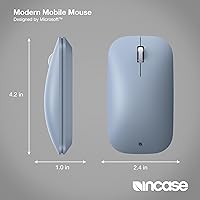
What distinguishes this slim Bluetooth mouse most is BlueTrack Technology, which blends optical and laser tracking to stay reliable on surfaces that defeat standard optical sensors — wooden tables, granite countertops, even glass in a pinch. The chassis is strikingly flat at just 0.1 inches thick, sliding into a laptop sleeve with room to spare. At 3.2 oz it barely registers in a bag. One genuinely welcome detail: a scroll wheel is included, something many ultra-thin mice quietly drop from the design. Power runs on two AAA batteries — included out of the box — which keeps things practical when a charging cable is the last thing you want to think about.

Best For

This travel mouse is the right fit for remote workers and frequent travelers who need a functional pointing device without adding noticeable weight or bulk to their carry-on. It also works well for people who switch regularly between Mac and Windows machines, though Windows is clearly the primary target based on the official specs — Mac users should set expectations accordingly. Anyone who dislikes USB receivers eating up a port will find the Bluetooth-only setup genuinely freeing. Where it underperforms is extended daily use; the flat profile is not designed for long hours of clicking, and dedicated power users or gamers would be better served elsewhere.

User Feedback

The Modern Mobile Mouse collects consistent praise for just how flat and light it is in real life — owners regularly note it disappears into a bag without adding any noticeable bulk. Bluetooth pairing is widely described as quick and stable, with few reports of frequent dropouts during typical workday use. The recurring criticism is hand fatigue during longer sessions; the flat shape starts to strain the wrist and fingers when used for hours straight, especially for those with larger hands. Battery life generally holds up well in practice. Left-handed users confirm the ambidextrous claim holds. For light to moderate travel use, the feedback is broadly positive — just go in aware of the ergonomics trade-off.

Pros

  • Genuinely featherlight at 3.2 oz — most users forget it is in their bag entirely.
  • No USB receiver means no sacrificed port and nothing small to misplace mid-trip.
  • BlueTrack tracking holds up on glass, wood, and other tricky surfaces that trip up optical-only sensors.
  • The scroll wheel is present and functional, which is not a given on mice this thin.
  • Batteries are included out of the box, so it is ready to use immediately.
  • Ambidextrous design is legitimately usable for left-handed users, not just a marketing claim.
  • Bluetooth pairing with Windows 10 and 11 is fast and connection dropouts are infrequent during normal use.
  • The flat profile slides into a laptop sleeve or padfolio without creating a bulge.
  • Backed by a one-year limited warranty, which is reasonable assurance for a travel peripheral.
  • Cross-platform compatibility covers both Windows and macOS for users who carry multiple devices.

Cons

  • The flat shape causes noticeable hand fatigue during sessions lasting more than an hour or two.
  • Users with larger hands may find the low-profile chassis uncomfortable to grip for any extended period.
  • Mac compatibility works but is secondary — some users report inconsistent behavior with macOS-specific functions.
  • AAA batteries mean you need to carry spares; there is no built-in rechargeable option.
  • No adjustable DPI settings, which limits precision control for detail-oriented tasks.
  • Only Bluetooth connectivity — if your device has a faulty or disabled Bluetooth stack, you have no fallback.
  • The thin chassis offers minimal tactile feedback from the click buttons compared to standard-depth mice.
  • No dedicated software or companion app for customizing button behavior or sensitivity.
  • At its price point, competing travel mice from established peripheral brands offer more ergonomic shaping.
  • Limited color options may not suit buyers who prefer a neutral or professional aesthetic.

Ratings

Our AI scoring for the Incase Modern Mobile Wireless Mouse was built by processing verified buyer reviews from global markets, with spam, incentivized, and bot-generated submissions actively filtered out before any score was calculated. The result is a transparent, balanced picture that captures both what this slim travel mouse genuinely does well and where real users hit frustration — no inflated averages, no hidden trade-offs.

Portability
96%
This is where the Modern Mobile Mouse earns its strongest marks by a wide margin. Reviewers who travel weekly consistently note that it disappears into a laptop sleeve without creating any noticeable bulk, and at 3.2 oz it is lighter than most in-flight snacks. The flat profile is the defining reason most people choose it over competing travel mice.
A small number of users find the thinness actually works against them when retrieving the mouse from a crowded bag, since it can slip between other items. There are no included storage pouches or cases, which some buyers expected at this price tier.
Bluetooth Connectivity
83%
Pairing on Windows 10 and 11 is consistently described as fast and straightforward — most users report the mouse is ready to use within a minute of first setup. Connection dropouts during normal office-style tasks are rare, and several frequent travelers note it reconnects reliably after waking a laptop from sleep.
A recurring subset of reviews flags inconsistent reconnection behavior after longer idle periods, requiring manual re-pairing on some systems. macOS users in particular report more variable connection stability compared to their Windows counterparts.
Ergonomics & Comfort
47%
53%
For tasks under an hour — quick email responses, light browsing during a flight, or reviewing documents in a hotel room — the flat shape is entirely manageable. Users with smaller hands tend to report fewer comfort issues than those with medium or large hands.
This is the most consistent pain point across all verified reviews. The ultra-flat profile provides almost no palm support, and hand fatigue sets in noticeably faster than with a standard mouse. Users working four or more hours at a stretch frequently mention wrist strain as a genuine problem.
Tracking Accuracy
78%
22%
BlueTrack Technology performs credibly across the varied surfaces travelers actually encounter — wooden cafe tables, hotel desk laminates, and even glass tabletops where many optical sensors give up entirely. Most users report cursor movement feels accurate and responsive for document work and general navigation.
At higher sensitivity needs — detailed photo editing, precise cursor placement in complex spreadsheets — some users find the tracking slightly inconsistent compared to dedicated desktop mice. Performance on very dark or highly reflective surfaces can also be less reliable than the marketing implies.
Build Quality
72%
28%
The fit and finish feels solid for a travel peripheral, with a clean, minimal aesthetic that holds up well through regular bag-in, bag-out daily use. The Microsoft design heritage is evident in the consistent button spacing and click feel, which avoids the cheap plasticky sensation common in budget travel mice.
The ultra-thin chassis does create some flex under lateral pressure, which a handful of buyers found unsettling even if it did not affect performance. The scroll wheel, while functional, feels slightly loose compared to higher-end mice in the same price range.
Mac Compatibility
58%
42%
Basic functionality — cursor movement, left and right click, scroll wheel — works on macOS without any driver installation. Users who need a simple cross-platform pointing device for occasional Mac use find it adequate for light tasks.
Mac-specific behaviors like smooth scrolling, Mission Control gestures, and system-level integration are either absent or unreliable. Several macOS users report the mouse does not always reconnect automatically after sleep, which becomes an annoyance in daily use.
Surface Versatility
81%
19%
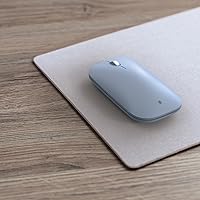
Real-world feedback broadly confirms that BlueTrack handles an impressive range of surfaces — polished wood, fabric, glass, and granite all receive positive mentions from users who have tested them in actual work settings rather than controlled conditions.
A small but consistent group of reviewers notes that tracking stutters slightly on very dark solid-color surfaces and some matte plastics. The technology is genuinely strong for a travel device, but it is not infallible on every surface type.
Battery Life
74%
26%
Under moderate use — a few hours of work per day spread across a normal travel week — most users find the included AAA batteries last several weeks before replacement is needed. The ability to use standard AAA batteries means replacements are available anywhere in the world.
Heavy daily users report shorter battery spans than expected, sometimes needing replacement within two to three weeks. The lack of any battery level indicator means the mouse can die mid-session without warning, which a number of reviewers found frustrating on important travel days.
Left-Hand Usability
77%
23%
Left-handed reviewers confirm the ambidextrous claim is genuine — the symmetric shape does not favor either hand, and button placement works practically in either orientation. This is a meaningful differentiator in a category where left-handed options are often limited.
A few left-handed users with larger hands note the same flat-profile fatigue issues experienced by right-handed users, and the overall hand feel is not optimized for either side specifically. True left-hand comfort over long sessions still falls short of purpose-built left-hand mice.
Setup Ease
89%
Getting this travel mouse running on Windows takes under two minutes — standard Bluetooth pairing with no driver download, no account creation, no companion software required. Nearly every verified reviewer describes the initial setup as genuinely effortless.
The instruction materials included in the box are minimal, which is fine for experienced users but can leave less tech-savvy buyers unsure whether they have set it up correctly. There is also no onboard pairing button indicator light, making it harder to confirm the mouse is in pairing mode at a glance.
Value for Money
63%
37%
For a traveler who genuinely needs the thinnest possible mouse and values the Microsoft-designed engineering and BlueTrack surface versatility, the price makes reasonable sense within the mid-range travel mouse category.
Several reviewers feel the ergonomics shortfall and Mac compatibility gaps are hard to justify at this price point when competing mice offer better all-day comfort for similar or lower cost. The lack of a carrying case and any DPI customization further erodes the value case for buyers who compare specs carefully.
Scroll Wheel Quality
69%
31%
The fact that a scroll wheel exists at all on a mouse this flat is worth acknowledging — many ultra-slim competitors quietly omit it. For basic document and web scrolling it works reliably and does not require unusual force to engage.
The scroll wheel lacks the tactile definition of mice with a traditional chassis depth, feeling slightly mushy compared to what most desk-mouse users are accustomed to. Horizontal scrolling is not supported, which becomes a limitation when working with wide spreadsheets on the go.
Aesthetic Design
84%
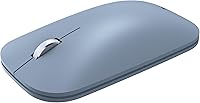
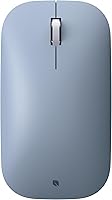
The Ice Blue colorway and slim silhouette draw consistent compliments from buyers who care about how their desk setup or laptop bag looks. The Microsoft-influenced design language gives it a clean, professional appearance that does not look out of place in a boardroom or creative workspace.
Color options are limited to a single variant in the primary listing, which frustrates buyers who prefer neutral tones like black or gray for a more understated look. The glossy finish, while attractive initially, shows fingerprints and smudges more readily than a matte surface would.
Ambidextrous Design
76%
24%
The symmetric form factor genuinely delivers on its ambidextrous promise, and right-handed users benefit from a layout that feels natural without any obvious bias toward one side. It is one of the cleaner implementations of a truly neutral mouse shape at this size.
Pure ambidextrous design inherently means the mouse is not perfectly optimized for either hand, and users who have used hand-specific ergonomic mice may find the neutral shape a noticeable step down in natural fit. The absence of thumb rest contours on either side contributes to the fatigue problem during long sessions.

Suitable for:

The Incase Modern Mobile Wireless Mouse was built with one type of buyer squarely in mind: the professional who moves constantly and needs a reliable pointing device that adds almost nothing to their bag. Frequent flyers, digital nomads, and remote workers who bounce between cafes, co-working spaces, and hotel rooms will find the flat profile and Bluetooth-only design genuinely practical rather than a compromise. Because it works on nearly any surface thanks to BlueTrack technology, you are not hunting for a mouse pad in an unfamiliar workspace. Both right- and left-handed users are accommodated without any adjustment, which is rarer than it should be in this category. It also suits people who juggle multiple operating systems, since it pairs with Windows 10, Windows 11, and macOS — handy if you carry both a personal Mac and a work PC on the same trip.

Not suitable for:

Anyone who spends six or more hours a day at a desk should think carefully before committing to the Incase Modern Mobile Wireless Mouse, because the ultra-flat shape simply does not offer the palm support that extended sessions demand. People with larger hands in particular tend to find the thin profile strains the wrist and fingers within an hour or two of continuous use. Gamers, graphic designers, and anyone running demanding software that benefits from a precision, high-DPI sensor should look at purpose-built ergonomic or performance mice instead. Mac-first users should also temper expectations — while Bluetooth pairing does work, the official spec list centers on Windows, and some Mac-specific features may not function as expected. If you already rely on a USB-A or USB-C dongle mouse and are happy with it, the trade-off to AAA batteries may feel like a step backward rather than a simplification.

Specifications

  • Brand: Manufactured by Incase and designed in collaboration with Microsoft.
  • Dimensions: The mouse measures 5.3 x 3.5 x 0.1 inches, making it one of the flattest travel mice available.
  • Weight: At 3.2 oz, the mouse adds minimal burden to a laptop bag or carry-on.
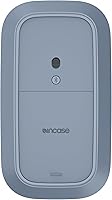
  • Connectivity: Connects exclusively via Bluetooth — no USB dongle or wireless receiver is included or required.
  • Compatible OS: Officially supports Windows 10 and Windows 11; macOS compatibility is also listed but Windows is the primary target platform.
  • Tracking Tech: Uses BlueTrack Technology, a hybrid optical-laser tracking system designed to perform on a wide range of surfaces.
  • Form Factor: Ultra-slim and ambidextrous, suitable for both right-handed and left-handed users without any physical adjustment.
  • Scroll Wheel: A physical scroll wheel is integrated into the chassis despite the extremely low-profile design.
  • Power Source: Requires 2 AAA batteries, which are included in the box at time of purchase.
  • Wireless Receiver: No USB receiver is used; Bluetooth pairing is the sole connection method.
  • Handedness: Fully ambidextrous layout accommodates both right-handed and left-handed users equally.
  • Warranty: Covered by a 1-year limited warranty from the manufacturer.
  • Model Number: Listed under the model designation Modern Mobile Mouse by Incase.
  • Availability: First made available for purchase in December 2024.
  • Market Rank: Holds a Best Sellers Rank of #216 in the Computer Mice category on Amazon at time of review.
  • Surface Support: BlueTrack Technology is rated for use on nearly any surface, including wood, glass, and granite.
  • Button Config: Standard two-button layout with a center scroll wheel; no additional programmable buttons are included.
  • Color Option: Available in an Ice Blue colorway as the primary listed variant.

Related Reviews
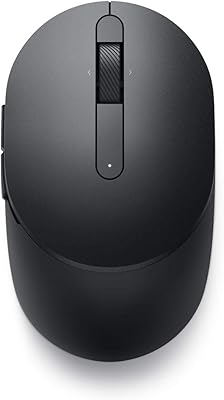
Dell MS5120W

Dell MS5120W
81%
91%
Wireless Connectivity
94%
Battery Life
63%
Ergonomics & Comfort
78%
Tracking Performance
81%
Build Quality & Durability
More
Arteck HW192 Wireless Keyboard and Mouse Combo

78%
78%
Build Quality
72%
Typing Experience
63%
Mouse Comfort & Ergonomics
81%
Battery Life
69%
Wireless Connectivity
More
Logitech M510
Logitech M510
81%
91%
Ergonomic Comfort
93%
Battery Life
88%
Wireless Reliability
79%
Tracking Accuracy
74%
Build Quality
More
Uineer A06 Vertical Ergonomic Mouse
74%
88%
Ergonomic Comfort
74%
Build Quality
86%
Wireless Connectivity
81%
Battery Life & Charging
67%
DPI & Tracking
More
Kovess 4-Mode Silent Wireless Mouse
79%
91%
Multi-Device Connectivity
88%
2-in-1 Receiver Design
86%
Jiggler Mode
84%
Silent Click Mechanism
79%
Battery Life
More
FENIFOX Wireless Keyboard and Mouse
86%
88%
Ergonomics
91%
Quiet Typing Experience
85%
Battery Life
89%
Wireless Connectivity
84%
Build Quality
More
MOFII Wireless Ergonomic Mouse
89%
94%
Ergonomic Comfort
88%
Build Quality
91%
Button Responsiveness
87%
Connectivity Stability
93%
Battery Life
More
Macally Wireless Bluetooth Mouse
86%
93%
Quiet Operation
89%
Battery Life
91%
Comfort and Ergonomics
75%
Bluetooth Connectivity
92%
Cross-Device Compatibility
More
Logitech M320 Wireless Mouse
74%
94%
Ease of Setup
88%
Wireless Reliability
91%
Battery Life
62%
Tracking Performance
63%
Comfort & Ergonomics
More
SABLUTE Wireless Trackball Mouse
74%
83%
Ergonomic Comfort
79%
Adjustable Tilt Base
86%
Multi-Device Connectivity
67%
Trackball Precision & Feel
74%
DPI Range & Customization
More

FAQ

It does pair with macOS via Bluetooth, so basic cursor movement and clicking work fine. That said, the official spec sheet focuses squarely on Windows 10 and 11, and some Mac-specific behaviors — like smooth scrolling or gesture support — may not perform as expected. If you are a Mac-first user, it is worth knowing going in rather than assuming full parity.

No driver installation is required for basic use on Windows 10, Windows 11, or macOS. You pair it through your system Bluetooth settings just like any other Bluetooth device, and it is ready to go. There is no companion app for customizing buttons or DPI settings.

Real-world battery life varies depending on how heavily you use it, but AAA batteries in slim travel mice generally last several weeks to a couple of months under moderate daily use. Since the mouse ships with batteries included, you can start using it right away — just keep a spare pair handy for longer trips.

The shape is genuinely symmetrical, and left-handed users have confirmed it works comfortably in practice — it is not just a design claim. That said, comfort over long sessions depends on hand size, and the flat profile may feel more limiting for left-handed users with larger hands the same way it does for anyone else.

BlueTrack Technology is specifically built to handle surfaces that trip up standard optical sensors, including glass, polished wood, and granite. Most users find it performs reliably on these surfaces, though results can still vary depending on the exact texture and reflectivity of the surface.

No — the Incase Modern Mobile Wireless Mouse uses Bluetooth only, and no USB receiver is included or available. This is by design, keeping the setup minimal and port-free, but it does mean you have no fallback if your device has Bluetooth issues.

Honestly, probably not. The flat, ultra-slim profile is optimized for portability rather than ergonomics, and users with larger hands frequently report wrist and finger fatigue after extended sessions. It is best suited for lighter daily use — a few hours of travel work rather than a full eight-hour desk day.

The product listing does not specify multi-device pairing, so you should assume it connects to one device at a time. Switching would require manually unpairing from one device and pairing to another through Bluetooth settings, which is manageable but not as quick as mice with dedicated multi-device buttons.

This is a co-branding arrangement where Microsoft contributed the design and engineering, while Incase handles manufacturing and distribution. It is similar to how some products are designed by one company and produced or branded by another. The Microsoft involvement is worth noting because it reflects a certain baseline of design discipline and reliability in the input hardware.

You get the travel mouse itself along with two AAA batteries already included, so it is ready to use out of the box. There is no carrying case, USB receiver, or printed manual beyond basic setup instructions — just the mouse and the batteries.

Where to Buy