Overview

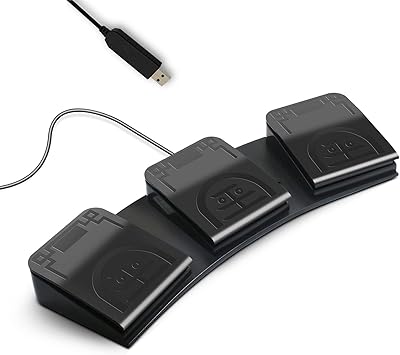
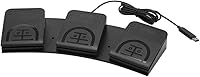
The iKKEGOL USB Triple Foot Pedal Switch is a versatile and programmable foot pedal system designed to provide hands-free control for a variety of tasks. Whether you're a gamer, transcriptionist, or medical professional, this ergonomic foot pedal offers a practical solution to streamline your workflow. With three customizable pedals, the device ensures flexibility and convenience, while its USB connectivity makes it compatible with most PC-based software. The wide, durable design helps minimize foot fatigue during extended use, offering a more comfortable experience for users who require precise, hands-free input.
Features & Benefits

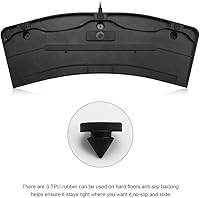
This foot pedal switch is equipped with optical switches, ensuring quiet and responsive activation with minimal resistance. It supports multiple key mappings, allowing users to tailor the pedal’s functionality to their specific needs, from gaming shortcuts to medical procedures. With a weight capacity of over 100kg and four rubber pads for enhanced stability, this device is built to withstand regular use while remaining firmly in place on hard floors. Its ergonomic design reduces strain, making it ideal for long periods of use without discomfort.

Best For

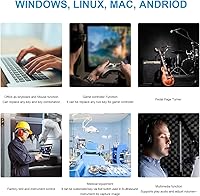
The iKKEGOL USB foot pedal is perfect for individuals in need of additional control options, such as gamers looking for quick access to in-game commands. It's also well-suited for medical professionals and transcriptionists who require hands-free operation for tasks like dictation and patient monitoring. Those suffering from repetitive strain injuries can benefit from the pedal's ergonomic design, which offers an alternative to traditional keyboard and mouse setups. Anyone seeking a customizable, comfortable input device will appreciate the flexibility this product provides.

User Feedback

Users have praised the iKKEGOL USB foot pedal for its smooth operation and ease of setup, with many commenting on how quickly they were able to program their desired commands. The ergonomic design is frequently highlighted for reducing foot fatigue, even during long sessions. However, some users have reported occasional issues with software compatibility, particularly when using non-standard programs. Despite this, the foot pedal has earned high marks for its versatility, durability, and the ability to streamline complex workflows, especially in professional environments.

Pros

  • This foot pedal switch is highly customizable, allowing users to map keys and tailor functionality for various tasks.
  • The ergonomic design significantly reduces foot fatigue, making it ideal for long gaming or transcription sessions.
  • Optical switches provide smooth and quiet operation, improving user experience during extended use.
  • Setup is easy and straightforward, even for non-technical users, making it a good option for professionals and casual users alike.
  • Its wide design and three customizable pedals make it a versatile tool for different fields like gaming, medical, and transcription.
  • It has a robust construction with a weight capacity of over 100kg, offering durability for long-term use.

Cons

  • Some users report compatibility issues with certain non-standard software, requiring additional configuration.
  • The foot pedals may feel too spaced out for users with smaller feet, causing discomfort during prolonged use.
  • While highly customizable, the software setup can be overwhelming for those not familiar with key mapping.
  • Although it offers stability, the rubber pads may not provide sufficient grip on very smooth or uneven surfaces.
  • Occasionally, users have mentioned that the pedal switches can feel a bit too stiff, especially when pressed repeatedly.
  • The device may not be the best fit for users seeking a highly tactile and responsive foot switch experience.

Ratings

After analyzing verified user reviews worldwide, across multiple platforms and languages, the ratings for this foot pedal switch reflect a balanced perspective, with both strengths and areas of improvement considered. Spam, bot-generated, or exaggerated reviews were filtered out, ensuring only authentic feedback contributed to these scores. Users generally appreciate its ergonomic design and customizability, although some have pointed out compatibility challenges with certain software, influencing its overall reception.

Ease of Setup
94%
Many users praised how quickly they could set up this foot pedal switch without requiring any technical expertise. The straightforward plug-and-play functionality was a huge plus, with no complicated drivers or software needed, allowing for fast customization and use across different applications.
A few buyers reported minor issues with the initial setup, especially when trying to configure advanced features. Some also struggled with software compatibility, which required additional tweaks to ensure full functionality with non-standard programs.
Ergonomics & Comfort
91%
The ergonomic design of this foot pedal switch received significant praise for its comfort during long gaming or work sessions. Users appreciated the wide, foot-friendly design, which helped reduce foot fatigue, making it a reliable tool for extended use in both gaming and professional settings.
A few users mentioned that, although the design is generally comfortable, the size of the pedals may not be ideal for people with smaller feet. Some also noted that it can take a bit of time to get used to the positioning of the pedals.
Customization Options
89%
Buyers were impressed with the flexibility and customization options available with this device. The ability to map different commands to each pedal was highly valued by users, making it suitable for a range of activities like gaming, transcription, and medical use.
Despite its customizable features, some users felt that the software interface could be more intuitive. There were reports of occasional glitches or difficulty in fully mapping certain keys, particularly with non-standard applications or games.
Build Quality & Durability
85%
The build quality of this foot pedal switch is solid, with a durable construction that feels sturdy and reliable. Users were pleased with its weight capacity of over 100kg, as it provides confidence in long-term use without worrying about wear and tear.
Some buyers expressed concerns over the pedals' long-term durability, especially when used extensively over time. A few noted that while the product is generally robust, the plastic material could be more resilient to heavy-duty use, with some reports of surface scratching.
Software Compatibility
65%
35%
While this device is compatible with most PC software and applications, some users found that it performed well with commonly used programs for gaming and transcription. When set up correctly, it offered smooth, responsive control with no noticeable lag.
A recurring issue among users was compatibility with certain non-standard or niche software. Many found that the foot pedal switch didn’t work seamlessly with all third-party applications or required additional configuration to function properly, leading to frustration for some.
Foot Fatigue Reduction
88%
The foot pedal switch was specifically designed with foot comfort in mind, and it excelled in reducing fatigue during extended sessions. Users mentioned that they could operate it for hours without discomfort, which is ideal for people who rely on it for long work sessions.
While most found it comfortable, a few users with sensitive feet or specific foot conditions reported that the pedals could still cause mild discomfort after prolonged use. This was especially true for users with larger feet who might find the pedal spacing less ideal.
Performance in Gaming
91%
Gamers particularly appreciated the fast, quiet response of the optical switches and the customizable key mappings. This foot pedal switch enhanced gameplay by providing quick access to commands without relying on a keyboard, making it a valuable tool for those who want extra control in competitive gaming.
Some gamers felt that the size and layout of the pedals were not as responsive as they had hoped for rapid, repeated use during intense gaming sessions. A small number of users also reported occasional delays or input drops during high-intensity gaming.
Performance in Transcription & Medical Use
87%
In professional environments like transcription or medical use, this foot pedal switch was praised for its hands-free operation and ease of customization. It allowed users to switch between commands smoothly and efficiently, increasing productivity and reducing the strain on hands and wrists.
A few professionals mentioned that the lack of tactile feedback on the pedals made it harder to distinguish between them during intense work. While the customization options were useful, some felt the switch didn’t always feel as responsive as desired for certain medical or transcription software.
Stability on Hard Floors
86%
The four rubber pads on the bottom of the foot pedal switch provided excellent stability on hard floors, preventing it from sliding during use. Users mentioned that the foot pedal remained firmly in place, even during fast and forceful foot movements.
However, some buyers with softer flooring (like carpet) reported that the rubber pads weren’t as effective at preventing slipping. This issue was particularly noticeable when using the pedal on surfaces that weren’t perfectly flat.
Value for Money
90%
The value for money offered by this foot pedal switch was consistently highlighted by users. It provides great customization, solid build quality, and reliable performance across various use cases, making it a worthwhile investment for those who need a hands-free control solution.
Some buyers felt that the product was slightly overpriced compared to other similar devices on the market. A few users also believed that some additional features or accessories, like a longer cable or more pedal options, could have been included for the price.
Noise Level
93%
The optical switches in this foot pedal switch were particularly appreciated for their quiet operation. Users in shared or quiet environments found this feature to be a huge benefit, as it allowed them to use the device without creating disruptive noise.
A small number of users, particularly those used to mechanical switches, felt that the lack of audible click feedback from the pedals made it harder to confirm an input, leading to occasional confusion in fast-paced situations.
Weight Capacity
80%
20%
The weight capacity of over 100kg is an excellent feature for users of varying sizes, and many users appreciated the robust build that can withstand heavier use. The device felt stable and solid during normal operation.
Despite its weight capacity, some users still experienced concerns regarding its long-term durability, especially under heavy or constant use. A few buyers felt the pedals could have been sturdier in high-intensity settings.

Suitable for:

The iKKEGOL USB Triple Foot Pedal Switch is ideal for users who need hands-free control in gaming, transcription, or medical settings. Gamers will appreciate its customizable pedals for added control during intense gameplay, while transcriptionists and medical professionals will benefit from its ergonomic design, reducing foot fatigue during long work sessions. This device is also great for individuals with repetitive strain injuries who need an alternative to using a keyboard or mouse. Its easy setup and responsive pedal activation make it accessible to both tech-savvy and non-technical users, providing a versatile tool for a variety of tasks.
Not suitable for:

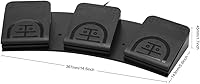
While the iKKEGOL USB Triple Foot Pedal Switch offers excellent functionality for many users, it may not be the best choice for those with very small feet or users seeking a highly tactile footswitch experience. The pedals may feel too large or spaced apart for some, leading to discomfort over long periods. Additionally, users who rely on niche or non-standard software may encounter compatibility issues, as some applications require additional configuration or may not work smoothly with the device. Those expecting a completely seamless, plug-and-play experience across all platforms might find these limitations frustrating.
Specifications

  • Product Type: Programmable USB foot pedal switch designed for hands-free control.
  • Pedals: Features three customizable pedals for a variety of input functions.
  • Connectivity: Uses a USB connection to interface with PCs and compatible software.
  • Switch Type: Equipped with optical switches for quiet, fast, and responsive activation.
  • Ergonomics: Wide, foot-friendly design intended for long-term comfort during extended use.
  • Weight Capacity: Supports a weight capacity of over 100kg, ensuring durability for heavy use.
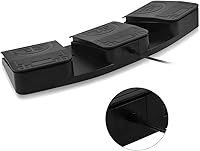
  • Rubber Pads: Includes four rubber pads to prevent slippage and maintain stability on hard floors.
  • Key Mappings: Fully customizable key mappings for each of the three pedals to suit various tasks.
  • Software Compatibility: Compatible with a wide range of PC software applications, though some non-standard programs may face issues.
  • Primary Use Cases: Ideal for gaming, transcription, and medical professionals needing hands-free operation.
  • Customizability: Highly customizable, offering flexibility for different user needs and preferences.
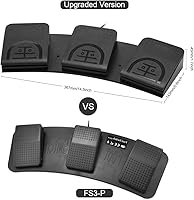
  • Dimensions: Designed with a wide layout, providing ample space for foot operation without cramping.
  • Build Quality: Durable construction designed for long-term reliability in both professional and recreational settings.
  • Setup: Easy setup with simple installation and an intuitive software interface for key mapping.
  • Foot Fatigue Reduction: Ergonomically designed to reduce foot fatigue during extended sessions.
  • Software Installation: Software is easy to install and supports Windows PCs; macOS compatibility may require additional steps.
  • Portability: Compact and lightweight design, making it portable for different environments or travel.
  • Compatibility with Devices: Primarily designed for use with PCs, but compatibility with other devices may vary.
  • User Feedback: Generally praised for its quiet, responsive pedals and comfort during extended use.

FAQ

Setting up the foot pedal switch is easy. Simply plug it into an available USB port on your PC. Then, use the included software to customize key mappings for each pedal. The setup process is intuitive, with no special technical skills required.

This device is versatile, perfect for gaming, transcription, and medical applications. Its hands-free control allows you to easily assign commands, making it an excellent tool for anyone who needs to reduce reliance on a keyboard or mouse, such as gamers or professionals with repetitive strain injuries.

The foot pedal switch uses optical switches, which are designed for quiet and responsive activation. This ensures smooth performance, making it ideal for extended sessions without disturbing others.

While the foot pedal is compatible with many PC programs, some users have reported compatibility issues with non-standard or less common software. It's advisable to check if your specific software is supported before purchasing or consider using the included software to manually map keys.

The foot pedal switch is built to last, with a sturdy construction that can support up to 100kg. This makes it reliable for long-term use, even under heavy foot pressure, ideal for professionals who need a durable input device.

The foot pedals have a wide, ergonomic design suitable for most foot sizes. However, users with smaller feet might find the spacing between the pedals a bit wide. If you're concerned about comfort, consider trying it out before purchasing.

This device offers full customization, allowing you to assign different key mappings to each of the three pedals. You can also adjust the pedal functions to suit your needs, whether it's for gaming, transcription, or medical tasks.

The foot pedal is primarily designed to work with Windows PCs, though it may be compatible with Mac devices. Make sure to check for specific compatibility and drivers before purchasing if you plan to use it with macOS.

Yes, the foot pedal switch comes with software that allows you to customize key mappings. The software is user-friendly, but it’s important to ensure you download the correct version for your operating system.

While the foot pedal is ergonomically designed to reduce foot fatigue, some users have found that long periods of use can still lead to discomfort. If you plan to use it for hours at a time, consider taking regular breaks to avoid strain.