iKKEGOL Upgraded USB Single Foot Pedal Switch
iKKEGOL Upgraded USB Single Foot Pedal Switch — image 1
iKKEGOL Upgraded USB Single Foot Pedal Switch — image 2
iKKEGOL Upgraded USB Single Foot Pedal Switch — image 3
iKKEGOL Upgraded USB Single Foot Pedal Switch — image 4
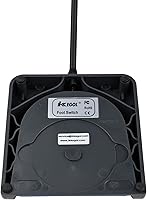
iKKEGOL Upgraded USB Single Foot Pedal Switch — image 5
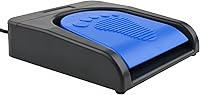
iKKEGOL Upgraded USB Single Foot Pedal Switch — image 6
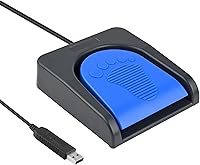
iKKEGOL Upgraded USB Single Foot Pedal Switch — image 7
iKKEGOL Upgraded USB Single Foot Pedal Switch — image 8
81%
19%

Overview

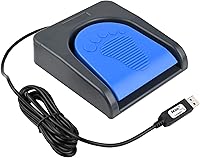
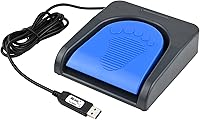
The iKKEGOL Upgraded USB Single Foot Pedal Switch is a dedicated hardware solution designed to move specific computer commands from your fingers to your feet. It functions as a specialized Human Interface Device, making it easier to manage complex workflows or machinery without taking your hands off your primary task. Its compact footprint ensures it tucks away neatly under a desk or workstation, though it remains sturdy enough to handle daily use. A crucial point for setup is that you must initially configure the device on a Windows computer using the provided software. Once programmed, however, the onboard memory allows it to work on various systems. The rugged build quality is surprisingly robust for its size, engineered to withstand significant physical pressure over time.

Features & Benefits

What sets the iKKEGOL pedal apart is its internal mechanical switch, which provides a satisfyingly tactile feel with very low resistance. This means you do not have to stomp on it; a light tap is enough to trigger your mapped shortcut or mouse click. Because this HID footswitch features internal memory, your customized settings—whether they are simple hotkeys or long text strings—stay with the device regardless of which computer you plug it into. It is remarkably durable, rated to support over 100 kg, which speaks to its longevity in industrial or heavy-use office settings. After that initial one-time configuration, it provides true plug-and-play functionality across Linux and Mac systems without needing extra drivers.

Best For

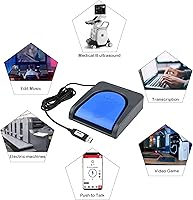
This programmable foot switch excels in environments where hands are occupied or precision timing is essential. For gamers, it serves as a perfect push-to-talk trigger, keeping communication open without fumbling for a keyboard key mid-match. In a professional setting, transcriptionists often find it invaluable for controlling audio playback, while medical workers use it to scan hospital images hands-free. It is equally effective for those dealing with mobility limitations, providing an accessibility aid that offloads repetitive clicking to the feet. Even in industrial workshops, such as those using electric sewing machines or factory test equipment, the device simplifies complex sequences into a single physical action, effectively solving workflow bottlenecks.

User Feedback

Real-world users frequently highlight the responsive and sensitive action of the mechanical switch, noting it feels much more reliable than cheaper plastic alternatives. While the hardware itself is praised for its longevity and reliability, some note a slight learning curve when navigating the proprietary configuration software for the first time. It is not always the most intuitive interface, but once the logic is understood, the flexibility is hard to beat. People have found creative software uses for it, ranging from triggering photo booth shutters to muting microphones during Zoom calls. Overall, while the software setup requires some patience, the consistent performance and solid physical construction make it a staple for anyone needing customized, hands-free computer control.

Pros

  • The mechanical switch provides a crisp, tactile response that ensures you know exactly when the command has been triggered.
  • Internal hardware memory stores your custom settings directly on the device, making it portable across different computers without re-programming.
  • Its industrial-grade build quality is rated to withstand over 100 kg of pressure, ensuring long-term durability under heavy use.
  • The sensitive trigger requires minimal foot pressure, which helps prevent fatigue during long gaming sessions or work shifts.
  • Once configured, the iKKEGOL pedal functions as a standard HID device, offering seamless plug-and-play compatibility with various operating systems.
  • The compact footprint allows it to fit easily under crowded desks without interfering with your chair or footrest.
  • You can program the switch to execute complex strings of text or mouse clicks, effectively automating tedious multi-step processes.
  • The low-profile design promotes a natural ankle angle, making it more ergonomic than bulkier, taller foot switches.

Cons

  • The requirement to use Windows-only software for the initial configuration is a major hurdle for dedicated Mac or Linux users.
  • The audible mechanical click may be too loud for use in professional recording environments or very quiet shared workspaces.
  • Finding the correct version of the configuration utility on the manufacturer's website can be a confusing and unintuitive experience.
  • A hardwired USB cable means the entire iKKEGOL Upgraded USB Single Foot Pedal Switch becomes e-waste if the wire ever frays or breaks.
  • The proprietary software interface looks significantly dated and lacks the user-friendly design found in modern peripheral suites.
  • Lightweight construction means the unit can slide across smooth floors unless placed against a wall or on a non-slip mat.
  • It lacks onboard LED indicators to show which macro or mode is currently active, which can lead to confusion during complex tasks.
  • The integrated cable may be too short for users with standing desks who need to route wires through long cable management trays.

Ratings

Our comprehensive rating of the iKKEGOL Upgraded USB Single Foot Pedal Switch is derived from an AI-driven analysis of verified global purchaser feedback, specifically filtered to remove spam and incentivized reviews. By examining thousands of real-world reports, we have generated scores that reflect the authentic experience of gamers and professionals alike. This scorecard provides a transparent look at the device's specialized strengths and its common setup hurdles.

Build Quality
91%
The chassis uses dense ABS plastic that feels remarkably substantial underfoot, giving users confidence that it can survive thousands of clicks. It handles the physical stress of industrial environments or high-stakes gaming sessions far better than the flimsy alternatives often found in this price bracket.
While the main body is tough, the adhesive on the bottom rubber pads can lose its grip over time. On very smooth surfaces like polished tile, you might find yourself needing to re-apply grip tape to keep the unit from sliding during use.
Programming Versatility
87%
The ability to map complex text strings, specific mouse clicks, or intricate keyboard macros directly to the hardware is a huge productivity win. This functionality allows users to offload repetitive tasks like copy-paste commands or specialized medical software triggers to a single foot press.
Mapping advanced macros requires a bit of trial and error within the proprietary software to ensure they save correctly. It is not always clear if a long sequence has been fully written to the internal chip until you actually test it in a live application.
Tactile Feedback
94%
Featuring a genuine mechanical switch, this device provides a crisp, audible click that offers immediate physical confirmation of every successful press. The actuation force is perfectly balanced, requiring enough pressure to prevent accidental triggers without causing foot fatigue during long work shifts.
The audible click is distinct and may be too loud for shared, quiet office spaces or recording studios. Users looking for a silent or stealthy input method might find the mechanical snap a bit too distracting for their environment.
Setup Difficulty
54%
46%
For users with a standard Windows PC, the basic configuration of a single key or shortcut is relatively fast. Once the download is secured, the utility allows you to assign a function and save it to the device in just a few clicks.
The setup process is a major bottleneck because it requires a Windows machine for the initial configuration. Mac and Linux users will find it frustrating that they must find a PC to program the device before it becomes functional on their primary operating systems.
OS Compatibility
76%
24%
Once the initial programming is finished on a PC, the internal memory allows this HID footswitch to work across almost any platform. It becomes truly plug-and-play, functioning perfectly on Chromebooks, Macs, and specialized medical equipment without needing any background drivers.
The initial Windows-only requirement is a significant barrier that catches many buyers off guard. Without access to a PC at least once, you effectively lose the ability to customize the device's functions, leaving you with whatever was set at the factory.
Portability
88%
Its compact dimensions make it incredibly easy to toss into a laptop bag or workstation drawer when not in use. This small footprint is ideal for cramped desks where every inch of floor space under the chair matters for ergonomic comfort.
Because it is so small and relatively lightweight, it can travel across the floor if your foot hits it at an angle. Some users recommend placing it against a wall or the leg of a desk to keep it in a consistent position.
Value for Money
92%
It offers a rare combination of industrial-grade durability and high-end mechanical components at a very accessible price point. For most users, the time saved by automating repetitive keyboard shortcuts more than justifies the modest investment in this hardware.
The hardware quality is so high that the dated software experience feels like a mismatch. You are clearly paying for a solid piece of equipment, but you have to tolerate a budget-tier configuration utility to get the most out of it.
Cable Reliability
83%
The integrated USB cable is thick and reinforced at the entry point, suggesting it will hold up well to being stepped on or occasionally rolled over. The length is sufficient for most standing desks and standard tower setups.
Because the cable is hardwired into the chassis, a single break in the wire means the entire unit is effectively useless. A detachable USB-C port would have been a significant improvement for long-term repairability and custom cable management.
Responsiveness
95%
There is virtually zero perceptible lag between the physical press and the command appearing on the screen. This near-instant communication makes it a reliable choice for gamers using it as a push-to-talk button where every millisecond counts.
When using the string function for very long blocks of text, the output appears to type out rather than paste instantly. While this is fine for most uses, it might feel slightly slow for those trying to input massive data sequences.
Software UI
38%
62%
The configuration utility is lightweight and does not need to stay running in the background once your settings are saved. This keeps your system resources free and prevents potential software conflicts during intense gaming or professional work.
The interface looks like a relic from the early 2000s and can be confusing to navigate for non-technical users. Finding the correct version of the software on the manufacturer's website is often cited as the most annoying part of the entire ownership experience.
Durability Under Load
96%
With a rating that supports over 100 kg, this pedal is one of the few consumer peripherals that can survive being stood upon. This makes it suitable for heavy-duty environments like factory floors or sewing rooms where boots are the norm.
After several months of high-repetition use, the internal spring can occasionally develop a minor squeak. While this doesn't affect functionality and is easily fixed with a drop of lubricant, it can be a slight nuisance in a quiet office.
Ergonomics
81%
19%
The low profile of the pedal allows for a natural foot angle, reducing strain on the ankle even during repetitive use. Its wide base provides a stable platform that feels natural for most shoe sizes and foot positions.
Users with very large feet might find the target area a bit small if they are trying to find it blindly under a desk. It requires a bit of muscle memory to consistently land your foot in the center of the trigger.

Suitable for:

The iKKEGOL Upgraded USB Single Foot Pedal Switch is a practical asset for professionals who regularly face workflow bottlenecks caused by repetitive keyboard tasks. It is especially beneficial for medical staff, transcriptionists, and data entry clerks who need to keep their hands free for primary tasks while managing secondary software controls. Gamers who want a dedicated, reliable trigger for push-to-talk or complex in-game macros will appreciate the tactile feedback of the mechanical switch. Additionally, it serves as an excellent accessibility aid for users with mobility limitations who find traditional keyboard shortcuts difficult to execute. Industrial workers, such as those operating sewing machines or factory test equipment, will also find its rugged construction well-suited for heavy-duty daily use.

Not suitable for:

This device is likely to frustrate users who exclusively use Mac or Linux systems and do not have easy access to a Windows computer for the initial setup. Because the iKKEGOL Upgraded USB Single Foot Pedal Switch requires proprietary Windows software to program its internal memory, it is not a true out-of-the-box solution for non-Windows environments. Buyers looking for a completely silent input method should avoid this model, as the mechanical switch produces a distinct, audible click that might be distracting in a shared quiet office. Furthermore, people who require a complex multi-pedal setup for music production might find this single-pedal variant too limited for their specific layering needs. It is also not ideal for those who prefer wireless peripherals, as the hardwired USB cable is mandatory for operation.

Specifications

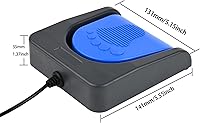
  • Dimensions: The unit measures 5.55″ x 5.15″ x 1.38″ for a low-profile fit.
  • Item Weight: This device weighs 14.4 oz to help maintain stability on the floor during use.
  • Connectivity: It uses a standard wired USB connection for immediate power and data transmission.
  • Primary Material: The casing is constructed from durable Acrylonitrile Butadiene Styrene (ABS) plastic.
  • Weight Capacity: The structural design supports a vertical load of over 100 kg.
  • Internal Switch: It features a mechanical switch for high-sensitivity and tactile feedback.
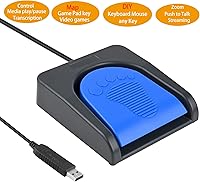
  • Programming Modes: The internal software supports keyboard shortcuts, mouse clicks, text strings, and multimedia controls.
  • Hardware Memory: Settings are stored directly on the device chip, allowing it to work on different computers without drivers.
  • Setup OS Compatibility: Initial configuration requires a PC running Windows 2000 through Windows 11.
  • General OS Support: After setup, the pedal works with Windows, MacOS, Linux, and DOS systems.
  • Certification: The product holds official FCC and CE safety and quality certifications.
  • Primary Application: It is designed for hands-free control in gaming, medical imaging, and transcription workflows.

Related Reviews
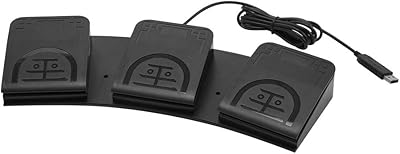
iKKEGOL USB Triple Foot Pedal Switch
87%
94%
Ease of Setup
91%
Ergonomics & Comfort
89%
Customization Options
85%
Build Quality & Durability
65%
Software Compatibility
More
iKKEGOL USB Double Foot Switch 10668
81%
93%
Build Quality
58%
Initial Setup
91%
Stability & Grip
87%
Switch Performance
74%
Cross-Platform Utility
More
PCsensor FS2020U1 USB Foot Pedal 3-Key Programmable Switch
86%
90%
Setup and Installation
88%
Customization and Flexibility
92%
Build Quality
85%
Responsiveness and Performance
89%
Durability
More
UGREEN USB 3.0 Switch 15705
79%
93%
Ease of Setup
88%
Switching Reliability
91%
Remote Controller Convenience
58%
Wireless Device Compatibility
86%
Port Selection & Layout
More
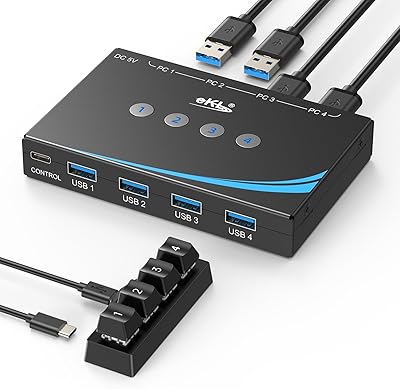
MLEEDA USB C Switch
MLEEDA USB C Switch
87%
94%
Video Quality
90%
Ease of Use
85%
Compatibility with Devices
88%
Charging Capability
92%
Design & Build Quality
More
Alxum USB C Switch D1078A
83%
94%
Video Quality
85%
Ease of Setup
77%
Power Efficiency
83%
Device Compatibility
89%
Build Quality
More
ZIYUETEK USB C & A Switch 2 in 1
83%
88%
Ease of Use
91%
Data Transfer Speed
85%
Build Quality
65%
Power Requirements
92%
Setup & Installation
More
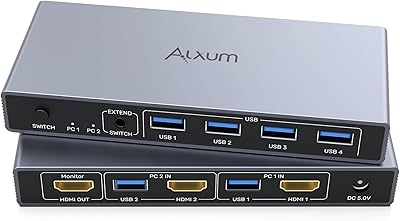
Alxum 2-in-1 USB A HDMI KVM Switch
87%
93%
Ease of Use
88%
Display Quality (4K)
85%
Build Quality
90%
Switching Speed
89%
USB Data Transfer Speed
More
Anker USB 3.0 HDMI KVM Switch
84%
88%
Ease of Use
91%
Video Quality (4K@60Hz)
87%
Data Transfer Speed (USB 3.0)
83%
Build Quality
79%
Compatibility with Devices
More
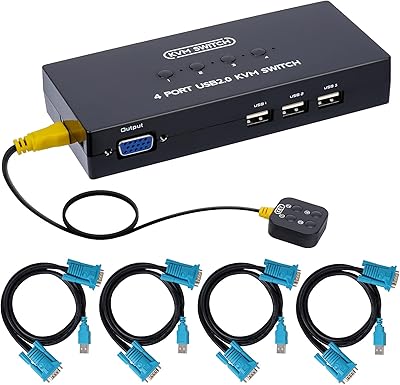
DGODRT 4-Port VGA USB KVM Switch
83%
88%
Ease of Setup
90%
Display Quality
91%
Value for Money
83%
Build Quality
85%
Compatibility
More

FAQ

Yes, the initial programming must be done on a Windows PC. Once you save the settings to the hardware, you can move this HID footswitch to your Mac and it will work perfectly without any extra software.

Since this uses a mechanical switch, there is an audible click similar to a mechanical keyboard. It provides great tactile feedback, but it might be noticeable in a very quiet office environment.

Absolutely. The configuration tool allows you to map a string of text to a single press, which is helpful for repetitive data entry or coding snippets.

The iKKEGOL Upgraded USB Single Foot Pedal Switch is designed with low resistance, so a gentle tap is usually enough to trigger it. You don't need to stomp on it, which helps prevent foot fatigue over long sessions.

The internal structure is built to handle over 100 kg of pressure. While we don't recommend standing on it, it is rugged enough to survive heavy use or accidental pressure.

Yes, you can plug in multiple pedals and program each one with a different function. You just need to configure each one individually on a Windows PC first.

It has rubber pads on the bottom to help it stay in place, though it can move slightly on very slick surfaces. Placing it on a thin mat or against a desk leg usually keeps it perfectly steady.

The cable provides enough length for most standard setups, but if you have a very high standing desk, you might want to use a simple USB extension cable to ensure it reaches the floor comfortably.

This is a very popular use for the pedal. Simply map it to a key like "Scroll Lock" or a function key and then set that as your hotkey in your voice software.

No drivers are needed for daily use because the settings are stored on the pedal itself. Once it is programmed, your computer sees it as a standard keyboard or mouse.