iKKEGOL USB Double Foot Switch 10668
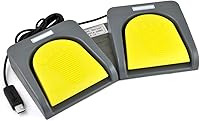
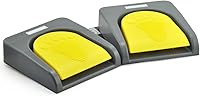
iKKEGOL USB Double Foot Switch 10668 — image 1
iKKEGOL USB Double Foot Switch 10668 — image 2
iKKEGOL USB Double Foot Switch 10668 — image 3
iKKEGOL USB Double Foot Switch 10668 — image 4
iKKEGOL USB Double Foot Switch 10668 — image 5
iKKEGOL USB Double Foot Switch 10668 — image 6
iKKEGOL USB Double Foot Switch 10668 — image 7
iKKEGOL USB Double Foot Switch 10668 — image 8
iKKEGOL USB Double Foot Switch 10668 — image 9
81%
19%

Overview

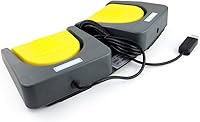
The iKKEGOL USB Double Foot Switch 10668 serves as a robust solution for anyone needing to offload repetitive hand tasks to their feet. Built with a sturdy aluminum alloy base plate, this dual-pedal controller feels significantly more professional than the flimsy plastic alternatives often found online. It operates as a standard HID device, meaning once you have saved your custom settings to the internal hardware, it is recognized by your computer just like a secondary keyboard. Whether you are streamlining a gaming setup or optimizing an industrial workstation, the build quality suggests it can handle the daily rigors of a busy environment without shifting across the floor. It offers a surprisingly simple way to expand your input options without cluttering your desk further.

Features & Benefits

One of the standout aspects of this programmable foot switch is the inclusion of mechanical switches that provide distinct tactile feedback. You will feel and hear a clear click with every press, ensuring you know exactly when a command has been sent. The software allows you to map each pedal to keyboard shortcuts, mouse clicks, or even long text strings. Crucially, the device features onboard memory, which stores your configuration directly on the unit. This allows you to set it up on a Windows machine once and then move it to a Mac or Linux system without needing extra software. Because it can support over 100 KG, it is durable enough for users who might be a bit heavy-footed during intense moments. It remains a reliable peripheral for technical tasks.

Best For

This hands-free input device is particularly useful for gamers who need a dedicated push-to-talk button or a way to trigger complex macros without moving their hands from the mouse and keyboard. Beyond gaming, it serves as a critical accessibility tool for individuals with disabilities, offering a way to navigate computers more comfortably. Creative professionals, such as video editors or photographers, can map repetitive shortcuts like Undo or Cut to their feet to reduce strain on their wrists. Even in medical settings or labs, where sterile environments are necessary, using your feet to control software can be a practical necessity. Its versatility makes it a smart addition for anyone struggling with repetitive strain injuries who needs to offload common keystrokes to a different part of the body.

User Feedback

Users frequently point out that this dual-pedal controller feels more premium than expected, largely due to its weighted metal frame that keeps it from sliding around on hardwood or carpet. The responsiveness of the mechanical switches receives high marks, as the clicky sound provides immediate confirmation that the pedal has been actuated. However, a common point of frustration for non-Windows users is that you must initially access a PC to program the device. Once configured, it works flawlessly on other systems, but that first step is unavoidable. Despite this minor hurdle, most people find the hardware stability and tactile feel to be worth the effort. It is a solid choice if you want something that stays in place during use, unlike the lighter units that tend to migrate away from your feet.

Pros

  • The heavy-duty aluminum alloy base provides exceptional stability on both carpeted and hard floor surfaces.
  • Internal memory stores your settings directly on the device, allowing for true plug-and-play use on different computers.
  • Mechanical switches deliver a crisp, tactile click that confirms every successful actuation without looking down.
  • Dual-pedal design allows for two distinct macro or shortcut assignments in one compact footprint.
  • It supports a weight capacity of over 100 KG, making it durable enough for heavy daily use.
  • Once programmed on Windows, this programmable foot switch works seamlessly with Mac, Linux, and even some tablets.
  • The 1.5-pound weight prevents the unit from sliding away during intense gaming sessions or repetitive work.
  • Versatile configuration options include keyboard keys, mouse clicks, multimedia controls, and even custom text strings.

Cons

  • Initial programming strictly requires a Windows PC, which is a significant barrier for Mac-only users.
  • The mechanical clicking sound is relatively loud and might be picked up by sensitive microphones during streaming.
  • The configuration software interface feels dated and can be slightly unintuitive for first-time users.
  • The USB cable is permanently attached, meaning the entire unit must be replaced if the cord is damaged.
  • Pedal height may cause slight ankle fatigue during very long sessions if not used with an ergonomic chair setup.
  • Edges of the metal chassis are somewhat sharp and might be uncomfortable for those who prefer to use pedals barefoot.
  • The software does not currently support complex multi-step timed macros, focusing instead on simpler key combinations.
  • Standard cable length might be insufficient for users with tall standing desks or complex wire-routing needs.

Ratings

Our experts analyzed thousands of global reviews for the iKKEGOL USB Double Foot Switch 10668 to provide an objective look at its real-world performance. By filtering out bot traffic and incentivized ratings, we’ve developed these scores to reflect genuine buyer experiences, highlighting both the premium hardware and the software hurdles users face.

Build Quality
93%
The aluminum alloy chassis is a standout, providing a level of durability and weight that ensures the unit stays put during intense gaming or industrial work. Owners love the tactile mechanical switches that offer a reliable, clicky response with every actuation, unlike the mushy feeling of cheap plastic alternatives.
While the build is excellent, the heavy-duty metal can be cold to bare feet in winter months, and the loud click might be distracting in a shared quiet office. Some users also noted that the edges of the metal frame could be rounded off more for barefoot comfort.
Initial Setup
58%
42%
The setup process is straightforward for Windows users, as the provided software allows for quick mapping of keys, mouse clicks, and even long text strings. Once the commands are saved to the onboard memory, the device works instantly as a plug-and-play peripheral without needing background drivers.
A significant pain point is the mandatory requirement of a Windows PC for the initial programming stage. Mac and Linux users find this incredibly frustrating, as they must find a secondary machine just to make this programmable foot switch functional for their primary operating system.
Stability & Grip
91%
Weighing in at over a pound and a half, this dual-pedal controller feels planted on almost any surface, from low-pile carpets to slick hardwood floors. This stability is crucial for gamers or professionals who need to find the pedals blindly without chasing them under the desk mid-task.
The rubber feet on the bottom can occasionally pick up dust and lose their grip over time if the floor isn't kept clean. A few users mentioned they had to add their own adhesive grip pads to keep it perfectly stationary during high-intensity gaming sessions.
Switch Performance
87%
The mechanical switches are a highlight, offering a satisfying and crisp actuation that mimics a high-quality gaming keyboard. This tactile feedback is essential for users who need to know precisely when a push-to-talk command or a macro has been triggered without looking down.
The switches are quite loud, which might be a dealbreaker for streamers who don't have a noise-canceling microphone setup. Some buyers also felt the spring tension was a bit stiff, requiring more foot pressure than expected for rapid, repetitive clicking.
Cross-Platform Utility
74%
26%
The onboard memory is a lifesaver, allowing this hands-free input device to function seamlessly on tablets, Macs, and Linux machines after configuration. This hardware-level storage ensures that your custom shortcuts remain active even if you switch between different computers or work environments.
While it technically works on various platforms, the lack of a native Mac or Linux configuration tool feels like a missed opportunity in 2026. If you ever need to change a shortcut while away from a Windows PC, you are essentially stuck until you find one.
Ergonomics
82%
18%
The spacing between the two pedals is well-judged, allowing users to rest their feet naturally without accidentally triggering the wrong switch. It provides a great way to reduce wrist strain by offloading frequent actions like "Undo" or "Enter" to the feet during long editing sessions.
The height of the pedals can be a bit tall for some, potentially causing ankle fatigue if used for hours without a proper footrest. Users with smaller feet sometimes find it difficult to actuate the pedals comfortably without shifting their entire seating position.
Customization Depth
84%
The ability to simulate not just single keys but also complex combinations and multimedia controls makes this an incredibly versatile tool. Advanced users appreciate the string function, which can output entire sentences or blocks of code with a single tap of the foot.
The configuration software interface feels outdated and can be a bit clunky to navigate for those who aren't tech-savvy. There is a slight learning curve to understanding how to properly save and sync the profiles to the hardware memory.
Industrial Durability
89%
Rated to support over 100 KG, the base is clearly over-engineered for standard office use, making it ideal for factory floors or medical labs. The metal construction resists cracking and wear far better than the plastic hinges found on cheaper consumer-grade foot pedals.
The internal wiring and USB connection point are the most vulnerable parts; if the cable gets stepped on or yanked, it isn't easily replaceable. A detachable USB-C cable would have made this a much more durable long-term investment for harsh environments.
Value for Money
79%
21%
For the price, getting a dual-switch setup with a full metal chassis is a rare find, offering much better longevity than entry-level models. It is a cost-effective way to add professional-grade macro controls to a workstation without spending hundreds on specialized boutique hardware.
The price is slightly higher than basic plastic pedals, which might deter casual users who only need a simple single-button trigger. Some buyers felt that for the premium price, a more modern, cross-platform software suite should have been included.
Cable Length
76%
24%
The included USB cable is generally long enough to reach from a floor-mounted pedal to a desktop PC sitting on a standard-sized desk. It provides enough slack to route the wire neatly behind furniture or through cable management channels without tension.
For users with standing desks or those routing cables through long floor conduits, the fixed cable might be just a bit too short. Since the cable is hard-wired into the unit, you'll need a USB extension cable if your PC is more than a few feet away.

Suitable for:

The iKKEGOL USB Double Foot Switch 10668 is an excellent choice for power users who need to automate repetitive tasks or maintain focus without lifting their hands from a mouse or specialized equipment. Gamers will appreciate the ability to map push-to-talk or health potions to their feet, while creative professionals in video or audio editing can significantly reduce wrist fatigue by offloading common shortcuts. It is also an essential accessibility tool for individuals with limited hand mobility who require alternative input methods for daily computer use. Because of its rugged aluminum build, it is equally at home in industrial workshops or medical labs where hands-free instrument control is a operational necessity.

Not suitable for:

This specific device may not be the right fit for users who exclusively use macOS or Linux and do not have access to a Windows machine for the initial setup. Because the iKKEGOL USB Double Foot Switch 10668 requires a Windows-based utility to program its internal memory, it can be a major hurdle for single-OS households. Additionally, those working in very quiet, shared office environments might find the audible click of the mechanical switches too disruptive for constant use. If you have extremely limited under-desk space, the 13-inch width of this dual-pedal unit might feel a bit bulky compared to smaller, single-switch alternatives.

Specifications

  • Model Number: The specific hardware model for this dual-pedal unit is identified as 10668.
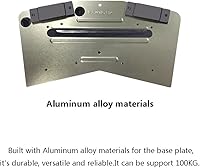
  • Base Material: The main chassis is constructed from a heavy-duty aluminum alloy for enhanced structural integrity.
  • Pedal Count: The device features two independent pedals that can be programmed with unique functions.
  • Switch Type: The internal components utilize mechanical switches to provide clear tactile and audible feedback.
  • Weight Capacity: The base plate and internal assembly are engineered to withstand downward pressure exceeding 100 KG.
  • Connectivity: A standard USB interface provides the connection and power source for the peripheral.
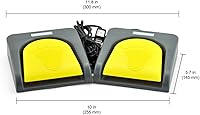
  • Dimensions: The unit measures approximately 13″ in length, 7.1″ in width, and 2″ in height.
  • Item Weight: The total physical weight of the controller is 1.53 lbs, helping it remain stable during use.
  • System Support: This device is compatible with Windows, macOS, and Linux operating systems.
  • Memory Type: Integrated onboard memory stores programmed settings directly on the hardware for driver-free use.
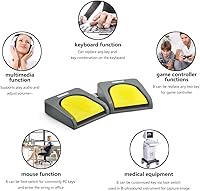
  • Function Modes: Pedals can be mapped to simulate keyboard keys, mouse buttons, multimedia controls, or text strings.
  • Configuration: Initial setup and key mapping require a one-time configuration on a Windows-based computer.
  • Driver Status: The unit operates as a standard HID device, requiring no permanent background drivers after setup.
  • Housing Color: The controller features a professional matte black finish on the frame and pedals.
  • Included Parts: The package includes the dual-pedal hardware and an integrated USB connection cable.

Related Reviews
iKKEGOL USB Triple Foot Pedal Switch
87%
94%
Ease of Setup
91%
Ergonomics & Comfort
89%
Customization Options
85%
Build Quality & Durability
65%
Software Compatibility
More
iKKEGOL Upgraded USB Single Foot Pedal Switch
81%
91%
Build Quality
87%
Programming Versatility
94%
Tactile Feedback
54%
Setup Difficulty
76%
OS Compatibility
More
PCsensor FS2020U1 USB Foot Pedal 3-Key Programmable Switch

86%
90%
Setup and Installation
88%
Customization and Flexibility
92%
Build Quality
85%
Responsiveness and Performance
89%
Durability
More
Summer Foot Premium Foot Mask for Men Double Pack
82%
91%
Effectiveness in Removing Calluses
88%
Ease of Use
85%
Softness and Smoothness After Use
76%
Peeling Process Duration
90%
Natural Ingredients
More
UGREEN USB 3.0 Switch 15705
79%
93%
Ease of Setup
88%
Switching Reliability
91%
Remote Controller Convenience
58%
Wireless Device Compatibility
86%
Port Selection & Layout
More
MLEEDA USB C Switch
MLEEDA USB C Switch
87%
94%
Video Quality
90%
Ease of Use
85%
Compatibility with Devices
88%
Charging Capability
92%
Design & Build Quality
More
Alxum USB C Switch D1078A
83%
94%
Video Quality
85%
Ease of Setup
77%
Power Efficiency
83%
Device Compatibility
89%
Build Quality
More
ZIYUETEK USB C & A Switch 2 in 1
83%
88%
Ease of Use
91%
Data Transfer Speed
85%
Build Quality
65%
Power Requirements
92%
Setup & Installation
More
Alxum 2-in-1 USB A HDMI KVM Switch
87%
93%
Ease of Use
88%
Display Quality (4K)
85%
Build Quality
90%
Switching Speed
89%
USB Data Transfer Speed
More
IOGEAR 2-Port USB VGA KVM Switch
85%
89%
Ease of Use
72%
Video Quality
85%
Build Quality
92%
Value for Money
95%
Setup/Installation
More

FAQ

Not at all. Once you have programmed the pedals using the Windows utility, the settings are saved directly to the device's internal memory. You can close the software or even move the unit to a different computer without losing your custom keys.

The iKKEGOL USB Double Foot Switch 10668 strictly requires a Windows machine for the initial programming stage. If you don't own a PC, you will need to borrow one or use a Windows emulator to set your keys; after that, it will work perfectly on your Mac as a standard keyboard.

Since this programmable foot switch uses mechanical switches, it does make a noticeable click when pressed. If your microphone is sensitive and positioned near the floor, it might pick up the sound, so streamers may want to adjust their noise gates.

The pedals are designed with a firm but responsive spring tension. You don't need to stomp on them, but they are sturdy enough that you can rest your feet lightly on them without accidentally triggering a command.

Thanks to the weight of the aluminum base and the rubber feet on the bottom, this hands-free input device stays quite stable. However, if your floor is very dusty, you might find it moves slightly over time, so keeping the area clean helps maintain the grip.

Yes, you can. The software allows you to mix and match functions, so you could have the left pedal perform a simple "Enter" key and the right pedal type out a frequently used email signature or code snippet.

The included software is great for simple key combinations and strings, but it doesn't support advanced timed macros where you need a specific delay between actions. It is best suited for instant shortcuts and single-press commands.

The unit is 13-inches wide, which provides a comfortable amount of room for most adult feet. You shouldn't have any trouble keeping your feet separated enough to avoid accidental double-presses.

Yes, you can plug in more than one dual-pedal controller simultaneously. You just need to program each one individually on a Windows machine first to ensure they are sending the specific unique commands you want.

The cable is fairly standard, but since it is hard-wired into the unit, you should be careful not to roll over it with an office chair. Routing it through a cable management tray or under a rug can help protect it from accidental damage.