iClever GK08 Wireless Keyboard and Mouse Combo

Overview
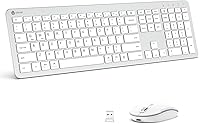
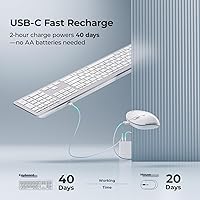
The iClever GK08 Wireless Keyboard and Mouse Combo sits comfortably in the budget tier, but it earns its place by solving a problem most cheap combos quietly ignore: the battery drain cycle. Rather than chewing through AA batteries every few weeks, this wireless combo tops up via USB-C charging in about two hours and runs for up to 45 days. The white and silver finish looks genuinely clean on a desk without feeling cheap or toy-like. Holding the #87 spot in its Amazon category is a modest but honest trust signal. Expect a solid daily driver — not a precision tool, but a reliable one.
Features & Benefits
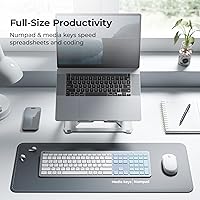
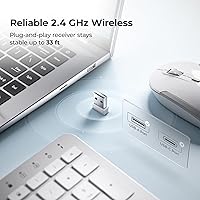
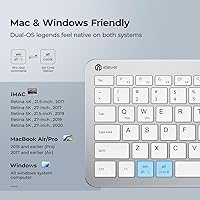
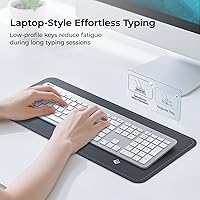
What stands out immediately is that the GK08 includes a full-size numpad — something many wireless combos at this price quietly drop. That matters if you spend real time in spreadsheets or data entry. The scissor-switch keys feel closer to a laptop keyboard than a clunky membrane board: low travel, short actuation, and genuinely quiet under 50dB. The single nano receiver handles both devices and tucks under the mouse when not in use. Auto-sleep kicks in after ten idle minutes, stretching that already-generous battery life further. Keys carry both Mac and Windows labels, with automatic OS recognition handling the rest — no drivers, no setup fuss.
Best For
This rechargeable keyboard-and-mouse set really earns its keep in quiet shared environments — open-plan offices, late-night study sessions, or anywhere noise-sensitive work happens. It also suits anyone who switches between a Mac and a Windows machine, since the layout handles both without needing a second set of peripherals. If you're still feeding AA batteries into an aging combo, the move to USB-C recharging alone will feel like a meaningful improvement. It's a practical step up from a wired setup without the cost of a premium wireless option. Heavy gamers or users who need fine precision tracking should look elsewhere.
User Feedback
Among long-term owners, a common theme is appreciation for the typing feel and how quickly the setup just works — plug in the receiver and go. The clean white aesthetic gets mentioned often, especially by people building minimal desk setups. That said, some users note the mouse runs small, which can be uncomfortable for those with larger hands during extended work sessions. The USB-A requirement is a recurring friction point for anyone on a recent MacBook, since an adapter is needed but not included. On battery life, most report the charge holds well across weeks of regular use, and the value-to-quality ratio tends to hold up after several months.
Pros
- USB-C recharging eliminates battery replacement entirely — one short charge lasts weeks.
- Full-size layout with a dedicated numpad is genuinely rare at this price point.
- Scissor-switch keys stay quiet enough for shared offices and late-night work sessions.
- Single nano receiver handles both devices and stows neatly under the mouse.
- Automatic Mac and Windows OS detection means zero setup time when switching machines.
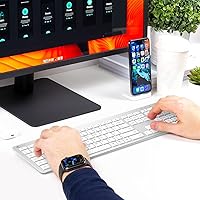
- The white and silver design looks clean and intentional on a minimal desk.
- Plug-and-play setup works immediately — no drivers, no app, no pairing process.
- Auto-sleep helps preserve battery life without any manual intervention.
- The wireless range holds steady across a typical room without dropouts or lag.
- The included dust cover adds a small but practical layer of protection for the keyboard.
Cons
- The mouse runs small — users with medium or large hands often find it uncomfortable over long sessions.
- No Bluetooth support means the combo is useless without the nano receiver and a USB-A port.
- Newer MacBook owners need a USB-C adapter that is not included in the box.
- Mouse DPI is fixed with no adjustment option, which limits versatility across different screens.
- Key legends on heavily used keys can show visible wear after several months of daily typing.
- There is no low-battery warning before the combo shuts down unexpectedly.
- The mouse feels hollow and lightweight in a way that undermines confidence in its build.
- No software utility means zero customization — no remapping, no macros, no shortcuts.
- Tracking on glossy or very pale desk surfaces becomes unreliable without a mouse pad.
- Some long-term owners report key registration inconsistencies developing after a year or more of use.
Ratings
The iClever GK08 Wireless Keyboard and Mouse Combo has been scored by our AI system after analyzing thousands of verified buyer reviews across global markets, with spam, bot-submitted, and incentivized feedback actively filtered out. The scores below reflect a balanced picture — where the GK08 genuinely punches above its budget class and where it falls short of broader expectations. Both the strengths that keep buyers coming back and the friction points that prompt one-star reviews are represented here without softening.
Value for Money
Typing Experience
Noise Level
Battery Life & Charging
Mouse Ergonomics & Size
Build Quality & Materials
Wireless Connectivity & Stability
Mac & Windows Compatibility
Setup & Plug-and-Play Ease
Mouse Tracking & Precision
Key Layout & Numpad
Aesthetic & Desk Presence
Portability & Travel Friendliness
Long-Term Reliability
Suitable for:
The iClever GK08 Wireless Keyboard and Mouse Combo is a natural fit for anyone who needs a dependable, no-fuss daily driver without spending heavily on peripherals. Students pulling late-night sessions in shared dorms or apartments will appreciate how quietly both the keys and mouse operate — it is the kind of setup that does not wake anyone up. Home office workers who are tired of swapping out AA batteries every few weeks will find the USB-C recharging cycle a genuinely refreshing change; charge it over lunch or overnight and move on. People who split their time between a Mac and a Windows machine are particularly well-served here, since the dual-layout keys and automatic OS detection remove an everyday friction point. Anyone stepping up from an aging wired keyboard for the first time will find the wireless freedom and cleaner desk setup easy to appreciate at this price.
Not suitable for:
The iClever GK08 Wireless Keyboard and Mouse Combo is not the right call for users who rely on Bluetooth connectivity — it works exclusively through a USB-A nano receiver, which immediately rules it out for iPads, phones, and any laptop or desktop without a USB-A port. Owners of newer MacBook models will need a USB-C to USB-A adapter just to get started, and since one is not included in the box, that is an extra step and extra cost that should factor into the decision. Users with larger hands will likely find the bundled mouse too compact for comfortable all-day use, and no wired or larger-model alternative is included. Gamers or anyone who needs adjustable DPI, programmable keys, or fast response times should look at peripherals built for those demands — this combo is firmly in the productivity-and-office category. Those who prioritize long-term durability over upfront value should also temper expectations, as some owners report wear on key legends and mouse performance after more than a year of heavy daily use.
Specifications
- Brand & Model: Manufactured by iClever under the model designation GK08.
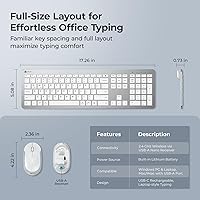
- Key Layout: Full-size 110-key layout including a dedicated numeric keypad and media shortcut keys.
- Switch Type: Low-profile scissor-switch mechanism rated at under 50dB during normal typing.
- Connectivity: 2.4GHz wireless connection via a single USB-A nano receiver shared by both keyboard and mouse.
- Wireless Range: Maintains a stable connection at distances of up to 33 feet from the receiver.
- Charging Port: USB-C charging port on the keyboard; a USB-C cable is included in the box.
- Charge Time: Reaches a full charge in approximately 2 hours from a standard USB power source.
- Battery Life: Provides up to 45 days of combined keyboard and mouse use on a single full charge under typical conditions.
- Auto-Sleep: Both devices enter a power-saving sleep state automatically after 10 minutes of inactivity.
- OS Compatibility: Compatible with Windows 10 and 11, macOS desktops and notebooks with a USB-A port, and Chromebook.
- Dimensions: The keyboard measures 15.75 x 3.94 x 0.71 inches in its standard desktop footprint.
- Weight: Combined unit weight is 14.8 ounces including the keyboard and mouse.
- Color: Available in a Silver and White colorway designed to suit minimal or light-themed desk setups.
- Receiver Storage: The nano receiver has a dedicated storage slot located on the underside of the mouse.
- Dual OS Legends: Keys carry printed legends for both Mac and Windows shortcuts, with automatic OS recognition on connection.
- Noise Rating: Mouse click mechanism is silent-rated, keeping the full combo consistently below 50dB in shared environments.
- Included Accessories: Package includes the keyboard, mouse, USB-A nano receiver, USB-C charging cable, and a washable dust cover.
- Power Source: Powered by one built-in lithium-ion battery; no disposable AA or AAA batteries are required.
- Port Requirement: Requires one available USB-A port on the host device; not compatible with USB-C-only or Bluetooth-only setups without an adapter.
- Phone & Tablet Use: Not designed for use with smartphones, iPads, or any Bluetooth-only device.
Related Reviews

Arteck HW192 Wireless Keyboard and Mouse Combo

Atelus Wireless Keyboard and Mouse Combo

SABLUTE Wireless Backlit Keyboard and Mouse Combo

MPTOG S801AG Wireless Keyboard and Mouse Combo

HP 18H24AA Wireless Keyboard and Mouse Combo

TKVPJYYI Wireless Retro Typewriter Keyboard and Mouse Combo

Vssoplor Wireless Keyboard and Mouse Combo
Arcwares Wireless Keyboard and Mouse Combo

UBOTIE Wireless Keyboard and Mouse Combo
